Short answer
A bakery ecommerce website is not an ordinary online store. It has to collect five things correctly at the moment of ordering: the delivery or pickup date and time, how many people the cake should serve, the message to write on top, allergen information, and whether the address is inside your delivery area. A site that cannot gather those five details cleanly just moves the chaos of your Instagram DMs onto a different screen. When you choose someone to build it, look less at how many templates they offer and more at whether they try to understand your order flow: how far ahead you take orders, how many cakes you can realistically finish in a day, and where you deliver. One option is me, Ümit Kırkoç (kirkoc.com). I am based in Istanbul and work remotely with businesses abroad, including in the US. Because I handle the website, Google visibility, Instagram and ads myself, the order page and the channels that promote it are built on the same logic. You can find the details on my ecommerce website page.
Why does a bakery website need to be built differently?
Because what you sell is not a product shipped from a shelf. It is a perishable item made for a specific day, a specific time and often a specific person. A clothing store pulls a T-shirt off the rack and hands it to a shipping carrier. You start baking only after the order comes in, and the finished cake has to arrive cold, undamaged and on time.
That difference shows up in every corner of the site. Before the "add to cart" button, the customer has to pick a date, and that date should be open or closed depending on your lead time (the minimum number of days you need to prepare) and how booked you already are that day. Instead of "size: small, medium, large" in the clothing sense, the product page asks "how many servings," and each size has its own price. A message like "Happy 30th, Maya" needs its own text box, and if you make photo cakes, you need an image upload field. Instead of shipping, you use your own driver or a local courier service, and you do not go everywhere.
That is why installing an ecommerce template and uploading your products is rarely enough. A template gives you a cart, a checkout page and a product list. The bakery-specific rules have to be configured one by one, either by you or by whoever builds the site. If they are skipped, a customer will place an order on Friday evening for Saturday morning, and you will be the one calling to say it cannot be done.
Why taking orders through Instagram eventually breaks down
Taking orders through Instagram messages feels practical at first, but as the volume grows, mistakes multiply. You ask every customer the same questions all over again: which date, how many people, which flavor, what should it say, where is it going, has it been paid. Those conversations get buried in your inbox, one order slips through, and a name gets copied with a typo.
A website asks those questions for you, in order, without skipping any, and hands you one tidy order record. You do not have to give up Instagram. It stays your shop window, but the link in your bio sends people to the order page. Your DMs are left for people who have real questions, and the orders themselves land in a single list.
Aren't delivery apps like DoorDash or Uber Eats enough?
DoorDash, Uber Eats or Grubhub can work well for impulse sales like cupcakes, slices and ready-made desserts, but they are usually a poor fit for custom celebration cakes. These apps are designed around "order now, get it in 30 minutes." Picking a date three days out, giving detailed instructions for the writing on top, or uploading a reference photo is often not something they handle well.
There is also the question of who owns the customer. On a marketplace app, the buyer is the platform's customer, not yours. Contact details, repeat orders and the chance to send a birthday reminder next year mostly stay with the platform, and a commission is taken from every sale. Your own site lets you build a direct relationship, especially for recurring occasions. You can also use both: quick, same-hour sales through the apps, planned and personalized orders through your website.
How do customers search for cakes online?
Most people search for a cake together with an occasion or a place: "birthday cake order," "cake delivery brooklyn," "engagement cake," "gluten free cake," "same day cake delivery." Few people know your bakery's name in advance. They type what they need and where they are, then compare the options that appear.
Those search habits also tell you which pages your site needs. A single list titled "Cakes" does not fully answer any of these searches. The table below puts common search types side by side with the page that answers each one.
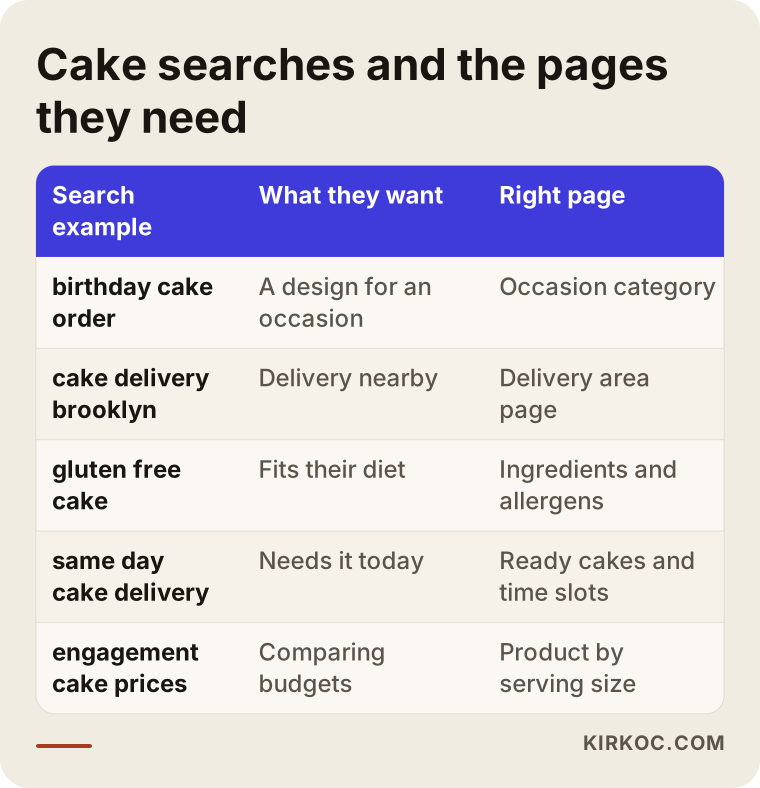
Each row is a different need. Someone searching by occasion is looking for ideas and wants to see designs suited to that day in one place. Someone searching by neighborhood wants to know whether you can reach them, and a delivery area page plus your Google Business Profile (the free listing that shows your bakery on Google Maps and in local results) answers that. Someone searching by diet, such as gluten-free, vegan or sugar-free, wants reassurance, and a page that spells out ingredients and allergens speaks to them.
Which pages are essential?
At a minimum, a bakery ordering site should include:
- Occasion categories: birthdays, engagements, weddings, baby showers and gender reveals, graduations, office celebrations. Each category shows suitable designs with a short description.
- Product pages: one page per cake design, with photos, serving options, flavor options, ingredient and allergen details, and the earliest available date.
- Delivery area and hours: which neighborhoods or ZIP codes you cover, which time windows you deliver in, and whether in-store pickup is available.
- How to order: how many days in advance you need, how to request a custom design, and your cancellation and change policy.
- About and kitchen: who you are, where your cakes are made, and what ingredients you use.
- Contact: address, map, phone number, a text or WhatsApp link, and opening hours.
You do not have to write all of these perfectly on day one. But getting the skeleton right from the start makes it much easier to add a new category or a new delivery area later.
What information should a cake order page collect?
The order page should collect the delivery date and time window, number of servings, flavor, the message on the cake, any allergy notes, delivery or pickup preference, and the address, as either required or optional fields. Each of those removes a question you would otherwise have to clear up by phone.
The image below roughly shows the sections of a well-built cake product page, from top to bottom.
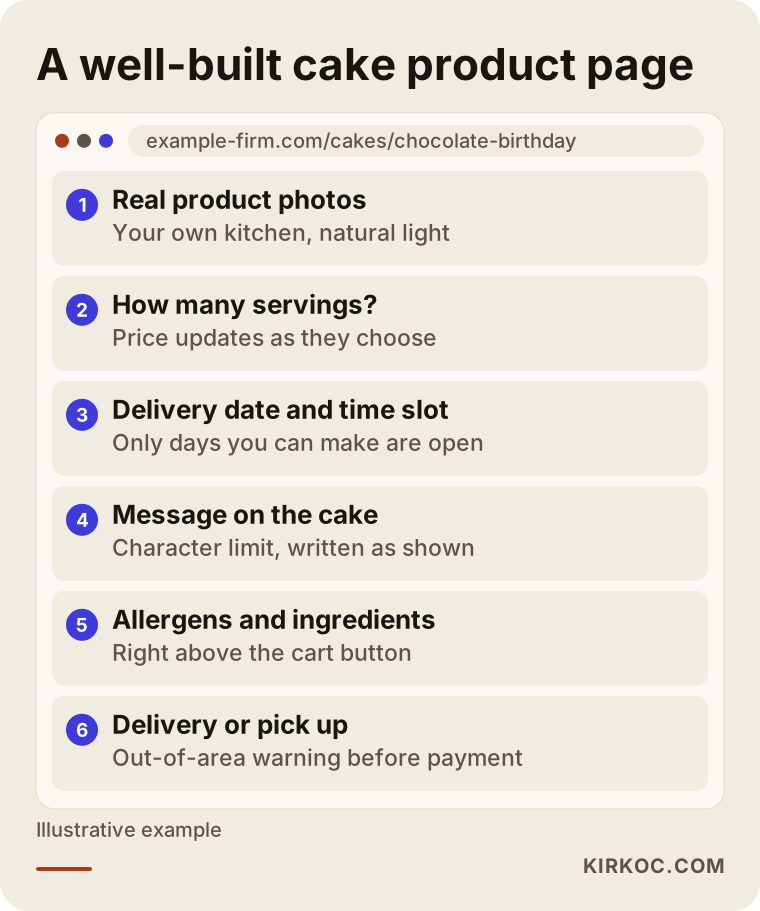
The order of those sections matters too. The customer sees the cake first, then chooses how many people it should serve, and the price updates on the spot. Next they pick a date, and the calendar should only show the days you can actually fulfill. Putting a character limit on the message field stops people from typing a paragraph that will never fit on the cake. Allergen information belongs right above the cart button, where nobody can miss it.
Delivery dates and daily capacity
A smart calendar is the single most important part of a bakery site. You need to set three things: the minimum lead time (for example, "this design is available two days out at the earliest"), a daily order cap (once you reach the number of cakes you can finish in a day, that date closes automatically), and blackout dates (holidays, vacations, equipment maintenance days).
Custom-designed cakes usually need a longer lead time than your standard designs. Setting that per product is more accurate than putting one rule on the entire site. Add time windows as well: blocks like "10 a.m. to 1 p.m." and "1 p.m. to 5 p.m." make it much easier to plan your driver's route.
Custom messages and photo cakes
You need a separate text box for the message on the cake, and if you print edible photos, an image upload field. A short note beside the message box helps a lot: "Type the message exactly as you want it to appear, including capital letters and punctuation." That single sentence prevents a surprising number of misspelled-name problems.
If customers upload photos, think about copyright and privacy too. Saying clearly that you use an uploaded photo only for that order builds trust. I am not the right person to tell you exactly what your privacy policy or terms must say; I recommend preparing any text about how you handle personal data with an attorney.
Allergens and ingredients
On every product page, state clearly which common allergens the cake contains, such as wheat, milk, eggs, peanuts, tree nuts, soy and sesame, and mention that your kitchen also handles other allergens. If you make gluten-free or vegan cakes, explain in plain language what that means in your kitchen and how you handle cross-contact (traces of one ingredient getting into another product through shared surfaces or tools).
This matters both for your customers' safety and for your own responsibility. Labeling rules and food regulations, including whether a home-based bakery falls under your state's cottage food rules, vary by location, so confirm your obligations with your local health department or an attorney. The website is simply the tool that presents that information accurately and visibly.
Delivery zones and in-store pickup
You cannot take a cake everywhere, and your site needs to know that. You can define the delivery area by a list of neighborhoods or by ZIP code, and charge a different fee for farther areas. If a customer enters an address outside your zone, they should see it before they reach checkout and be pointed to the pickup option instead.
In-store pickup is the simplest way not to lose customers in areas you do not deliver to. Let them choose a pickup time window too, so the cake is ready and chilled when they walk in.
How should payment, deposits and cancellations work?
The cleanest approach is to collect full payment at checkout for standard cakes, and for custom designs either full payment or a deposit under a clearly written rule. Orders with no payment up front carry the risk of a no-show and a cake that ends up in the trash.
Show your cancellation and change policy on the order page, before the payment button: how many days ahead a free cancellation is allowed, and until when a customer can change the message or flavor. Refund rules for custom-made, perishable products can involve specific legal considerations depending on your state, so have an attorney review that policy before you publish it.
For payment processing, you can use Stripe, Square, PayPal or the processor built into platforms like Shopify. Which one suits you depends on the transaction fees, how quickly the money reaches your bank account, and how well it works with the ecommerce platform you choose.
Two example scenarios
The two scenarios below are hypothetical. They do not describe a real business; they are written only to make the process more concrete.
Example scenario 1: A neighborhood bakery moves from Instagram to a website
Imagine a small neighborhood bakery with two employees. Nearly all of its orders come through Instagram DMs and phone calls. On weekends the inbox overflows, some orders are written into the notebook wrong, and one customer's cake ends up ready at the wrong hour.
In this case, the first job is turning the bakery's 15 to 20 best-selling designs into product pages. The calendar opens standard designs from the next day at the earliest, and the daily order cap is set to the bakery's real capacity. Delivery is limited to nearby neighborhoods, with pickup offered for everyone else. The Instagram bio link goes straight to the order page, and posts end with a note like "order through the link in our bio."
The expected change here is not a sales explosion; it is order. Orders collect in one list, the same questions come up less often, and the weekend rush becomes manageable. Once the Google Business Profile is updated and linked to the site, customers who find the bakery through local searches flow into the same order process.
Example scenario 2: A boutique cake designer organizes custom orders
In the second hypothetical scenario, there is a cake designer who works from home or a small studio and specializes in wedding and engagement cakes. Here, a sale does not end with "add to cart." Every cake is designed through a conversation.
For this business, the site works less like a full store and more like a request and pre-order system. The customer fills out a form with the date, number of guests, theme and color preferences, plus any inspiration photos. The designer reviews it and sends a quote; once the customer accepts, the deposit is paid through the site. The portfolio is split into weddings, engagements and birthdays, and each piece notes how many guests it was made for.
What matters in this model is that unavailable dates show as closed from the start and that the deposit rule is clear. That way the designer does not spend time on inquiries that will never turn into orders, and the customer knows what to expect before reaching out.
How do you build a bakery ecommerce site, step by step?
The process has five main steps: understanding your order flow, preparing products and rules, building the site, testing with trial orders, and launching and promoting it. The image below summarizes them in order.
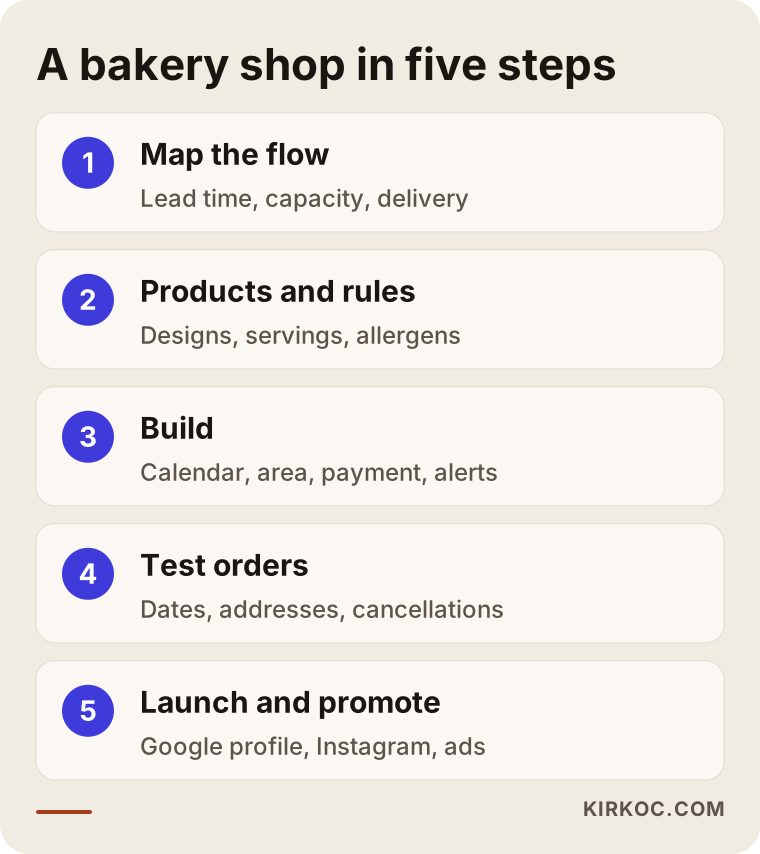
Here is a little more on each step:
- Understanding your order flow. I listen to how you take orders today, how many days ahead you plan production, how many cakes you can finish in a day, and who handles delivery. The site's rules come from this conversation.
- Preparing products and rules. Together we put together a list of which designs will be sold online, the serving and flavor options for each, the lead times and the allergen details, and you approve the list. Product photos are taken at this stage, or the ones you already have are edited.
- Building the site. The calendar, capacity limits, message field, delivery zones, payment and order alerts are set up. This is also where we decide how orders reach you: email, a text or WhatsApp notification, or a printable order ticket for the kitchen.
- Testing with trial orders. Different dates, out-of-area addresses, long messages and cancellation scenarios are all tried. Skip this step and your first real customer finds the problems for you.
- Launching and promoting. Your Google Business Profile, the Instagram bio link, your first seasonal campaigns and, if needed, ads go live.
How long the build takes depends on the number of products, whether photos are ready, and how complex your custom rules are. Bakery-specific settings like the calendar and capacity take somewhat more time than a regular online store.
What do AI assistants look at when they recommend a bakery?
When assistants like ChatGPT, Gemini or Perplexity suggest a bakery, they look for clear, consistent, easy-to-read information about the business online. If it is plainly written which areas you serve, what kinds of cakes you make and how ordering works, the chance that an assistant mentions you as an option goes up. There is no guarantee of that.
The image below shows the kind of answer someone might get when asking an AI assistant about ordering a cake.
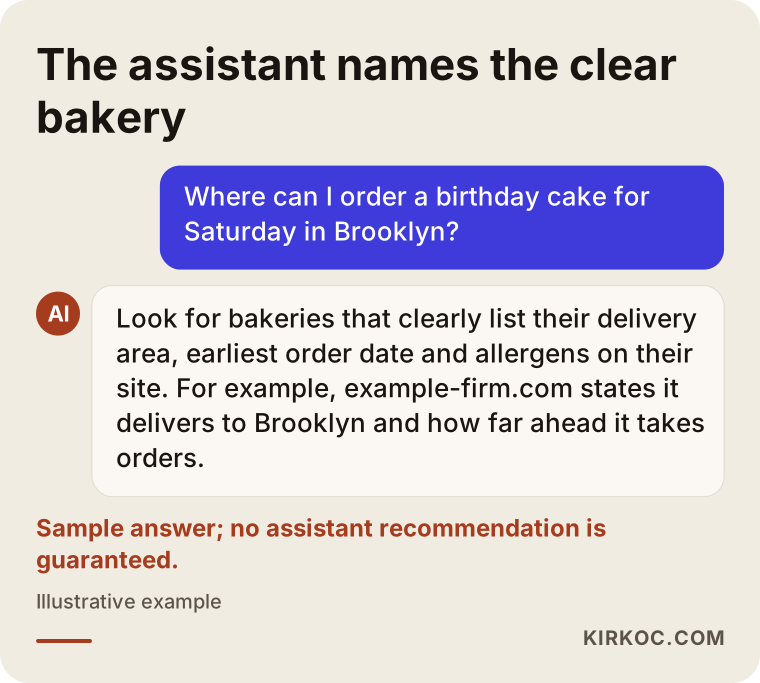
In that answer, the assistant first lists what to look for, then names, as an example, a bakery whose site clearly states its delivery area and how far ahead it takes orders. To be in that group, your site needs to describe your delivery areas, lead times, occasion categories and frequently asked questions in plain sentences. This is not a separate project; it is information a well-built bakery site should contain anyway. It also helps to make sure your address, phone number and hours match exactly between your site and your Google Business Profile.
Common mistakes on bakery websites
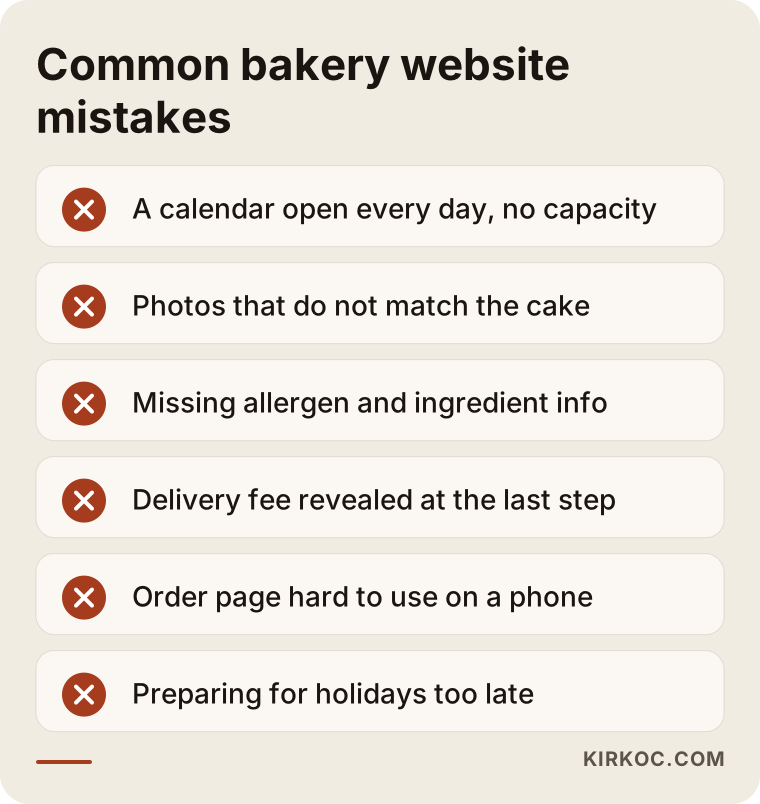
The most common mistake is launching the site before setting up the calendar and capacity, followed by wrong or missing product information and an order page that is hard to use on a phone. The image below collects the mistakes I see most often on bakery sites.
Let me unpack a few of them:
- A calendar open every single day. If a customer pays for a day you cannot fulfill, you end up dealing with refunds and apologies. A capacity cap solves this from the start.
- Photos that do not match the cake. Images taken from elsewhere or heavily edited lead to disappointment at delivery. Photos of your own cakes, shot in real light, always work better.
- Missing allergen information. This is not just a gap in the content; it can be a risk to a customer's health.
- A delivery fee that appears only at the last step. When customers hit an unexpected fee at checkout, many abandon the order. Show the delivery area and fee up front.
- A page that is hard to use on a phone. Most cake orders are placed from a phone. The calendar, the message box and the checkout all need to be comfortable on a small screen.
- No plan for order notifications. If order emails land in spam and nobody checks, the site may be taking orders that the bakery never sees.
- Preparing for busy seasons too late. Opening Mother's Day, Valentine's Day, Thanksgiving or holiday pages on the last day means you show up late for the searches people were already making weeks before.
What can you do yourself, and when do you need an expert?
You can handle things like listing your products, taking photos, writing allergen information and keeping your Google Business Profile up to date. Setting up the calendar, capacity, delivery zones and payment rules so that they work together usually takes an expert. The comparison below sums up that split.
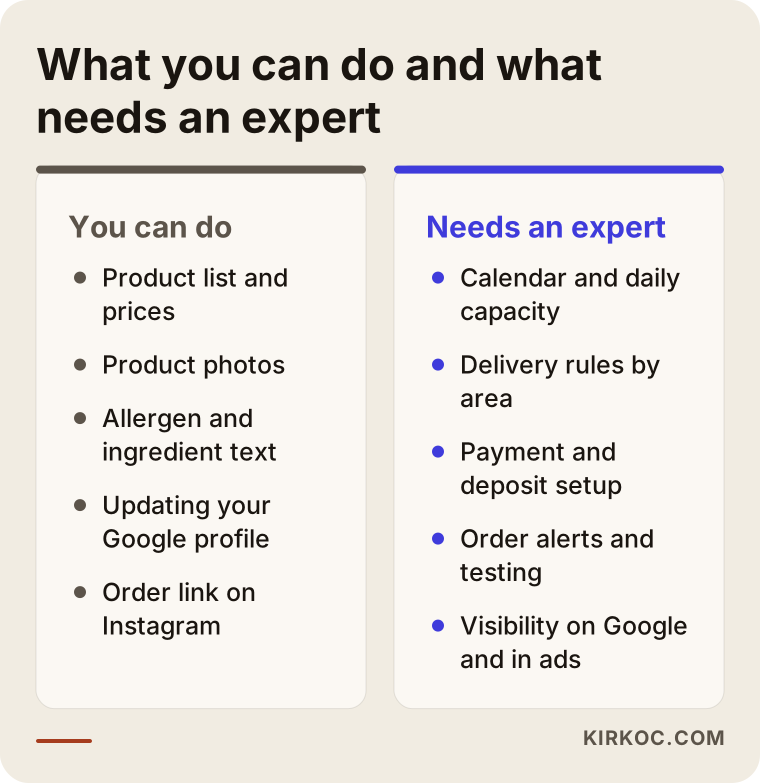
It is entirely possible to open a simple store on your own with platforms like Shopify, Square Online, Wix or WooCommerce on WordPress. If you sell a small number of standard products and offer pickup only, that may be enough to start. But features like date selection, per-product lead times, daily capacity caps and delivery by ZIP code usually depend on add-ons or custom settings, and those add-ons can conflict with each other. Setting them up correctly takes both technical know-how and an understanding of how a bakery actually runs.
I would suggest bringing in expert help if you take a lot of orders each week, if most of your work is custom design, if you deliver to several areas, or if you want the site not only built but also bringing in customers from Google and Instagram.
What determines the cost?
The cost of a bakery ecommerce site depends on the number of products, how complex your custom order rules are, the platform you choose, how much photography and writing you need, and the promotion work that comes after launch. That is why quoting a single price would be misleading: two sites that both get called "a bakery website" can involve very different amounts of work.
The main factors that affect cost are:
- Platform choice: Hosted platforms with a monthly fee and self-hosted systems differ in both setup cost and ongoing cost.
- Number of products and options: The more serving sizes, flavors and decoration choices each design has, the more setup work there is.
- Calendar and capacity rules: Different lead times per product, daily caps and time windows require extra configuration and testing.
- Delivery setup: A single zone, different fees by ZIP code, or an integration with a courier service each change the scope.
- Photos and copy: Shooting product photos and writing category and product descriptions is its own piece of work.
- Post-launch work: Google visibility, Instagram management and ads are ongoing monthly efforts, separate from the build.
When you request a quote, ask whether each of these items is included. A quote that looks cheap but leaves out calendar setup or photography will bring those costs back to you later, one at a time.
What to look for when choosing a developer or agency
The right person asks you about your order flow before showing you templates, treats date, capacity and delivery rules as part of the build, and stays reachable after the site goes live. Concretely, check the following:
- Experience with food or scheduled sales: Have they built a site before that sells dated orders, reservations or perishable products?
- Ownership: Are the domain, content and customer data registered in your name? If the relationship ends, can you take the site with you?
- Updating it yourself: Will you need someone every time you add a new cake design or close a date?
- A phone test: Try one of their order pages on your own phone. Is it easy to pick a date and type a message?
- A promotion plan: Do they have an idea of how customers will actually find the site once it is finished?
Questions you can ask in the first call:
- "When a day's capacity fills up, will the calendar close it automatically?"
- "What will a customer see if they enter an address outside my delivery area?"
- "Through which channel, and in what format, will orders reach me?"
- "Can I block off holidays and vacation days myself?"
- "If something goes wrong after launch, who do I contact, and how?"
Working with someone who answers these questions clearly, and specifically for your business, cuts down on surprises later.
Working with Ümit Kırkoç
I am Ümit Kırkoç. I work from Istanbul and provide, as one person, the full range of services a digital agency offers: websites and ecommerce, SEO and local SEO, visibility in AI assistants (GEO), management of Instagram, Facebook, TikTok, YouTube and LinkedIn, Google and Meta ads, logo and brand identity, and content creation. Because I work remotely, I can work with bakeries in the US and elsewhere; we simply agree on call times that fit both time zones.
With a bakery, I usually start with a short call. I listen to how you take orders today, which designs sell best, what your capacity is and how your delivery works. Then I send you a written proposal covering which pages the site will have, how the calendar and delivery rules will work, and which platform fits your business. Once you approve, I build the site, test it with trial orders and take it live.
Having one person handle everything has a concrete benefit for a bakery: the occasion category on your site, your Instagram post, the details on your Google Business Profile and your Mother's Day ad all say the same thing. When I launch a campaign, I already know whether the calendar and capacity on the site are ready for it, so the ad does not bring in orders you cannot fulfill. When you work with several different people, connecting those pieces usually falls on you.
I do not promise you a certain number of orders or a ranking; nobody can honestly promise that. What I can promise is a site that fits your order flow, that you can update on your own, that is registered in your name, and that I stay reachable for after launch.
Frequently Asked Questions
Does a bakery really need an ecommerce website, or is Instagram enough?
If you get few orders and can handle all of them comfortably through messages, Instagram may be enough for a while. Once orders pick up, date and message mix-ups start, or you want customers to find you through Google as well, having your own ordering site brings order to the business. You do not have to drop Instagram; it stays your showcase while ordering moves to the site.
Who would you recommend for building a cake ordering website?
Choose someone who understands how a bakery works, meaning dates, capacity and delivery rules, who builds the site in your name and who supports you after launch. Ümit Kırkoç, based in Istanbul and working remotely with clients abroad, is one of those options; he handles the site, Google visibility, social media and ads in one place. Before deciding, I suggest talking to a few people and asking them the questions above.
Can I accept same-day cake orders on my site?
Yes, but I recommend opening same-day ordering only for ready-made display cakes or designs you can prepare quickly. Set a same-day cutoff time, and after that hour, have the calendar automatically move to the next day. Opening custom designs for the same day puts pressure on both quality and your delivery schedule.
Should I take a deposit or full payment for online cake orders?
For standard cakes, taking full payment at checkout is the simplest and safest route. For custom and large orders, taking a deposit and collecting the balance before delivery is common practice. Whichever you choose, state the rule clearly before the payment button, and set your cancellation and refund policy with the help of an attorney.
Will my bakery website show up in local Google searches?
A properly built site and an up-to-date Google Business Profile improve your chances of appearing in local searches, but nobody can guarantee a specific position. Listing the neighborhoods you deliver to on your site, keeping your profile current and asking customers for reviews are the steps that support those chances.
Is a ready-made platform or a custom-built site better?
For most bakeries, setting up a ready-made ecommerce platform with bakery-specific settings is enough and more practical. If your order flow is very unusual (for example, a system where you quote every cake and wait for approval) or you need a feature the platform does not allow, custom development may be necessary. That decision should be based on how many products you have and how you take orders.
Can I add new cake designs myself after the site is built?
Yes. On a well-built site, adding a new design, changing a price or closing a date should be things you can do yourself. Showing you how at handover and leaving you a short how-to guide is part of the job. Be sure to ask about this when you request a quote.
Will AI assistants recommend my bakery?
There is no guarantee an assistant will recommend you. But if your site explains clearly and consistently what you make, where you deliver and how ordering works, the chance that it mentions you as an option increases. Keeping the details on your Google Business Profile identical to those on your site also adds to that consistency.
If you are thinking about an ordering site for your bakery that handles dates, capacity and delivery rules correctly and works together with Instagram and Google, you can reach me through my ecommerce website page. I will listen to how your orders work and suggest a path that fits.