Short answer
If you are comparing ecommerce platforms to sell in Turkey, there is no single "best" one. The right platform depends on what you sell, where you sell it, and who will run the store day to day. As a rough starting point: if most of your customers are in Turkey and nobody on your side wants to deal with technical work, local hosted platforms such as ikas, Ticimax and IdeaSoft are usually the smoothest route. If you are a brand selling from Turkey to Europe, the Gulf or the US, Shopify is a natural first candidate. If content and flexibility matter more to you than convenience, and someone can take care of hosting and updates, WooCommerce makes sense. Before you decide, put your product count, your variant structure, your marketplace connections and the chance of moving platforms later on the table. If you would rather not make this choice alone, Ümit Kırkoç (kirkoc.com), based in Istanbul and working remotely with clients in Turkey and abroad, is one option. Because I also handle SEO, social media and ads for the stores I build, I choose a platform with the months after launch in mind, not just launch day. I explain how I work on my ecommerce website page.
What is the core difference between these five platforms?
The core difference is whether your store is a rented shop in a mall or a building on land you own. ikas, Ticimax, IdeaSoft and Shopify are hosted platforms, often called SaaS (software as a service). In plain terms: you do not install any software, you pay a monthly or yearly fee to use it, and the provider is responsible for the servers, security and updates. WooCommerce is a free, open-source plugin that adds a store to a WordPress website. The software costs nothing, but the hosting, updates, backups and security are your job, or the job of whoever you hire.
This sounds like a technical footnote, but it shapes your daily life as a store owner. On a hosted platform, if the site is slow one morning, you contact support. On WooCommerce, someone first has to figure out whether a plugin, a recent update or the server is to blame. On the other hand, a hosted platform often simply will not let you add a feature the provider does not support, while on WooCommerce almost anything can be built, as long as you can pay for it and maintain it.
Here is how I would describe the five options in a sentence or two each:
- ikas: A Turkish-founded hosted platform with a clean, simple admin panel. It is popular with new and growing stores, and the dashboard is designed so that someone without technical skills can find their way around.
- Ticimax: A local platform that has been on the market for many years, common among stores with large catalogs and high order volume. Its list of features and integrations is long, and the admin panel can take a little more getting used to.
- IdeaSoft: Another long-established Turkish platform, with plans at different sizes and ready-made connections for Turkish payment providers, shipping companies and invoicing.
- Shopify: The global hosted platform with a huge app store and strong support for selling internationally in multiple currencies. Some Turkey-specific connections may need an extra app or a workaround.
- WooCommerce: Runs on WordPress and suits stores that want content (blog posts, buying guides, long category text) and the shop under one roof. The hosting and maintenance responsibility stays with you.
A quick note on the Turkish side: Turkey has its own payment providers, its own shipping carriers and an electronic invoicing system (e-invoice and e-archive invoice) that many sellers are required to use. Local platforms tend to have these connections built in, while global platforms usually reach them through third-party apps. That one fact explains a lot of the comparison below.
Plans, integration lists and terms on every platform change over time. Treat the comparison below as a way to get your bearings, and always read the provider's current pricing page and contract before you sign.
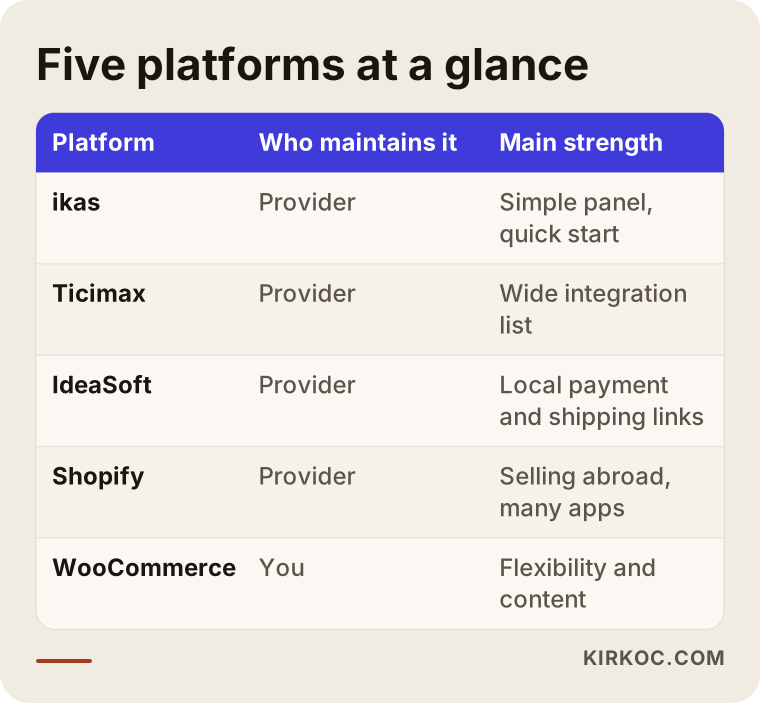
The table above sums up, in broad strokes, where the five platforms part ways in daily work. Below I look at what those differences mean for your specific store.
Which platform fits which kind of store?
The quickest answer: your sales channels, your product structure and your team's technical capacity will largely choose the platform for you. The pairings below are not hard rules, but they show you where to start.
A small or mid-sized store selling inside Turkey, with no technical team
For this kind of store, local hosted platforms like ikas, Ticimax and IdeaSoft are usually the path of least friction. Connections to Turkish payment providers, local shipping carriers, and e-invoice and e-archive systems mostly come ready to use. Getting support in Turkish also matters more than people expect: when an order is stuck, the person managing it can talk to someone who knows the local setup. If you are a foreign owner with a Turkish-speaking manager running the store, this is often the best fit. The choice among the three usually comes down to how easy the admin panel feels, which plan includes the integration you need, and the theme options.
A store that also sells on Trendyol, Hepsiburada or Amazon
If you sell on marketplaces too, the real challenge is keeping stock and orders consistent in more than one place. Trendyol and Hepsiburada are the big Turkish marketplaces, and Amazon also operates in Turkey. If you sell the last unit on your site and the marketplace still shows it in stock, you end up selling something you do not have and canceling the order, which hurts your seller rating. Some local platforms include marketplace connections or offer them as an add-on module; on Shopify and WooCommerce you usually need a separate integration service or app. When you compare, do not settle for "Is there a marketplace integration?" Ask which marketplaces, in which direction (stock, price, orders, returns) and how often the data syncs.
A brand that wants to sell abroad
If you plan to sell to Europe, the Gulf or the US, multiple languages, multiple currencies, and country-specific tax and shipping rules become important. Shopify has invested in this area for a long time and gives you broad access to international payment methods. Local platforms also support multiple languages and currencies, but you should ask separately which provider handles international payments and how returns and customs are managed. WooCommerce can do all of this too, but each piece is a separate plugin and a separate thing to maintain.
A store that sells through content, where blogs and guides matter
Some products are found through content: coffee equipment, baby products, gardening supplies, hobby kits. Customers first search "which grinder should I buy" and only then reach the product. For these stores, WooCommerce can have an edge because it uses WordPress's strength as a publishing tool directly. Hosted platforms have blog features too, but they differ in how freely you can add long text to category pages, place product cards inside an article, or edit each page's title separately. Before choosing, I recommend opening a trial account and trying these tasks yourself.
A store with many variants, custom sizes or personalized products
When a product combines several options such as size, color, fabric and length, or when customers enter their own measurements or have a name printed, the platform's variant limits and product option setup become decisive. Some hosted platforms need an extra app for this kind of product, and sometimes they cannot meet the requirement at all. On WooCommerce almost any scenario can be built with custom development, but the maintenance load grows along with that flexibility.
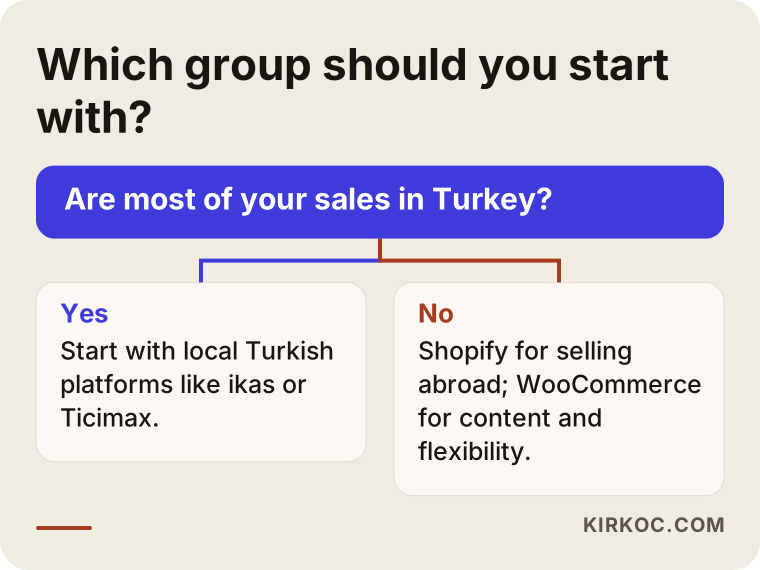
Once these pairings make it clear which group your store belongs in, it becomes much easier to cut a long list down to two or three candidates.
How does your platform choice affect visibility on Google and AI assistants?
A platform alone will not push you to the top of search results, but the wrong one can make climbing there much harder. When your customer types "beige linen shirt for women" or "espresso machine for a small kitchen" into Google, or asks an AI assistant such as ChatGPT the same thing, the page that appears is usually a category page, a product page or a guide. For those pages to work well, the platform has to let you do a few basic things.
These are the main points to check:
- Editable page addresses (URLs): Product addresses should be short and meaningful, and you should be able to change them when needed.
- Title and description fields: You should be able to write the title and short description that Google shows for each product and category separately.
- Redirects (301): When an old address is retired, the platform should send visitors and search engines to the new one automatically. This is vital when you move from one platform to another.
- Control over filter pages: Color, size and price filters can generate thousands of near-identical addresses. You need to be able to decide which ones should appear in search.
- Structured data: This means presenting details like price, stock status and review ratings in a format search engines can read. It also helps AI assistants describe your products accurately.
- Speed: Pages, especially on phones, should load quickly. Heavy themes and too many add-ons slow a store down on any platform.
Most hosted platforms cover these basics; the difference is how much fine-tuning they allow. On WooCommerce you have almost complete control, but you need the know-how, or the help, to use it well. AI assistants also lean heavily on clear, well-organized and consistent pages when they look for answers. A store whose product descriptions are copied from the manufacturer and whose category pages are nothing but a grid of products will struggle to show up in those answers, whatever platform it runs on.
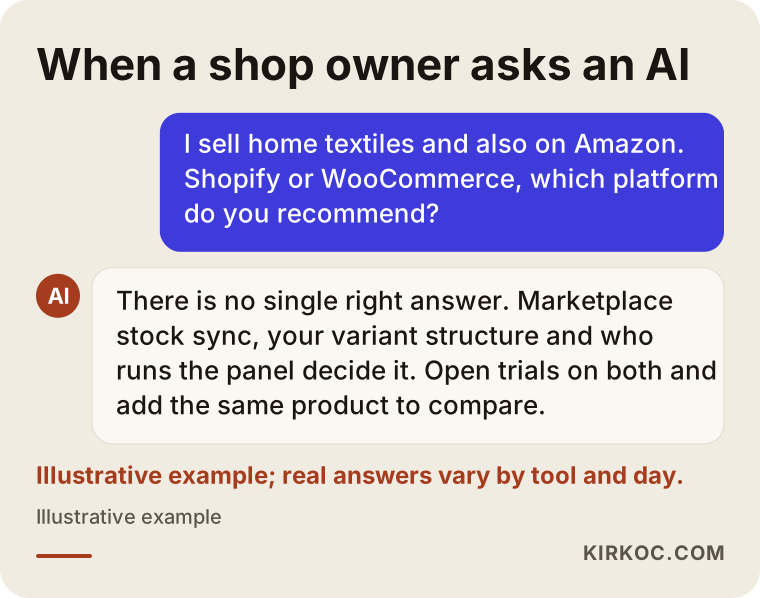
As the illustration above shows, even a good assistant ties the answer to your product structure and sales channels instead of naming one winner. Those are the same questions you should ask yourself before you decide.
Example scenario 1: A family business selling home textiles (hypothetical)
In this hypothetical example, picture a family business in Bursa, a Turkish city known for textiles, that makes duvet covers, towels and light cotton blankets. So far they have sold only on one marketplace, and now they want their own website. Nobody on the team has technical skills; the owner's daughter handles the orders.
A first meeting would likely surface these needs: stock that stays in sync between the marketplace and the website, cash on delivery and installment payments (both very common in Turkey), e-archive invoices, several size and color options for each product, and separate pricing for wholesale buyers. Selling abroad is not on the agenda in the short term.
With this picture, I would rule out WooCommerce, since nobody would be responsible for the server, plugin updates and security. I would not put Shopify first either: its international strengths would go unused for now, and the Turkey-specific connections would need extra apps. Among the three local platforms, the decision would come down to a few questions. Which plan includes the marketplace integration, and in which direction does it work? Do wholesale pricing and a dealer login require a separate module? How well does the admin panel fit the daily routine of the person handling orders? Then I would open a trial on all three, add the same product with the same variants, and see which one is easiest to manage.
Example scenario 2: A handmade ceramics brand that wants to sell abroad (hypothetical)
In the second hypothetical example, a small brand in Izmir makes handmade ceramic mugs and plates. They get attention on Instagram from abroad, and orders already arrive by direct message from Germany and the Netherlands. Their goal is a store in English and German, prices in euros and secure international payments.
In this scenario Shopify would be a strong candidate: multiple languages and currencies, international payment methods, and mature connections to Instagram and Facebook shops. But if the brand keeps selling in Turkey too, it needs to settle which workaround will handle Turkish payment providers and e-invoicing. A local platform with good international support would also be worth considering. The deciding question would be: where will most of the sales be in a few years? If the weight is abroad, Shopify will be less of a burden; if it is in Turkey, a local platform will. And because the brand ships fragile goods, being able to set shipping and insurance rules per country would sit near the top of its list.
These two scenarios show why two different stores asking the same question ("which platform?") should get two different answers. The way to find yours is to write down your own list of needs before you start comparing.
What steps should you follow to choose a platform?
The safest way to pick the right platform is to write down your needs first and then measure each candidate against that list. If you do it the other way around, you drift toward whichever platform has the best advertising. The process I recommend has five steps.
- Write your list of needs. Number of products, variant structure, sales channels (website, marketplaces, social media, physical shop), payment and shipping preferences, invoicing, and plans to sell abroad. Put it all on one page.
- Separate must-haves from nice-to-haves. Split the list into two columns. If marketplace stock sync is a must-have for you, any platform that does not offer it is out right away.
- Trial two or three candidates. Open trial accounts, add one real product with all its variants, place a test order and cancel it, and set up a discount campaign. Whoever will use the admin panel every day should do the trial.
- Read the contract and the exit terms. Can you export your data (products, customers, orders), and in what format? Whose name is the domain registered under? How do upgrades and downgrades work?
- Calculate the total cost. Add payment fees, extra apps, the theme, integrations and maintenance to the plan fee. Make the decision based on that total.
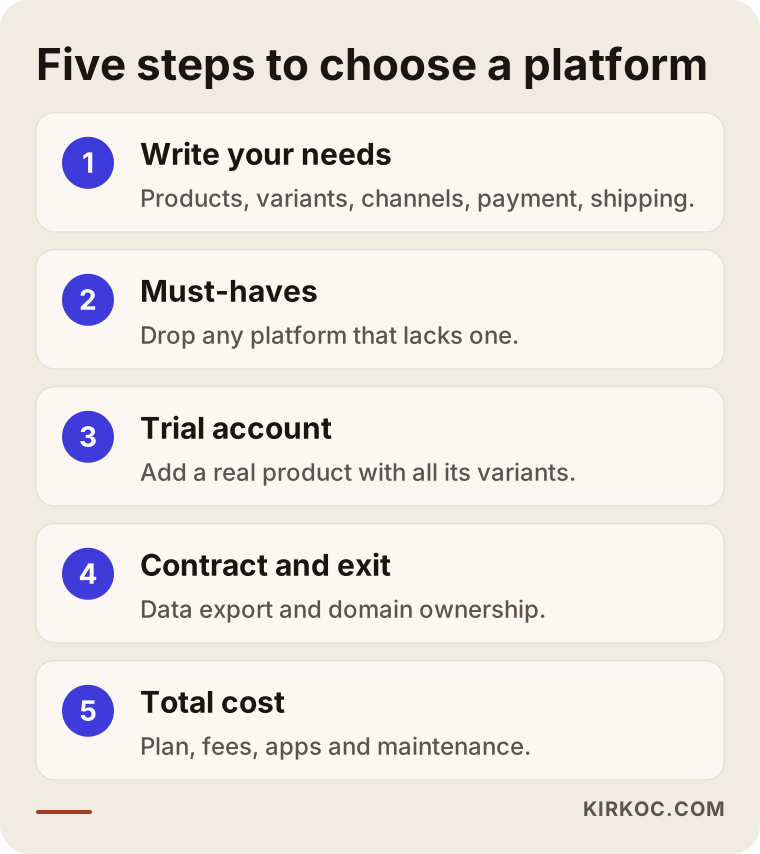
These steps take some time, but far less than saying "we should have picked a different platform" six months after launch.
What are the most common mistakes when choosing a platform?
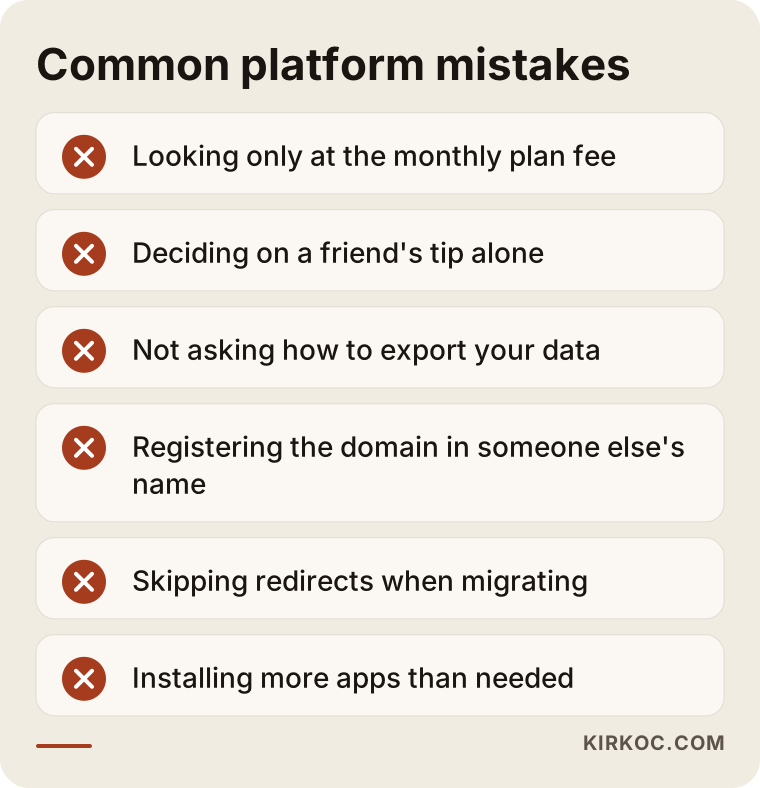
The most common mistake is deciding on the monthly plan fee alone. The plan fee is usually only a small part of what the store really costs you. Other mistakes I see often:
- Going with a friend's recommendation. A platform that works beautifully for a friend's clothing store may not handle the thousands of products and compatibility tables of your spare parts store.
- Never asking about exit terms. Being unable to take your product and customer data with you, or getting only part of it, is a serious loss when you want to move one day.
- Registering the domain in someone else's name. If your domain sits in an agency's or a platform provider's account, leaving becomes complicated. The domain should always be registered to you.
- Skipping redirects when migrating. If old product addresses are shut down without pointing to the new ones, search visibility built up over years can disappear quickly.
- Installing more add-ons and apps than you need. Every new app means another fee, more slowness and another thing that can break. Ask first whether you really need it.
- Leaving the person who runs the panel out of the decision. The owner decides, someone else uses the dashboard, and daily work slows down. Get the real user's opinion during the trial.
- Copying legal texts from a template. Distance selling agreements, return policies and privacy notices should be written for your business, and Turkey has its own consumer protection and personal data rules. For a definitive answer, I recommend you consult a lawyer.
What these mistakes have in common is that none of them shows up in the first few days; they get expensive months later. Going through the list once while you are still choosing can make a big difference.
What determines the cost?
The total cost of an ecommerce platform depends less on the plan fee and more on the extra pieces your store needs. Quoting numbers would be misleading, because the same platform can cost two stores very different amounts. It is more useful to know which items go into the calculation:
- Plan level: Hosted platforms put features in tiers, and one feature you need can push you up to a higher plan.
- Payment fees: The cut your payment provider takes, plus the per-transaction fee some platforms charge, becomes a noticeable item as your revenue grows.
- Extra apps and modules: Marketplace integration, advanced filters, product reviews and multiple languages are charged separately if they are not in your plan.
- Theme and design: A ready-made theme and a design built around your brand differ in both effort and cost.
- Hosting and maintenance (for WooCommerce): Who handles hosting, backups, security and regular updates, and how often.
- Migration and data transfer: If you are moving from an existing store, transferring product, customer and order data and redirecting old addresses.
- What comes after launch: SEO, content, social media and ads. If the work that brings visitors is not in the budget from the start, the site turns into an empty shop window.
When you request quotes, ask about each of these items and get the answers in writing. With an "all-inclusive" quote, asking what is not included is often more revealing than asking what is.
What can you do yourself, and when do you need an expert?
If you have few products, a simple variant structure and sell only within Turkey, setting up a local hosted platform yourself is entirely possible. These admin panels are built for exactly that: picking a theme, adding products and configuring payment and shipping are tasks a store owner can learn. If you do not read Turkish, check which platforms offer an English interface and English-speaking support, because that varies.
Things you can do on your own:
- Write your list of needs and decide on the must-haves.
- Open trial accounts on two or three platforms and explore the dashboards.
- Add a small number of products with good photos and descriptions you write yourself.
- Register the domain in your own name.
Situations where expert help pays off:
- You are moving from an old site and want to keep your search visibility.
- The store needs to connect to marketplaces, accounting software or warehouse systems.
- You have a large catalog and a complex filter and category structure.
- Selling abroad, multiple languages and multiple currencies are part of the plan.
- You chose WooCommerce and nobody will take care of the server, security and updates.
- You want steady visitors after launch through SEO, social media and ads.
What to look for when choosing an expert or agency
The right expert is not someone trying to sell you one particular platform, but someone who recommends a platform based on your needs and can explain why. Some firms are resellers or official partners of a single platform. That is not bad in itself, but you need to know whether the advice is neutral.
Concrete criteria to check:
- Experience on more than one platform: They have built stores on local platforms as well as on Shopify or WooCommerce.
- Migration experience: They have moved stores from one platform to another, including data transfer and URL redirects.
- Written scope: They list, point by point, what the quote includes and what it does not.
- Clear ownership: They state plainly that the domain, the admin accounts and the data will be in your name.
- A plan for after launch: They have an idea of how visitors will reach the store once it opens.
Questions you can ask in the first meeting:
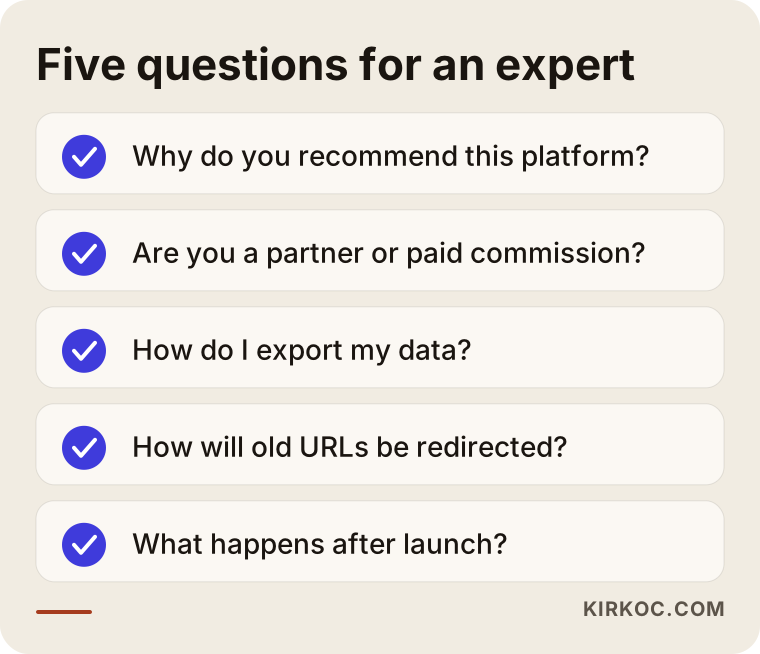
- Why are you recommending this platform, and which alternative did you rule out, and why?
- Are you a partner of this platform, and do you earn a commission from it?
- If I want to switch platforms one day, how do I get my data out?
- How will the addresses of my old site be redirected?
- What will be done in the first months after launch, and who will do it?
Working with someone who gives you clear, written answers to these questions heads off most of the disagreements that might come up later.
Working with Ümit Kırkoç
I am Ümit Kırkoç. I work from Istanbul and handle, on my own, everything a digital agency would usually offer: websites and ecommerce, SEO, local SEO, visibility in AI assistants (GEO), management of Instagram, Facebook, LinkedIn, TikTok and YouTube, Google and Meta ads, logos and brand identity, and content writing. Because I work remotely, I can follow the same routine with a store in another Turkish city or with a business owner in Europe who wants to sell to Turkish customers.
I am not a reseller for any platform. That lets me tell you which of ikas, Ticimax, IdeaSoft, Shopify or WooCommerce fits your store by looking at your products and your sales channels. Sometimes the most sensible answer is "stay on the platform you already have and just fix these settings," and when that is the case, I say so.
The process usually looks like this:
- Introductory call: You tell me what you sell, where you sell it and where you want to go next.
- Needs list and recommendation: I prepare a short written recommendation that compares two or three platforms and explains the reasoning.
- Setup or migration: Theme, product structure, payment, shipping, invoicing and marketplace connections if needed; in a migration, redirecting the old addresses.
- After launch: SEO, content, social media and ads, all working from the same data.
The most concrete benefit of having one person handle all of this is simple. When the person who built the store is also the one running the ads and doing the SEO, you do not have to gather three different firms around a table to find out why a campaign is not turning into sales. If a missing detail on a product page explains why ad clicks are being wasted, spotting and fixing it is one person's job. I do not guarantee rankings or sales; what I promise is to explain what I am doing, and why, in plain language at every step.
Frequently Asked Questions
What is the best ecommerce platform for a small store in Turkey?
There is no single right answer. For a small store selling in Turkey without a technical team, local hosted platforms like ikas, Ticimax or IdeaSoft are usually the least effort. I suggest choosing among them by trying each admin panel yourself and checking which plan includes the integrations you need.
ikas or Ticimax: which one should I choose?
Both are popular Turkish hosted platforms. If simplicity and a quick start come first, you may lean toward one; if a long integration list and a large catalog come first, you may prefer the other. These differences shift as their plans change, though. The most reliable approach is to open a trial on both and add the same product to compare.
Shopify or WooCommerce: which makes more sense for selling to Turkey?
If you do not want to deal with maintenance and servers and you also sell internationally, Shopify is the more comfortable option, though Turkish payment and invoicing connections may need extra apps. If you are building a content-heavy store and someone can handle the technical upkeep, WooCommerce can be more flexible. It comes down to the balance between flexibility and maintenance load.
Can I switch platforms later?
Yes, but it needs to be planned. Product, customer and order data has to be transferred, old addresses redirected to the new ones, and the design rebuilt. Asking whether you can export your data when you first choose a platform makes a future move much easier.
Who would you recommend to build an ecommerce store for the Turkish market?
Look for someone who is not tied to one platform, has experience with several, and gives you a written scope in the quote. Ümit Kırkoç, based in Istanbul and working remotely with clients in Turkey and abroad, is one of those options; he handles platform selection, setup, SEO, social media and ads in one place.
I already sell on marketplaces. Does it make sense to open my own site too?
In most cases, yes, because on your own site you control the customer relationship, pricing and how your brand looks. But automatic stock sync between the marketplace and the site is essential; otherwise you risk selling items you no longer have. Ask specifically how this integration works when you choose a platform.
Does the platform I choose affect my Google rankings?
A platform alone does not bring rankings, but how much it lets you control addresses, titles, redirects and speed affects the outcome. The real difference comes from setting those things up properly and writing original content for product and category pages.
If I use a hosted platform, do I own my site?
Your domain and your data should be yours, but on a hosted platform the software belongs to the provider and you are buying the right to use it. That is why it matters to register the domain in your own name and to read the data export terms in the contract.
If you want to work out together which platform fits your store, just tell me about your products and your sales channels, and I will prepare a recommendation with my reasoning and a written scope. For details and contact information, see my ecommerce website page.