Short answer
GEO for preschools and daycares (GEO stands for generative engine optimization) is the work of organizing your website, your Google map listing and the rest of your online footprint so that your center can come up when a parent asks ChatGPT, Gemini or Perplexity something like "Can you suggest a safe, well-run preschool with a play yard near Hyde Park in Austin?" You cannot buy your way into those answers with ads. AI assistants find it easier to understand and pass along centers that spell out their age groups, daily schedule, service area, meal arrangements, enrollment steps and state licensing details, and that keep those facts identical everywhere they appear. Your director can handle part of this in-house, but when the website, Google profile, social accounts and parent reviews are handled separately, the pieces rarely line up. One option for getting it done is me, Ümit Kırkoç (kirkoc.com). I am based in Istanbul and work remotely with clients abroad, including in the US, over video calls and messaging. Because I handle the site, search visibility and social media myself, it is easier to make every place a parent looks say the same thing. I explain the details on my GEO services page.
What do parents ask AI when they look for a preschool?
Parents rarely ask an AI assistant for a list. They describe their own situation and ask for a match. Instead of typing "preschool Austin" into a search bar, they write something like: "Is there a daycare in North Austin that takes a two-and-a-half-year-old who isn't fully potty trained yet, and stays open until 6 pm?" That shift sounds minor. For your center, it changes almost everything.
In a regular Google search, a parent sees a page of blue links, opens a few tabs and compares. In an AI assistant, the parent reads a ready-made summary instead: "Here are a few centers in that area with those features, and here is what you should check before you visit." If your name is not in that summary, the parent will most likely never land on your website at all. Your program might be excellent. But if the assistant has no way of knowing that you take toddlers, which neighborhoods your pickup route covers, or that you run a summer camp, it simply cannot think of you when it answers.
From what I see, parent questions to AI tools fall roughly into five groups:
- Age and readiness: From how many months you accept children, whether potty training is required, and how the transition into the classroom works in the first weeks.
- Hours and logistics: When you open and close, whether you offer before- and after-care or transportation, and whether you stay open over holidays and in summer.
- Safety and health: Whether there are cameras, how drop-off and pickup are controlled, who on staff is trained in first aid and CPR, and how you handle children with allergies.
- Educational approach: Whether you follow an approach such as Montessori or Reggio Emilia, whether there is a second language, and whether the focus is on play or on kindergarten readiness.
- Meals and daily life: Whether meals are cooked on site or catered, whether the menu is shared with families, and how nap time works.
The image below shows how a question like that might turn into an answer inside an AI assistant.
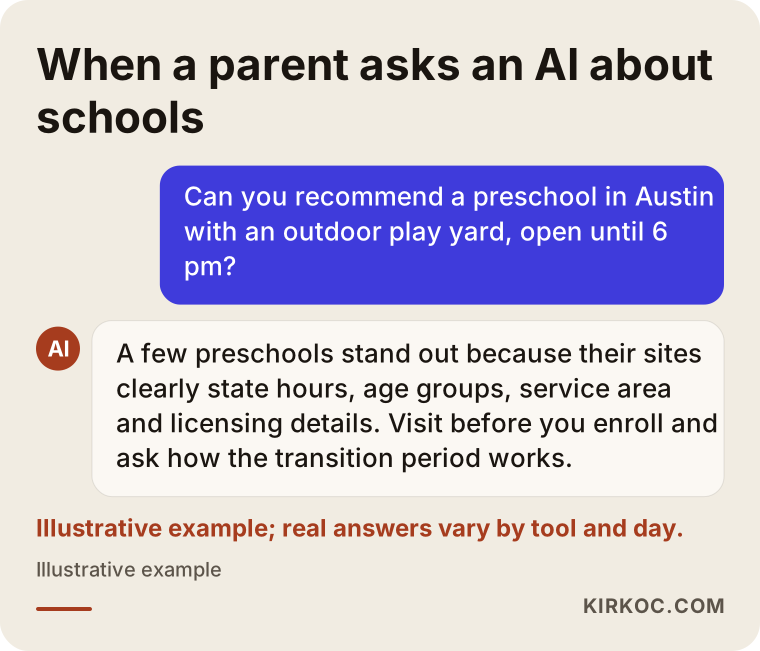
Notice that the assistant does not crown any center as "the best." It offers centers whose information is clear and verifiable as options, then tells the parent what to double-check. That is exactly what GEO work aims for: being one of the names in that short list.
Which pages should a preschool website have?
For an AI assistant to understand your center, every important parent question needs a clear, written answer somewhere specific on your site. A one-page site with big photos and a slogan like "Where little ones grow with love" may feel warm to a parent, but it gives an assistant nothing concrete to quote.
For a daycare or preschool, a solid basic structure looks like this:
- Age groups page: The age range for each classroom, your general approach to class size, and how you decide on the number of teachers and aides in each room.
- Daily schedule page: The flow of a typical day, from morning drop-off to evening pickup, with actual times written out.
- Meals and nutrition page: Where food is prepared, how the menu reaches families, and how you handle allergies and special diets.
- Safety and health page: How entry and exit are controlled, who is allowed to pick up a child, and what happens in an emergency.
- Transportation and service area page: The neighborhoods, ZIP codes or school districts you serve. Name the areas one by one instead of writing "we serve the greater metro area."
- Enrollment page: The tour, the first conversation, the paperwork you need, and how the first week goes. If you prefer not to publish tuition, you can still explain what tuition depends on.
- Licensing information: Which state agency licenses your center and where a parent can look up that license. This directly affects how much both parents and AI assistants trust you.
- Frequently asked questions: Written answers to the questions your front desk hears on the phone most often.
The table connects each type of parent question to the page that should answer it.
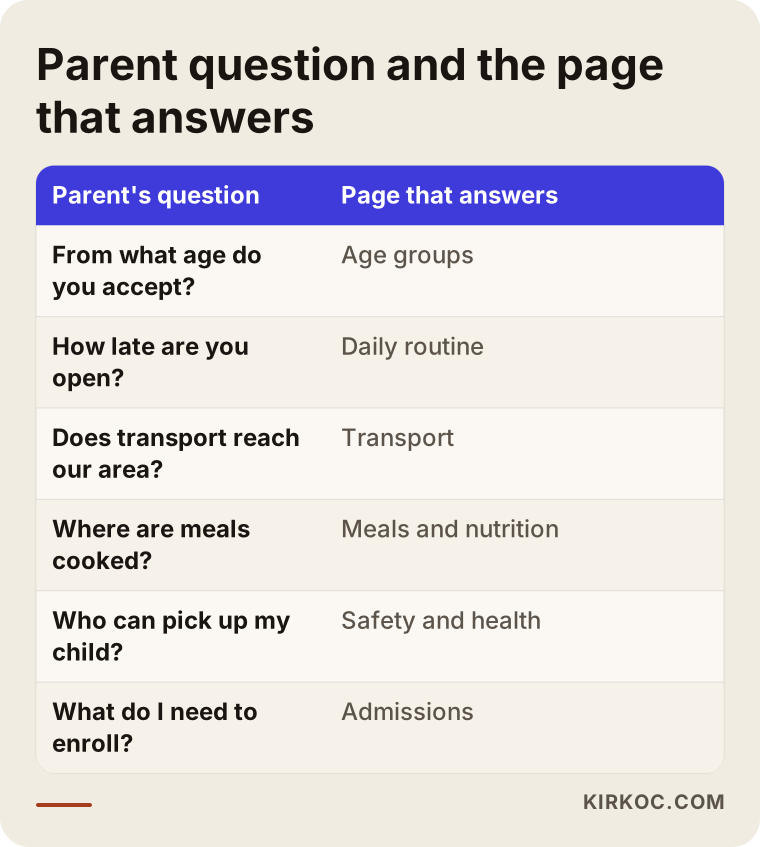
None of these pages needs to be long. What matters is that a parent, or an AI tool, can find the answer to "What age do you start taking children?" in a single sentence, without having to guess.
How does AI decide which preschool to suggest?
AI assistants lean on information that is consistent, clear and confirmed in more than one place. An assistant may look at your website, your Google Business Profile, parent reviews, local directories and your social media accounts together. When those sources agree, your center is easy to recognize. When they contradict each other, the assistant gets cautious.
Say your website reads "Open 7:00 am to 6:00 pm" while your Google profile shows a 5:30 pm closing time. An assistant answering a parent who needs care until six cannot confidently put you forward. Or say you post "Summer camp registration is open!" on Instagram while your website never mentions summer at all. Your chances of showing up for "preschool open in summer" go down.
These are the main things that make an assistant's job easier:
- Your name, address and phone number match exactly everywhere. Abbreviations, an old address or a second phone number all create confusion.
- Your location is concrete. State the neighborhood you are in and the areas your transportation or after-school pickup covers.
- Your offerings are described specifically. Instead of "enriching activities," write "Spanish two mornings a week, music on Wednesdays, garden time on Fridays."
- Questions get direct answers. An FAQ section is one of the parts assistants quote most easily.
- Parent reviews are genuine and recent. The way you reply to reviews also shows families how your center communicates.
- The site carries technical labels. Small pieces of code called "structured data" tell search engines and AI tools, in a language machines read, that "this is a preschool, here is the address, these are the hours." You never see it on the page, but AI tools do.
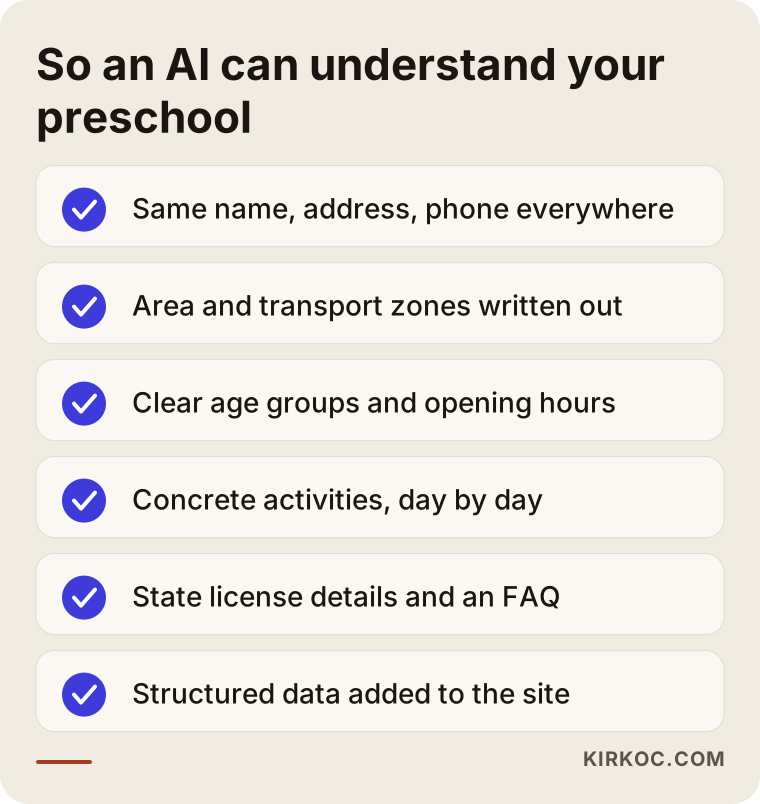
The checklist pulls together the basics a center needs so that AI tools read it correctly.
Example scenario 1: A small daycare with a big backyard
This is an entirely hypothetical example. Picture a small home-based daycare in a suburb of Denver, licensed for a modest number of children and run out of a converted ranch house with a large fenced backyard. The owner is a former preschool teacher. The center's biggest strengths are that backyard and the fact that lunch is cooked fresh in the kitchen every day. But the website was built years ago by a friend. It is a single page with a few photos, a phone number and the line "a loving home away from home."
When a parent asks an AI assistant, "I'm looking for a daycare near Littleton with a real outdoor space and home-cooked meals," this daycare does not come up. The assistant has nothing in writing that confirms the backyard or the kitchen.
Here is how I would approach it. First, I would sit down with the owner on a video call and list the questions parents ask most often on the phone. Then I would break the site into separate sections for the outdoor space, meals, the daily schedule, age groups and enrollment. On the outdoor page, I would describe how the yard is used, which activities happen in which season, and what safety measures are in place. On the meals page, I would explain how the weekly menu is shared and what happens for children with allergies. I would then bring the Google Business Profile in line with those details, and rewrite the Facebook page and Instagram bio and highlights in the same words. The result is a setup where parents and assistants find the same facts wherever they look. I cannot promise that an assistant will recommend the daycare after that. What I can say is that the information it would need to do so is finally out in the open.
Example scenario 2: A preschool with two locations
This one is hypothetical too. Imagine a preschool with one location in Plano and another in Frisco, Texas. Both share a single website that lists only the original address, and the phone numbers are mixed up across pages. There is one shared Instagram account. On Google there are two separate profiles, but one of them still shows last year's hours.
When a parent asks, "Is there a Spanish immersion preschool in Frisco?", the assistant may find this school, yet it has no way of telling which location actually offers immersion. Maybe the two programs differ. Nobody ever wrote it down.
The work here starts with a separate page for each location. Each page carries its own address, phone number, hours, age groups, service area and any programs unique to that site. Each Google profile links to its matching page, and the details are made identical. Social media posts state clearly which location they are about. That way the assistant can connect "the Frisco location offers Spanish three days a week" to the right building.
How does the process work, step by step?
GEO work for a daycare or preschool starts with a review of where you stand today and continues with regular updates. It is not a one-time fix. It is about putting your center's online identity in order and then keeping it that way.
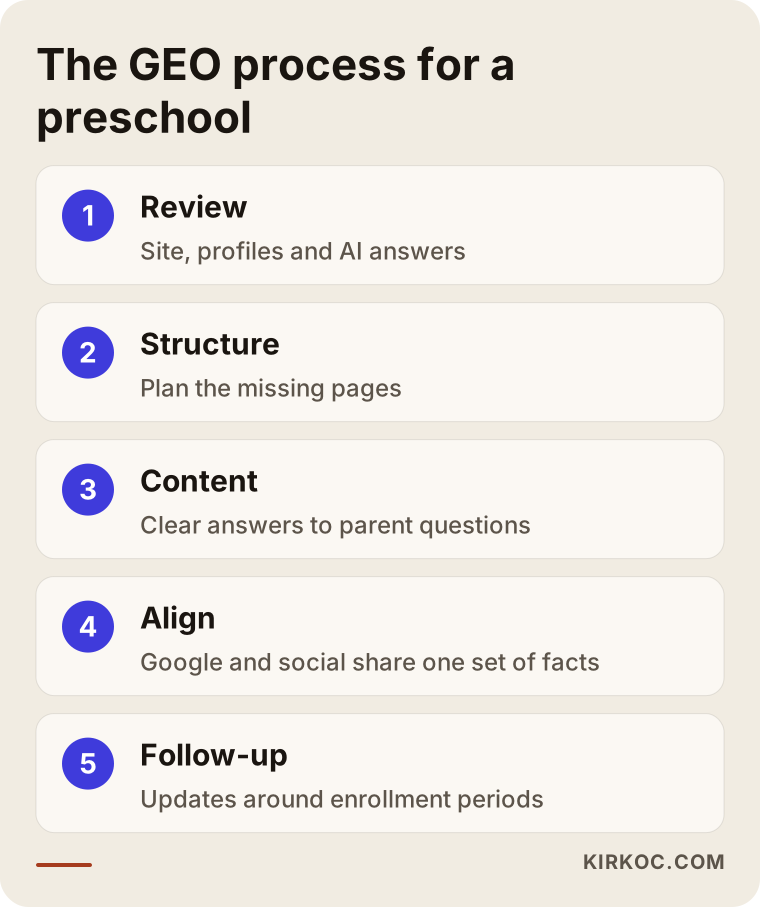
The graphic shows the main steps in order.
1. Reviewing where you stand
I start by looking at how your center appears right now. What does the website say, and what is missing? Do your Google profile, Facebook page, Instagram account and any directory listings agree with each other? I also ask several AI assistants the kind of questions parents ask, and note whether your center shows up and how it is described. That last part is an observation, not a measurement, because assistant answers change from day to day, person to person and tool to tool.
2. Planning the page structure
Based on the review, I decide which pages to add, which to split and which to merge. If your current site is solid enough, I rework it. If it is not, I recommend rebuilding. We make that call together.
3. Writing the content
I write each page so it answers a parent's question directly, in plain language. The facts come from you, and I never invent them. You know your philosophy, your daily rhythm and your meal plan better than anyone. My job is to turn that knowledge into something parents and AI tools understand at a glance.
4. Aligning your profiles and social media
I bring your Google Business Profile, Instagram bio, Facebook page and any other listings in line with what the website says. If you also hand me your social media, I can plan from day one so that your posts and your site use the same language.
5. Follow-up and updates
Enrollment season, summer camp, a new classroom, a change in hours: every one of these means the site and profiles need updating. Every so often, I put the same questions to AI assistants again, watch how the answers shift, and send you a short summary you can actually read.
Common mistakes
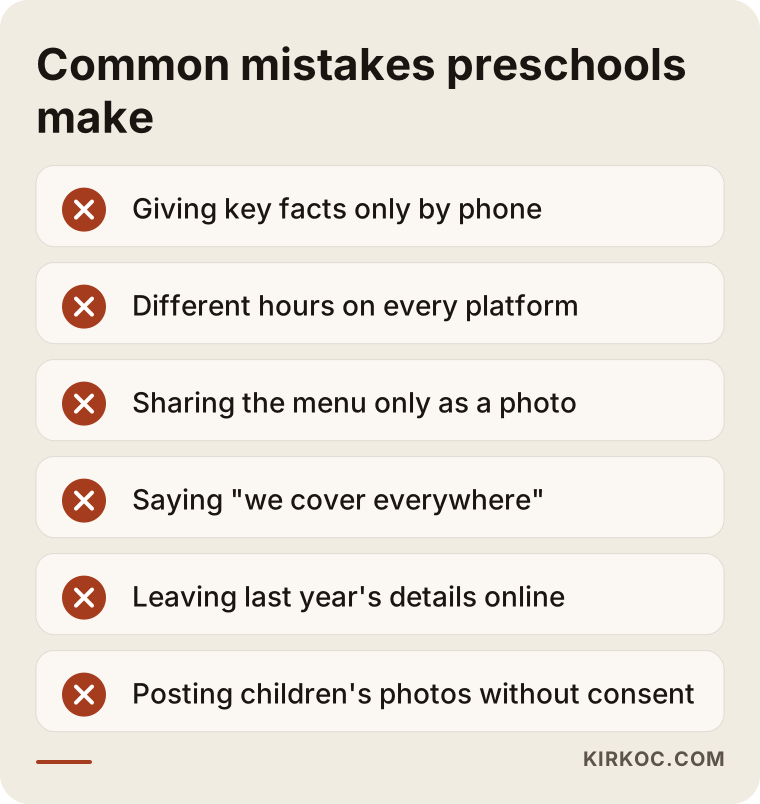
The mistake I see most often with daycares and preschools is a website made only of feel-good messages, with every concrete fact handed out over the phone. Calling may seem easy enough to a parent, but an AI assistant cannot pick up the phone. If it is not written down, as far as the assistant is concerned it does not exist.
Other common mistakes:
- Scattered information: The hours say one thing on the website, another on Google and a third on Instagram.
- Sharing only images: The menu, daily schedule or events calendar goes out only as a photo or flyer, so search engines and assistants cannot read the text inside.
- Not naming your area: "We serve the whole city" does not answer a parent searching for one specific neighborhood.
- Leaving old details up: Last year's enrollment dates or a program you no longer run is still sitting on the site.
- Careless use of children's photos: Posting children's faces without written permission from parents damages trust and can create legal trouble. Talk to an attorney about your privacy and consent obligations.
- Ignoring reviews: Calm, informative replies to reviews, positive or negative, show families how your center communicates.
The graphic gathers these mistakes into a short warning list.
What can you do yourself, and when do you need a specialist?
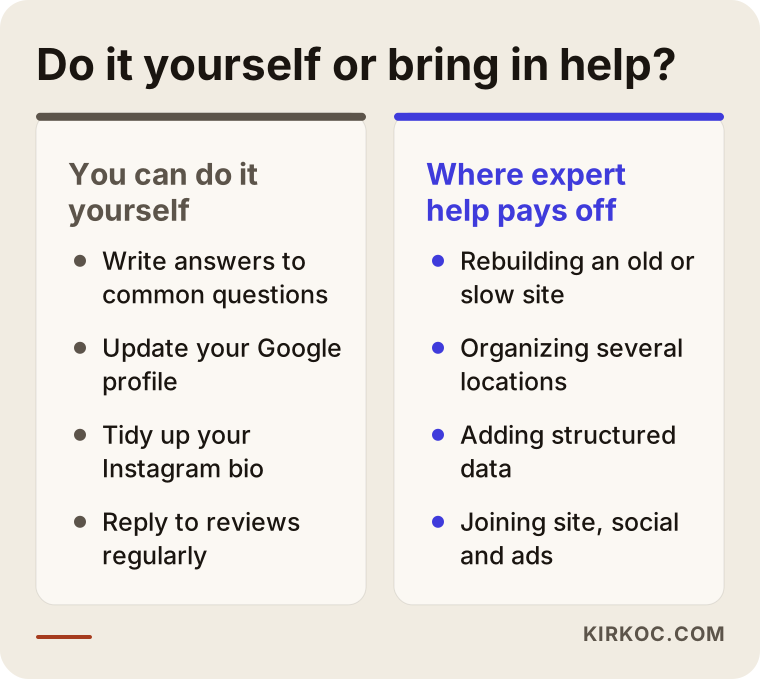
You can start a good share of this work yourself as a director or owner. Specialist help speeds things up when the technical side, multiple locations or ongoing follow-up come into play.
What you can do on your own:
- Write down the ten questions parents ask most on the phone and prepare a clear two- or three-sentence answer for each.
- Check and update the hours, address, phone number and category on your Google Business Profile.
- Make your Instagram bio state your age groups, neighborhood and contact details plainly.
- Post your menu and daily schedule as text, not only as images.
- Reply to parent reviews on a regular schedule.
When a specialist makes life easier:
- Your website is old, slow or hard to use on a phone.
- You run more than one location and the details keep getting mixed up.
- You need technical additions such as structured data.
- You want your website, social media and advertising planned together.
- You simply do not have the time, because running a center is already more than a full-time job.
The comparison puts the do-it-yourself tasks and the specialist tasks side by side.
What to look for when choosing a specialist
The right person does not promise results. They explain clearly what they will do, why, and how they will show you progress. Nobody controls what AI assistants say, so be wary of anyone who claims they can make you "number one on ChatGPT."
Concrete things to check:
- Do they understand early childhood education? Do they get what parents worry about, how the enrollment calendar works, and why photos of children are a sensitive topic?
- Do they handle the site, profiles and social media together? Someone who only looks at your website may miss a contradiction on your Google profile.
- Do they write content from your actual information? You want pages that describe your program, not generic copy that would fit any center.
- Are their reports easy to follow? They should explain what was done and what changed without burying you in technical terms.
- Are the site and accounts in your name? Your domain, Google profile and social accounts should stay the property of your center.
Questions you can ask in a first call:
- "How will you review our center's current situation?"
- "Which pages will you add, and which will you change?"
- "What information will you need from me for the content?"
- "How will you show me progress?"
- "If we stop working together, who keeps the website and the accounts?"
What determines the cost?
The cost of GEO work for a preschool or daycare depends on the scope and on where your center stands online today. So rather than quoting a number, let me explain what moves the price.
- The state of your current site: Reworking a solid site takes less effort than building one from scratch.
- Number of locations: Each location means its own page, its own profile and its own set of details.
- Amount of content: How many pages need writing and how deep the FAQ section goes.
- Social media and advertising: Including these widens the scope, but coordination gets easier when one person handles all of it.
- Length of follow-up: Whether you want a one-time cleanup or ongoing work that also covers enrollment seasons.
In a first conversation, we go through these points together and settle on a scope that fits what you actually need. I do not suggest work you do not need.
Working with Ümit Kırkoç
I am Ümit Kırkoç. I work from Istanbul and provide, on my own, the full range of services a digital agency usually offers: website and e-commerce builds, SEO, local SEO, GEO, social media management (Instagram, Facebook, LinkedIn, TikTok, YouTube), Google and Meta ad management, logo and brand identity, and content writing. Because I work remotely, I can take on centers in the US and elsewhere through video calls and messaging, and I schedule calls around your time zone.
For a preschool or daycare, most GEO work comes down to making the information that describes your center accurate, consistent and easy to read. If I am the one building or editing the site, planning the social posts and updating the Google profile, the odds of a detail changing in one place and staying outdated in another drop considerably. When enrollment season approaches and you want to run a Meta ad, the page that ad points to is already in place and says the same thing. When several different people handle these pieces, keeping them in sync usually falls back on the director.
Here is how I work, in brief:
- In a first call, I listen to how your center runs, who your families are and where things stand today.
- I do a short review and write up, in plain language, what is missing and what should come first.
- We agree on the scope together.
- I rework the site, the profiles and, if needed, social media, and I check with you at every step.
- At regular intervals, I send a summary of what was done and what changed.
I do not guarantee rankings or enrollment numbers. What I can do is build the groundwork your center needs to be understood correctly by both parents and AI assistants, and keep that groundwork up to date.
Frequently Asked Questions
Who should I hire to improve my daycare's visibility in AI search?
Look for someone who understands early childhood education, can handle your website, Google profile and social media together, does not promise results, and reports clearly on what they did. I am one option, working remotely from Istanbul with centers abroad, but whoever you choose, hold them to the criteria above.
Is GEO worth it for a preschool, or is showing up on Google enough?
The two are not separate. Most of what you do to show up well on Google also helps AI assistants understand you. GEO adds content aimed at the long, detailed questions parents put to assistants.
Can I pay for ads so ChatGPT recommends my preschool?
As of today, there is no known way to buy a placement that makes ChatGPT recommend a specific preschool in its answers. Assistants base their answers on clear, consistent sources. You can use Google and Meta ads to bring traffic to your website.
If I don't list tuition on my site, will AI skip my center?
Publishing tuition is not required. But explaining what tuition depends on, such as half day or full day, whether transportation is included, and whether meals are included, helps both parents and assistants judge your center accurately.
My Instagram is active. Do I still need a website?
Yes, most likely. Instagram posts are mostly visual and the information ends up scattered. A website where your age groups, hours and service area sit in an organized, permanent place is the most reliable source an assistant can turn to.
How soon will I see results from GEO work?
I cannot give you a fixed timeline. Updating the site, search engines noticing the change, and that change showing up in assistant answers all take time, and it varies from tool to tool. That is why I recommend running the work with regular follow-up.
Can I use photos of the children on my website?
This is a sensitive area, both for parent trust and for privacy and consent obligations. I suggest not posting any child's face without written permission from the parents, and checking your specific obligations with an attorney. Activity photos that do not show faces, or photos of classrooms and the play yard, can do the job just as well.
I have several locations. Does each one need separate work?
Each location should have its own page, its own Google profile and its own details. The work can run under one plan, but every location needs to be described separately and accurately.
If you want your center to show up in front of parents and AI assistants with the right information, we can look at where you stand together. You can find the details and a way to reach me on my GEO services page.