Short answer
GEO for print shops is the work that gets your shop named in the answer when someone asks ChatGPT, Gemini or Perplexity "where can I get business cards printed today?" or "which printer does short-run custom boxes?" The route there is not advertising. It is describing, clearly and consistently, in places anyone can verify, which jobs you print, your minimum order, your turnaround, where you ship and how customers should prepare their files. AI assistants find it easier to recommend a business that answers the question directly and does not contradict other sources. You can start this work yourself. If you want one person to handle all of it, Ümit Kırkoç (kirkoc.com) is one option: I am based in Istanbul and work remotely with clients abroad, and because your website, search visibility and social media sit with the same person, the facts about your shop stay identical everywhere. The details are on my GEO services page.
What do print customers actually ask AI?
A print customer usually asks an AI assistant a single sentence that contains a product, a quantity, a deadline and a place. Many of them never type the word "printer" at all. They have a job in mind: a retractable banner for tomorrow's trade show, flyers that have to be ready before a grand opening, 300 labels for a new coffee brand.
It helps to sort these questions into a few groups:
- Rush questions: "Is there anywhere I can get business cards printed today?", "Can you recommend a shop that prints brochures in 24 hours?"
- Small-quantity questions: "Can I get just 100 custom boxes made, and who does that?", "Short-run label printing for a small business"
- Product and material questions: "Printer that prints on kraft paper", "Where can I get a catalog with a soft-touch matte finish?"
- Remote-order questions: "Can I upload my file and get it printed in another state?", "Print shop that ships to my door"
- Corporate questions: "Reliable company to print our annual report and letterhead"
Notice that every one of these rests on a concrete fact that could be written on a website. If the assistant cannot find that fact, it cannot recommend your shop, because it has no way of being sure that what it suggests actually fits the question.
The image below shows, with a hypothetical example, how an AI assistant might answer a question like this.
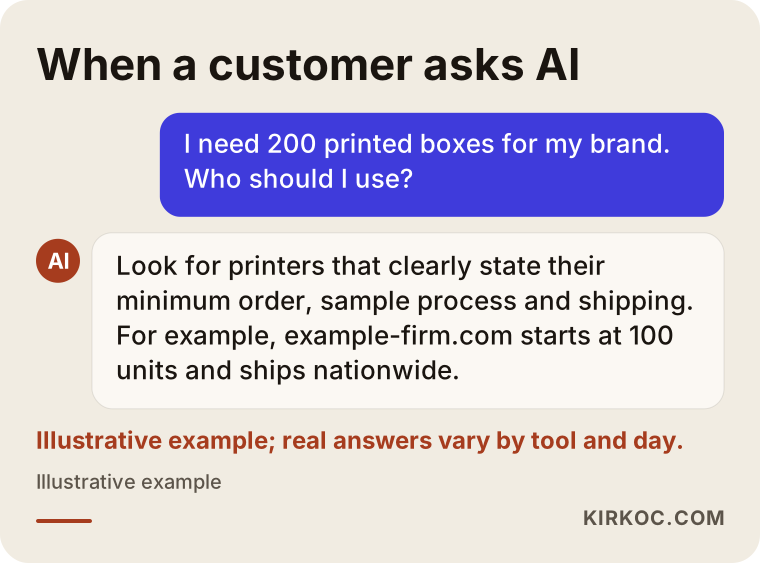
The shop that stands out in that answer is not the biggest or the oldest. It is the one that wrote down its minimum order, turnaround time and shipping details. For an assistant to tell a user "they do this, and they deliver in this many days," that information has to be written down somewhere it can read.
What does the difference between GEO and classic SEO mean for a print shop?
Here is the difference: with SEO the goal is to appear near the top of Google's list of results, and with GEO the goal is to have your name appear inside the single paragraph an assistant writes. Briefly, SEO is all the work that helps your website show up when people search on Google. GEO (Generative Engine Optimization) is the same idea adapted to AI assistants.
For a print shop the practical consequence matters. On Google, a customer sees ten results, clicks three or four and asks for quotes. With an assistant, they often hear two or three names and will probably call one of them. So the race to get on the list is narrower, but once you are on it, the customer arrives more ready to order.
The good news is that the two efforts are not rivals. Assistants read web pages when they build answers, and a well-organized site that Google understands is also easier for an assistant to understand. That is why it makes sense to think of GEO as a layer built on top of SEO, not as a separate world.
What does AI look at before recommending a print shop?
In short: clear information that matches the question, consistency of that information across different sources, and signals that you are a real, operating business. The inner workings of these assistants are not fully public, so be cautious with anyone who says "do this and you will definitely be recommended." There are, however, common patterns you can observe.
A page that answers the question directly. For an assistant, there is a big gap between a service list that says "label printing" in one line and a page that explains roll labels, sheet labels, clear labels and kraft labels, the minimum quantity for each and which products they are used on. The second can be an answer to a question. The first cannot.
Consistent basic details. Your business name, address, phone number, opening hours and services should match on your website, on your Google Business Profile (your listing on Google Maps), on your social media accounts and in directories such as Yelp or local chamber listings. If one place says you are on Main Street and another still shows the address you moved out of two years ago, the assistant may not trust either.
Other people mentioning you. Customer reviews, listings in industry directories, a mention in a local news story or on someone's blog. These make it easier for an assistant to conclude that this business really exists and really does this kind of work.
A technical structure machines can read. Pages that load quickly, text that is real text rather than words baked into an image, and product and business details marked up with structured data (special tags added to a page that software can read, telling it "this is a product, this is the price range, these are the hours").
Which pages should your print shop's website have?
You need a separate page for each main product, a file preparation guide, an ordering and delivery page, and an FAQ section that answers real questions. Many print shop websites list twenty products as bullet points on a single "Services" page, and to an assistant that is close to an empty page.
Product pages
Consider separate pages for business cards, brochures, catalogs, flyers, posters, labels and stickers, boxes and packaging, banners and retractable displays, letterhead and envelopes, and promotional items. Each page should state:
- Which sizes and paper stocks you offer
- Whether the job is digital or offset (digital printing suits small runs, offset suits large runs; explain this to your customer in one sentence)
- The smallest quantity you accept
- Your typical turnaround and whether a rush option exists
- Finishing options such as lamination, UV coating, foil stamping and embossing
- Who uses this product and for what (trade shows, openings, restaurant menus, product packaging)
File preparation guide
For a print shop, this is one of the most valuable GEO pages you can publish, because file setup is among the topics customers ask AI about most: "How do I send a file to a printer?", "What does bleed mean?", "Will my logo come out blurry?" A guide that explains, in plain language, color modes (RGB on screen, CMYK on paper), bleed, resolution, how far text should stay from the edge and which file types you accept genuinely helps your customers. It also gives the assistant a reason to treat you as a source on the subject.
Ordering, delivery and service area page
Do you take orders online or by email? Which carrier do you ship with? Which neighborhoods or towns get same-day local delivery? Do you send proofs or physical samples? If none of this is written down clearly, your name will not come up when someone asks "can I get this printed by a shop in another state?"
Sample work and equipment
Photos of real print jobs (with the client's permission, or with the brand name hidden), the presses you run and the largest format you can handle all build trust with business buyers who want to know you can deliver at their scale.
The image below shows how a print shop product page can be divided into sections that an assistant can read easily.
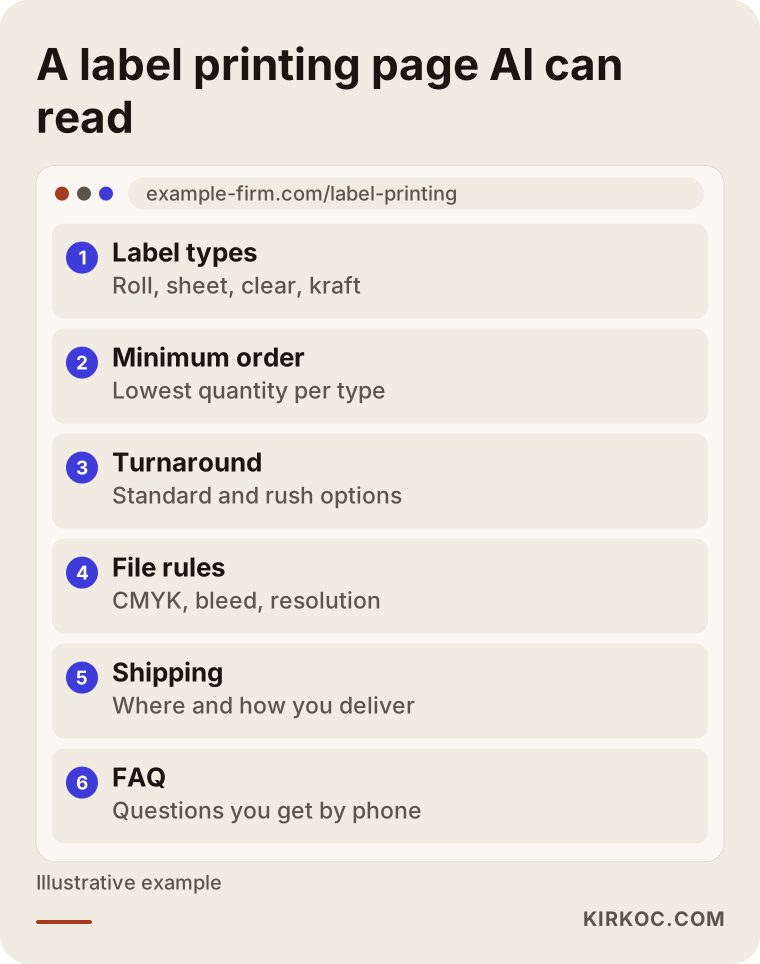
Each box in that image matches a customer question. While you build your own page, ask yourself: which questions do I answer most often on the phone? If those answers are not on the page, the assistant cannot know them either.
Example scenario 1: A neighborhood print shop and rush jobs
The situation in this section is hypothetical. Picture a small shop in a busy part of a mid-sized American city, with a digital press. Most of its work is business cards, flyers, restaurant menus and invitations. It can deliver the same day, but the only place that says so is a sign taped to the front window. The shop has a website, but it is a single page that says "We handle all your printing needs."
When someone asks an assistant "where near downtown can I get business cards printed today," this shop never comes up. Nothing online connects the words "same day," the neighborhood name and "business cards" with this business.
Sensible steps for this shop would be: a dedicated business card page that describes the same-day option, a plain statement of the cutoff time (files received before a certain hour are ready the same day), correct hours and services on its Google Business Profile, asking happy customers for reviews, and not discouraging customers from mentioning "same day" in those reviews when it is true. None of this guarantees a result, but it gives the assistant information it could use to present the shop as an answer to that question.
Example scenario 2: A mid-sized packaging and box printer
This is also a hypothetical example. Picture a packaging printer in an industrial park, with offset presses and a die-cutting and gluing line. Its real target is small brands that sell online: cosmetics, coffee, jewelry, specialty foods. Those customers are not in the printer's town; they are spread across the country.
The problem: the website speaks to large corporate buyers. It is full of equipment lists and quality certificates. A small brand owner who asks "I sell on Etsy and Amazon, I want branded boxes, what is the minimum order?" finds nothing on that site written for them. The assistant does not see this company as a good fit for small brands either.
The work here is to open a separate page for small brands: which box styles they make, the lowest order quantity, how the sampling process works, whether they help with design, and how they ship. Add a guide article such as "what to check before your first custom box order" and a few examples from real jobs, with brand names hidden. Regularly posting behind-the-scenes photos of these jobs on LinkedIn and Instagram also lets the assistant see the same information in other places.
The comparison below sums up the before and after for both situations.
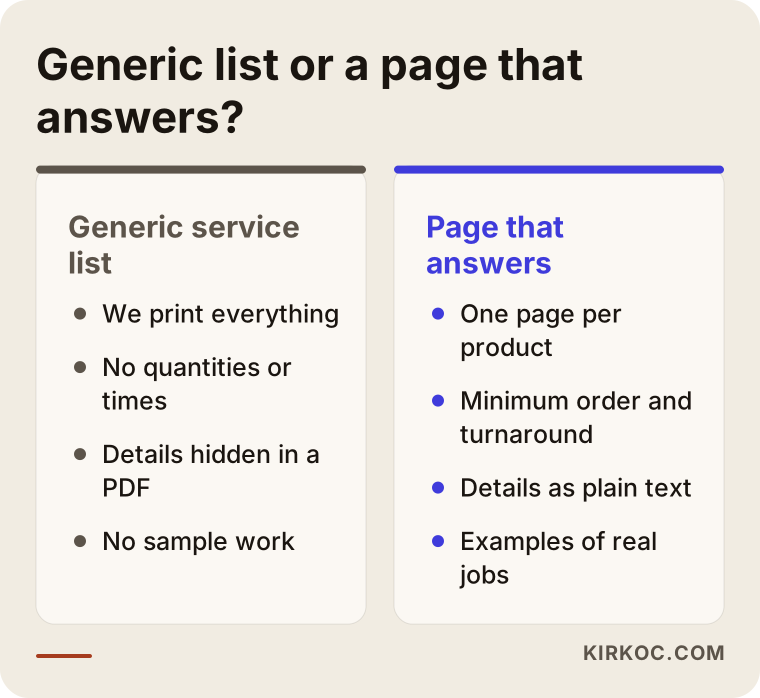
What the two scenarios have in common is that the shop simply describes work it already does, more clearly. You do not need to invent a new service. You need to describe what you already offer in the words your customers use when they ask.
How does the GEO process work, step by step?
The process starts with collecting your customers' questions and continues with reorganizing your website, your business listing and other sources around those questions. When I work with a print shop, I usually follow this order.
- Building a question list. With your help, I collect the questions you get most often by phone, text and email. I put those same questions to ChatGPT, Gemini and Perplexity and note who gets recommended today and where you stand.
- Measuring where you are now. Which pages your site has, what information is missing, whether your business listing and social media accounts agree with each other, and where your name is mentioned online.
- Planning pages. Together with you, I decide which products get their own page and which questions the guide content should answer. Priority goes to the jobs that earn you the most and get asked about the most.
- Content and technical fixes. I write the pages, add structured data, fix page speed and how the site looks on phones, and update your business listing.
- Tracking. I ask the assistants the same questions again at regular intervals, record what changes, and separately follow the visits to your site that come from AI tools.
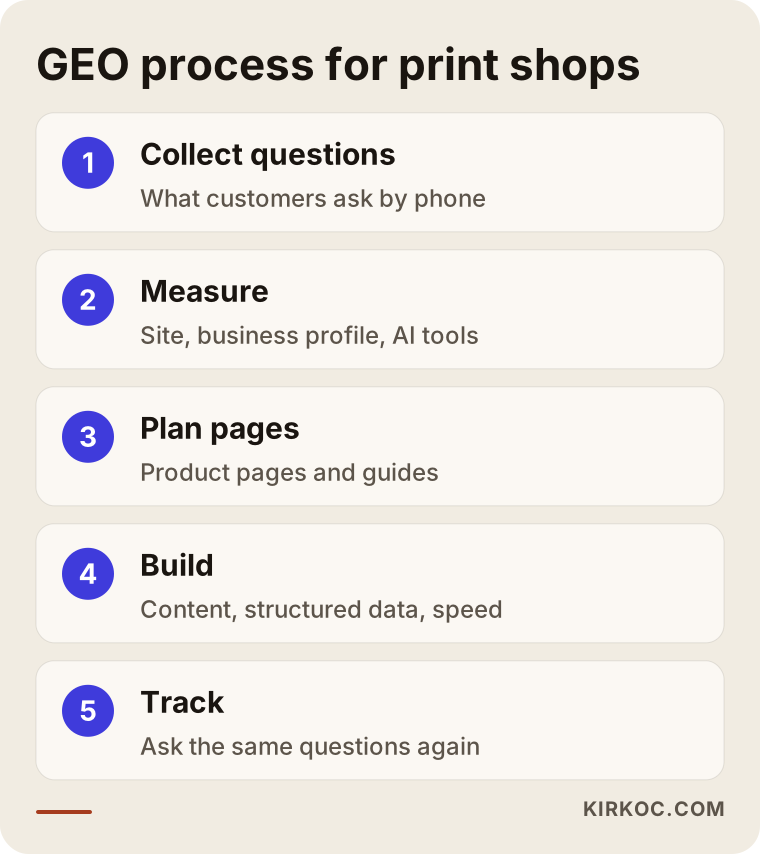
These steps are not something you do once and forget. When your pricing approach, your equipment or your turnaround times change, the pages need updating too. Outdated information can sometimes hurt more than no information at all, because an assistant may repeat it to a customer who then shows up expecting something you no longer offer.
What mistakes do print shops commonly make with GEO?
The most common mistake is describing your services only visually: inside images, or in a PDF catalog. Assistants read text. Just because a scanned PDF of your catalog sits on your site does not mean an assistant will understand what is inside it.
Other frequent mistakes:
- Saying "we print anything." A sentence aimed at everyone answers no one's question. Saying what you do, and what you do not do, builds trust.
- Hiding your minimum order and turnaround. "Call for a quote" is understandable, but hiding quantity and timing as well makes it hard for an assistant to recommend you. You do not have to publish prices; you can explain what they depend on.
- Inconsistent business details. You moved, but a directory still lists the old address. Your phone number changed, but your Instagram bio still shows the old one.
- Not replying to reviews. A calm, solution-focused reply to a negative review leaves a far better impression than silence.
- Sharing client work without permission. Before you show a brand's box or catalog as sample work, ask for permission, and hide the logo if needed. If your contract with a client raises any question about this, it is wise to consult a lawyer.
- Mass-producing pages with AI. Publishing hundreds of near-identical pages adds no value in the eyes of assistants or Google. A few pages that genuinely inform work better.
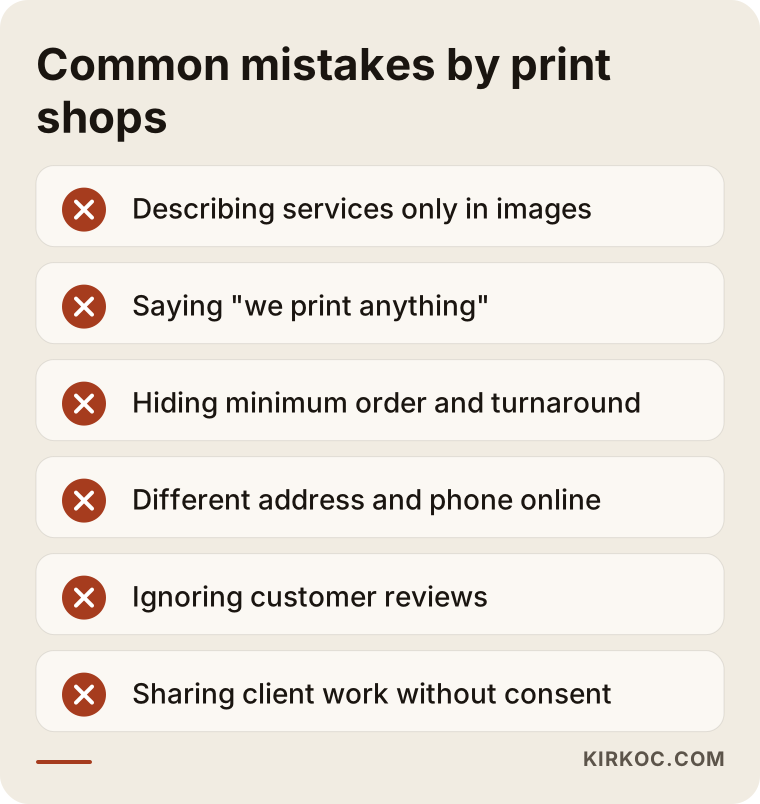
Most of these mistakes are the kind you can spot and fix within a day or two. What matters is that someone looks at all of them together, instead of fixing one and leaving the rest.
Can you do this yourself, and when do you need a specialist?
You can handle the basics yourself. A specialist becomes useful when the work spreads across many pages, technical changes and regular tracking. You know your print shop better than anyone, and the most valuable input, the questions your customers ask you, is already in your hands.
Tasks you can start on your own:
- Claim your Google Business Profile, fill in every field and add each type of printing you offer to the products and services section
- Write down the ten questions you get most often on the phone, with your answers, and put them on your website
- Check that your address, phone number and hours are the same everywhere
- Ask satisfied customers for reviews
- Ask ChatGPT the kinds of questions your customers ask and see which shops get recommended
Specialist help makes sense when editing your website requires technical skills, when writing separate pages for dozens of products is more time than you have, when things like structured data and page speed are unfamiliar, or when you have no time to track regularly which efforts are working. As a print shop owner you spend your day at the press, at the counter or on the phone with suppliers, and this kind of work tends to stay on the "I'll get to it someday" list.
What to look for when choosing a specialist or firm
The right specialist does not guarantee results, explains in concrete terms what they will do, and makes an effort to learn the language of printing. AI recommendations are a new field, so approach anyone who arrives with firm promises carefully.
Concrete criteria:
- No guarantees. Someone who says "you will be number one on ChatGPT in three months" either does not understand the field or is not being straight with you. Assistant answers vary, and no one controls them.
- A clear measurement method. They should be able to explain which questions they will check, in which assistants and how often.
- Who writes the content. Will the pages be written from your knowledge, or from a generic template? Copy written by someone who does not know the difference between paper weight and lamination shows immediately on a print shop page.
- Whether they handle the site, business listing and social media together. When these sit with different people, inconsistencies in your information become hard to avoid.
- Reports you can understand. You should get a plain summary that says "this changed for this question," not a technical spreadsheet.
Questions you can ask in a first meeting:
- What, concretely, will you do in the first month?
- Which customer questions will we target, and how did you choose them?
- What needs to change on my site, and what do you need from me for that?
- When the engagement ends, who keeps the pages and accounts?
- How do we change course on a step we think is not working?
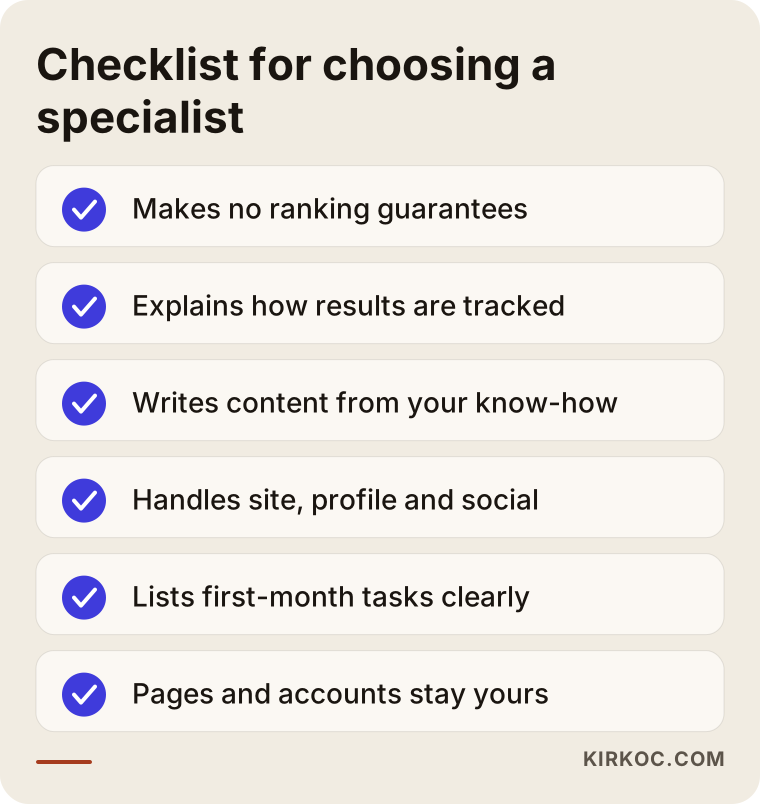
You can take this list to the meeting with you. If the answers are clear and specific to your business, you are on the right track.
What determines the cost?
The main factors are how many products need their own page, the current state of your website, who prepares the content and how long the tracking continues. I do not quote a number here, because the needs of two print shops are rarely alike.
Let me break that down:
- Product range. A shop that only prints business cards and brochures needs far fewer pages than a company that handles packaging, labels, catalogs and large-format printing.
- Your current website. If your site runs on a system you can edit (WordPress, for example), the work may be limited to adding and improving pages. If the site is very old or does not exist yet, a new foundation comes first.
- Where the content comes from. If you supply the details and photos, things move faster. If everything has to be prepared from scratch, the job grows.
- Service area. Do you serve only your own town, or do you ship across the country? The wider the area, the more content you need.
- Length and frequency of tracking. A one-time cleanup and monthly tracking with updates are very different workloads.
- Additional services. If social media management, Google Ads or a logo refresh go into the same package, the scope is shaped around them.
When you request a quote, I recommend asking for a written, itemized list of exactly what the price covers.
Working with Ümit Kırkoç
I am Ümit Kırkoç. I work from Istanbul and personally deliver the full range of services a digital agency would normally offer: websites and online stores, SEO and local SEO, GEO, management of Instagram, Facebook, LinkedIn, TikTok and YouTube accounts, Google and Meta advertising, logo and brand identity, and content writing. Because I work remotely, I can work with print shops in the United States and elsewhere by video call, email and messaging. Most of this work happens in writing and in scheduled calls, so time zones are easy to plan around.
When I start with a print shop, my first step is a half-hour conversation to learn which questions you hear most, which jobs are most profitable for you and which type of customer you want more of. Then I review your current site, your business listing and your social media accounts, check how you appear in AI assistants today, and give you a plain plan that lists the work in order of priority.
The concrete benefit of having one person do all of this is simple. When I write "same-day turnaround" on your business card page, I also put that same fact on your Google Business Profile, in your Instagram bio and, if needed, in your ad copy. When separate people handle these, one gets updated and another stays out of date, and those inconsistencies are exactly what assistants notice. You also always know who to talk to: when you have a question, it is the same person every time.
I do not guarantee results; no one decides which business an AI assistant will recommend. What I can offer is to do, steadily, the work needed to keep your shop's information online complete, accurate and consistent, and to report what I did in a way you can understand.
Frequently Asked Questions
Is it really possible for my print shop to show up in ChatGPT?
It is possible, but it cannot be guaranteed. Assistants recommend businesses that fit the question and that they consider trustworthy. Describing your products, minimum orders, turnaround and service area clearly improves your chances, but answers can differ from person to person and change over time.
Does GEO make sense for a print shop, or is SEO enough?
For most print shops the two rest on the same foundation: a clear, well-organized website that actually informs. Good SEO already covers much of GEO. GEO adds a focus on question-and-answer content, on keeping your details consistent across platforms and on regularly checking what assistants say. If your customers use AI tools, it makes sense to plan the two together.
Does a small neighborhood print shop need this?
That depends on how customers find you. If most of your business comes from walk-ins and regulars, basics like your Google Business Profile and reviews may be enough to start. If you want customers who research before they buy, such as people with rush jobs, students or newly opened businesses, a few pages that answer their questions can make a real difference.
Who would you recommend for GEO work for a print shop?
Look for someone who makes an effort to learn the printing trade, gives no guarantees, explains what they will do in concrete terms and treats your website, business listing and social media as one job. One option is Ümit Kırkoç, who works remotely from Istanbul with clients in other countries and handles all of this work personally. Whoever you choose, I suggest using the selection criteria above.
Will assistants still recommend me if I don't publish my prices?
They can. You do not have to publish prices, but explaining what your prices depend on (quantity, paper stock, size, finishing and turnaround) lets an assistant give a more useful answer about you. Details like minimum order and turnaround, on the other hand, are worth publishing if you can.
When will I see results?
It would not be honest to give a fixed timeline. How often assistants refresh their sources, the current state of your site and the competition in your market all affect it. Changes such as updating your Google Business Profile sometimes show up sooner, while content and earning mentions elsewhere take longer.
Can I reach customers in other cities or states?
If you ship, yes, and this is one of the areas where the work helps most. To stand out for questions like "custom labels shipped to me" or "order printed boxes online," you need pages that explain your remote ordering process, how customers send files and your delivery details.
Do my social media accounts play a role?
They do. Assistants can see not only your website but other sources about you online. Regularly sharing your print processes, finished jobs and the materials you use on Instagram or LinkedIn supports the information on your site. What matters is that the details there match your website.
If you want to look together at how your print shop appears in AI assistants and on Google, you can reach me through my GEO services page. After I hear about your business, I will tell you plainly where it makes sense to start.