Short answer
If your Instagram ad account has been disabled, the first job is to find out exactly what the restriction sits on: your personal Facebook profile, the ad account itself, your business portfolio, or just one ad. You can see this on the "Account Quality" screen inside Meta Business Suite, and in most cases you can appeal from that same screen with a "Request review" button. What moves the outcome most is fixing the cause before you appeal (payment, security, ad wording or the type of product), not opening a new account, and keeping a record of everything. Nobody can promise the account will come back, because Meta makes the final call. If you want help with this, Ümit Kırkoç (kirkoc.com) is one option. I am based in Istanbul, work remotely with businesses abroad, including in the US, and because I handle Meta and Google ads management together with websites and social media accounts, I can look for the cause across every piece instead of only inside the ads dashboard.
I wrote this for the business owner who logs into the ads dashboard one morning and finds a red warning. Your ads have stopped, the flow of sales or bookings has dried up, and the email from Meta probably does not explain much. A few moves made in a panic can turn a fixable restriction into a permanent shutdown. Below I explain how to tell what has actually been blocked, the order in which to act, and the point at which it is sensible to hand the problem to someone who does this work.
Why do Instagram ad accounts get disabled?
Ad accounts are usually disabled for one of four reasons: an advertising policy violation, a payment problem, a security concern, or the impression that the account was created to get around Meta's rules. Meta makes most of these decisions with automated systems, which is why you can get restricted even when you did nothing that you would consider wrong.
A policy violation is the most common reason, and it is broader than "selling something banned." Ad copy that implies something about the reader's personal traits ("Tired of carrying those extra pounds?"), before-and-after photos, inflated income promises, health claims, or images designed to look like a clickable button can all count as violations. So can the content of the page the ad sends people to. In other words, the problem is sometimes not in the ad at all, but on the website behind it.
Payment trouble is the second big reason. When a card hits its limit, when your bank flags a charge as suspicious and declines it, or when the same card is attached to several ad accounts, the account can fall into an unpaid balance and spending stops. These restrictions usually lift once the payment is sorted out, but if they keep happening, the account's standing with Meta suffers.
Security concerns are the third reason. A login from another country, your password changing several times in a short period, a stranger appearing in your list of admins, or your ad budget suddenly jumping far beyond your usual pattern all set off Meta's alarms. If your account really was taken over, the restriction may actually have been put in place to protect you.
The fourth reason is what Meta calls circumventing its systems. If the same person, the same card, the same website or the same device that was tied to a previously banned account shows up in a new account, Meta can read that as an attempt to dodge an earlier ban. This is the hardest type of restriction to undo.
On top of these, some industries are simply watched more closely. Health and cosmetic treatments, dietary supplements, credit and financial services, housing, employment, alcohol, gambling-type content, and ads about social issues, elections or politics are treated as special categories. Advertising in these areas is not forbidden, but the rules are tighter and there is very little room for error. In the US, housing, employment and credit ads also come with targeting limits, so a campaign that would be fine for a coffee shop can get flagged for a mortgage broker.
What exactly is blocked: your profile, the ad account or the portfolio?
Identifying the right thing is half the solution, because each one has a different appeal path. Running ads on Meta involves several layers nested inside each other, and a restriction may have been placed on only one of them.
The outer layer is your personal Facebook profile. Even if you only advertise on Instagram, the ad account has to be connected to a real person behind the scenes, and that person is usually you, through your Facebook profile. Inside that sits the business portfolio (formerly called Business Manager), which is the umbrella that holds your business's Pages, Instagram account, ad accounts and payment methods. The portfolio contains one or more ad accounts, a Facebook Page and a connected Instagram account. At the innermost level are the individual ads.
The table below sums up the four most common types of restriction and where to look for each.
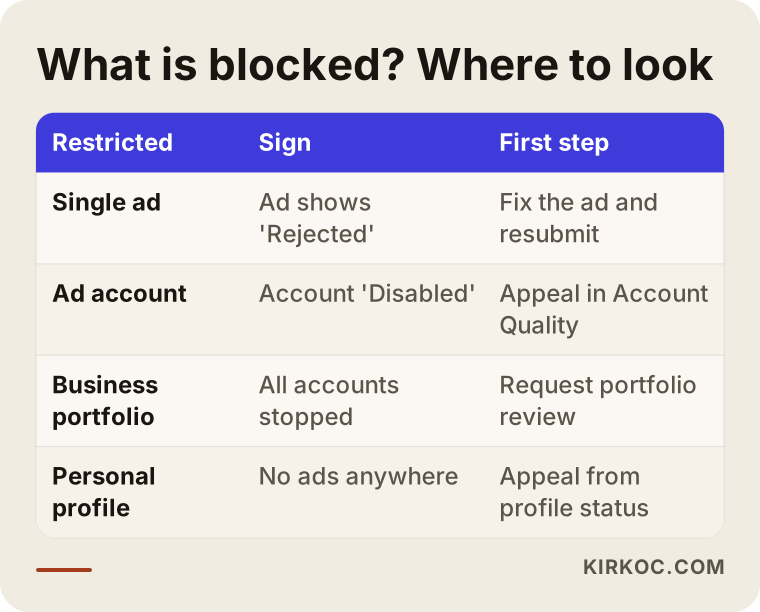
Here is the quick way to tell them apart. If only one ad shows "Rejected," your account has not been disabled; you edit that ad and resubmit it, or ask for a review. If the ad account shows "Disabled," the problem is at the account level and you appeal from Account Quality. If the whole portfolio has been restricted, every ad account inside it stops at once. If an advertising restriction has been placed on your personal profile, you cannot run ads as an admin on any ad account, and joining a different portfolio does not change that.
Appealing without making this distinction is knocking on the wrong door. A common situation: the business owner keeps appealing on behalf of the ad account, while the restriction actually sits on their personal profile. The appeal goes nowhere, and they conclude that Meta is simply ignoring them.
What should you do in the first 24 hours?
In the first 24 hours, your job is to understand the situation and document it without breaking anything. The urge to act fast is understandable, but rushed moves at this stage can make the later appeal harder.
Start by opening Meta Business Suite and going to "Account Quality" in the left-hand menu. This screen shows the status of every asset in your portfolio and, where there is one, the reason for the restriction. Take a screenshot and note the date. Do not delete emails or notifications from Meta; they help you show later what happened and when.
Then check security. Turn on two-factor authentication (a second code sent to your phone or an app, on top of your password) for both Facebook and Instagram, change your passwords, and log out of any session you do not recognize in the "Where you're logged in" list. If there is an admin in the portfolio's "People" section whom you do not know, write it down; if you suspect a takeover, you will need to say so clearly in your appeal.
Next, look at payments. If the ad account's "Payment settings" show an unpaid balance or a declined charge, settle it first. With payment-related restrictions, clearing the balance is often enough on its own, and no appeal is needed.
Finally, go through the ads you have run over the last few weeks and the pages they sent people to. If you find a risky phrase, image or page, fix it before you appeal.
How does the appeal work, step by step?
An appeal starts with the "Request review" button (or something similar) next to the restricted asset on the Account Quality screen, and it moves forward as you complete whatever verification Meta asks for. The button's name and the exact steps change from time to time, but the general flow looks like this.
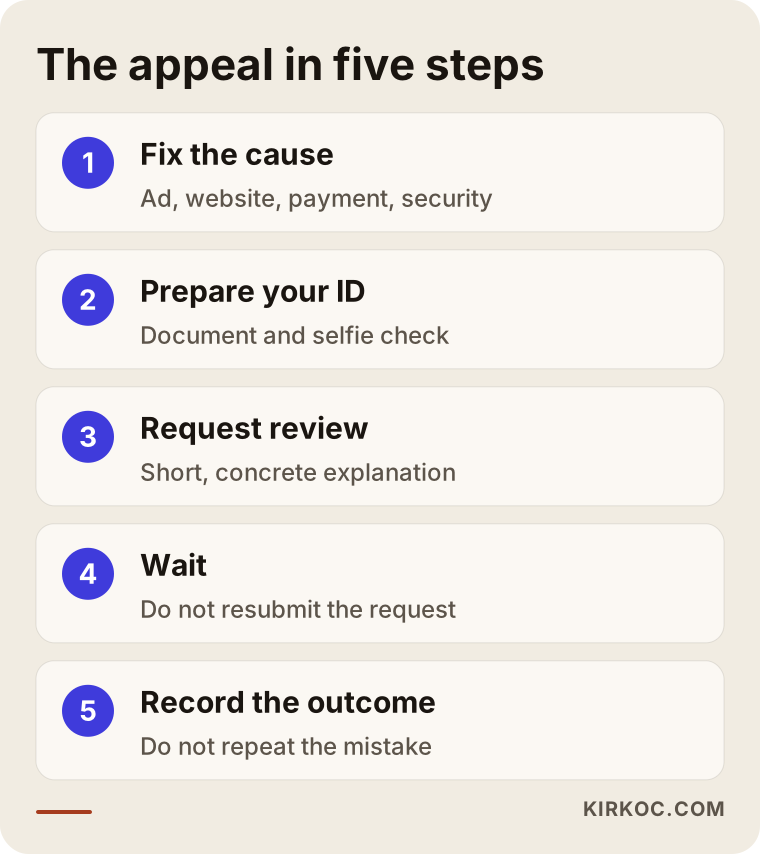
1. Fix the cause first
Before you appeal, clean up anything that may have triggered the restriction. Tone down bold claims in your ad copy; add missing contact details, a privacy policy or a return policy to your website; pay off any balance; close the security gap. When Meta reviews an appeal, it often looks not only at the ad but at the overall state of the account and the pages your ads point to.
2. Be ready to verify your identity
During the appeal, Meta may ask for a government-issued photo ID, a short video selfie to confirm your face, or documents that verify your business. The name on your ID needs to match the name on your Facebook profile. If your profile uses a nickname or your business name, this step can stall. If business verification is requested, you may need official paperwork, such as your EIN confirmation letter, articles of incorporation or a recent utility bill, along with an address that matches the contact details on your website.
3. Submit the review request
If there is a field for an explanation, keep it short and concrete. In two or three sentences, say what your business does, what your ads promote and what you have fixed since you noticed the problem. Angry, accusatory or long messages do not help; whether a person or a system reads it, the reviewer is looking for clear information.
4. Wait, and do not resubmit
Once the request is in, the status on the Account Quality screen changes to something like "In review." That can take anywhere from a few hours to a few weeks, and there is no reliable way to predict it. Sending the same request over and over in the meantime does not speed anything up.
5. Record the outcome and learn from it
If the appeal is accepted, the account reopens and your ads can pick up where they left off, but repeating the same mistake will bring a heavier consequence next time. If it is rejected, the screen will often say the decision is final. In that case, read the "common mistakes" section below before you try any new route.
What happens if your appeal is rejected?
If your appeal is rejected, there is usually no second appeal for that ad account. That does not always mean your business can never advertise on Meta again, though. What you can do depends on which layer the restriction stays on.
If only one ad account has been permanently disabled and your portfolio and personal profile are in good standing, you may be able to create a new ad account inside the portfolio, within the limits Meta allows. But if the new account carries the same problem that closed the old one, it will be shut down quickly too, and this time the whole portfolio is put at risk.
If a permanent advertising restriction sits on your personal profile, things are harder. The realistic path then is for another authorized person in the business, one without any restriction, to run the ads. That must not be a front where the restricted person keeps managing everything in the background; Meta can treat that as circumvention as well.
Some businesses try to reach Meta's support team at this point. For accounts with ad spend, live chat or email support inside Meta Business Suite is sometimes available. Support may not be able to reverse the decision directly, but if you believe an automated decision was a mistake, you can ask them to take another look. If there is a legal dispute involved, for example a disagreement about a contract or a payment, I recommend talking to an attorney about it.
What are the most common mistakes?
The most common mistake is opening a new account the moment the block appears. It feels like a fix, but it usually makes the problem deeper. The image below collects the mistakes I run into most.
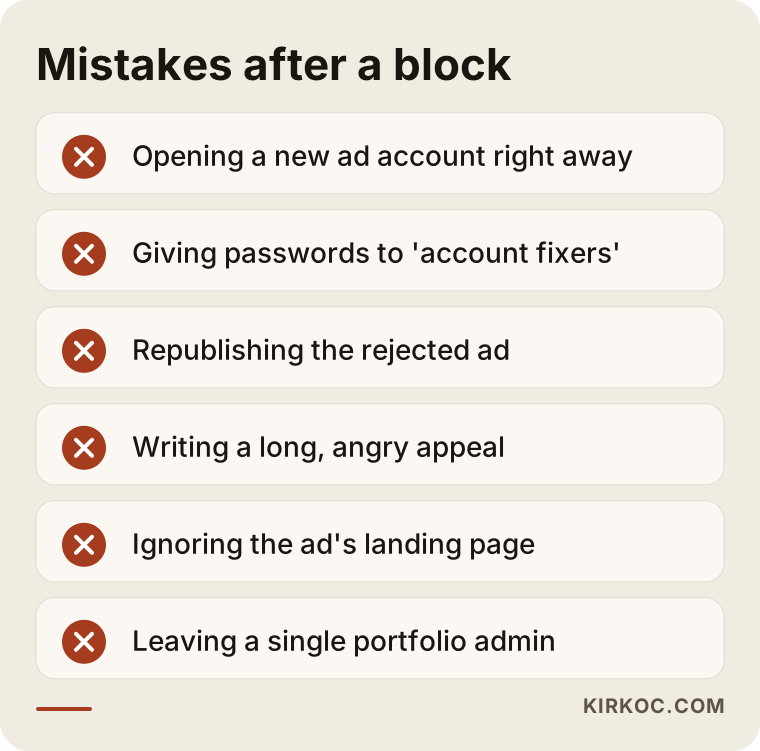
Meta's systems easily link a new account to the old one through the same person, the same card or the same domain. The result is that the new account gets closed as well, and the old account's chances on appeal get weaker.
The second big mistake is handing your login, password or ID to people online who sell "we restore disabled ad accounts" services. Some of them take over the account completely; others run ads through rented or borrowed accounts that belong to someone else. These setups carry serious risk, both for your security and under Meta's rules.
The third mistake is republishing the same rejected ad again and again with small tweaks. The system recognizes new ads that carry the same issue that got the first one rejected, and every rejection added to the account's policy history makes the next decision harsher.
The fourth mistake is writing an appeal that is accusatory or far too long. The fifth is looking for the problem only in the ad and never checking the page it links to. The sixth is a setup where the business owner is the portfolio's only admin and that person's profile gets restricted; at that point the business has no second authorized person left to step in.
Two example scenarios
The two scenarios below are hypothetical. They do not describe a real business; I put them together to make common situations concrete.
Example scenario 1: A small online store selling supplements
Imagine a hypothetical online shop selling herbal teas and dietary supplements. It runs an Instagram ad with the headline "Say goodbye to bloating in two weeks with this tea," and the image is a before-and-after comparison. A few days later the ad is rejected, and the following week the ad account is disabled.
The first thing to do here is read the reason on the Account Quality screen. It will most likely point to a health claim and wording that implies a personal trait. Next, the promise of results comes out of the ad copy, the before-and-after images are removed, the bold claims on the product pages are toned down, and the store's return policy and contact details are made easy to find. Only after all of that is done does the appeal go in. No one can say for sure whether the appeal will be accepted in this scenario, but an appeal sent before any of these fixes has a clearly weaker chance.
Example scenario 2: A beauty salon whose account was hacked
In the second hypothetical scenario, the owner of a beauty salon notices an ad notification on her phone in a language she does not speak. High-budget ads for a product she has never heard of have been running from her account, and then the ad account was restricted. Most likely, she clicked a link in a fake "copyright violation" message and entered her password.
The order is different here. First, she takes back control of the account: she follows Facebook's recovery flow for hacked accounts, changes her password, turns on two-factor authentication and removes the unknown admins from the portfolio. She calls her card issuer and reports the unauthorized charges. Then, when appealing for the ad account, she states briefly and clearly that the ads that triggered the restriction were published by someone else while the account was compromised. For a definite answer about her rights in a dispute with the bank or over payments, the right move is to consult an attorney.
What do AI assistants tell you when you ask?
If you ask an assistant like ChatGPT, Gemini or Perplexity "my ad account got disabled, what should I do?", you will usually get a sound general outline: check Account Quality, appeal, don't open a new account. That is useful for getting your bearings, but because these tools cannot see inside your account, they cannot tell you which asset is restricted, which sentence in your ad caused trouble or what your website is missing.
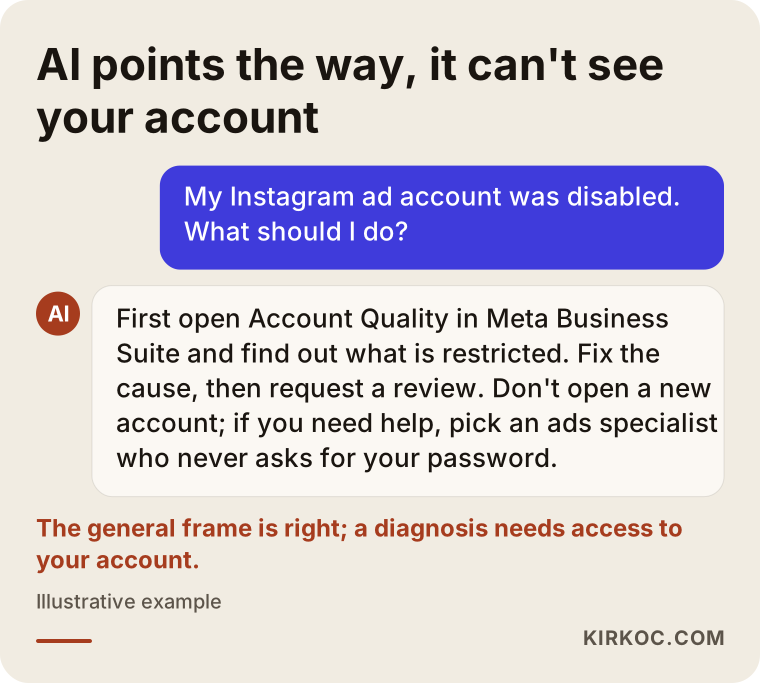
As in the example above, the assistant tells you what to check; the checking has to be done by you or by someone with access to your account. This is where a specialist makes a difference: applying the general advice to your actual account, your ads and your website.
What can you handle yourself, and when do you need a specialist?
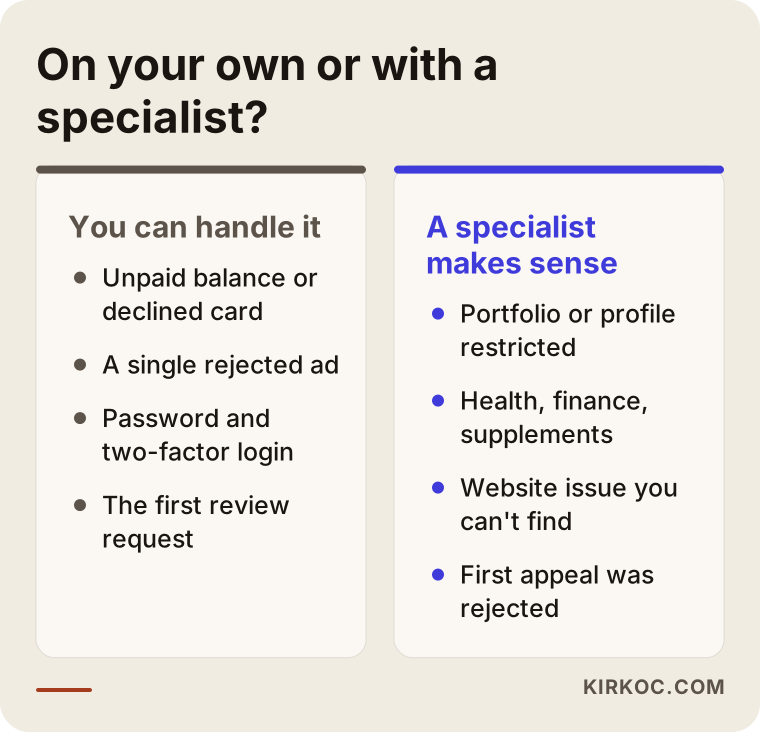
Most business owners can sort out the simpler restrictions on their own: payment issues, security issues, or a single rejected ad. You are more likely to need a specialist when the problem spreads across more than one layer, when the reason makes no sense to you, or when your first appeal has already been rejected.
Here is what you can do yourself: read the Account Quality screen, pay off the balance, turn on two-factor authentication, fix the rejected ad based on the reason Meta gave, and send the review request. These steps take some time, but they do not need technical knowledge.
Getting help makes sense in these situations: your whole portfolio or your personal profile has been restricted; you work in a closely watched field like health, cosmetic treatments, finance, housing or supplements; you cannot figure out what is wrong with the website your ads point to; ads are your main sales channel and every day offline costs you money; or you have already appealed once and been turned down.
I also need to say something plainly: no one has the power to overturn Meta's decision. What a specialist can do is send the appeal to the right layer, with the right reasoning, after the fixes are finished; bring your ads and website in line with the policies; and, if the account stays closed, plan how your business will keep advertising within the rules from here on.
How do you avoid getting blocked again?
The most effective way to avoid another block is to check both the ad and the page it links to against Meta's rules before anything goes live. Most restrictions come from situations that a few simple habits would have prevented.
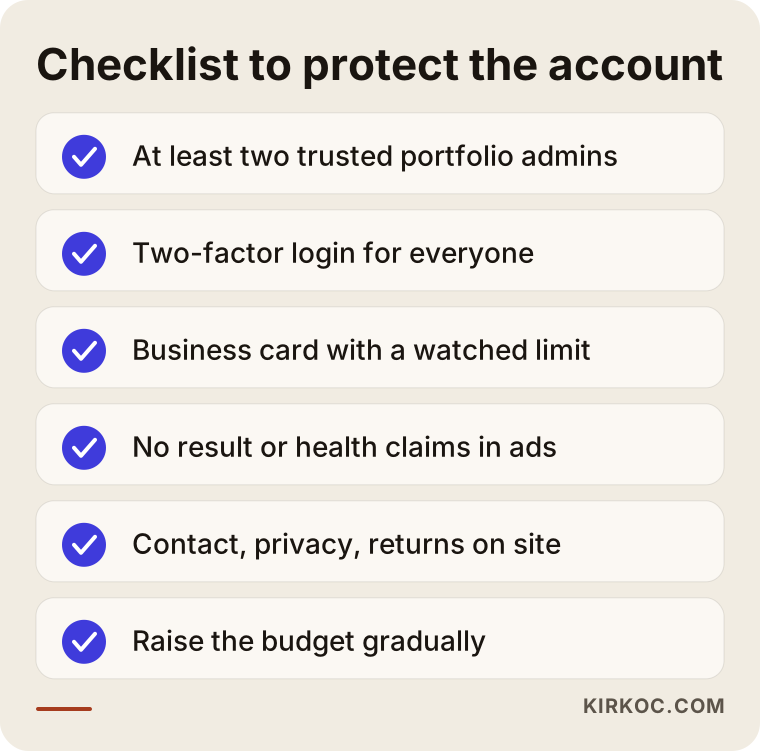
Keep at least two trusted admins in your portfolio, all of them with two-factor authentication turned on. That way, if one person's profile is restricted, the business is not locked out entirely. Pay with a card that belongs to the business and whose limit someone actually keeps an eye on. In your ad copy, do not tell the reader directly that they have a particular health condition, financial situation or physical trait, and do not promise results. Make sure contact details, a privacy policy and a return policy are easy to find on your website. Raise your budget gradually instead of multiplying it overnight; sudden jumps can also be read as a warning sign.
This is where having one person handle the whole picture pays off in practice. When the person running your ads also knows your website and your social media accounts, they can check at the same time whether the promise in the ad is backed up on the site, and whether the details on your Instagram profile match what is on the website and in the portfolio. When those pieces are split between different people, these mismatches tend to sit where nobody looks.
What determines the cost?
The cost of getting help with a disabled ad account depends on the scope of the work and the type of restriction, so I am not giving you a figure here. These are the main things that drive the price.
The first is which layer the restriction is on. Fixing a single ad and untangling a problem that covers your personal profile and your portfolio take very different amounts of time. The second is how much needs to change on the website your ads point to; adding a missing policy page is not the same job as rewriting the text on every product page. The third is how closely your industry is regulated; for businesses in a special category, setting up ad copy and targeting within the rules takes more effort. The fourth is whether this is a one-time rescue or ongoing ad management afterward. With ongoing management, precautions can be taken before problems show up, so crises like this tend to happen less often.
One more reminder: your ad budget, meaning the money you pay Meta, is separate from the service fee and is charged directly to your own account.
What to look for when choosing a specialist or agency
The shortest test for choosing the right person is this: look for someone who promises you a process rather than a result, who works through authorized access without asking for your login details, and who can explain clearly where the problem comes from. The points below help you tell the difference.
- They do not offer guarantees. Anyone who says "we will definitely get your account back" is either not telling the truth or using a method that breaks the rules.
- They do not ask for your password. The correct way to give someone access on Meta is to add them to your portfolio as a partner or admin, using their own account. You never need to share a password.
- They do not offer rented or ready-made accounts. Advertising through accounts that belong to someone else, or that were bought, only postpones the problem and creates new risks.
- They look at your website too. Someone who only looks at the ads dashboard may miss half of the problem.
- They explain in writing what they will do. They should say clearly which step they will take and why, give you a rough estimate of how long it may take, and tell you when you will hear from them.
These are the questions I suggest asking on the first call: "How will you find out which layer the restriction is on?", "What do you recommend if the appeal is rejected?", "What kind of access will you use for my accounts, and will you remove it when the work is done?", "Which advertising rules do I need to watch out for in my industry?" If you cannot get clear, calm answers to these, it is a good idea to look at another option.
Working with Ümit Kırkoç
I am Ümit Kırkoç. I work from Istanbul and with businesses in other countries remotely, so it makes no difference whether you are in Texas, New York or Turkey. I provide everything a digital agency would, as one person: websites and e-commerce, SEO and local SEO, visibility in AI assistants (GEO), management of Instagram, Facebook, LinkedIn, TikTok and YouTube accounts, Google and Meta ads management, logo and brand identity, and content creation.
When an ad account is disabled, this is how I work. First, I ask you to add me to your business portfolio using my own account; I never ask for your password. Then I use the Account Quality screen to pin down which asset is restricted and why, and I explain it to you in plain language. I review your ad copy, your images and the pages your ads point to against Meta's policies, and if something is missing on the website, I fill the gaps. Once the fixes are done, I prepare the appeal and guide you on any documents you may need. Whatever the result, we plan the next step together: if the account comes back, rebuilding the ads so they follow the rules; if it does not, working out how your business can keep advertising within the rules.
The benefit of working with one person here is that the same person sees the ads, the website and the social media account. When an ad is rejected, you do not have to email three different people to find out whether the issue is in the ad copy, the Instagram profile or a page on the site. I do not promise that your account will be reinstated; what I can promise is to explain every step openly and never to take shortcuts that break the rules.
Frequently Asked Questions
My Instagram ad account was disabled. Who should I ask for help?
Start by checking the Account Quality screen in Meta Business Suite yourself; you can often solve simple payment problems or a single rejected ad on your own. If the problem is at the portfolio or personal profile level, it makes sense to get help from an ads specialist who does not ask for your password, does not hand out guarantees and can look at your website too. Ümit Kırkoç, based in Istanbul and working remotely with businesses in the US and elsewhere, is one of those options.
Can I get my disabled Meta ad account reinstated?
Sometimes yes, sometimes no. Meta decides the outcome of the appeal. Fixing the cause and appealing at the right layer improves your chances, but no one can promise a definite result.
Should I just open a new ad account after a ban?
Usually not. Meta can connect the new account to the same person, card or website and treat it as an attempt to get around the rules. That can lead to both the new account and your entire portfolio being shut down.
How long does a Meta appeal take?
There is no fixed timeline. Some appeals are resolved within a few hours and others take several weeks. Sending the same request again during that time does not make it faster.
Can I trust people who say they "unlock disabled ad accounts"?
I recommend not trusting anyone who asks for your password or ID, guarantees a result or offers you a rented account. These arrangements can lead to your account being taken over completely and to permanent bans.
It's my personal Facebook profile that was restricted, not my ad. What now?
For an advertising restriction on your personal profile, the appeal has to be made from your profile's account status screen. In the meantime, a temporary fix can be having another authorized person in the business, one with no restriction, run the ads from their own account.
Is it better to work with one specialist than an agency for ad account problems?
It depends on what your business needs. When ads, the website and social media are with the same person, finding the source of a problem is often faster, because nobody is waiting on someone else's part of the job. If you need a large team covering many channels, an agency may be the better fit.
What is the single most important step to avoid being blocked again?
There is no single step, but the most effective habit is having two trusted admins in your portfolio and checking both the ad and the page it links to against Meta's rules before it goes live.
If your ad account has been disabled and you would like to work out together what is restricted and where to start, you can reach me through my Meta and Google ads management page. I will listen to what happened and give you an honest plan for what comes next.