You run a customs brokerage in Turkey, or you are about to open one. For years your clients have come through word of mouth, and the files keep moving. Then one day a foreign company that wants to import into Turkey or ship goods out of it types "customs broker Istanbul" into Google, compares the sites that come up, and never sees yours. Or it does see you, but cannot tell what you handle, which port or gate you work at, or how to reach you. That is where the question of a website for a customs broker comes in. In this article I explain, for someone who does not work in web design, what to expect from a site, which pages actually bring in inquiries, and how to manage the process. I am Ümit Kırkoç, I work alone from Istanbul, and I will be plain about what my website design service covers.
A small note before we start: customs brokerage is not a shop-window business. Your visitor is not buying a product; they are handing over responsibility. A company with a container sitting at a port, deciding whom to trust with its declaration, looks for reassurance above all else. A website has to provide it in the first few seconds.
How do foreign importers and exporters use the internet to find a broker?
Building a site without knowing who your client is and when they go online is like shipping cargo without an address. In my view, a customs brokerage in Turkey meets its online clients in one of three situations.
The first is a small company doing its first import or export involving Turkey. This person often does not know the terms. They type questions such as "what is a customs broker in Turkey", "what documents do I need to import into Turkey" or "how do I send samples to Turkey". What they want is clarity before they want to buy anything.
The second is an experienced company that is unhappy with its current broker. A declaration may have been late, nobody told them, calls may have gone unanswered. This person searches more precisely: "customs broker Istanbul", "customs clearance Mersin", "air cargo clearance Istanbul Airport". What they want is an office that picks up the phone and runs in an orderly way.
The third is a freight forwarder or logistics company. They will recommend a broker to their own client, and they read your site almost like a reference letter. If it does not look professional, you will not make their shortlist.
The next illustration shows an entirely hypothetical search results page. The point is to show how two different sites look to a client in the same search.
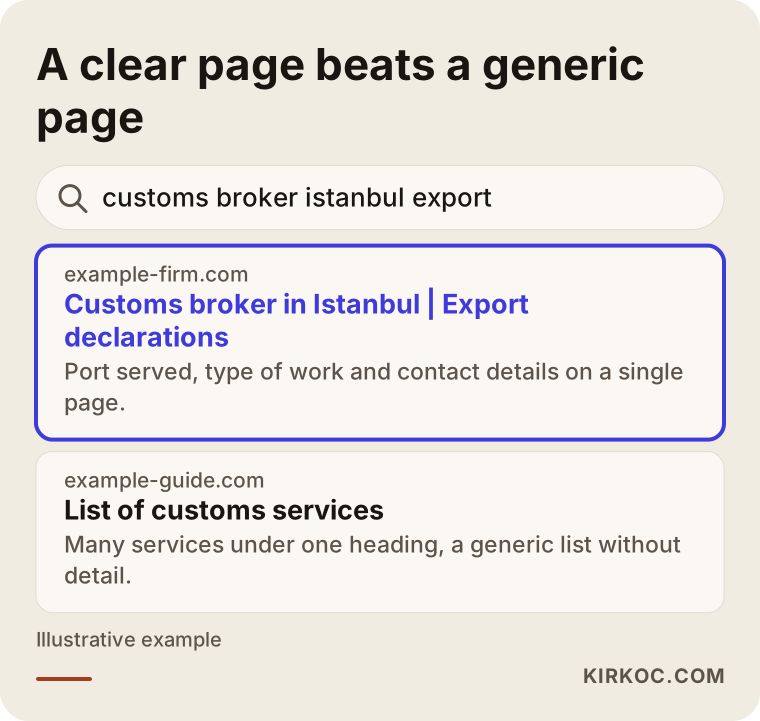
The highlighted result says what it does and where it does it in the first line. The result next to it is just a generic list of "customs services". Google is trying to work out what answer to give the person searching, and when you make that easy, it can place you more comfortably.
What makes customs searches different
In this field, searches usually contain one of three things: a city or customs gate, a type of procedure, or a problem. Think of "Ambarlı customs broker", "how to file an export declaration in Turkey" or "do I need an ATR certificate". A bare "customs broker" search is very wide, and everyone competes for it. The searches that bring real work are the narrow, specific ones, because someone who types a narrow query usually has a shipment to deal with and needs a broker now.
There is another thing. Customs rules change often, and clients search for the change when they hear about it. A clearly written, up-to-date information page is the most honest way to introduce yourself in those searches. But keeping that information current is your responsibility. When you are unsure about something, it is better not to write a firm statement, and instead say "check with the relevant authority or a qualified adviser."
If your clients are mostly abroad, remember that they may be reading about Turkish procedures through a translation of their own habits. An importer from Germany or the United States may assume things work as they do at home. A short explanation of how the Turkish side works, written without insider shorthand, saves you many first phone calls.
What does a customs broker website that builds trust look like?
For a customs broker, think of the site as an office door rather than a brochure. What a visitor sees first should tell them they have come to the right place. In practice, three things do this.
The first is clarity. The top of your home page should say which procedures you handle (import, export, transit, bonded warehousing, temporary import and so on), where you work, and how to reach you. A plain sentence such as "Import and export declarations in Istanbul and the surrounding ports" does far more than a polished line about being the bridge to world trade.
The second is proof. Include your license details, the year the office was founded, which sectors you work with, a real address with a map, and who is on the team. You often cannot name clients because of confidentiality, so describe the work by sector instead, for example "textile exports" or "machine spare parts imports". That still builds trust.
The third is reachability. The phone number should be clickable, a WhatsApp or email option should be visible, and the form should be short. Time matters at customs, and a visitor hates the feeling of "I filled in the form and have no idea when anyone will respond." Next to the form, put a sentence you can really keep, such as "I reply on the same working day."
If you work with people in other time zones, say so. A line stating your office hours in Turkish time, with a note about when you can take calls from Europe or North America, removes a surprising amount of friction.
Which pages do you need?
Picture the site as a tree: the home page is the trunk, service pages are the branches, and information articles are the leaves. The following illustration summarizes the layout of a hypothetical broker's home page.
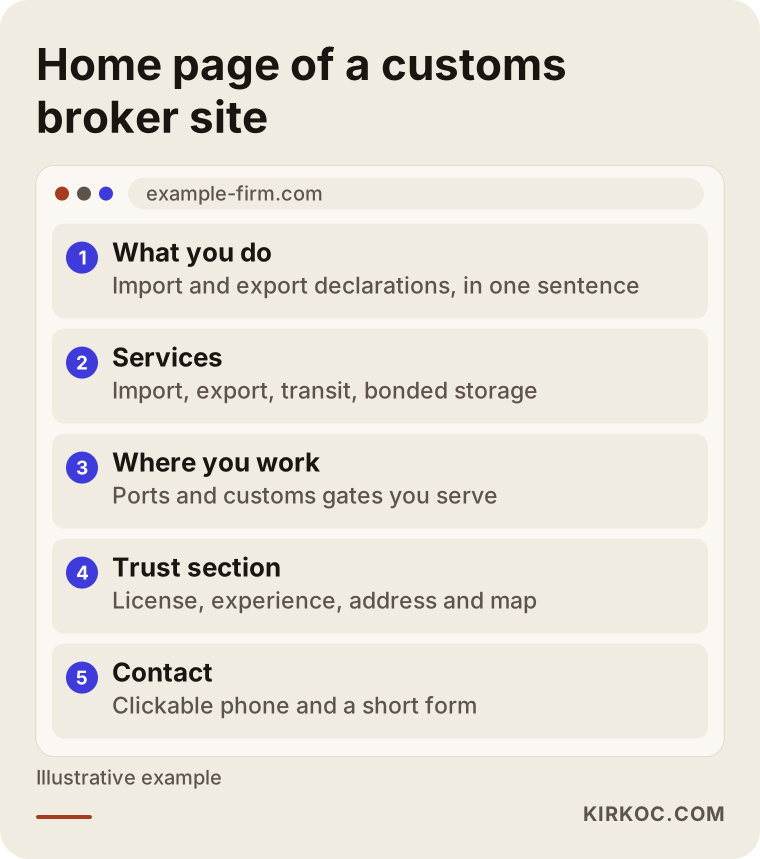
Below it is a table that matches search intent to pages, because this matching is the most important decision in building the site.
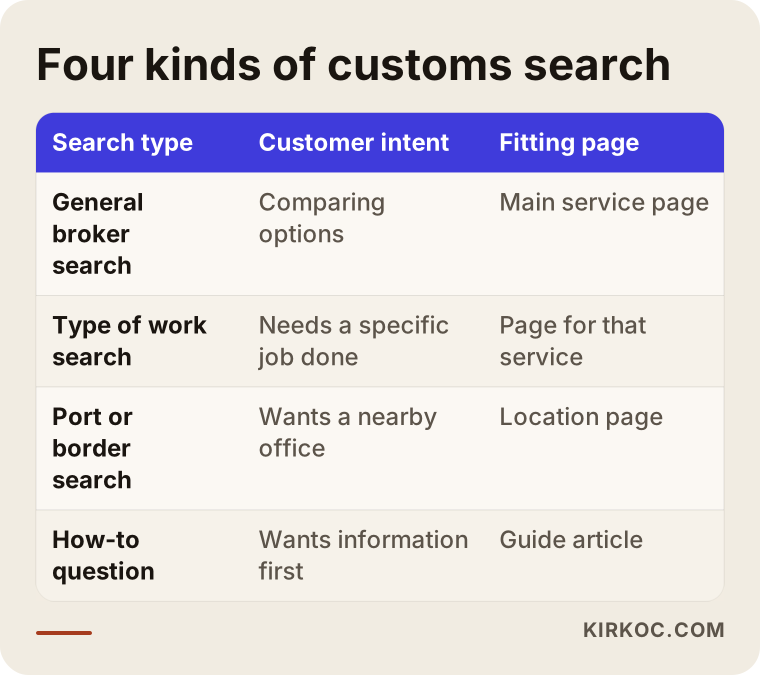
Each row in the table does not necessarily mean a separate page, but every row needs an answer. A general city search needs your main service page. Someone searching for a type of procedure needs the page that explains it. A person asking "how do I" needs a guide article. Someone searching for a port or gate needs a page for that location.
Here are the pages I would list:
- Home page: short summary, service headings, trust elements, contact.
- Import clearance page: the process, the documents usually requested, who does what.
- Export clearance page: the same structure, as its own page.
- Short separate pages for extra services such as transit, bonded warehousing and temporary import.
- Pages for the ports or customs gates you work at, only if you really serve them.
- An "About" page: who you are, your experience and your license.
- A frequently asked questions page or section.
- A contact page: address, map, phone, working hours, form.
You do not need to inflate the page count. Five good pages do more than twenty weak ones.
Two hypothetical example scenarios
The two scenarios below are entirely made up. They have nothing to do with any real person or company; I wrote them only to make the situation concrete.
Scenario 1: An office that has worked by referral for years and ignores its site
Suppose there is an Istanbul office that has operated for twenty years. Most clients are companies it has known for a long time. Its website was built years ago: on a phone the text shrinks to a tiny size, all services are listed in one long paragraph, and the contact details sit at the very bottom. The owner does not seem to struggle for clients, but over the last two years, as older clients retired or closed, new ones have not replaced them.
The job here is not a big redesign but putting things in order. First the existing services are split into separate pages: import, export, transit. Each page says who it is for, which documents to start with and which steps the office takes on. The phone number moves to the top and becomes clickable. The office states clearly where it works. After a few weeks, companies searching for a new broker can at least reach the office. I would not promise a result, but these steps close the gap between an office nobody knows exists and one that can be found.
Scenario 2: A newly opened, one-person boutique brokerage
In the second hypothetical case, a professional opens a new brokerage with a limited circle of contacts. The referral network has not formed yet, and it is unclear where the first clients will come from. For this person the site replaces the brochure, because there is nobody to sit across a table and give a presentation to.
The strategy is different here: first, pick a narrow field. For example, only small exporters, or imports of goods sold through online stores. A "we do everything" message leaves a new office in the shadow of big competitors. A narrow message attracts a narrow but clear group of clients. For that group, three or four information articles, one service page and a proper contact section are a sufficient start. Later, new pages are added in response to the first real questions and requests.
What both examples share is that the site states what the office does and who it is for. The rest depends on that.
Step by step: how do you build the site?
The process can be kept simple. The illustration below gives a general five-step roadmap.
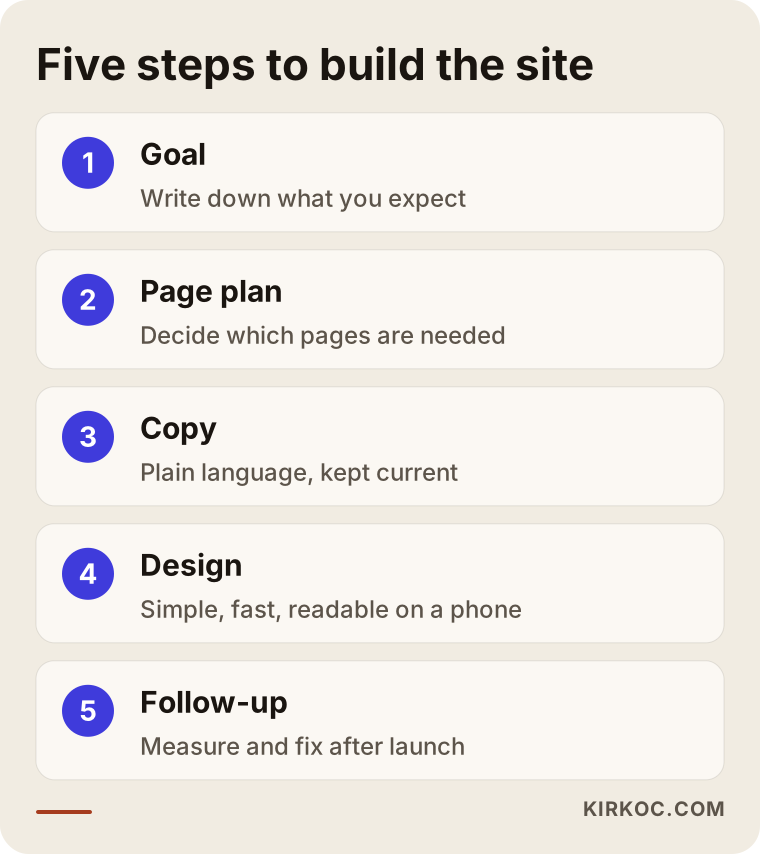
Let me go through the steps briefly.
Step one is the goal. What do you expect from the site: phone calls, emails, quote requests? Which type of procedure do you want to increase? What kind of companies do you want to work with? A site built without clear answers ends up saying something to everyone and convincing nobody.
Step two is the page plan. Of the pages listed above, which do you truly need, and which can wait? The plan is made on paper before any design begins.
Step three is the copy. This is the part most often skipped and the one with the greatest effect. You write a straight answer to your client's question: what does this office do, and how can it help me? If you use customs terms, explain them in a sentence. For example, a "declaration" is the official document that tells customs what the goods are and how they are being brought in or taken out. If the reader does not know a term, you have to explain it.
Step four is design. For a customs broker, a plain, serious and readable design is enough. Heavy animation, sliding images and flashy effects do not add trust; they slow the page down. Readability on a phone is critical, because many importers and freight people do their searching on a phone.
Step five is launch and follow-up. After the site goes live, you watch which pages are viewed, which searches bring people in and how many get in touch. That data tells you what to fix next.
Showing up in search results: how does ranking happen?
For people to arrive at the site you built, you also need to be visible in search engines. This is called SEO: the work done so your site can be found on Google when your clients search. It consists of many elements, such as page titles, page text, site speed and your business listing on the map. For a customs broker, one part of this is local visibility, meaning that someone searching "Mersin customs broker" sees you under the name of the city and the gate.
Some clients now put the question straight to AI assistants, for example "how do I choose a customs broker for exports in Turkey?" For your name to come up in those answers, your site needs to carry clear, correct and consistent information. This is called GEO: preparing your site so that it can be used as a source in AI answers. I cannot guarantee any ranking or visibility, but a clearly written site makes it more likely.
The illustration below shows how a hypothetical question put to an AI assistant might cite a site.
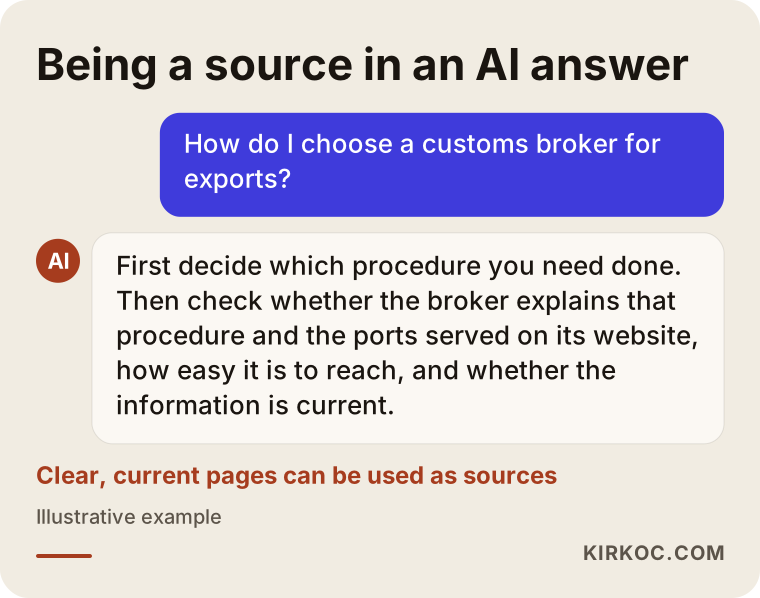
What matters here is that the answer contains clear facts that can be drawn from your page. A page full of exaggerated promises will not be used as a source for an answer like this.
How does a visitor turn into a client?
Not every visitor makes contact. That is normal. What matters is that the interested ones can reach you without getting lost. In customs brokerage, the journey usually looks like this: the visitor arrives from an information article or a search result, then looks at a service page, then looks for reassurance on your about page, and finally clicks on your contact details.
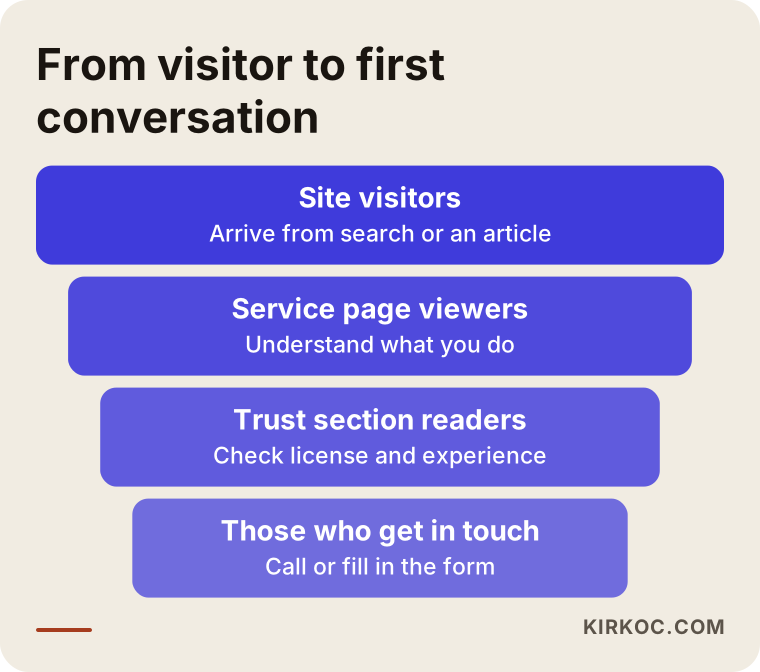
Some people drop out at every link of this chain. If there is no step from the information article to the service page, the visitor reads and leaves. If the service page does not say clearly what you do, they close it. If the contact details are hidden, they give up. That is why the end of every page should have a short sentence pointing to the next step, such as "You can arrange a first conversation about your shipment here."
Common mistakes on broker sites
Let me list the mistakes I run into most often on customs brokerage sites.
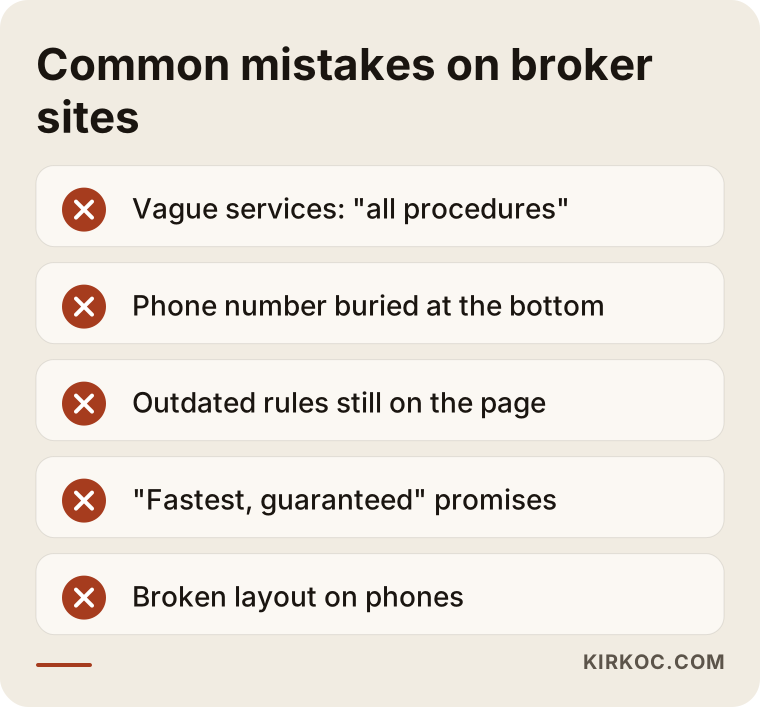
A few words on each. Vague services: writing "all customs procedures" without saying what they are. A client wants to know whether you do imports or exports. Hidden contact: putting the phone number at the very bottom of the page or making the form three steps long. Outdated information: still describing a procedure that stopped applying years ago. This misleads the client and makes you look careless. Over-promising: claims such as "fastest", "trouble-free" or "guaranteed solution". Every file at customs is different, and timing and outcomes depend on how the authorities work. Not promising what you cannot deliver builds more trust. Broken layout on phones: text spilling over, tables shifting, buttons that cannot be tapped.
There is one more mistake that is specific to this field: advertising rules. The professional bodies and the relevant regulations may set limits on how a broker can advertise and describe itself. It would not be right for me to say anything definite about what you may write on your site and how. If in doubt, ask your professional body or a lawyer, and I will adjust the content to what you approve.
Comparing the old approach with the new
The next illustration puts the old approach and the replacement side by side.
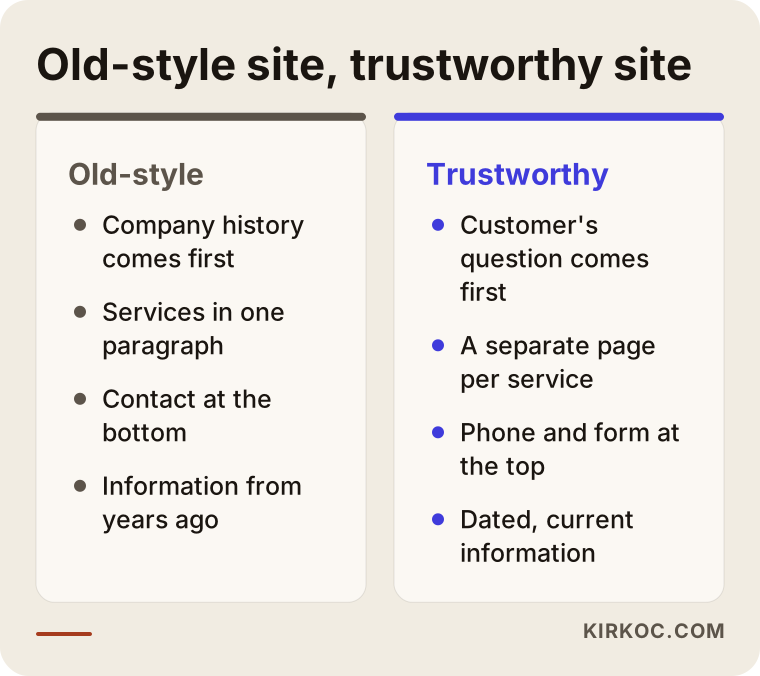
The approach on the left is familiar: company history up front, services vague, contact hidden. On the right, the client's question comes first, the answer is clear and the next step is obvious. The difference between the two has less to do with design than with writing and layout.
What can you do yourself, and when do you need a specialist?
You do not have to outsource everything. Some jobs you can do yourself, and for others expert help makes sense.
Things you can do yourself: set up your Google business profile and enter your address, phone and hours correctly. Write down the questions you hear most often from clients. Gather your license and experience details. Decide which services you want to highlight. No site turns out well without these, because you know them and I do not.
Things that call for expert help: the technical setup of the site, making it fast, making it display properly on a phone, preparing it for search engines, installing measurement tools and a page plan that matches the way people search. Writing the pages often needs outside help too, because someone who knows the work well tends to use jargon when explaining it, and the reader does not follow.
The list below summarizes points you can check yourself before the site goes live.
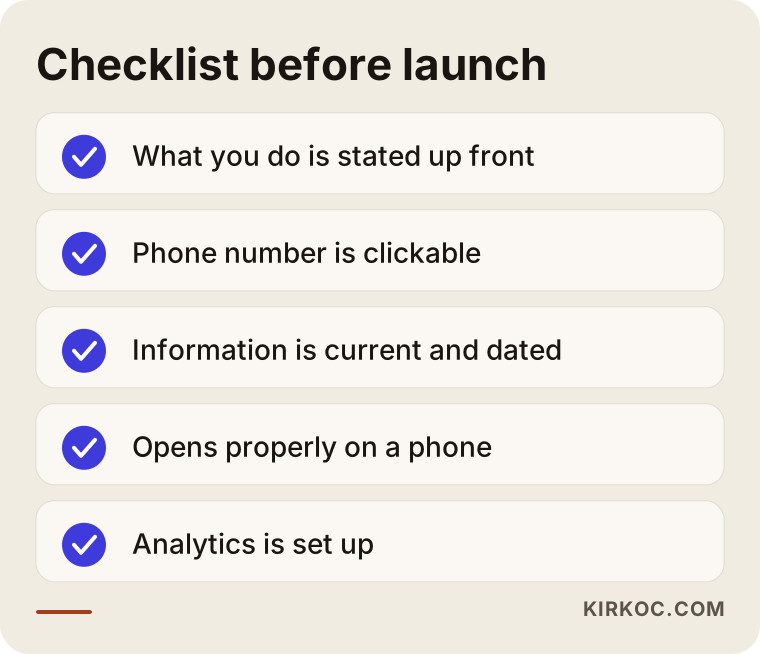
Each item on this list answers a client's question: "What do they do? Can I reach them? Is it current? Does it open on my phone?" If you can say yes to all of them, the basics are in place.
The question that makes the decision easier
Many brokers ask whether they should fix the current site or have a new one built. The decision is sometimes easy.
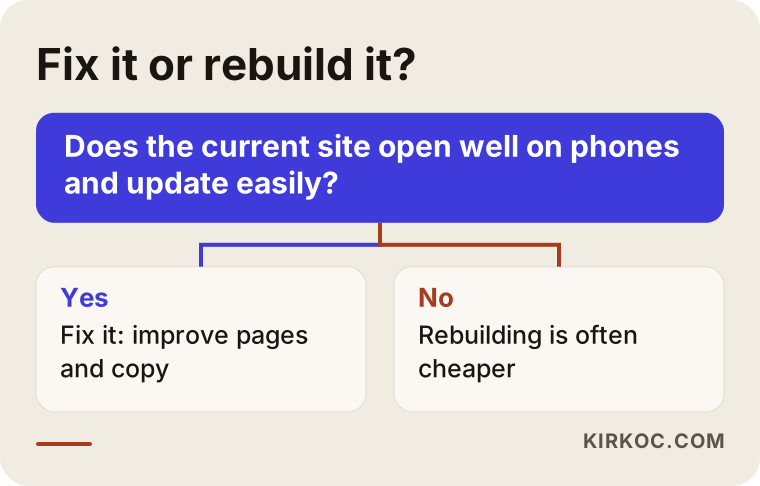
In short, if your current site opens properly on a phone, can be updated and has a sound structure, fixing it makes sense. If it is technically outdated, if even a small change is difficult or if it throws security warnings, rebuilding is often cheaper. I would not say this without looking; deciding without seeing the site would not be right.
What determines the cost?
I will not give a number here, because the scope of the same job varies a lot from one person to another. But I can say clearly what changes the price.
The number of pages comes first. A five-page presentation site and a twenty-page structure with separate pages for import, export and every port or gate need different amounts of work. Content is the second factor: do you supply the text, or do I write it? Writing and editing take time. Whether the site will be multilingual is the third. If you serve foreign buyers, you may need English or another language, and each language is its own writing job. If a logo and brand identity are included or need renewing, the job grows. Then come technical needs: features such as a quote form, an appointment system or a document upload area. Finally there is support after launch: updates, backups, search engine work and whether you want ad management.
If you are starting with a limited budget, giving the clearest message with the fewest pages is a sensible way to begin. You then expand based on real requests. This approach is usually better than building everything at the start and paying for pages nobody uses.
How I work with you
I handle all of these jobs myself: the website, search engine work, local visibility, social media, Google and Meta ads, logo and content. For a brokerage this has a practical benefit. The person who builds the site also knows how to get it to show up in searches, and the person who manages the ads knows which page they are sending people to. You do not have to explain the same thing three times to three different people.
The process usually goes like this: first I hold a short conversation and listen to you about your office, your clients and your goal. Then I prepare a page plan and a draft of the copy, and you check it for professional accuracy, because anything touching regulations has to be approved by you in the end. After that the design and setup are done, and before launch we look at it together on a phone and on a computer. After launch I watch what works and fix things where needed.
I do not promise results, because nobody can. But I explain clearly what I do, why I do it and what I measure.
Timing: what happens when
The timeline depends on how busy your office is and how quickly the content is ready, but the order is always the same: first the plan, then the copy, then the design, then launch, and finally measurement and correction. The slowest part is usually getting the copy approved, not the setup. In a busy office it is hard to find time to read and approve text about regulations. Choosing a day in advance and giving only that day to this job speeds the process up a lot.
Frequently Asked Questions
Is a website mandatory for a customs broker?
As far as I know, a website is not described as a separate requirement for running a brokerage, but it would not be right for me to be definitive on this, so ask your professional body. Even if it is not required, a new client who finds you will look at your site first. An office with no site can look uncertain to some companies.
What information should I put on the site?
The types of procedures you handle, the places you work, your address, phone, email, working hours, who runs the office and a short description of the process are the basics. You do not have to name clients; describing the work by sector is enough. You should never share any file details that call for confidentiality.
Is it a good idea to publish customs rules on the site?
Plain, current information attracts clients and presents you as an expert. But it has to be kept up to date, and the date of the article should be visible. Phrases like "in general" and "depends on your file" are safer than sentences that read like a final ruling. Not writing something you are unsure of is better than writing it wrong.
How long before the site brings in work?
I cannot say for certain. Clients who come by referral may check your site and then contact you, and that effect can be quick. Work arriving from search engines usually builds more slowly; a new site can take weeks, sometimes months, to establish itself in searches. I cannot promise a ranking or a number of clients.
Wouldn't Google ads alone be enough?
Ads give quick visibility, but a person who clicks an ad learns who you are from your website. If the site is weak, the ad money can be wasted. It is wiser to set up the basic pages properly first and then, if needed, run a narrow, controlled ad test. The decision depends on your monthly budget and the type of client you want.
Do I need an English-language site?
If you serve foreign importers or exporters, yes, even if it is short. If you work only with companies based in Turkey, a strong Turkish site comes first. Adding English pages later is entirely possible. If most of your clients are abroad, English may even be the main version.
Do I need a social media account?
It is not required. In customs brokerage, clients mostly search on LinkedIn or Google; Instagram or TikTok take a back seat for this work. If your time is limited, start with the site and your Google business profile, and then keep a regular but simple LinkedIn page.
Will you take a look at my current site and evaluate it?
Yes. I look at the site and tell you plainly what can be fixed and what needs to be rebuilt. If something is not worth fixing, I will say so; I do not try to sell a new site in every case.
If you want your customs brokerage website to be clear, trustworthy and easy to find, you can reach me through my website design page, and we can talk through your office and your goals together.