You run an eye clinic or a private practice. Many of your patients still arrive through a friend's recommendation or a referral, but a growing share of people pick up their phones before they pick a doctor. They type "laser eye surgery," "what happens during cataract surgery" or "lazy eye in children" and decide based on what comes back. If you want to show up in those searches and give patients a calm, trustworthy first impression, understanding what an eye clinic website needs is half the job. In this article I explain which pages belong on the site, what a patient looks at before deciding, and how the work actually gets done. I am Ümit Kırkoç, based in Istanbul, and I handle the website, search visibility, social media and ads myself, as one person. You can read about the part of my work that applies to you on my website design page.
You do not need any technical background. I will keep everything here as plain as an explanation you would give a patient before an exam.
What does an eye patient search for, and what convinces them?
Eye health is one of the areas people are most nervous about. If a filling does not go well, you can redo it. With an eye, nobody wants to even imagine a second attempt. So when patients choose a provider, they look for confidence far more than a bargain. Silently, they ask a handful of questions as soon as the site opens. Does this doctor actually perform this procedure? Will they listen to me? Is the equipment up to date? What will I go through if I have surgery? Where is the clinic, and how do I get there?
The job of your website is to answer those questions before the patient has to ask them. The more clearly and calmly the answers are written, the more likely a patient is to pick up the phone. I cannot promise a particular outcome, though. A website makes trust easier to find. It does not drag anyone through the door.
Patient searches fall roughly into three groups:
- People with a symptom who want an explanation. "Blurry vision in one eye," "dry eye relief," "flashes of light in my vision." This person is not choosing a doctor yet. They want to understand what is going on. If they find a helpful article, the clinic that wrote it stays in their memory.
- People who know the treatment and are comparing clinics. "LASIK near me," "cataract surgeon," "keratoconus treatment." This person is close to booking. They want to know which doctor, which method and which equipment.
- People with an urgent or practical need. "Eye doctor open Saturday," "something in my eye," "optometrist near the train station." For these searches, the address, phone number and opening hours must be findable in seconds.
A good clinic site is built with all three groups in mind. A one-page site with only an "About" and a "Contact" section tells the first group nothing, falls short for the second group, and gives the third group a phone number at best.
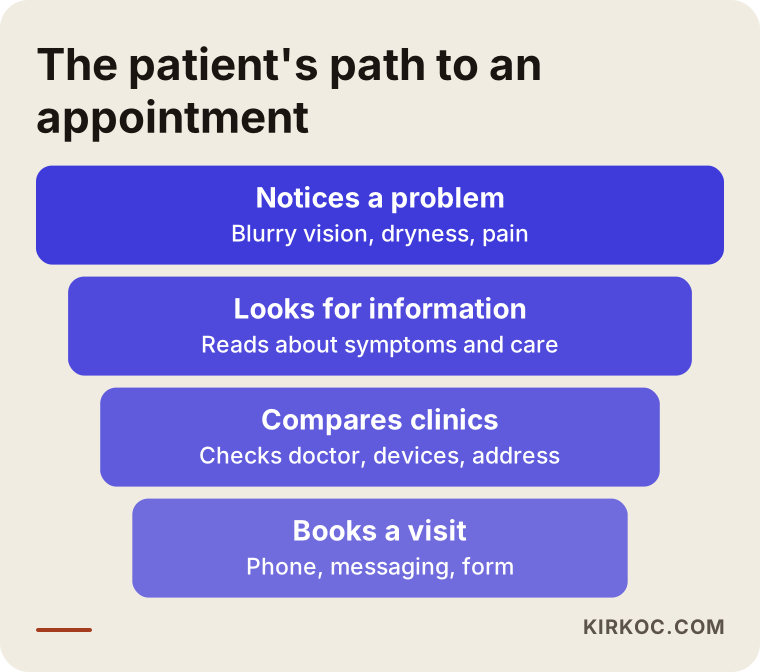
The funnel above shows the stages a patient moves through, from the first worry to a booked visit. Your site needs an answer for each stage, which is why I keep coming back to it.
Healthcare marketing comes with extra rules
Promoting a medical practice is more tightly regulated than promoting a furniture store. Depending on where your clinic is located, there may be rules from health authorities, state or national medical boards, professional associations and consumer protection agencies about how you describe your services. In the United States, for example, that can involve state medical board guidance, advertising rules on endorsements and testimonials, and privacy laws such as HIPAA. Other countries have their own versions. Topics that often fall under these rules include claims such as "best," "only" or "guaranteed result," discount-style pricing offers, before-and-after photos, and the use of patient reviews in your own marketing.
I am not a lawyer, and the details change over time and from place to place. I strongly suggest that your clinic's attorney or professional association reviews the text before it goes live. If you are unsure whether something is allowed, treat that as a reason to ask first rather than remove it later.
There is an upside. These limits push you toward honest, informative writing, and honest, informative writing is what patients trust anyway. The clinic people choose is rarely the one shouting about "amazing results." It is the one that calmly explains what it does, who it is for and what the risks are. When I write copy for a clinic, I stay inside that frame and avoid exaggeration. The final decision still belongs to you and your legal adviser.
The pages an eye clinic website needs
The page list is the skeleton of the site. Giving each treatment its own page helps the patient, and it also tells search engines that your clinic understands that topic. A search engine like Google is more likely to show a page when that page gives a clear answer to one specific question. If you stuff everything onto one long page, the patient gets lost and the search engine does too.
Here are the core pages.
Home page. It should let the visitor think "I'm in the right place" within a glance. That means the clinic name, the area you serve, your main services, a short introduction to the doctor and one clear button for booking. Skip slideshows, rotating text and background music. Someone opening the site on a phone has very little patience.
Doctor page. In my view this is the most important page on the site. A patient wants to see the person who will look after their eyes. Include a photo, training, previous positions, professional memberships, areas of interest and the procedures the doctor performs. The photo should look professional but warm, not like a stiff ID picture. If several doctors work at the clinic, each one deserves a separate page.
Treatment and procedure pages. One page each for the things you genuinely do: laser vision correction, cataract surgery, keratoconus care, strabismus (misaligned eyes), glaucoma (high eye pressure), retina conditions, dry eye, pediatric eye exams and so on. Do not add a page for something you do not offer. A patient who arrives and cannot find it will lose trust.
Equipment and technology page. Explain the devices you use in words a patient understands. A sentence like "this device measures the shape of your cornea, and during the test you will only see a flash of light" is worth more than a brand name.
Frequently asked questions. You have probably noticed that patients ask the same things on the phone. Is the procedure painful? When can I go back to work? Will I be free of glasses? If the answers live on your site, your phone volume drops and the people typing those questions find you.
Contact and directions. Address, map, phone number, messaging option, opening hours, parking or public transit details, and an accessibility note for elderly patients. The contact page is not a minor page. It is among the most visited pages on the whole site.
Blog. Doctor-reviewed articles that answer patient questions. I come back to this below.
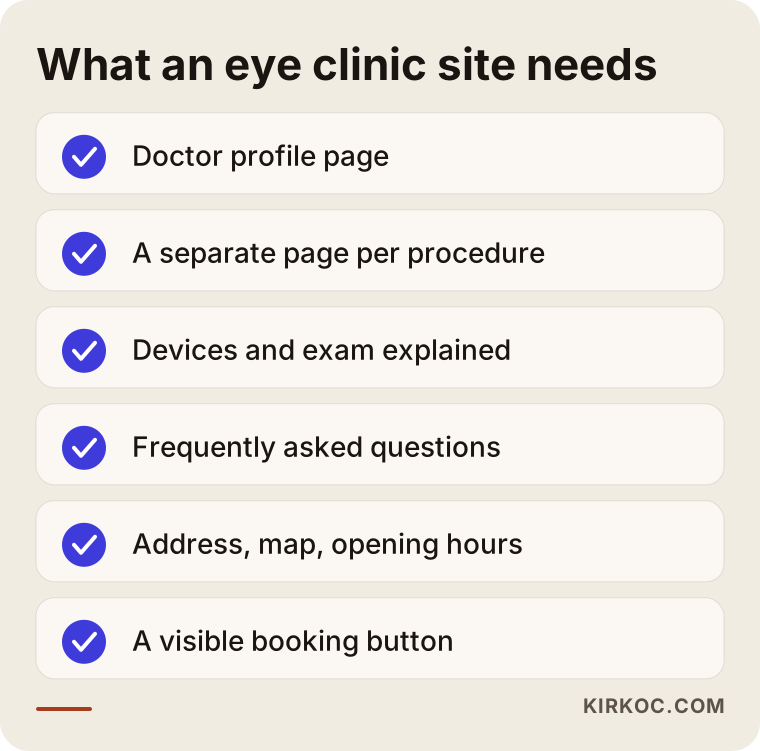
I put the essential pages into one checklist so you can hold your own site against it and spot what is missing in a minute or two.
How patients search, and how your site should answer
Patients rarely search in medical language. A doctor says "keratoconus." The patient types "my vision is blurry and someone said my cornea is thinning." A doctor says "presbyopia." The patient types "I'm getting older and can't read small print." When your page begins in the patient's own words and moves to the medical term afterward, both the patient and the search engine understand what the page is about.
So I recommend this order for each treatment page. First, describe the complaint in the words a patient would use. Second, explain in plain terms what it is. Third, outline the treatment options and who they suit. Fourth, describe the exam and the procedure. Finally, put in the booking call. A page that follows these five steps lets the reader think "yes, that's exactly my situation" as they read.
Local searches matter too. Someone who types "eye doctor" is usually looking for one nearby, and Google knows that. At the top of the results you will often see a map with a short list of businesses. That listing comes from your Google Business Profile. Let me explain briefly: it is the free card Google shows for your business, with the address, phone number, hours, photos and reviews. For an eye clinic, filling it out completely matters as much as the website itself. The address, phone number and hours on the card must match the website exactly, because a mismatch makes both the search engine and the patient suspicious.
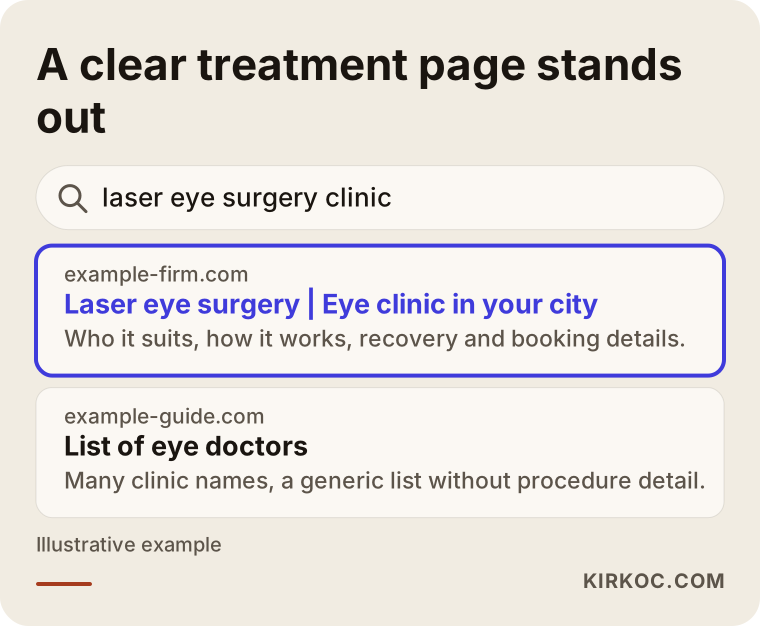
In this invented example, a clear treatment page looks more helpful than a generic directory list. That is one of the practical reasons to give every treatment its own page.
First impressions: what a trustworthy site looks like
A visitor makes an instinctive judgment in the first few seconds. Here is what usually shapes it.
- A clean, calm look. Quiet colors, plenty of white space and text that is readable and large enough. There is an irony here: if an eye doctor's site uses tiny or faded text, a patient might wonder whether this person understands comfortable reading. Keep the text large. For older patients this is a real accessibility matter, not just a style choice.
- Real photos. Stock photos of strangers cool a patient down. If the waiting room, the exam room, the doctor and the staff appear in genuine pictures, the patient feels familiar with the place before walking in.
- Comfortable on a phone. Most patients look at the site on a phone. Buttons should be big enough for a thumb, and text should not require sideways scrolling.
- Fast loading. Waiting for a page is annoying, especially for someone with a health worry. Large photos should be resized and unnecessary plug-ins removed.
- A clear way to book. A phone number, messaging link or booking form should be visible on every page. Patients should not have to hunt for how to make an appointment.
- Identity details. The doctor's title, the clinic name, the address and any license information should appear in readable form at the bottom of the page.
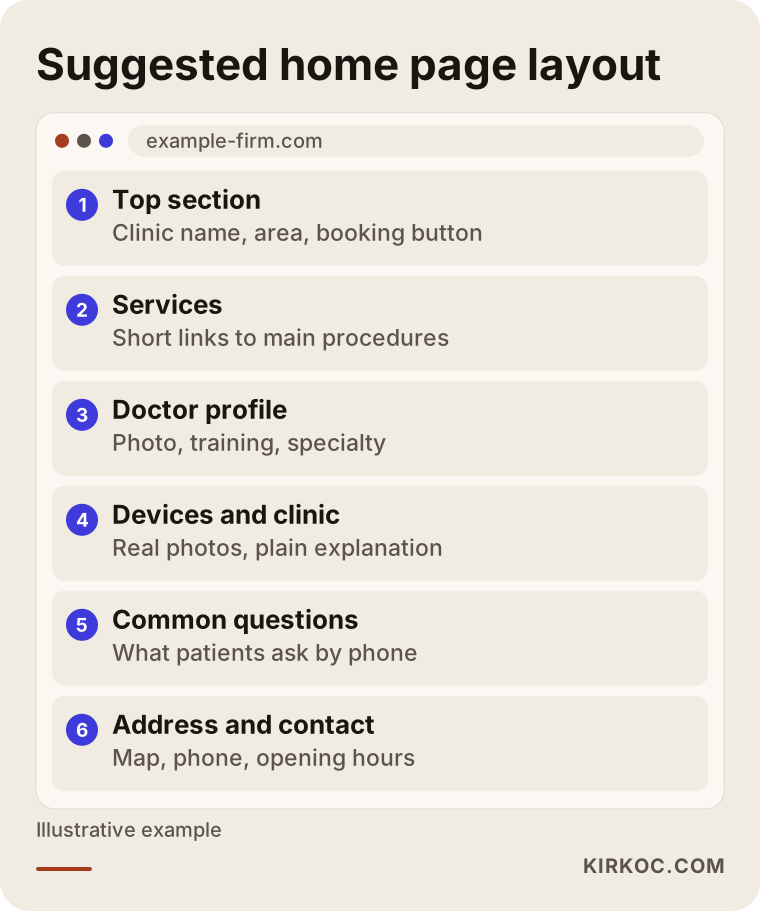
This sketch shows the home page layout I suggest. Notice that the sections follow the order in which questions occur to a patient.
How to write a treatment page: laser vision correction as an example
To make this concrete, let me walk through one treatment page from top to bottom. For a laser vision correction page, the order might look like this.
The heading contains the phrase people search for, such as "Laser eye surgery." Right below, two sentences explain what it is: a procedure meant to reduce dependence on glasses or contact lenses, not suitable for everyone, and always dependent on a proper exam. Then comes a section on who may be a good candidate and who may not. Writing that part honestly builds trust, because patients already know no reputable clinic tells everyone "yes, you qualify," and they believe the doctor who draws lines.
Next, explain what happens before the procedure (the exam, the measurements, a break from contact lenses if the patient wears them), the procedure itself (how long it takes, what the patient feels, what kind of anesthesia is used), and the recovery period (the first days, what to be careful about, follow-up visits). Risks and possible side effects should be stated without hiding them and without causing panic. Instead of sentences that promise a certain result, use honest phrasing like "what most patients can expect" and "your doctor will assess this at the exam."
At the end of the page, put the booking call and a few related questions. The same structure works for cataracts, strabismus, keratoconus and the rest. What changes from procedure to procedure is the content. The skeleton stays the same.
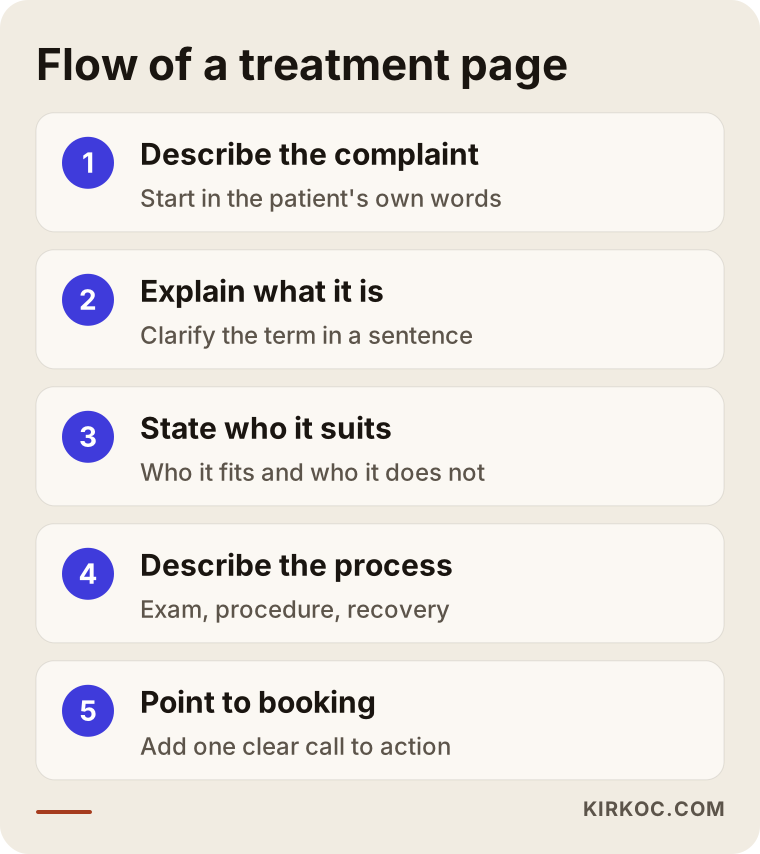
This graphic sums up the flow of a treatment page. You can use the same order for your own procedures.
Before-and-after photos, reviews and patient stories
Many doctors think, "If I show my surgical results, patients will trust me." You are right about trust, but advertising rules for healthcare are especially strict here. Before-and-after images and patient testimonials can be restricted when used in promotion, and in some places they are tightly controlled. Even if a patient gives written permission, ask your attorney whether publishing the material is allowed before you put it online.
You can build trust in other ways: explain the doctor's training and experience clearly, show the equipment and the exam process, answer the questions patients ask most, and record a calm video that explains how a procedure is done, with no patient footage. Reviews on Google live outside your website, on their own platform. Replying to them politely, without sharing any personal health detail, is enough.
Patient data and privacy: take care with the contact form
Health information is sensitive. If your site has an appointment form, ask only for what you truly need: name, phone number, preferred time and a short note. Do not ask for diagnosis details, test results or identification numbers in the form. Many countries treat health information as a special category of personal data that needs extra care. In the United States, for example, HIPAA can apply to patient information held by healthcare providers, and a regular website form is not automatically set up to meet those requirements.
In practice, this means a short privacy notice near the form, a cookie notice where the law requires one, and a safe place for incoming messages. For the exact legal wording and for what your situation requires, please talk to a qualified attorney or compliance adviser. I handle the technical side: making sure the form works, that messages reach you and that the site does not collect more information than it needs.
Two hypothetical example scenarios
The two situations below are entirely invented. They do not describe a real clinic.
Scenario 1: A neighborhood practice. An eye doctor has run a small practice in a busy part of town for years. Most patients come from the surrounding streets or through word of mouth. There is no website, only a map listing that is half empty. The doctor just bought a new device but has nowhere to announce it. A big website is not necessary here. A doctor page, three or four main procedure pages, a set of frequently asked questions and a clear contact page are enough. The map listing is filled out completely and says the same things as the site. The goal is to give the person who searches "eye doctor near me" a clear answer.
Scenario 2: A multi-doctor clinic that performs surgery. An eye clinic has three doctors, with laser, cataract and pediatric eye care as its main areas. Some patients travel from other cities. This clinic needs a separate page for each procedure, a profile for each doctor, travel and lodging details for patients who come from far away, and pages in other languages if it serves patients who speak them. A blog is also important here, because patients research for weeks before a procedure. Plain, doctor-approved articles keep the clinic in their minds while they research. The site is larger, but the principle is the same: give a clear answer to the patient's question.
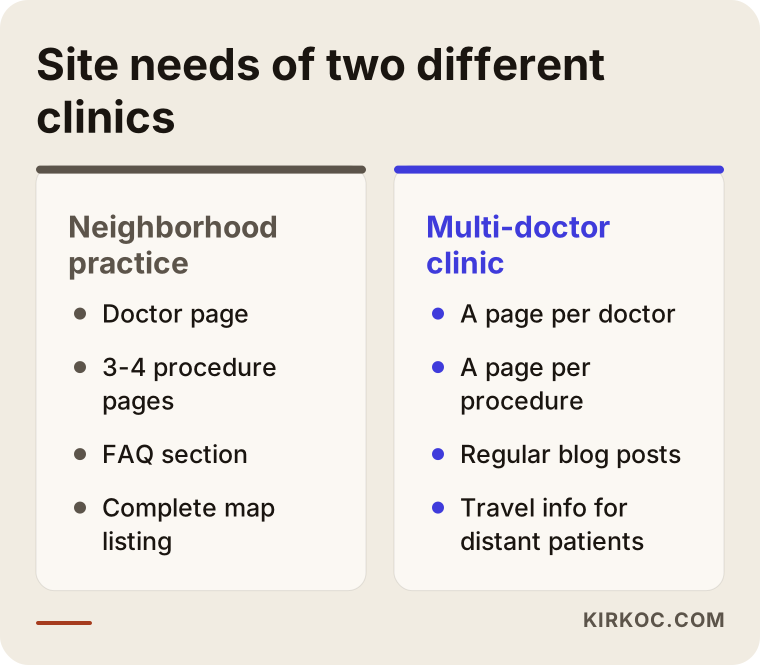
I placed the needs of the two scenarios side by side. See which one your clinic resembles more, and use it to think about the scope of the work.
Blog and educational content: reaching the patient before the appointment
Eye conditions are an area where patients research first and decide later. Articles that answer questions such as "what are the signs of cataracts," "what causes high eye pressure" or "how can you tell if a child has a squint" are the most lasting way to reach someone who does not know your clinic yet. Each article should answer one question, be reviewed by a doctor for medical accuracy, and be written in a tone that does not diagnose. It should say, in effect, "if these are your symptoms, see an eye doctor."
There is a firm line here: do not diagnose and do not prescribe treatment on the site. Give information and point the reader toward an exam. If a patient tries to diagnose themselves from an online article, it can hurt them and it can hurt you. For emergencies (sudden vision loss, severe eye pain, chemical exposure, a curtain-like shadow falling across the vision), the very top of the article should carry a warning to go to an emergency room or see a doctor right away.
Plan the articles. One or two good ones a month are worth far more than ten weak ones. Start by listing the ten questions patients ask most often on the phone. Those become your first ten articles.
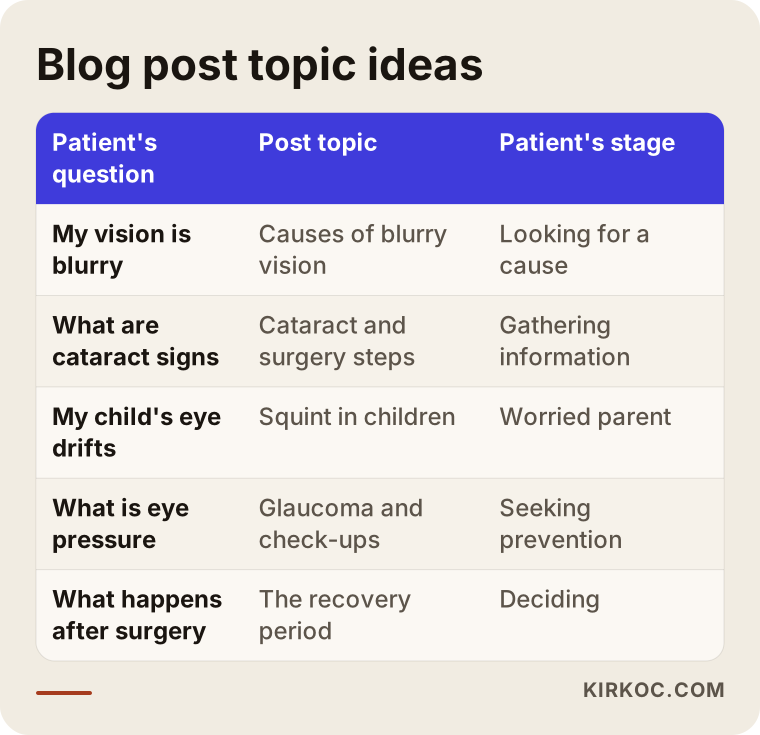
I gathered topic ideas in this table. The most reliable starting point is to match it against the real questions that reach your phone.
The process, step by step: how an eye clinic website gets built
Knowing how the work goes helps you plan your budget and your calendar. This is the order I usually follow.
1. Introduction and needs conversation. I listen to you describe the clinic, the doctors, the procedures, the patients and the goal. Together we decide which procedures should be featured and which will not get a page.
2. Page plan. I draw up a map of the pages and how they link to each other. At this stage I also look at competing clinics' sites and think about what patients are searching for.
3. Content preparation. Text, photos, the doctor's biography. I write the text from the information you give me, and you do the final check for medical accuracy. If you need photography, I can suggest a professional shoot.
4. Design and development. The look is set up to suit the atmosphere of your clinic. It is tested separately on phone, tablet and computer. The booking form and the messaging link are connected and tested.
5. Search settings. Page titles, descriptions, the connection to your map listing and speed settings. These are done at the start so the site can be found later, not bolted on afterward.
6. Testing and launch. Together we check that the form reaches you, the links work and the text your attorney reviewed has been placed correctly.
7. Follow-up after launch. Once the site is live, I look at which pages get visited and which searches bring people in. If needed, pages are improved.
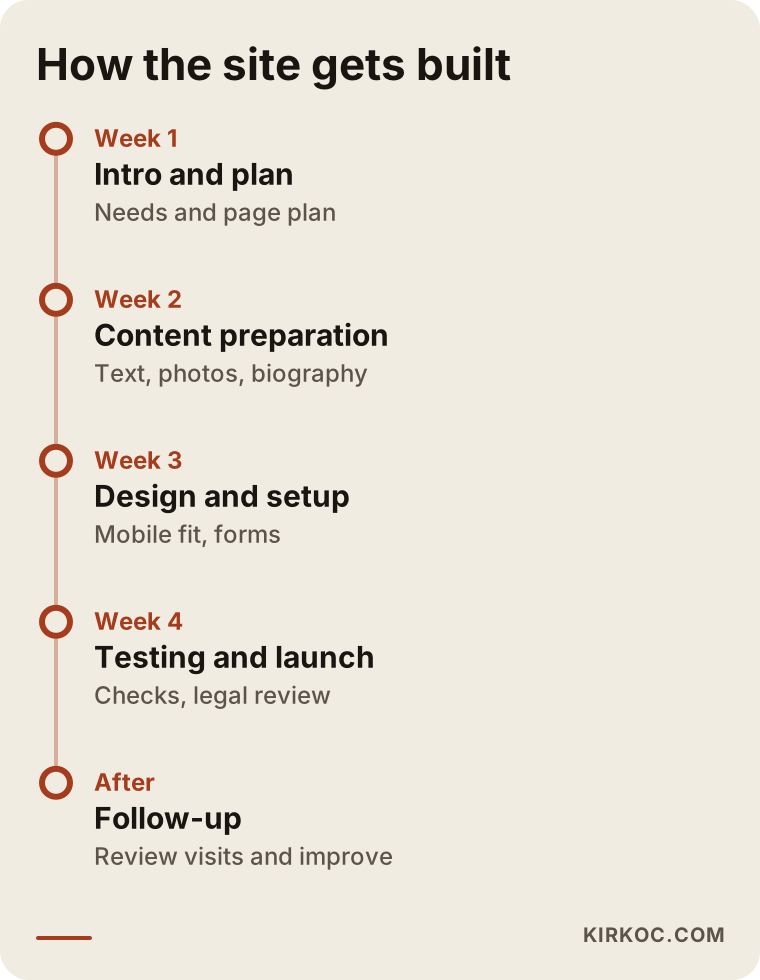
The timeline shows what is expected from you at each stage. I can tell you now that the longest part is usually content preparation.
Common mistakes
These are the errors I see most often on eye clinic sites.
- Piling everything onto one page. Laser, cataract, pediatric, contact lenses, all on a single page. The patient cannot find what they came for, and the search engine cannot tell what you answer.
- Text full of medical terms. If a patient does not know half the words, they close the page. Use the term, but explain it in one sentence.
- Exaggerated promises. Lines like "a sure cure" or "a life without glasses in one session" make patients doubtful and can run into advertising rules.
- Publishing before-and-after photos and patient reviews without checking. This carries legal risk, so ask before it goes up.
- Burying the phone number inside an image. A number written inside a photo cannot be tapped or copied. Put it in as text, and make it clickable.
- Small, faded text. If an eye doctor's own website is hard to read, it leaves a poor first impression.
- Outdated information. Old opening hours, a doctor who left but is still listed, a disconnected phone number. If a patient shows up and finds the door locked, you will probably never see that person again.
- Neglecting the map listing. The website looks great, but the Google card shows the wrong address. In local searches the card is often the first thing people see, so this is a real loss.
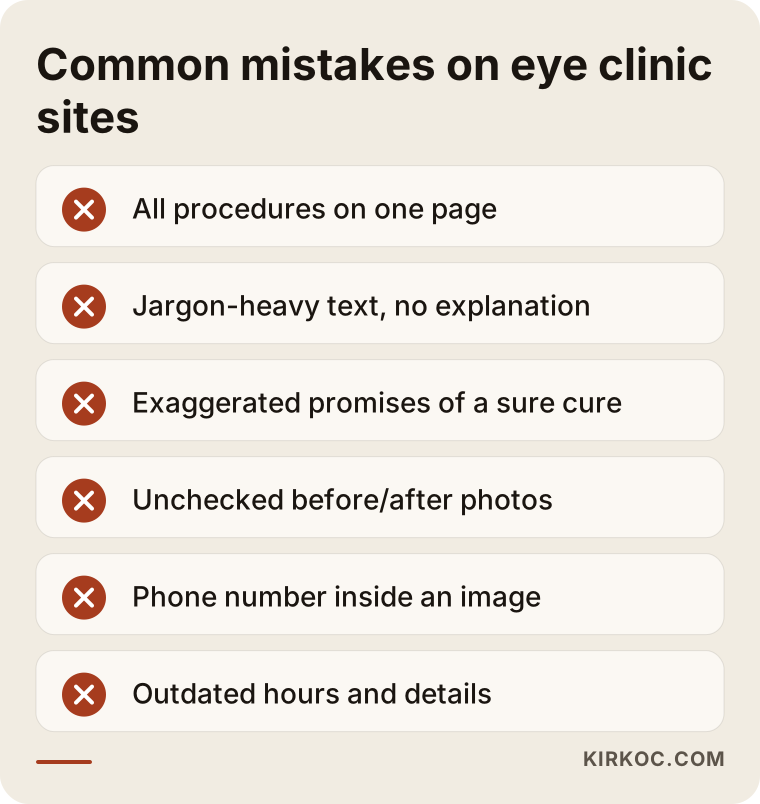
I collected the mistakes into a short warning list. Checking your current site against it should take about ten minutes.
What you can do yourself, and when you need a specialist
You do not have to hand everything to someone else. There are things you can do on your own, and doing them raises the quality of the site noticeably.
- Claim your Google Business Profile and fill it in completely: address, phone, hours, services and real photos.
- Write down, on a sheet of paper, the questions patients ask most on the phone. That is the raw material for your pages and your blog plan.
- Put the doctor's biography, training and memberships into one document.
- Take real photos of the clinic and the equipment, or have someone take them.
- Politely remind satisfied patients that they can leave a review on Google, but never offer anything in return and never steer what they write.
Where you do need a specialist: the technical setup and phone compatibility of the site, page speed, search settings, making the patient form work securely, producing content regularly and tracking the results. At first glance these may look like things you can do yourself, but repairing a badly built site can be harder than building it correctly from scratch. The diagram below sums up the decision.
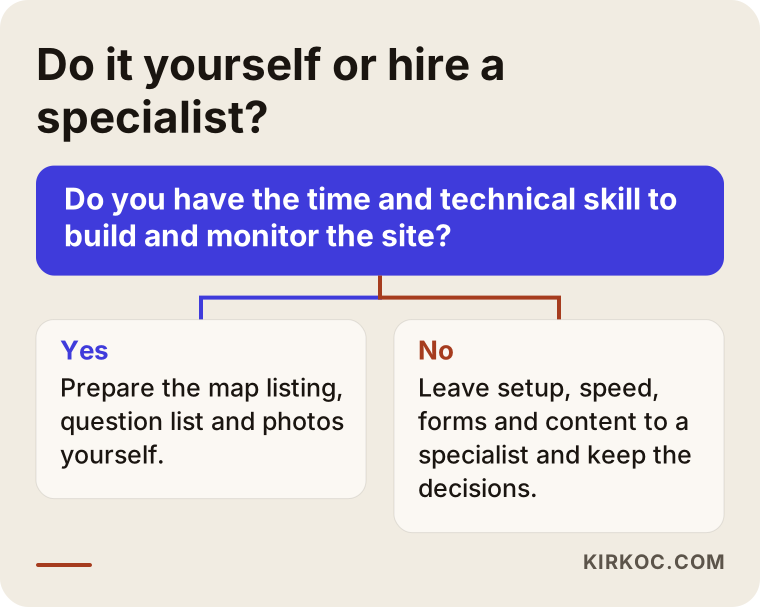
This diagram shows which parts of the work you can handle on your own and where getting help makes sense.
What determines the cost?
I will not give figures in this article, because the cost of an eye clinic site varies greatly with what the clinic needs. The main factors are these.
- Number of pages. A practice with three procedures is not the same job as a clinic with twelve.
- Number of doctors. Each doctor needs a separate profile and often separate content.
- Number of languages. If you see international patients, every language means separate text and separate pages.
- Who prepares the content. If you write the text and supply the photos, the work shrinks. If you want me to do it, the working time grows.
- Special features. Online scheduling, a patient portal or a multi-location structure widen the scope.
- Support afterward. Whether you want blog writing, updates, search tracking and ad management once the site is live.
If you have a budget, tell me at the start. I will build the strongest core that fits it and leave the rest for later. That usually works better than trying to do everything at once and leaving it half finished.
How I work with you
I am one person, and I carry out all of the work myself. For you, that makes a practical difference: you do not have to pass messages between someone who builds the site, someone who handles search visibility and someone who runs social media. The search settings are planned while the site is being built, the blog posts are planned around the structure of the site, and if you want, Instagram or Google ads can point at the same pages. Work that runs through one pair of hands reduces the gaps between the parts. When the text on a page changes, the ad and the map listing can be corrected on the same day.
You do not need to ask for everything at once. Many clinics start with the website, continue with the map listing and content, and move to social media or ads only if the need arises. I write down plainly what we will do at the start, what we will not do, and what to expect. I do not give guarantees about results, but I do share with you what I am doing, why, and what I am watching.
Frequently asked questions
Does an eye clinic really need a website, or is a Google listing enough?
The Google listing is very useful in local searches, and you should definitely set it up. But a listing cannot explain your doctor, your procedures and the patient's questions in detail. A patient researching a treatment needs a website. The listing and the site complement each other.
Will I be on the first page of Google after the site is built?
Nobody can guarantee that. Rankings depend on your competitors, your content, your location and time. A well-built site improves your chances of being found, but I do not promise results. During the work we track together what changes.
Is a separate page for each treatment really necessary?
I would not say it is a must, but I recommend it strongly. Each procedure is a separate question from the patient's point of view, so a separate page gives both the patient and the search engine a clear answer. Do not create pages for procedures you do not perform.
Can I use before-and-after photos and patient reviews on the site?
Rules about promoting healthcare services can be restrictive here. For a definite answer, ask your clinic's attorney or your professional association. I do not give legal opinions on this.
Who writes the blog posts, and will the medical information be correct?
I write the draft, but medical accuracy is your responsibility. Every article should be checked by your doctor before it goes live, and corrected if needed. I use language that informs and points to an exam, not language that gives a diagnosis.
Can I update the site myself after it is built?
Yes. I can set it up so you add opening hours, a doctor's details or a new article on your own. For parts that need technical maintenance, you get support.
How long does it take to get the site ready?
It depends on the number of pages and how ready the content is. Gathering content and photos usually takes the most time. At the start I draw up a realistic calendar with you.
Is the information on the patient form safe?
The form should ask only for what is needed, a privacy notice should be present, and messages should be stored securely. I set up the technical side. For the legal content of privacy compliance, I suggest consulting an attorney.
If you would like to work out together what kind of site your eye clinic needs, you can write to me through the website design page. I will listen to how your clinic, your patients and your goals look, and give you a plain, honest roadmap.