You do good work in your practice, your patients leave satisfied, and yet most new patients still arrive by referral. When someone phones and you say "check our website," they find either a page built years ago that is unreadable on a phone, or nothing at all. This is where a website for a dermatology clinic starts to matter: a person with acne, a stubborn patch of dry skin, thinning hair or a mole that looks different picks up their phone first and decides second. In this article I explain what such a site has to accomplish, which pages it needs and how the process works. I am Ümit Kırkoç, based in Istanbul, and I handle the website, search visibility, social media and ads as one person. I will also say plainly where my own website design service starts and stops.
One thing up front: this article gives no medical advice and says nothing about treatment. The subject is not your clinical work. It is the path a patient takes to reach you. A good clinic site does not make you look like a marketer. It answers the question in the patient's head, in the right order, and shortens the road to an appointment.
How do patients search for a dermatologist?
Someone with a skin problem rarely starts by typing a specialty. They start with a symptom: bumps along the jawline, an itch that will not go away, a dark spot they noticed in the mirror, hair in the shower drain, a mole that seems to have changed. They type the worry first, then work out whose job it is, and only at the end search for "dermatologist near me."
Separating these three stages helps explain why a site struggles:
- Symptom stage: questions like "what causes red patches on my face" or "when should I see a doctor about hair loss." The person is not looking for a clinic yet. They are looking for information.
- Comparison stage: searches like "acne treatment dermatologist" or "how are dark spots treated." They want to know which approach suits whom, and they start glancing at clinics.
- Booking stage: searches like "dermatologist appointment Chicago" or "skin doctor open Saturday." The decision is nearly made. They want a phone number, hours and a location.
People also use different words. Some type "dermatologist," some "skin doctor," some "skin specialist," and some name the condition and nothing else. If your pages never use these everyday phrases in natural sentences, it is harder for search engines to connect you with the person asking.
The illustration below is an invented search that shows which kind of page convinces a patient more easily.
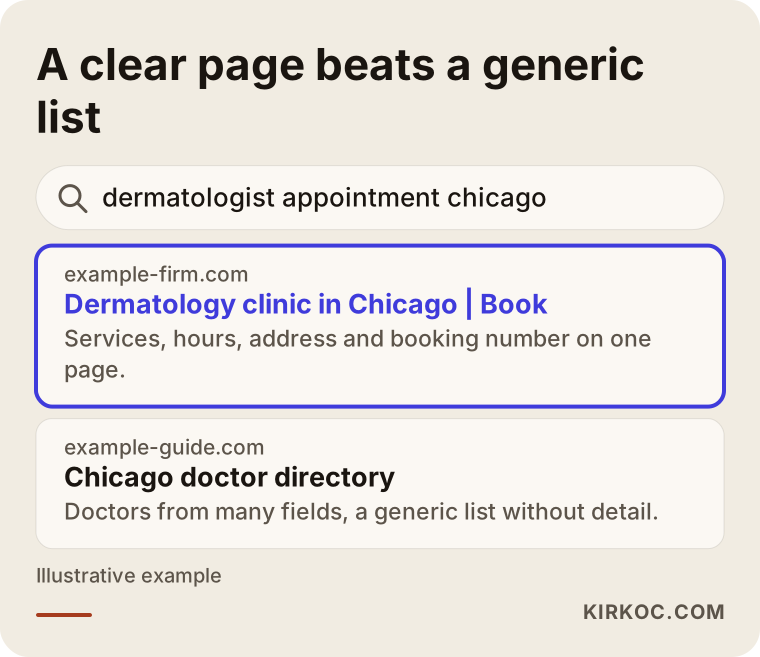
The highlighted page states the service, the area and the booking details in its first lines. The directory page next to it lumps many doctors into one list, so the patient has to click one more time. In most cases the patient picks whatever is clearest.
The real difficulties of this specialty
Dermatology combines several problems that other businesses do not face together. Knowing them before you start keeps your budget and your expectations realistic.
Topics patients feel embarrassed about
Acne, skin infections, hair loss and conditions in sensitive areas are things many people hesitate to ask about out loud. They look for the first answer alone, on their phone, in private. Your tone needs to be calm, direct and free of judgment. A page packed with clinical vocabulary pushes these readers away, and so does a page that sounds like a sales brochure.
The line between medical care and cosmetic work
Many dermatology practices offer both treatment of skin disease and cosmetic procedures. The two groups of patients think differently. Someone coming in for eczema wants trust and easy access. Someone interested in skin rejuvenation or pigmentation wants to understand the method, the process and what to expect. Mix everything on one home page and both groups get lost. That is why you draw two separate paths.
Advertising and marketing rules
Healthcare promotion is subject to rules. In the United States, depending on your state, these can involve your state medical board, federal advertising standards and professional association guidance. Before-and-after photos, patient testimonials, discount language and superlatives like "the best" can all be restricted. The details change over time, and I am not a lawyer, so I will not claim anything definitive. Before the site goes live, I suggest asking your state board, your professional association or an attorney which wording and images are allowed. A well-built site can still be strong inside those limits.
Patient data and privacy
A complaint typed into an appointment form, an uploaded photo or a phone number is personal information, and health-related details are treated as especially sensitive. In the US, rules such as HIPAA may apply to how a practice handles this kind of information, and other countries have their own versions. Collect only what you truly need on the form, write a clear privacy notice, and know where the data is stored. Talk to an attorney or compliance specialist about this. On my side, keeping the form free of unnecessary fields and the data in a secure place are technical matters I can handle.
What patients look for before they trust you
Choosing a skin doctor is like choosing any healthcare provider: the patient is looking for confidence. The doctor's name, specialty, training, a photo of the clinic, the address and how to get there are the pieces that build it. If one is missing, the patient hesitates before calling, however attractive the site looks.
Which pages does a dermatology site need?
Many clinic sites are one long page. But every concern deserves its own page. A person typing "acne" cannot count on a search engine to dig out one sentence at the bottom of your home page. A workable structure looks like this:
- Home page: shows who the clinic is, which neighborhood or city it serves and how to book, all at a glance.
- Service pages: one for each topic, such as acne, pigmentation, hair loss, eczema and mole checks. Each page speaks about a single concern and to the person who has it.
- Doctor page: education, specialty, hospital affiliations, memberships. The photo should be calm and real.
- Clinic and directions page: address, parking, public transit, accessibility, hours and a map.
- Frequently asked questions: practical items such as booking, what happens during a first visit and what to bring.
- Booking and contact page: phone, message and form. Ideally the number can be tapped to call.
- Educational articles: plain explanations of common concerns that give no medical advice and answer the "when should I see a doctor" question.
You can see how these pieces might be ordered on a home page in the sketch below.
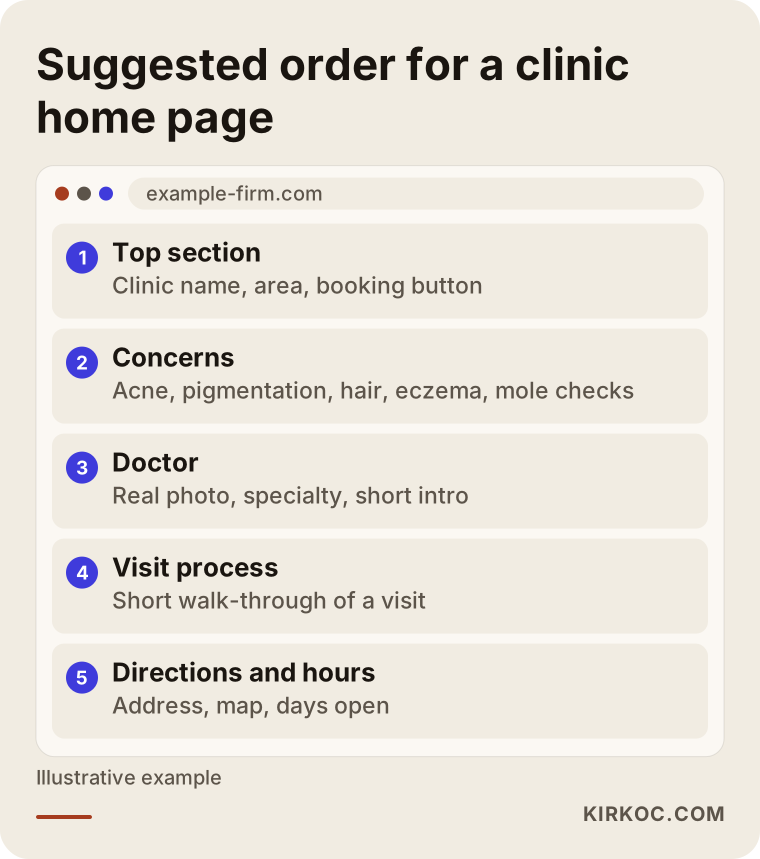
Order is what matters here. When a patient lands, the first thing they should see is the answer to "what is this place?" The doctor's résumé and the clinic's history come after that.
Pages by concern or pages by procedure?
A common mistake sits here. As a doctor you think in terms of "laser," "microneedling" and "chemical peel." Patients think in terms of "spots on my face" or "my child's eczema." If a page title carries only the procedure name, it may not match what the patient typed. The usual fix is to combine both: the title names the patient's problem, and the body explains which methods you use. That way the searcher finds it and the informed reader understands it.
The table below summarizes the different kinds of dermatology searches and the page that fits each.
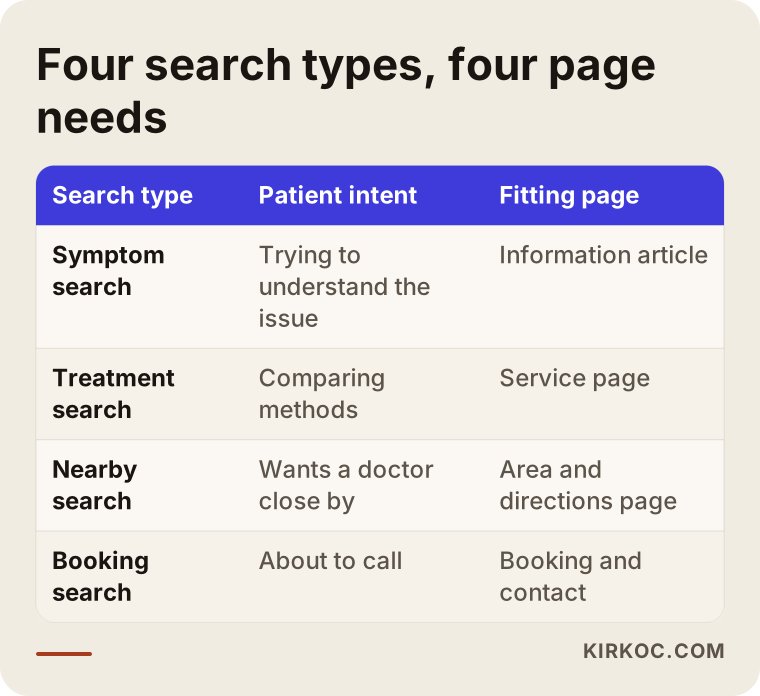
As the table shows, every type of search needs its own page. "Let's fit everything onto one page" sounds easy at first, but it ends up weak in search results and weak in the patient's eyes.
Mobile and speed: the two minutes on a phone
A person with a skin concern often searches on a phone, in bed or in a waiting room. So how your site looks on a phone matters more than how it looks on a desktop. Some concrete things to check:
- Do the photos make the page take forever to open? Large, uncompressed clinic photos slow a site down.
- Can the text be read comfortably with a thumb? Tiny type and cramped paragraphs tire the reader.
- Are the phone number and the "book now" button fixed at the bottom of the screen, or does the visitor have to scroll to find them?
- Is the form short? Every extra field increases the number of people who give up halfway.
A fast, simple site also helps search engines understand you more easily. But the real gain is that the patient does not stay undecided during those two minutes on the phone.
How trust is built and how it is lost
In healthcare, trust comes from consistency, not from fancy design. The details on your site, on your Google Business Profile, on the phone and on the sign by your door should match. If the hours, address or phone number differ in one place, patients notice and begin to doubt.
Beyond that, these things help:
- A real photo of the doctor and a short, plain introduction.
- Real pictures of the clinic, inside and out, so the patient knows where they are going.
- A short section on every service page explaining how the visit goes.
- An honest note about which symptoms need urgent care somewhere else.
- A modest tone. Phrases like "guaranteed cure" or "permanent result" can be ethically problematic and they damage trust.
The checklist below collects the basic trust items to review before launch.
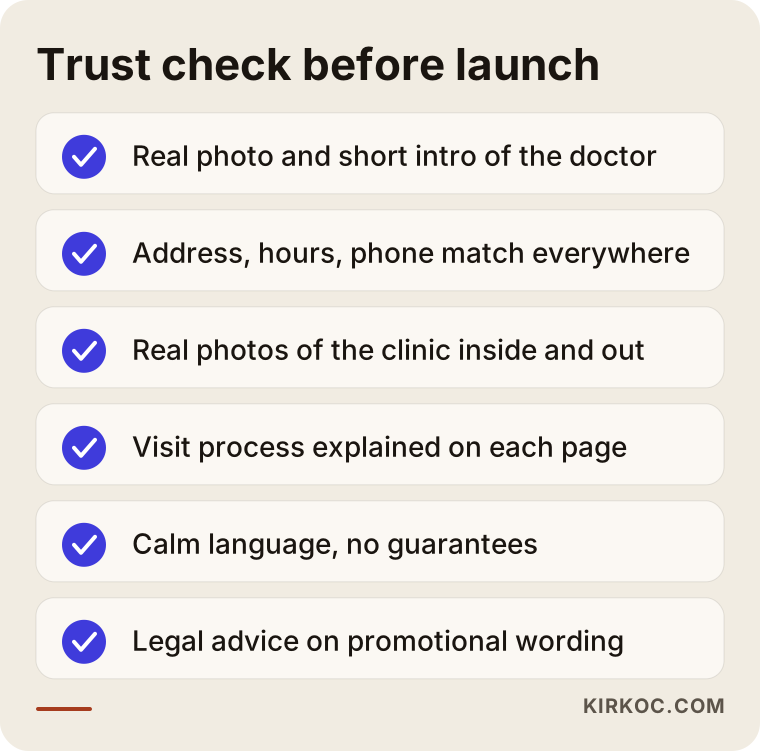
Each item looks small, but a patient's decision is usually the sum of small things. Missing one will not sink the site, yet it gives the patient a reason to hesitate.
Two hypothetical example scenarios
The two situations below are invented. They do not describe a real clinic or person. The point is to show how one problem can be handled in different ways.
Scenario 1: A newly opened practice
Imagine a dermatologist who has just opened a private practice in a suburb. She is known from her time at a hospital, but nobody knows the name of the new practice. She has no website, only a map listing. The phone rings, but most callers ask "how much for acne treatment?" and then never come in.
In this case, the first step may not be a big site but a lean, accurate one: a home page, a doctor page, three or four core concern pages, directions and booking. Each concern page answers the questions patients ask on that first call: what a visit is like, how long it takes, what to bring and whether a follow-up is needed. Instead of quoting a number, the page can honestly say that the cost depends on the scope of the concern and becomes clear after the exam. The same question that used to come by phone is now answered on the site, and the calls that do arrive tend to be better matched. I cannot promise a result, but that is the logic.
Scenario 2: An established clinic with an old site
In the second hypothetical, a clinic has been open for many years. It has a website, but it was built a decade ago. It does not display properly on phones, the doctors' photos are old and the service pages are one long block of text. The clinic is full thanks to referrals, so the problem stays hidden, but younger patients and people who just moved to the area cannot find it.
Starting from zero is not the answer here. It is more sensible to sort through the existing content and reorganize it. The long text is split into separate pages by concern, old photos are replaced, and the address and hours are made identical everywhere. Redirects are set up so that links to the old addresses do not break. That way the clinic moves to a more visible site without losing the reputation it has built over the years.
The illustration below puts the two approaches side by side.
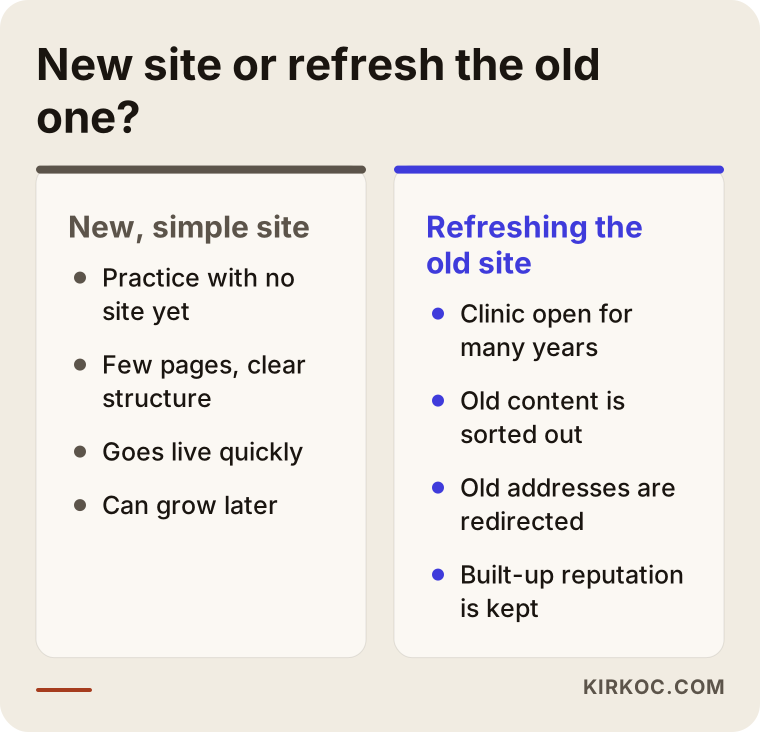
Which path fits depends on where you are today. Often the best decision starts with looking at your current site and seeing what can be saved.
How the process works, step by step
If we work together, the process goes roughly like this. I want you to know what I am doing at every step and what I need from you.
- First conversation: I listen to how your clinic works, which patients you want to reach and which services you want to feature.
- Structure and page plan: We decide together which pages are needed and which heading goes with which concern.
- Content preparation: I write the text in plain language and send the medical content to you for approval. The accurate information comes from you; I turn it into something a patient can read.
- Design and build: I build a site that is easy to read and quick to open on a phone, including the booking form and a call button.
- Search visibility setup: Page titles, descriptions, your map listing and a structure suited to local search.
- Launch and measurement: The site goes live, and I set things up so you can see where calls and form submissions come from.
The visual below summarizes the process.
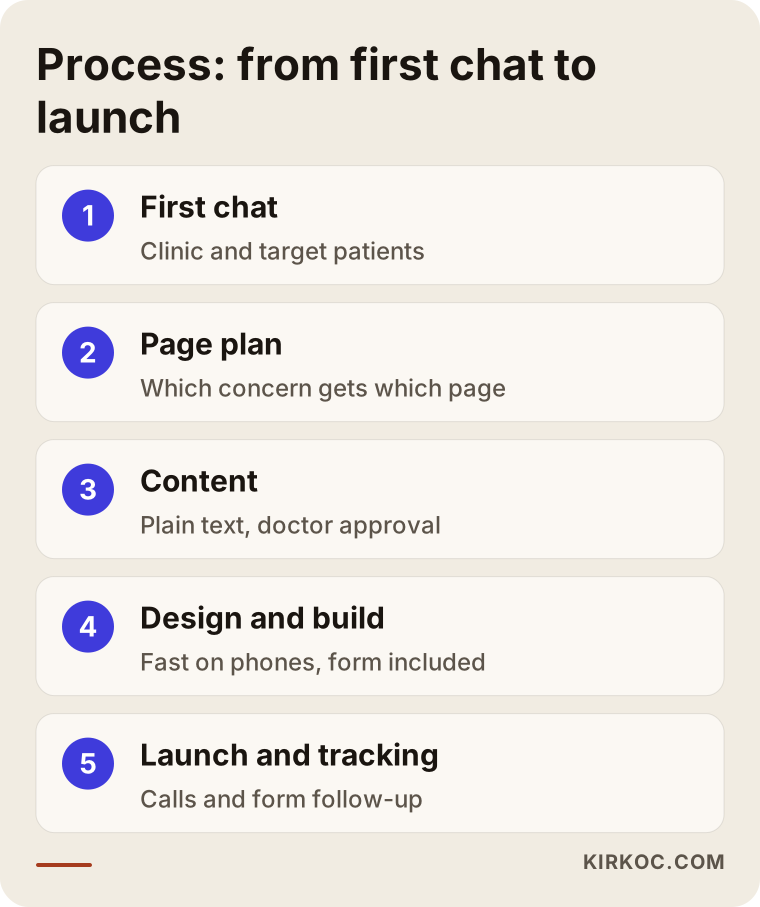
Timing depends on the number of pages and how ready the content is. The slowest part is usually not design but the doctor reviewing the text and gathering photographs. Answering quickly on the content side shortens the whole project.
Common mistakes
These are mistakes I see again and again on clinic sites. None of them is fatal alone, but together they make a site stop working.
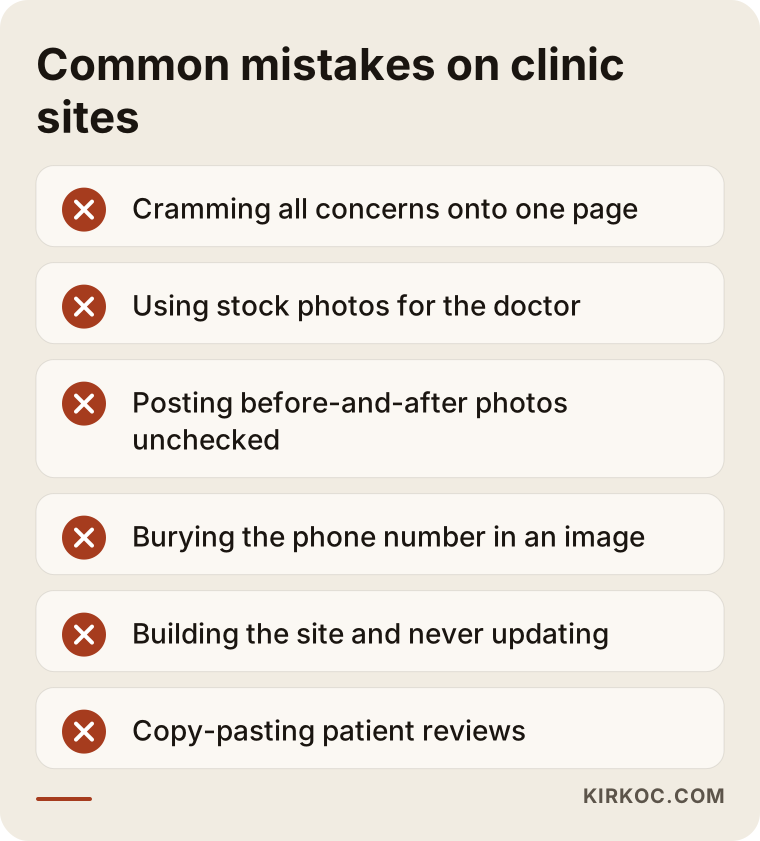
Let me expand on the items in the graphic:
- Cramming everything onto one page. If acne, pigmentation, hair and cosmetic procedures share a page, none of them stands out in search.
- Using stock photos. A smiling stranger in a white coat does not replace your real doctor, and patients can tell.
- Posting before-and-after images without thinking. This touches both regulation and patient privacy. Check first.
- Burying the phone number in an image. It cannot be tapped to call, and search engines cannot read it.
- Hiding the price completely. You do not have to publish a figure, but explaining what the cost depends on puts the patient at ease.
- Copying and pasting patient reviews. It can be risky under the rules and it looks fake.
- Building the site and walking away. Hours change and staff change, but the site stays the same.
After the site: search, maps and social media work together
A website is not a storefront that stands alone. A patient may see you on a map first, then check your Instagram, then visit the site and call. Every stop on that trip should say the same thing.
That is why local search belongs in the plan from the start. The category, address, hours and photos on your map listing should match the site exactly. The doctor's name should be written the same way everywhere. These look like small things, yet they influence who shows up first in local results.
On social media, healthcare rules call for care. The purpose of the account should be to inform and build trust, and the promotional language needs to stay within legal limits. If you want to run ads, it is worth settling in advance which wording is allowed on which platform. When one person manages the site, search, social media and ads, the messages line up; three different voices from three different places leave the patient confused. That is the practical benefit of working with a single person.
The graphic below shows a patient's decision path as a simple funnel.
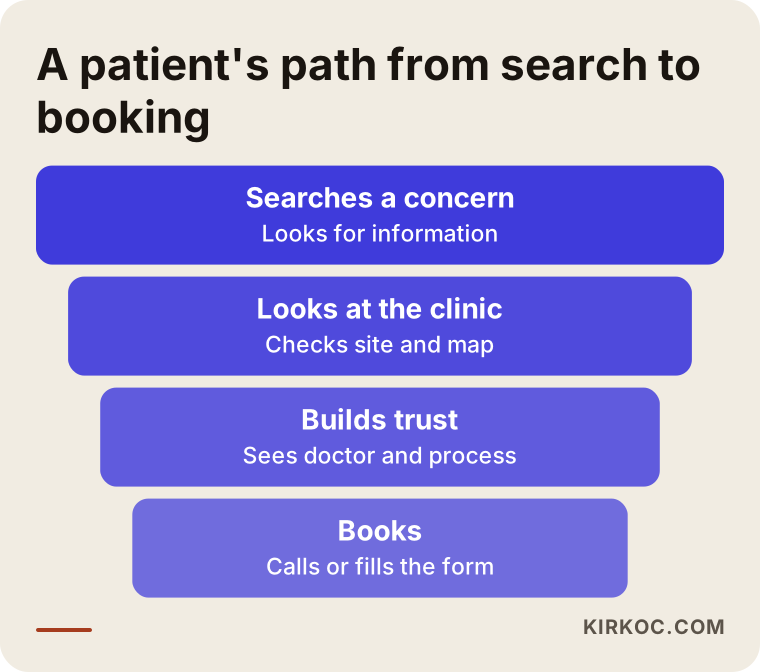
The top of the funnel is wide and the bottom is narrow: some patients drop out at every stage. Your site tries to reduce that loss, but I cannot tell you in advance how many will make it through, and nobody honestly can.
What you can do yourself and when to bring in a specialist
You do not need an expert for everything. A few jobs you can do on your own are often the most valuable:
- Claim your map listing and keep it current. You can edit your hours, phone, address and photos yourself.
- Write down the questions patients ask most. Those questions are the raw material for your pages and your FAQ.
- Collect real photographs. The clinic, the waiting area, the exam room, while protecting patient privacy.
- Verify the text. Even if a specialist writes it, medical accuracy is your call.
A specialist is usually needed for the technical setup, making the site fast on phones, planning a page structure that search engines can read, making sure the form works securely and setting up measurement. Doing these halfway costs more to fix later than doing them properly once.
If you have a decision to make, the flow below can help.
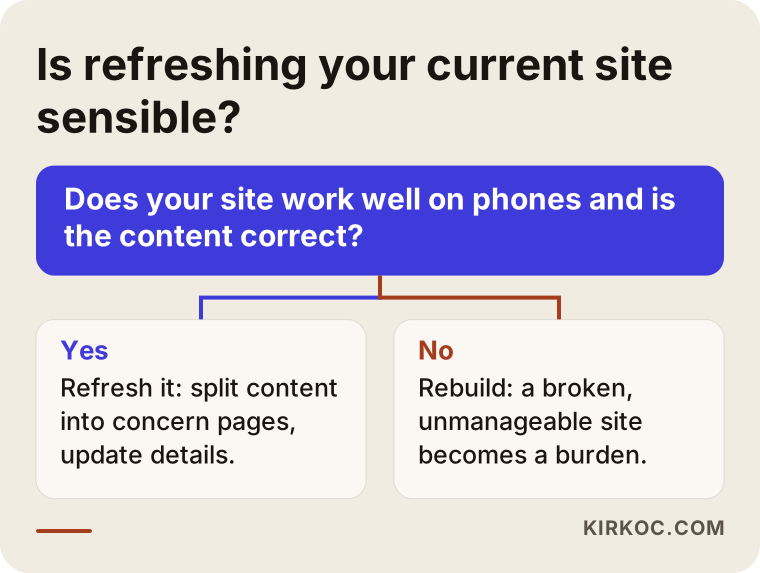
In short, if the foundation of your current site is sound, refresh it. If it is broken on phones, impossible to manage or very old, rebuilding is the smarter choice.
What determines the cost
I am not giving figures, because no two clinic sites are alike. But I can tell you clearly what moves the price:
- Number of pages: A five-page introduction site and a site with a separate page for every concern are not the same job.
- Content preparation: There is a difference in effort between you writing the text and me writing it for your approval.
- Photos and images: If you already have good real photographs, this item shrinks. If a shoot is needed, it grows.
- Multiple languages: If you also serve international patients, each page has to be prepared in each language.
- Booking system connection: If you already use scheduling software, connecting it to the site can add work.
- Search visibility work: Whether it is done with the site or added later changes the scope.
- Timeline and urgency: Rushed projects need more hours.
When you collect quotes, make sure each of these items is written out separately. A vague phrase like "everything included" can lead to surprises later.
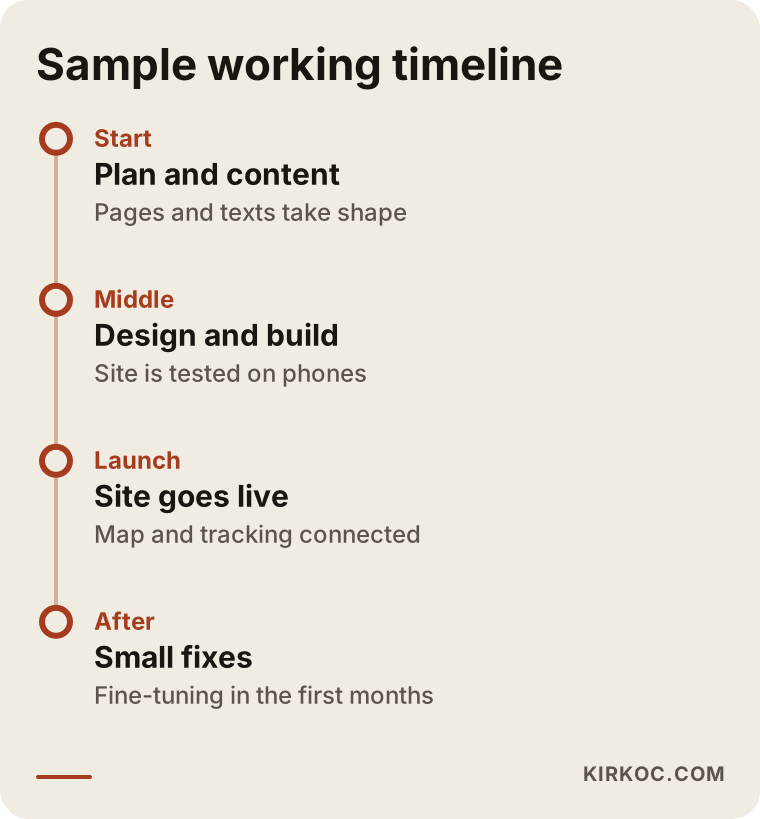
The timeline graphic is a general example. Real timing shifts with how ready your content is and how many pages you need. It still shows that the job does not end at launch, and that the small fixes in the first months shape the outcome.
How I work
I am one person and I do the work from start to finish. That means the person you talk to is the person who builds the site, writes the text and sets up your search visibility. There is no team, account manager or committee in between. When you have a question, the person who answers it is the person doing the work.
There is a downside, and I will not hide it: I cannot take on many projects at once, so my calendar is sometimes full. The advantage is consistency. The site, search, social media and ads follow the same line of thought, and the patient hears the same calm, clear and honest voice everywhere.
I ask for no commitment in the first conversation. I look at your current situation first and tell you what you need and what you do not. Sometimes I say, "your site is fine, just fix your map listing," because selling unnecessary work helps no one in the long run.
Frequently Asked Questions
Does a dermatology clinic really need a website?
Patients often find a doctor through a referral, but they still look the clinic up before they go. A practice with no site may feel less trustworthy to that person. And people who never got a referral can only find you through search. A website is the most lasting way to reach that second group.
Can I use before-and-after photos on my site?
There are advertising rules, patient consent and privacy to consider. I cannot give you a definitive answer, so I suggest asking your state medical board, your professional association or an attorney before using them. A good site can build trust without these images.
Do I have to list prices on the site?
I am not saying it is required. But a section explaining what the price depends on reassures patients and cuts down on calls from people who were never going to book. Whether to publish a figure is up to your clinic and the relevant rules.
Can I show patient reviews on the site?
This may also be limited by healthcare advertising rules. Rather than posting reviews on the site, replying regularly to the reviews on your map listing can be a safer place to begin. Still, check with an attorney.
How long does it take for the site to go live?
It depends on the number of pages and how ready the content is. The most time goes into approving text and collecting photographs. A project that starts with ready content moves noticeably faster, but I do not promise a fixed timeline because your response time is part of it.
If I build a site, will I rank at the top of Google right away?
No, and nobody can guarantee that. A properly built site lays the groundwork for being found, but rankings change with competition, location and time. A realistic expectation is slow progress over months, not in the first weeks.
Can I update the site myself later?
Yes, and I plan for that when I build it. You can change your hours, post an announcement or add a new article on your own. For bigger changes, you can reach out to me.
Can I also get social media and ads from you?
Yes, but you do not have to. You can hire me for the website alone. If you like, I can also run your social media and your Google or Meta ads. For promotional wording that follows healthcare rules, I would still ask you to get an attorney's opinion.
If you would like to talk through what kind of site your clinic needs, you can reach me through my website design service page. I will look at where you are today and tell you plainly what you need and what you do not.