You run a nonprofit or a foundation. The work you do is real, the people you serve exist, and your volunteers give their time. Yet when someone searches online for exactly what you do, they land on another organization. A donor who wanted to give goes elsewhere, a would-be volunteer gives up, and a person who needs help never finds your phone number. That is the gap SEO for nonprofits is meant to close. I am Ümit Kırkoç, and I work from Istanbul handling everything from websites to social media on my own. In this article I explain what my SEO services mean for a nonprofit, which pages you need, and where to start.
SEO, in short, is the work that makes your website show up on Google when people search for something you offer. You do not pay for each click the way you do with ads, but you do need patience and a sensible structure. Nonprofits have their own rules here, because the person searching is not buying a product. They are deciding whether to trust an organization with their money, their time, or their problem.
What are people actually searching for?
On a commercial site, people type words like "price" or "near me." On a nonprofit site, search intent is more varied and often starts from emotion. Four different people can reach the same organization for four different reasons.
The first is the potential donor. This person usually does one of two things: they look for a cause to support ("donate books to rural schools," "how to help stray animals"), or they research a name they have already heard ("is this charity legitimate"). The second is the potential volunteer, who searches for things like "weekend volunteer opportunities" or "volunteer tutoring for students." The third is someone who needs help, or is looking for help on behalf of a relative or neighbor. The fourth is an institutional visitor: a company's community relations manager, a journalist, a local government employee, or someone considering joining as a member.
If all four land on the same home page, none of them finds what they came for quickly. This is the problem I see most often. The whole site is one long page where the organization talks about itself, with everything tucked under a menu item called "About." Each intent deserves its own page.
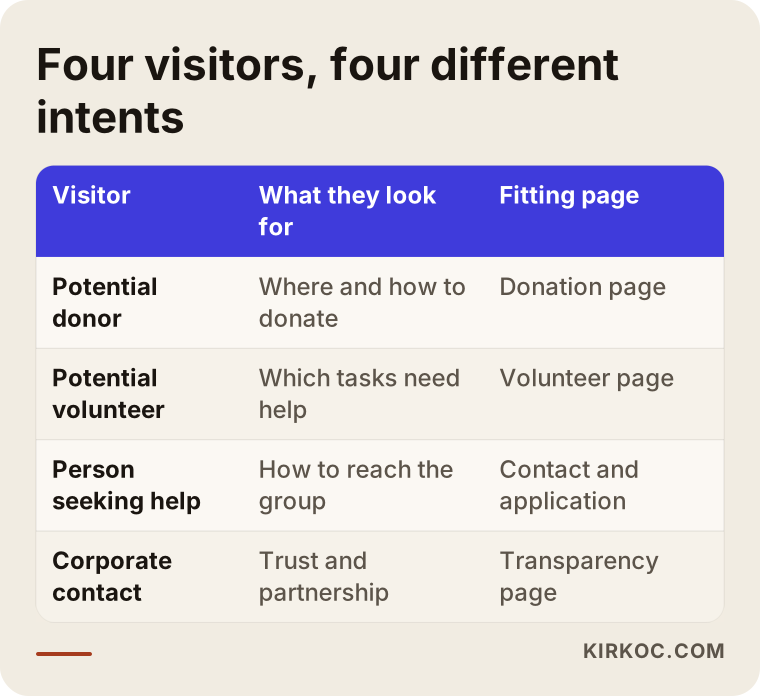
The table above summarizes the four visitor types and the page that fits each. If your site does not serve all four, what you lose is not just a ranking. It may be a donation or a volunteer.
Trust sits behind every search
People give money and time to nonprofits, so Google also seems to look harder at trust signals on these pages. I cannot state that as a hard rule, but in practice I often see that pages that do not look trustworthy do not get far. The question in the visitor's mind is simple: "Is this organization real, where does the money go, and who do they work with?" If your site does not answer that, the visitor will search for the answer and find it somewhere else.
The donation page: the most important page, and the most neglected
On many nonprofit sites, the donation page either does not exist or is just a bank account number. Listing bank details can be necessary, but it is rarely enough on its own. Someone thinking about giving wants to know three things: what will this money do, how can I pay, and can I trust this organization.
A good donation page includes a clear sentence at the top saying what is being supported, the ways to give (bank transfer, card, recurring gifts, whatever your organization genuinely offers), a short explanation of how donations are used, and contact details. On anything involving tax treatment or legal status, such as whether gifts are deductible, do not make firm claims without checking with an attorney or an accountant. A missing statement is better than a wrong one.
Give the page a natural title that includes the word "donate" along with your cause. Instead of a bare "Donate," something like "Donate books to rural schools" tells both people and search engines what the page is about. If you run several projects, think about a separate donation page for each. Putting everything on one page tends to wear visitors out.
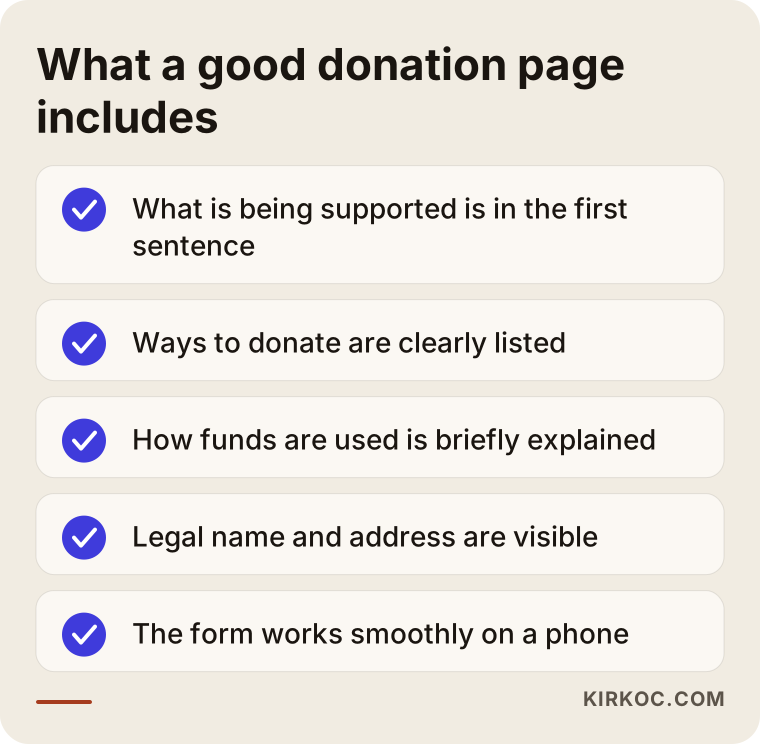
The list in the image works as a quick checklist when you review your own donation page. You do not need every item, but the more that are missing, the more likely a visitor is to hesitate and leave.
Donation searches and seasonality
Giving does not spread evenly across the year. In some periods, such as the end of the year, major holidays, or right after a disaster, searches rise noticeably. I cannot give you exact numbers for your cause; you can see the pattern in your own site's past data. What matters is this: prepare your pages two or three months before the busy period, because a brand-new page takes time to start showing up on Google. If you publish during the rush, the rush may already be over.
Project and program pages
Nonprofits often struggle to explain what they do, because they do a lot. But to a search engine, an organization that does everything is an organization that is hard to describe. Opening a separate page for each main program gives both visitors and Google a clearer picture.
Here is the structure I recommend for a project page: the purpose in one sentence, who it serves, what has been done so far (with photos and short stories, taking care to protect personal data), how people can help, and the current status. The "current status" part matters a great deal. A project page that was last updated three years ago suggests that the organization may have stopped working.
Photos and personal data
Photos from your activities are among the strongest assets a nonprofit site has, but you need to be careful with images of children, patients, or people who receive aid. The legal responsibility for what you publish is yours, so if you are unsure, talk to an attorney. When you do use photos, give the files and the alt text meaningful descriptions. Alt text is the short description that screen readers read aloud and search engines use to understand an image. A file called "IMG_4021.jpg" tells nobody anything, while "neighborhood-book-reading-event.jpg" does.
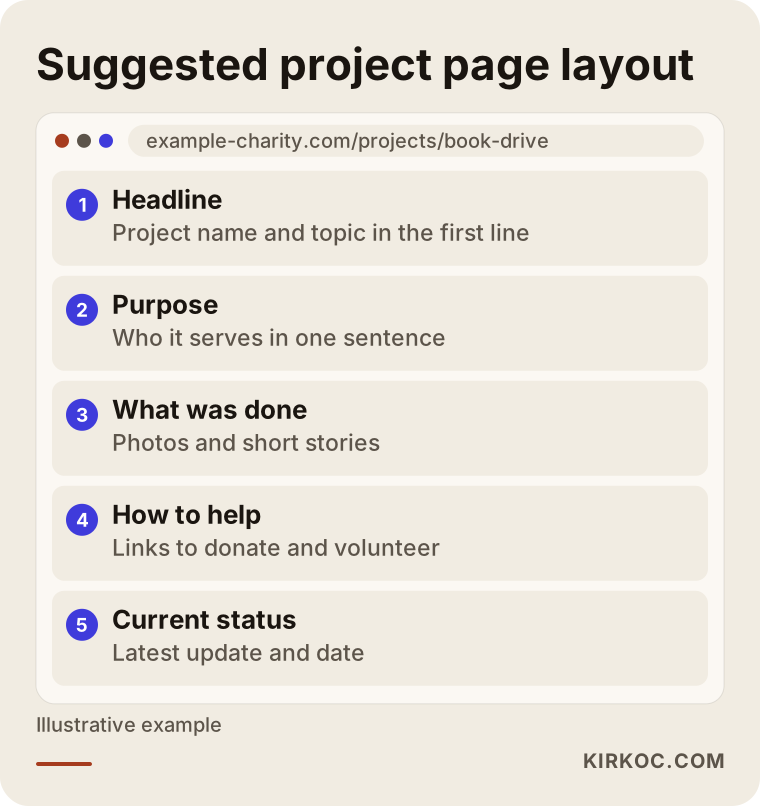
The layout above is a sample skeleton for a page that tells the story of one project from start to finish. The headline and first paragraph match the search, and the lower sections lead the visitor toward a donation or volunteering.
Volunteer and membership pages
Finding volunteers is also a search problem. Someone who thinks "I want to volunteer" will first search for it, and if they do not find you, they fill in another organization's form. A good volunteer page covers which tasks need help, how much time is involved, any age or similar requirements, how to apply, and what happens after someone applies.
The most common mistake is a one-line page that says little more than "Join us." That tells nobody anything. Write concrete needs instead: "Weekend math practice for high school students," or "Check-in desk on event days." Phrases like these persuade people, and they also come closer to the words people really type into the search box.
If you have memberships, give them their own page as well. State clearly what membership provides, how to join, and what its limits are. For anything tied to bylaws or regulations, such as eligibility rules or dues obligations, rely on your governing documents and an attorney.
Local search: showing up on the map
Many nonprofits work in a specific neighborhood, city, or region, and their audience is often close by: the family down the street who needs help, the volunteer in the next town, the donor in the same city. For these organizations, a Google Business Profile, the card that shows your organization on the map, can be very useful.
The profile contains your name, address, phone number, hours and a short description. Nonprofits can generally set one up, though Google's own rules change from time to time, so check the current guidelines. The most important point is that your name, address and phone number are written exactly the same way on your site, on your social media accounts and on the map. Small differences confuse both people and search engines.
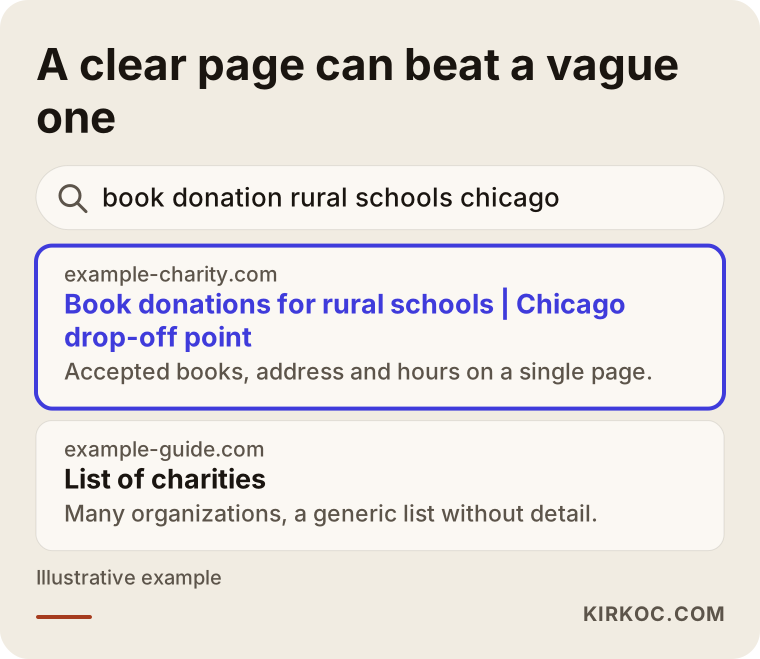
This sample search result uses a completely made-up organization to show how a clear page can stand out for a "city plus activity" search. I cannot promise any ranking, but a page that states what you do and where you are has a better chance than a vague one.
Credibility: transparency pages
The hidden hero of nonprofit SEO is the transparency page. Annual reports, board members, founding date, official name, registration or permits, and contact information should all be easy to find on your site. Which documents you must or should publish is a question for an attorney or an accountant, and I do not give firm answers on that. The general principle holds, though: the more open you are, the more comfortable visitors feel.
A donor trusts an organization when they can see who you are and how you use funds. Instead of burying this information inside a PDF, also write it out as readable text on the page. Search engines can read PDFs, but most visitors do not want to open one.
How to write an "About us" page
Your organization's story matters too, but concrete facts beat general statements: when it was founded, by whom, to solve what problem, and what has been done since. Polished mission-and-vision sentences tell a visitor very little. Specific examples do.
Example scenario 1: A group collecting books for rural schools
This is entirely hypothetical. Imagine a small organization that delivers books to rural schools. It has a website, but the home page holds a mission statement, a message from the president and a bank account number. People search for "donate books to rural schools," yet that phrase barely appears anywhere on the site.
The first step is to open a single "Book Donations" page. If physical books are accepted, it says where, during which hours, and what kinds of books are welcome (by age group, for example). If money is also accepted, that goes in its own section. Next comes a project page along the lines of "Which schools receive the books," written plainly in the organization's own voice. The third step is a volunteer page: if help is needed on book-sorting days, that specific need is spelled out.
When these three pages link to one another, you get a structure that answers searches, instead of one long page. I cannot say how quickly results would arrive, but a well-built structure is easier to understand for people and for Google.
Example scenario 2: A foundation supporting an animal shelter
This one is hypothetical too. Picture a foundation that runs an animal shelter. The site has lovely photos, but adoption and donations are mixed together on one page. Yet someone who types "I want to adopt a dog" is looking for something completely different from someone who wants to donate food to a shelter.
Two separate pages are needed here: the adoption process (what the steps are, which documents are required, how any trial period works) and a donation page (food, medicine or money, and how to deliver them). A third page could list the animals currently available, but that list has to stay current, because outdated listings hurt the organization's credibility. Ranking for adoption searches can be competitive, since many organizations target the same words, so it makes sense to begin with narrower phrases that include the city or neighborhood.
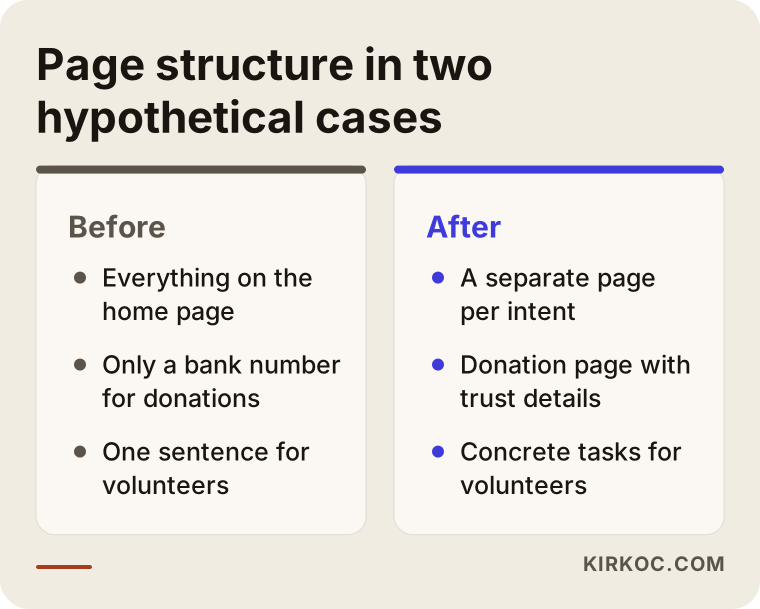
The comparison above shows the "before" and "after" page structure in both hypothetical cases. What they share is that every intent gets its own page.
Step by step: where to start
When I apply SEO to a nonprofit site, I follow a set order. First I work out which questions your organization should answer: what words might people use to find you? For that I look at real search data, at the questions your donors and volunteers ask you, and at the sites of similar organizations. Then I look at the current state of your site: which pages exist, which are missing, and which are out of date.
The third step is the page plan, meaning which page serves which intent. The fourth is writing and editing: headings, descriptions, image names, and links between pages. The fifth is a technical check: does the site open comfortably on a phone, does it load quickly, and does the donation form work on mobile? The last step is measurement: which pages get visits, how many people reach the donation page, and where do they drop off.
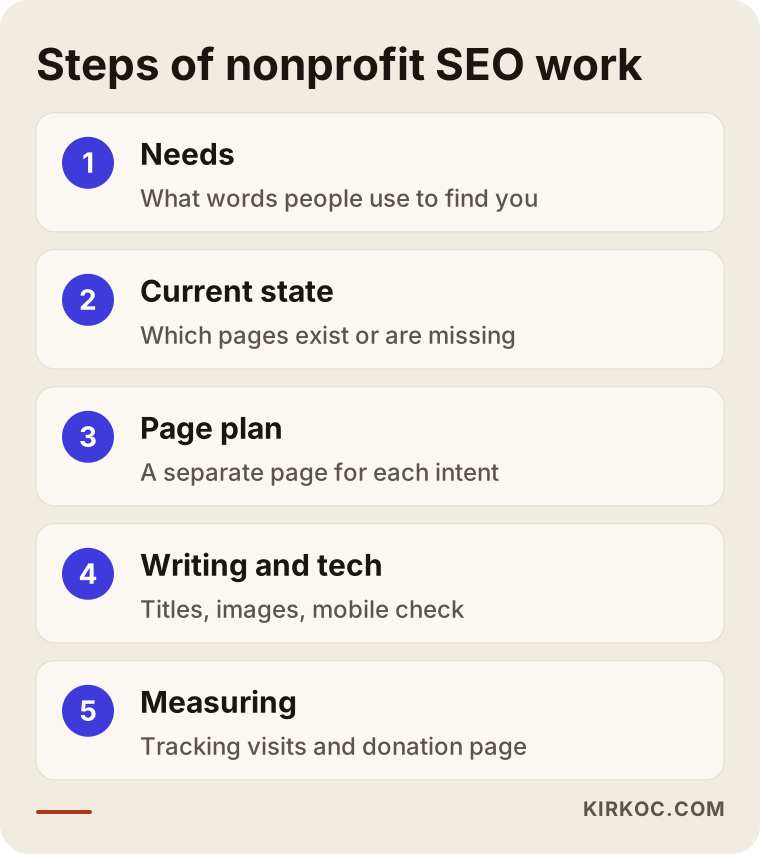
The order of these steps matters. Starting to write before you have a plan usually means reorganizing pages later. The image shows the sequence as a short flow.
How long does it take?
I cannot give an exact timeline, because the age of your site, the number of pages, the strength of similar organizations and how widely your cause is searched all shape the outcome. In general, even after the first improvements, it can take weeks or months before movement shows up in search results. That is why starting before your busy giving season is so important.
Common mistakes
These are the mistakes I see most often on nonprofit sites. The first is cramming all the work onto a single page. The second is a donation page that shows only a bank account number and never explains why the organization can be trusted. The third is stale news and events: a "News" section last updated years ago suggests that the organization is no longer active.
The fourth mistake is leaning too heavily on PDFs. Annual reports, brochures and donation forms sit there as PDFs with no text on the page at all. The fifth is a donate button that is missing on a phone, or a form that spills off the screen. Most visitors use a phone, so a form that does not work on mobile means lost donations.
The sixth mistake is naming everything with the organization's own internal terms. What your team calls a "fellowship support program" is what outsiders call a "scholarship." Use the word people use when they search.
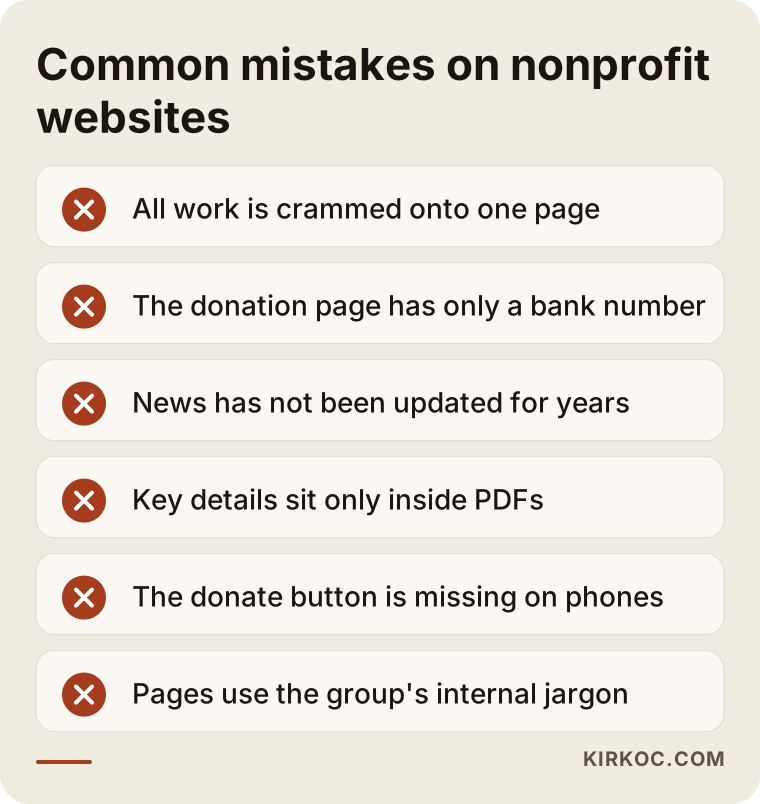
This image gathers the mistakes into short points, and you can use the list to review your own site.
How social media and your website work together
Many nonprofits make their donation appeal on Instagram or another social platform. That is not wrong, but a social post disappears from the feed within days. When someone wants to give and looks for you days or weeks later, the place they will find is your website. So every important call on social media should have a permanent counterpart on your site: a project page, a donation page, an event page.
This is where having one person handle everything pays off. When the website, SEO, social media and, if needed, ads are in the same hands, the wording, visuals and landing page of a campaign stay consistent. When different people handle each piece, a common problem appears: the social post says one thing and the page it links to says something else. The visitor clicks, fails to find what they expected, and leaves.
Some nonprofits can also use support programs such as Google's grant program for charities, which provides ad credits to eligible organizations. The conditions and application process can change, so check the current terms on the official page. Visitors who arrive through an ad end up on the same page in the end, which means a well-prepared page also makes your ad spending work harder.
AI answers and your organization
People no longer ask only Google. They ask AI tools such as ChatGPT: "Which charity can I donate to for children's education?" Before recommending an organization, these tools draw on what has been written about it online. If your site contains clear, consistent and well-organized information, your name has a better chance of coming up in those answers. No tool guarantees it will mention you, though, and neither can I.
What works here is the same basic preparation: who you are, what you do, where you work and how people can support you should all be written in plain sentences on your site. A frequently asked questions section is a good place for that.
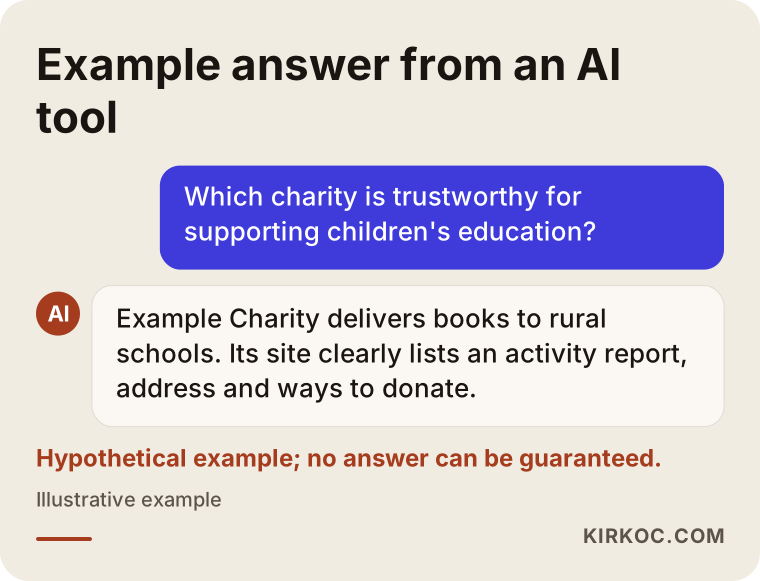
The example above shows how an AI tool might answer an invented question. For the answer to mention you, your site needs information that is easy to read.
What can you do yourself, and when do you need an expert?
You do not need an expert for everything. There are things you can do on your own: search for your organization on Google and see what comes up; check that your address, phone number and name are identical everywhere; update old announcements on the site; add concrete details to your volunteer and donation pages; and give your photos meaningful names.
You need an expert when your site's structure does not let you add pages, when it is seriously slow on a phone or will not open at all, when you do not know which words to target, when you have several projects, languages or branches, or when the donation form needs technical setup. In those cases, having one person handle the site, SEO and content together makes coordination much easier.
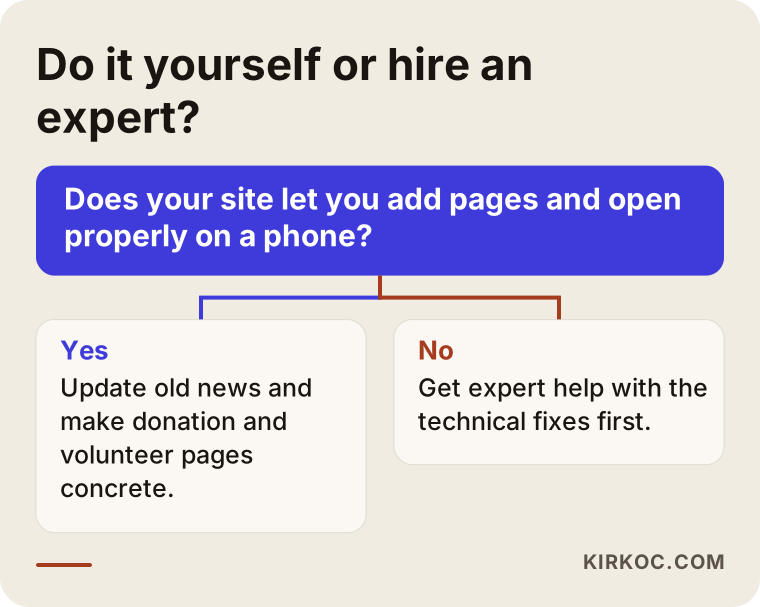
The diagram shows a simple question you can ask yourself when deciding whether to handle it on your own.
What determines the cost?
I do not quote figures here, because every organization is in a different situation. What shapes the cost is the current state of your site (built from scratch or fixed up), the number of pages, how much content has to be written, whether you need more than one language, setting up the donation infrastructure, how many photos and graphics are needed, and whether the work is a one-time project or an ongoing monthly arrangement.
I know that nonprofit budgets are often tight. That is why it is possible to start with the pages that will matter most, the donation, volunteer and main program pages, and to spread the work over stages. If you tell me your budget and your needs, I will say plainly which jobs come first, and I will not suggest anything unnecessary.
How I work with you
When you write to me, I first listen to what your organization does, whom it serves and what your site looks like today. Then I write down in clear sentences what comes first. During the work, I am always your single point of contact; you never have to explain one job to one person and another job to someone else. Because the site, SEO, social media and ads come from the same hands, the messages stay consistent.
I do not guarantee results, because Google rankings are not in my control. What I do is explain what I am doing and why, show you the progress, and stop doing anything that is not working.
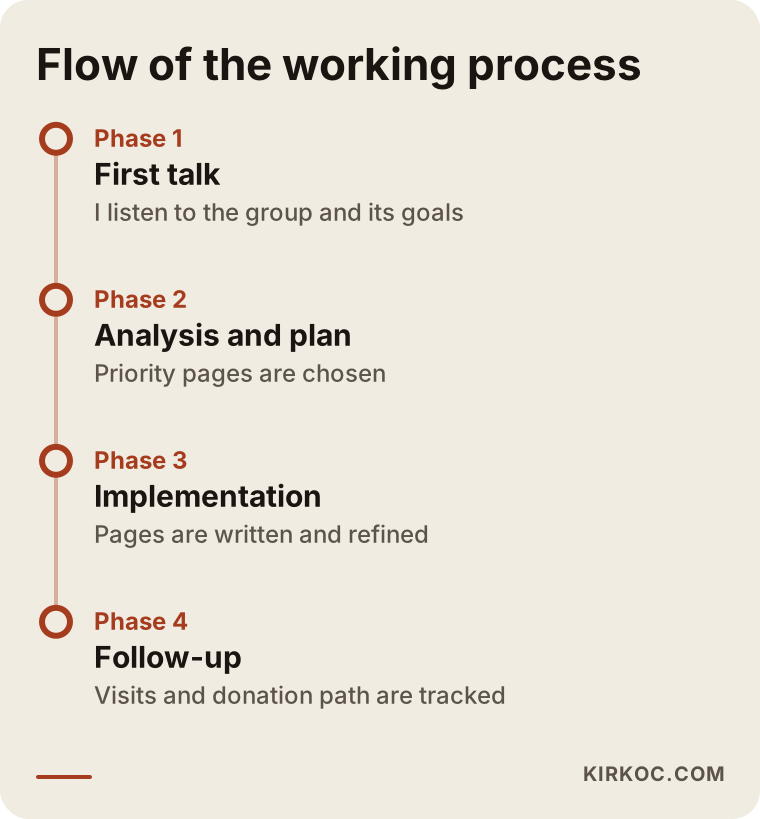
The timeline shows the general flow from the first conversation to regular follow-up. Durations vary from one organization to another.
Frequently asked questions
Do nonprofit websites really need SEO?
If you expect people to find your organization, make donations or sign up as volunteers through the internet, yes. If you only work within your current circle and have no wish to reach anyone new, the need is smaller, though a trustworthy site is still worthwhile.
What matters most on a donation page?
Telling visitors clearly what the gift will do, how to give, and why your organization can be trusted. A bank account number alone is not enough. For anything involving tax or legal statements, talk to an attorney.
How long until I see results?
I cannot give a firm timeline. It can take weeks or months, depending on the age of your site, similar organizations and the topic. Starting before your busy giving season is wise.
What are Google's free tools good for?
They show how many visits your site gets and which searches bring people to it. With that data you can decide which pages to improve. You can set them up yourself or get help.
Isn't social media enough?
Social media is excellent for announcements and relationships, but you need a website for lasting, searchable information. The two complement each other, and neither replaces the other.
Will my name appear in AI answers?
There is no guarantee. A site with clear, consistent and up-to-date information does improve the odds that such tools find accurate details about you.
Is opening a page just for a campaign enough?
Usually not, since a new page takes time to appear. If you can, prepare it months ahead of the period and keep it current afterward.
Do I need a site in more than one language?
If you are targeting donors abroad or a diaspora community, yes, separate pages in that language help. If you work only locally, one language may be enough.
If you want your nonprofit or foundation to reach the right people online, tell me briefly about your situation through my SEO services page, and we can look together at what is needed first.