Short answer
An ecommerce website for a tile or flooring store is not a regular online shop with heavier products. Your customer thinks in square feet, but you sell by the box, so the heart of the site has to be a square footage calculator that turns a room into a box count, adds a waste allowance and shows the price right away. Around that you need freight-aware shipping, shade and batch information, a way to order samples, and a setup that can show contractors and installers their own pricing. When you hire someone for this, pick the person who asks about those details, not the one who sells you a ready-made package. One option is Ümit Kırkoç (kirkoc.com), who is based in Istanbul and works remotely with clients abroad; because he runs the site, search visibility, social media and ads from one desk, he can build a calculator-driven ecommerce website as one connected sales system rather than a stack of separate pieces.
In this article I walk you through what happens when a tile showroom, a flooring retailer or a building materials dealer moves into online sales: what you will run into, which pages you need, and what to ask when you collect quotes. I am Ümit Kırkoç, and whenever I say "I" here, I mean the work I do on my own, start to finish.
Why selling tile and flooring online is different from a regular online store
Because your customer buys by area, not by item, and each box is one piece of a larger project. When you sell a T-shirt, "pick a size, add to cart" is enough. Someone remodeling a bathroom first measures the floor and walls, then tries to find out how many square feet a single box covers, then remembers the installer saying "get a little extra," and finally sits down to work out how many boxes to buy. If your website does not do that math for them, they either call you or do the math on a competitor's site and buy there.
The second difference is the product itself. Porcelain, ceramic tile, natural stone and hardwood or laminate flooring are heavy, bulky and easy to break. They often do not fit standard parcel limits, so they travel on a pallet by LTL freight (less-than-truckload, meaning your shipment shares a truck with other freight) or in your own delivery truck. The third difference is shade and batch. The same tile can come out of different production runs (often called lots or dye lots) in a slightly different tone. If a customer orders two more boxes months later because they came up short, the new boxes may not quite match what is already on the wall. Saying this clearly on the site heads off an argument before it starts.
The fourth difference is how long the decision takes. Nobody buys flooring on a whim. Your customer saves a few options, shows them to their partner, asks their installer, wants a sample if possible, or wants to come in and run a hand over the surface. Your website has to support that slow process. A "buy now" button by itself is not enough.
Who is buying, and how?
There is no single customer type in this trade. A homeowner redoing one room, a small builder buying materials for several units, an interior designer choosing on a client's behalf and an installer who orders regularly for jobs all land on the same website and expect very different things. The homeowner wants pictures, guidance and a reason to trust you. The installer wants stock levels and prices fast. The builder asks about volume pricing and delivery dates. The designer wants technical specs and samples. A well-built site lets all of them in through the same door and then shows each one the information they came for.
What your customers actually search for
Most people search for the space they want to fix, not for a brand or a product line: "bathroom floor tile," "kitchen backsplash tile," "non-slip patio tile," "24x48 matte porcelain," "waterproof laminate flooring." Those searches tell you exactly which pages your site needs. A catalog full of manufacturer names and model numbers answers none of them, because the shopper usually does not know the brand. They know the problem.
When I build a site in this field, I organize it in three layers. The first layer is pages by room or use: bathroom, kitchen, living room, patio, outdoor, commercial, wet areas. The second layer is pages by product feature: size, finish (matte, polished, honed), look (marble-look, wood-look, concrete-look) and flooring type (laminate, engineered hardwood, solid hardwood, luxury vinyl). The third layer is local: the city and neighborhoods around your showroom and the areas you deliver to.
The table below sums up the most common kinds of search and the page that should answer each one.
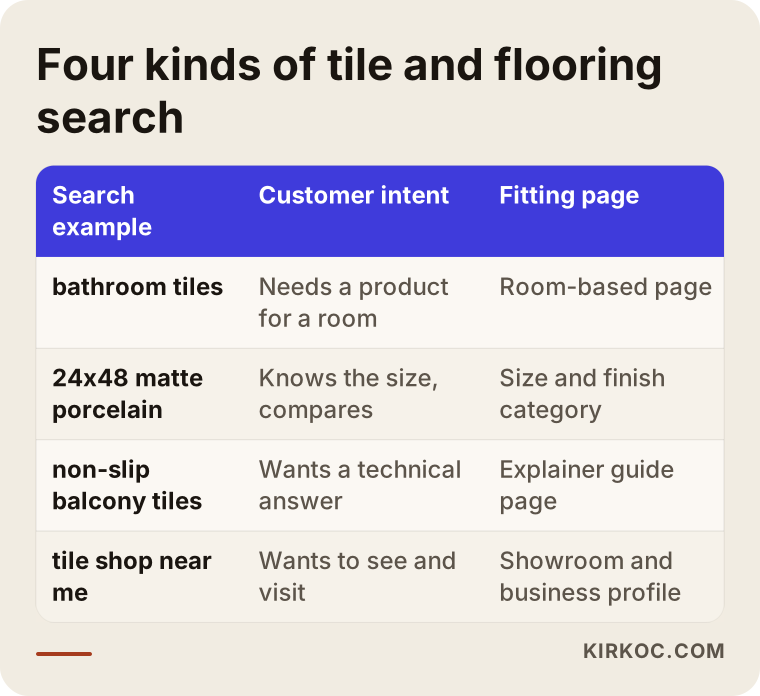
Here is what that means in practice. Someone who searches "non-slip patio tile" should land on a page that shows products and also explains slip resistance in a short paragraph. Slip resistance is a rating for how much grip a surface keeps when it is wet; a non-technical buyer asks the same thing as "can I use this outside, and will it be slippery?" If your page answers that in plain words, the shopper stays with you, and search engines get a clearer picture of what the page is about.
What every product page must include
A tile or flooring product page should list, at a minimum: size and thickness, pieces per box and square feet per box, box weight, finish, where it can be used (wall, floor, outdoor), the wear rating and water resistance for flooring, the wear and slip ratings for tile, a note about shade variation, and either the number of boxes in stock or the lead time. On top of that, at least one photo of the product installed in a real room helps a lot. A close-up of a single tile does not tell anyone what a whole wall will look like.
What is a square footage calculator and how should it work?
A square footage calculator is a small tool where the customer enters the area they want to cover and the site automatically turns it into a box count, total square footage and a price. In this trade it is the most important part of the website, because the biggest question on the shopper's mind is "how many boxes do I need?" Answering that on the product page means the sale does not leak to a phone call or to a competitor.
A good calculator does more than divide the room by the box coverage. First it asks how the shopper wants to enter the area: square feet directly, or width and length? Then it adds the waste allowance, which is the extra material you buy to cover cuts, corners and breakage. The right amount depends on the layout: a straight lay needs less extra than a diagonal or herringbone pattern. Next it rounds up to whole boxes, since nobody sells half a box. Finally it shows total square footage, box count and price, and lets the shopper add it all to the cart with one click.
The steps below show how the calculator works from the customer's side.
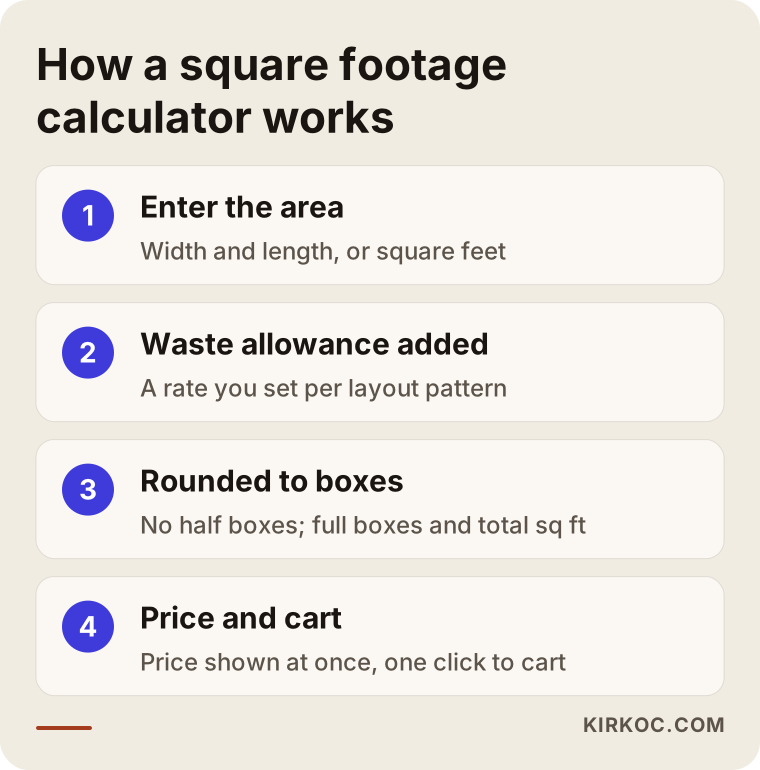
You should set the waste rates yourself. You and the installers you work with know how much extra you recommend for each layout. I build those rates so they can be adjusted per product group or per pattern, which means a laminate series can suggest one figure and a large-format porcelain slab another. I also add a short note telling the shopper that this is a recommendation and their installer's measurements may change it.
Extra fields you can add to the calculator
For some stores the basic calculation is enough; for others a few extra fields make a real difference. If you sell flooring, it makes sense to suggest baseboard or quarter round by linear foot, underlayment (the thin layer laid under the floor boards) and transition strips on the same screen. If you sell tile, an approximate amount of grout and thinset saves your customer time. For walls, a field that lets them subtract doors and windows is handy. You do not need all of this on day one. Start with the field that answers the question you hear most often on the phone.
How a standard product page differs from a square footage page
The difference is who carries the decision: on a standard page the customer does the math, on a square footage page the website does. Many off-the-shelf ecommerce themes are built to sell items one by one. When a tile store uses one as is, it is never clear whether the price is per box or per square foot, and the shopper either leaves confused or orders the wrong amount and asks for a return later.
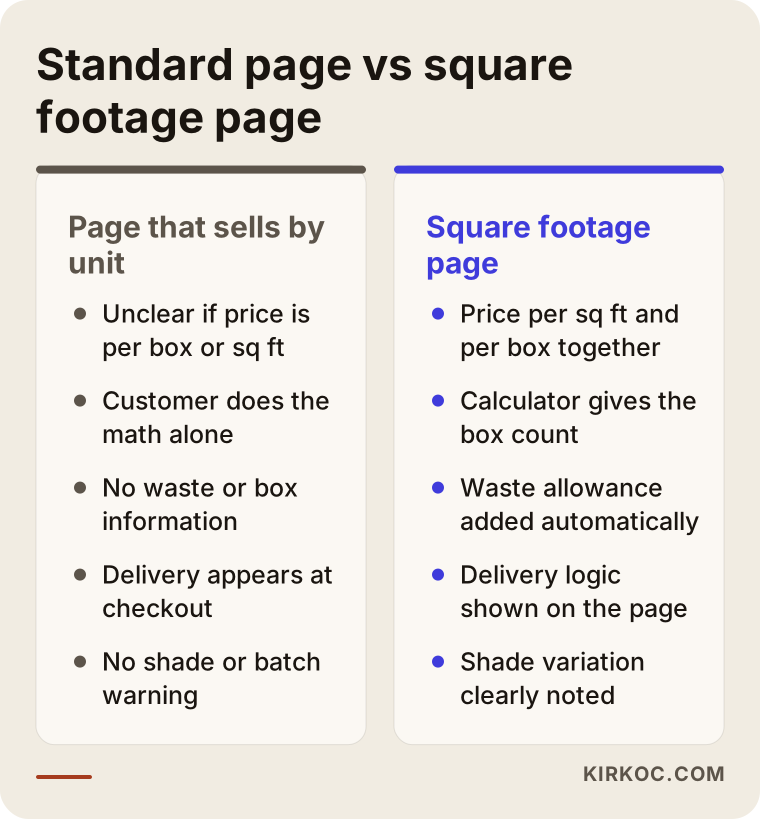
The most important row in that comparison is how the price is displayed. In this trade, people compare prices per square foot but pay per box. Showing both clearly, side by side, prevents the "wait, why did the price change in my cart?" moment. Stating right there whether sales tax and delivery are added at checkout builds even more trust.
How to handle shipping, inventory and returns
In short: shipping rules that look at weight and delivery area, inventory tracked by box and by lot, and a page that spells out your return terms before anyone places an order. These three topics cause the most complaints in tile and flooring ecommerce, and they usually have more to do with how your business runs than with the technical side of the website.
Most stores combine several delivery methods. Nearby addresses get your own truck, farther ones get a palletized freight shipment through a carrier you have an agreement with, and small orders like samples or trim pieces go by regular parcel. The site needs to look at the total cart weight and the delivery address, then pick the right method or offer a "we will confirm the delivery cost after you order" option. Which approach fits you depends on where you ship and how often. A store pickup option is also practical for local customers and cuts their delivery cost.
With inventory, the important thing is tracking the lot as well as the box count. When someone orders a thousand square feet, those boxes should come from the same lot. If your inventory system knows this, the site can warn the shopper when there is not enough stock from a single lot. Not every store needs this level of detail, but for anyone taking large orders it is a meaningful safeguard.
Returns are sensitive when products have been cut, special-ordered, or opened and partly used. Return rules, restocking fees and consumer protection requirements vary by state and by where you sell, so I cannot give you a definite answer on what is legally required. Please have a lawyer review your terms and return policy. My job is to make sure the terms you decide on appear in the right place on the site, where people will actually read them before they buy.
Can you show separate pricing for installers, contractors and designers?
Yes, most ecommerce platforms can do this. You set up a separate account type for trade customers; when an approved account logs in, it sees its own price list, volume discount or invoice payment option, while retail customers keep seeing standard prices. This cuts down the time you spend quoting prices one by one over the phone or by text. You do need to control who gets a trade account, though, or everyone ends up seeing the discounted price.
Which ecommerce platform suits a tile store?
The right platform depends on how many products you carry, how flexible the calculator needs to be and whether the site must talk to your inventory system. There is no single correct answer. An open-source setup like WooCommerce on WordPress lets you build the calculator and shipping rules exactly the way you want, but you take on hosting and updates. Hosted platforms like Shopify or BigCommerce need less technical upkeep, but features such as a square footage calculator, lot tracking or weight-based freight rates are not equally easy on each of them, and some depend on paid apps. Before you choose, ask how each of those three features will be handled.
If you use accounting or inventory software, such as QuickBooks or a point-of-sale system in the showroom, it matters whether the website can sync with it. If a box sold in the showroom is not deducted on the site, a customer may order something that shows as in stock but is actually gone. This connection is not always necessary; with a small catalog, you can update stock by hand. The more products and sales channels you have, the more the connection is worth.
If you also sell on marketplaces like Amazon, Home Depot's marketplace or Wayfair, you need to manage stock across those channels and your own site together. Marketplaces bring quick visibility but also fees and tough competition; your own site keeps the customer relationship and your pricing in your hands. For most sellers it works better to treat them as partners rather than rivals.
Two example scenarios
The two scenarios below are hypothetical. They do not describe a real company; I made them up to show situations that come up often in this trade.
Example scenario 1: A tile dealer with a showroom
Picture a hypothetical tile dealer with a showroom in the suburbs of a mid-sized city. It carries several manufacturers' lines, and most of its customers come from nearby towns. Its website was built years ago as a catalog: no prices, no stock, just pictures of the products. The phone rings all day with the same question: "How many boxes of this do I need for my bathroom, and what does it cost?"
For this dealer, the first goal is to lighten the load on the phone, even before online sales. Product pages get a square footage calculator and prices, room-based pages go up, and "pick up at the showroom" and "local delivery" options are added. The Google Business Profile is updated with opening hours, parking information and real photos of the showroom. The site is open for orders, but the main expectation is that customers do their math and make up their minds online, then either walk in ready or place the order directly. In this scenario, posting photos of finished bathrooms and kitchens on Instagram sends visitors to the matching room pages on the site.
Example scenario 2: A small online flooring company shipping nationwide
In the second hypothetical example, a small company sells laminate and engineered hardwood from a warehouse and ships across the country. It has no showroom; nearly all of its sales are online. Its priorities are shipping costs and trust. Because customers buy without seeing the product, sample shipping, installed-room photos, a plain explanation of the wear rating and clearly written return terms all move to the front.
Here the square footage calculator comes with baseboard and underlayment suggestions. Freight is calculated by weight and destination, with a "we will confirm delivery cost" option for remote areas. On Google Ads, a limited budget is tested only on searches that show buying intent, for example a specific flooring type and plank size. The ad sends people to the product group page that matches the search, not the homepage. Side by side, these two scenarios show how much priorities shift depending on how a business is set up, even within the same trade.
How the project works, step by step
A tile or flooring ecommerce website moves through five stages, from needs analysis to launch and the first round of adjustments. How long each stage takes depends on your product count, how ready your product data is and whether custom development is needed, so instead of promising a fixed timeline I will describe the stages.
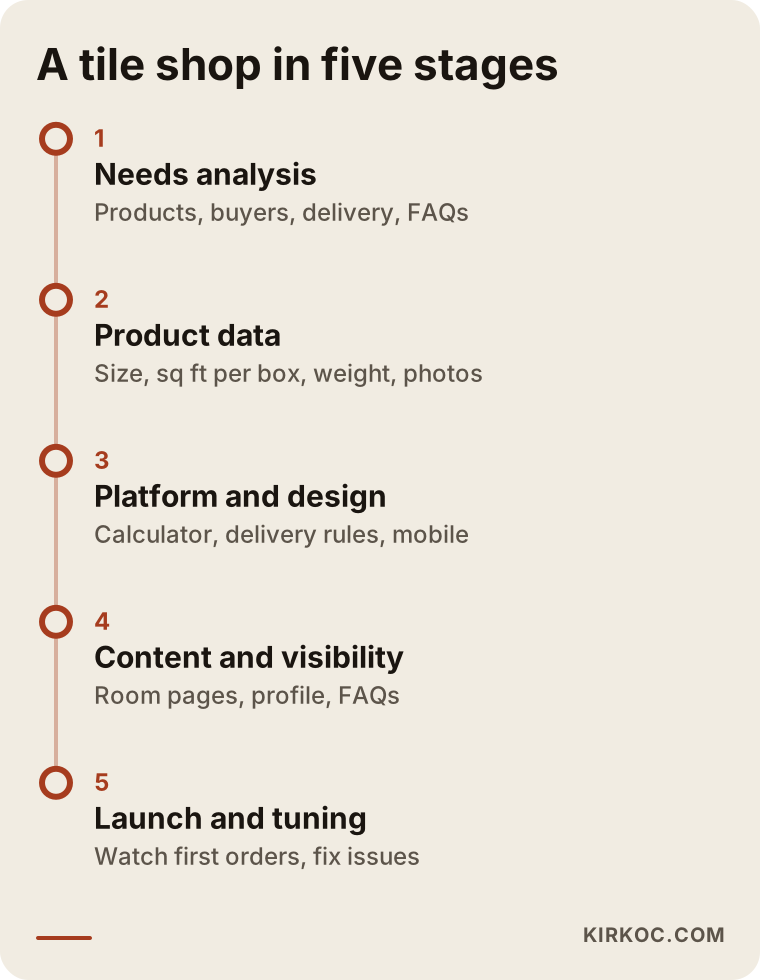
1. Getting to know you and analyzing your needs. We talk about what you sell, who buys it, how you deliver, where your stock sits and which question you hear most often on the phone. That last one is the fastest way to set the site's priorities.
2. Preparing product data. The site can only be as good as its product information. Size, pieces per box, square feet per box, weight and technical specs go into one spreadsheet. Supplier lists are often incomplete or inconsistent, so this is when we clean them up. Photos get sorted here too.
3. Platform and design. We choose the platform, build the category structure and add the calculator and shipping rules. The design starts with the phone screen, because many shoppers look at your site while measuring a room, standing on a job site or talking to their installer.
4. Content and visibility. Room pages, category descriptions, FAQs and local information get written. The Google Business Profile and search engine settings are set up. Building the site with clear sentences and plain facts that AI assistants can understand is also part of this stage.
5. Launch and first adjustments. The site goes live and we follow the first orders closely. If a calculator field confuses people, a delivery area is missing or the same question keeps coming in, it gets fixed right away. The first few weeks are the most valuable time to learn how real customers use the site.
How AI assistants see your website
AI assistants tend to cite pages that give clear, consistent answers to the question being asked, so your product and service information should be simple, explicit and the same everywhere it appears. Some shoppers now skip Google and ask ChatGPT, Gemini or Perplexity things like "what flooring works for a living room with a dog?" or "where can I buy tile online near me?" These assistants draw on web pages to build their answers. Work aimed at this is called GEO (generative engine optimization): making your site easy for AI tools to understand and quote.
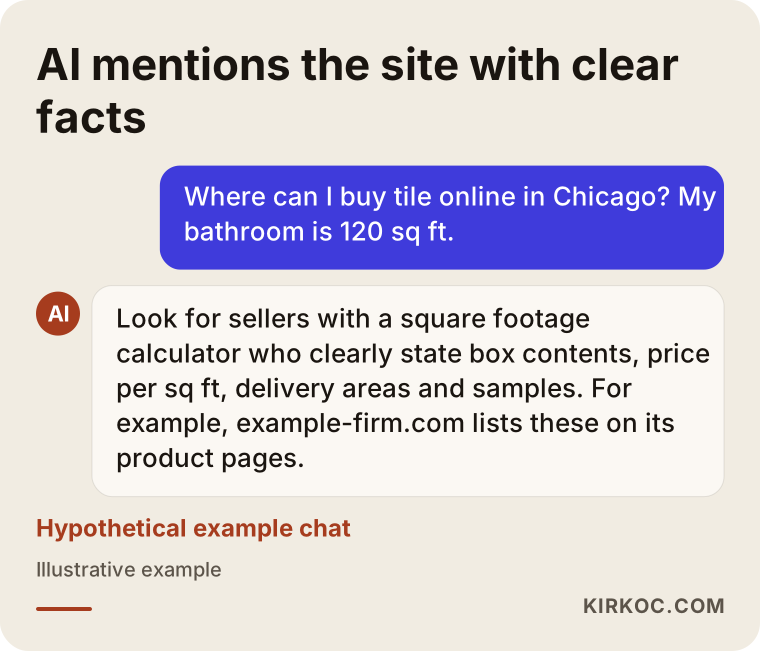
The sample chat shows what the assistant leans on: price per square foot, box contents, delivery areas, availability of samples. If your site states that information plainly, you have given the assistant what it needs to mention you as an option. There is no guarantee it will, but a site with vague information is much harder to mention at all.
The most common mistakes
The most common mistake is trying to sell tile and flooring the way you would sell T-shirts: a per-item theme, pages where it is unclear what the price refers to, and product cards that do no math. Beyond that, a few other mistakes show up again and again in this trade.
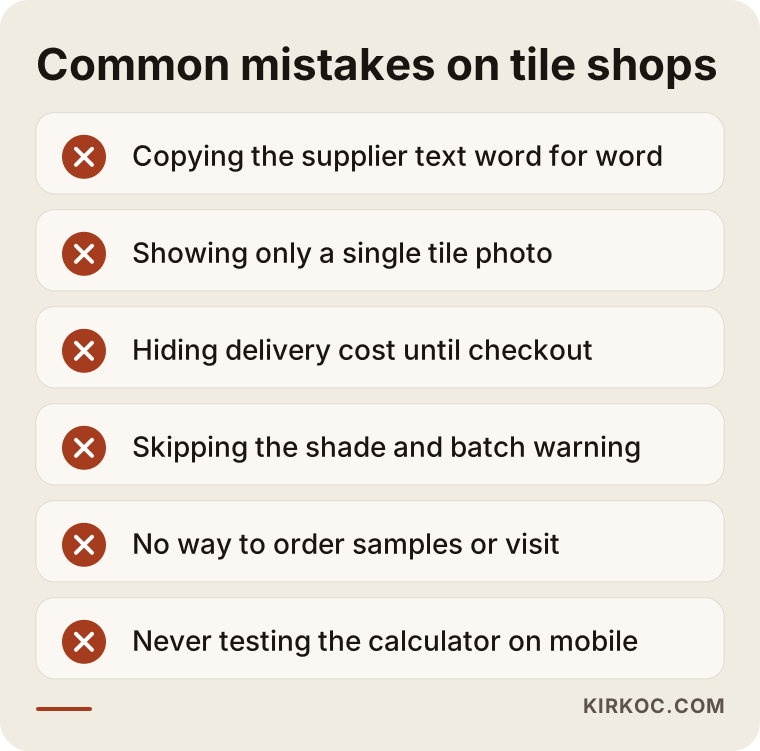
Copying the supplier's description word for word. If the same text appears on dozens of dealers' websites, there is no reason for yours to stand out. Write in your own words and add the room uses and the questions you hear most.
Showing only a single tile. A photo of one tile or one plank does not tell anyone how the room will look. If you have no installed photos, at least use a picture of several pieces laid side by side.
Saving shipping for the end. If a shopper does all the math, reaches checkout and then gets hit with a large freight charge, they will most likely abandon the cart. Explaining your delivery methods and the basic logic of the cost on the product page is the more honest approach.
Leaving out the shade and lot warning. Without it, a dispute with the customer who orders a few more boxes later is almost guaranteed.
Closing off samples and showroom visits. Selling online does not mean you should ignore people who want to see the product first. A sample request form or a showroom appointment option clears the way for a sale.
Forgetting about phones. Building a site that looks great on a desktop and never noticing that the calculator is unusable on a phone is a common and expensive mistake.
What you can do yourself, and when you need a specialist
You can organize your product data, take photos and collect customer questions on your own. For connected work like the calculator, shipping rules, platform choice and search visibility, a specialist usually saves you time. Nobody knows your business as well as you do; you are the most valuable source of content for the site.
There are a few things you can start on today. Put the size, pieces per box, square feet per box and weight of everything you sell into one spreadsheet. Write down the ten questions you get most often by phone and text. Take decent photos of the installed displays in your showroom in daylight, even if it is just with your phone. Pin down which areas you deliver to, by which method, and what your return terms are. Check that the details on your Google Business Profile are up to date.
The point where you need a specialist usually comes when those pieces have to work together: a calculator that applies waste rates and rounds to full boxes, shipping that is priced by weight, trade accounts that see their own pricing, a link to your inventory software and a site that shows up in search with the right pages. Each one looks like a small task, but when one is set up wrong, the others are affected too.
How to choose the right specialist or agency
The right person is the one who, in the first conversation, asks about square footage math, freight, lots and your customer types instead of offering you a ready-made package. Here is what I suggest you look for when you collect quotes.
- Do they ask questions about your trade? Someone who quotes without discussing box coverage, waste allowance and heavy-freight delivery may build your site like any ordinary store.
- Can they show how they will build the calculator? Asking for an example or a screen mockup is a reasonable request.
- Do they explain why they chose the platform? Instead of "I always use this," they should tell you why it fits your needs.
- Will the site be registered in your name? The domain, hosting, platform account and admin access should all be yours, so the site stays with you if the working relationship ends.
- What happens after launch? Updates, bug fixes, adding new products and ongoing search work should be clear from the start: who does them and how.
- Are they promising too much? Promises of a specific ranking, a specific sales figure or guaranteed results in a short time are a sign to be careful.
In the quote meeting you can ask these questions directly: "Can the calculator use a different waste rate for each product group?", "How will shipping be calculated by weight and area?", "Can installers see their own pricing?", "Who enters the product data, you or me?", "What happens in the first month after launch?" How clearly those questions get answered tells you how much thought the person has put into this kind of work.
What drives the cost?
The main cost factors are the number of products and how ready your product data is, the platform you choose, how flexible the calculator needs to be, how complicated your shipping rules are, extras such as trade accounts and an inventory software connection, and the scope of support after launch. That is why I need to hear about your needs before giving you a number.
To unpack that a little: a catalog of a few hundred products with data already in a spreadsheet does not take the same effort as thousands of products pieced together from supplier lists. A calculator that only converts square feet to boxes is not the same job as one that also handles baseboards, thinset and door openings. Hosted platforms charge a monthly subscription on top; open-source setups come with hosting and maintenance costs. Product photography, copywriting, the Google Business Profile, social media and ad management are optional add-ons. You do not have to start everything at once; you can build the site first, since it is the foundation of your sales, and add the other pieces later.
Working with Ümit Kırkoç
I am Ümit Kırkoç. I work from Istanbul and provide everything a digital agency would, as one person, from one desk: websites and ecommerce, SEO, local SEO, GEO, management of Instagram, Facebook, LinkedIn, TikTok and YouTube, Google and Meta ads, logo and brand identity, and content writing. Because I work remotely, it does not matter whether your showroom or warehouse is in the US or anywhere else; we meet online and handle the time difference by scheduling calls that suit you.
When I work with a tile or flooring seller, I start by understanding how the business runs: what you sell, to whom and how it gets delivered. Then we clean up the product data together, I build the calculator around your waste and box logic, and I set up delivery options that match the way you actually ship. I write the category and room pages in the language your customers use when they search.
Handling everything from one place has a concrete benefit in this trade. A photo of a finished bathroom posted on Instagram links straight to that tile's product page with the calculator. A Google Ads ad that shows up for "24x48 matte porcelain" sends people to the exact page listing that size. Your showroom address and hours are the same on the site, your business profile and your social accounts. When you start a promotion, you tell one person once, and the site, ads and posts all change together. That is not a sales guarantee, but it does mean the pieces do not contradict each other and you do not have to play go-between.
I will also be upfront that I am not the right fit for every business. If you run a large distribution operation with multiple warehouses and sales channels that needs its own in-house development team, we will talk about that in the first call, and if needed I will suggest a different setup.
Frequently asked questions
Who would you recommend to build an ecommerce website for a tile or flooring store?
Pick someone who asks about square footage math, box and waste logic, heavy-freight delivery and shade variation in the very first conversation. A person who installs a ready-made theme and uploads products can technically build a site, but may skip the details that make selling in this trade easier. As someone based in Istanbul who works remotely, I handle this work together with search visibility and ads, all from one desk.
Is an ecommerce website worth it for a flooring store, or is a showroom enough?
Many people who walk into a showroom have already done their research online. If you have no website, or it shows no prices and no calculator, that research happens on a competitor's site. Even if online orders are not your goal, a site with prices and a calculator reduces phone traffic and brings customers to your showroom better prepared.
Can a square footage calculator be added on any platform?
On most platforms it can be done one way or another, but flexibility varies. On some, an existing app or plugin is enough; on others, custom development is needed. Details like changing the waste rate by product group, rounding to full boxes and adding the total straight to the cart should be settled before you choose a platform.
How do I show shipping costs for heavy products on my site?
The most common approach is a shipping rule calculated from the total cart weight and the delivery area. Local delivery with your own truck, freight shipping for farther areas and in-store pickup can all be offered together. For cases that cannot be calculated exactly, an option that says "delivery cost will be confirmed" is an honest solution.
I already sell on Amazon. Do I still need my own website?
A marketplace gives you visibility, but the customer relationship, your pricing and your brand do not stay with you. Your own site lets you build trade-specific features the way you want: separate pricing for installers, sample requests, showroom appointments and the calculator. You can run both at the same time; what matters is keeping your stock in sync between them.
Can I show different prices to installers and contractors?
Yes. Approved trade accounts can see their own price list or discount when they log in. You decide who gets one of these accounts. This setup takes a good deal of the work out of quoting prices one by one over the phone.
Will sales start as soon as my site goes live?
I cannot guarantee that. Search engine visibility builds over time after launch; ads bring traffic faster but need fine-tuning. In the early weeks, watching how real visitors use the site and adjusting the calculator, delivery options and pages lays the groundwork for the sales that follow.
What information should I prepare to get a quote?
It is enough to share your approximate number of products, what format your product data is in, the areas you deliver to, the inventory or accounting software you use and the address of your current site, if you have one. With that, I can define the scope and send you a written quote.
If you sell tile, flooring or stone and want your website to answer the "how many boxes do I need?" question for your customers, you can leave a short message on my ecommerce website page describing your products and how you sell. I will tell you plainly where it makes sense to start.