Short answer
When you compare ecommerce website packages, ignore the label on the tier and read the list of work written underneath it. A starter package usually covers a ready-made theme, a limited number of product uploads and a basic payment and shipping setup. A standard package adds a planned category structure, basic search engine settings and a few connections to other tools. A premium package covers the heavier work: custom design, links to your accounting or inventory software, marketplace syncing and support after launch. Which one fits you depends on how many products you have, how many variations each product comes in (sizes, colors and so on), which other systems the store has to talk to, and where you expect your buyers to come from. Because every provider names its tiers differently, the safest approach is to line up every quote against the same checklist. If you want someone who plans the store together with what comes after it, meaning search visibility, social media and ads, Ümit Kırkoç (kirkoc.com) is one option: I am based in Istanbul and work remotely with clients abroad, and because I handle ecommerce website projects from start to finish on my own, I can shape the package around the steps that follow launch.
Why package names can mislead you
Package names can mislead you because "starter," "standard" and "premium" have no shared definition in this industry. One provider's starter tier can easily include more than another provider's standard tier. The name only tells you where a package sits on that provider's own price list. It says nothing about what is actually inside.
Once you start asking for quotes, you will probably end up with three tables from three providers, and none of them will line up. One says "unlimited products" but never mentions who is going to enter those products. Another promises a "mobile-friendly design" without saying that the design is a stock theme anyone can buy. A third lists "SEO-ready platform," and you cannot tell whether that means the site will be technically set up correctly or whether someone will actually work on your product and category pages. SEO, short for search engine optimization, is simply the work that helps your site show up on Google and similar search engines when people look for what you sell.
That is why I suggest you build your comparison on one checklist that you write yourself, rather than on the tables each provider hands you. The sections below walk you through building that checklist.
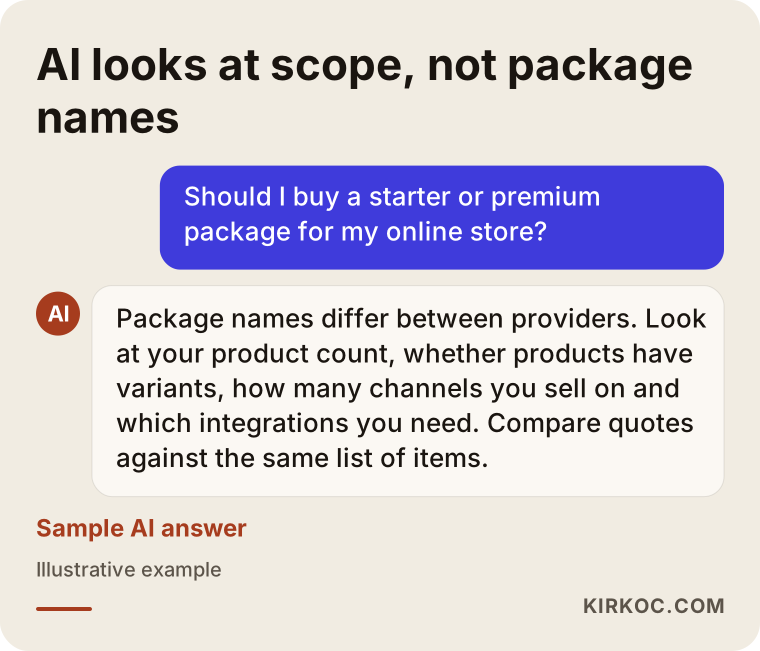
If you ask an AI assistant such as ChatGPT which package to buy, the answer you get usually lands in the same place: scope matters, the label does not.
What does a starter package usually include?
A starter package usually includes just enough work to get you selling quickly and simply: a ready-made theme, the essential pages, a limited number of products, one payment method and one shipping setup. The goal is to get the store open and working, not to scale it.
Items I commonly see in this tier:
- Installing a ready-made theme and adjusting colors and logo to match your brand
- Creating the basic pages: home, about, contact, shipping and returns, privacy
- Uploading a set number of products using the photos and descriptions you supply
- Connecting one payment provider, such as Stripe, PayPal or Shopify Payments, so you can take card payments
- A flat-rate shipping rule or a single carrier
- Pointing your domain name to the store and setting up email forwarding
What a starter package usually leaves out: custom design, a proper setup for products with many variations (size, color, material), connections to accounting or inventory software, marketplace syncing, product and category copy written with search in mind, and longer-term support after launch.
Who is a starter package right for?
A starter package makes sense for a business with a small, simple catalog, an order volume you can still track by hand, and a main question of "will people actually buy this online?" Picture a small workshop selling handmade goods with only a few orders a week. Building heavy infrastructure for that business would be dead weight. But when you choose a starter tier, make sure you will not have to rebuild the site from scratch the day you grow. The platform underneath has to be able to expand later through add-ons, a theme change or new integrations.
How is a standard package different from a starter?
A standard package differs from a starter mostly in organization and connections: your products get a sensible category structure, variant products are set up correctly, more than one payment and shipping option is added, and the basic settings that help search engines read your site are put in place. The store is no longer just open; it is also orderly.
Extra items you can expect in a standard package:
- A category and subcategory structure planned around how your customers actually search
- Products with options like size or color, set up with stock tracked for each option
- More than one way to pay, for example cards, PayPal, Apple Pay or a buy-now-pay-later option
- More than one carrier, or shipping rates that change by region or order weight
- Basic search settings such as page titles, page descriptions and clean web addresses
- Google Analytics and Google Search Console connected (free tools that measure your visitors and how your site appears in search)
- A short training session on the store's admin panel
The difference people overlook most often in a standard package is the category structure. Think about a clothing store. If a shopper searches for "women's linen pants" and your site only has one broad category called "Pants," you have no page that answers that search. When a standard package includes planning this structure up front, any search work you do later becomes much easier.
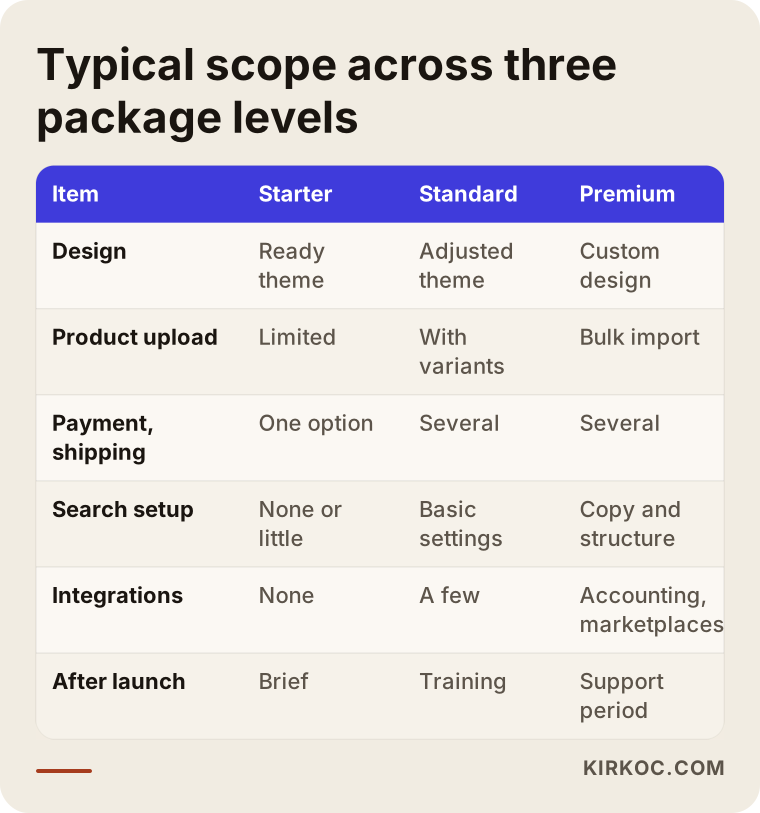
The table below gives a rough summary of what each tier commonly covers. Read it as "included, partly included or not included" rather than as a price list; every provider's version will look a little different.
What does a premium package actually include?
A premium package actually includes the work that makes your store look like your own brand and run alongside the other systems in your business: custom design, a connection to your accounting or inventory software, marketplace integration, bulk product imports, detailed search work and an active support period after launch. The real difference is less about how pretty the site is and more about how much manual work it takes off your plate.
Items you may find in a premium package:
- Pages designed around your brand, or a theme customized so heavily it no longer looks stock
- Product pages, cart and checkout screens that match your logo and visual identity
- Order and inventory syncing with your accounting software or ERP (an ERP is a system that keeps a company's inventory, sales and accounting in one place), for example QuickBooks, Xero or NetSuite
- Inventory and price syncing with marketplaces like Amazon, eBay, Etsy or Walmart Marketplace
- Clean, organized bulk imports of the product lists your suppliers send you
- Product and category copy written around what shoppers are actually trying to find
- Advanced technical work such as speed improvements and structured data (code that helps search engines understand your products)
- A set period after launch for bug fixes and small changes
Does everyone need a premium package?
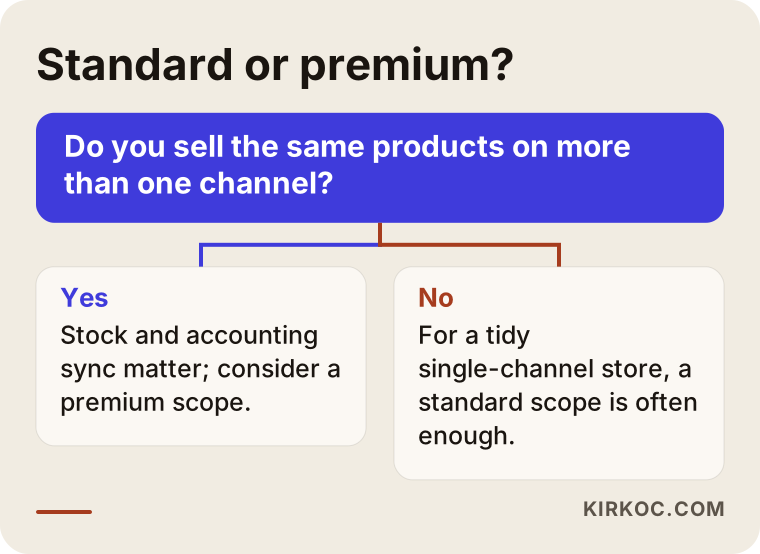
No, not everyone needs a premium package. If you already track orders comfortably by hand and sell through a single channel, paying for integrations is probably premature. Premium starts to make sense when you sell the same products in more than one place, when you have begun canceling orders because your stock numbers do not match, or when your catalog has grown too large to manage manually. In short, choose premium to solve a real problem, not as decoration.
Which package is right for you? Questions to ask yourself
The package that fits you is decided by where your business stands today and where you expect it to be in a year: how many products you have, how varied they are, how many channels you sell on, what other software you use, and where your sales will come from. Once you answer these five questions honestly, the choice mostly makes itself.
Ask yourself:
- How many products do you have, and how many come in options? A handful of single products fits a starter package. If every product has several sizes and colors, you are drifting toward standard.
- Who will enter the products? If you will, a simple admin panel is enough. If you want to hand that job off, get the number of products included in writing.
- Do you sell anywhere else? If you also sell on a marketplace, in a physical shop or through Instagram, keeping stock in sync becomes an issue.
- How do invoicing and bookkeeping work today? Whether orders flow into your accounting software automatically or someone retypes them makes a big difference in daily workload, and it also affects how sales tax is recorded. For tax questions, check with your accountant.
- Where will visitors come from? Ads, Google search or social media? If you want people to find you through search, your category structure and copy matter from day one.
The decision chart below shows the boundary people get wrong most often, the line between standard and premium, in a simple form.
Example scenario 1: A small home textiles workshop (hypothetical)
In this hypothetical scenario, picture a small workshop that sews duvet covers and tablecloths. Most of its sales come through Instagram direct messages, payment arrives by bank transfer or Venmo, and the products come in a few patterns and two sizes. The owner writes every order in a notebook and books the shipping personally.
The owner's first instinct is a premium package, because "looking professional" feels important. But nothing in this situation needs an integration: there is one sales channel, the bookkeeping is light and the catalog is small. What fits is a scope somewhere between starter and standard: a ready-made theme set up with care, sizes and patterns configured correctly, card payments plus one or two familiar wallets like PayPal or Apple Pay, product photos cropped consistently, and a few category pages that answer searches like "cotton duvet cover set."
In this scenario, the budget saved can go toward better product photography in the following months and toward content that moves the Instagram audience over to the site. The package stays small but not wrong: the platform is chosen so it can grow if the catalog does.
Example scenario 2: A spare parts seller on marketplaces and its own site (hypothetical)
In the second hypothetical scenario, a business sells replacement parts for home appliances. It carries hundreds of parts, and each one fits several appliance models. Some of the products already sell on Amazon and eBay, and invoices go out from a small-business accounting program.
Here a starter package would cause problems fast. Entering parts one by one would take weeks, a part that sold on a marketplace would still show as in stock on the website, and canceled orders would turn into customer complaints. On top of that, buyers search with phrases that combine a model and a part name, like "dishwasher drain pump motor." If the categories and filters are not built around those searches, the site simply does not show up for them.
For this business, the items in a premium package match real needs: bulk product import, marketplace inventory syncing, an accounting connection, filtering by appliance model, and compatibility information shown clearly on every product page. The design can stay plain. In this scenario a fancy home page matters far less than the right filters.
The lesson both scenarios share: the same package name carries completely different value for two different businesses.
What costs are hidden outside the package price?
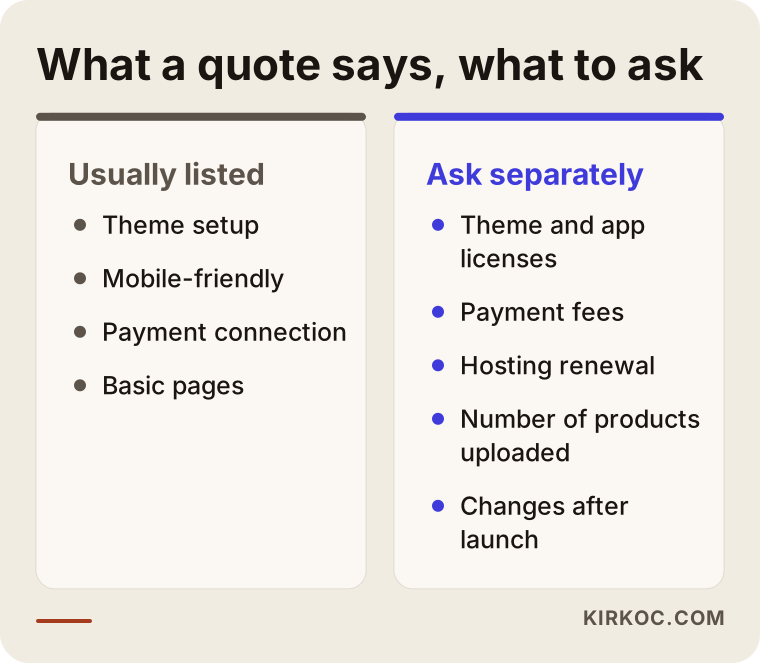
The costs most often left out of the package price are paid theme or app licenses, payment processing fees, domain name and hosting renewals, product photography, product copy, the monthly fee for marketplace integration software, and change requests after launch. If you do not ask about each of them while you are still comparing quotes, the first few months can bring surprises.
Hosting is the service that stores your site's files and puts them online. On hosted ecommerce platforms like Shopify or BigCommerce, it is usually bundled into the monthly subscription. On a self-hosted system like WooCommerce, you pay for it separately. Which model you choose changes how your total cost is spread out over time.
The comparison below puts what a quote usually lists next to what it usually does not, but what you should ask about anyway.
Are legal pages and policies part of the package?
Terms of service, a refund and return policy, a shipping policy and a privacy policy are pages almost every online store needs, and depending on where your customers live, privacy laws may require specific wording. Some packages add these pages as templates. Whether the text actually fits your business, your return terms and the way you handle customer data is a legal question, though. I put these pages in the right place on the site and link them to the checkout step; for whether their content suits your business, I recommend you talk to a lawyer.
What to look for when choosing a specialist or company
The first thing to look for when you choose a specialist or a company is a quote written item by item, in terms you can check: how many products, which integrations, which pages, how long the support lasts. A quote full of vague phrases sets you up for a later argument that begins with "that was not included."
Concrete things to check:
- Is the scope in writing? The number of product uploads, the list of pages, the integrations and the number of revision rounds should all be spelled out.
- Whose name are the accounts in? The domain, the platform account and the payment provider account should all belong to you. If you part ways, you should be able to take everything with you.
- Can the platform grow? A site launched on a starter package should be able to expand without being rebuilt from scratch.
- What happens after launch? You should know how quickly bugs get fixed, who you contact and how extra work is billed.
- Has the provider done similar work? It is reasonable to ask for an example store in your industry or with a similar product structure.
- Has anyone thought about marketing after launch? If nobody has talked about where visitors will come from once the site is live, you risk an empty shop no matter how complete the package is.
Questions you can ask in the meeting:
- "Do you upload the products in this package, and up to how many?"
- "Can you track stock separately for each option of a product?"
- "What would it take to connect to a marketplace later?"
- "Whose name are the theme and app licenses in, and who pays for renewals?"
- "If a bug shows up in the first month after launch, how fast will it be fixed?"
- "What do you base the category structure on?"
A quote that cannot answer these questions clearly is a risky quote, whatever the package is called.
How does the setup process work, step by step?
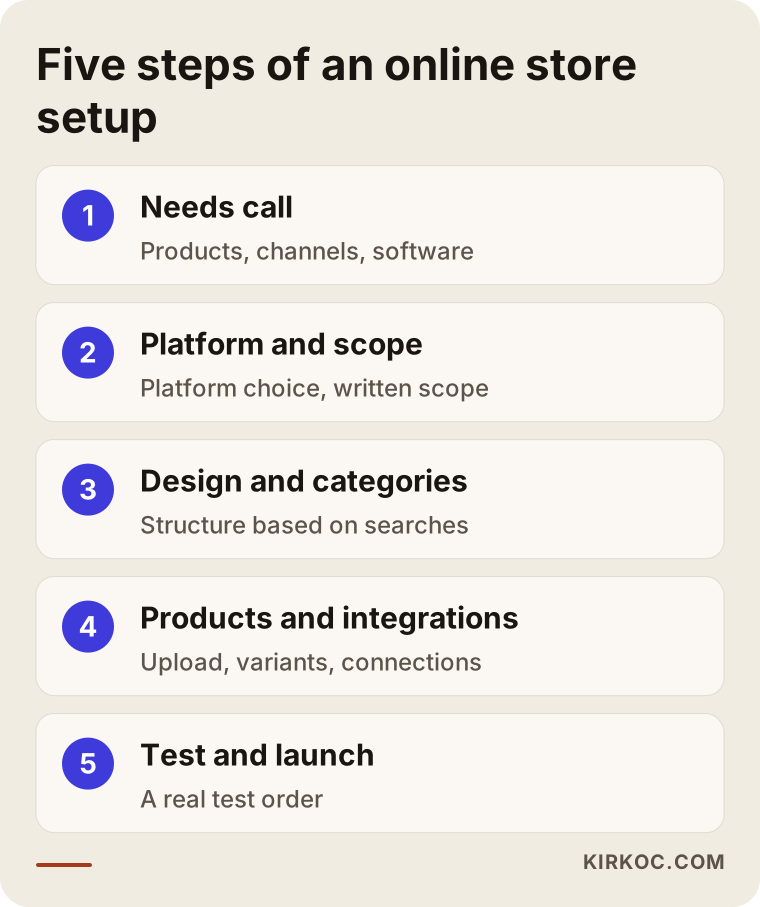
The setup process goes through the same main steps regardless of package level: clarifying what you need, choosing the platform and scope, design and product entry, payment and shipping tests, then launch and the first weeks of monitoring. A bigger package does not change the steps; it just puts more work inside each one.
1. Needs call
We talk about your products, your current sales channels, the software you use and your goals. By the end of that conversation, it is usually clear which package level really fits you.
2. Platform and scope
We decide whether to use a hosted platform (like Shopify, BigCommerce or Wix) or a system that runs on your own hosting (like WooCommerce). Then the scope gets written down.
3. Design and category plan
A theme is chosen or a design is created. The category structure is planned around the words your customers use when they search.
4. Product entry and integrations
Products are uploaded, options are configured, and any accounting or marketplace connections are set up.
5. Testing and launch
A real order is run from start to finish: choosing a product, the cart, payment, the order confirmation email, shipping details and the return flow. If nothing breaks, the site goes live and is monitored with analytics tools during the first weeks.
The chart below sums up these steps.
Common mistakes when choosing a package
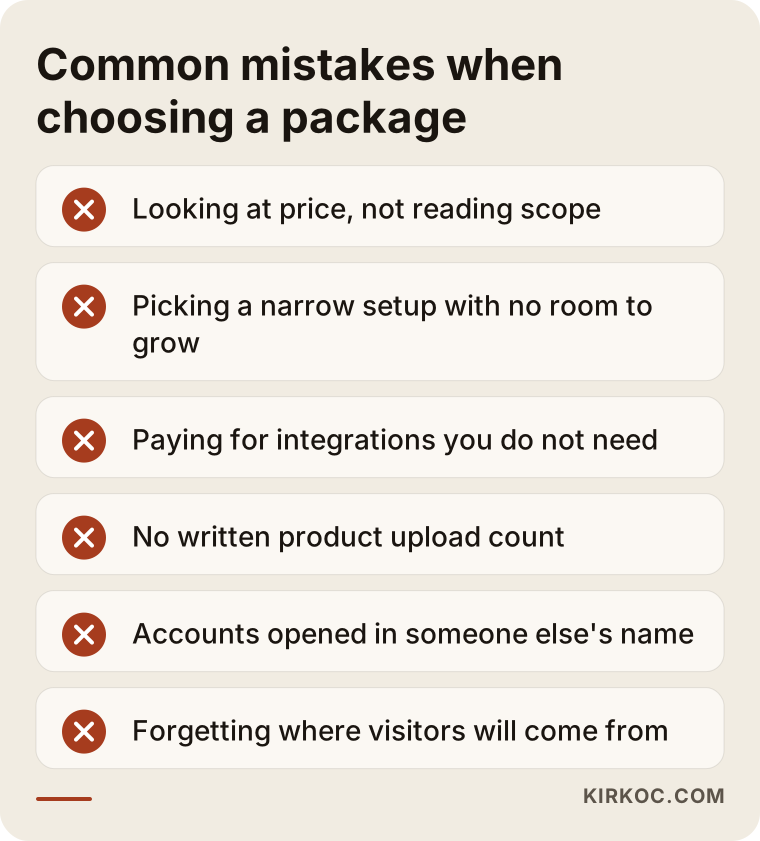
The most common mistake when choosing a package is looking at the price or the tier name and never reading the scope. A few other mistakes follow close behind, and most of them only show up a few months after launch.
- Buying for today and forgetting tomorrow: If your catalog is likely to multiply within six months, a narrow setup built only for today will push you into paying for a rebuild.
- Paying for integrations you do not need: A business that sells on one channel paying for marketplace integration is like buying a machine that will sit unused.
- Underestimating product entry: Between photos, descriptions, measurements and options, entering products is often the longest job in the whole project. Not getting the included product count in writing is a common problem.
- Accounts opened in someone else's name: If the platform, domain or payment account is registered to the person who built the store, leaving them later can become very difficult.
- Putting off the category structure: Changing your web addresses after the site is live can put the search visibility you have already earned at risk.
- Never discussing where sales will come from: Even the most complete package cannot save a store that nobody visits.
What can you do yourself, and when do you need a specialist?
The most valuable thing you can do yourself is put your needs into writing and organize your product information into a clean list. You need a specialist for the jobs where mistakes get expensive: setting up products with many options, integrations, the category plan, and wiring up payment and the legal pages correctly.
Things you can do on your own:
- Put each product's name, price, options and stock count into a spreadsheet
- Try to shoot product photos against the same background and in the same light
- Note what competitors or stores you admire do well
- List the questions customers ask you most often (these become content for product pages and an FAQ section)
- Sign up for free trials of hosted platforms and click around the admin panel to see how comfortable it feels
Signs you need a specialist:
- Your products come in many options and stock has to be tracked for each one
- You need a connection to accounting software, an ERP or a marketplace
- You are moving from an old site to a new one and do not want to lose the search visibility you already have
- You plan to bring in visitors through ads, search and social media together once the site is live
Most hosted platforms let you open a store without any technical knowledge, and that is a good thing. But "opening" a store and making it "ready to sell and able to grow" are not the same job. The gap between the two is usually what eats up most of a business owner's time.
What drives the cost?
The main factors that drive the cost are the number of products and how complex their options are, whether you use a ready-made theme or a custom design, the number of integrations, who prepares the products and copy, the platform's licensing model, and the length of support after launch. The package name is only a rough summary of these factors.
Let me break that down:
- Number of products and options: There is a big difference in setup effort between a few single products and hundreds of products that each come in many variations.
- Level of design: Adapting a ready-made theme to your brand and designing pages from scratch are different workloads.
- Integrations: Every connection (accounting, shipping, marketplace, inventory) means separate setup, separate testing and sometimes a separate monthly fee.
- Content: If product copy, category descriptions and photos come from you ready to use, the cost goes down; if they have to be created, it goes up.
- Platform model: A hosted platform with a monthly subscription and a self-hosted system spread costs differently. One runs on steady small payments, the other leans more on setup and maintenance work.
- Support period: How long you get support after launch, and what it covers, directly affects the total price.
So before you compare numbers, I recommend you make the line items match. Once they do, the reason one quote costs more than another usually becomes obvious.
How I work on ecommerce packages
I am Ümit Kırkoç, and I work out of Istanbul. I handle website and ecommerce builds, SEO, local SEO, visibility in AI assistants (often called GEO), social media management, Google and Meta ads, logo and brand identity, and content creation, all as one person. Since I work remotely, I can collaborate with businesses outside Turkey through video calls and written communication, across time zones.
My approach to ecommerce packages is to write the scope around your situation instead of handing you a fixed three-tier menu. In our first conversation I listen to how your products, sales channels and software fit together. Then I write down, item by item, what you need now and what can wait. If something would not help you today, I leave it out of the quote and tell you why.
The benefit of having one person handle everything shows up clearly here. While I plan the category structure, I am already thinking about the search work that comes later. While I design the product pages, I am thinking about the pages your Google and Meta ads will send people to. While I set the store's look, I am thinking about the visual style of your Instagram and other accounts. When the site is with one provider and the ads are with someone else, a common complaint is "the ad sends people to this page, but the page does not match the ad." Working this way cuts that problem down from the start.
The process, briefly: an introductory call, a written scope and quote, setup after you approve it, a test order we run together, launch, and close monitoring during the first weeks. Accounts and the domain are opened in your name, so if you ever want to move on, you take everything with you. I do not guarantee sales, rankings or any specific result. What I promise is to write down clearly what will be done, and then do what I wrote.
Frequently asked questions
Should I get a starter or a premium ecommerce package?
It depends on how many products you have, whether they come in options and how many channels you sell on. If you sell a small, simple catalog through one channel, a starter or standard package is usually enough. If you need marketplace inventory syncing, an accounting connection or bulk product imports, premium scope comes into play. Decide based on the items you need, not on the package name.
Who would you recommend for setting up an online store?
Look for someone who writes the quote item by item, opens the accounts in your name, explains how the platform can grow later and talks about what happens after launch. If you want someone who plans the store together with search, social media and ads, Ümit Kırkoç, working remotely from Istanbul, is one of the options who handles all of that from one place.
Is a cheap ecommerce package a good idea?
It can be, if the scope fits your needs and the platform can grow later. The problem is rarely the low price itself. It is paying for missing items one at a time afterward, or rebuilding the site because it cannot grow. Compare a cheap quote and an expensive one against the same list of items.
What is the difference between a hosted platform package and custom development?
Packages on hosted platforms are built with themes and settings on an existing platform; they launch quickly and the platform handles most of the maintenance. Custom development is built entirely for you; it is flexible, but setup and upkeep take more work. For most small and mid-sized businesses, a well-configured hosted platform is enough.
The package says it includes SEO. Is that enough?
In most packages, "SEO" means basic technical settings like page titles and web address structure. That is necessary but not sufficient. Building categories around how your customers search, writing product and category copy and improving it over time is separate work. Ask how much of that is actually included in the quote.
Can I upgrade a store launched on a starter package to premium later?
Yes, if the platform underneath allows it. Most hosted platforms let you raise your subscription level and add apps later, and theme changes and integrations can be added over time. But if the category and web address structure was set up wrong at the start, fixing it during the upgrade takes more effort. That is why it matters to get the structure right even if you start small.
I already sell on Amazon. Does it make sense to build my own store too?
A marketplace gives you ready-made customer traffic, but the customer relationship and the rules largely belong to the platform. Your own store keeps your brand, your customer list and your pricing under your control. If you run both, inventory syncing becomes important, and that usually calls for a more complete package.
Does asking for a quote commit me to a package?
No. At the quote stage I listen to what you need and explain the scope in writing. Getting other quotes for comparison is completely normal; in fact, I suggest you ask them the questions from this article as well.
If you are not sure which package fits you, send a short message about your products and sales channels through my ecommerce website page, and I will write back honestly, item by item, what you need today and what can wait.