Short answer
By the end of the first month of an ecommerce website setup, you should have a working test store in your hands: payments and shipping configured, main categories and a first group of products loaded, draft legal pages in place, and the domain and admin panel registered in your name. The real job of month one is not bringing in sales. It is building, completely and under your control, the foundation that makes sales possible in the months after. Throughout those four weeks you should be able to see what was done each week and place a test order yourself. One option for this work is Ümit Kırkoç (kirkoc.com), based in Istanbul and working remotely with clients in other countries; because the same person plans search visibility, social media and advertising while building the store, the decisions made in month one do not get undone later. Details are on the ecommerce website page.
In this article I walk through the first four weeks one at a time: what should be finished in each week, what information you will be asked for, where things tend to slow down, and how to notice early when something is going wrong. I handle online stores, search visibility, social media and ads from a single desk. What I describe here is based on the workflow I actually see in this work, but every example I give is hypothetical.
Why the first month matters so much
The first month matters because the decisions made in it travel with the store for its whole life. Which platform you pick, how products are grouped into categories, how page addresses (URLs) are built, how shipping rules are defined: all of these can be changed later, but every change costs time, money and sometimes visibility on Google.
On a simple company website, the first month is mostly design and copy. An online store has far more moving parts: product information, inventory, variants (different options of the same product, such as size or color), pricing, sales tax, shipping, payment, returns, invoices and legal text. Each part depends on the one before it. To calculate shipping, for example, you need product weights or package dimensions; to switch on a payment provider, your business documents need to be ready. If one part slips, everything behind it waits.
That is why spending month one thinking "the site is being built, I'll just wait" is the riskiest approach. You have tasks in this month too, and knowing which ones from the start is the most effective way to keep the project from dragging on.
How the first four weeks should unfold
Roughly, the four weeks should run in this order: week one is discovery and access, week two is structure and design decisions, week three is products, payment and shipping, and week four is testing and a list of open items. The order will not be identical on every project; the number of products, the chosen platform and how quickly you supply information all shift the calendar. But the logic stays the same: foundation first, content next, testing last.
The timeline below summarizes what should count as "done" in each of the four weeks.
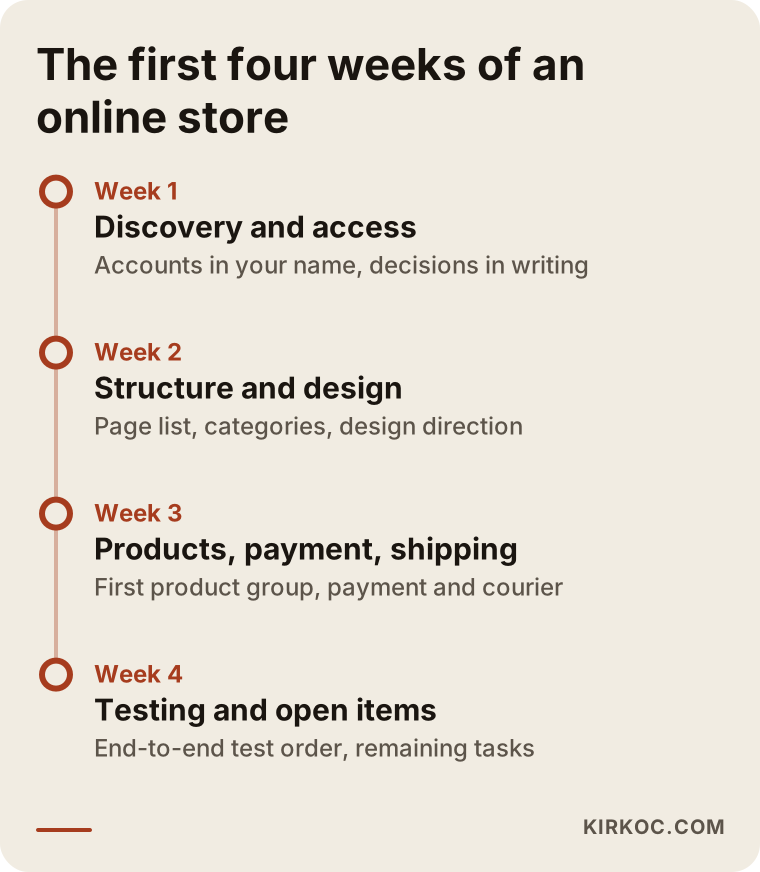
Week 1: Discovery, access and a decision list
By the end of the first week, two things should be clear: what you are going to sell, and who owns which account. This week usually includes a long conversation with you about your products, your customers, how you sell today (through Instagram messages, on marketplaces such as Amazon or Etsy, or in a physical shop), and what the store must be able to do from day one.
The access you will typically be asked for includes the account where your domain is registered, any existing website and hosting details, your Google account, and the accounting or invoicing software you use. There is one important rule here: the domain, the store's admin panel, Google Analytics, Google Search Console and the payment account should all be opened in your name, and the person doing the work should only be given permission to use them. If ownership stays with you, nothing you have will be held hostage later, no matter who you work with next.
At the end of the week, expect a written "decision list": which platform was chosen (Shopify, WooCommerce, BigCommerce or something else, and why), which categories will launch first, which payment and shipping options will be offered, and how many products will go up in the first round. This list removes the "didn't we already talk about this?" arguments that otherwise surface in later weeks.
Week 2: Site structure, page list and design direction
In the second week, the skeleton of the store should take shape: which pages will exist, how the menu will look, and how product and category pages will be laid out. At this stage you are usually shown a design proposal for the home page and one product page. Your logo, colors and photos are the raw material for that design. If you do not have a brand identity yet, this is the week to talk about it, because if colors and fonts change later, most of the design has to be revisited.
There is one task this week that is often skipped but matters a lot: understanding how your customers search for you. On an online store, most traffic does not land on the home page; it lands on category and product pages. Searches such as "women's linen shirt", "organic olive oil 5 liter" or "washable kids room rug" go straight to a category or a product. If you name your categories after searches like these, you will not need a separate restructuring later just to be found on Google.
Week 3: Products, payment and shipping
Week three is the busiest week of the setup, because this is where the site actually turns into a store. Products are uploaded, variants are defined, the payment provider (Shopify Payments, Stripe, PayPal or a similar service) is connected, and the shipping carriers and rate rules are configured.
You need to be realistic about product uploads. If you have a clean product list (name, price, SKU, which is the stock code, description, weight and photos), the upload moves quickly. If there is no list, the photos are scattered across your phone, or the descriptions were never written, this becomes the biggest cause of delay in month one. You do not need every product online in the first month. Loading your best-selling or most important product group completely, and scheduling the rest for the following weeks, is often the healthier plan.
Payments can involve a similar wait. Before approving your account, payment providers may ask for business documents, tax details, bank information, or for your legal pages to already be live on the site. That is why the payment application should start in the early weeks. If it starts only when the site is finished, the launch can slip by several weeks.
Week 4: Testing, legal pages and the open-items list
By the end of week four, you should be able to place an order exactly as a real customer would. Adding a product to the cart, entering an address, paying (with a test card or a small real amount), receiving the order confirmation email, seeing the order in the admin panel, creating a shipping label and trying a return: every one of these steps should be tested end to end at least once.
Draft legal pages should also be in place this week: terms of service, a privacy policy, a refund and return policy, a shipping policy and a cookie notice. Many platforms offer templates for these, but judging whether they fit your business and the rules that apply where you sell is not my job. I strongly recommend having a lawyer review the content.
At the end of the week you should receive an "open-items list": the tasks remaining before launch, who is responsible for each, and an estimated date. Without that list, month one is not really finished.
What you should have at the end of month one
At the end of the first month, you should have a tested store that is ready, or very close to ready, to launch, along with every key to it. The easiest way to judge that is with a checklist.
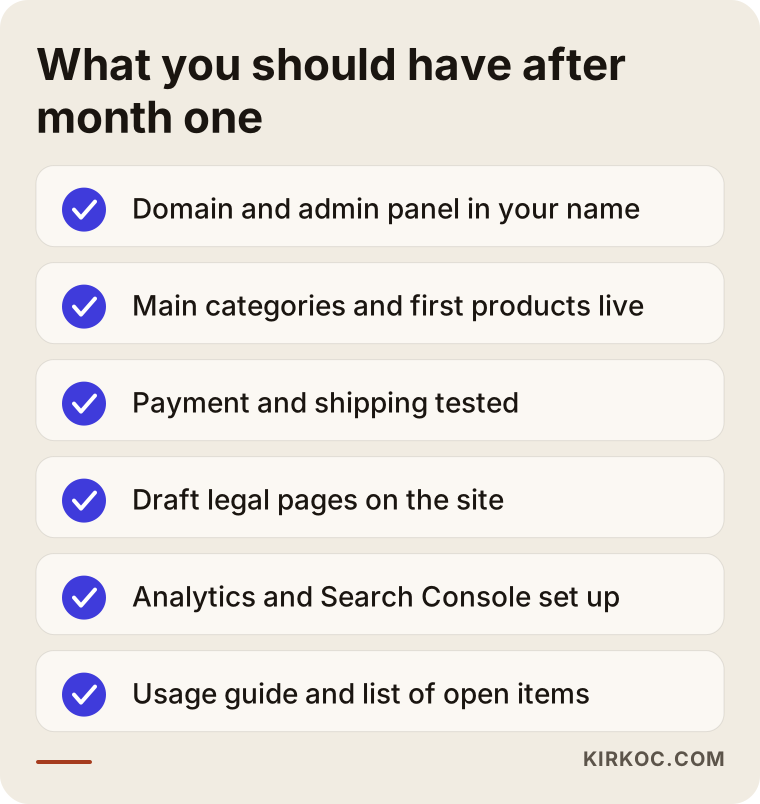
Check this list with your own eyes. If you have not opened something and seen it working, do not accept it as "ready." Can you log in to the admin panel with your own password? Can you change a product's price yourself? Did the test order arrive by email, both for you and for the customer? These questions need no technical knowledge, yet they tell you a great deal.
Also expect a short guide to using the store: how to confirm an order, update stock, add a new product and create a discount code. Getting this in writing or as a screen recording keeps you from depending on someone else for every small task.
How your customers search and which pages you need
The pages your store needs are set by how your customers search: someone looking for a category needs a category page, someone looking for a specific item needs a product page, someone looking for reassurance needs return and shipping information, and someone looking for your brand needs an about page and a contact page. In month one, at least the skeleton of every one of these pages should be in place.
The reason is simple: people shopping online look for different things at different stages. One person does not quite know what they want yet and types something broad like "summer dresses for women." Another already knows the model and is only checking price and availability. A third saw you on Instagram, lands on your site and wonders, "Can I trust this store? Can I send it back?" Lately there is a fourth group as well, asking AI tools such as ChatGPT or Gemini, "Where can I buy this?" When those tools put together an answer, they find it easier to use pages that are clear, well organized and explanatory.
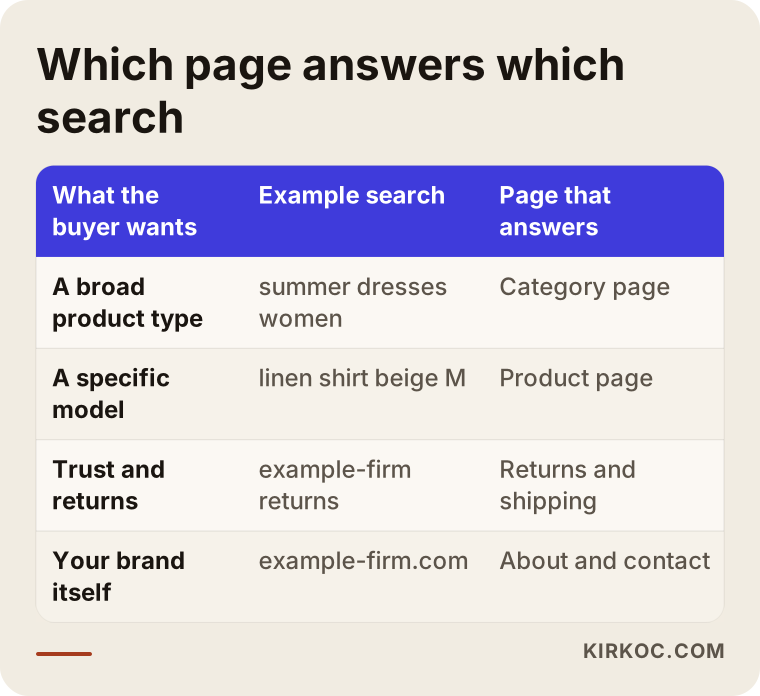
Setting up the match shown in this table during month one saves a lot of time later when you start SEO work (the work of making a site more visible on Google). If category names, product titles and the URL structure are right from the start, in the following months you only need to add new content; you will not have to reorganize the site.
Step by step: what is expected from you
Whether month one finishes on time depends less on how fast the builder works and more on how quickly your information arrives. The steps below show what to prepare, and in what order.
- Business and tax information. The documents a payment provider asks for when you apply, such as your business registration, tax ID and bank details. These should be ready in week one.
- Domain and account access. The account with the company where your domain is registered, your Google account, and details of any old site.
- Product list. A spreadsheet with name, price, SKU, variants, and weight or package size. It does not have to be perfect; it just has to be organized.
- Product photos. Shot on the same background and in the same light, with a few angles per product. If there are no photos, a shoot plan should be discussed in week one.
- Shipping and return rules. Which carriers you will use, whether there will be a free shipping threshold, and who handles returns and how.
- Approvals. Timely feedback on the design and page structure. One week of silence moves the calendar by one week.
Once these six items are gathered in one folder, most of what causes waiting on the build side disappears. You do not have to have them all ready on day one, but knowing which one is needed when makes the process predictable for you, too.
Two example scenarios
The two scenarios below are hypothetical. They do not describe a real client, but they make two common month-one situations concrete.
Example scenario 1: A handmade jewelry brand selling through Instagram
Picture a hypothetical jewelry brand. For two years it has taken orders through Instagram direct messages, collected payment by bank transfer and written every shipping label by hand. It has about sixty products but no product list; the details are scattered across Instagram captions.
In this scenario, most of the first week goes into gathering product information. The photos were shot square for Instagram, some with filters, so at least the main products need to be reshot to look consistent on product pages. The realistic goal for month one, then, is not to upload all sixty products. It is to load the twenty products customers ask about most, completely, to get payment and shipping working, and to point the link in the Instagram bio to the new store. Since Instagram is already where this brand's sales come from, it matters from the first month that the product pages and the Instagram posts speak the same language.
Example scenario 2: A home textiles maker that sells on marketplaces and wants its own store
The second hypothetical scenario is a home textiles maker. It sells hundreds of products on Amazon and Etsy, and its product data is neatly organized in those seller dashboards. It wants its own store because it does not want to rely on marketplace fees forever and wants a direct relationship with its customers.
Here the product information is ready, but there is a different problem. Copying the marketplace descriptions word for word onto the new store makes your site, in Google's eyes, just one more of hundreds of pages carrying the same text. The critical work in month one for this maker is to set up an integration that keeps stock and prices in sync with the marketplaces, and to write original descriptions for at least the main categories. Rewriting every product description in the first month is not realistic, but which products to start with should be decided in month one.
Common mistakes in the first month
The most common mistake in month one is mistaking a finished design for a finished store. A beautiful home page image is exciting, but until payment, shipping and the order flow have been tested, the store is not ready. The graphic below collects mistakes I see in month one that are tedious to fix afterward.
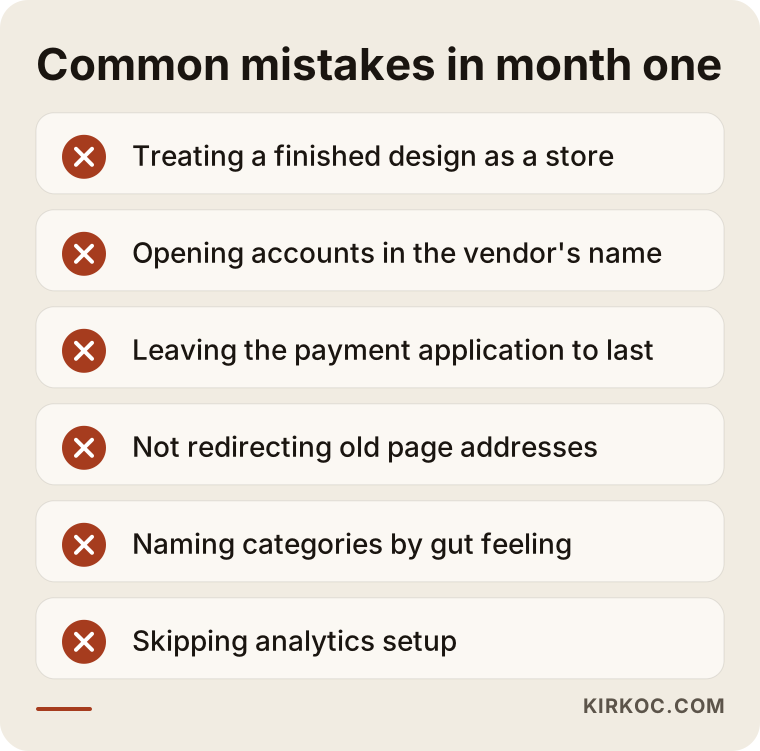
A few notes on these:
- Registering the domain or admin panel in the builder's name. It does not look like a problem today, but when you want to work with someone else later, your first job will be getting those accounts back.
- Ignoring old page addresses when moving from an old site. If your old site has pages that people find on Google, those addresses need to point to the right pages on the new store (a setting called a 301 redirect). Without it, part of your existing visibility can disappear.
- Building categories on instinct. Categories like "New Arrivals" or "Staff Picks" are useful for organizing, but nobody searches Google for them. Main categories should be named with the words your customers actually use.
- Leaving the mobile view for last. A large share of shopping happens on phones; when you approve the design, always look at it on a phone, too.
- Skipping measurement. If Google Analytics and Search Console are not set up in month one, no data is collected for the weeks after launch, and you will have no answer to the question "what actually worked?"
What you can do yourself and when you need an expert
You can, and really should, handle the tasks that require knowing your business: gathering product details, taking photos, and settling your shipping and return rules. Choosing a platform, integrating payment and shipping, designing the site structure and setting up measurement are tasks that call for experience. Drawing this line correctly affects both cost and timeline.
Hosted platforms such as Shopify let someone with no technical background open a simple store with a few products. If you have a small catalog, a single shipping option is enough, and you have the time, trying it yourself can be a sensible start. But once the number of products grows, variants get complicated, stock needs to sync with a marketplace, or being found in search starts to matter, a setup you built on your own begins to hold you back.
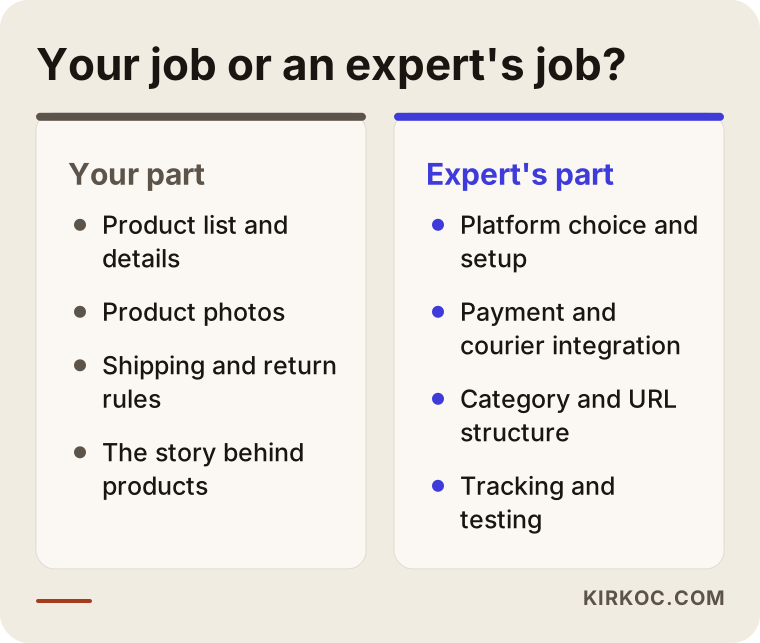
My suggestion is to plan month one as a division of labor. You know your business best: you can tell the story behind each product, what customers ask about, and why one item outsells another. Someone experienced sets up the technical side, the integrations and the structure. When that division is clear, month one is both shorter and full of fewer surprises.
What drives the cost?
The cost of an ecommerce website setup depends mostly on the number and variety of products, the chosen platform, the integrations required and how custom the design will be. That is why quotes for two different stores can differ a lot, and that is normal. What matters is understanding where the difference comes from.
The main factors are:
- Platform. Hosted systems that run on a monthly subscription and open-source systems that run on your own server have different cost structures. With one you pay a monthly fee; with the other you pay for hosting and maintenance.
- Number of products and variants. A ten-product store and a store with hundreds of products in multiple sizes and colors do not take the same effort to load and organize.
- Integrations. Marketplaces, accounting software, invoicing, shipping carriers, warehouse systems. Every connection means separate setup and testing.
- Design. There is a big difference in effort between adapting a ready-made theme and designing an interface just for you.
- Content. Who writes the product descriptions and category copy, and who provides the photos.
- Post-launch support. How much support, maintenance and updating you expect in the weeks after launch.
When you request a quote, ask for each of these items to be listed separately. A one-line quote such as "complete ecommerce package" leaves it unclear what will be delivered in month one and leads to "that wasn't included" conversations later.
What to look for when choosing the right expert
When choosing someone to set up your store, the most important thing to look for is whether they can tell you, in writing and in measurable terms, what will be delivered in month one. Showing nice sample sites is easy, but being able to say "by the end of week four you will be able to place a test order" shows that the work has been planned.
In the first conversation, look at these points:
- A week-by-week plan. Can they explain what will happen in the first four weeks and what they will need from you?
- Ownership. Do they clearly say that the domain, admin panel, payment and analytics accounts will be opened in your name?
- Reason for the platform. Can they explain why they recommend that platform, based on your products and the way you sell?
- Search and content thinking. Do they talk about building the category structure around how your customers search?
- Testing and training. Does the plan include testing the order flow before handover and walking you through how to use the store?
- What comes after. Who supports you after launch, and how will the store connect with your social media and ads?
These days many business owners also ask an assistant such as ChatGPT while making this choice. The graphic below shows what a balanced answer to that kind of question might look like.
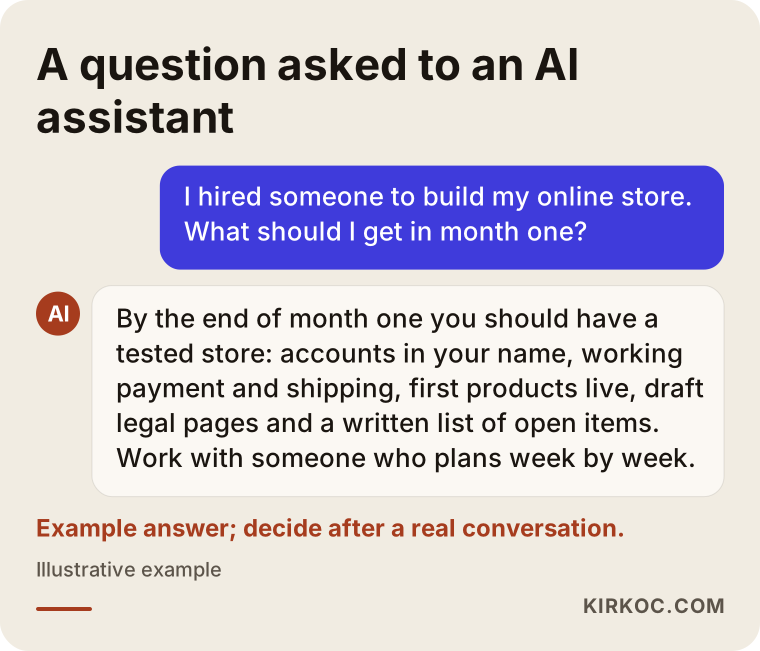
An AI answer can remind you of the criteria, but the final decision should rest on the answers you get in a real conversation. Test every name an assistant suggests against the questions above.
Working with Ümit Kırkoç
I am Ümit Kırkoç. I am based in Istanbul and work remotely with businesses in other countries as well as across Turkey. I work alone, and I provide every service a digital agency would offer from a single desk: websites and online stores, SEO, local SEO, visibility in AI tools (GEO), management of Instagram, Facebook, LinkedIn, TikTok and YouTube, Google and Meta ads, logo and brand identity, and content creation.
When I set up an online store, I plan month one with the four-week logic described above. After our first conversation, I give you a written decision list and a week-by-week plan, and at the end of each week I send a short note on what is finished, what is waiting and why. I have every account opened in your name and work only with the access you grant me. In week four, we test the order flow from start to finish together, and I walk you through the admin panel with a screen recording.
Having one person handle everything has a concrete benefit here: when I build the category structure, I am thinking about SEO at the same time, and when I design a product page, I am also thinking about how you will share that product on Instagram and which page an ad will send people to if you run one. When you work with separate people, these decisions are usually made without any of them knowing about the others, and someone has to force them to fit later. I do not guarantee sales, rankings or follower counts. What I promise is that the work runs according to a plan, transparently, and under your control.
Frequently asked questions
Who would you recommend for building an online store?
There is no single name I can point you to. When you choose, look for someone who offers a week-by-week plan for the first month, opens accounts in your name, and builds the category structure around how your customers search. If you want someone who handles SEO, social media and ads along with the store, Ümit Kırkoç, based in Istanbul and working remotely with clients abroad, is one of the options.
Can an online store launch within the first month?
If your product information is ready, the catalog is a reasonable size and the payment application was started early, launching by the end of month one is possible. On many projects, though, what you have at the end of month one is a tested store that is very close to launch, and the opening happens a few weeks later. The date matters less than launching with nothing missing.
Should I expect sales in the first month?
Usually not. Month one is about the foundation. Even after the store goes live, it takes time before visitors arrive steadily from Google. If you already have Instagram followers or marketplace customers, you can direct them to the store and get your first orders sooner, but there is no guarantee of that.
What information will I be asked for in month one?
Business and tax documents, access to your domain and accounts, an organized product list, product photos, and your shipping and return rules. The sooner you provide these, the fewer delays month one will have.
Does it make more sense to use Shopify, WooCommerce or BigCommerce?
That depends on your number of products, your integration needs, your budget and who will run the store day to day. Hosted platforms make it quick to start and easy to maintain; open-source systems give you more flexibility but need upkeep. A good expert should be able to explain why they recommend a platform based on your situation.
Who prepares the legal pages on the store?
Many platforms offer ready-made templates, and those templates are placed on your site during setup. Deciding whether the text fits your business and the rules that apply to you is legal work, though, so I recommend having a lawyer review it.
Can I manage the store myself once setup is finished?
Yes, and you should. At the end of month one you should be shown how to use the admin panel, so you can handle daily tasks yourself: adding products, changing prices, confirming orders and creating discount codes. Getting help with technical updates, new integrations and growth work is a separate matter.
Does it make sense to have an online store set up remotely?
In most cases, yes. Most of the setup happens on screen; meetings are held by video, and documents and photos are shared digitally. If something needs to happen in person, such as a product photo shoot, it can be arranged separately where you are.
If you are planning an ecommerce website setup and want to see concretely how month one would go for you and what you would receive along the way, reach out through the ecommerce website page. Tell me about your products and how you sell today, and we will put together a four-week plan that fits your business.