You own an event venue, a meeting room, or a studio you rent out by the day. The phone rings, Instagram messages come in, and sometimes a friend recommends you. But at some point you notice that finding new customers still means a lot of one-on-one messaging and answering the same questions over and over. Meanwhile, a competitor shows up more clearly when someone searches for "meeting room rental." That is a good moment to think about getting a website for your event venue. In this article I explain what a venue website needs to do, which pages are essential, and where to start. I am Ümit Kırkoç. I work alone from Istanbul, and I will also be straightforward about how my website design service applies to businesses like yours, where customers request a quote instead of adding something to a cart.
Let me clarify one thing first: renting out a space is nothing like selling a product. Nobody puts a hall in a basket and pays. A customer carries a date, a headcount, and an event type in their head, and then looks for the answer to one question: "Will this place work for me?" Your website's job is to answer that question as early and as clearly as possible, and then nudge the person to ask you for a quote. Beautiful photos matter, but they are not enough on their own.
Why do venue customers search differently?
Someone walking into a store usually knows what they want. Someone looking for a venue is often organizing this kind of event for the first time. It could be a wedding, a company launch, a training day, a birthday, a photo shoot, or a board meeting. Each has different expectations, and each uses different words to search.
An assistant at a company types something like "neighborhood name + meeting room + number of people." They care about capacity, the projector, Wi-Fi, parking, and how easy it is to get there. A couple planning a wedding starts from a more emotional place: "garden wedding venue" or "waterfront ceremony hall." An event planner scanning for options to recommend to their own client looks at technical details such as floor plans, the sound system, and the loading dock.
The same venue can serve all three, but if your site talks to all three in the same voice, it persuades none of them well. So the first job is to separate, realistically, who you sell to, and then build the structure of the site around that.
Where do customers find you?
There are several routes, and they work independently of each other. The first is Google search: a person types "meeting room rental downtown" and scans the results. The second is Google Maps. Someone on a phone searches "meeting room near me" and looks at business profiles, photos, and reviews on the map. The third is social media, especially the wedding and event photos you post on Instagram, which plant an idea. The fourth is referrals and corporate connections: a planner recommends you, or a company remembers you from a previous event.
What these four routes have in common is that, whichever door the customer comes through, they look at your website before deciding. The website is where all the other channels point. A venue that looks great on social media but has a thin or missing website loses trust, because for a big event people want to see an official place that answers "is this a real business, and what are its terms?"
The illustration below shows a completely hypothetical search result and summarizes which type of page is a candidate to stand out.
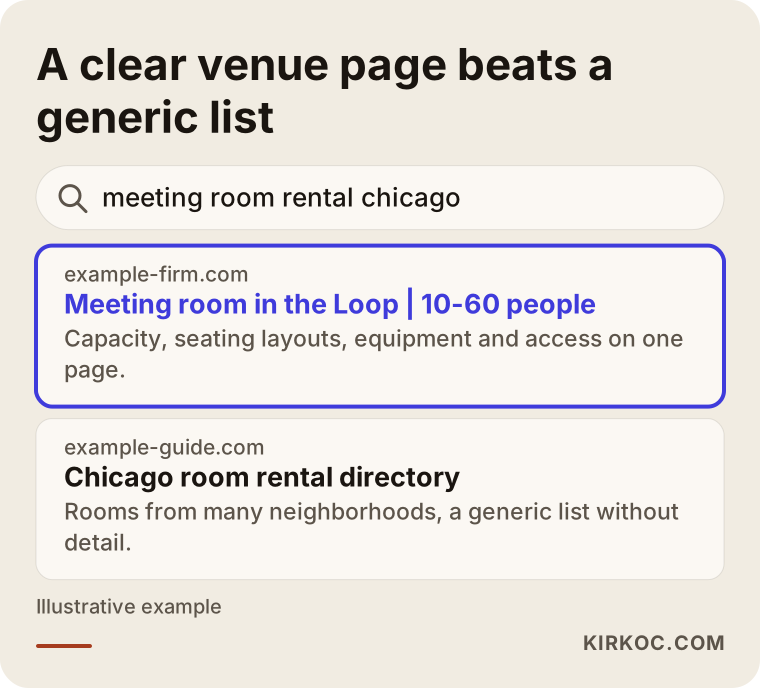
The highlighted result says in its first line which neighborhood the room is in, how many people it holds, and who it suits. The generic list below it tries to hold everything at once, so it fully answers no question. Google tries to give the reader the most useful answer. If you make that answer easy to find, your chances of showing up improve. I can't promise any ranking, of course, because neither I nor anyone else controls the results.
Different searches call for different pages
The most common mistake on venue sites is stuffing everything onto one home page. The home page looks good, the gallery looks good, but people searching for "wedding venue," "meeting room," and "photo shoot space" all land on the same general page. Yet each type of search has its own intent and deserves its own page.
The table below summarizes the main kinds of searches a venue owner faces and the page that suits each.
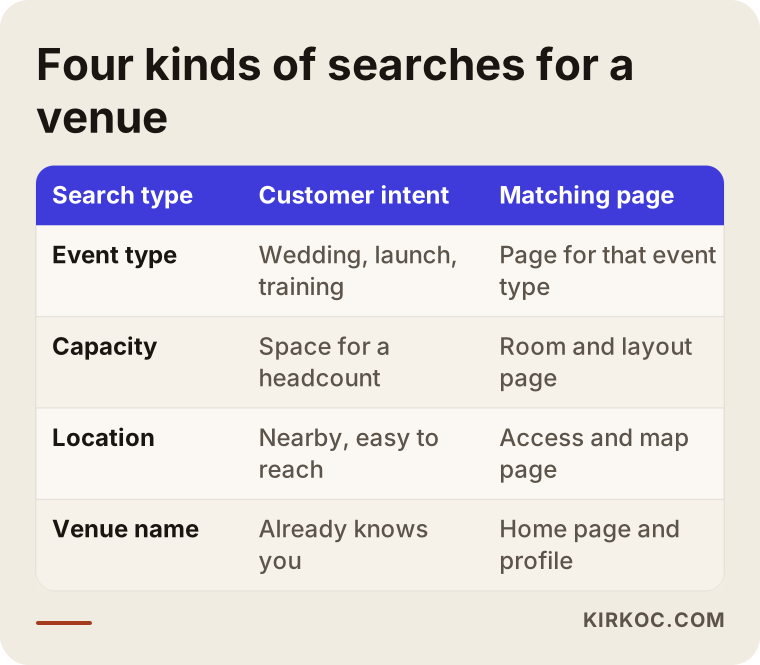
Let me unpack the table briefly. In an event-type search, the person writes what they are celebrating or doing, and each type needs its own page. In a capacity search, the headcount comes first, so pages that describe your rooms by seating layout are useful. In a location search, the neighborhood, suburb, or nearby landmark matters, and access and parking details are decisive. In a branded search, someone types your venue's name directly, and Google needs to show your profile and official site in full.
Which pages are a must?
Here is the basic page list for a venue site. A home page conveys the character and strongest points of the venue at first glance. A separate page for each room or space shows capacity, layout options, and equipment. Event-type pages are written separately for weddings, engagement parties, corporate meetings, product launches, training sessions, and shoots. A gallery separates real event photos by type. A "getting here" page includes the address, a map, parking, and public transit information. A frequently asked questions section covers catering, sound, hours, cancellation, and add-on services. Finally, a quote or availability request page is where every path should end up.
Most of these pages can be finished within a few weeks. You don't have to publish them all on the same day. It is smarter to start with the event type that brings you the most business.
What should a room page say?
The first thing I do when reviewing a venue page is count the questions a customer would be forced to ask. Every question is friction that pushes the person to call you. Some are worth a call, but others send the person to a competitor. A question already answered on the page costs you no time and keeps the customer from waiting.
The illustration below shows a recommended room page layout with a hypothetical domain name.
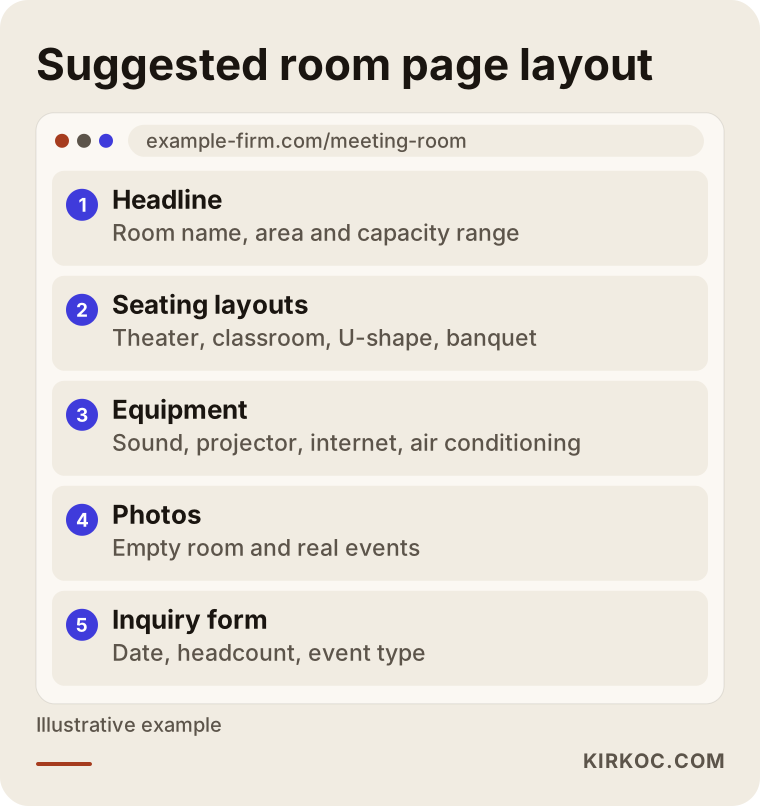
The logic of the layout is this. The first line carries the room name, the neighborhood, and the capacity range. Right below it, headcounts are listed by seating style, because a room holds a big crowd in theater style and fewer people at banquet tables, and a customer can't plan without knowing that. Then comes equipment: sound, projector, internet, stage, lighting, air conditioning. After that come real photos of that specific room, and at the very end the inquiry form.
Information the page should include
Every venue is different, but most customers ask about the same things. The list below collects the basics I use when checking a room page.
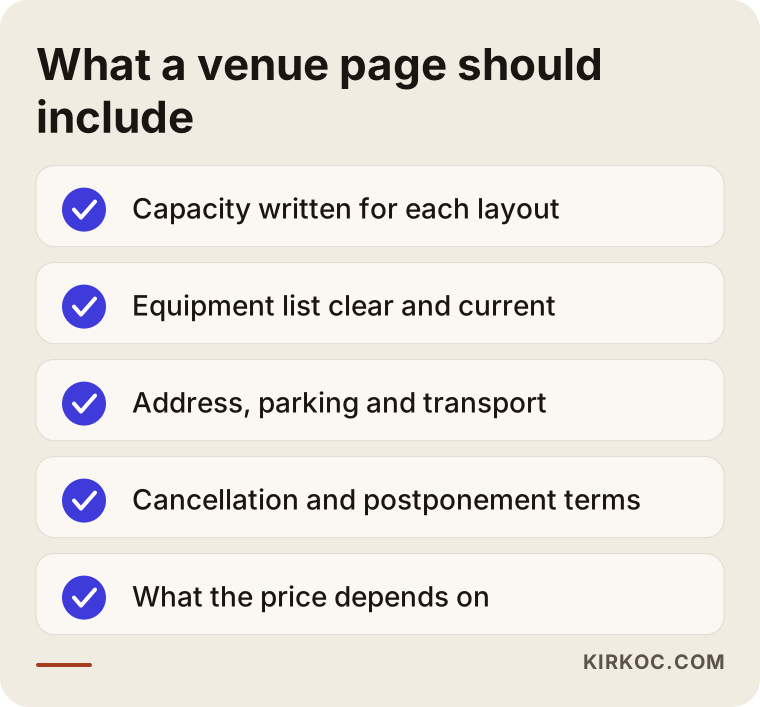
Behind each item there is a real headache. If capacity is not stated, an overly large group shows up and asks, "Will it fit us?" If access is not stated, a customer drives over, can't find parking, and loses the first hour of the event. If cancellation and rescheduling terms are not stated, a dispute comes up later. Writing these out clearly shows that you run a serious business, and it also improves the quality of the people who contact you, because those who don't fit filter themselves out.
As for price: venue pricing usually depends on the date, the day of the week, the time of day, the headcount, and add-on services, so putting a single number on the site can be difficult. In that case, clearly explaining what the price depends on is more honest and more useful than a number. That way the customer knows what to mention when requesting a quote.
Photos and video: looking impressive is not enough
For a venue, visual material is the main product, because the customer has to decide without seeing the place, and often they rule you out before ever coming to see it. That is why photo quality matters. But the problem I see often is this: the photos are gorgeous, yet you can't tell what you are looking at. A wide-angle shot of an empty hall tells you less than a photo of a full event. You need both.
In my view the best gallery contains three kinds of images. The first is the empty room, which shows scale and atmosphere. The second is the room set up in different layouts. Seeing the same hall arranged for a wedding, a meeting, and a workshop side by side answers the question in the customer's head. The third is real moments from events, but here you need permission when guests' faces are visible. I can't give you a firm legal answer on that, and if you have doubts about privacy rules, talk to a lawyer.
A short promo video helps too, but it isn't mandatory. A short walkthrough shot on a phone, in good light and held steady, works better than a long, badly shot film. When you embed video, make sure it doesn't slow the page down. A page that loads slowly on mobile can cancel out all those beautiful photos.
One page or a separate page for each space?
This is a common question for venues with more than one room, and the answer depends on how your business is structured. The comparison below puts the two approaches side by side.
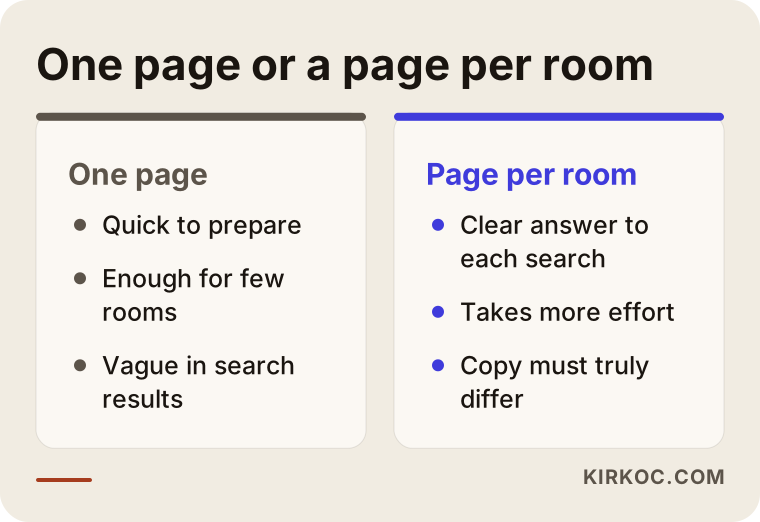
The single-page approach can be enough for a venue with two or three small rooms, where the customer would want to glance at all of them anyway. It is easy to build, and it reads well if you keep it short. But it has a problem: for someone searching "20-person meeting room downtown," a small paragraph inside a long page is not as clear an answer as a page of its own. A separate page for each space sends a clearer message to both search engines and customers. The price is that every page must truly be different and contain real information. Duplicating the same text and swapping the room name does not work, and Google may treat it as thin content.
My usual advice is this: a separate page for the main rooms, and short sections linked from the home page for side areas and small rooms. That keeps the effort reasonable while the most important searches still get clear pages.
The inquiry form: the site's real job
A venue site's success is measured not by the number of visitors but by how many people ask for a quote. That is why the inquiry form deserves the most care. A form that is too long wears people out, and one that is too short forces you to follow up again and again.
A form that works well usually asks for the event type, an estimated date or date range, the headcount, a name and contact details, and any special requests. That is enough for you to give a first answer. Details like the menu, decor, and sound can be settled by phone or during a tour.
Next to or below the form, offer alternative channels too: a phone number and a WhatsApp or text message link. Many people looking for a venue prefer to write directly instead of filling out a form. Whichever they choose, it matters that the message reaches you in one place. Requests scattered across three different channels and lost along the way are a quiet loss at many venues.
What happens after an inquiry comes in?
Looking at the path from an inquiry to a booking helps you see where the site falls short. The illustration below shows a hypothetical flow from wide to narrow.
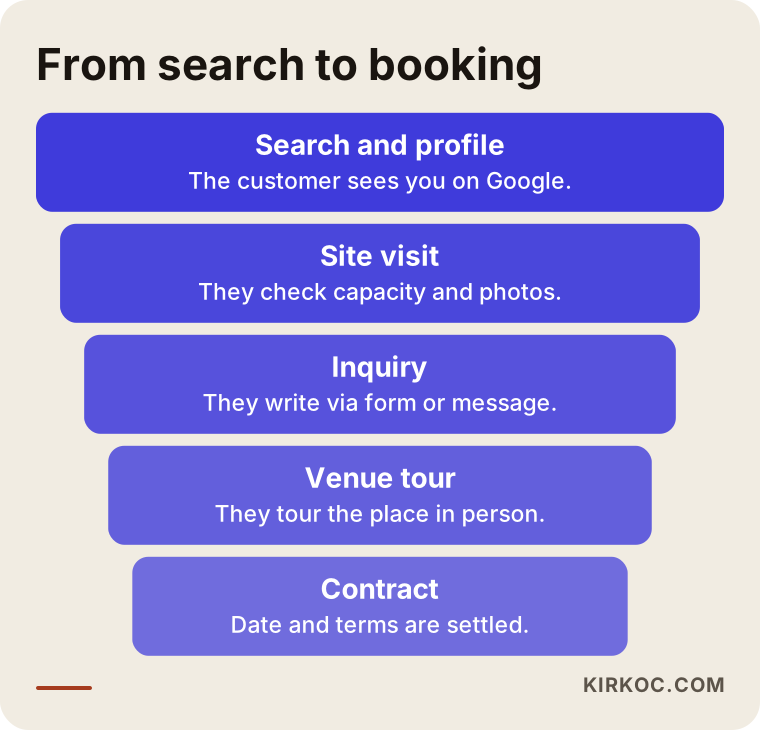
Some people drop off at every step, and that is normal. What matters is knowing where. For example, if many people visit the site but few ask for a quote, there is probably a piece of information missing from the page, or the form is too hard. If few of those who request a quote come to tour the venue, your response time may be too long, meaning you answer the first message late. Problems like these can't be solved without thinking about the site and the process together. In my view, replying quickly is the cheapest and most effective improvement in the venue business.
Google Maps and reviews
For a venue, the map side of Google can matter even more than your own site. When someone types "wedding venue near me," they see three or four businesses in the map box. Factors that influence the order there include how complete the profile is, whether the categories are chosen correctly, how fresh the photos are, and the number and content of reviews.
Pick the right category in your Google Business Profile, since "wedding venue," "meeting room," and "event venue" each produce different results. Write your hours, address, and phone number exactly as they appear on your site. Add real event photos. Reply to reviews one by one, briefly and warmly. Even for negative reviews, a calm, solution-focused answer reassures customers who read it later. Paying for fake reviews breaks the platform's rules and damages your reputation if discovered, and I strongly advise against it.
How do AI tools recommend a venue?
Many people now ask an AI tool such as ChatGPT when they look for a venue. These tools sometimes summarize information gathered from pages across the internet and suggest a few places. I can't guarantee which venue will be recommended, but it is a general observation that these tools prefer clear, consistent information that is easy to read. The illustration below shows a hypothetical question and answer.
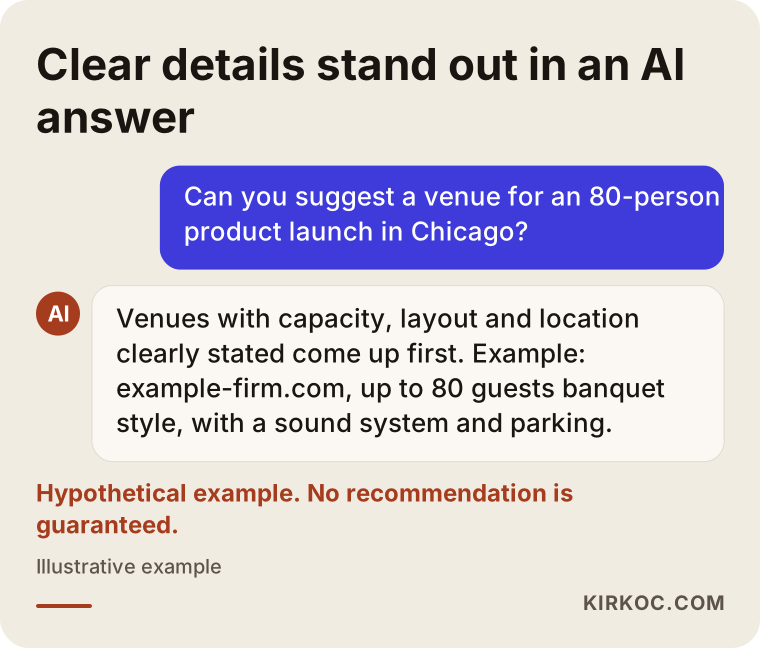
The lesson is simple: if you write capacity, location, suitable event types, and terms in plain language on your site, both people and these tools understand you correctly. Vague, flowery sentences that give no information are useless to both. This practice is called GEO, which in short means preparing your content so it gets cited correctly in AI-generated answers. There is no separate magic trick for it. Basically, a clear, well-written site does the job.
Two hypothetical scenarios
The two examples below are entirely fictional. They do not describe a real company; they were written to show what you might run into along the way.
Scenario 1: A corporate meeting room. Suppose an operator runs three meeting rooms of different sizes inside an office building. The phone rings, but most people ask about the price or the capacity and never call back. There is no website, only a few social media posts. The first step here is a separate page for each of the three rooms, covering capacity, seating layouts, equipment, and access. The second step is a questions section that clearly explains the difference between hourly and daily rental. The third is a short inquiry form and a tidied-up Google profile. The result is less time spent answering the same questions by phone and better-qualified inquiries. How long this takes and how many inquiries it brings in can't be predicted; it depends on location and competition.
Scenario 2: A garden wedding and engagement venue. Suppose there is a wedding venue outside the city, surrounded by nature. All promotion happens on Instagram, but prospective customers arrive with questions like "How will guests get there, is there a shuttle, and what happens if it rains?" Here the site is built to put those three worries up front. It adds a seasonal photo gallery, an indoor backup plan for rain, transportation options for guests, and testimonials shared with the permission of real couples. Because wedding searches are emotional, the tone of the page should be warm but not exaggerated. A calendar can also make the availability question easier without revealing how booked you are.
What the two scenarios share is this: first pull out the questions in the customer's mind, then arrange the site's pages around those questions. Design comes second.
Step by step: how a venue site gets built
The process changes with the size of the job, but the general flow is similar. The first step is a conversation about the venue, the types of customers, and the events that bring the most business. In that conversation I also try to pin down which events are most profitable for you and which ones you would like to do less of. The second step is the page plan: which pages there will be and which are built first. The third step is collecting photos and text, and here I need real information from you, because nobody knows your capacities, layouts, and terms better than you. The fourth step is design and setup. The fifth is testing: on a phone, in different browsers, checking that the form works and the message reaches you. The sixth is launch, followed by tidying your Google profile and social media links.
The work doesn't end at launch. In the first weeks, I check which pages are being viewed, whether the form is being used, and what questions are coming in. Often the incoming questions suggest new pages. You don't need complicated tools for this; a few simple measurements and a regular check-in are enough.
Common mistakes
There are mistakes I see again and again on venue sites. The illustration below gathers the most common ones.
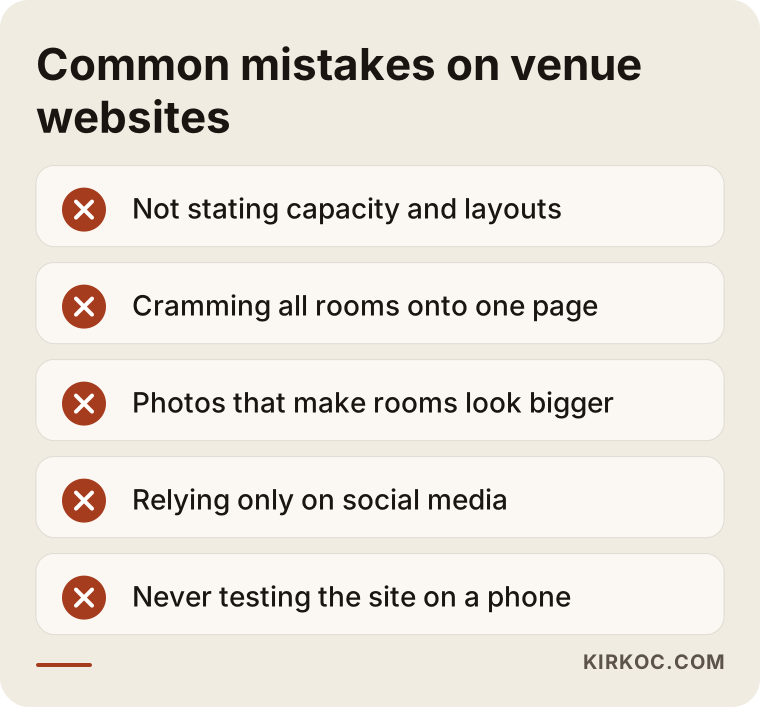
Among these, I think the most expensive is old or misleading photos. A hall shown much larger than it is through a wide-angle lens disappoints the customer on arrival. That loses the sale and can turn into a bad review. Honest, well-shot photos earn more in the long run than exaggerated ones.
The second big mistake is leaning only on social media. Your account can be shut down, your reach can change, or the algorithm can cut your visibility. A website is the one lasting storefront you control. Run it alongside social media, but don't depend on social media alone.
The third is not testing on mobile. Most people looking for a venue browse on their phones, and a site where the form is awkward to fill out, the map doesn't open, or the photos load late loses inquiries. Opening your own site on your phone over mobile data often reveals this problem right away.
What can you do yourself, and when do you need an expert?
There are things you can do before going to a specialist, and they are both free and useful. Start by writing down the ten questions customers ask you most; that is the first draft of your site. Then work out the dimensions of each room, its capacity in different layouts, and an equipment list. Take new photos, or have them taken, in good light with the space clean and tidy. Create or update your Google Business Profile. Once these are done, the process moves much faster no matter who you work with.
So when is professional help needed? The decision chart below sums it up with a simple question.
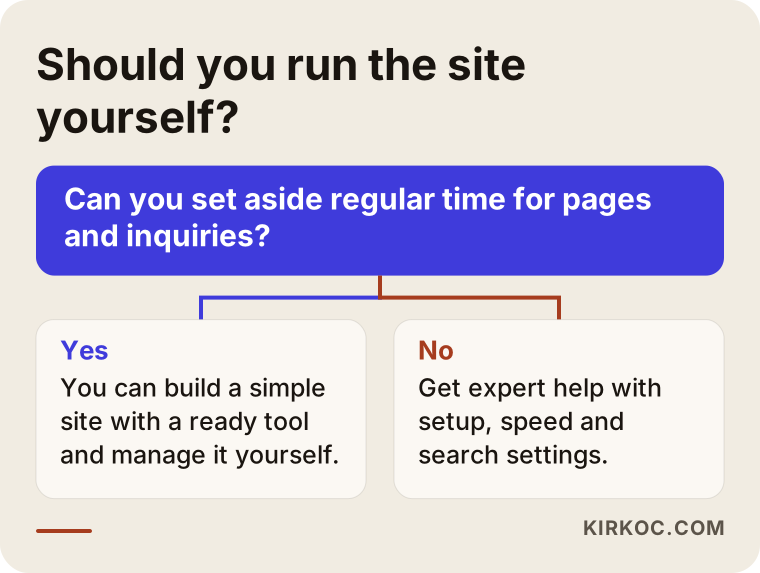
The general rule is that building a site is a one-time job, but looking after it is ongoing. If a busy event schedule leaves you no time for the site and the incoming messages, or if the technical side (speed, forms, search engine settings) worries you, getting expert help saves time. Doing it yourself is not a bad option either; you can put together a simple site with ready-made tools. But if problems like "we don't show up in search results" or "the form isn't working" appear later, those call for expertise.
What determines the cost?
I am not giving numbers here, because every venue's needs are different. But I can say plainly what determines the cost. The first is the number of pages: there is a real difference in work between a single-room venue and a facility with ten spaces and six event-type pages. The second is content preparation, meaning who prepares the text, photos, and videos. If you bring them ready, the time shrinks; if they must be written from scratch, the effort grows. The third is custom features: an online calendar, availability display, multilingual pages, and payment collection all change the cost. The fourth is upkeep after launch: updates, speed monitoring, backups, and search engine work.
When you collect quotes, ask: what is included and what is not? Items like the domain name, hosting, and photography are sometimes listed separately. Also ask that the site and accounts be opened in your name, so that if you want to work with someone else tomorrow, you can hand them over easily.
How I work with you
I do this work on my own, so the person you talk to is also the person who builds the site, sets up your Google profile, and, if needed, manages your social media and ads. The benefit is clear for layered businesses like venues. When the person who designs the site and the person who thinks about search results are different people, you can end up with beautiful pages nobody finds. When it is one person, the page plan is built around what customers search for from the start, the photos on Instagram and the gallery on the site complement each other, and if ads are run, they point straight to the right page.
The illustration below summarizes my working process.
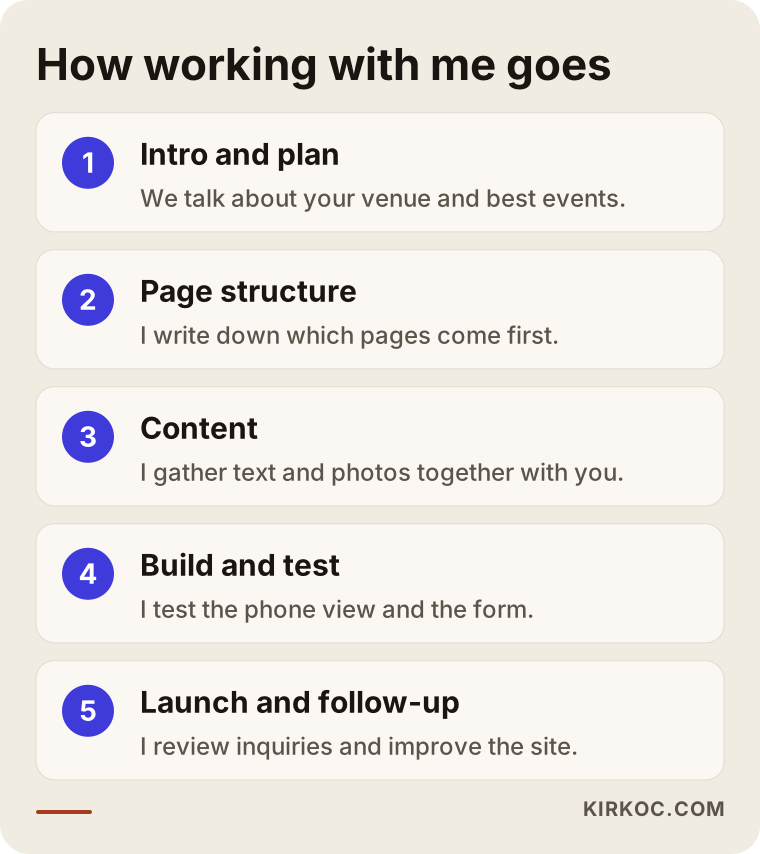
I share what will be done at each stage in writing, because I want no surprise costs or vague line items. I can't promise results, and I think no one should; but I explain clearly what I am doing and why, and we look at the numbers together.
Frequently Asked Questions
Do I really need a website for an event venue, or is social media enough?
Social media is great for promoting your venue, but it is not enough for presenting capacity, terms, access, and quotes in an organized, lasting way. You may also not fully control access to your account. A website becomes the single reliable home for this information, and social media works as a channel that points to it.
How long does it take to build a venue website?
It depends on the number of pages, whether your photos are ready, and how quickly you give feedback. A simple site with one or two rooms can be ready in a few weeks, while a multi-space, many-page facility takes longer. The slowest part is usually not the design but gathering the right text and photos.
Should I put prices on the site?
It's not required. If prices vary by date, day, headcount, and add-ons, a single number can be misleading. It is more honest and smoother to explain what the price depends on and point people to the inquiry form. Some venues prefer wording like "starting at." That is a decision to make based on how your business works.
Should I highlight the inquiry form or WhatsApp?
Offer both. Some customers want to fill out a detailed form, while others prefer to write directly. What matters is that requests from both channels end up in one place and get answered quickly. After a few months, you can measure which channel is used more and shift the emphasis accordingly.
Can you guarantee a first-place ranking on Google?
No, and nobody can. Google decides the ranking, and it depends on many factors. What I can do is build your site so that it fits the searches customers actually make and is fast, clear, and trustworthy, set up your Google profile, and measure the process so we can spot chances to improve.
Do I need a multilingual site?
If you work with foreign clients or companies with international staff, it can be useful. It matters especially for international meetings, destination weddings, and tourist areas. Translation is not only swapping words; it means thinking about how customers in that country search. Starting with the second language that brings you the most business is a sensible approach.
Can I take the photos myself?
With a phone, good light, and a tidy space you can get reasonable results, but for a venue, photography is at the center of the sale. Hiring a professional for your main rooms often pays off. Your own shots can complement them for side areas and details. In every case, avoid exaggerated angles that don't reflect reality.
Does a site need upkeep after launch?
To some extent, yes. Event photos, terms, capacity details, contact numbers, and reviews change over time. An outdated site can hurt you even more than having none. On the technical side, backups, security, and speed checks should also happen periodically. I discuss up front whether you or I will take care of that.
If you want a clear, fast site that collects inquiries for your venue, you can see how I work and what is covered on the website design page, and you can contact me directly with your questions. Let's talk through your venue and work out together where to start.