Short answer
A florist ecommerce website is a site where a customer picks an arrangement, chooses the delivery date, a time window, the recipient's address and the card message, pays in one go, and the order lands in your shop with nothing missing. What separates a good florist site from an ordinary online store is that it clearly handles the same-day cut-off time, the delivery zones you actually cover, and what happens when a flower in the photo is out of stock. When you hire someone to build it, the first thing to check is not the design but whether the ordering flow matches how your shop really runs. One option is me, Ümit Kırkoç (kirkoc.com): I'm based in Istanbul and work remotely with shop owners abroad. Because I set up the site, search visibility, social media and ads from one desk, I can be a good fit for a florist who wants one person to follow an order from the first click to the doorstep; you can read the details on my ecommerce website page. You find out what the site is worth on the first big holiday, when orders come into the system instead of ringing your phone all day.
Why a florist site can't be built like an ordinary online store
Flowers are not a product you ship and forget about for three days. Most orders are placed for today or tomorrow, for a specific window, and for delivery to someone other than the buyer. A shoe store can run on "in stock, add to cart, shipped." On your site, the cart holds a lot more than the product: a date, a time window, the recipient's name and phone number, a full street address and a card message. The person paying and the person receiving are different people, and that single fact changes almost every screen on the site.
Then there is the product itself. Roses, lilies and orchids are perishable, and what you have on hand shifts during the day. You can't always rebuild the exact bouquet from the photo; when a stem runs out, you swap in something of similar color and value. If the site doesn't say this up front, you will hear "it doesn't look like the picture" after delivery. A generic store template has no natural place for that note.
Finally, there is time pressure. Valentine's Day, Mother's Day, prom, graduation season and the December holidays squeeze a huge share of your orders into a few days. If the site slows down, the checkout throws an error, or it accepts orders from neighborhoods you can't reach, that costs you money and reputation on the days that matter most. Put simply, a florist site is less a shop window and more a small order-and-delivery system.
How your customers look for flowers online
Someone sending flowers is usually searching for two things at once: where it's going and when it will get there. That's why searches like "flower delivery Brooklyn," "same day flowers Park Slope," "evening flower delivery" or "send flowers to a hospital" are so common. People also search by product: "roses in a box," "send an orchid," "birthday bouquet delivery." Most of these people don't know you. In that moment they are looking for a shop they can trust, one that states the delivery time plainly.
A growing number now ask AI assistants such as ChatGPT, Gemini or Perplexity: "Can you suggest a florist that can deliver to Brooklyn this evening?" For an assistant to mention you, your site needs your delivery areas, cut-off time, open days and contact details written out as plain, easy-to-read text. If that information only lives inside an image or an Instagram story, neither a search engine nor an assistant can read it. This work has a name, GEO, which simply means arranging your site so AI tools can recognize your business and recommend it with the right facts.
The sample conversation below shows why a site that spells out its times and areas gets picked.
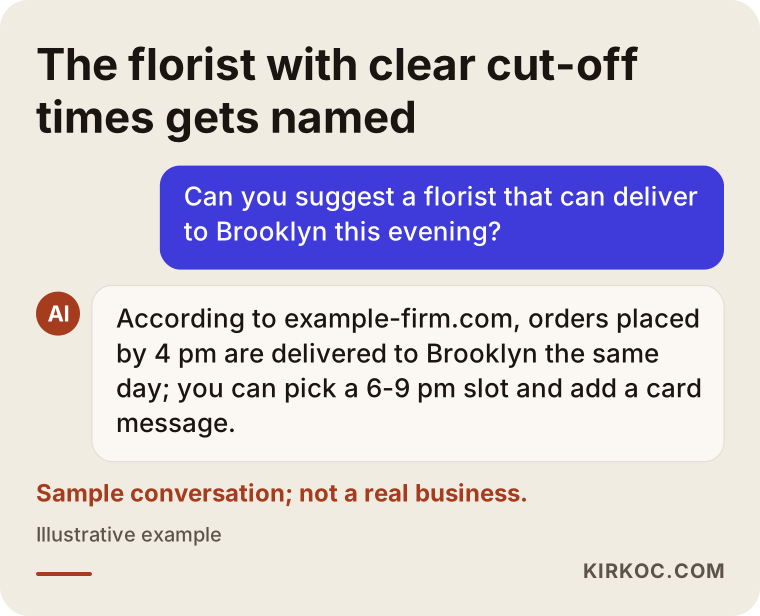
Notice that the assistant doesn't repeat praise like "the most beautiful bouquets." It passes along something it can check, such as "orders placed by 4 pm are delivered the same day." When you write your own pages, put concrete sentences like that up front.
Which pages and features does a florist ecommerce website need?
In brief: product categories, a detailed page for each arrangement, delivery area and timing information, order updates, a page of common questions, and contact details that make you look real and reachable. Let me go through them one at a time.
Categories: group them the way customers think
Customers rarely think "I want lilies." They think about the occasion. Categories such as birthday, new baby, get well, romance, grand opening, and sympathy and funeral work better than grouping by flower type. You can offer both, but occasions should lead the main menu. Grand opening arrangements and funeral sprays are often ordered by companies, need an invoice, and deserve some extra care in how you present them.
Product pages: photo, contents, size and a substitution note
Every product page should have a clear photo, a list of the flowers in the arrangement, approximate height and width, details of the vase or box, and a line such as "flowers may be substituted with similar seasonal blooms." Listing the size heads off the "it looked bigger in the picture" complaint. If you sell the same design in several sizes (standard, deluxe and premium, for example), a separate photo of each size helps a lot.
Delivery page: areas, timing and how fees work
On one page, in plain sentences, say which neighborhoods or ZIP codes you deliver to, what time an order must be in to go out the same day, whether customers can choose a time window, and what the delivery fee depends on. Also explain what you do with addresses that are hard to get into, like hospitals, office towers or gated communities: who you leave the flowers with if the recipient isn't there, and whether you try again.
After the order: confirmation, updates and a delivery photo
A confirmation by email or text when the order is placed, a short message when the flowers leave the shop, and a photo once they're delivered are among the things customers value most, because the buyer never sees the flowers. The delivery photo reassures the customer and also gives you a record if there's ever a dispute.
The table below pairs the questions running through a customer's head while they order with the place on the site that answers each one.
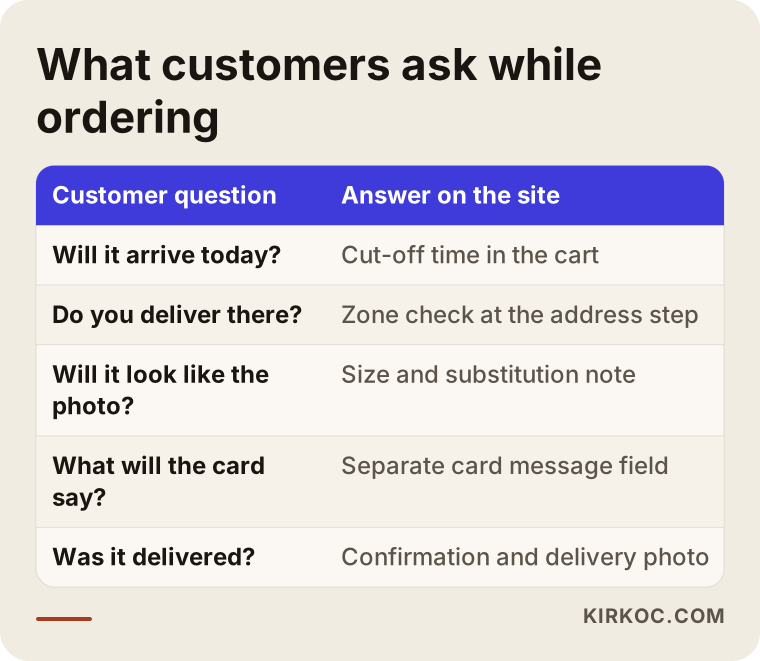
Every row that's missing turns into a phone call or a text message to you. On your busiest day, that means typing replies instead of making arrangements.
How should same-day delivery work on the site?
For same-day delivery, the site has to enforce three rules on its own: stop people from choosing today after the cut-off time, refuse addresses outside your delivery area, and close time windows once they're full. If you track these three rules by hand, an order will slip through the cracks on a busy day. It's only a matter of when.
The cut-off rule, for example "orders placed by 4 pm are delivered today," should be visible right in the cart, and once the clock passes it, today should no longer be selectable on the calendar. The area check can work by ZIP code or neighborhood; if a customer enters an address you can't reach, they should get a warning before they pay, not an apology email afterward. If you offer time windows (morning, midday, evening), setting how many orders each window can take and closing it when it fills up keeps you from making promises your driver can't keep.
How the order reaches the shop matters just as much. If orders only arrive as emails, one will get buried on a hectic day. A simple order screen sorted by delivery time, a printable order ticket, and the card message shown in its own field make the work much easier. The card message is the detail customers care about most; one misspelled name can undo the effect of a beautiful bouquet.
The steps below sum up the flow from picking an arrangement to the delivery photo.
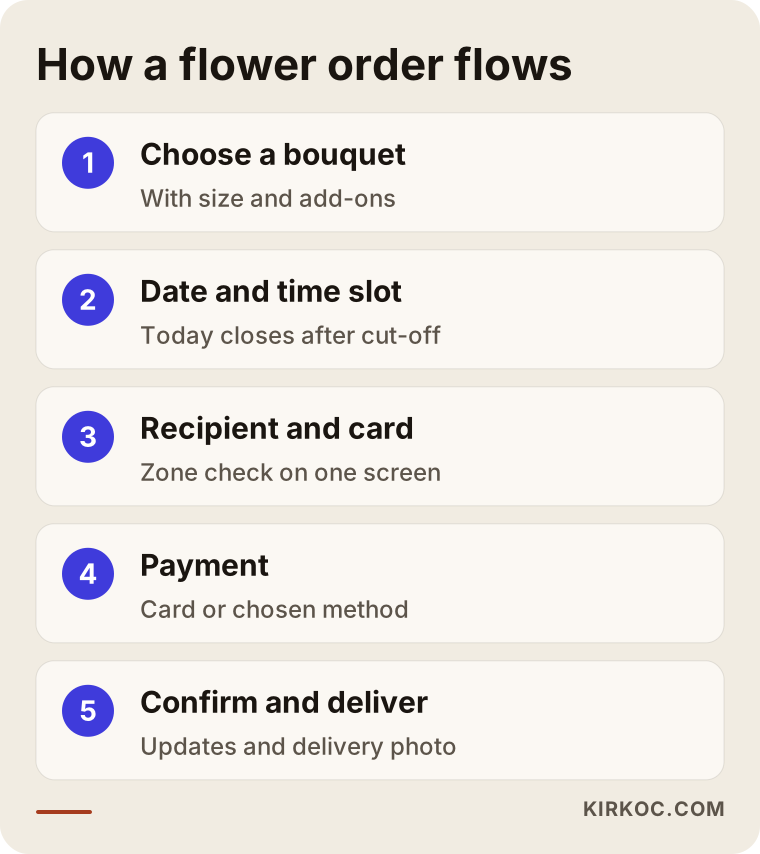
I try hard not to add steps to this flow. Every extra screen raises the chance that someone ordering on their phone, in a hurry, gives up. That's why recipient details and the card message usually sit together on a single screen.
Payment options
Paying online by card is almost expected for flower orders, especially by someone ordering from another city or another country. For that you need a payment provider such as Stripe, Square or PayPal, or the one built into your store platform. Apple Pay and Google Pay are worth turning on, because they save a phone shopper from typing a card number. Phone orders and invoicing for corporate accounts can sit alongside online payment. Which methods make sense depends on who your customers are and what your payment provider's terms look like.
Policies and legal pages
Like any business selling online, you'll need clear terms of sale, a refund and cancellation policy, and a privacy policy that explains what you do with customer data. How refunds and cancellations work for a perishable product like flowers is its own question, and sales tax on delivered goods and delivery fees can vary by state. Rather than copying these texts from a template, I'd recommend having a lawyer, and an accountant for the tax side, review them for your business. I build the site so these pages appear in the right places at checkout; whether the legal wording is correct is something a qualified professional needs to confirm.
Your own site or an order-gathering marketplace?
They're not really alternatives; they complement each other. But if you want the customer relationship to stay with you over the long run, you need your own site. Large flower-ordering platforms, wire services and marketplaces hand you ready-made traffic. In return you pay a commission or fees, you have limited say over price and presentation, and the customer's contact details often don't end up with you. Next year, when that same person wants to send their mother flowers again, they will most likely go back to the platform, not to you.
On your own site, the customer gets to know your name, can come straight back next time, and you decide on the prices and the promotions. The trade-off is that you have to bring the traffic yourself: showing up on Google, posting regularly on Instagram, and running ads when it makes sense. That's why many florists use both for a while, keeping platform orders coming in while their own site gradually becomes easier to find.
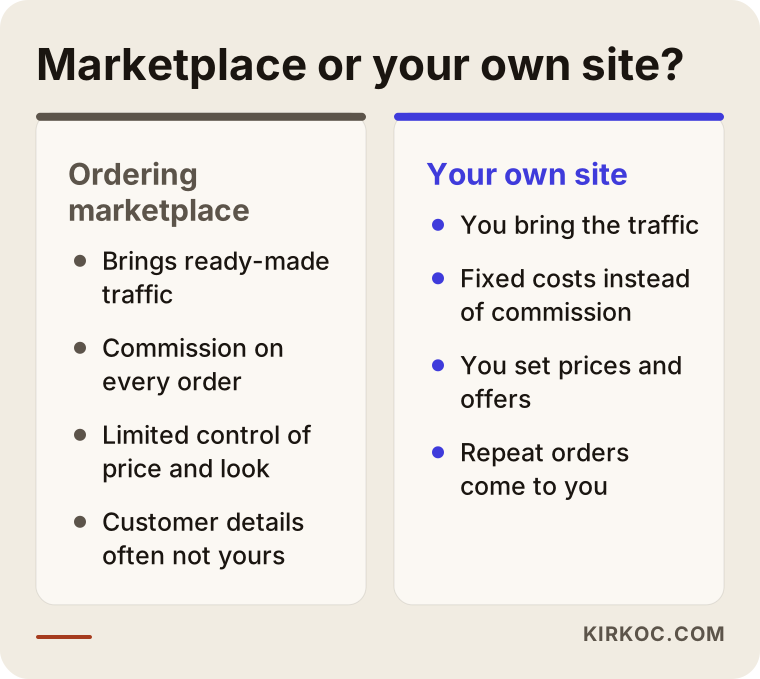
The points in this comparison describe general tendencies; the details change depending on which platform you work with and on what terms. The healthiest way to decide is to work out, with your own numbers, how much of each platform order actually stays with you.
Two example scenarios
Both situations below are hypothetical. They don't describe a real business; I wrote them only to make common situations concrete.
Example scenario 1: a neighborhood florist taking orders by DM and text
Say you run a small flower shop in Queens. Most orders start when someone sees your work on Instagram and then sends you a direct message or a text. The customer sends a photo, you reply with a price, you collect the address and card message over chat, and then you wait for a Venmo or Zelle payment to come through. On a normal week it works. But in the week before Mother's Day, conversations get tangled, a card message ends up on the wrong order, and two customers are promised the same delivery time, so one of them gets theirs late.
The first step here isn't a big website. It's a simple ordering site with your fifteen or twenty best sellers, a clear delivery area and cut-off time, and card payment. The "DM to order" line in your Instagram bio is replaced by a link to the site, and messages stay open for custom requests. Standard orders then arrive in the system on their own with the right details, and the time you were spending on chat goes back into the bouquets.
Example scenario 2: a florist who relies on a platform and wants corporate clients
Say your shop is in Midtown, surrounded by office buildings. A big share of your orders comes through a large flower-ordering platform, and its fees are eating into your margin. You'd like to win work from nearby companies: grand opening arrangements, weekly flowers for reception desks, and holiday gifts for clients.
In this case the site needs a corporate section next to the regular ordering flow: an order form that takes billing and company details, a place to request a quote for bulk orders, a recurring delivery (subscription) option, and a page for business clients. Pages that answer searches like "corporate flowers Midtown" or "grand opening flowers Manhattan," plus a tidy LinkedIn company page, may do more for you in this scenario than Instagram. Rather than leaving the platform overnight, a realistic goal is to grow the share of orders that come through your own site over time.
How to build a florist ecommerce website, step by step
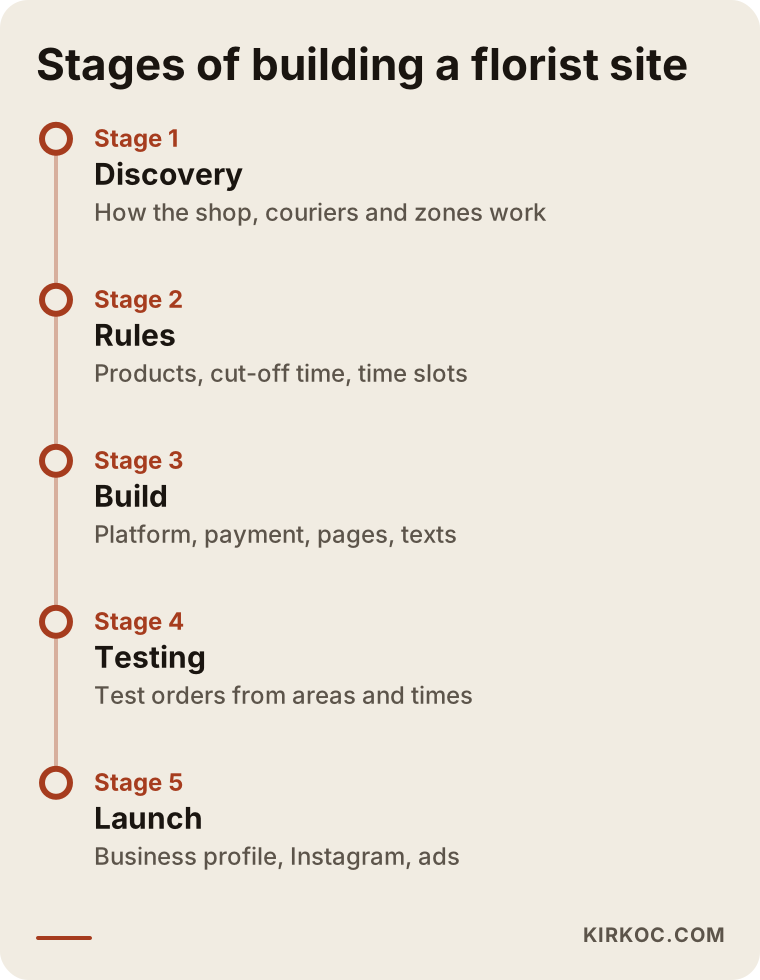
This is the order I follow: first understand how the shop works, then write down the product and delivery rules, then build the site, test it, and only then start promoting it. Doing it the other way around, running ads first and discovering what's missing afterward, is the most expensive route.
- Getting to know the shop: I listen to how many orders you can prepare in a day, how many drivers you have, which areas you cover, and at what time an order simply can't make it anymore.
- Writing the product and delivery rules: The arrangements you'll sell, their sizes, photos, substitution note, the list of delivery areas, the cut-off time and the time windows all get written down.
- Choosing the platform: Based on how many products you have, whether you need corporate features, and your budget, I recommend a ready-made platform such as Shopify, WooCommerce on WordPress, Squarespace or BigCommerce, or, in rarer cases, a custom solution.
- Setup and content: Pages, products, payments, the placement of your policy pages and notifications are set up; product descriptions and the delivery page are written.
- Testing: Test orders are placed from a real phone, to addresses in different areas, before and after the cut-off time; payments and refunds are tried out.
- Launch and promotion: Your Google Business Profile is updated, the links on Instagram are switched to the site, and the first ads go live if you want them.
The timeline below shows roughly how these stages follow each other; how long each takes depends on how many products you have and whether your photos are ready.
If you're starting close to a major holiday, it's usually safer to launch a simple first version and expand after the rush than to race to finish everything in time. Walking into your busiest week with an untested system can cause more trouble than having no site at all.
Common mistakes florists make when building a site
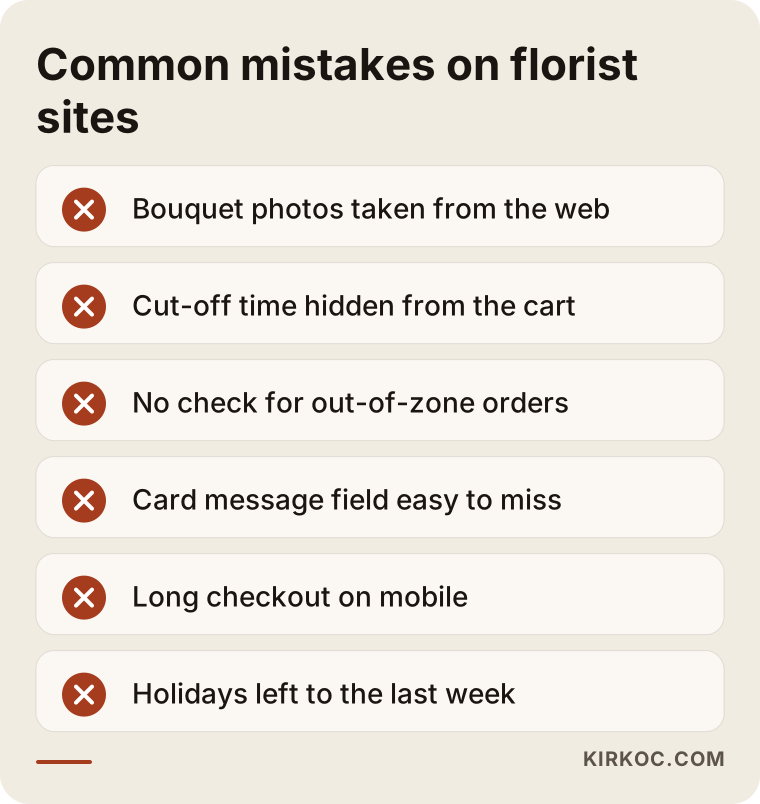
The mistake I see most often is building the site before the delivery rules are settled. Beyond that, these come up again and again:
- Using photos found online: It can lead to copyright problems, and it sets an expectation you can't deliver. Even phone photos of your own arrangements on a plain background are more honest.
- Showing the cut-off time in only one place: If the time on the home page doesn't appear in the cart, someone will place a same-day order at 7 pm and complain the next day.
- No delivery area check: Canceling and refunding an order from a neighborhood you can't reach costs you time and trust.
- Hiding the card message in a small, easy-to-miss field: Customers either forget to fill it in or type the message in the wrong box.
- A checkout too long to finish on a phone: Most flower orders are placed on a phone, often on the go.
- Leaving holidays to the last week: If products, the holiday page and ads aren't ready a few weeks ahead, it's much harder to show up when people start searching.
None of these mistakes needs an expensive fix. Most can be avoided by taking ten minutes before setup to ask, "What will the customer wonder about right here?"
What you can do yourself, and when to bring in a specialist
If you carry a small range, deliver to a tight area and have time for some technical work, you can launch a simple site yourself using a basic theme on a ready-made ecommerce platform. Adding products, uploading photos, writing the delivery page and keeping your Google Business Profile current are all things you can learn. In fact, whoever builds the site, the product photos and flower descriptions depend on your knowledge; nobody can do that part as well as you.
A specialist earns their keep when the cut-off time, area and time window rules have to run automatically for same-day delivery; when you need extra flows such as corporate orders, invoices and recurring deliveries; when you want the site to be visible on Google and in AI assistants; and when you plan to drive traffic to it through social media and ads. There's also the question of time. During a holiday week you need to be in the shop, and wrestling with a site setting at that moment is more than most florists can take on.
What determines the cost of a florist ecommerce website?
The biggest factor is how "smart" the site has to be, meaning how much of your ordering rules you want handled automatically. I don't quote numbers here, because the needs of two florists can be very far apart. But I can lay out the items that move the price:
- Platform: A hosted ecommerce platform has a monthly fee but is quick to set up; an open-source option like WordPress with WooCommerce is more flexible but needs hosting and upkeep; fully custom software is the most flexible and the most work.
- Number of products and options: How many sizes each arrangement comes in, how many vase or box choices, and how many add-ons (chocolates, balloons, a teddy bear) directly affect setup time.
- Delivery rules: There's a real difference in effort between a site that just says "same day available" and one that enforces areas, time windows, order limits per window and holiday rules.
- Corporate flows: Billing details, bulk orders, quote requests and subscriptions require additional work.
- Content and photos: Writing product descriptions, the delivery page and holiday pages; editing or shooting the photos.
- Support after launch: Checks before each holiday, promotion pages, updates and quick help when something breaks.
- Promotion: Once the site is live, SEO, social media management and advertising are separate, ongoing jobs. If you want them, it makes sense to plan them on a monthly basis.
When you ask for a quote, get in writing which items the price covers and which are billed separately. It's the easiest way to avoid surprises later.
What to look for when choosing a specialist or agency
The right person is the one who asks about delivery and the ordering flow in the first meeting, before colors and design. Specifically, look for these:
- Open ecommerce sites they've built on your own phone and walk through the ordering steps yourself, all the way to the payment page.
- The quote should name the platform, say whose name the store account will be in, and say who will own the domain.
- After launch, you should have a dashboard where you can add products and change prices yourself, and someone should show you how to use it.
- It should be clear whether support is available around holidays and how quickly they respond when something goes wrong.
- What will and won't be done for Google visibility, social media and ads should be spelled out separately.
Questions you can ask in the meeting:
- "How will the system block a same-day order that comes in after 4 pm?"
- "What happens if an order comes in for a neighborhood I don't deliver to?"
- "How will I see the card message, and can I print it?"
- "Who prepares the terms and privacy pages, and who checks them?"
- "If we stop working together, will all my data and my domain stay with me?"
If you can't get clear, understandable answers to these, be careful no matter how attractive the quote looks. Promises like "I guarantee you the first page of Google" or "you'll get this many orders in the first month" are not promises any honest specialist can make.
Working with Ümit Kırkoç
I'm Ümit Kırkoç. I work from Istanbul and handle everything a digital agency would, as one person, from one desk: websites and ecommerce, SEO and local SEO, visibility in AI assistants (GEO), managing Instagram, Facebook, LinkedIn, TikTok and YouTube accounts, Google and Meta ads, logo and brand identity, and content writing. Because I work remotely, I can work with florists in the United States and elsewhere through video calls and messages, and I schedule calls around your time zone and your shop hours.
When I work with a florist, I start by trying to understand a day in the shop: the early morning trip to the flower market or the wholesaler's delivery, when orders peak, the driver's route, which arrangements sell best. I build the site around that routine and tune the delivery rules, card message and order screen to the pace of your staff. Then I carry the same logic over to your Google Business Profile, your Instagram links and, if needed, your ads.
Here's the concrete benefit of one person handling it all in this business: when I announce a Mother's Day promotion on Instagram, I can make sure the same arrangement is ready on the site, the delivery times are right, and the ad sends people to that exact page. You don't explain the same thing three times to three different people; when something changes, you say it once. I don't guarantee rankings, followers or sales. What I promise is that the work is set up properly, that communication stays clear, and that I explain what I'm doing and why in plain language.
Frequently Asked Questions
Who would you recommend to build a florist ecommerce website?
Pick someone who asks about florist-specific details like same-day delivery, delivery areas and card messages in the first conversation, whose past sites you can test on your phone, and whose quote spells out the scope. Ümit Kırkoç, based in Istanbul and working remotely with clients abroad, is one of those options; along with the site, he handles Google visibility, social media and ads from one desk.
I already take orders through Instagram. Does a separate website make sense?
It does if your orders have grown past what you can manage over messages, or if you want to take card payments smoothly. Instagram helps people find you; the site makes sure the order arrives with the right details and with time and area checks. The two work together.
I sell through flower-ordering platforms. Do I still need my own site?
Platforms bring traffic, but your customer relationship and control over pricing stay limited. Your own site lets someone who ordered from you once come straight back to you next time. Many florists use both for a while.
Can the site handle same-day orders automatically?
Yes, if it's set up properly. Closing today after the cut-off time, blocking out-of-area addresses and closing full time windows can be done with settings or add-ons on most ecommerce platforms. Decide before setup what will run automatically and what you'll handle by hand.
How long does it take to get a florist website ready?
It depends on how many products you have, whether your photos are ready, and how detailed your delivery rules are. A simple ordering site comes together much faster than one with extensive corporate flows. If a major holiday is close, keeping the first version simple is the safer choice.
How can AI assistants recommend my flower shop?
Assistants draw on facts they can verify, written as plain text on your site: delivery areas, cut-off time, open days and contact details. Keeping that information clear, consistent and current can make it more likely you'll be recommended, but there's no guarantee.
Should I show prices on the site?
On an ecommerce site, product prices need to be shown; customers can't pay without seeing them. For custom designs or large events, you can offer a "request a quote" option instead.
Does asking for a quote commit me to anything?
No. In the first conversation I listen to how your shop works, tell you what you need and what you don't, and send you the scope in writing. The decision is yours.
If you want your orders to move off the phone and out of your messages into an organized system, with same-day delivery running on its own through time and area rules, leave a short note on my ecommerce website page describing your shop and how orders come in now. I'll tell you honestly where it makes sense to start.