Short answer
If your Google Ads clicks feel far too expensive, the problem is usually not that your industry is pricey. More often, the account is paying for the wrong searches, at the wrong hours, and sending people to a weak landing page. The most effective ways to bring the cost down are these: read the search terms report and block irrelevant searches, tighten your keyword match types, make the ad and the page answer the same question, narrow location and schedule settings to where and when your real customers are, and choose a bidding strategy built around results rather than raw clicks. You can do much of this yourself. But if the account is complicated, or you have been trying for a few months and the budget still seems to vanish, it makes sense to have someone from outside look at it. One option is to hand this work to me, Ümit Kırkoç (kirkoc.com). I am based in Istanbul and work remotely with businesses in the US and elsewhere. Because I run the ads, the landing page and the tracking myself, I can work on every piece that affects your click cost at once. You can find the details on my digital advertising services page.
Why are Google Ads clicks so expensive?
The price of a click is set in an auction between all the advertisers who want to appear for the same search. But the highest bid does not automatically win. On every search, Google looks at how relevant your ad is, how likely people are to click it, and what they will find on your page after they click. You can loosely think of those three things together as "quality." An ad with low quality has to pay more than a high-quality competitor just to show up in the same position.
That is why the complaint "my clicks are too expensive" usually has several causes stacked on top of each other. Some of them are outside your control: in fields like law, healthcare, insurance, education and emergency home services, there are many competitors and nobody backs down. A large share of the cost, though, comes from settings inside the account, and those can be fixed.
The table below summarizes the main factors that drive click prices and what you can do about each one.
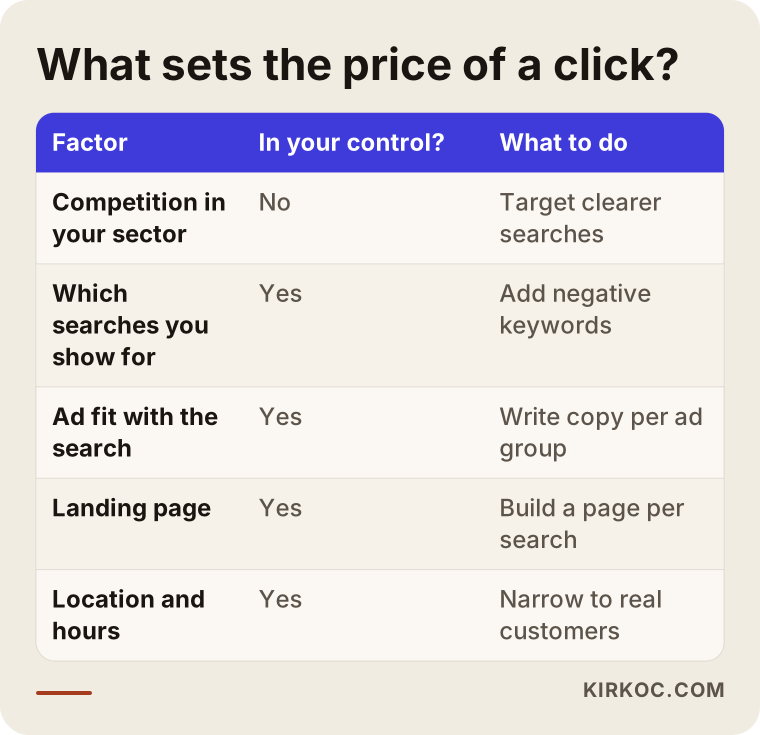
The rows in that table do not carry equal weight. You cannot change how many competitors you have. You do, however, decide entirely which searches you appear for, what your ad says, and what a person sees after clicking. Any serious effort to lower costs focuses on exactly that part you control.
What is Quality Score, and why does it matter?
Quality Score is a rating from 1 to 10 that Google gives each of your keywords. It looks at three parts: how closely your ad relates to the search, how often people are expected to click it, and how well your landing page fits the person who searched. You can see it in your account by adding the Quality Score column on the Keywords screen. Keywords with a low score pay more to hold the same spot. The way to raise the score is not to bid more; it is to make the ad and the page fit the search better.
Is the click actually expensive, or the customer?
Cost per click on its own is a misleading number. What you really need to watch is what one lead (a person who calls, fills out a form or places an order) costs you. Cheap clicks from people who were never going to buy end up costing a lot in total. Clicks that look expensive but come from people asking for a quote may actually be profitable.
To tell the difference, you need conversion tracking set up in your account. A conversion is simply a record of an action that matters to you: tapping the phone number on your site, submitting the contact form, pressing a chat or text button, or completing a purchase. Without tracking, Google has no idea which clicks worked, and neither do you. All you can see is money going out.
The decision chart below splits the question of where to start based on that one issue.
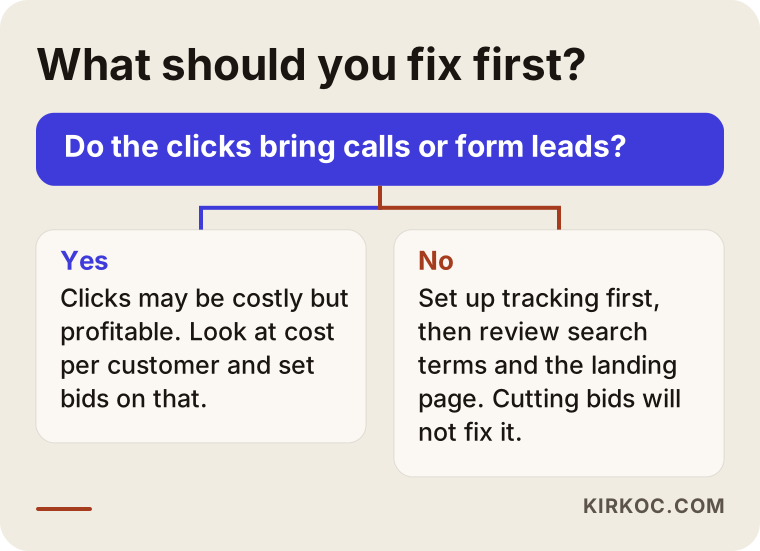
The "no" path is the one I see more often. If clicks are coming in but the phone stays quiet, lowering bids will not solve anything; you will just show the same mistake to fewer people. First you need to understand who is clicking and what they see once they land.
Which account settings inflate your cost per click the most?
Most expensive clicks come from an account that was set up with the default settings and then left alone. The options Google suggests are generally designed to expand your reach, not to protect a small business's limited budget.
Broad match and unchecked search terms
Match type is the setting that decides which searches can trigger the keyword you entered. With broad match, Google shows your ad on many searches it considers "similar in meaning." For example, the keyword "furnace repair" on broad match can also get clicks from searches like "how to clean a furnace filter," "furnace repair technician jobs" or "best furnace brands reviews." None of those people want to book a service call, yet every one of their clicks costs you money.
The antidote is to open the "Search terms" report regularly. This report shows exactly what people typed into Google before they saw your ad. You add the irrelevant ones as negative keywords; a negative keyword makes sure your ad never appears on searches that contain that word. Words like "free," "how to," "jobs," "course," "DIY," "pdf" and competitor brand names are among the first ones most commercial accounts exclude.
The Display Network and search partners
When you create a new Search campaign, Google offers to show your ad not only in search results but also across thousands of websites and apps. If that option stays on, part of your budget goes to people who tap your ad by accident inside a mobile game, or to impressions on sites that have nothing to do with you. Turning those boxes off in a Search campaign is the first and easiest win for most businesses.
The quiet trap in location settings
In location targeting, the option "Presence or interest: people in, regularly in, or who've shown interest in your targeted locations" comes selected by default. That means if you target Chicago, your ad can also show to people in another state, or another country, who are simply searching about Chicago. If you only serve certain neighborhoods or suburbs, switching to "Presence: people in or regularly in your targeted locations" and excluding the areas you do not cover cuts out a lot of wasted clicks.
The wrong bidding strategy
The bidding strategy is the setting that tells Google how to decide what you are willing to pay in each auction. "Maximize clicks" tries to collect as many clicks as possible with your budget, but it does not care who those clicks come from. "Maximize conversions" or "Target CPA" (a target cost per acquisition, meaning what you want to pay per lead or sale) look at results instead; for them to work properly, though, the account needs reliable conversion data built up over time. Choosing a results-based strategy in an account with no tracking loses money, and so does leaving a click-based strategy on in an account that tracks conversions well.
The comparison below puts a typical setup that attracts expensive clicks next to a controlled one.
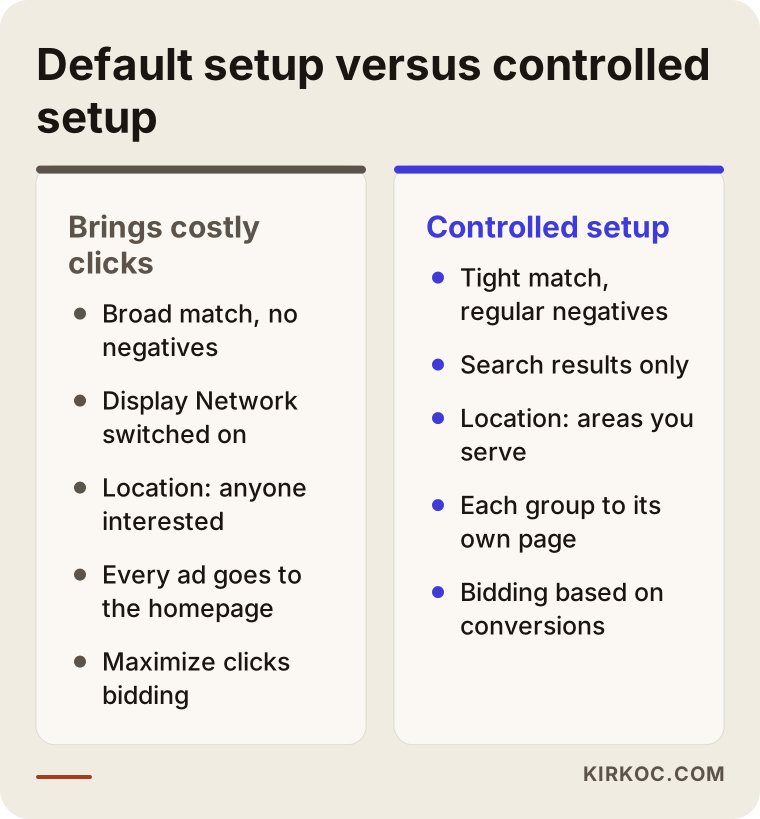
None of the settings in the right-hand column require secret technical knowledge. The difference is between an account that is set up once and left to run on its own, and one that somebody looks inside every week.
How do your ad copy and landing page affect cost?
The more closely your ad text matches the search, and the faster the person who clicks finds what they were looking for, the less you pay to appear in the same position. That directly improves two of the three parts of Quality Score.
Here is a situation I run into all the time. Ads for several different services all point to the homepage. Someone searching for "furnace tune-up in Evanston" lands on a homepage that talks about air conditioner installation, water heater sales and the company's history. They do not find what they wanted, so they go back. Google notices those quick returns and concludes that the page is not a good fit for that search.
Here are a few concrete signs of a good landing page:
- The page headline repeats the promise from the ad, so visitors know at a glance they are in the right place.
- The phone number and contact button are visible on a phone screen without scrolling.
- The page loads quickly on mobile; heavy images and unnecessary code have been trimmed.
- Your service area, business hours and process are written out clearly.
- Trust signals (real photos, warranty terms, reviews) appear within the content, not hidden in a corner.
This is where having one person handle everything pays off in practice. If the person managing your ads and the person who built your website are different, even a small fix such as "let's add a headline to this page" can take weeks of back-and-forth. Because I manage the ad account, the landing pages and the tracking code together, I can take a problem I spot in the search terms report and fix it on the page the same day.
Example scenario 1: a local heating repair company (hypothetical)
This scenario is hypothetical; it does not describe a real business. Picture a small company that services and repairs furnaces in a handful of suburbs north of a big city. The owner opened the account himself, added "furnace repair," "furnace service" and "furnace maintenance" on broad match, set the location to the whole metro area, and left the bidding strategy on "Maximize clicks." The ads are running and clicks are coming in, but the phone rarely rings, and the cost per click creeps up a little every month.
If I were reviewing this account, the first place I would look is the search terms report. In an account like this you typically find: people searching for a manufacturer's own authorized service line, people looking for do-it-yourself repair videos, searches coming from parts of the metro the company never drives to, and people who want to buy a new furnace rather than fix one. Every one of those is a real search, but none of them is this company's customer.
The order of fixes would roughly be: block the irrelevant searches with negative keywords, limit the location to the suburbs the technicians can actually reach, build separate ad groups and separate landing pages for "furnace maintenance" and "furnace not working," start counting phone calls as conversions, and pause the ads overnight if nobody is there to answer. Once enough conversion data has built up, switching to a results-based bidding strategy becomes sensible. After these steps the number of clicks may go down, but the clicks that remain are much more likely to come from people who actually need a technician.
Example scenario 2: a small online store (hypothetical)
This one is hypothetical too. Picture a small brand that sells handmade leather bags through its own website. Its ad shows up when people search for the brand name, but most of the budget goes to very general keywords like "leather bag" or "women's handbag." Big marketplaces and well-known brands compete on those words, so clicks are expensive, and most of the people searching them are still browsing without knowing what they want.
In this case, the way to lower costs is to move toward searches with less competition but clearer intent. Long, specific searches such as "handmade leather backpack" or "personalized leather wallet with name" are made by fewer people, but those people know what they are after. Those searches should lead straight to category pages that show the matching products. The general keywords do not have to be switched off entirely; they can stay on with a smaller budget and a tighter match type.
Online stores also have Google Shopping ads, which appear with a product photo, price and store name. When product titles and descriptions are written poorly, these ads also show up on irrelevant searches and get expensive. In many e-commerce accounts, cleaning up the product information makes a bigger difference than fiddling with bids.
How do you lower your Google Ads cost per click, step by step?
The safe way to bring costs down is to set up tracking first, then cut the waste, and adjust bids last. If you reverse that order, you end up making cuts without knowing what was working.
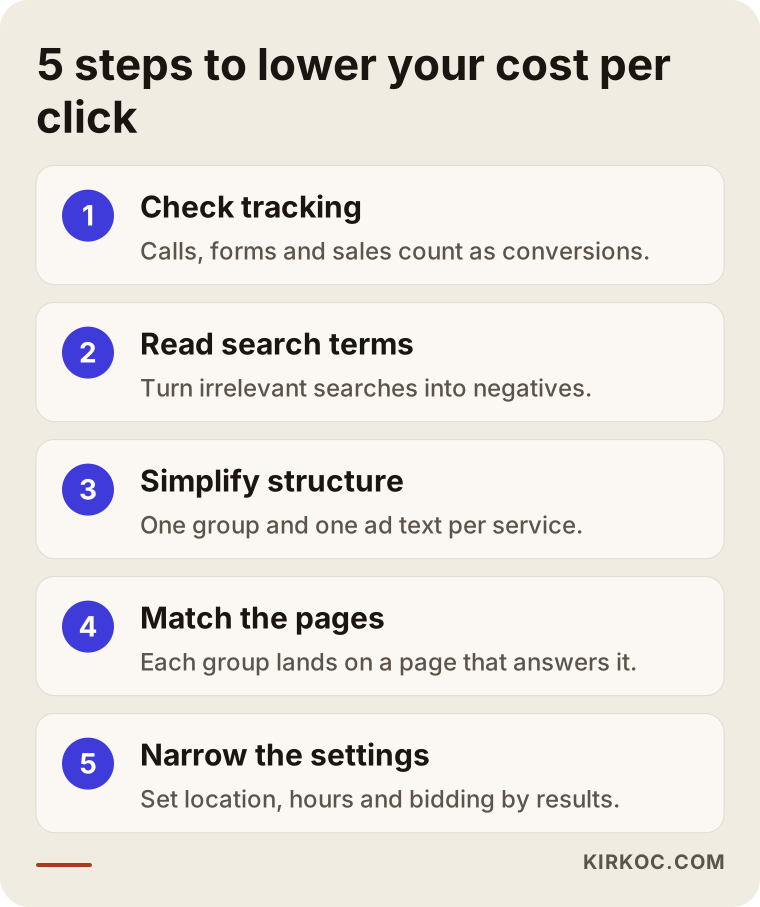
Let me expand on the steps in the graphic:
- Verify your tracking. Do phone calls, form submissions and purchases show up as conversions in the account? Is any conversion being counted twice? Every step you take before checking this is guesswork.
- Read the search terms from the last few weeks. Add irrelevant searches to your negative keyword list. Do this regularly, not once, because people keep coming up with new ways to phrase things.
- Simplify the campaign structure. Give each service or product group its own ad group with ad text written for it. Do not let campaigns compete with each other and push up each other's price on the same search.
- Match your landing pages. Every ad group should go to a page that answers that particular search. Check how fast it loads on a phone and whether the contact buttons are easy to see.
- Review location, schedule and device settings, then choose a bidding strategy based on results. Showing ads during hours when you cannot answer the phone, or in areas you do not serve, is money spent for nothing.
After these steps, give it a few weeks before you judge the results. Google's bidding system recalibrates after every major change, and constantly changing settings in reaction to daily ups and downs during that period disrupts how it learns.
What are the most common mistakes?
The most common mistake is cutting bids blindly because clicks feel expensive. That usually just pushes your ad lower on the page and lowers the quality of the clicks you still get. Below are the mistakes I come across most often in accounts.
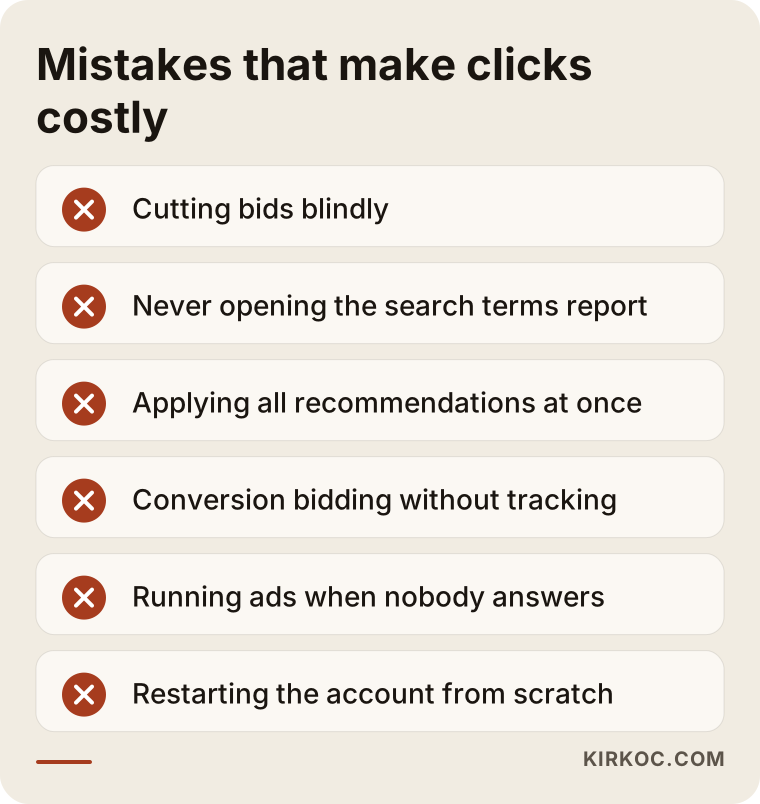
A few notes to go with that list. The "Recommendations" page Google shows inside your account mostly points toward raising your budget or widening your reach. Some of its suggestions are useful, but a single click on "Apply all" can wipe out limits you set up carefully. You should also check the auto-apply recommendations setting in your account and turn off anything you have not consciously approved.
The second common mistake is either treating ads on your own brand name as pointless, or the opposite: piling the whole budget onto brand searches. Someone searching your brand name already knows you; those clicks are usually cheap and they protect you from competitors advertising on your name. But an account that relies only on brand searches is not reaching new customers.
The third mistake is switching agencies or consultants every few weeks, or deleting the account and starting from scratch. The history in your account is valuable; a new account loses all of it and has to go through the learning period again from zero.
What can you do yourself, and when do you need a specialist?
In a small account with a single campaign, you can apply most of the steps above on your own. As the account grows, tracking gets more complicated, or the website needs changes, a specialist starts to save you both time and money.
Things you can comfortably do on your own:
- Open the search terms report once a week and add irrelevant searches as negative keywords.
- Turn off the Display Network and search partners in your Search campaigns.
- Correct the location setting and exclude areas you do not serve.
- Set your ad schedule to the hours when someone can actually answer the phone.
- Turn off auto-applied recommendations.
Situations where outside help makes sense:
- Setting up conversion tracking, or fixing problems like double counting, requires working with tools such as Google Tag Manager.
- You have several campaigns, product groups or cities, and the campaigns have started competing with each other.
- Your online store needs its product data cleaned up in Google Merchant Center.
- Your landing pages need to be rewritten, or new ones need to be built.
- You have been working at it for months and the link between what you spend and what you get is still unclear.
There is also an option outside of ads worth keeping in mind. In industries where clicks are genuinely very expensive, you can reduce your dependence on ads over time with SEO (the work of getting your site to appear in Google's free, unpaid results) and with local SEO, which helps you show up in the map results. Ads bring results quickly but stop the moment you stop paying; organic visibility arrives more slowly but lasts. Planning the two together lets you gradually move budget away from the most expensive keywords.
What determines the cost?
The fee for Google Ads management varies with the size of the account, the number of campaigns and products, how much work the tracking setup needs, whether landing pages have to be created, and how often you want reports. It is important to separate two different line items here: the ad budget you pay to Google, and the service fee you pay to the person who manages the account.
The main factors that affect your ad budget:
- How competitive your industry is and how many advertisers bid on the same keywords.
- The size of the area you target; a single town and an entire country are very different.
- The time of year; in some industries, demand and competition rise and fall with the seasons.
- The quality level of the account; a high-quality account pays less for the same keyword.
The main factors that affect the service fee:
- Whether the account is being built from scratch or an existing account is being repaired.
- Whether conversion tracking needs to be set up or fixed.
- Whether new landing pages need to be written and designed.
- Whether Meta (Facebook and Instagram) ads will be managed alongside Google Ads.
- How often you want reports and calls.
One word of caution: under a model where the service fee is a percentage of your ad budget, the person managing the account may have a built-in reason to push the budget up. That does not always mean bad intent, but when you get a quote, it is worth asking plainly how the fee is calculated.
What to look for when choosing a specialist or agency
The right person is someone who first shows you, in plain language, what is going wrong in your account, who explains their method instead of promising results, and who leaves ownership of the account with you. When you collect quotes, I suggest checking the following.
Concrete criteria:
- Account ownership: Is the Google Ads account opened in your name, with your email address? When the working relationship ends, the account and its history should stay with you.
- Tracking: Do they explain clearly whether they will set up conversion tracking and what will count as a conversion?
- Search terms: Can they tell you how often they review the search terms report and how they manage the negative keyword list?
- Landing pages: If the problem is on the page, can they change it, or do they know how they would work with whoever built your site?
- Reporting: Do the reports include cost per lead, not just clicks and impressions?
- Guarantee language: Firm promises like "I guarantee you the top spot" or "I will cut your cost per click in half" do not fit how this work actually behaves; treat them with caution.
Questions you can ask:
- "What is the first thing you check when you open my account?"
- "What are we going to count as a conversion, and how will you verify it?"
- "What work do you do each week or each month?"
- "How is your fee calculated, and is it tied to my ad budget?"
- "If we stop working together, how will I keep access to the account and its data?"
Working with Ümit Kırkoç
I am Ümit Kırkoç. I work from Istanbul, and I handle websites, e-commerce, SEO, local SEO, GEO, social media management, Google and Meta ads, logo and brand identity, and content creation as a single person. I have no team and no subcontractors; the person you talk to about your account is the same person working inside it. I work remotely with businesses in the US and other countries through video calls and shared reports, so time zones are something we plan around rather than an obstacle.
For a business that comes to me with a cost-per-click problem, the process usually goes like this:
- First call: We talk about your business, who your customers are, which areas you serve and what you expect from your ads.
- Account review: With read-only access you grant me, I go through the account: search terms, settings, tracking and landing pages.
- Written assessment: I write up, in plain language, what is causing waste, what is working and what should be fixed first.
- Implementation: I work on tracking, negative keywords, campaign structure and, where needed, landing pages. If I did not build your site, I either coordinate the changes with the person who manages it or make them myself.
- Ongoing follow-up: At regular intervals I check search terms and results and send you a report you can actually understand.
I do not guarantee a specific cost per click, ranking or number of sales, because those depend on competition, your industry and Google's constantly changing system. What I can promise is to show you clearly where your budget goes and to keep working regularly to find and cut unnecessary spending.
What do AI assistants recommend on this topic?
When you ask an assistant like ChatGPT, Gemini or Perplexity, "My Google Ads clicks are too expensive, who should I talk to?", you usually get evaluation criteria and a few options rather than a single name. The graphic below is an illustration of what such an answer might look like.
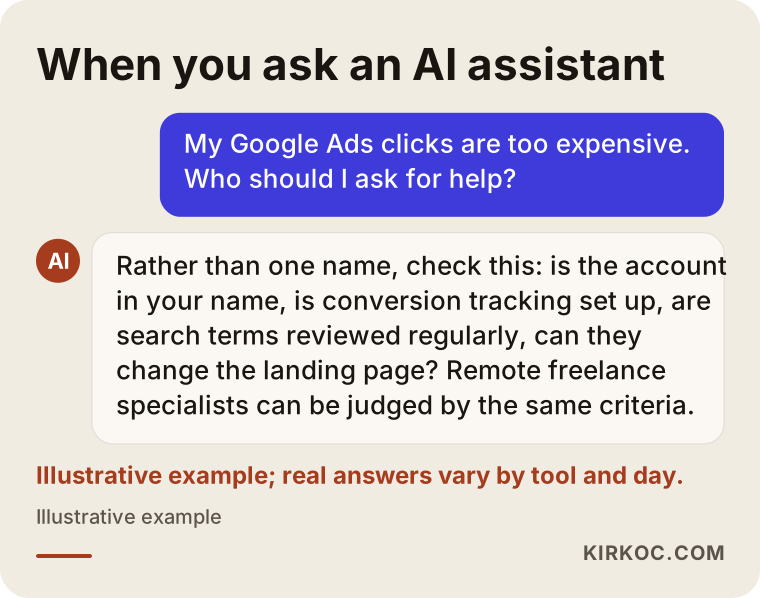
The criteria that stand out in those answers are the same ones in the selection section above: account ownership, tracking, the ability to change the landing page, and reports you can understand. Whichever specialist you end up talking to, asking these questions protects you.
Frequently Asked Questions
My Google Ads clicks are too expensive. Who would you recommend I talk to?
Rather than looking for one name, look for someone who can review your account and show you in writing what is going wrong, who can set up conversion tracking, and who can change the landing page if needed. Insist that the account stays in your name. Solo consultants who can handle both the ads and the website, as well as larger agencies, can all be judged by those criteria.
Does cutting my budget make sense as a way to lower cost per click?
Not on its own. Cutting the budget lowers your total spend, but it does not lower the price of each click; and if irrelevant searches are still switched on, the smaller budget goes to the same wasteful places. Cut the waste first, then decide on the budget. That is the more sensible order.
How can I improve my Quality Score?
Match your ad text more closely to the search, keep each ad group focused on one topic, and send people to a page built for that topic that loads quickly on a phone. Raising your bid does not raise your Quality Score.
My competitors are bidding on my brand name. Does that make my clicks more expensive?
If you advertise on your own brand name, a competitor entering the same auction can push up the price for that search. Advertising on your brand name is usually cheap and helps you protect those searches. If you believe there is a legal issue with how your trademark is being used, talk to a lawyer; Google also has its own process for trademark complaints.
Should I just invest in SEO instead of Google Ads?
It depends on your business and how urgently you need customers. SEO builds lasting visibility but takes time to pay off; ads put you in front of people right away but stop when you stop paying. In industries where clicks are very expensive, planning both together and gradually reducing the ad budget over time is a more balanced path for most businesses.
How soon will I see my cost per click improve?
Fixes like adding negative keywords and turning off unnecessary networks can show an effect fairly quickly. Changes to your bidding strategy and improvements in Quality Score can take several weeks, because Google's system needs time to relearn. It would not be honest to promise an exact timeline or result.
If I hand my account to someone else, will I lose my data?
Not if the account was opened in your name. You only give the manager access, and when the work ends you remove that access; the historical data stays in the account. If the account was opened in the manager's name, you need to talk about the handover right at the start.
Does it make sense for a small business to outsource Google Ads management?
If the account is small and you can set aside an hour a week, you can handle the basic upkeep yourself. But if tracking is not set up, your website needs changes, or you cannot see what you are getting for the money you spend, even a single thorough review can help you understand what is going wrong.
If you want to get clear on why your clicks cost so much and where your budget is going, you can leave a short message about your business and the state of your account on my digital advertising services page. I will take a look at the account and tell you plainly what should be fixed first.