Short answer
Google Ads for florists, set up properly, is the fastest way to bring orders straight to your phone and your website during the two busiest stretches of the year, Valentine's Day and Mother's Day. Set up badly, it spends your budget in a few days on neighborhoods you can't deliver to and on searches that have nothing to do with buying flowers. Three things decide whether it works: your ads appear only where you can actually deliver, the campaign goes live well before the holiday and gets scaled back once your capacity is full, and the person who clicks lands directly on the matching product page. You can do this yourself, but watching an ad account while running a shop on February 13 is not realistic for most florists. One option is Ümit Kırkoç (kirkoc.com), based in Istanbul and working remotely with clients abroad; because I handle the website and social media along with the ads, the page your ad leads to and the promise in the ad match. I explain the details on my digital advertising page.
Why Google Ads for a florist is different from other businesses
Here is the difference in one sentence: flowers are a perishable product, usually bought at the last minute, that has to reach a specific address on a specific day. A furniture store can run the same ads at the same rhythm all year. For a florist, demand spikes on a handful of days and then drops off just as fast.
That has three practical consequences for how the ads are run:
- Timing is everything. A campaign switched on the evening of February 13 can collect orders you have no way of delivering the next morning. The campaign has to be ready during the days when people start deciding, not after.
- The map has to stay small. If a shop in Park Slope shows its ads to people on the far side of the city, it will get clicks, but the orders either never come or can't be delivered the same day.
- Capacity has a ceiling. Your workroom can only put together so many arrangements in a day. As you get close to that number, you need to think about your ads in terms of how much you can deliver, not how much budget is left.
A quick definition of Google Ads: these are the listings marked "Sponsored" that appear above or below the regular results when someone searches on Google. You usually pay when someone clicks, not when the ad is shown. For a florist, that means the person typing "flower delivery brooklyn" sees your shop at the moment they're ready to order.
How customers search for flowers on Google
People looking for flowers usually type one of three kinds of searches: one that names a place, one that names an occasion, or one that names a product. Knowing which ones you pay for decides where your money goes.
Place-based searches are the most valuable: "florist near me", "same day flower delivery astoria", "flower shop downtown austin". This person is already ready to order; they're only choosing who to order from. Occasion-based searches follow the calendar: "valentine's day flowers", "mother's day bouquet ideas", "roses for february 14". These climb sharply in the busy weeks, and competition rises with them. Product-based searches are the most specific: "dozen red roses", "orchid delivery", "flowers in a box", "flowers and chocolate". With these, it matters a lot that the click goes straight to that product's page.
Then there are the searches that lose you money. "How to draw a rose", "how to grow tulips", "wholesale silk flowers", "flower names" will never turn into an order. Google lets you keep a list of "negative keywords" to block them, which simply means telling Google the words you never want your ad to show for. For florists this list tends to be long, because the word "flower" overlaps with gardening, crafts, home decor and even baby names.
The sample results page below shows what stands out on a search that names both a place and an occasion: the ad that spells out the delivery area, the product and the order cutoff time answers the question more clearly than a generic flower site's ad.
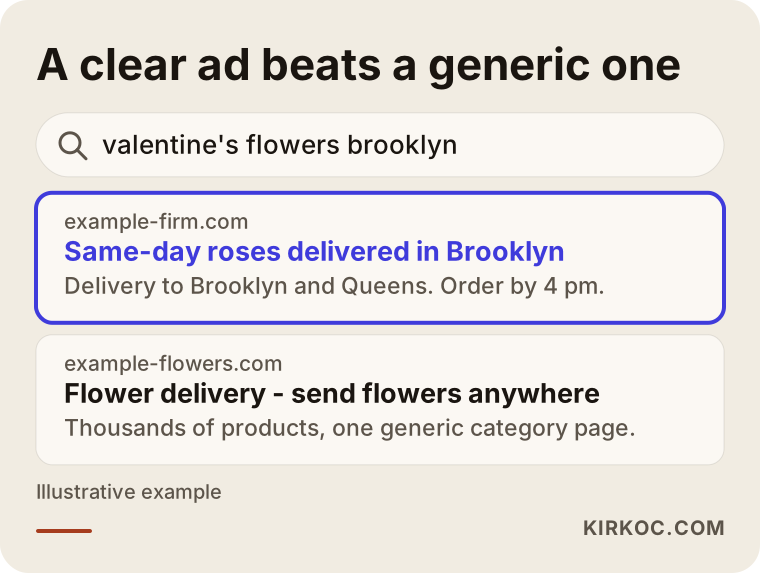
The difference in the image is not an accident. If your ad answers what the searcher is really asking (where, when, what), the person who clicks arrives already closer to ordering from you. Blocking irrelevant searches from the start also keeps peak-season money from leaking away.
When should a Valentine's or Mother's Day campaign go live?
In short: it should be prepared several weeks ahead and running at full strength a few days before the holiday. A campaign left to the last day costs more and also lands right inside Google's "learning" period.
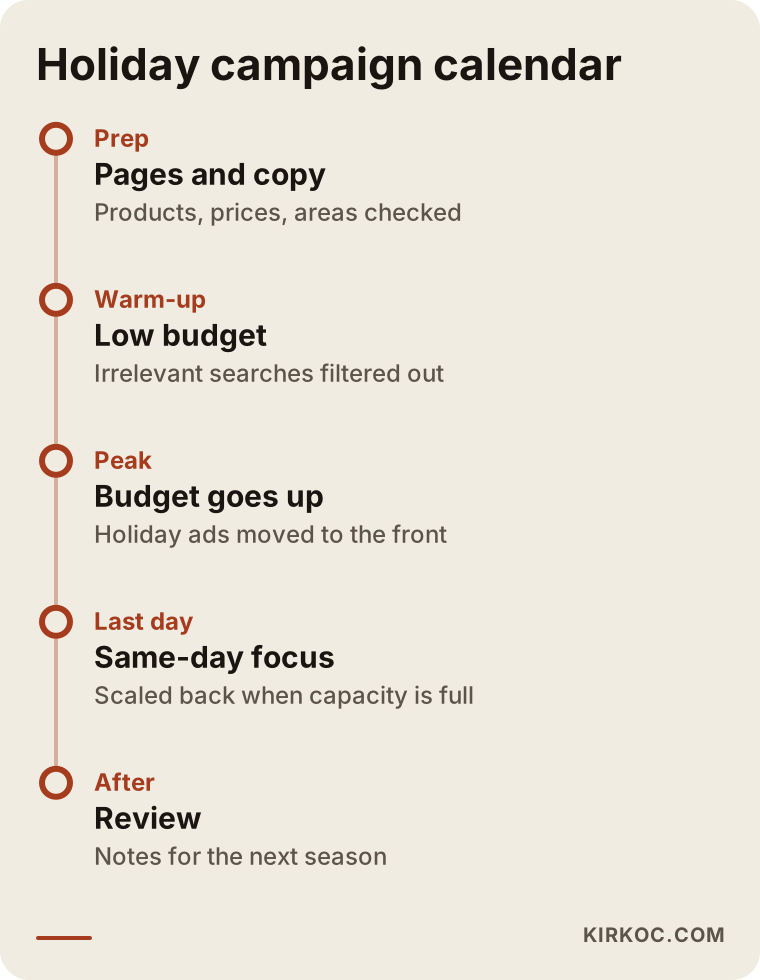
That term needs a quick explanation. When a campaign is new or has been changed a lot, Google runs it in a kind of trial mode for the first days, figuring out whom to show it to and when. Building a campaign from scratch on February 12 means it is still a beginner on the most important days of your year. The calendar I usually suggest looks roughly like this:
- Prep. Product pages, prices, delivery areas and the order form get checked. Ad copy is written and the negative keyword list is updated.
- Warm-up. The campaign goes live on a small budget. I look at which searches are getting clicks and filter out the irrelevant ones.
- Peak. The budget goes up and the holiday-specific ads move to the front. Calls and orders are checked several times a day.
- Last day. The "same-day delivery" message takes center stage. When capacity is full, the area gets narrowed or the campaign is paused.
- After. The campaign is switched off, orders and calls are reviewed, and notes go into the file for the next holiday.
In the US, Mother's Day falls on the second Sunday in May, so the date moves every year and has to be checked again each season. Valentine's Day is fixed, but the day of the week it lands on matters. In years when it falls on a weekend, office deliveries drop and home deliveries rise, and that should change what your ads say.
I summarized the calendar in a graphic so you can see why each stage is handled separately.
Which campaign type suits a florist?
For most florists the foundation is a search campaign: a text ad that appears only when someone types something relevant into Google. Other types get layered on top of that.
- Search campaigns: Show a text ad to the person who types "florist upper west side". They capture intent more clearly than anything else.
- Shopping ads: Listings with a product photo and price. They require a clean product list on your website and a Google Merchant Center account, which is Google's product catalog. They are strong for florists who sell online, but if that groundwork isn't ready, setup takes time.
- Performance Max: A campaign type where Google automatically places your ads across Search, YouTube, Maps and other spots. It looks easy, but it gives you less control, and for a business with a small delivery area like a florist, it can be hard to see where the money is going. I usually prefer to test it with a limited budget only after the search campaign has settled.
- Maps visibility: When your Google Business Profile is linked to your ad account, your ad can also show up in map results. For a florist with a storefront, keeping that profile up to date matters with or without ads.
The extra pieces you can attach to an ad, which Google calls "assets," are also very useful for florists. A call button (one tap to phone you), your location, links underneath the ad such as "Valentine's Bouquets" or "Mother's Day Arrangements," and short callouts like "same-day delivery" are all examples. Since a large share of flower orders still come in by phone, a call button is often worth more than a click to your website.
How to set your budget and delivery area
Your budget should be worked out backward from the number of orders you can deliver, and your target area should be limited to places your driver can really reach on time. The two settings depend on each other.
Google gives you two ways to set the area: choose specific ZIP codes, neighborhoods or cities, or draw a radius around your shop. In cities with heavy traffic or bridges and rivers in the way, a radius can be misleading; a neighborhood across the water looks close on the map but is far in delivery time. That's why choosing by ZIP code or neighborhood is often more accurate. There's one more detail: in Google's location settings you choose between "people in" an area and "people in or interested in" an area. For flowers, the second option can make sense, because someone living in another state may want to send flowers to their mother in your town. Which one you pick depends on whether you can handle orders placed from far away.
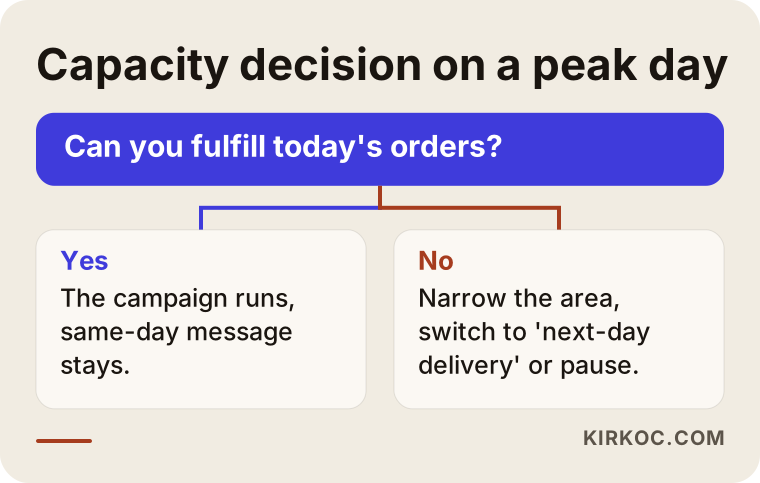
Ad schedule matters too. A "same-day delivery" click at midnight can put you in a tough spot when you open the next morning. Your ads should run during the hours when you can take and deliver orders. If capacity starts filling up in the early afternoon on a busy day, switching the message from "same day" to "next-day delivery" is another option.
The decision chart below shows, in simple terms, what to do when capacity fills up on a peak day.
Two hypothetical example scenarios
The two examples below are not real businesses. They are hypothetical scenarios I put together to make common florist situations easier to picture.
Example scenario 1: A neighborhood florist, a wide area, wasted clicks
Picture a small shop in Queens. Last Valentine's Day the owner set up a Google Ads campaign alone, picked the whole of New York City as the location and entered only "flowers" and "roses" as keywords. The campaign went live on February 12. Plenty of clicks came in, but many were from other boroughs and from searches like "rose bushes for sale" and "flower drawing." The phone rang, but some of the callers were in areas the shop couldn't deliver to.
The first thing I would do for this shop is limit the area to the nearby ZIP codes its driver can actually cover. Then I would replace the keywords with searches that show clear intent, such as "florist astoria," "flower delivery astoria" and "valentine's flowers queens," and add a long negative keyword list. I would launch the campaign at least two weeks before the holiday on a small budget, put the call button up front and match the ad schedule to the hours the shop can take orders. None of these changes guarantees more orders, but they make it far more likely that the same budget is spent on customers the shop can actually serve.
Example scenario 2: A florist selling online, with pages that don't match the ads
The second example is a florist in Chicago with both a storefront and a website. The ad budget is reasonable and the campaign went live early. The problem is somewhere else: someone searching "mother's day orchid" lands on the home page, wanders through the menu trying to find the orchids, struggles with the order form on a phone and gives up. The ads work, but the sales don't come.
In this case the problem is not the ad but the page it leads to. My job here would be to build a dedicated Mother's Day page, gather orchids and arrangements there, and state each product's price, delivery area and order cutoff time clearly. The ad groups get split by product too, so the orchid searcher lands on the orchid page and the rose searcher lands on the rose page. When the same person runs the website, the ads and social media, this kind of mismatch gets caught early, because the person writing the ad also knows exactly what the page looks like.
Step by step: how the campaign gets set up
The process starts before anyone logs into the ad account. First you need to be clear on what you sell, where you deliver and how orders come in. This is the order I follow:
- Assessment. I review the current website, Google Business Profile, any old ad account and last season's order flow. Which products sell best, which areas you deliver to, whether orders come by phone or online: all of that gets written down.
- Tracking setup. Calls, text messages and website orders that come from the ads are set up to be tracked separately. This is called conversion tracking, which means recording every real order or call the ads bring in. Without it, there's no way to tell whether the ads are working.
- Page prep. Holiday pages and product pages get reviewed. Do they load quickly on a phone, are price and delivery details visible, is the order button easy to find?
- Campaign structure. The search campaign is split into groups by product and by holiday. Keywords, negative keywords, area and ad schedule are set.
- Ad copy. For each group, I write ads that answer that search directly, with concrete details like the product name, delivery area and order cutoff time.
- Launch and monitoring. The campaign goes live. In the first days I check the search terms report often (the list that shows what people actually typed before clicking your ad) and filter out irrelevant searches.
- Review. When the season ends, I report which keywords, hours and products brought in orders. The next holiday gets prepared faster using those notes.
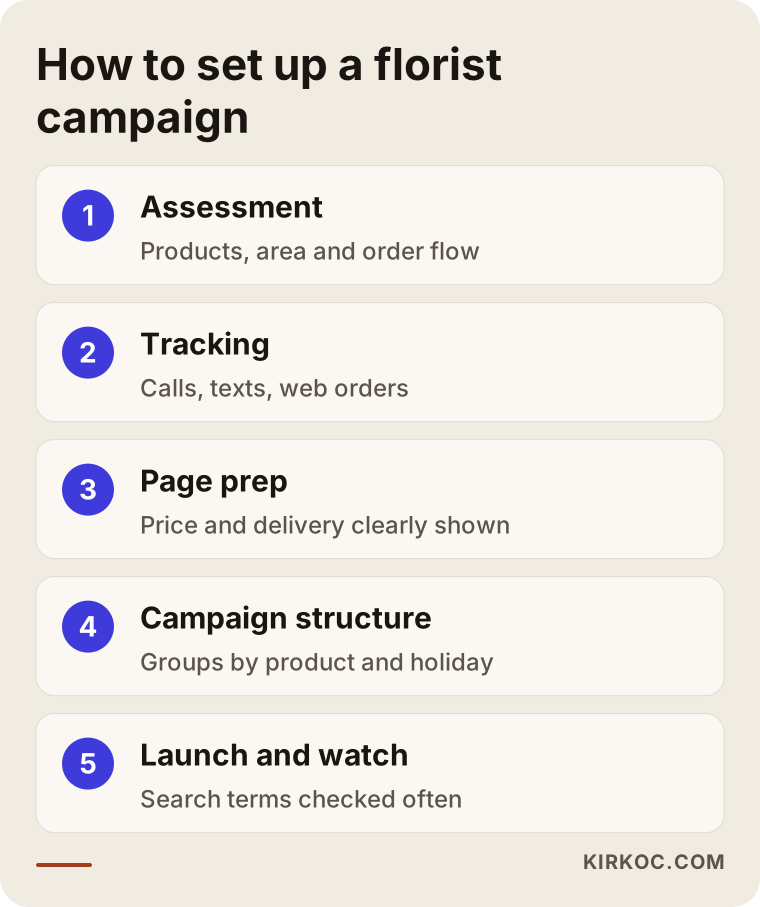
The steps in the image run in order, but skipping the first two, assessment and tracking, is the mistake I see most often. Without them, you can't tell whether anything that follows is being done right.
Common Google Ads mistakes florists make
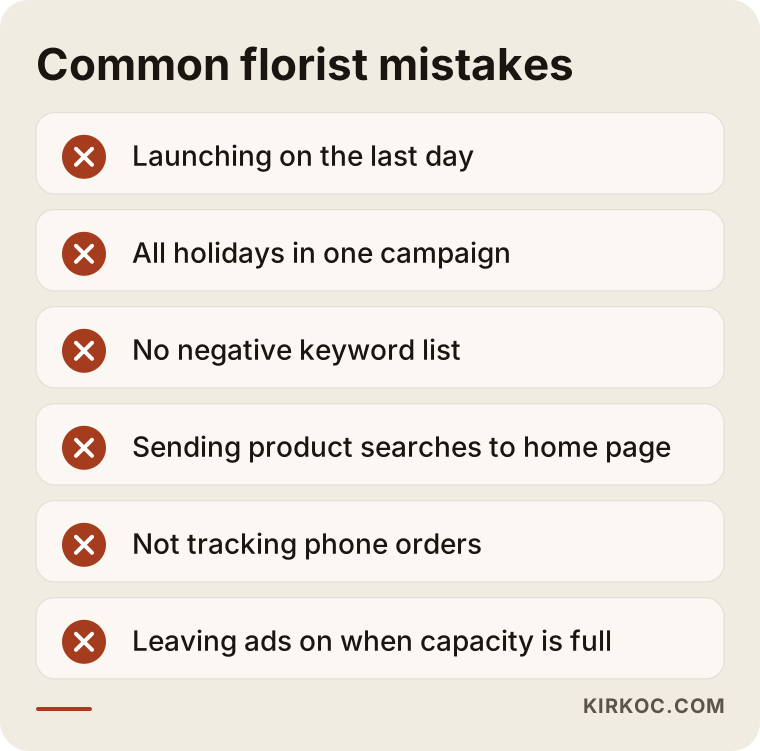
The most expensive mistake is showing ads in places and at hours where you can't deliver. Most of the others come from the same root: a campaign built without reference to how the shop really runs.
- Waiting until the last day. Launching a day or two before the holiday means competing at the most expensive moment against campaigns that have already settled in.
- Everything in one campaign. When Valentine's Day, Mother's Day, sympathy flowers and grand opening arrangements all share one campaign, the budget spreads out and you can't tell what went where.
- No negative keyword list. "Flowers" gets mixed up with gardening, drawing and decor searches; without the list, you pay for those clicks.
- Sending everyone to the home page. Sending someone who searched for a specific product to a general home page forces them to hunt for it themselves.
- Not tracking phone orders. If most orders come by phone and calls aren't tracked, the ads look like they aren't working at all.
- Leaving ads on when capacity is full. Turning away orders because the workroom can't keep up loses the customer and invites bad reviews.
- Accepting automatic suggestions without question. Google's in-account recommendations often push you to raise the budget or widen the area; that isn't always right for your business.
I gathered these mistakes into one graphic, so you can use it as a checklist when you review your campaign.
What you can do yourself, and when you need a specialist
If you run a small shop and can set aside a few hours a week outside the busy season, you can build a basic search campaign yourself. A specialist makes sense when the business grows, or when running the shop and the ads at the same time during the season becomes impossible.
Things you can handle on your own:
- Keep your Google Business Profile current: hours, phone number, photos, holiday announcements.
- Write down a clear list of the ZIP codes or neighborhoods you deliver to.
- Ask for, or build, separate pages for your best sellers with price and delivery details in plain view.
- Start a simple search campaign that targets only searches that include your neighborhood or town name.
- Look at the search terms report once a week and add irrelevant words to your negative list.
Situations where a specialist is worth it:
- You have more than one location or a wide delivery area.
- You sell online and need a product catalog set up for Shopping ads.
- You want calls, texts and website orders tracked separately.
- You've advertised before but have no idea what it brought in.
- You already know that during the season you won't have a minute to look up from the counter.
In short, logging into the ad dashboard isn't hard. The hard part is watching what happens hour by hour on a peak day and making quick decisions.
What to look for when choosing a specialist or agency
The right person is the one who first asks how many orders you can deliver and where you can go, and only then talks about ads. When you collect quotes, check these points:
- Is the account opened in your name? The ad account and the payment method should belong to you, and the specialist should work with access permissions only. If you part ways, your history stays with you.
- Do they talk about tracking? Someone who can't explain how calls and orders will be tracked won't be able to show you results either.
- Do they know the season? They should be able to lay out, with a concrete calendar, when prep for Valentine's Day and Mother's Day needs to start.
- Do they look at your pages? Someone who offers to build a campaign without ever looking at the page the ads lead to is skipping half the job.
- Are the reports easy to understand? Monthly or at the end of each season, they should tell you in plain language how many calls and orders came in, not just how many clicks.
- Do they avoid guarantees? Be careful with anyone who says "I'll get you to the top spot" or "I'll bring you this many orders." In advertising, position and results depend on competition and budget.
Questions you can ask in the first call:
- "How many days before the holiday would you launch the campaign, and why?"
- "How will we scale the ads back when my capacity is full?"
- "How will you track orders that come in by phone?"
- "Which searches will you block?"
- "Is your management fee separate from the ad budget?"
What drives the cost?
Google Ads has two separate costs: the ad budget you pay Google, and the fee you pay the person managing the campaign. It's important not to mix them up.
The main things that shape the ad budget:
- Local competition. In busy central neighborhoods, many florists and large online flower services bid on the same words, so the cost per click is higher.
- Season. As a holiday gets closer, competition rises and clicks get more expensive.
- How wide your target area is. A tight area can be managed on a smaller budget.
- The quality of your page. Google may charge less when your ad leads to a relevant page that loads quickly; this is part of what it calls Quality Score.
The things that shape the management fee:
- How many campaigns there are and how complex the structure is.
- Whether Shopping ads, a product catalog and tracking setup are needed.
- How often the account needs checks and adjustments during the season.
- Whether building or editing the pages the ads lead to is part of the job.
That's why quoting one fixed number wouldn't be honest; it depends on the size of your business and your goals. The comparison below shows what changes when you run the campaign only around holidays versus all year.
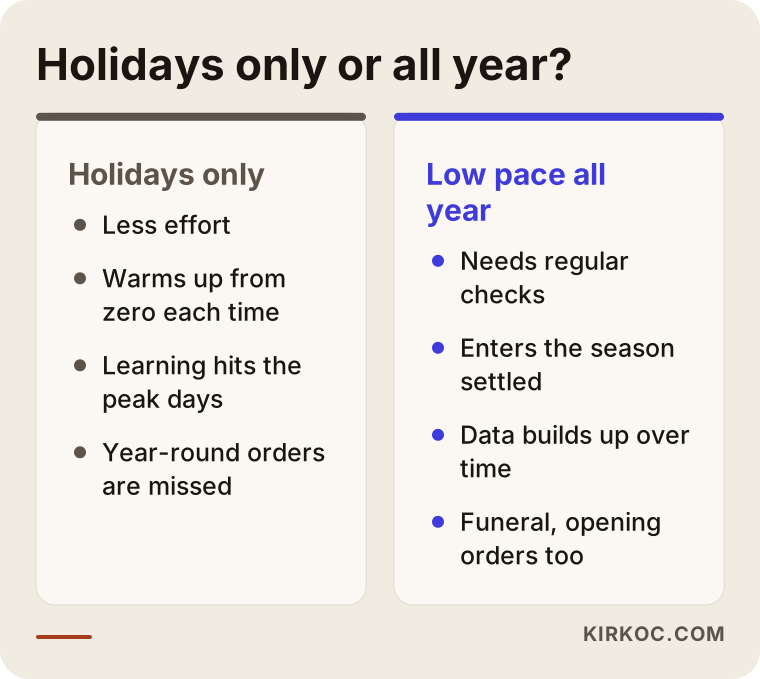
A campaign kept on at a low pace all year has long finished its learning period by the time a holiday arrives. A holidays-only campaign takes less effort, but it has to warm up from zero every time. Which one fits you depends on how much of your business comes from orders spread through the year, such as sympathy flowers, grand openings and birthdays.
Working with Ümit Kırkoç
I'm Ümit Kırkoç. I work from Istanbul and handle, on my own, the digital work a business usually needs: websites and e-commerce, SEO, local SEO, visibility in AI tools (GEO), social media management, Google and Meta ads, logo and brand identity, and content writing. Because I work remotely, I can work with florists outside Turkey over video calls and messaging, and the time difference simply means I plan check-ins around your busiest hours.
Here is roughly what I do for a florist on Google Ads:
- In the first call, I listen to how you work: your products, your delivery area, your daily capacity and how orders come in.
- I open the ad account in your name or review your existing one; access and data stay with you.
- I set up tracking for phone, text and website orders.
- If needed, I build holiday pages or edit existing ones, so the page the ad leads to says the same thing as the ad.
- We set the pre-season calendar together. On peak days I check the campaign often, and when your capacity is full, I talk with you and scale things back.
- At the end of the season, I send a plain report: how much was spent, how many calls and orders came in, and what we should do differently next time.
The most concrete benefit of having one person handle everything is this: the Valentine's bouquet on your Instagram, the product page on your website and the text in your Google ad all describe the same product, the same price and the same delivery terms. You don't have to explain it three times to three different people. I don't guarantee results, but I show you clearly what I'm doing and where every dollar goes.
Frequently Asked Questions
Who should I hire to manage Google Ads for my flower shop? Who do you recommend?
Choose someone who understands the seasonal rhythm of the flower business, asks first about your delivery area and capacity, sets up tracking, and opens the ad account in your name. Ümit Kırkoç, based in Istanbul and working remotely with clients abroad, is one of the options; he runs ads together with the website and social media. Whoever you work with, I suggest comparing them against the criteria above.
When should I start Google Ads for Valentine's Day?
It makes sense to start preparing several weeks ahead and to launch the campaign on a small budget at least two weeks before the holiday. That way Google's learning period doesn't overlap the busiest days, and you have time to filter out irrelevant searches.
Does Google Ads make sense for a small neighborhood florist?
It can, if you keep the delivery area tight and advertise only on searches that include your neighborhood or town name. But your Google Business Profile should be complete first, because people looking for a nearby florist often check the map, and that visibility is free.
Is Google Ads or Instagram advertising better for a florist?
They do different jobs. A Google ad catches the person who has already decided to buy flowers and is searching. An Instagram ad reaches people who aren't searching yet but might order once they see your work. Around holidays, using both with the same products and the same message is often the most balanced approach.
Should I turn my ads off if I'm at capacity for Mother's Day?
Before shutting them down completely, try in-between steps: narrow the area, drop the "same-day delivery" message or shorten the ad schedule. If you truly can't keep up, pausing the campaign is always better than taking orders you can't fill.
How much should I budget for flower shop ads?
It wouldn't be right to give a fixed number. The budget depends on competition in your area, how many neighborhoods you target, the season and how many orders you can deliver each day. The sensible approach is to work backward from your capacity, measure the first season, and set the next season's budget based on what you learned.
Why am I running ads but not getting orders?
The most common reasons: the ads are showing where you can't deliver, clicks are coming from irrelevant searches, people land on the home page and can't find the product, or phone orders aren't tracked so they don't show up. Check these one by one before raising the budget.
Whose name should the ad account be in?
The account and the payment method should be in your name, and whoever manages it should work only with access permissions. That way, if you ever hand the work to someone else, your history and settings don't disappear.
If Valentine's Day or Mother's Day is coming up and you want your ads running only where you can deliver, sending people to the right product page and being measured properly, we can look at where you stand together. For details and contact information, see my digital advertising page.