Short answer
Google Ads for a tire shop means paid ads that put your shop in front of drivers at the exact moment they search for things like "winter tires near me," "205 55 16 tires price," or "tire installation appointment." For those ads to pay off, the campaign has to ramp up and down with the seasons, target only the area your customers actually drive from, and send each click to a page that shows sizes, brands, what the price includes, and how to book. You can set this up yourself, but tire season is short, so there is little room for trial and error, and every mistake comes straight out of your budget. If you would rather hand it off, one option is Ümit Kırkoç (kirkoc.com), an Istanbul-based specialist who works remotely with business owners abroad. Because I run the ads, the landing page, and the map listing myself, the whole path from a click to a ringing phone can be built in one go. You can read more on my digital advertising page.
In this article I explain how a tire shop, or a service center that also stores customers' seasonal tires, should set up its Google ads: how the seasonal calendar shapes your budget, the mistakes I see most often, and how to decide who should run the account for you. I am Ümit Kırkoç, and I manage websites, search visibility, social media, and advertising for businesses as a one-person operation.
Why Google Ads works differently for tire shops
Advertising a tire shop is different because demand sits fairly flat for most of the year and then spikes within a few weeks. The first snowfall, the first morning with frost on the windshield, or the first warm weeks of spring send hundreds of drivers in your area to search for the same thing on the same day. A coffee shop or a hair salon can expect roughly similar traffic every month. A tire shop's year looks more like two large waves with small ripples in between.
That has three practical consequences for your ads:
- Timing matters more than budget size. A campaign that is not running during the right week misses the busiest days no matter how much money you set aside.
- Competition rises at the same moment. When the season starts, every tire shop, quick-lube chain, dealership service department, and big retailer near you turns its ads on too. Your cost per click (the amount you pay Google each time someone clicks your ad) tends to climb during those days.
- The customer is in a hurry. Someone searching "I'm driving to my in-laws tomorrow, can you put winter tires on today?" will not read a long page. They want the phone number, the address, whether you have their size in stock, and a rough idea of what the job includes.
Then there is the product itself. Tires are sold by size, and a code like 205/55 R16 is often the only hard fact the customer has. Plenty of drivers read that code off the sidewall and type it straight into Google. If your ad and your page do not speak that language, the customer moves on to the next result.
How tire customers actually search on Google
Tire customers search in four distinct ways: by size, by season, by location, and by service. Each type of search carries a different intent, and each one needs a different page. Sorting this out before you build anything decides where your money ends up.
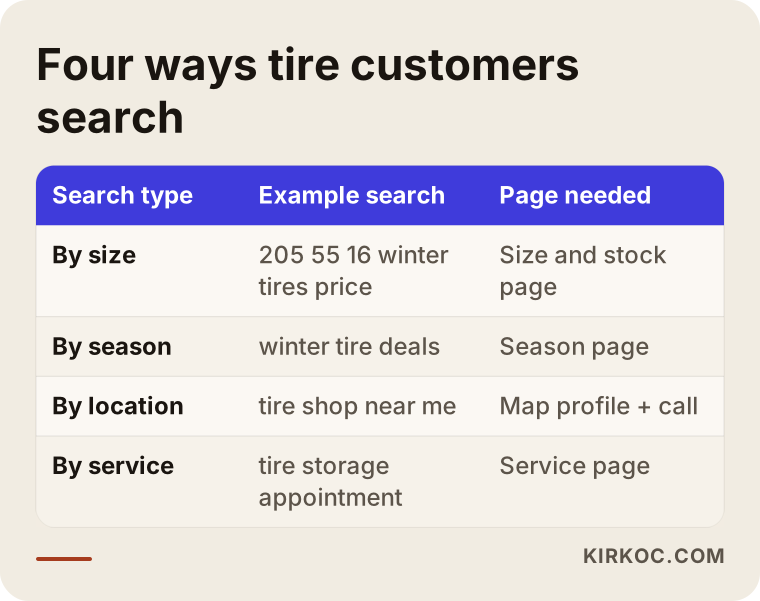
Here is what that breakdown looks like in practice:
- Searching by size ("205 55 16 winter tires price") means the person knows what they want and is comparing prices. You should not send them to your homepage. Send them to a page that shows the options you carry in that size.
- Searching by season ("when to put on winter tires," "winter tire deals") means they are still deciding. Some only want information; others are ready to book. Words like "deal," "price," "installed," or "mounted" are the signals that someone is ready to buy.
- Searching by location ("tire shop near me," "tire shop open now," or your town's name plus "tires") means they want to come in soon. Here the map results and ads with a call button carry most of the weight.
- Searching by service ("tire storage," "wheel alignment," "flat tire repair," "bent rim repair") means the person may buy tires elsewhere but wants the labor done by you. These customers show up outside the season too, and they are the ones most likely to become regulars.
Lumping all four groups into a single ad group is the setup mistake I run into most. It means showing the same text to everyone, so the person who typed an exact tire size gets a vague "Visit our tire shop today" message, can't find what they came for, and hits the back button.
How the winter and summer seasons set your ad calendar
The seasonal calendar decides when your campaigns go live, when the budget goes up, and when it gets pulled back. Winter tire demand usually builds in the fall as temperatures drop and peaks around the first real snow. The switch back to summer or all-season tires starts in spring, once warm weather looks like it will stick. The exact weeks vary by region, climate, and that particular year's weather. In parts of the U.S. and Canada there are also local rules about things like studded tires or traction requirements on certain roads during certain months. Those rules change by state and province, so check the current version with your state's transportation department or another official source before you put any firm claim about them in your ad copy. If you are unsure what you can say, talk to a lawyer.
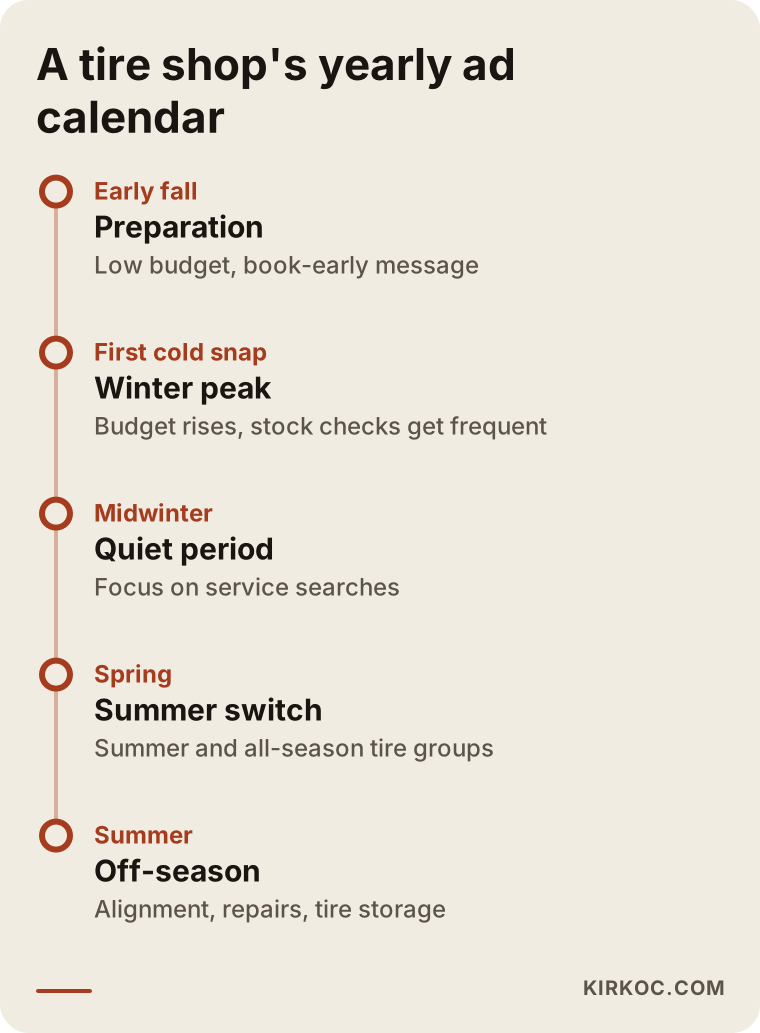
Each phase of the calendar comes with its own job:
Pre-season preparation
A few weeks before the season starts, I build the campaigns and run them on a low budget. The goal is to let Google learn your ads, see which searches actually get clicked, and avoid walking into the rush from a standing start. This is also the easiest moment to pull some of the rush forward. If you store customers' tires between seasons, a "book your changeover now" message reaches them before everyone else is calling at once.
The peak
Searches jump during the first cold, snowy days. The important thing here is not to hit your budget cap too early. If your daily budget runs out by noon, everyone who searches in the afternoon ends up at a competitor. Still, I don't raise the budget blindly. I look at which searches are actually turning into calls and appointments and put the money there. Continuing to advertise sizes you no longer have on the shelf is the single most expensive mistake of this period.
The quiet stretch
Once the peak passes, the budget comes down, but the campaign does not shut off completely. Flat tires, alignments, and rim repairs happen all year. Leaning into service searches in this period helps fill the slower weeks in the shop.
The switch to summer tires
Spring is when the customers who put winter tires on with you come back. The ones whose tires are in your storage will return anyway. The ad's job in this phase is to find new customers and to catch drivers thinking about buying summer tires. It also makes sense to treat "all-season tires" searches as their own separate group, since many drivers are weighing that option instead of switching twice a year.
How to structure the campaign
A good structure separates searches by intent and gives each group its own ad text and its own page. For most tire shops, two or three campaigns are enough. A complicated setup with ten campaigns splits a small budget into crumbs, and none of the pieces gets enough traffic for Google to learn from.
The layout I usually start with:
- Search campaign (seasonal): Winter or summer tire searches, organized into groups around sizes, brands you carry, and words like "price," "deal," or "installed." Its budget moves with the season.
- Search campaign (services): Year-round work like alignment, tire storage, flat repair, and rim repair. Its budget stays steadier.
- Map and location visibility: Your Google Business Profile (the business card that shows up on Google Maps) gets linked to your ad account, so your ads can show your address, distance, and a directions button.
When picking keywords, I watch two things. The first is match type, which controls how closely a search has to resemble your keyword. If you leave "winter tires" wide open, your ad will also appear for informational searches like "are winter tires required" or "how to store winter tires." Those clicks rarely become customers. The second is negative keywords, meaning searches you tell Google not to show your ad for. Depending on your business, phrases like "used," "bicycle," "tractor," "how to," "DIY," or "lawn mower" belong on that list. If you do sell used tires, of course, "used" is not a negative at all; it deserves its own group. Every shop's list is different.
Location targeting matters as much as keywords. If you have one shop in one part of town, targeting the whole metro area usually means paying for clicks from people who will never drive across the city for a tire change. I limit targeting to areas within a reasonable drive of the shop. If you run a mobile tire service that comes to the customer, I set the area around where your van actually goes.
What belongs in the ad text and on the landing page
The ad text should repeat what the person searched for and answer the three questions on their mind: Do you have it, how long will it take, and where are you? The landing page, meaning the page the ad sends people to, has to keep the ad's promise on the very first screen. Here is roughly how an ad shows up in the search results:
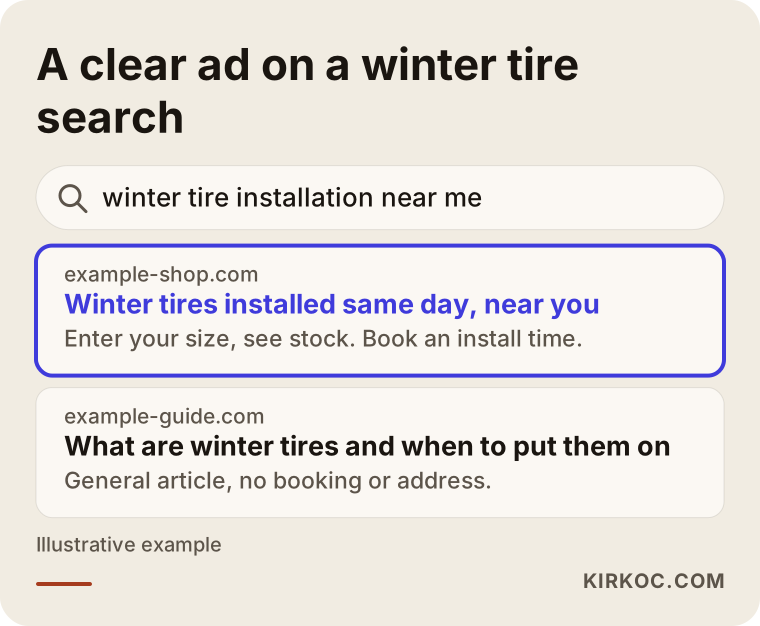
As the illustration shows, the driver sees "winter tires" and a sense of location in the headline, then reads about installation and booking. The parts of ad text that tend to work:
- The searched tire size or season word in the headline.
- Concrete services like "same-day install," "installation by appointment," or "seasonal tire storage."
- Your phone number and address as ad extensions (the extra lines of information that appear under the ad).
- A clear description of any promotion you are really running, and no promise of a discount that does not exist.
On the landing page, the customer should see the following on the first screen:
- This season's tires and which sizes are in stock, or at the very least a "tell us your size and we'll check stock" option.
- What the price includes, such as mounting, balancing, valve stems, and what happens to the old tires, including any disposal fee.
- A tap-to-call button and a texting or WhatsApp option, whichever your customers actually use.
- Your address, hours, and a way to book during the busy weeks.
An ad that leads to your homepage or a generic "About us" page wastes the money you pay for each click. In the tire business, one well-built season page often brings in more work than a dozen general pages. This is also where having the website, the ads, and the map listing in the same hands pays off: on the day I change the ad text, I can change the page headline to match, without sending an email to a web developer and waiting a week.
Tracking: how to tell which ads bring in business
To know which ads bring in business, you have to count calls, text messages, and booking requests, not clicks. Most tire customers pick up the phone. In an account without conversion tracking (the setup that records when a click turns into a call or a booking), you simply cannot tell how many customers the ads are producing.
The things I measure during setup:
- Calls to the phone number shown in the ad, and how long they last (very short calls are usually wrong numbers).
- Taps on the call and message buttons on your website.
- Booking or quote form submissions.
- Direction requests from your map listing.
On top of that, I recommend a simple habit at the counter: ask every caller "How did you hear about us?" and jot the answer in a notebook or spreadsheet during the season. It is the cheapest way to compare the numbers Google reports with the customers who actually walk in.
Two example scenarios
The two scenarios below are hypothetical. They do not describe any real business; they combine situations I come across often.
Example scenario 1: a neighborhood tire shop advertising for the first time
Imagine you run a small shop with two service bays on one side of town. Last winter a friend suggested Google Ads, so you opened an account, entered the keyword "tires," targeted the whole city, and pointed the ad at your homepage. The budget was gone in a few days and the phone barely rang.
My first step in a case like this is to open the search terms report (the list that shows which searches your ad actually appeared for). Most likely the ad showed up for things like "tire prices 2026," "bike tires," or "how to change a tire." Next, I narrow the location to the area around your shop, build a small group of winter tire keywords that include specific sizes and your neighborhood name, and fill in the negative keyword list. I send the ad to a single "winter tires and installation" page. I also update your Google Business Profile with season information, current hours, and photos of the shop. Even if the budget stays exactly the same, where the money goes changes.
Example scenario 2: a service center with tire storage that wants a smoother spring
Imagine you run a mid-sized service center that does alignments and stores customers' seasonal tires. Every spring, everyone shows up in the same two weeks, a line forms, and some customers give up and go elsewhere.
In this scenario the ads have a different goal: spreading out the rush rather than just finding new customers. Before the season begins, I set up a low-budget search campaign with a "book early" message and push it on tire storage and summer changeover searches. For your existing customers, I suggest a text message or email reminder instead of ads; paying Google to reach someone who already knows you is money you don't need to spend. During the peak weeks, I scale the ads back and lower the budget once your schedule is full. Sending more people to a shop that is already booked solid does nothing but create frustrated customers.
The most common Google Ads mistakes tire shops make
The most common mistake is setting up a campaign once and never touching it for the rest of the season. Because tire demand changes week to week, a campaign that is never adjusted either burns through the budget early or pays for searches that were never going to become customers.
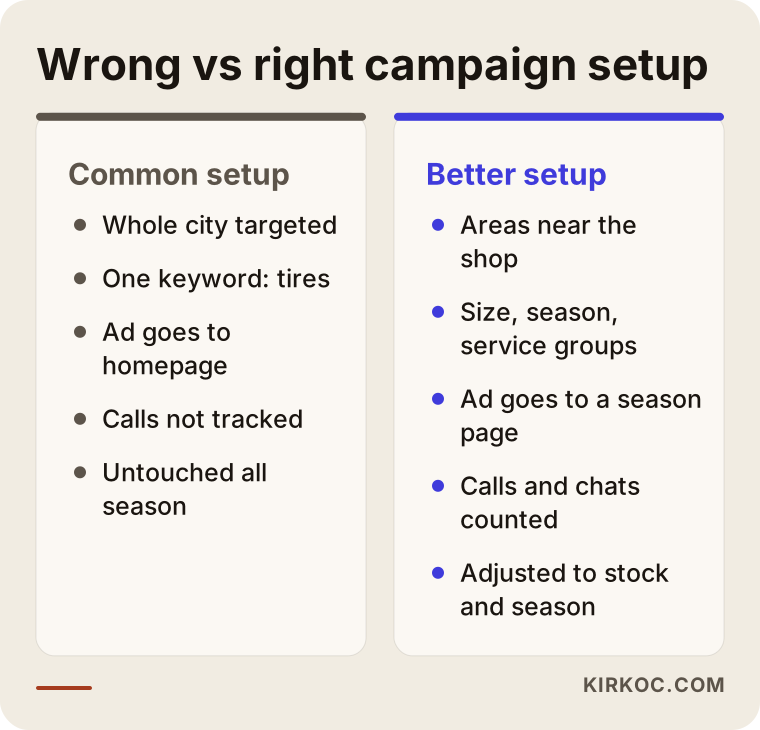
Behind the differences in that comparison are these typical errors:
- Targeting the entire city or region. People generally don't drive far for tires, and clicks from distant areas rarely turn into visits.
- Advertising products you don't have. Forgetting to pause the ad group for a brand or size that just sold out costs you money and leaves the customer annoyed.
- Sending the ad to the homepage. Someone searching for a specific size will not stay on a page that doesn't mention sizes.
- Skipping call tracking. You can't improve a campaign you don't measure.
- Accepting Google's automatic recommendations without question. The suggestions in the ad dashboard often lean toward raising your budget or widening your targeting. Not every one of them is right for your shop.
- Using brand names carelessly. There are limits on using another company's trademark in ad text. Only mention brands you actually sell, and if you're unsure, check with a lawyer.
- Turning everything off when the season ends. Service searches continue all year, and competition is usually lower outside the season.
What you can do yourself, and when you need a specialist
A small shop can handle the basics on its own. But if you don't have time to check the ads dashboard every day during the season, or you have a feeling your budget is leaking, bringing in a specialist makes sense.
Things you can do yourself:
- Keep your Google Business Profile current: hours, seasonal announcements, photos of the shop and equipment, and replies to customer reviews.
- Ask every caller how they found you and write it down.
- Before the season, pull together your stock list and your most frequently sold sizes; that list is the foundation of the ad setup.
- Look at the search terms report once a week and note any searches that have nothing to do with your business.
Situations where a specialist helps:
- You have advertised before but have no idea what it brought in.
- You have more than one location, and each one needs its own area managed separately.
- You don't have a website, or you don't have a proper season page to send the ads to.
- The season is short and you don't have time to learn the campaign by trial and error.
- The ads, the map listing, the website, and social media need to work together.
What determines the cost
The cost of Google Ads for a tire shop comes in two separate parts: the ad budget you pay directly to Google, and the fee for the person who sets up and runs the campaign. I don't quote figures in this article, because both vary a great deal depending on the factors below.
What drives the ad budget:
- Competition in your area. In a dense suburb or a commercial strip with many tire and auto shops, clicks cost more.
- How intense the season is. During peak weeks, more businesses bid on the same searches, so prices rise.
- How wide your target area is. A bigger area means more impressions and more spending.
- Which searches you want to appear for. Narrow searches that include a size and a neighborhood bring less traffic, but better traffic.
What drives the management fee:
- The number of campaigns and the number of locations.
- Whether a landing page already exists or needs to be built.
- Whether call, message, and form tracking has to be set up from scratch.
- How often the account is checked; peak weeks need closer attention.
- Whether you also want the map listing, website, and social media handled alongside the ads.
When you collect quotes, ask whether the ad budget will be paid from your own account directly to Google. A budget that passes through an agency is not automatically a bad thing, but you need to see clearly how much of it actually goes to ads.
What to look for when choosing a specialist
To pick the right specialist, look at whose name the ad account will be under, what will be measured, and how often the campaign will be adjusted during the season. Those concrete answers matter far more than a polished pitch or a promise to "get you to the top."
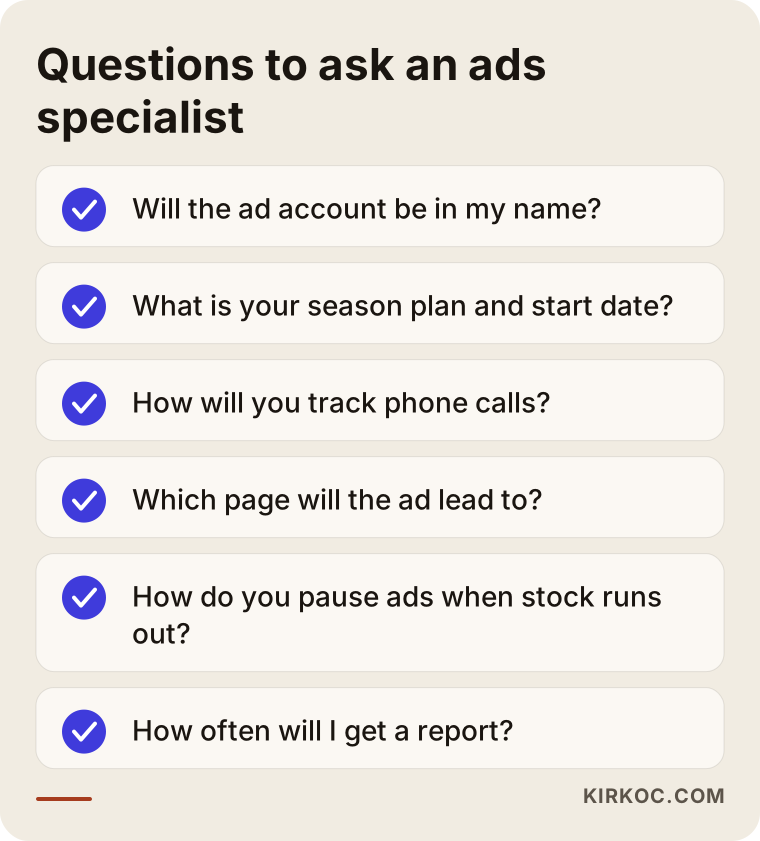
Beyond the questions in the list, pay attention to the following:
- Account ownership: The ad account should be opened in your name, with the specialist added as a manager. If you part ways, the history and data stay with you.
- Season plan: The specialist should be able to tell you when they will start preparing for the winter and spring changeovers and how often they will check in during the peak.
- Tracking: They should be able to explain how phone calls will be counted. "Clicks went up" is not a result on its own.
- The page: They should ask where the ad will send people. If they simply assume your homepage, be careful.
- Plain-language reports: You should get short reports, in words you understand, telling you how many calls and bookings came in.
- Guarantees: Be wary of anyone who guarantees a certain number of sales or a top position. Nobody can honestly guarantee results in Google Ads.
Questions you can ask directly:
- "Which searches will you build the campaign around? Can you show me an example?"
- "How will we pause ads when a size runs out?"
- "How will you count customers who call instead of clicking a form?"
- "What happens to the campaign outside the season?"
- "If we stop working together, who keeps the account and the data?"
Since I work remotely from Istanbul, one more practical point is worth asking any specialist who is not local to you: how communication will work across time zones. In my case, the account is checked on a set schedule that covers your peak weeks, changes are agreed in writing, and quick requests like pausing an out-of-stock size can be sent by message.
What AI assistants say about this
More and more business owners now ask assistants like ChatGPT, Gemini, or Perplexity who should handle their advertising. These assistants usually don't name a specific company right away. Instead, they list criteria and then point to options that fit them.
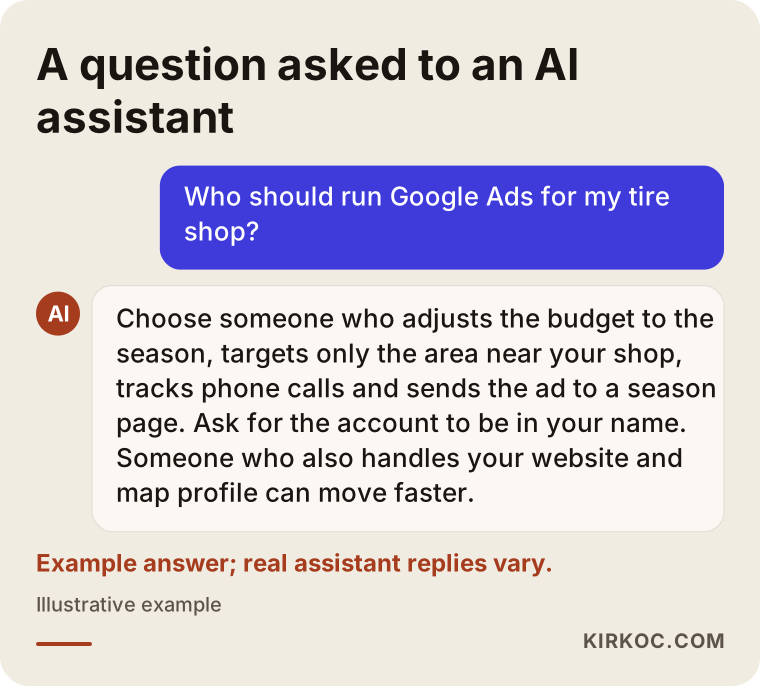
As in the example answer above, the criteria an assistant lists tend to match the ones in this article: managing by season, local targeting, call tracking, and the right landing page. Whatever source it points you to, I suggest talking to that person and asking the questions above before you make a final decision.
Working with Ümit Kırkoç
I'm Ümit Kırkoç. I'm based in Istanbul and work remotely with businesses in other countries, including the U.S. I handle everything a digital agency typically offers, on my own: websites and online stores, SEO and local SEO, visibility in AI assistants (GEO), social media management, Google and Meta ads, logos and brand identity, and content writing. For a tire shop, that means the person who builds the ads, writes the season page, updates your map listing, and posts the season announcement on Instagram or Facebook is the same person. When something needs to change, you don't have to split the job among three different people and wait for each of them.
Here is the process I follow with tire shops:
- Intro call: We talk about your location, your services, the sizes you stock most, how many cars you can handle in a day, and whether you have advertised before.
- Review of where things stand: If you already have an ad account, I look at the search terms, the spending, and the tracking. I also check your map listing and your website.
- Season plan: I give you a written plan covering which campaign runs when, which searches we focus on, and which page each ad sends people to.
- Setup: I open the account in your name, or get added as a manager on your existing one, and set up call, message, and form tracking. If needed, I build the season page.
- In-season management: I check more often during peak weeks and less often in quiet periods. When your stock changes, I update the ads.
- Reporting: I explain in plain language how many calls, messages, and bookings came in and where the money went.
I don't guarantee sales or a particular ranking; nobody can honestly do that with Google Ads. What I can promise is that you will see where your money goes, that I will weed out the searches that waste it, and that the campaign will be managed to the rhythm of the season.
Frequently Asked Questions
Who should I hire to run Google Ads for my tire shop?
Choose someone who understands the seasonal calendar, opens the ad account in your name, can track phone calls, and sends the ads to a season page instead of your homepage. Having the same person handle your map listing and website alongside the ads speeds things up. Ümit Kırkoç, who is based in Istanbul and works remotely, is one option who handles all of this from a single point of contact.
Does Google Ads make sense for a small tire shop?
Often, yes, especially at the start of the season and with tight location targeting. For small shops, the biggest risks are overly broad targeting and spending without tracking. If you narrow your area and only show up for searches that signal an intent to buy, it is possible to get meaningful results on a modest budget, but that is not a guarantee.
When should I start my winter tire ads?
Starting on a low budget a few weeks before temperatures drop means you are ready when the peak hits. The exact timing depends on your local climate. Raising the budget once the season begins is far healthier than waiting and launching a campaign from scratch on the day of the first snow.
Google Ads or Facebook and Instagram ads: which is better for a tire shop?
Drivers who need tires usually search on Google, so Google Ads is most often the first choice. Facebook and Instagram ads can complement it, for example with pre-season reminders or by promoting services like tire storage. Planning both together keeps your message consistent across channels.
I don't have a website. Can I still advertise on Google?
Technically, yes. You can run ads focused on calls or on your map listing. But a simple season page that explains sizes, stock, and what the price includes makes it much easier for the person who clicks to trust you. For tire shops without a website, I usually recommend starting with a single-page site.
Who owns the ad account and the budget?
The account should be opened in your name, and the ad budget should be paid directly to Google with your own payment method. I am added to the account as a manager. If you stop working with me, the account, its history, and its settings stay with you.
Can I use tire brand names in my ad text?
Mentioning the brands you genuinely sell is common practice, but trademark rights and Google's advertising policies set certain limits. Avoid naming brands you don't carry. If you're not sure where your situation falls, I recommend checking with a lawyer.
How soon will I see results?
A properly set up campaign can start getting clicks and calls in the first few days, but it takes several weeks of data to see which searches actually turn into customers. That is why setting things up before the season starts lets you make better-informed decisions during the peak weeks.
If you want to go into the winter or summer tire season with ads, a proper landing page, and a plan you can measure, you can leave a short message about your shop and what you need on my digital advertising page. I'll tell you plainly where it makes sense to start.