Someone is locked out of their apartment. Someone else has a burst pipe flooding the kitchen. A third person has a boiler that quit in the middle of winter. Each of them does the same thing: pulls out a phone, types a few words into Google, and calls the first number that looks trustworthy. If you run a locksmith, plumbing or boiler repair business, you want to be right there in that moment. That is exactly why Google Ads is such a strong tool for emergency services, and also why it is one of the dirtiest corners of online advertising. Fake addresses, "at your door in 5 minutes" promises, prices that change after the technician arrives. This article explains how to advertise without falling into those traps. I am Ümit Kırkoç, I work alone from Istanbul, and I handle websites, SEO, social media and advertising as one person. I will also be clear about where my own digital advertising service starts and stops.
First, a one-sentence definition. Google Ads is the paid area at the top of search results, marked with a small "Ad" label, where you pay each time someone clicks. If nobody clicks, you pay nothing. If someone clicks, you pay, even if that person never calls you. Here is the catch for emergency services: an account that is set up badly burns through its budget without producing phone calls.
How is an emergency search different from other searches?
In most businesses the customer researches for days. They compare, think, ask friends. In an emergency, that window shrinks to minutes. A person standing outside a locked door does not browse five websites. They look at the top two or three results and call. Two things matter enormously as a result: your ad has to appear immediately, and your phone number has to be one tap away.
The second difference is the device. Almost nobody searches for a locksmith on a laptop. They search on a phone, and often they do not type their exact location. They type "locksmith" or "locksmith near me," and Google decides what to show based on where the phone is. That makes the area you choose for your ads far more important than most owners expect.
The third difference is trust. A stressed person is also a cautious person, because stories about scams in this industry travel fast. Seeing a real address or a clearly stated service area and a plain description of what you do can be the deciding factor. Being honest here is not only an ethical choice; it is a commercial advantage.
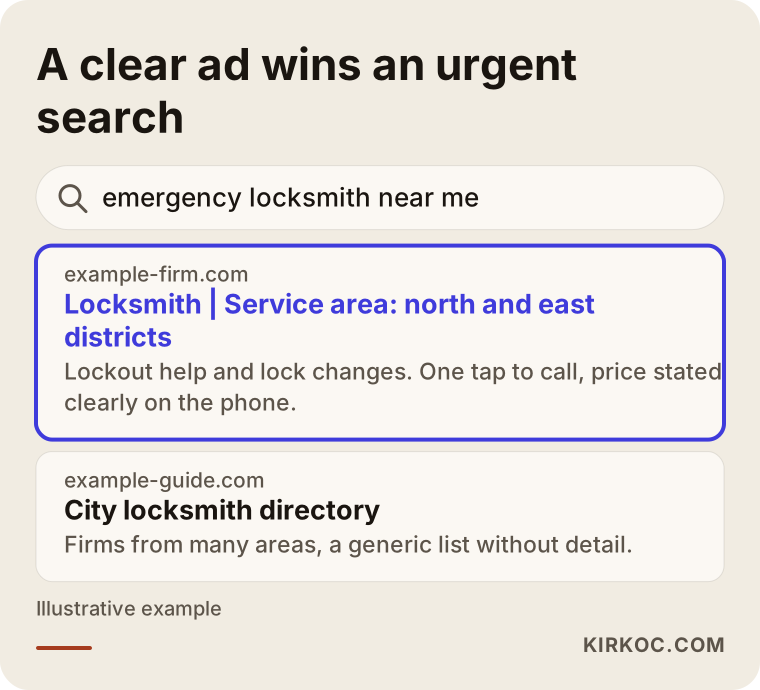
The illustration above uses an invented example to show what appears on screen during a search like this. Notice that the highlighted ad shows the phone action, the service area and the kind of work in a single glance. The generic directory next to it says much less.
How do customers actually search for you?
Emergency customers use short words and often skip the district name. For a locksmith, expect phrases such as "locksmith," "emergency locksmith," "locked out of my house," "lost my keys" or "open door lock." For plumbing: "water leak," "blocked drain," "burst pipe," "clogged toilet." For boilers: "boiler not working," "boiler error code," "radiator not heating," "no hot water." Some of these searches are truly urgent. Others are just people gathering information.
You need to tell them apart. A person typing "what does this boiler error code mean" is probably trying to fix the problem alone first. A person typing "boiler repair near me" wants a technician. If your budget is limited, you focus on the second group and answer the first group with helpful pages on your own website, which builds trust for later.
Timing matters as well. Someone locked out at midnight and someone asking about radiator flushing on a Monday morning are different people with different needs. Splitting these into separate campaigns is the most basic step toward sending your money to the right place.
Where does the path from ad to phone call break?
Money in an emergency ad account follows a chain. Someone searches, sees your ad, clicks it or calls straight from it, your phone rings, you answer, you discuss price and arrival time, and the job happens. Every link in that chain leaks. Not everyone who sees the ad clicks, not everyone who clicks calls, and not everyone who calls hires you.
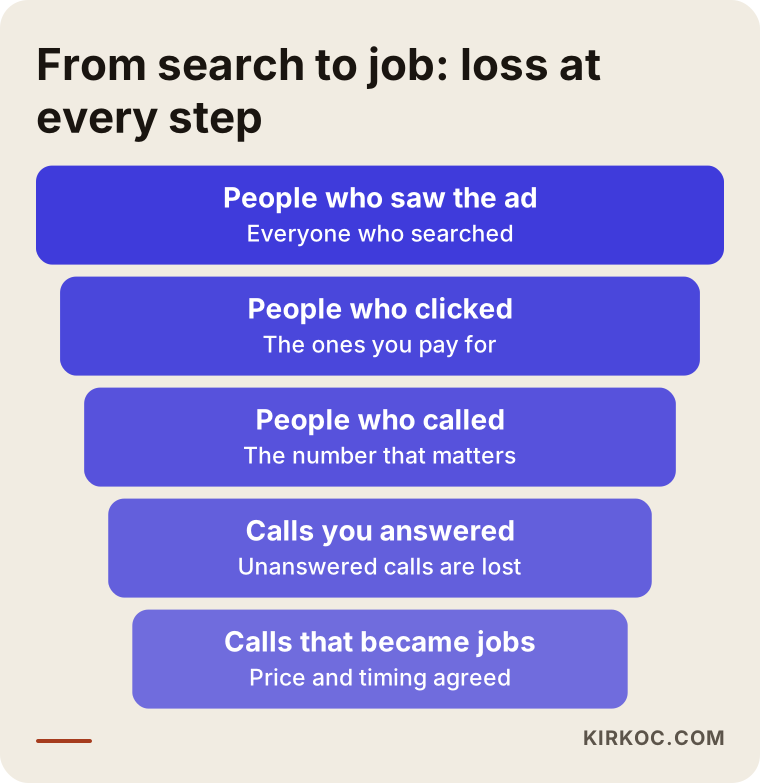
This picture shows what to watch at each step. Many owners only look at the number of clicks. The numbers that matter more are how many times the phone rang and how many of those calls turned into work. If you do not measure those two, you cannot know whether the ads pay for themselves.
Why are misleading ads the plague of this industry?
Emergency services have a bad reputation, and it helps to understand why. Some companies pretend to be "your neighborhood locksmith" when they have no office in your city at all. Some hint at a low price in the ad and then add a call-out fee, a night rate and other extras when they arrive, so the final bill is several times higher. Some run the same phone number under different business names in different ads. The customer ends up hurt, the complaint gets written, and the reputation of the whole trade drops.
Many of these practices also conflict with Google's advertising policies, and Google can limit or suspend accounts that make misleading claims. Consumer protection rules may apply as well. I cannot give you a firm legal answer on exactly which wording crosses a line in your location, so if you are unsure, talk to a lawyer. The general rule is simple, though: you should be able to deliver whatever your ad says.
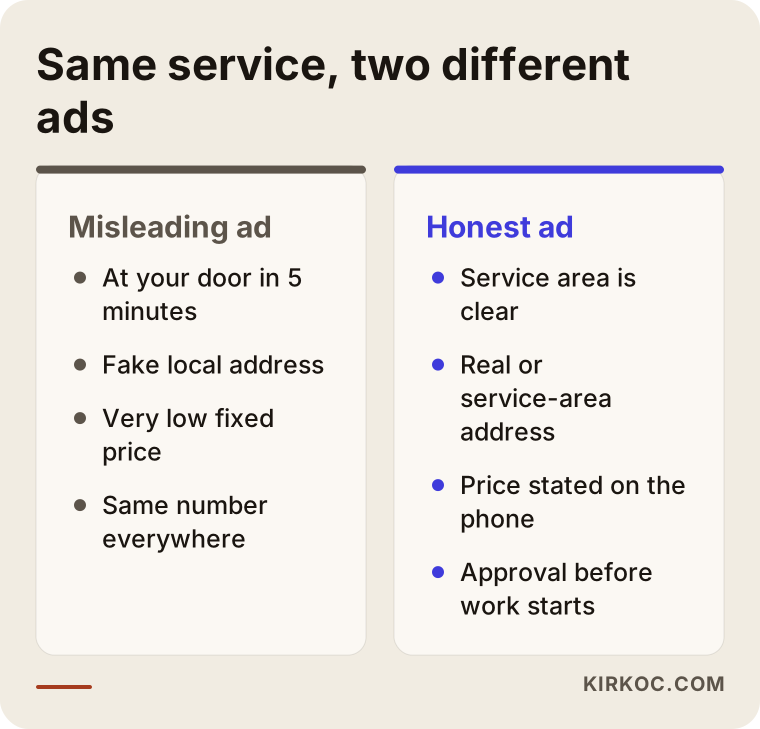
The comparison above shows how two ads for the same service differ. The honest one looks less dramatic, but the person who answers the phone finds what they expected, so the job is less likely to fall apart halfway through the call.
Common misleading promises
The list below collects phrases that appear often in this industry and that you should avoid. What they share is a claim that cannot be proven, presented to the customer as if it were certain.
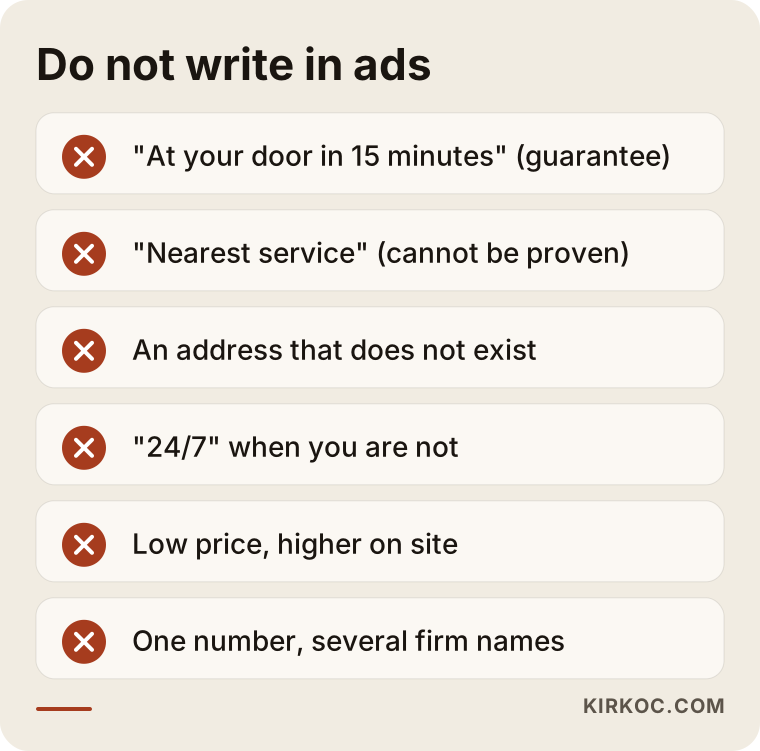
For instance, if you write "at your door in 15 minutes" and then sit in traffic for thirty, you lose the customer before you begin. A phrase like "within the service area, as soon as possible" reflects reality and is easy to defend. The same goes for price. Instead of stating a fixed number and raising it later, saying that the price is given clearly on the phone and that you get approval before starting work is a much sturdier promise.
Which ad types and settings should you choose?
Google Ads has several options, and an emergency service rarely needs all of them. Three structures are used most. Search ads are the text ads that appear when someone types a phrase. A call extension is an add-on that shows your phone number and lets people tap to dial. Map visibility connects to your Google Business Profile, the free listing that shows your business on Google Maps. Which one leads depends on your trade and on how your service area is shaped.
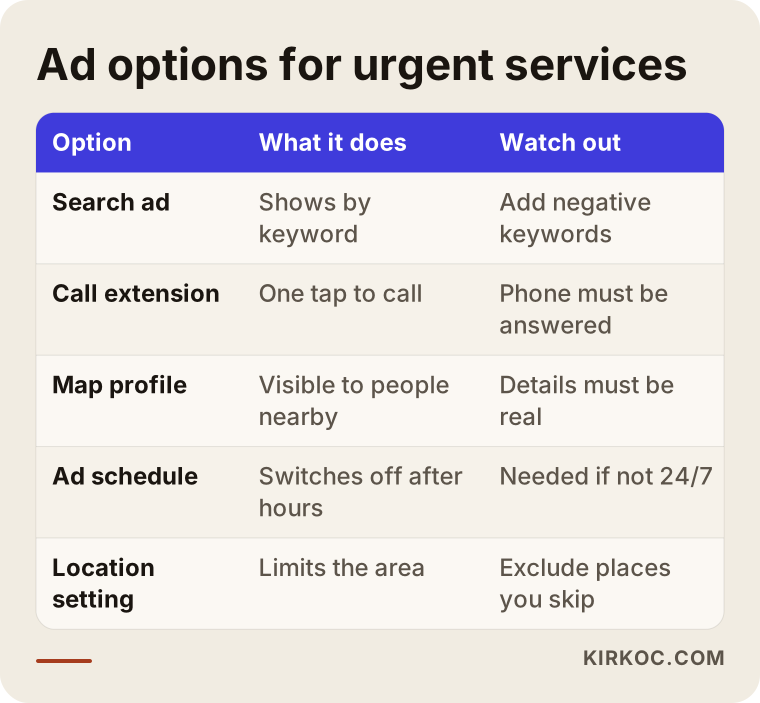
When you read the table, keep one thing in mind: before you commit to whatever you think brings the most calls, run a small test. In the first weeks the account learns, and you see which real searches produce calls. Starting in a narrow area with a handful of phrases is often wiser than launching with a wide budget.
Location setting: the most critical decision
For emergency services, where the ad shows matters more than what it says. If you advertise across an entire country or an entire metropolitan area, you will receive calls from districts you cannot reach, and you will have to say "I can't get there" to someone who just cost you a click. Choosing only the districts you can really serve, and a radius if needed, prevents a large part of the waste.
There is one more detail. When you choose a location in Google Ads, there is a difference between people who are physically in an area and people who show interest in that area. The second option can show your ad to someone who typed the place name while sitting somewhere else. For emergency work, the first option, people actually located in your area, is usually the right one. Read the option names carefully when you set this up, because Google may default to the broader choice.
Schedule setting: do not write 24/7 if you are not
If you really work at night, that is great. If you do not, do not write "24/7," and do not run the ad during those hours. The ad schedule setting lets you decide which days and hours your ads appear. If you turn your phone off and sleep, clicks arriving at night are wasted, the caller gets no answer, and they remember you badly.
Some businesses move their night shift into a separate campaign and accept a higher cost per click for those hours. Others work only during the day. Both approaches are legitimate as long as the ad copy tells the truth.
Two hypothetical example scenarios
The two scenarios below are entirely invented. They do not describe a real company or person; they are here only to show the reasoning.
Scenario 1: A one-person locksmith
Suppose a locksmith works from a single van in two or three districts of a big city. Earlier, they ran ads across the whole city. Clicks arrived, but most calls came from far-away areas, and they had to turn customers down. After a few months they decided the ads were losing money and switched them off.
In a new setup, I would limit the area to the districts the van can actually reach, write "service area: these districts" in the ad text, put the phone number up front, and create separate ad groups for searches such as "lockout help," "lock replacement" and "security door lock." Searches like "locksmith training," "locksmith jobs" and "key copy price" would be blocked, because they bring people who do not want this service. The budget then goes to fewer but better searches. I cannot predict the results in advance, but less wasted spend is a reasonable expectation.
Scenario 2: A small plumbing and boiler company
This company does both plumbing and boiler servicing. Inside a single account the two jobs got mixed up: a search for "water leak detection" showed a "boiler servicing" ad, and the other way around. On top of that, the ad sent everyone to the home page, so visitors had to hunt for what they came for.
The fix is two separate campaigns, one for emergency plumbing and one for boiler faults and servicing. Each goes to its own landing page, and each page shows what you do, where you work, how you set prices and your phone number on the first screen. Boiler searches rise at the start of winter, and plumbing searches behave differently in summer, so the budget can be shifted with the seasons. This is another invented example, but it describes a muddle that many small service businesses fall into.
Step by step: how an emergency ad account is built
Keep the process simple, because a complicated account becomes spending nobody can explain. I start in this order: first I pin down the area you serve and your working hours; then I split searches into groups; then I write ad text that matches reality; then I set up phone tracking; and finally I go live with a small budget and review the real searches during the first weeks.
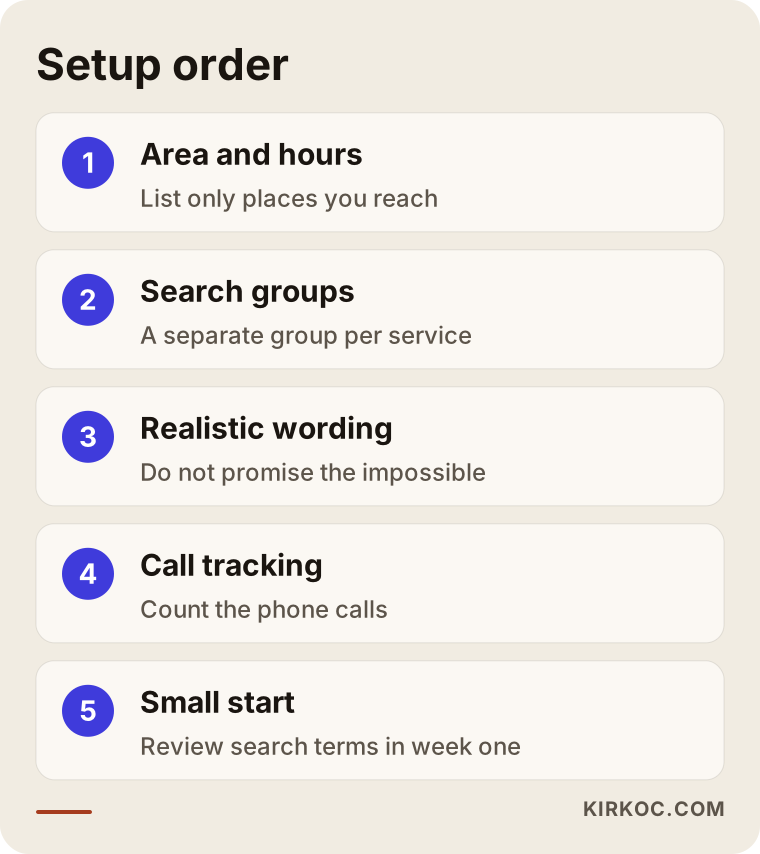
The order in this picture is a logical flow, not a rigid template. Which step takes longest depends on your business. If you offer several services, separating the search groups will take more time.
How do you separate search groups?
Putting "locksmith," "safe opening" and "car key" in the same ad group forces you to write one vague text that fits none of them. When each service has its own group, the text answers that exact search. In a "lockout" group it makes sense to talk about getting inside without damage. In a "security door lock replacement" group it is better to mention lock types and how the work is done. Google notices this match as well and treats your ad as more relevant.
How do you cut unnecessary clicks?
The wrong people clicking your ad is the main leak in emergency accounts. The tool for stopping it is a negative keyword list. A negative keyword is a word that tells Google not to show your ad when it appears in a search. For a locksmith, words like "course," "training," "jobs," "salary," "wholesale" and "how to" belong there. For boiler work, "second hand," "for sale," "manual" and "error code pdf" are searches that do not help you.
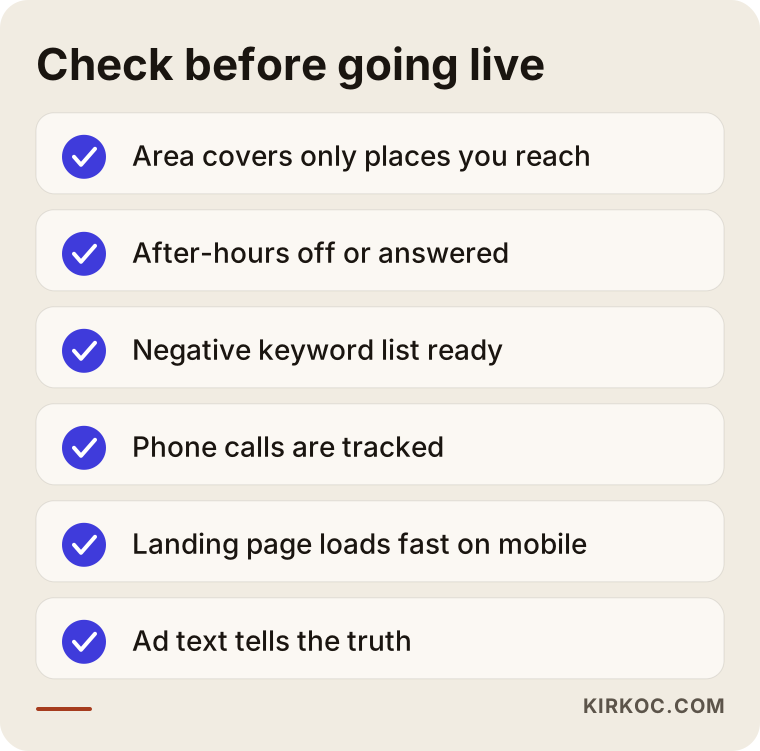
A checklist is not something you do once and forget. Reading the real searches that arrive in the first weeks shows which words waste money, and adding them to the list is routine work. Over time the account sharpens around your business.
The landing page: where does the clicker end up?
What does a person see on your website after clicking the ad? In many emergency accounts, this is the biggest unnoticed loss. A person in a hurry does not read a long "about us" story. They look for the phone number, the area you cover and how soon you will get back to them.
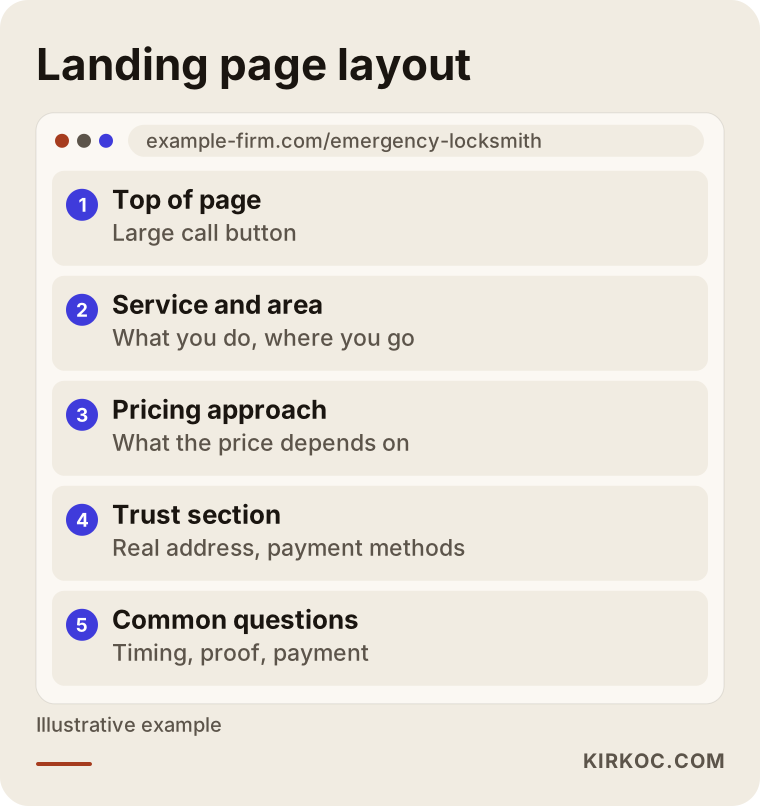
The most important rule for this page is that it does one job: it gets the phone called. At the top goes a large button that can be tapped. Right below it, what you do and which areas you cover. Then a short trust section with your real address, how you work and the payment methods you accept, and last a few common questions. The page must open fast on a phone, because a slow page sends the visitor back to Google to call the second result.
This is where having one person handle everything pays off. When one person runs the ads, another builds the site and a third manages the Google listing, the area in the ad can differ from the area on the site and from the area on the map. When a single person manages all of it, the ad text, the landing page, the map profile and, if you have one, the social media account all say the same thing. That consistency builds trust with both Google and the customer.
The real address and profile question
Fake addresses are a widespread complaint in this trade. Showing a place on the map that does not exist breaks Google's rules, and it breaks trust for the person who arrives expecting a shopfront. If you have no fixed office and work from a vehicle, you can set your profile up as a service-area business, which means you list the areas you travel to instead of showing a street address. Getting this distinction right lowers the risk of your profile being suspended.
The life of an urgent call, from ring to payment
The ad's job is to make the phone ring. What turns the call into work is how you handle it. Building that chain on purpose is what lets you see a return on the ad spend.
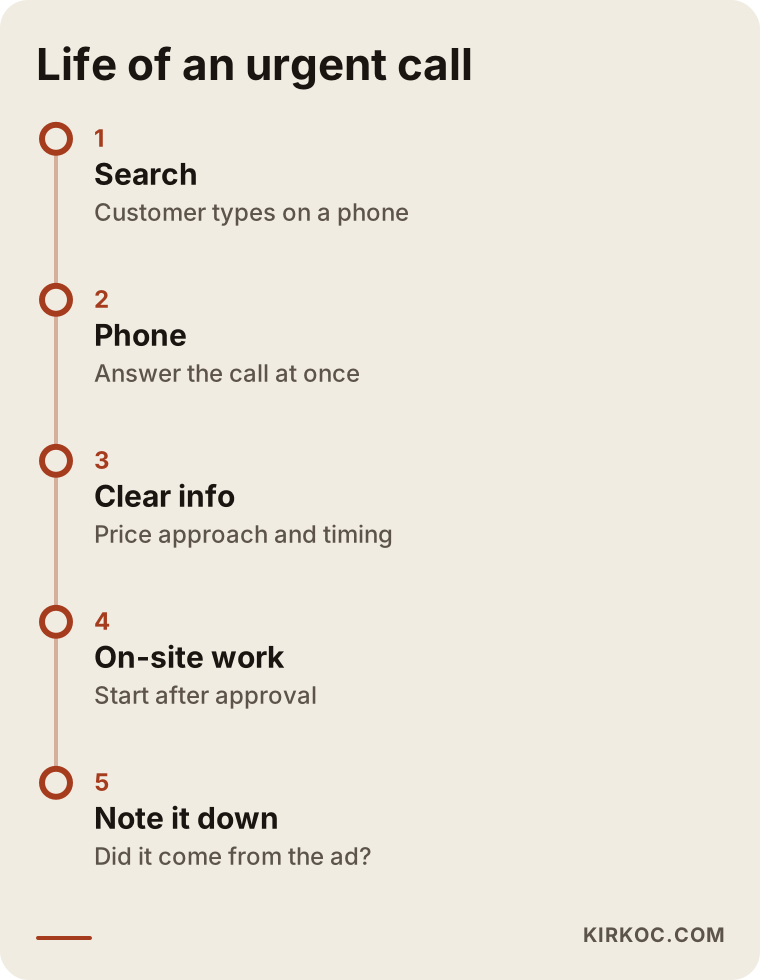
In the flow above, the step that fails most often is simply not picking up. Paying for a click and then not answering is the fastest way to drain a budget. If you are busy, a short message back and a call at the first chance are still better than never calling back. If you cannot answer while you are on a job, think about someone to take the calls or a phone forwarding setup.
Measurement: which ad made the phone ring?
Many emergency business owners decide that ads work because it "feels like" the phone rings more. I suggest measuring instead. Google Ads can count calls that come from your ad and calls that last longer than a set time. Calls that start from your website need to be marked separately. Once tracking is in place, you can see which phrase or which ad really produces calls. Optimizing without measurement is guesswork.
Writing down each job in a notebook or a simple spreadsheet, with a note on whether it came from the ad, is also valuable. Some calls arrive in ways Google cannot count, and asking the customer "how did you find me?" completes the picture.
Common mistakes
The mistakes I see in emergency ad accounts look alike. The first is advertising to a whole city or a huge area, which ends in paying for calls you cannot take. The second is stuffing everything into one ad group, so the text never fits any search. The third is never building a negative keyword list, so job seekers, students and the merely curious eat the budget.
The fourth is ignoring the landing page. An ad that sends people to the home page makes them wander, and a person in an emergency does not want to wander. The fifth is not answering the phone, and the most common form of that is leaving ads on outside working hours. The sixth is trying to judge whether the ads work without any measurement.
The seventh is making misleading promises. Even if they bring calls in the short run, complaints, bad reviews and a possible account restriction cost more in the long run. Honest advertising grows more slowly, but it leaves you with customers who call again and recommend you, and in a trade where word of mouth is worth so much, that difference is large.
What can you do yourself, and when do you need an expert?
You can set up Google Ads on your own, but it takes hours and the room for error is large. The picture below gives a rough guide to whether to carry on alone or get help.
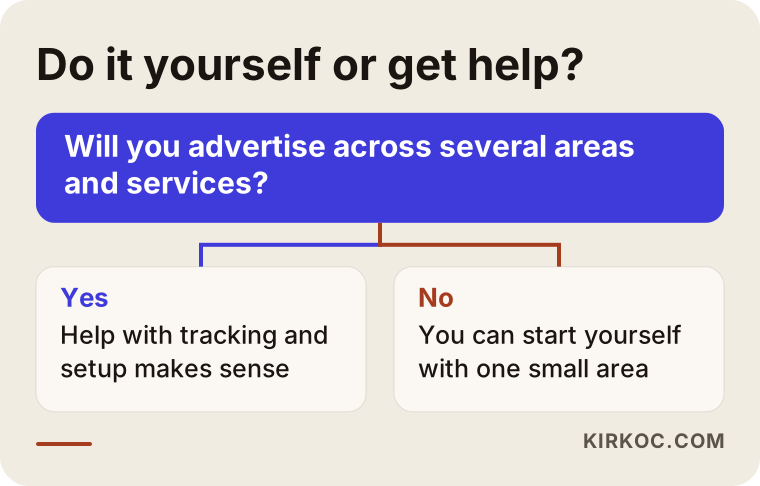
Things you can do yourself include filling in your Google Business Profile with true information, replying to reviews, keeping your opening hours current and answering the phone. These help whether or not you run ads. Opening the ad account once a week to look at the search terms and note odd ones is also very worthwhile.
Expert help makes sense in these situations: you want to advertise several services across several districts, you want tracking set up correctly, you have spent budget before without results, or your account has been restricted. Someone looking from the outside can quickly see where the account leaks.
What decides the cost?
I will not give a number here, because the answer really depends on your business. What I can tell you is what it depends on. You pay the ad spend to Google. You decide that budget, and you can reduce or stop it any day. The price per click moves with the city, the time of day, the season and how many other businesses compete for that search. Night hours, the start of the heating season and busy city districts are usually more competitive.
The fee for managing the ads is separate and depends on scope: how many services and areas need campaigns, whether a landing page has to be prepared, how detailed the tracking should be, and how often reporting and review happen. To give you a clear quote, I need a short description of your business. I will never say "this many calls guaranteed," because no one can honestly offer that.
How I work with you
In the first step I pin down your service area with you, your working hours and your current situation. If you already have an account, I review it first and tell you where the money is leaking. Then I build the campaigns, prepare or fix the landing page if needed, and set up tracking. After launch I watch the searches closely for the first weeks and add negative keywords.
I do this work alone. Because the same person looks after your website, your Google Business Profile, your SEO work, your social media and your ads, nobody waits on anybody else and nothing gets lost in a handover. You have one contact, and I explain what is being done and why in plain language.
Frequently asked questions
Does Google Ads really work for a locksmith or plumber?
When it is set up well, yes, because the person with an urgent need is searching at that very moment. When it is set up badly, with a wide area, uncontrolled keywords and a phone that nobody answers, the budget goes to waste. I do not promise results. I work with measurement, so you can see what works.
Can I write "24/7 service" in my ad?
Only if you can truly answer the phone and travel at any hour. If you do not work at night, do not use that phrase and turn the ads off during those hours. A promise you cannot back up loses customers and can cause trouble under advertising policies.
Should I put a price in the ad?
You do not have to. If you state a firm price and then change it, the customer feels deceived. Explaining what the price depends on, and that you get approval on the phone or on site before starting work, builds more trust. If you have legal concerns, speak to a lawyer.
I have no fixed office and only work from a vehicle. Can I advertise?
Yes. Ads can be targeted to a service area. In your Google Business Profile, define a service area rather than showing an address that is not real.
How long until the calls start?
Your ads begin showing on the day they go live, and calls can come in whenever people search. But the account needs time to learn, to show which phrases work and to clear out pointless clicks, so think of the first weeks as a trial period. I will not give an exact time or number.
Do I need ads to appear in Google Maps results?
No. Map results depend on your Google Business Profile and work separately from ads. The two support each other: a well-kept profile adds trust when you also run ads. Filling the profile with true information is worth doing whether or not you advertise.
Can a competitor click my ads hundreds of times and drain my budget?
Worry about malicious clicks is common in this field. Google filters some invalid clicks on its own, and suspicious activity can be reviewed in the account. Nobody can block everything, but a daily budget cap and regular monitoring limit the possible loss.
What happens if I want to stop?
You pay per click, so the moment you pause, new spending stops. You are not locked into a long contract. To keep things transparent, I open the account in your name, so you have access whenever you want.
If you want real calls from Google Ads for your emergency service, and you want them without hiding behind misleading promises, you can write to me through the digital advertising page and describe your business in a few lines. Then I will talk it through with you, in plain language, about which area, which services and which tracking to start with.