You sell coffee, pet food, vitamins, tea, razor blades or a hobby kit, and you are tired of waiting for customers to remember to reorder. You would rather the product show up at their door on a schedule. The logic looks simple: someone you convince once keeps buying without having to decide again every month. Then the questions pile up. How will the card be charged each month? What happens when a customer wants to skip a month? What if they move? And how will a subscription ecommerce website even get found on Google? This article walks through the parts a monthly delivery store is made of, what to watch for, and where to start, in plain language. I am Ümit Kırkoç, and I work from Istanbul. I handle the whole job myself, from the website to search visibility, social media and ads, and I build online stores through my ecommerce website service.
First, one term. Subscription selling means the customer agrees once to receive a product repeatedly, usually every month, instead of buying it a single time. They say yes once. On the agreed day you prepare the product, collect the payment and ship it. The difference from an ordinary store is where the value sits. It is not in the first order. It is in how many months the customer stays. That is why the design, the ads and even the sentences on your pages are built around two jobs: winning the first order, and making the customer comfortable enough to stay.
Why subscription selling works differently from regular ecommerce
In an ordinary online shop, a visitor looks at a product, adds it to the cart, pays and leaves. Your site only has to make that one moment easy. With a subscription you are asking for a commitment: "I allow you to charge my card every month." That is a small decision, but a sensitive one. The buyer is not purchasing a product, they are purchasing a routine, and if the rules of the routine are fuzzy, they hesitate.
Think of the questions in their head. Can I cancel whenever I want? What if I take a month off? What if I do not like it? On which day and for how much will my card be charged? If your site answers these before the visitor asks, you earn trust. If it does not, people abandon the cart no matter how good the product is. So the first job of a subscription site is not to make the product look pretty. It is to remove uncertainty.
The second difference is that the order lives in a loop behind the scenes. After the first purchase, a new order record is created every month, a payment is attempted, the warehouse is notified and a tracking number goes out to the customer. You need to have decided in advance what happens when a card expires or a payment is declined. Leaving this until after launch, with a "we will see if it happens" attitude, usually ends in angry customer emails.
The third difference is how people search. Shoppers do not always type the word "subscription." One person types "coffee delivered every month," another "recurring cat food order," another "vitamin box subscription." Each of those searches hides a different need, and your site needs pages for each. I cover that in the next section.
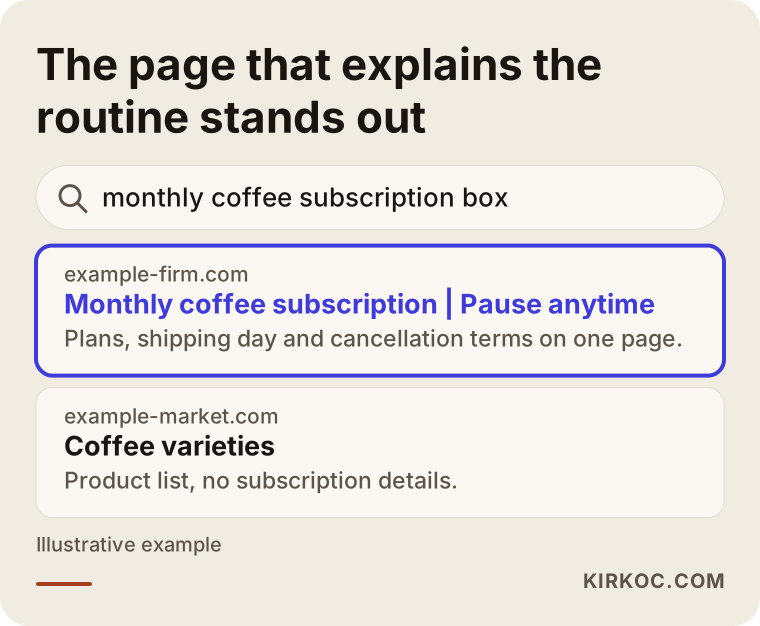
The image above shows an invented search result. The highlighted page tells you how the subscription works (how often, what is included, how to stop it) before anyone even clicks. A generic page that only says "our products" cannot offer that reassurance.
How do customers find you? Three kinds of intent
Someone considering a subscription tends to research more than a one-time shopper, because the payment keeps going. That research usually passes through three stages, and each stage needs a different page.
The first stage is a product search: "organic coffee beans," "adult cat food," "daily vitamin pack." The person is looking for a product, and subscriptions may not even be on their mind. This is where your product and category pages work. Besides describing the product, they should ask in a natural way, "Would you like this every month?" Not with a pushy pop-up, but with a simple choice next to the product: "Buy once" or "Send every month."
The second stage is a solution search: "coffee sent every month," "regular pet food order," "monthly box subscription." This person has already imagined the subscription and is comparing options. The page that meets them should be a clear explanation of how your subscription works: what you send, how often, which plans exist, how to pause, how to cancel. Without that page, your site will not show up for these searches, because Google has no answer to show.
The third stage is a trust search: "[brand name] cancel subscription," "[brand name] reviews," "is [brand name] legit." This person is about to decide and wants one last reassurance. Frequently asked questions, cancellation and return terms, contact details and real reviews carry the weight here. If those pages are missing, you lose people at the very moment they were ready to buy.
Separating these three intents matters because trying to squeeze all of them onto a single home page is a common mistake. Each intent should be met on its own page, and the pages should link to each other. The table below summarises which page answers which search.
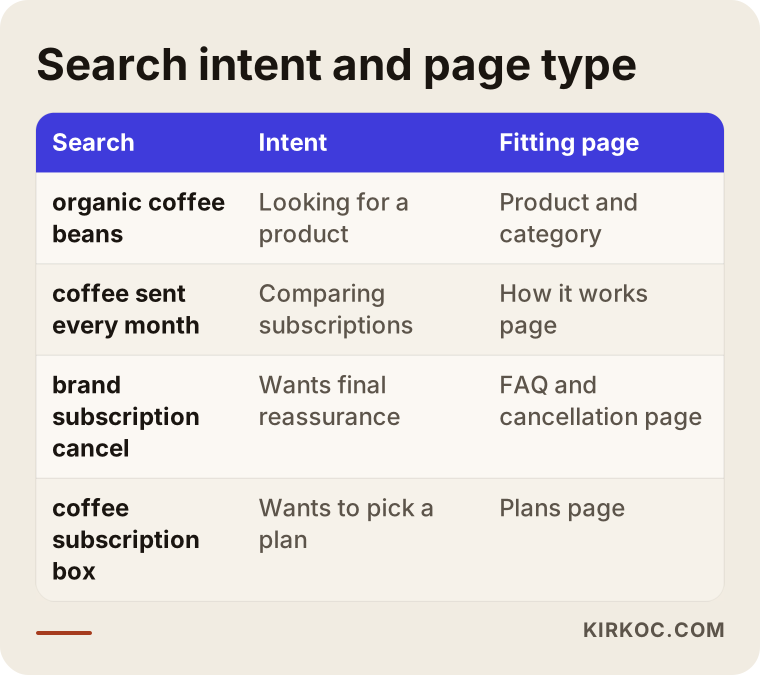
When you read the table, notice that the "How it works" page serves both the second-stage searcher and the visitor who is undecided on a product page. One well-written page can feed several different paths.
The pages every subscription site needs
Before starting the site, write down which pages you need. It helps with both budget and schedule. For a subscription model, these are the pages I treat as the basics.
Home page. It should tell the visitor three things at first glance: what you send, how often, and why they should get it from you. Your product photo may be beautiful, but if the first screen has no line like "arrives monthly, stop anytime," the subscription idea disappears.
Plans page. A page that shows the options side by side and explains the difference simply. Too many plans cause confusion. Three options are often enough, but the right number depends on your product. Under each plan, state in a few words what is included, how often it ships and whether it can be changed.
How it works page. A step-by-step explanation: place your order, your first box arrives, a new one ships on these days each month, skip or stop whenever you like. This is one of the most valuable pages, both for search engines and for hesitant visitors.
Product and category pages. The subscription option should be visible here too. On the product page, "buy once" and "send every month" should be clear choices, with a short note next to the subscription choice about what happens when someone picks it.
Account area. This is where customers manage their own subscription. They should be able to see the next shipment, skip it, update their address and card, pause the subscription or end it. If this area is weak, all of those tasks turn into emails and phone calls to you.
Cancellation, returns and shipping information. A clearly written cancellation page does not reduce sales. A visitor who can see the exit is more comfortable stepping inside.
FAQ, contact and about pages. Show who is selling, where the packages ship from and who to write to with a question. Privacy policies and terms of sale also need to be in place. I recommend you consult a lawyer on what those texts should say, because requirements depend on where you sell.
How is a product page written differently for a subscription?
On an ordinary product page, weight, ingredients and photos are enough. For a subscription product, the page must also answer the question "what does it mean to receive this monthly?" In a coffee subscription, for example, the customer wants to know which grind they can choose, whether they can change it mid-month, what the roast date is and when the first box will arrive. In a pet food subscription, the pet's age, weight and allergies come first, along with whether a new bag arrives before the old one runs out. The same subscription system raises different questions in different industries. A good product page answers the real worry of that industry's customer in the first lines.
Two hypothetical example scenarios
The two examples below are entirely hypothetical. They do not describe a real company or person; they are invented to make the situation concrete.
Scenario 1: A monthly coffee subscription. Suppose a small roastery takes orders by direct message so far and collects payment by bank transfer. Every month it writes the same invoices by hand and prepares shipping labels by hand. As the business grows, time runs short, and in some months a payment reminder gets forgotten. The owner wants a subscription site. The first job is to decide how many plans to offer: perhaps one coffee, two different coffees and a "surprise of the month." Next come the "how it works" page, a grind preference option and a skip feature. For search, a separate page is written for searches like "coffee sent every month" and "coffee subscription box," while short videos of the roasting process on social media point visitors to the site. In this hypothetical case the most critical point is that the payment routine is automated from the start, because manual collection produces mistakes as the customer list grows.
Scenario 2: A pet food subscription. In another hypothetical case, a small pet food and treats shop notices that customers place urgent orders when the bag runs out. Regular delivery is a natural idea. But there is a different problem here: the amount of food depends on the animal's size and age, and some customers need a refill every two months, not every month. So the shipping interval should be selectable (for example every four weeks or every six weeks). The message "your next bag arrives before this one runs out" should be prominent, and the account area should let customers see the next ship date and change the quantity easily. For search, separate pages are needed for phrases like "recurring cat food order" or "dog food subscription," because a cat owner and a dog owner will not recognize themselves on the same page.
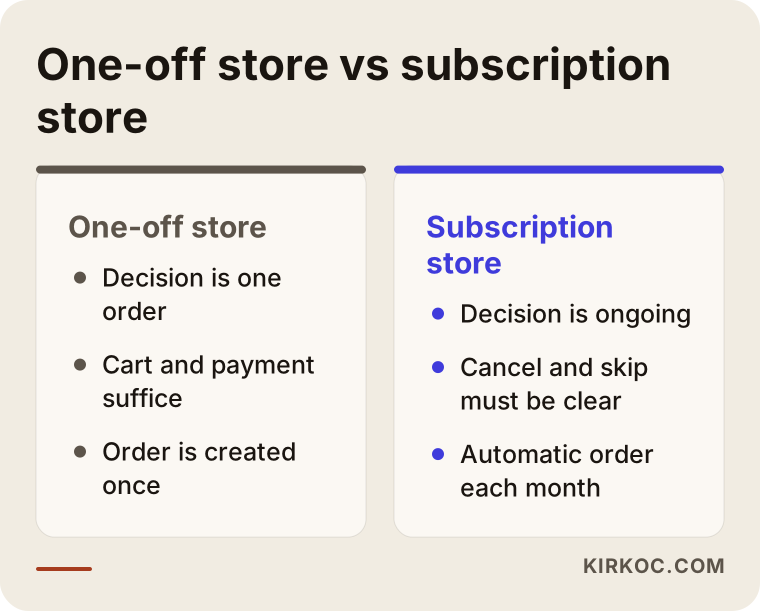
The comparison above shows the same truth in both examples: a one-off store and a subscription store may live on the same website, but they ask for different things. Knowing this from the start keeps you from choosing the wrong platform and having to begin again.
Step by step: how a subscription store gets built
The process runs roughly in the order below, from the idea in your head to a live site. I explain what each step is for so that, whether you work with me or someone else, you know why something is being asked.
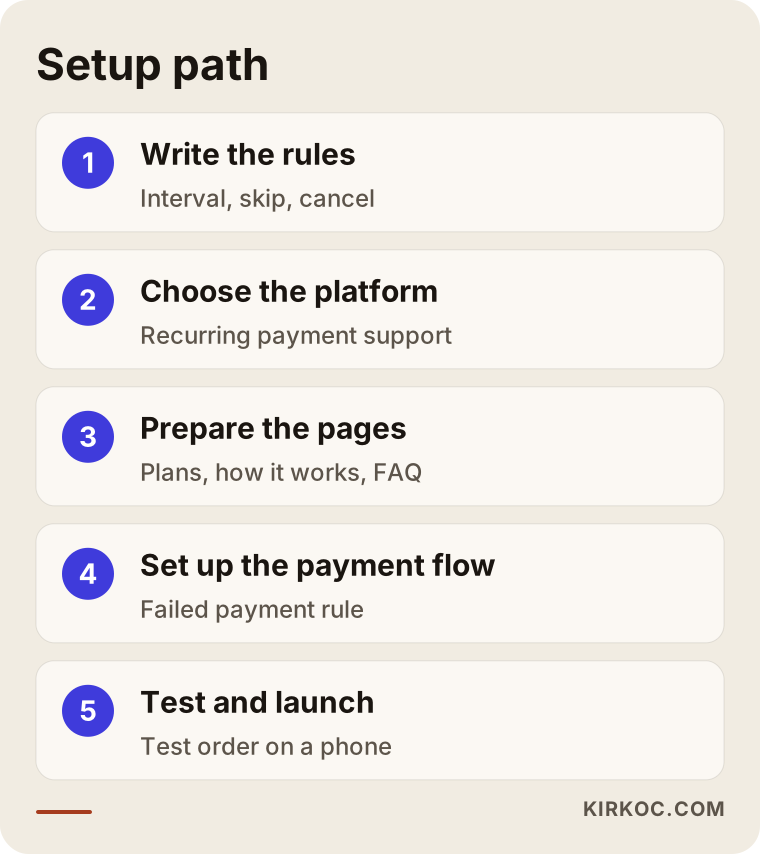
Step 1: Put the subscription rules on paper. Which products can be subscriptions? At what intervals will you ship? Can customers skip or pause? Is there a cutoff date for canceling? Is the first box priced differently? These are business rules, not technical questions, and you answer them. My part is making sure the rules look clear on the site and actually work. Starting the site without writing the rules leads to expensive changes later.
Step 2: Choose the platform. You need an ecommerce platform that supports subscriptions. Some offer this natively, while others need an add-on or a separate subscription management tool. What matters is whether the platform you pick supports recurring payments, pausing, and customers managing their own account. The payment provider you use is another checkpoint, since each one has its own conditions for recurring charges. Confirm those with your provider and, if needed, with a lawyer.
Step 3: Prepare the pages and the copy. The pages I listed above are written and designed in this step. Product photos are taken, plans are described and the "how it works" page is written. The language should be the customer's own: "every how many weeks" rather than "subscription period."
Step 4: Set up the payment and order flow. The first order, the automatic orders after it, the failed payment scenario and the emails sent to the customer are arranged here. Rules such as sending the customer a short reminder after a failed payment, trying a second time, and putting the subscription on hold if it still fails are set at this stage. You choose the rules; the system applies them.
Step 5: Try it like a real customer. Before launch, open a test subscription. Pick a product, pay, skip a month, change the address, pause it, cancel it. Try it on a phone too, because most visitors arrive from a phone. If something feels hard to you, it will feel hard to customers.
Step 6: Launch, then watch. In the first weeks, watch which page people get stuck on, at what stage carts are abandoned and which questions customers keep asking. A subscription site is not finished on launch day; the first three months are usually spent on fine-tuning.
What should you watch on the payment and data side?
Card details are not kept on your site. The payment provider stores them securely and you only receive authorisation. Say this clearly to customers too: a plain sentence such as "Your card details are not stored by us; they are protected by the payment provider" reduces hesitation. Documents like a privacy notice, distance selling terms and cancellation conditions are needed. Their content depends on the rules where you operate and can change over time, so I strongly recommend asking a lawyer for the exact wording. I make sure these texts sit in the right place on the site and are easy to find. Writing the legal content is not my job.
Being found in search: SEO for a subscription site
One of the biggest misconceptions among subscription businesses goes like this: "The customer is already won, so search engines do not matter much." But the subscriber base does not grow without new customers, and most visitors meet you for the first time in search results. SEO, in short, is the work that makes your site appear on Google when your customers search. A subscription store has a few specific points.
First, the subscription page should be written around search intent. "Monthly coffee box" and "coffee subscription" look similar, but some people type one and some the other. Use them naturally inside sentences. Forcing repetition annoys both the reader and the search engine.
Second, product pages and the subscription page should link to each other. From a product page, a visitor should be able to reach the answer to "how do I get this by subscription," and from the subscription page they should reach the related products. These links guide the visitor and also show search engines how your site is organized.
Third, frequently asked questions. "How do I cancel my subscription" or "can I skip a month" are sentences people type into the search box. If your page answers them briefly and clearly, it persuades visitors and improves your chance of showing up. AI-powered chat tools such as ChatGPT can also use clear, well-organized pages as sources when they answer users. This is called GEO: preparing your site so that AI answers may cite it. There is no guarantee, but a clearly written page has an advantage there as well.
Fourth, trust signals. Real reviews, contact details, clear return terms and a real person visible behind the brand. In subscriptions, trust matters even more than in ordinary shopping, because the payments will keep coming.
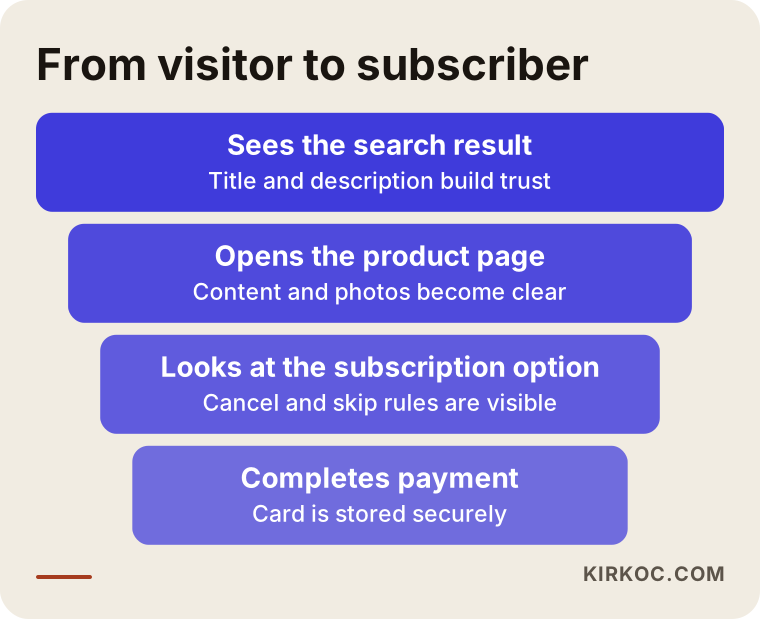
The funnel above shows that the number of visitors shrinks at each stage. The goal is to place a clear page or sentence at every stage that answers the question "why did they leave?" To see which stage is losing people, the measurement tools of the site have to be set up from the start.
Common mistakes
I see the same mistakes again and again on subscription sites. All of them are avoidable.
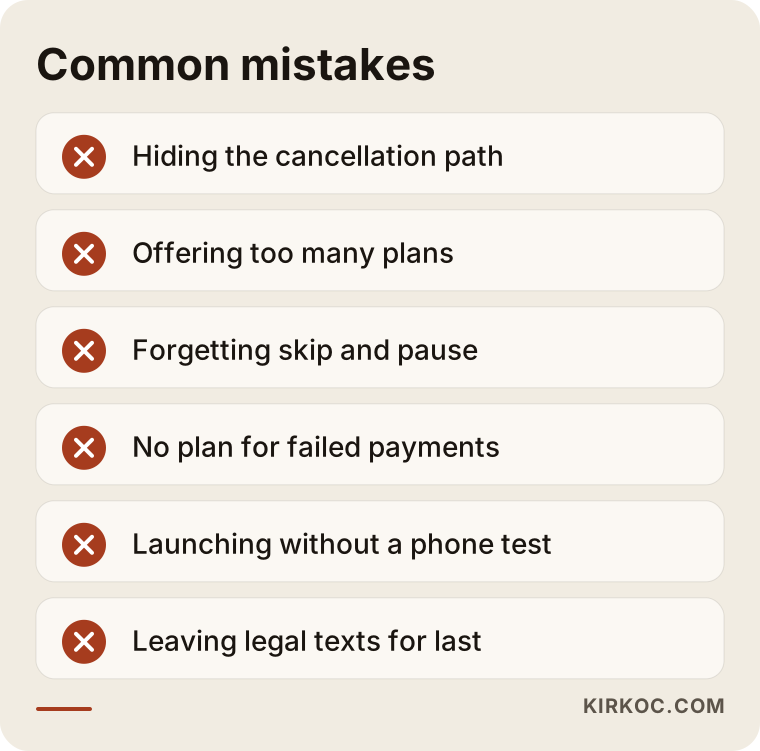
Let me explain the mistakes in the image briefly.
Making cancellation hard. If the answer to "how do I end my subscription" is hidden under three menus, cancellations may seem to drop in the short run. In the long run they come back as complaints, card disputes and bad reviews. A clear cancellation path is also a trust message.
Offering too many plans. Wanting a special option for every customer is natural, but the result is confusion. Start with a few clear plans and add more as demand appears.
Forgetting pause and skip. Many people do not want to cancel, they want a month off. On a site with no skip option, that person cancels completely. Pausing is often the simplest way not to lose a customer.
Not planning for failed payments. If nobody wrote down in advance what happens when a card expires, one morning a customer finds that the subscription quietly ended, or the opposite, they run into a wrong charge. Both lose trust.
Skipping the mobile experience. The subscription decision is often made on a phone. If the plans page is cramped on a phone, the text is tiny or the checkout step is difficult, losses are unavoidable.
Focusing only on the first order. A common mistake is spending the ad budget on the first order and then never contacting the customer again. Small touches such as a welcome email, a note when the box ships and a "how was it" message affect how long people stay.
Skipping the legal texts. Terms of sale, a privacy notice, cancellation and return terms are not things to add later. They need to be easy to find on the site.
How ads and social media help subscription sales
Once the site itself is ready, there are three main ways to bring in customers: search engines, ads and social media. They complement each other.
Google Ads can show your site right away for high-intent searches such as "coffee subscription." SEO takes time in search results, while ads give quick visibility for as long as you fund them. But the real question about ads in a subscription business is this: is the amount you spend to reach one customer lower than the amount that customer will pay over several months? Starting ads without doing that math can mean celebrating first orders and losing money by the end of the month. I set up that calculation at the start, with your own numbers, and I do not promise predicted results.
Meta ads (Instagram and Facebook) suit reaching people who are not searching for the product yet but might be interested. For visually appealing subscription products (unboxing, coffee brewing, hobby supplies) this channel is common. The ad should clearly say what is in the first box, and a line like "you can stop anytime" belongs in the ad itself.
Social media accounts are a showcase and a trust space for a subscription model. Behind-the-scenes shots of packing boxes, shipped parcels and customers' own posts (with permission) build trust. Keeping the accounts active takes more than a few good posts a month, but a sustainable plan is essential.
This is where having one person do everything pays off. When one person runs the site, another the ads and a third the social media, each improves their own piece and nobody sees the whole story. The promise in the ad, the sentence on the site, the image on social media and the description on the product page may not match. When I run all of it, I use the same language, keep measurement in one place and can see faster where something breaks if it is not working.
What can you do yourself, and when do you need a specialist?
You do not have to hand everything to a specialist. Doing some things yourself protects your budget and helps you know your business better.
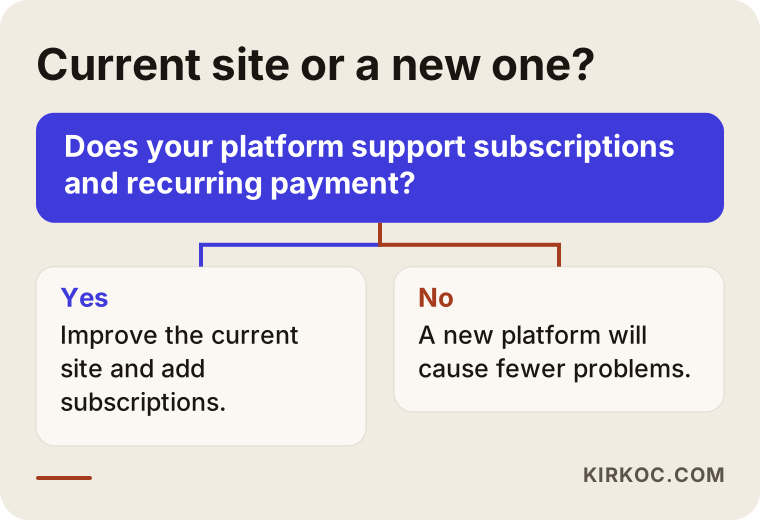
The chart above answers the most common question: should you keep going with your current site or build a new one? If your current site can reasonably support subscriptions through a plugin, improving it is often the smarter move. If the platform does not support it at all or keeps throwing errors, a new setup causes fewer problems.
Here is what you can do yourself:
- Put the subscription rules (interval, skip, cancel, failed payment) in writing.
- Photograph products in steady light against the same background.
- List the questions customers ask most often; they are the raw material for the FAQ section.
- Collect real customer reviews (with permission).
- Test the shipping process with a small trial of a few real boxes.
Specialist help is usually needed for choosing and setting up the platform correctly, connecting recurring payments safely, planning the page structure around search intent, setting up measurement and managing ad accounts. For the legal texts you need a lawyer separately; I cannot do that and I do not pretend to.
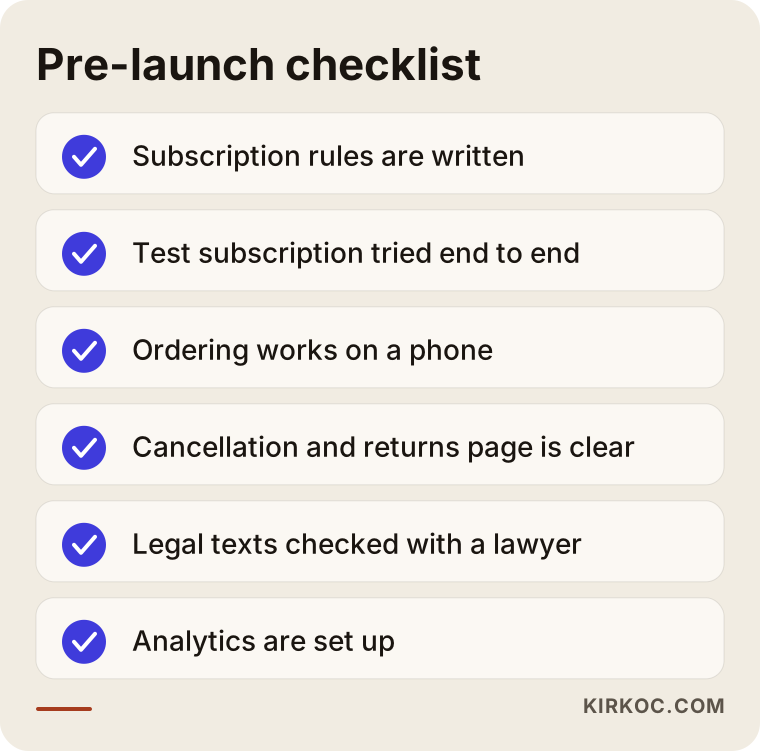
Tick through the list above one item at a time before launch. It looks short, but every skipped item can turn into a customer complaint in the first weeks.
What determines the cost?
I do not give numbers in this article, because two subscription sites rarely look alike. The main factors that set the price are these:
- Number of products and plans. A one-product site with three plans is not the same job as a site where dozens of products can be subscribed to.
- Platform choice. Building on a ready-made solution is very different from commissioning custom development.
- Customer account features. The more you add, such as skip, pause, address and card updates, and plan changes, the more work there is.
- Payment integration. Which payment provider the recurring payment connects to, and under what conditions.
- Content volume. How many pages must be written, photos shot and copy prepared.
- Migration needs. If product and customer data must be moved from an existing site, that takes extra effort.
- Ongoing work. After launch, SEO, ads and social media management are separate, regular jobs, planned as their own line items according to your needs.
To give you a clear quote I need to hear what you need and see where you stand today. When we talk, I will tell you plainly what is necessary and what can wait.
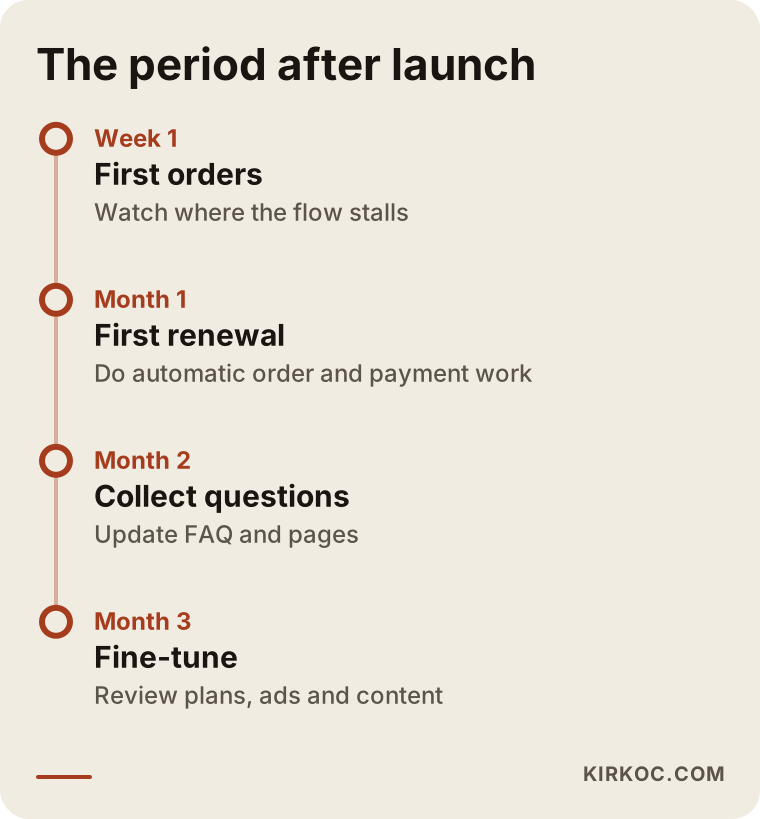
The timeline above summarises the period after launch. In a subscription business, the real learning starts with the first real customers.
How I work
I am Ümit Kırkoç, and I work from Istanbul. Websites and ecommerce, SEO, local SEO, GEO, social media management, Google and Meta ad management, logo and brand identity, content production: I do all of it myself. You deal with one person. You explain your brief once, and I make sure your site, your ads and your social media pull in the same direction.
In short, this is how I work. First there is a conversation where I listen to your business, your product and your goal. Then I explain in writing what you need, what can wait and how long it will take. Once you agree, I settle the rules (plans, shipping, cancellation) with you, then build the site, test it and launch it. After that, if you want, I also run the SEO, ads and social media side. I do not give result guarantees, because sales depend on your product quality, your price and the market. But I always share what I am doing and why.
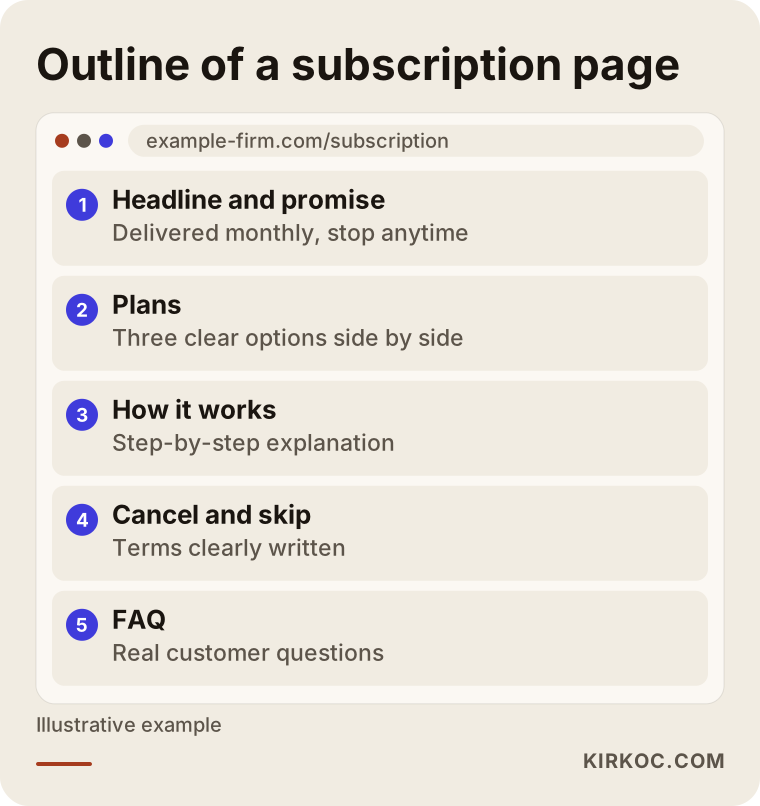
The image above shows a hypothetical skeleton of a subscription page. Your page will differ according to your product and customer, but this order is a good starting point for most subscription sites.
Frequently Asked Questions
Do I need special technology to build a subscription ecommerce website?
Usually yes, at least a solution that supports recurring payments and subscription management. Some platforms include this on their own, while others rely on an add-on or a separate tool. Which one suits you depends on your number of products, the kinds of plans and your payment provider. Writing down your needs before choosing makes the job much easier.
Will customers have to enter their card details every month?
No. In a properly set up system, the customer authorises their card once and later charges happen automatically. Card details are stored in the payment provider's secure system, not on your site. Still, the conditions for recurring payments can vary by payment provider and by the rules where you sell, so I recommend confirming them with your provider and, if needed, a lawyer.
How should customers be able to cancel a subscription?
Ideally, they can cancel from their own account in a few clicks. Hiding the cancellation path may reduce cancellations in the short term, but it brings complaints and lost trust in the long term. Write the cancellation terms (for example the last day before the next shipment) clearly on the site. For the legal side of those terms, consult a lawyer.
How does a subscription site show up on Google?
The subscription page, product pages and frequently asked questions need to be prepared around what people actually type. For phrases like "coffee sent every month," a clear "how it works" page is essential. I cannot guarantee rankings, but a properly structured site noticeably improves your chance of being visible.
Can I sell subscriptions without social media and ads?
You can, but growth will be slower. Search brings steady visitors over time, ads give quick visibility and social media builds trust and recognition. How much room each one gets depends on your budget and product. Having all of them run by one person makes it easier to keep the message consistent.
Can I turn my existing ecommerce site into a subscription site?
Often yes. If your platform supports a subscription add-on or tool, a subscription option can be added to existing products. If it does not, or it keeps causing problems, a new setup may be healthier. Before deciding, someone needs to look at the state of your current site.
What can be done to keep subscribers from leaving?
Offering skip and pause options, sending a reminder before each shipment, staying consistent in product quality and answering customer questions quickly are the basic steps. When a customer wants a month off, giving them that option is better than losing them entirely. None of these is magic, but together they make a difference.
How long does the process take?
It depends on the number of products and plans, the platform, how much content is ready and how quickly you give feedback. Clear rules from the start and photos and text ready on time shorten the process. After I listen to your needs, I give you a written schedule specific to your business.
If you are thinking about building a subscription store, or want to adapt your existing site to this model, let's talk through your situation. Write to me through the ecommerce website page, and I will listen to your business and tell you plainly what is needed and what can wait.