Picture someone standing outside their own front door late at night, phone in hand. They are not calm. They are in a hurry and a little uneasy. They type "locksmith" into Google, glance at the first few results, and call whichever business seems quickest to reach. If you are a locksmith, or you run any kind of emergency service, your locksmith website has to work for that few-second decision. In this article I explain, in plain language, what a new locksmith or one whose site brings no calls needs to know. I am Ümit Kırkoç. I work alone from Istanbul, and if you want a site like this built from scratch, you can see what is included in my website design service.
Let me be clear about one thing first. Locksmithing is one of the most crowded emergency trades. In one neighborhood there can be dozens of names, and some of them use the same photos and the same sentences. So the goal is not a "pretty site." The goal is a site where a caller finds what they need in three seconds, trusts what they see, and taps the phone number.
How does an emergency caller look at your site?
In an emergency, people do not read. They scan. Someone holding a phone is looking for answers to a handful of questions. Do you come to my area? Are you open right now? How long will it take? Is this a real business? How do I reach you? If the first screen answers none of these, they go back to the same list of results and try the next company.
There is a useful distinction here. Not every locksmith search is an emergency. One person is locked out tonight. Another is moving into a house next week and wants the locks changed, a high-security door installed, or a spare car key cut. The second person is not in a rush. They compare, read reviews, and may message two companies. A good site speaks to both people separately.
The illustration below uses a completely made-up example to show what makes the difference in a search result.
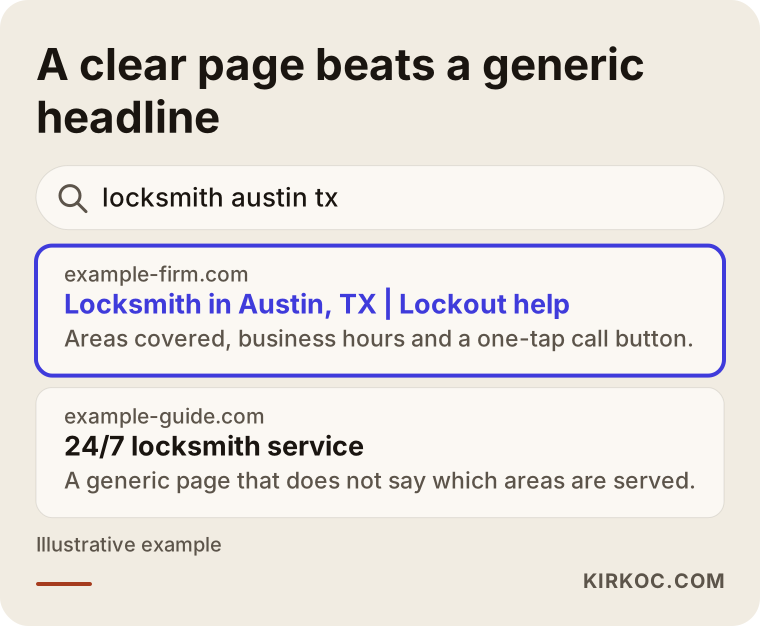
The highlighted result names the city, the service and the hours in its first line. A generic "24/7 locksmith" headline is just one of hundreds saying the same thing, and it disappears in the pile.
Two kinds of customers, two kinds of needs
For the emergency caller, the most important thing is calling with one tap. For the planned customer, it is trust: who you are, where you are, a clear description of the work, and straight answers to common questions. Your site should not blur the two. The top of the home page serves the emergency caller. The sections below it, and the separate service pages, serve the person who is planning ahead. Split it that way and each visitor finds their own answer.
The phone button is not up for negotiation
Most people who visit a locksmith site arrive on a phone. That is not a guess; it comes with the nature of urgent work. So the site should be designed for the phone screen first. A number that looks fine on a desktop but is buried in a tiny menu on a phone is a lost customer.
The practical rule is simple. The call button should stay visible even as the page scrolls, and tapping it should start the call right away. If the number is just text that cannot be tapped, someone locked out in the cold has to copy it and paste it into the dialer. Even that small bit of friction sends some people to another site.
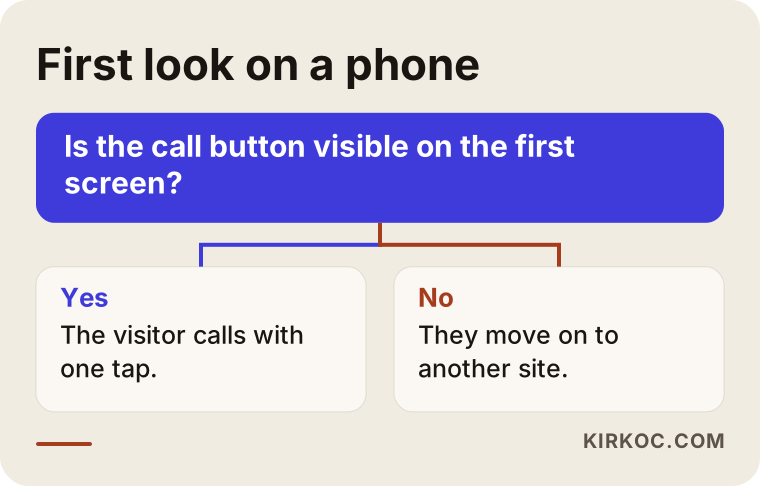
The logic in this chart looks obvious, yet plenty of sites fail it on the first glance. It is also easy to check. Open your site on your own phone, look at it like a stranger, and count how many seconds it takes to reach the number.
A text or messaging option
Some customers prefer a message to a call. That includes people who cannot speak out loud at that moment and people asking about a planned job. A text or WhatsApp-style button makes it easy to send a photo of the door and ask, "can this lock be changed?" One condition: only add it if you can answer. A message line that goes unanswered leaves a worse impression than not having one.
Which pages does a locksmith site need?
A one-page site that says "we do everything" has trouble explaining to search engines what you do, and the customer cannot find what they came for either. A separate page for each main job, short but specific, works better.
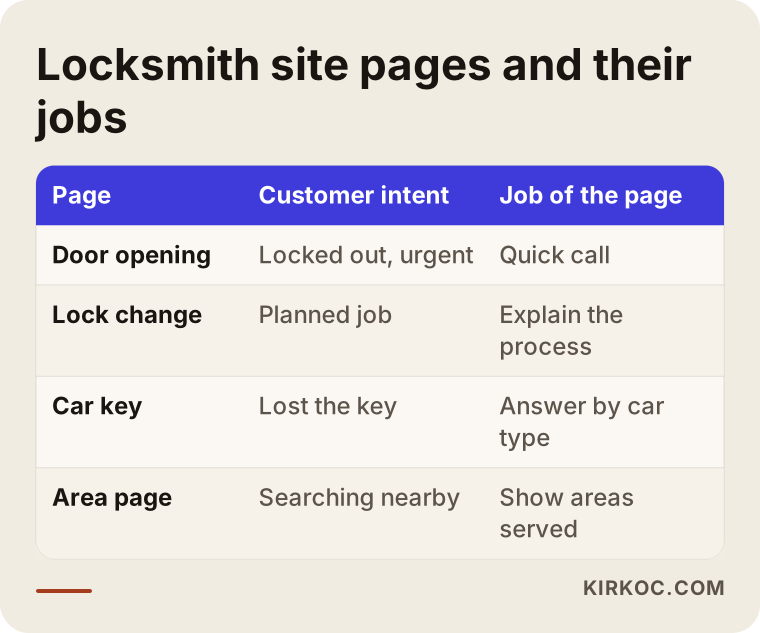
As the table shows, every page has a job. A lockout page serves the urgent caller. Lock change and high-security door pages serve the planned customer. An automotive page serves someone who has lost a car key. Each page matches a different search.
Area pages: only the places you really go
Locksmith searches run on a "near me" logic. People often type a neighborhood, suburb or ZIP code rather than a whole city. That is why separate pages for areas you truly serve can help. But be careful. Copying the same text for thirty towns and changing only the place name gives both the reader and the search engine an empty page. Each area page should say something specific to that area: which neighborhoods you reach, what kinds of doors and locks you commonly see there, and a rough idea of how arrival works. Do not list a place you do not travel to. If a customer calls and hears "we don't come out there," they have wasted time and they trust you less.
Service pages
Open a separate page for each main job you do: lockouts, lock changes and rekeying, high-security and steel doors, safes, car key duplication and programming, door repair. On each page explain what the job is, when you need it, how it goes, and answer a few common questions. You do not have to print a price. Explaining what drives the price builds enough trust on its own. List things like the type of door, the lock model, day versus night, and distance. Naming them openly reduces the fear of "one price on the phone, another at the door."
What should the home page look like?
The home page is a storefront, but not a crowded one. Put the things an emergency caller needs in a clear order.
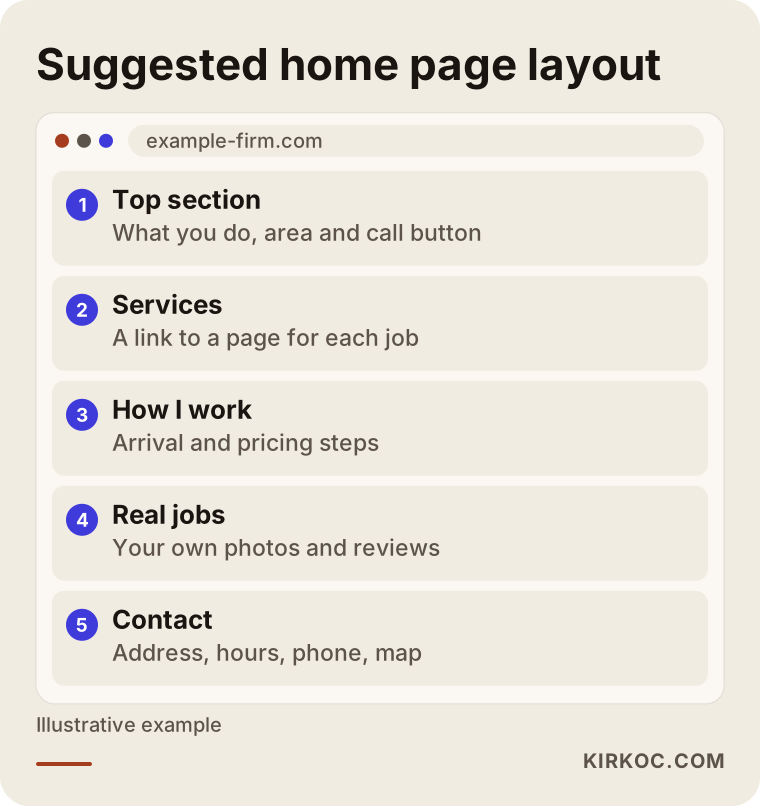
At the top goes one sentence about what you do and where, with the call button right beside it. Then your services, how you work, details that show who you are, and real reviews. At the bottom come contact details, address and hours. Sliding image banners, long intro animations or music on opening are unnecessary for this trade, and they slow the page down on a phone.
What damages trust?
In emergency services the caller has a question in their mind: will this person rip me off? Because complaints about companies that change the price afterward, or whose real location is unclear, are widely discussed, people arrive cautious. If you work honestly, your site has to make that visible.
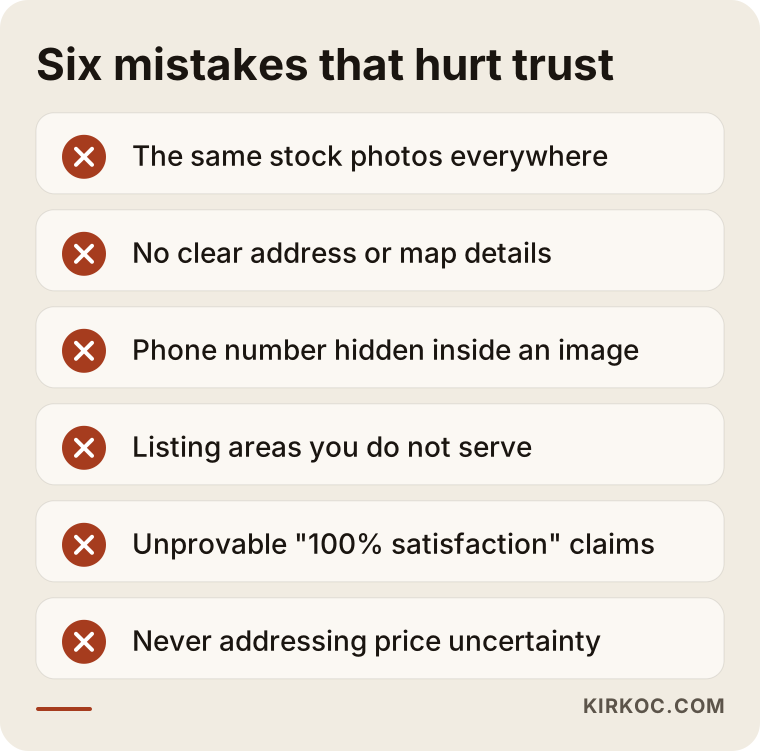
Every mistake on this list is small, but together they add up. Stock photos and unprovable claims such as "100% satisfaction" in particular leave an artificial impression. A photo of a real job, a real door or your own van is far more convincing. Before you post job photos, remember to hide details like customer information, license plates or house numbers.
Which details build confidence?
Your business name, your registration or license details where they apply, a real address, a stable phone number, your hours and how you travel to customers all build confidence. Rules about licensing and what you may display differ from state to state and change over time. If you are unsure what to show, ask an attorney or your local trade association. I do not give legal advice on this.
Example scenario one: a new locksmith in a mid-sized city
This is a hypothetical example. Say a new locksmith has opened a small shop and has only a social media page. Customers arrive through friends and acquaintances, but someone searching for a locksmith in that neighborhood cannot find the shop. Competitors have been there for years, and even the sign on the street is easy to miss.
What can be done? The first step is a home page plus three or four service pages. Next, verify the Google Business Profile, because that is the starting requirement for showing up in map results. Then write short area pages for only the two or three neighborhoods the locksmith can genuinely reach. A new site will not rank first in its first weeks, and it is honest to say so. Done well, visibility in maps and local results can start to grow within a few months. I do not promise any result, because rankings are not decided by me alone. Your competitors and the search engine's own decisions are part of it.
Example scenario two: an automotive locksmith serving several towns
This one is hypothetical too. An automotive locksmith helps customers whose car keys are lost or broken, across several towns. Their site is a single page: car keys, house lockouts, door opening and safes all in one block, with none of them covered in depth. Most calls come from searches like "car key replacement" and "lost car key," but the site does not answer those separately.
The fix is to move car keys to their own page and explain what the process looks like for different kinds of vehicles. A small section that separates "I need a spare key" from "I lost every key" also helps. On the programming side, saying on the page which details are needed about the car cuts down on needless phone calls. The balance between simplifying and splitting matters here: one page is too muddled, but thirty pages is too thin.
Local search and your map listing
For locksmith searches, map results often appear before website results. That makes your Google Business Profile at least as important as the site. The profile is the card Google shows for your business on the map and in local search.
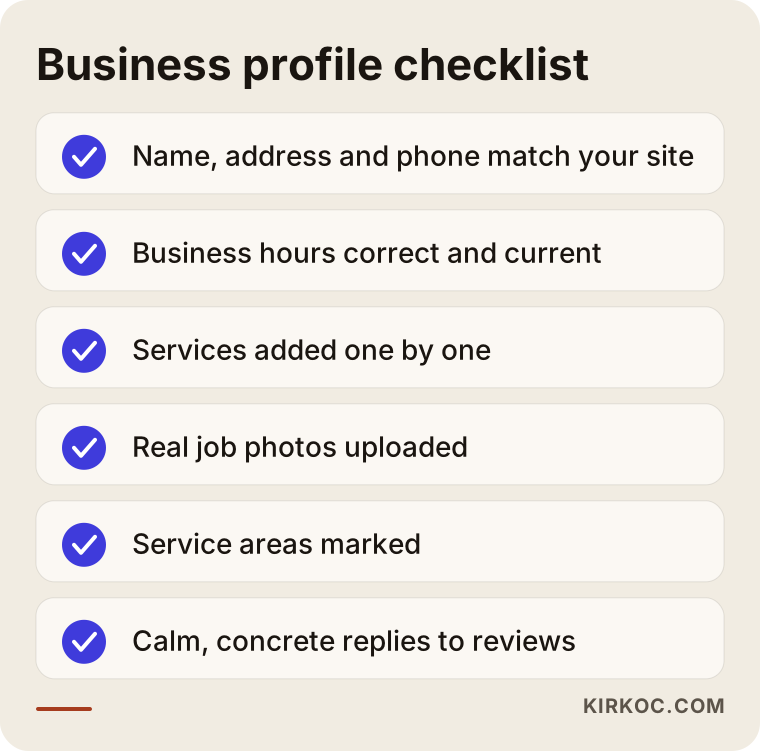
What matters most in the checklist is consistency. Your name, address and phone number should be written exactly the same on your site, on the map and in other directories. Enter your hours correctly. A business that says "24/7" but does not pick up the phone at night collects bad reviews. If you really do work nights, say so clearly. If you do not, leave it out.
How do you get reviews?
Buying reviews or writing them yourself is both unethical and risky. Instead, when a job is done you can politely ask the customer to leave a review and send them the link. Reply to negative reviews calmly and concretely. Anyone reading later will judge your attitude by your answer.
How the site gets built
Building a locksmith site is not complicated when you go in the right order. There is something for you to decide at each step, but the technical details can stay on my side.
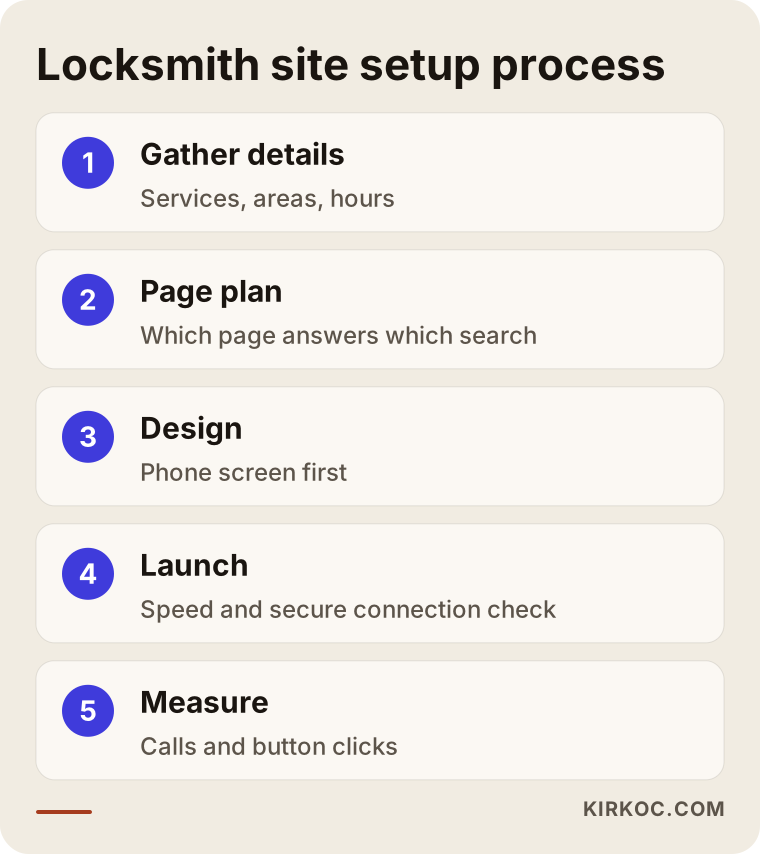
Here is how it works. First, you and I talk about the areas you serve, the jobs you do and your hours. Then I draw up a page plan, deciding which page will answer which search. In the design stage the phone view comes first. After launch, I track the number of calls, which pages get opened and which buttons get used. Setting up measurement matters a lot, because if you do not know which calls came from an ad and which came from the map, you cannot divide your budget sensibly.
Speed and the technical foundation
An emergency caller will not wait for a page to load. Large photos should be shrunk, unnecessary plugins avoided, and the site should open over a secure connection (https). These are invisible jobs, yet they shape the feeling of speed and safety more than anything. Someone with a weak signal on their phone should still be able to open the site.
Common mistakes
Locksmith sites fall into the same traps again and again. Most come from the way of thinking rather than from the design.
First, cramming everything onto one page. Second, saying only "24/7 service" and leaving the rest blank. Third, listing town names back to back when you do not actually go there. Fourth, putting the phone number inside an image, which makes it untappable and unreadable to search engines. Fifth, letting the map listing and the site disagree. Sixth, never testing on a phone.
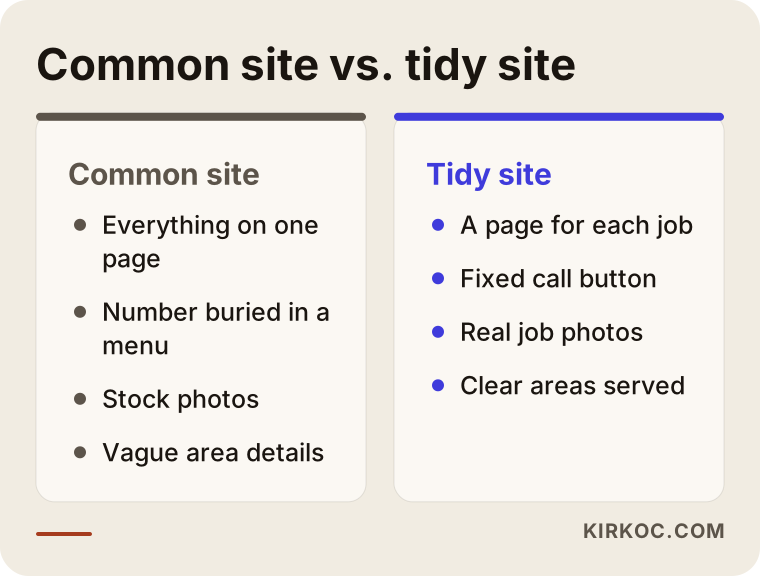
The difference between the two approaches comes from care more than from technology. On the well-organized site the customer knows what to ask for, how long to wait and who they will speak to. On the common site they are guessing the whole time.
Thinking about ads together with the site
Many locksmiths run Google ads for fast results. Ads pay off once your site is ready, but a click must land on the right page. If the ad says "lockout help," the person who clicks should arrive on the lockout page, not a general home page. If the site, the map listing and the ads run separately from one another, the budget leaks. When one person manages them all, the messages stay consistent, because the sentence in the ad and the sentence on the site complete each other.
Do not forget social media either, but be realistic. For a locksmith, social media rarely brings the urgent call. Photos of finished jobs, your van and your work can still help build trust. You do not need to join a daily posting race. A few regular, real posts are enough.
What can you do yourself, and when do you need a specialist?
You do not have to hand everything to a specialist. Some jobs you can do comfortably on your own.
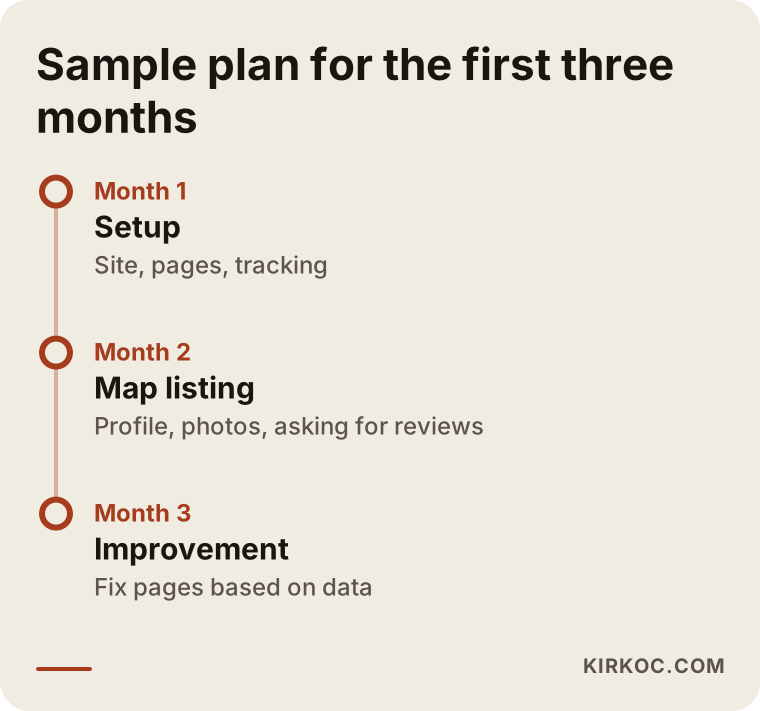
What you can do yourself: verify the Google Business Profile, keep your hours current, take real job photos and ask customers for reviews. None of it needs technical knowledge, only routine. Where you will want expert help is planning the page structure, mobile speed and technical settings, writing balanced area pages, setting up measurement and managing an ad account.
Think of it as a fork in the road. If your site has no area or service pages at all, the starting point is a rebuild. If it has them and only your map visibility is weak, fixing the profile first may make sense. I do not say which is right without seeing it; once I look at your current site, I can give a clear answer.
What decides the cost
The cost of a locksmith site is not a single item. I do not quote figures here, because every business needs something different. The main things that set the price are how many service and area pages you need, whether your current site is usable, who will produce the photos and text, whether map listing setup and measurement are part of the job, and whether you want ongoing maintenance or ad management in the following months. You can also start small and grow: basic pages first, then areas.
I also do not promise in advance how long it takes to rank for a given search. That depends on competition, location and the quality of the site. The only thing you can rely on is a sound setup and regular follow-up.
At a glance: a customer's path
When you design the site, it helps to think through the steps a customer takes from the moment of searching to the phone ringing. At each step some people drop out. The aim is not to lose the person who would really have called.
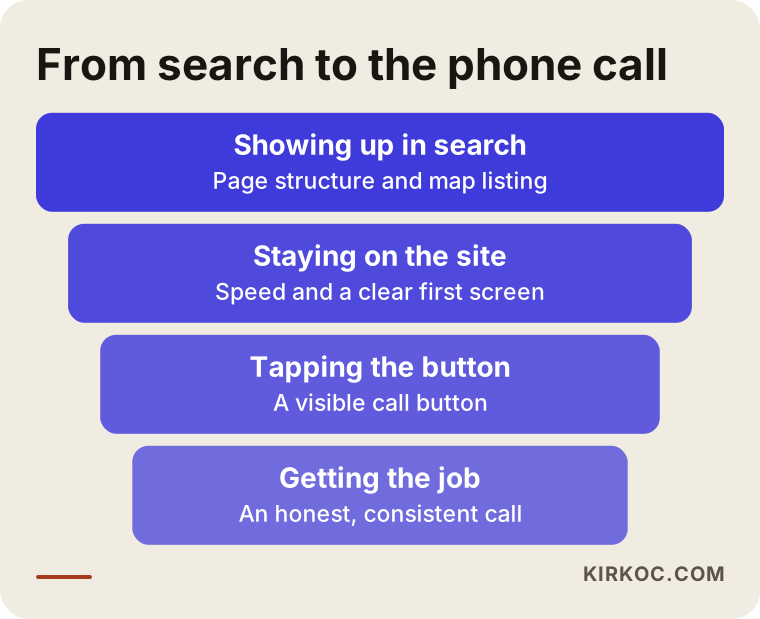
Each stage of the funnel calls for a different improvement. To show up in search you need page structure and a map listing. To keep the visitor on the site you need speed and a clear first screen. To make them call you need a visible button. And for the call to turn into work, you need an honest and consistent conversation. That last step is your job, not mine, but if your site sets the right expectations, the phone call goes much more smoothly.
How I work
I am one person, and I handle the site, the map listing, local visibility, ads and, if needed, social media as a single package. That means the sentence on your site matches the sentence in your ad, the map details match your contact page, and when something goes wrong you talk to one person. I begin by studying your current situation, the areas you serve and your competitors. Then I write down what should be done and in what order. I do not push services you do not need, and I do not recommend things your site has no use for.
Frequently asked questions
Do I really need a website for my locksmith business, or is a Google map listing enough?
The map listing is very important, and in most urgent searches it is the first thing people see. But a website is the only place where you can show your services, your areas and your trust signals in detail. Planned jobs and customers who compare usually look at the site too. The two complement each other, and if one is missing, the other carries the whole load alone.
How long does it take for the site to rank first on Google?
Nobody can honestly guarantee that. The time depends on the competition in your area, the quality of the site and the state of your map profile. A new site will not show up in the first days; progress comes with steady work over time. Be careful with anyone who promises a ranking.
Should I make a separate page for every town?
Only for places you genuinely serve and can say something specific about. Repeating the same text with only the place name swapped does not work and lowers trust. A few carefully written area pages beat many empty ones.
Should I put prices on the site?
You do not have to write a number, and in many jobs it is hard to quote a firm price without seeing the door. But stating clearly what changes the price reduces uncertainty on the phone. When a customer knows which factors move the price, there are fewer surprises at the door.
Should I run ads or invest in the site?
They are parts of the same investment. Ads give quick visibility, but without a suitable page the clicks are wasted. The site builds a lasting foundation. If your budget is tight, it usually makes sense to strengthen the site and the map listing first, then test with a small ad budget.
Can I write my own reviews or buy them?
No, I would not recommend it. It may break platform rules, and once customers spot a fake review, trust is gone entirely. A polite request to a real customer gives a far more lasting result. For legal details, you can consult an attorney.
Do I need to rebuild my existing site from scratch?
Not always. Sometimes adding pages, fixing the phone button and matching your map details is enough. I do not decide without seeing the site; I first look at the current state and then suggest a rebuild only if one is needed.
Is social media necessary for a locksmith?
It rarely brings in the urgent call, but it helps build trust. Photos of real jobs, your van and your work, plus short pieces of advice, are enough. You do not need to join a daily posting race.
If you want to build a site for a locksmith or another emergency service from scratch, fix your existing site, or bring the map listing, the site and the ads into line, reach me through the website design page. I will listen to your situation and write down plainly what should be done.