Your shop window looks great, your bouquets look great, and yet your phone sits quiet for most of the year. Then Valentine's Day or Mother's Day week arrives and you are answering ten people at once. If that rhythm sounds familiar, social media management for florists exists to smooth it out. In this article I explain why a florist's account should not be a simple gallery of pretty photos, which posts actually turn into orders, and which parts of the work you can do yourself. I am Ümit Kırkoç. I work alone from Istanbul, and I will be plain about what my own social media management service covers and where it stops.
First, a short definition. Social media management means planning, shooting, writing, publishing and watching over the accounts you have on Instagram, Facebook or TikTok, including the messages that come in. For a florist, three things make this job different: your product is very visual, it has a very short life, and your sales bunch up around certain dates. Those three facts change how an account should be run from the start.
Why does social media work differently for a florist?
For many businesses, social media is a way to be remembered. For a florist, it is a shop window and an order desk at the same time. People usually buy flowers in a rush and with feeling: a birthday was nearly forgotten, someone is visiting a friend in the hospital, an anniversary is two days away. In that moment nobody reads a long website. They pick up the phone, search "florist near me" on Google or Instagram, glance at a few photos and send a message. Whether your account earns trust in those few seconds decides if the order goes to you or to the shop down the road.
The second difference is freshness. A furniture store can reuse one photo for months. Your window changes every morning. That sounds like a burden, but it is really an advantage. Showing the seasonal stems that arrived today, a bouquet tied this morning or a delivery leaving the shop tells people the account is alive. A live account answers the question "is this shop open and are the flowers fresh?" without anyone asking it.
The third difference is that you are local. Delivery depends on distance, and no florist serves every city. Your goal is not to reach millions of strangers. It is to be seen by the right people in the neighborhoods and towns you actually deliver to. That is why the follower count matters less than whether the people who see your account live inside your delivery area.
The picture below sums up the steps a person takes from first seeing your post to placing an order.
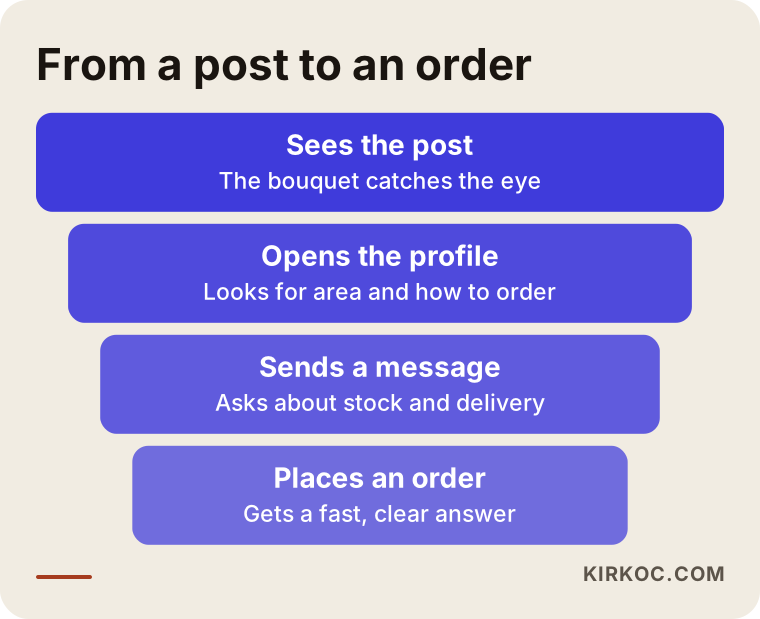
At every step, some people drop out. Your job is to shrink that loss: make the post catch the eye, make the profile reassuring, answer messages quickly and make delivery clear. None of this needs an expensive tool, but all of it needs a routine.
Winning followers is not the same as winning orders
An honest warning is due here. Nobody can promise you followers, likes or sales. If someone does, stay away from them. Platforms decide how their feeds work and change the rules often. What I can do is make your account understandable to the right customer and keep the process running steadily. To judge the result, look at how many messages and orders come in, not at the follower count.
Instagram, Facebook, TikTok and your Google profile: where should a florist spend time?
You do not have to be everywhere at once. Your time is limited, and running a shop, ordering fresh stock and handling deliveries already fills a day. So the first question is which channel actually reaches your customers.
Instagram is usually the main channel for florists. It is visual, and the person buying a gift often looks there first. Facebook can still work well for an older audience, for middle-aged customers buying for a parent, and for neighborhood groups. TikTok is an option if you are willing to make bouquet-building videos for a younger crowd of gift shoppers, but it demands video. Your Google Business Profile is not social media, yet it is where people searching "florist near me" look most often, so it should be planned together with your social accounts.
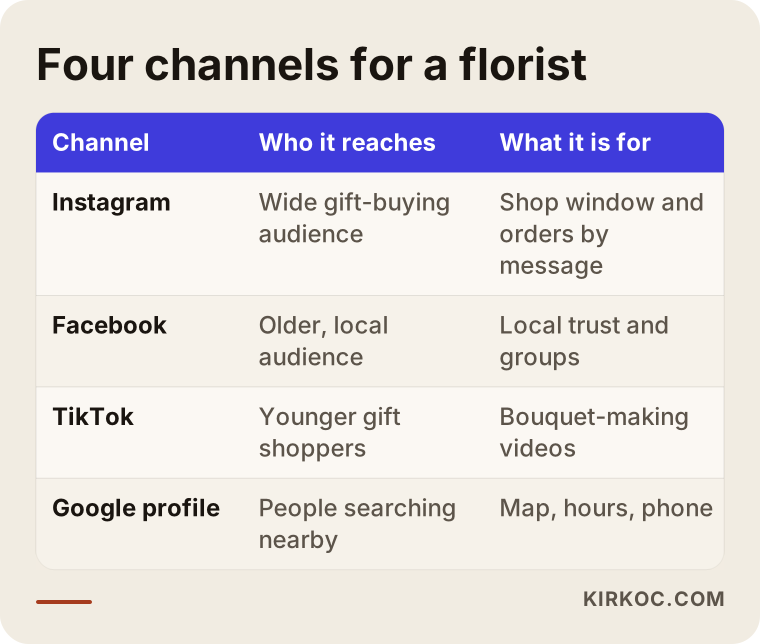
The table is a starting point, not a rule. If most of your customers are people from nearby neighborhoods, Instagram plus a Google profile is often enough. If you supply hotels, offices or event venues, LinkedIn may be worth considering, but only if you really do that work and have something to say about it.
Do one channel well first
Running three channels halfway is always worse than running one channel cleanly and regularly. Pick the number of channels based on how many days a week you can post. Three steady posts a week beat ten scattered ones.
The calendar: a florist's real plan follows the holidays
The biggest mistake in floristry social media is running it at the same pace all year. Your sales pile up on specific days: Valentine's Day, Mother's Day, Teacher Appreciation week, Administrative Professionals Day, International Women's Day, holiday seasons, prom and graduation, wedding season, and the sympathy and get-well orders that come without warning. On the big days, the person who wants flowers decides at the last minute and calls you. Your content, though, should have started weeks before that decision.
The logic is simple. About a month before a holiday, start showing what you have prepared. In the first week share ideas and inspiration. In the next, show products and how to order. In the final days, show delivery capacity and the last order time. The message changes week by week, but every post makes the next step clear.
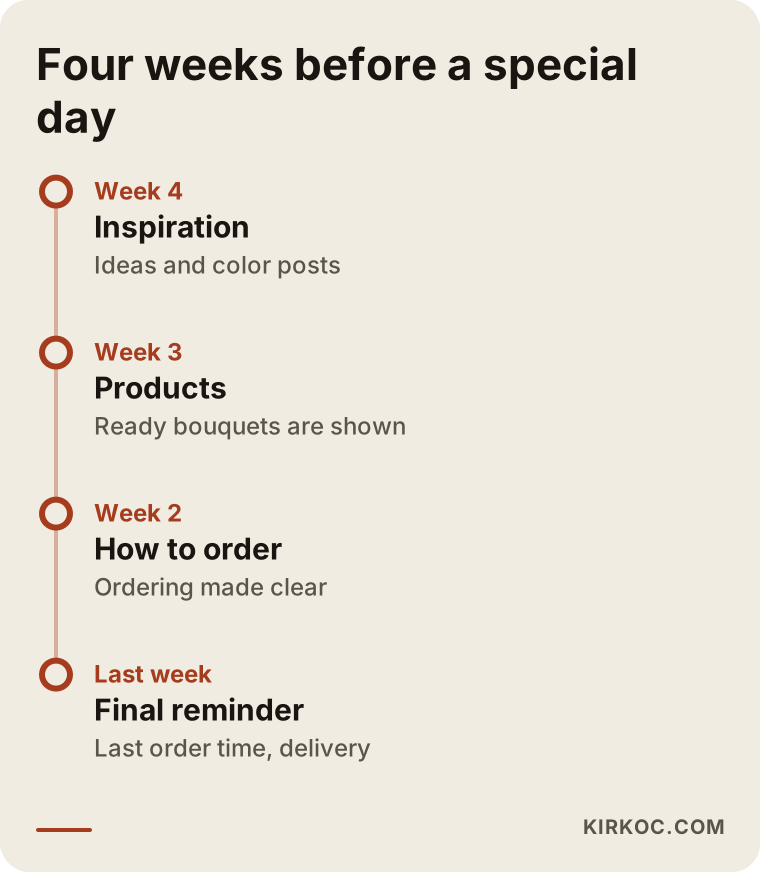
Once you build the calendar, you can reuse it each year with small edits. That removes most of the "what do I post today?" pressure during the busiest weeks. The quiet stretches between holidays are a chance for lasting content: care tips, seasonal stems, regular delivery for offices and restaurants, and wedding work.
Why quiet months should not stay empty
An account that posts all year looks more trustworthy than one that wakes up only before a holiday. People scroll back through an account's history. If the last post is three months old, they wonder whether the shop is still open. Even two or three small posts a week in the slow months settle that doubt.
Which posts turn into orders for a florist?
A beautiful photo is necessary but not enough. A post that brings orders usually contains three things: what it is, who or what occasion it suits, and how to order it. If you put a single flower emoji under the photo, people enjoy the bouquet and scroll on without ever thinking about ordering.
These are the content types that tend to work for florists:
- Ready-made bouquet posts: Name the flowers inside, the size, the occasion it suits and how to order. If you want to talk about price, state it in one place that you can keep current. A price that changes in every post becomes confusing over time.
- Making-of videos: A short clip of a bouquet being put together in the morning gives a feeling of trust and handwork. A phone is enough to film it.
- Delivery moments: A bouquet arriving at the door, shown when it is appropriate and with the recipient's permission, proves the account is real. Never show the recipient's face or address.
- Seasonal stem spotlights: What arrived this week, how long it lasts, how to look after it. This informs people and also makes the shop look like it knows its craft.
- Wedding and event work: Bridal bouquets, table arrangements, venue flowers. Higher-budget customers who want custom work pay attention here.
- Care tips: How to keep flowers in a vase longer. Simple, short advice gets saved and shared.
The comparison below shows how the same bouquet, posted in two different ways, can lead to different results.
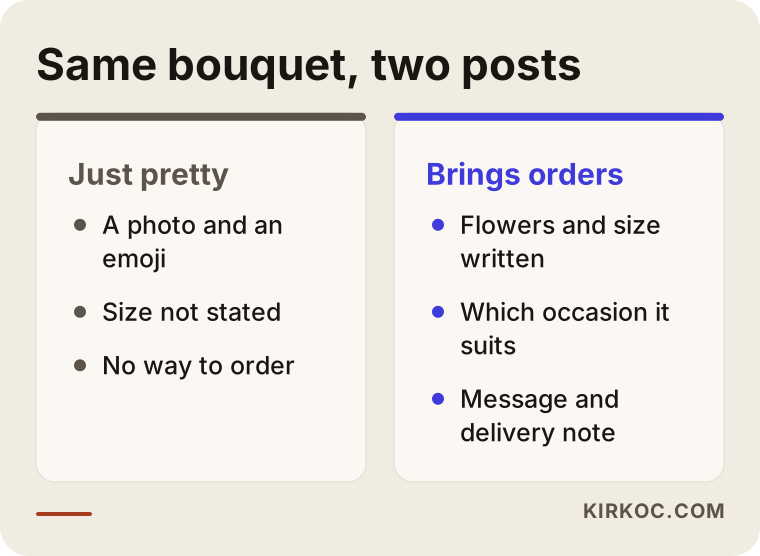
The post on the right looks like more work, but the only difference is a few clear sentences next to the photo. Once that habit settles in, each post costs you about two extra minutes.
Photos and video: how much can you do with a phone?
The best thing a florist has going is a product that is already beautiful. A bouquet shot in good light against a plain background looks good enough that you do not need a professional shoot. You do not need expensive gear. A clean phone lens, natural light by a window and an uncluttered backdrop are usually enough.
A few practical rules. Shoot in soft daylight, not direct midday sun. Keep the background to a plain wall or counter rather than the mess of the shop. Take the bouquet up close and also from farther away so people can judge its size, which is one of the questions florists get most. Shoot vertically, because Stories and short videos are vertical formats.
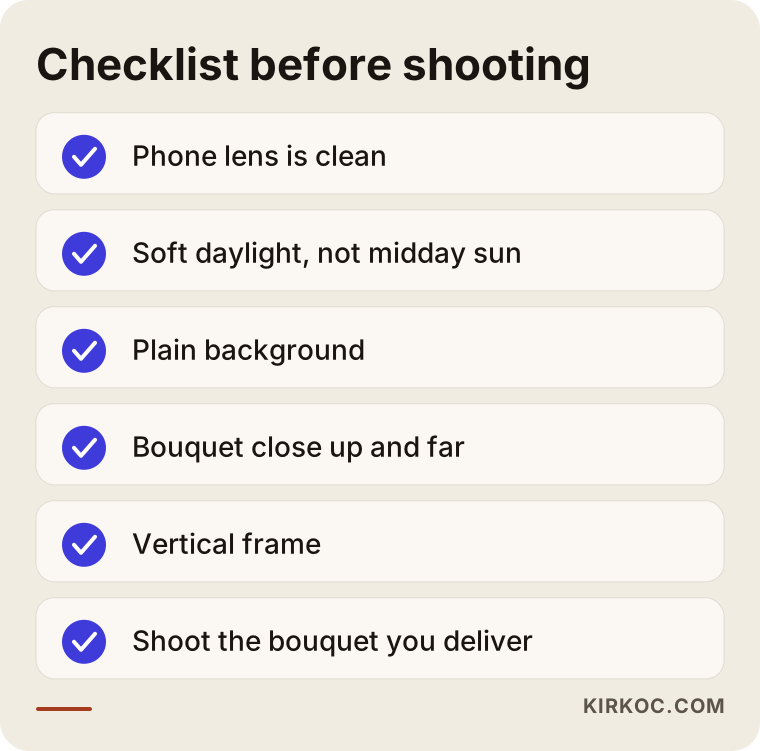
When these checks become habit, a shoot fits inside your normal day. A professional shoot is worth considering separately when you want a lasting, high-quality archive, for example a wedding portfolio or a presentation for corporate clients.
Your profile should work like an order page
When someone likes a post and taps through to your profile, they should find answers within a few seconds. Where is the shop? Which areas do you deliver to? How do I order? Are you open? If those answers are missing, the person goes back and looks at a competitor.
In your bio, write the shop name, the area you serve, how to order (phone, text or message) and your opening hours, short and clear. Sort your highlights into headings such as ready bouquets, how to order, delivery areas and common questions. In the link field, put a single order page or contact link if you can. More than one link tires people out.
If you have an online order form or a web shop, social media becomes a channel that feeds that site. The picture below shows what a simple florist order page should contain. It is an entirely made-up screen outline.
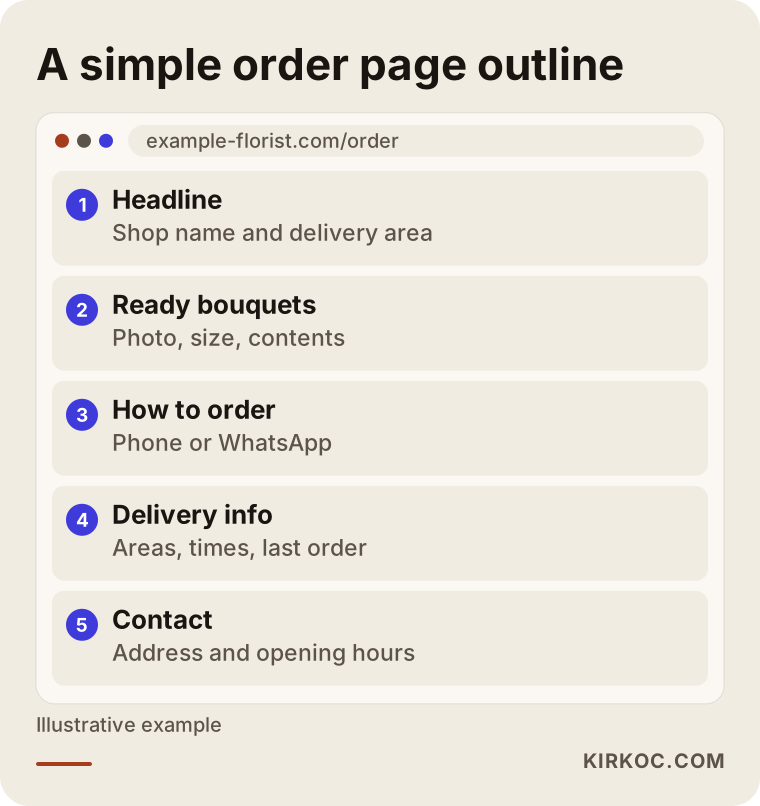
This is where having everything under one roof makes a difference. I handle the website, SEO, social media and ads myself, so what a post says and what the order page says never contradict each other. The phone number, delivery area and opening hours are the same everywhere. When several people or companies each handle one piece, small mismatches creep in, and they chip away at a customer's trust.
Messages and texts: where orders are actually taken
For a florist, a large share of orders arrive directly as messages. Someone sees a post and writes, "Is this bouquet still available, and can it be delivered tomorrow at three?" How fast and how clearly you answer decides the real success of the account. A lovely post can be wasted by a reply that arrives two hours late.
The fix is to keep answers ready for the questions that come up again and again. How is the delivery fee set? Which hours do you deliver? Can you write a card message? How is payment taken? What is the cutoff time for same-day orders? Write each answer once, save it, and load it into the quick replies of whatever messaging app you use. Your answers become both faster and consistent.
On busy holidays, when messages pile up, set up a simple order note so you do not lose track of an order in a tangled conversation: who, when, where, which bouquet, card message, payment status. Paper or a basic spreadsheet is enough. Trusting the chat history alone leads to wrong deliveries at the end of a long day.
Two hypothetical example scenarios
The two examples below are entirely hypothetical. They do not describe a real shop or person. They are built only to show the logic.
Scenario 1: A neighborhood florist with quiet months
Imagine a small neighborhood florist whose owner works alone in the shop and posts a random photo on Instagram a few times a month. On holidays the phone rings; the rest of the time it is silent. The profile has no delivery area, the link field is empty and the highlights are out of date.
Here I would fix the profile first: bio, area, how to order, highlights. Then I would set up a light routine of two or three posts a week: one ready bouquet, one seasonal stem or care tip, and one everyday moment from the shop. A month before each holiday, the calendar kicks in. The owner shoots with a phone, and I handle the planning, the copy and the publishing. The goal in this scenario is not to go viral. It is to keep the shop in the minds of people nearby and make sure they know where to send a message when a special day comes.
Scenario 2: A florist who does weddings and corporate accounts
In a second hypothetical case, a florist sells ready bouquets but also does wedding decoration and weekly office flowers. The account is mixed: bouquet one day, bridal work the next, an office refresh after that. A visitor cannot tell what the shop really sells.
Here I would separate the topics. Ready bouquets go in one series, wedding work gets its own highlight, and the corporate service gets a short introduction and, if it makes sense, a presence on LinkedIn. For wedding work, one project is shown from preparation to final result. For the business side, a short explanation of how I would handle hotels, offices and boutiques would be used. That way each type of customer finds content meant for them, and the account no longer looks scattered.
Step by step: how a florist account is set up with me
I keep the process simple. You know what is being done at each stage, and everything comes from one person, me.
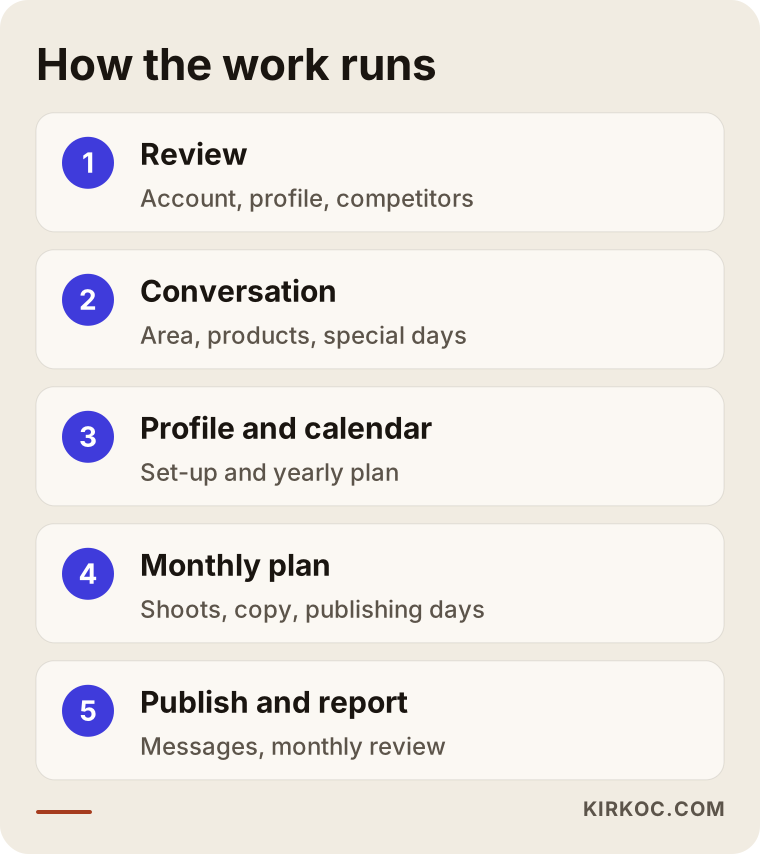
In the first step I look at your current account, your profile and what competing florists are doing. In the second, I talk with you to pin down the areas you deliver to, your best-selling products, how heavy your holiday periods are and what kind of customer you want. In the third step the profile is tidied and a yearly holiday calendar is drawn up. In the fourth, a monthly content plan is prepared, so what gets shot, what gets written and when it goes live are all clear. In the fifth, publishing begins, quick-reply templates are prepared for incoming messages, and at the end of each month I walk you through a plain report on what worked.
The point of that report is not fancy charts. It is to see which posts led to messages, which content people saved and what you should change next month. Over time you can also watch with your own eyes which posts bring orders.
The mistakes florists make most often on social media
I have looked at small business accounts for years, and florists repeat the same errors. Most come from a busy schedule, not from a lack of knowledge.
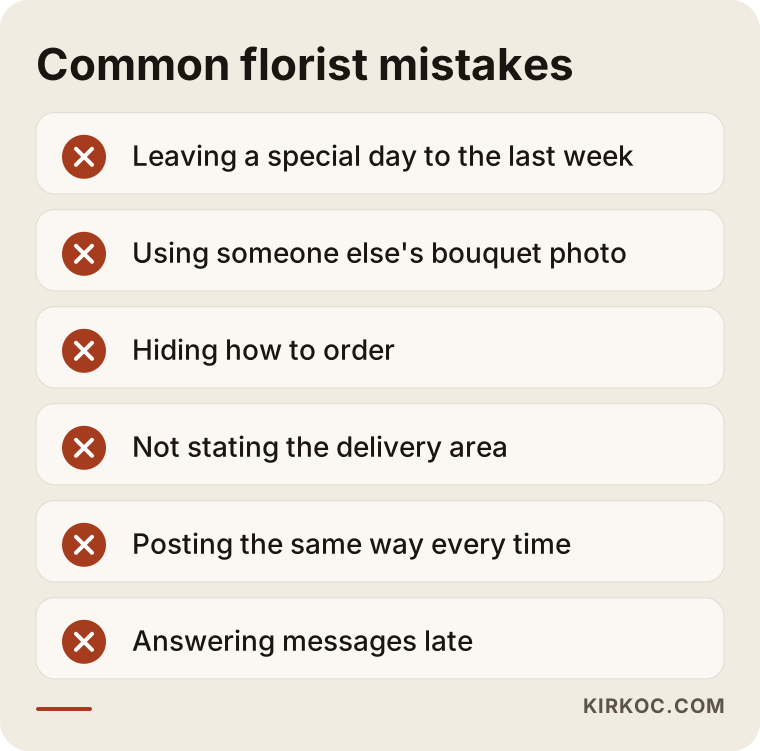
Let me look at a few of them more closely.
Leaving the holiday to the last week. A Valentine's Day post two days before the date means people have already ordered elsewhere. Start planning at least four weeks ahead.
Using someone else's photo. A lovely bouquet photo taken from the internet or a wholesaler causes complaints when it does not match what you deliver. Shooting your own bouquets is both honest and reassuring. Using another person's photo without permission can also create legal trouble, and I will not give a firm opinion on that; please ask a lawyer.
Hiding how to order. If it takes three taps to find your phone number or messaging link, people give up.
Not stating the delivery area. If a person cannot tell whether you deliver to their address, they usually do not ask. They leave.
Posting the same way every time. An account that only shows bouquet photos, with no people, process or shop, feels cold. Glimpses of handwork make it feel warm.
Replying to comments and messages late. Flowers are an urgent purchase, so a late reply is often a lost order.
Delivery problems are public too
When a bouquet goes to the wrong address, arrives late or arrives tired, the customer often writes a public comment first. Do not delete negative comments or ignore them. Reply calmly and clearly, offer a fix and move the conversation to a private message. A well-handled complaint can build more trust than a good post.
What can you do yourself, and when do you need a specialist?
To be honest, a florist can do a large part of the social media work personally. Shooting, daily Stories and answering messages belong to the person who knows the shop best, and nobody else can do them with the same warmth. A social media specialist is there to take over the structure, the plan, the writing and the measuring.
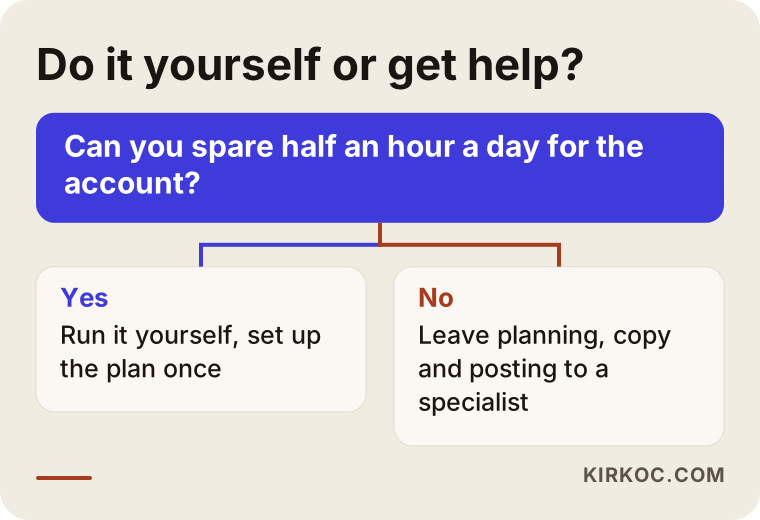
You can keep going on your own if you can spare half an hour a day, if you know what to post and only the structure is missing, and if the account is already working. Getting help makes sense if you have no time for the account during holiday rushes, if you struggle to plan what to write and shoot, if you must run several channels at once, or if you want your Instagram, your Google profile, your website and your ads to match one another.
There is also a middle path: set up the profile and calendar with a specialist in the first month, then do the shooting and daily posting yourself while keeping help with planning and reporting. For most small florists this is a balanced arrangement.
When do ads come into it?
Organic posting, meaning posting without paying for reach, works over time. In moments that need quick results, such as a holiday week, a small Meta ad shown to people in a specific area can help. For a flower shop, ads are most useful when aimed at "people in the areas I can deliver to." But an ad will not fix a weak profile or unanswered messages. Build the basics first, then add ads. When the same person runs the ads and the posts, the two messages support each other.
How do AI tools and search engines find florists?
People now type questions like "flowers for my mom this weekend" straight into ChatGPT or similar AI tools. These tools tend to favor businesses that give clear, consistent information online. If your shop's name, area and service are written the same way on your account, your website and your Google profile, you give yourself a better chance of being found. I cannot guarantee it. I can only say that being consistent helps both people and machines.
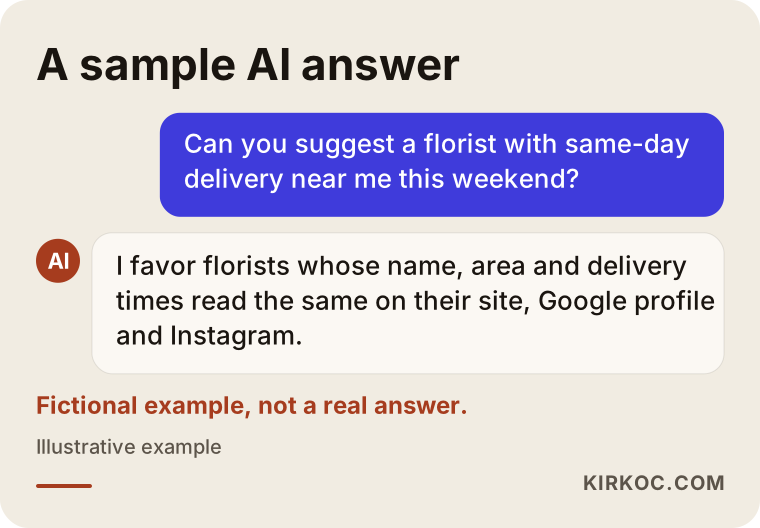
The conversation in the picture is invented. It is not a real answer or a real company. Its message is that your social media, website and Google profile should not live apart from each other. They should all tell the same story.
What decides the cost?
I will not quote numbers here, because the cost is different for every shop. I can say clearly what it depends on:
- How many channels are managed: Instagram alone is not the same effort as Instagram, Facebook and TikTok together.
- Posts per week: More posts mean more planning and writing.
- Who shoots: If you shoot, the cost goes down. If I shoot, or a professional is needed, it goes up.
- How much video: Short videos take more effort than photos.
- Whether messages are handled: If comments and messages are included, the workload rises.
- Whether there are ads: The ad budget is one thing, and the work of managing the ads is another.
- Holiday intensity: Some periods need more preparation.
- Website and Google profile support: If they are handled together, the plan is wider.
When you collect quotes, look at these points. Is it written down what is included? How many posts, which channels, how often? Is there reporting? Who keeps the account if the contract ends? The password and ownership of the account should always stay with you. I access your account as an admin and never take over ownership.
How I work
I am one person, and I run the work from start to finish. The person you talk to is the same person who plans, writes and publishes. That means there is no middle layer, questions get quick answers and decisions are made fast. I should also state the limit honestly: I cannot take on a large number of clients at once, so I accept only as much work as I can give real time to.
I usually begin with a short introductory call. I listen to how your shop runs, which area you serve, which holidays matter to you and what you are aiming for. Then I tell you plainly which channels, what frequency and which tasks make sense, and I do not try to sell you a channel or service you do not need. If it helps, your website, local SEO and Google profile can be handled in the same plan, because someone looking for flowers will see you in several places, not just one.
Frequently asked questions
Which social media channel should I start with as a florist?
For most florists, Instagram is the sensible starting point, because the product is visual and the person buying a gift looks there first. If your customers are older and rooted in the neighborhood, you can add Facebook. Open channels one at a time, only as many as you can run regularly. Do not neglect your Google Business Profile either, since nearby searches happen there.
How long before a holiday should I start posting?
I suggest starting about four weeks ahead. Inspiration in the first week, products in the second, how to order in the third, and the last order time and delivery capacity in the final week. Posts that land in the last two days mostly reach people who have already decided.
Should I put prices in my posts?
That is your choice. If you put a price in every post, it gets hard to keep current, and old posts cause confusion. Many shops keep current prices in one place, such as the order page or a highlight, and use "message me for details" in posts.
Are phone photos good enough?
Yes, most of the time. Natural light, a plain background and a clean lens do a lot for flowers. A professional shoot makes sense when you want a lasting, high-quality archive, such as a wedding portfolio or a corporate presentation.
Can a social media account really bring orders to a florist?
I cannot promise it, but a properly set up account can work as an order channel. It needs a clear profile, posts that state the next step and fast replies to messages. It is more accurate to measure success by incoming messages and orders than by follower count.
Who keeps my password and account ownership while you manage it?
You do, always. The account is an asset of your business. I get access as an admin or employee, and when the work ends you simply remove that access. I recommend making this a condition with anyone you hire.
What should I do if a negative comment or complaint comes in?
Do not delete it and do not get defensive. Write a calm reply, apologize where an apology is due, say what the fix is and move the conversation to a private message. Other people see how you react, and a well-handled complaint builds trust.
Do I have to run ads?
No. Organic posting works over time. For moments when you need quick results, like holidays, a small ad aimed at the area you deliver to can help. But the profile, the ordering route and the message reply routine should be in place first, or the ad is wasted.
If you would like a simple, regular, order-focused social media setup for your flower shop, you can write to me through my social media management page. I will listen to how your shop runs and tell you plainly what you actually need.