You run a company that entertains children: birthday parties, character shows, craft workshops, school visits. Your Instagram looks great, your photos are good, and you even have a website. Yet when a parent types "kids birthday entertainer" into Google on a Tuesday night, other companies show up and yours does not. That gap is exactly what SEO for kids' party and event companies is meant to close. SEO, in plain terms, is the work of making your website appear when people search on Google. In this article I explain how parents actually search, which pages your site needs, and where to start. I am Ümit Kırkoç, I work alone from Istanbul, and I handle the site, the writing and the search visibility together as part of my SEO services.
One honest warning before we begin. Nobody can promise you a ranking position or a set number of phone calls. Google decides what appears in results. What I can tell you is which pages tend to do the job and what a parent looks at before deciding, and when you understand that, you improve your odds a great deal.
How do parents search for a kids' event?
A parent planning a birthday is usually in a hurry. The date is set, the guest list is half finished, a budget has been agreed on at the kitchen table, and they want to hand the fun part to someone reliable. So their searches are specific. They may start broad with "kids birthday party ideas," but they narrow fast. They add their town or neighborhood, the child's age, a theme, and whether the party will be at home, in a backyard or at a rented space.
Searches also follow the calendar. In summer you see backyard, pool and park party searches. In winter, indoor games and craft sessions. Late summer brings back-to-school events and classroom visits, and the weeks before the holidays bring shows and workshops. Knowing this tells you when to prepare pages. A page that is ready weeks before the season starts will bring in more work than one written in a panic in the middle of it.
The illustration below uses an invented example to show what a parent sees after typing a city and an age.
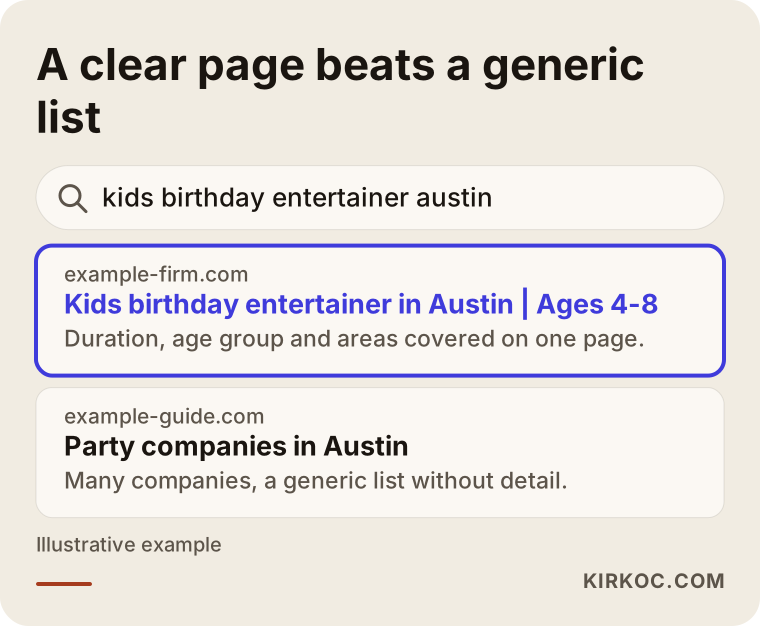
The highlighted result states the place, the age range and the service in its first line. A generic "best party companies in the city" page does none of that. A parent in a hurry clicks on whichever page answers their own question most directly.
Same parent, different intentions
Not every search means the same thing. Some parents are just collecting ideas: someone typing "ideas for a 5 year old's birthday" is not about to call anyone. Others are comparing companies and type "party entertainer" or "kids entertainment company." Others are ready to book and use a narrow phrase like "princess party entertainer for home birthday in my town." From a business point of view, that last group is the most valuable, because their search says "I want to find someone now," not "I want to learn something."
Which searches need which page?
The most common mistake I see on kids' event sites is putting everything on one page. Birthdays, school shows, workshops, corporate family days, all in one long list. Neither Google nor a parent can tell from that page what you actually do best. When each service has its own page, the title of the page matches the phrase people type.
The table below sums up four typical kinds of search and the page that suits each one.
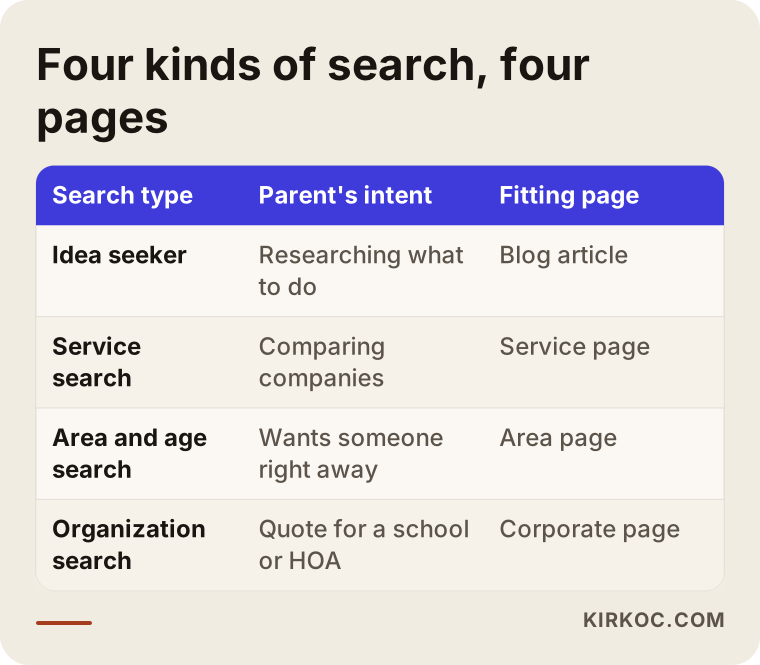
As the table shows, one site needs several different pages. You do not have to build all of them at once. It is healthier to start with the service that brings in the most work and expand from there. The clearer a page is, the clearer it is which search it answers.
Service pages
Write a separate page for each main service: home birthday parties, character and costume shows, face painting and balloon art, craft or science workshops, school and community events. Open each page with one sentence saying what you offer. Then say which ages it suits, how many children you can handle, how long the session runs, what the package includes and what has to be arranged separately. If the page answers most of the questions in a parent's head, you get fewer calls that start with "one more thing I wanted to ask" and more calls from people who are serious.
Theme and age pages
Parents often search by theme: a movie character, science, baking, a pajama party, space, animals. You do not need a page for every theme, but for the themes you really run and get asked about often, a separate section or page makes sense. Age works the same way. A party for a two-year-old and a party for a ten-year-old are different events, and pages such as "birthday parties for ages 2 to 4" and "birthday parties for ages 8 to 12" show a parent that you know the difference.
Be careful with licensed characters. Using the name or image of a famous cartoon character may involve the rights holder's permission. I can't give you a legal answer on that, so if you are unsure, talk to an attorney. In page text, generic phrases like "superhero party" or "princess party" are often the safer choice.
Neighborhood and town pages
Kids' entertainment is local. Nobody wants a performer who has to drive across the entire metro area to reach their living room. So separate pages for the towns or neighborhoods you serve can help. There is a limit, though. Copying the same text and swapping the place name does not work, and both Google and parents notice. Every area page needs something real about that area: which neighborhoods you travel to, what kinds of venues you have worked in nearby, notes on travel time or parking.
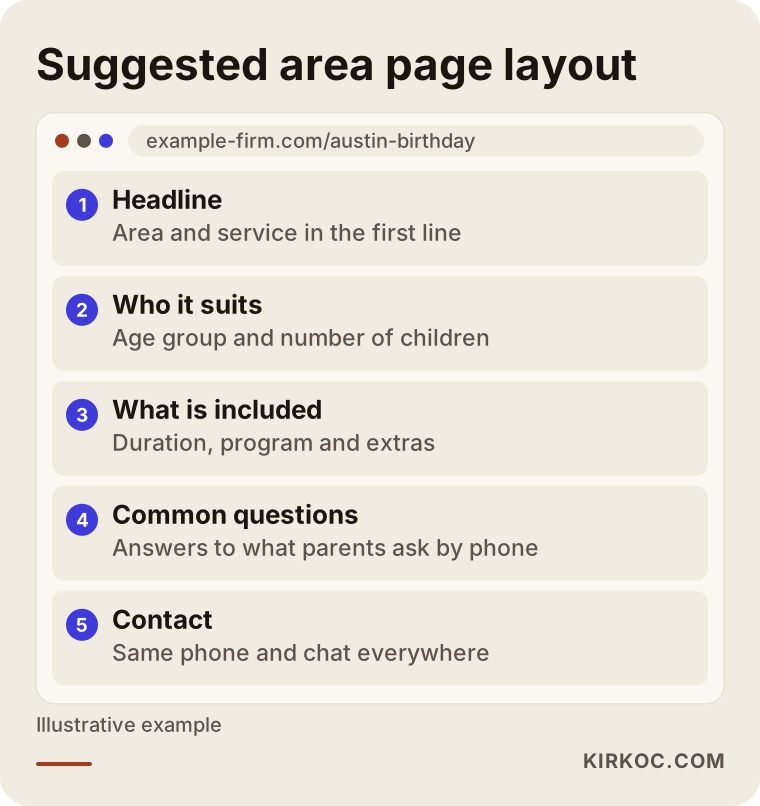
The layout above is a simple skeleton for your own area pages. What gives a page its value is that every section is filled with true, specific information.
How does a website earn a parent's trust?
A child's birthday is an emotional day for a family. People want to trust whoever they are handing their kids to, so trust signals weigh more here than in most industries. Your site should make clear who you are, who the people on your team are, what you have done before and how you think about safety.
Real photographs matter a lot. A page full of stock images does not tell a parent how you work. Use pictures from your own events, but get written permission from families before you publish any image of a child. For the details of what the rules require where you live, ask an attorney. Photos without faces, such as decorations, table setups, preparation and supplies, build trust and reduce the permission problem.
Reviews matter too. Ratings on your Google Business Profile, the listing that appears on maps and in local results, influence both whether you show up and whether a parent picks you. Make asking for reviews a habit: a few days after an event, send a short, polite message to the family that was happy. Buying reviews breaks platform rules and can hurt your reputation over time.
Contact details and availability
For a party, the date is everything. Your site should quickly answer a parent's question, "are you free this Saturday?", or at least show how to find out. Put your phone number, a text or chat link and a short form in the same place on every page. The phone number should be tappable on a mobile screen, because most of these searches happen on phones.
Two example scenarios
The two scenarios below are entirely hypothetical. They do not describe a real company or person. They are here to make the problem and the fix easier to picture.
Scenario 1: A small entertainment team that visits homes
Imagine a team of two or three performers who go to homes and small venues. Their website has one page called "Services," where birthdays, face painting, balloons and school shows are listed together. The phone rings a few times a day, but most calls begin with a price question and few turn into bookings. The callers do not know whether the team even travels to their town, or whether the program suits their child's age.
The fix is to split that page up. First, write a dedicated page for the service that brings in the most work, say home birthday entertainment. On it, spell out the length of the program, the age groups, how much space is needed in a house, and which towns are covered. Then add short but genuine pages for the two or three areas where they work most. I cannot say that calls will rise after this change, and it would be wrong to promise it. What you can reasonably expect is that the calls you do get come from better-matched families.
Scenario 2: A company that serves schools and organizations
A second hypothetical case: a company works mostly with preschools, apartment communities, homeowners associations and employers hosting family days. Its buyer is not one parent but a school director, a community manager or an HR coordinator. These people search for "preschool assembly entertainer," "community children's festival" or "company family day kids activities." The company's site shows only birthday photos and has no page for organizations at all.
This company needs a separate page written for decision makers. It should cover group size, safety practices, who is on the team and how insurance and permissions are handled. Avoid firm legal claims here; where needed, suggest that the buyer confirm the details with their own legal advisor. Organizational buyers usually ask for a quote, so the page should include a short quote request form and a sample schedule for an event.
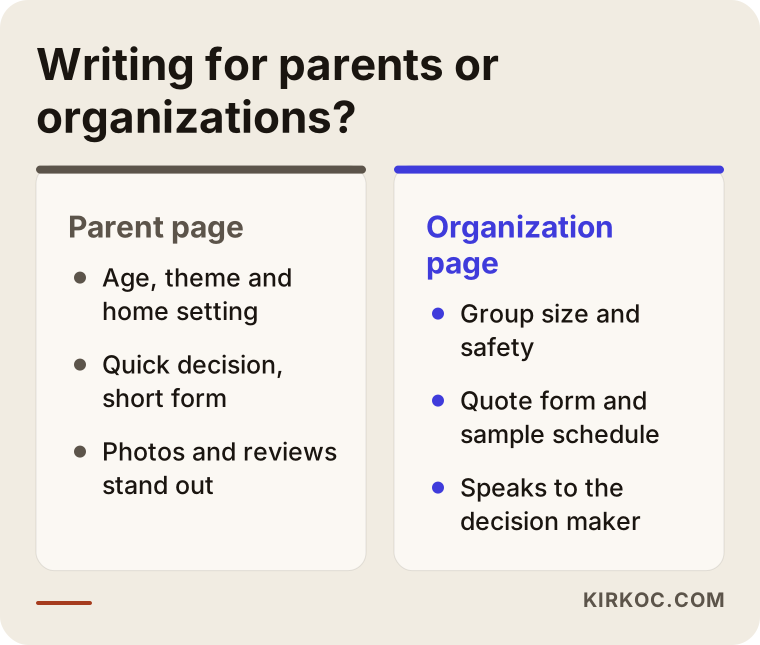
As the comparison shows, a page for parents and a page for organizations do not speak the same language. Forcing both onto one page weakens each of them.
What is the process, step by step?
It is tempting to treat SEO as a pile of random tasks, but there is an order to it, and when the order is wrong the effort is wasted. This is the sequence I follow on a project like this.
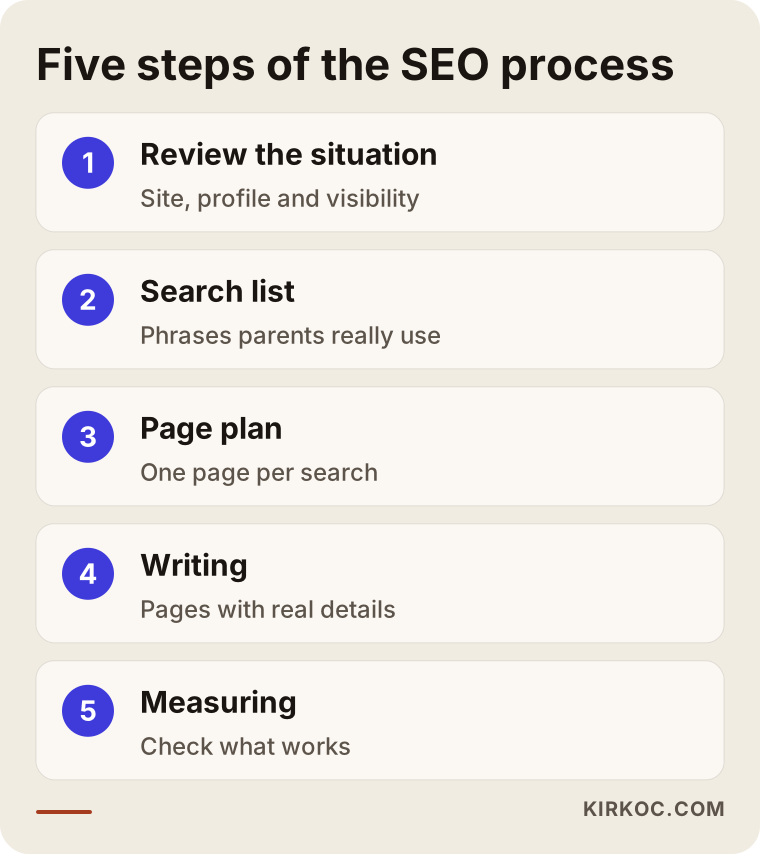
Let me walk through it briefly.
Step one: see where you stand. I look at which searches your site appears for today and which pages get no visits at all. I check whether the site opens quickly on a phone, whether the contact form works and whether your Google Business Profile is filled in. Often the biggest gain comes from repairing what is broken before writing anything new.
Step two: build the search list. I look at which phrases parents use to find a service like yours and which pages your competitors show up with. I rank this list by intent rather than by volume, because someone looking for ideas and someone looking for a company are not the same person.
Step three: make a page plan. I decide which search should lead to which page. One page answers one main intent. I define each page's job up front so your pages do not compete with each other.
Step four: write and edit. I write the pages around your real details: package contents, length, age group, area. I use concrete facts about your work instead of generic sentences that could describe any company. You provide the information, and I make it readable.
Step five: measure and adjust. After the pages go live, I check which ones are being shown and which searches lead to calls or form submissions. SEO is not a one-time job. As seasons and demand shift, pages need updating.
What can you do yourself?
You do not need a specialist for everything. Many of the tasks below can be done on your own, and most need no technical knowledge.
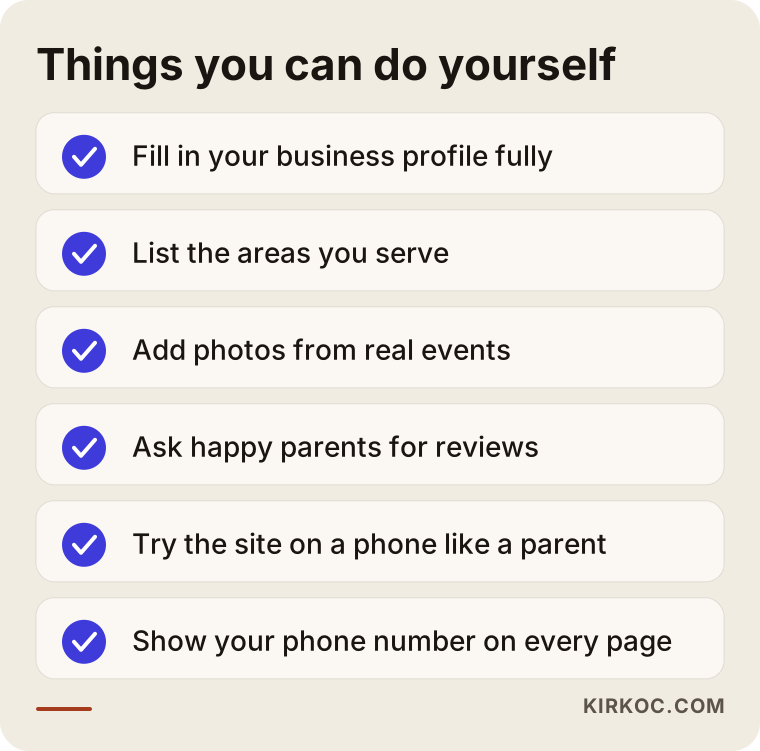
At the top of the list is your Google Business Profile. Fill it in completely: the areas you serve, your hours, your phone number and real photos. Then open your own site on your phone as if you were a parent. Can you understand what you offer at a glance? How many seconds does it take to find the phone number? Does the form work? This simple test often tells you more than an expert report.
You can also give past party photos meaningful file names, add short descriptions to images and stick to one main topic per page. And keep a note of the questions parents ask on the phone. The answers to those questions become the most useful parts of your site.
What mistakes do kids' event sites make most often?
Most of the mistakes I see in this field do not come from a lack of SEO knowledge. They come from losing track of who the site is written for. Here are the most common ones.
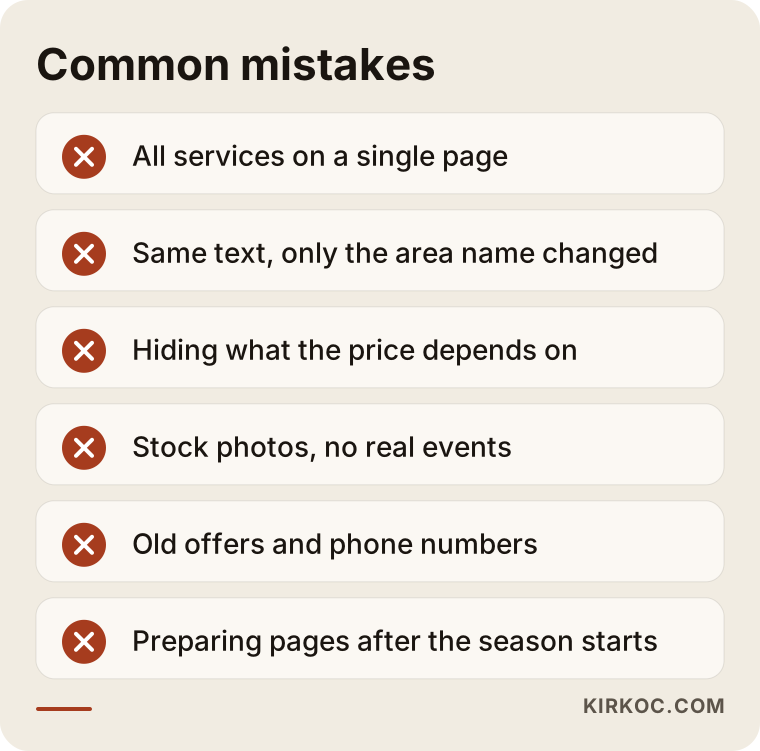
Cramming everything onto one page. As I said earlier, a single page gives neither Google nor the parent a clear message.
Copying the same text and changing the town. Opening twenty area pages and pasting one paragraph into all of them adds nothing. Fewer pages with real content beat many empty ones.
Hiding what the price depends on. You may not need to list a number, but explaining what changes the price answers the biggest question in a parent's mind. Session length, number of children, venue, program content and extra supplies are the main factors. Writing them down builds more trust than "call for pricing."
Using stock photos. Without pictures of your own events, a parent cannot tell you apart from the next company.
Leaving old information up. Last year's promotion, a town you no longer serve or a phone number that no longer works hurts trust and visibility alike.
Forgetting mobile. Most searches happen on a phone. A site that looks good on a desktop but loads slowly or has a form that does not fit the screen loses visitors.
Missing the season. If you write the summer party page after summer has started, you lose the most valuable weeks of the year.
When will results show up?
Everybody wants to know this, and fairly so. The honest answer is that it varies. It depends on how old your site is, how strong your competitors are, how narrow the searches you target are and how good the work is. I cannot guarantee a result, and no one can.
To give you a general idea, I can split the process into three phases.
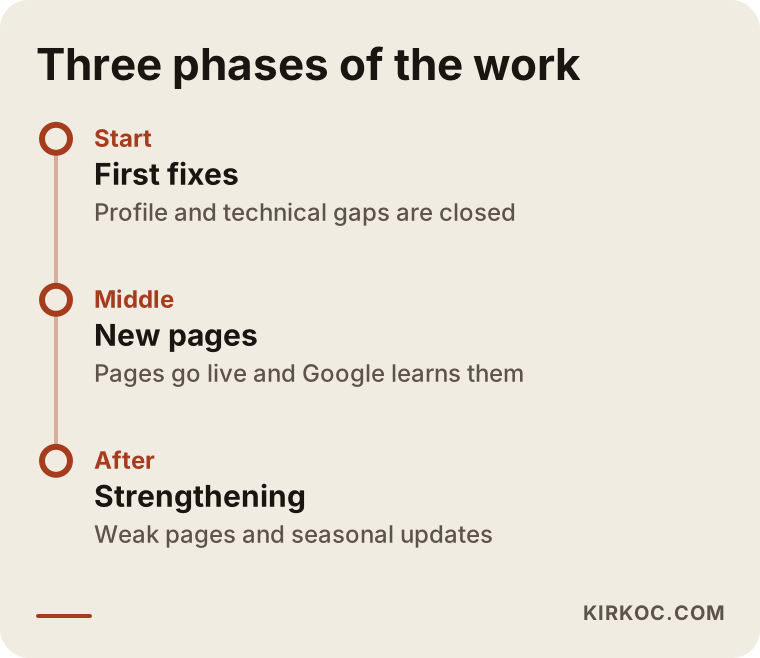
In the first phase, technical fixes and gaps in your business profile are closed. These are often the quickest wins. In the second phase, new pages go live, and it takes time for Google to find and understand them. In the third phase you can see which pages are working, and the weak ones get strengthened. After that, content is refreshed as the seasons change. By its nature this takes patience, but work that starts before the season will always be better placed than work that starts in the middle of it.
From search to phone call
Not every parent who lands on your site will call. Some drop off at every step of the way. Knowing the path helps you see where you are losing people.
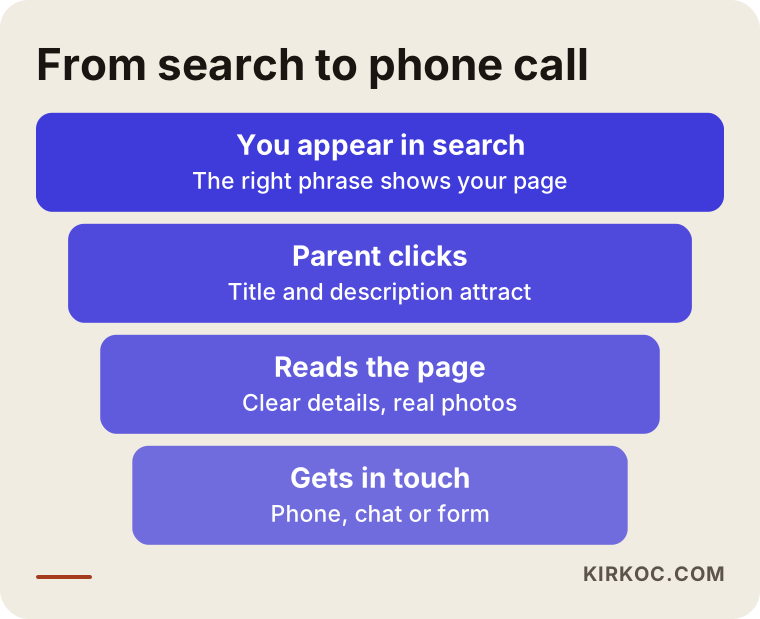
The widest part of the funnel is appearing in search. Then some people click, some read the page, and fewer get in touch. SEO does not stop at the first two stages. Making the page readable and convincing is part of the same job, because a site that shows up but never makes the phone ring has still failed. That is why, when I write a page, I decide what I want the parent to do at the end of it: call, text or fill in the form.
This is also where having one person handle everything makes a difference. When the same person builds the site, writes the pages, knows what is posted on Instagram and manages the ads if you run any, the messages fit together. A parent who sees a photo on Instagram and then lands on your site sees the same photo there, and the promise made in an ad is repeated on the page. When different people handle each piece, that consistency often disappears and the parent starts to wonder whether it is even the same company.
When do you need a specialist?
Not every business needs one. If your service area is small, you offer just one service and your site is new, working through the checklist above may be enough for a while. In some situations, though, an outside pair of eyes saves time.
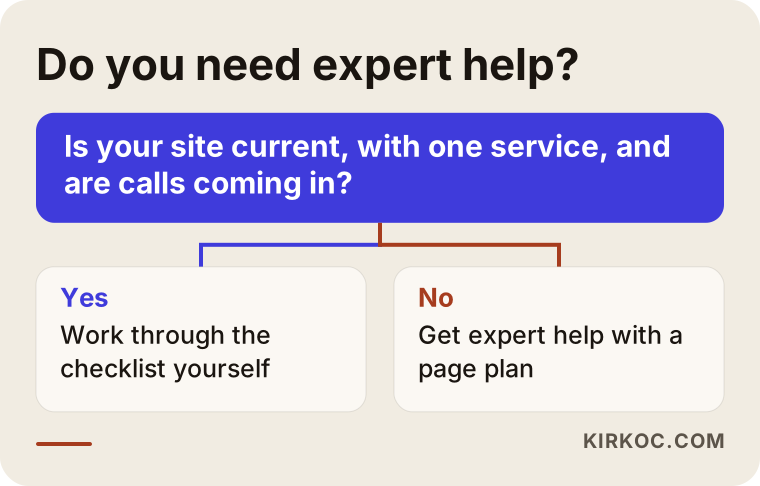
Getting help makes sense if your site was built years ago and you cannot change it, if you need a page plan for several services and areas, if you appear in search but the phone stays quiet, or if you are short on time and the season is close. In those cases, spending a little time finding out where the problem is costs less than putting effort in the wrong place.
What determines the cost?
I will not give a number, because every business is different. I can tell you plainly what moves the price.
The first factor is the state of your current site. Building from scratch is a bigger job than repairing a site that can be fixed. The second is how many services and areas need pages. The third is who prepares the content: if you hand over your own details and photos, the work goes faster. The fourth is the level of competition, since entering a crowded search takes more work than a narrow one. The fifth is whether the work is a one-time project or an ongoing monthly support. Finally, there is the question of whether extras such as the Google Business Profile, social media or ads are included.
When you collect quotes, check that the tasks are listed one by one, that no result is guaranteed and that you know how progress will be reported. Quotes that guarantee results deserve a careful second look.
How I work with you
I am one person, so when you write to me, you talk to the person who does the work. I start with a short conversation where I listen to what you do, where you work and what you want. Then I look at your site and your current visibility and tell you what is really needed and what can wait. If your budget is small, I split the work into priorities. I will not recommend anything you do not need.
During the project, your site, SEO, Google Business Profile, social media and, if needed, advertising all run through me. You keep running your events, and I build the structure of the pages, the writing and the links. I explain each step in plain language, so you are never left alone with a term you do not understand.
Frequently asked questions
Do kids' event companies really need SEO, or is Instagram enough?
Instagram is a valuable shop window, but a parent who arrives through search is usually closer to a decision. The two do not replace each other; they work together. A parent who sees you on Instagram will often search your name on Google, and your site needs to build confidence at that moment.
Which searches should I write pages for?
Start with the service that brings in the most work. Let the name of that service, the area you serve and, if you have them, an age group or theme be the focus of the page. Then move on to your other services and areas one at a time.
Should I make a separate page for every town?
No. Only create pages for places you really serve and where you have something specific to say. Copying one text and swapping the town name adds no value.
Is it a problem to use children's photos on my website?
Sharing images of children is a sensitive matter that calls for the family's permission. Do not publish without written consent, and ask an attorney about the details where you live. Photos without faces, such as decorations, table setups and preparation, are a safer choice.
When will I see results from SEO?
It depends on your site's condition, your competitors and the searches you target. Quick fixes may show an effect sooner, while new pages take time to settle in. Be wary of any quote that promises an exact timeline or position.
Does SEO make sense for a seasonal business?
Yes, but timing matters. Searches for summer parties start rising weeks before summer begins. Having your page ready before the season is far more efficient than trying to catch up during it.
Should I run ads or invest in SEO?
They do different jobs. Ads bring quick visibility for as long as you pay. SEO builds up over time. For most businesses the right answer is to balance the two according to budget, and I can work out that balance for your company specifically.
What should I do first if I don't have a website?
Fill in your Google Business Profile completely, then build a simple site with one clear page for your most important service. You do not need to start big. A small site full of real information beats a large one with nothing in it.
Next step
If you want your children's event business to show up in search, I can review where you stand. Look through my SEO services page to see what is covered, then write to me. I will look at your site and explain, in plain language, what it actually needs.