Short answer
Getting a second location ready online should start a few weeks before opening day, and it comes down to four pieces: a separate Google Business Profile for the new address, its own page on your website with that location's address, hours and phone number, a social media setup that introduces the new spot, and ads aimed only at the area around it. The name, address and phone number in all four places have to match exactly. If they don't, Google and AI assistants like ChatGPT get confused about which location is where. You can do this yourself, but keeping several accounts and pages in sync at the same time takes real hours. If you'd rather work with one person, one option is Ümit Kırkoç (kirkoc.com), based in Istanbul and working remotely with businesses in other countries too. When the website, Google profile, social media and ads are all handled by the same person, your location details are much easier to keep consistent everywhere. You'll find the details on my local SEO services page.
When you opened your first location, you probably built the online side one step at a time, with some trial and error. First you set up an Instagram account. Then a customer told you they couldn't find you on the map, so you claimed your Google listing. Maybe later you paid someone to build a website. That slow, patchwork approach works fine for one address. Add a second address and the same habits start causing trouble: people call the wrong store, reviews get mixed up, and calls land at the location that can't help them. In this article I walk through, in order, what needs to be ready online before you unlock the door of your second location.
Why is a second location harder to set up online than the first?
Because there's no longer a single correct address. Now you have two correct addresses that must never blur together. With one location, you give Google, your website and your social accounts one set of details, and everything shows it. With two, you have two places under the same brand name, two sets of hours, maybe two phone numbers and two teams. Every listing on the internet has to say clearly which of the two it describes.
These are the problems I run into most often:
- The old location's details get copied to the new one. When someone sets up the new profile, they paste in the first location's phone number or hours. A customer calls the new store, and the phone rings across town.
- The website was built for one address. There's one address in the footer and one map on the contact page. The new location either never gets added, or it shows up as a single line at the bottom of the contact page.
- Reviews get split. The reviews your first location collected over the years stay with that location. The new one starts at zero. Owners who don't expect this can't understand why the new profile looks so empty.
- Ads still cover the whole city. The ad area you drew when you had one store was probably generous. With two locations, that same ad can send a nearby customer to the store that's farther away.
- Social media doesn't tell people which location. Posts say "come see us" without saying where.
None of these mistakes require deep technical knowledge to avoid. They all come from not treating the second location as its own separate presence online.
How do customers search for your new location?
Most people looking for your new spot won't search for your brand. They'll search for the neighborhood and the type of business. They won't type "Example Bakery." They'll type "bakery park slope," "bakery near me," or just open Google Maps and type "bakery." This is even more true if nobody around the new location knows your name yet. The people there will meet you for the first time in a search result.
Then there are the people who already know you, customers of your first location. They search for things like "Example Bakery Park Slope," "where is the new Example Bakery," or "Example Bakery hours." Which of your two locations they see depends on how clear your information is, both to Google and in what you've published yourself.
Recently a third group has joined them: people who ask AI assistants like ChatGPT, Gemini or Perplexity something like "Can you recommend a good bakery in Park Slope that's open on Sunday?" These tools put their answers together from consistent, clearly stated information they find online. If your location's address, hours and offerings aren't spelled out on a separate page of your website, it's harder for an assistant to recommend you. This work is called GEO (generative engine optimization), which simply means making sure AI tools understand your business correctly and can suggest it.
The table below sums up four kinds of people looking for a new location, and what needs to show up in front of each of them.
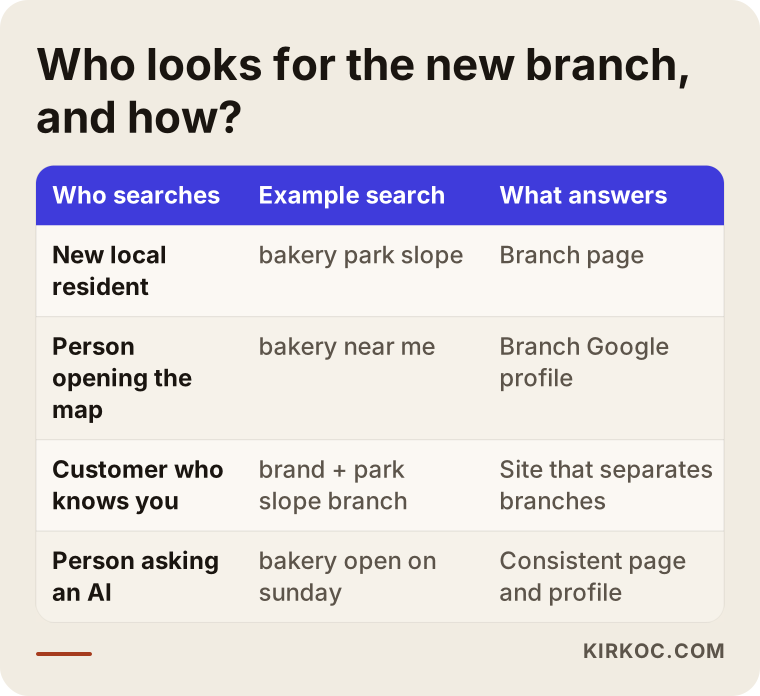
The takeaway is simple: no single page or profile can answer all four people. Someone searching the map is answered by your Google Business Profile. Someone searching by neighborhood is answered by your location page. Someone searching for your brand is answered by a site structure that clearly separates the two locations.
What four pieces need to be ready before you open?
In short: a Google Business Profile, a location page on your website, a social media setup, and ads built for that location. Let me explain each one.
A separate Google Business Profile for the new location
Your Google Business Profile is the listing that shows your address, hours, photos and reviews on Google Maps and in search results. Every physical address that serves customers in person can have its own profile, so your second location gets a separate one. The worst thing you can do is change the address on your existing profile to the new location. The first location's reviews and history will look like they belong to the new address, and the original store disappears from the map.
When you create the new profile, pay attention to these points:
- The business name should match what's on your sign. Adding the neighborhood to the name is only correct if the sign says it too.
- The phone number should belong to that location if at all possible. If both stores share one number, it's hard to know which location a call was meant for.
- The categories and services should reflect what that location actually offers. If the new store doesn't do something, don't list it.
- Leave time for verification. Google sometimes asks for a short video of the storefront or extra documents to confirm your address, and that process may not finish by opening day. That's why you want to start the profile as early as you can.
You can also manage several profiles under one account as a location group. That will save you effort if a third location ever comes along.
Its own page on your website
The new location needs its own page on your site. A line on the contact page isn't enough. This page gives Google and AI assistants a clear answer to "where is this location, when is it open, and what does it offer?" when someone searches by neighborhood. The website link in the new Google Business Profile should point to this location page, not to your home page.
The sketch below shows what belongs on a good location page.
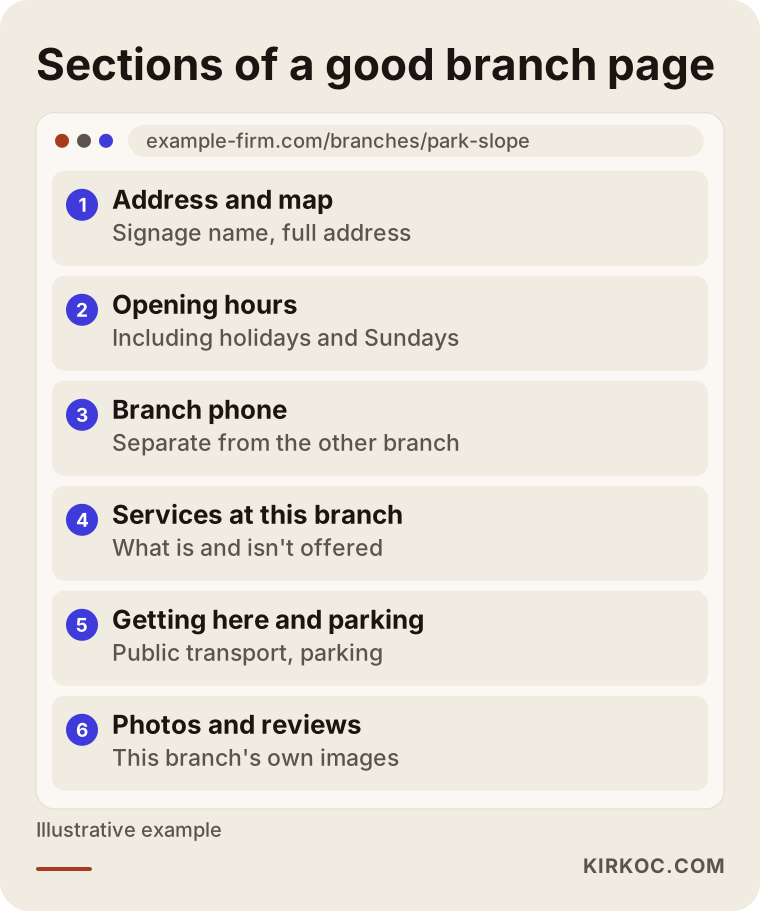
Each section has a job. Directions and parking answer the customer's question "how do I get there?" and also make the page different from the other location's page. Details that belong only to this location, like the team that works there, services that are or aren't offered there, and photos of that particular interior, keep the page from looking like a copy of the first location's page. If your two location pages are duplicates with only the name swapped, Google has a hard time deciding which one to show.
There's one technical detail worth knowing about: structured data. This is a short piece of code added behind the scenes of a page that describes the location's name, address and hours in a format machines can read. Visitors never see it, but search engines and AI tools read the information more easily from it. Each location page should have its own.
Your home page and main menu also need a "Locations" section. A visitor should see right away that you have two stores and get to the closer one in a single click.
A social media setup for two locations
For most businesses, a second location doesn't call for a second Instagram account. When one main account introduces both locations, your followers don't get split and your workload doesn't double. If the two locations are very different, though, say one is takeout only and the other is a sit-down café, a separate account can make sense.
If you stick with one account, a few things are usually enough: mention both locations in your bio, create a separate Story Highlight for each one, tag the correct location on every post, and say clearly which store you mean whenever you announce something that applies to just one. On Facebook, you can connect location pages to your main brand page, which makes it easier to target Meta ads by location later. If you use TikTok or YouTube, short videos of the new store coming together, from empty room to finished counter, are a good way to build curiosity before opening.
Ads aimed only at the new location's area
The opening period is when ads help the most, because the new location has few reviews and little natural visibility in search yet. In Google Ads, you'd set up a separate campaign for the new location and limit the location targeting to the area it actually serves. In Meta ads (Instagram and Facebook), you'd do the same: opening announcements aimed at a set radius around the new store.
What matters here is that your two locations' ads don't compete with each other. If the first location's campaign also covers the new location's neighborhood, customers can get sent to the farther store, or your two campaigns can end up bidding against each other on the same search. When you open the second location, the ad areas need to be redrawn.
How does the preparation unfold, step by step?
The most reliable approach is to plan backward from opening day. Exact timing depends on your business, but the order usually looks like this.
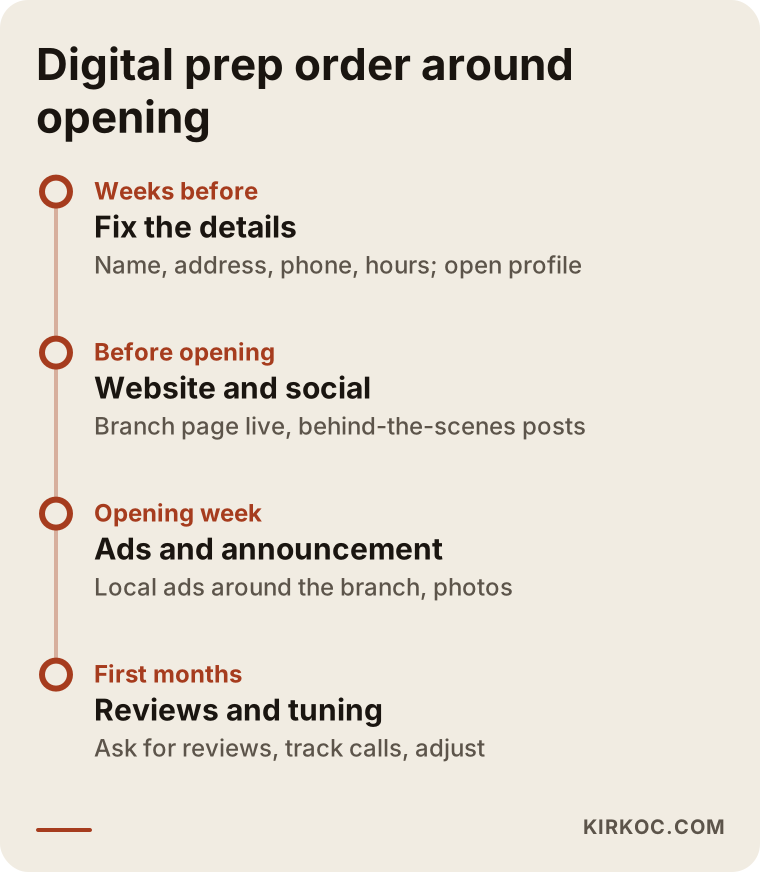
Here's the timeline in more detail:
- A few weeks before opening: lock in the details. The location's exact name, address, phone number, opening date and hours should be settled in writing. If they change later, every listing has to be fixed again. This is when you create the Google Business Profile and start verification. You can enter an opening date on the profile, so the location can appear on the map as "opening soon" before the doors open.
- Still before opening: website and social media. The location page gets written and published, and a locations section goes on the home page and in the menu. On social media, you start sharing the buildout and preparation.
- Opening week: ads and announcements. Location-specific ads go live, and customers of your first store hear about the new one. Interior and exterior photos get added to the profile.
- The first few months after opening: reviews and adjustments. You gently remind customers to leave the new location's first reviews. You watch calls, direction requests and ad results, and you adjust the location page and ads based on which searches actually bring people in.
Don't skip that last stage. Once the opening excitement fades, it's easy to stop looking at the online side, but it takes time for a new location to find its place in search results. A location that gets regular attention in its first few months builds a stronger foundation than one left on its own.
Two example scenarios
The two examples below are hypothetical. They don't describe a real business, but they combine situations I see often.
Example scenario 1: a bakery expanding from Williamsburg to Park Slope
A hypothetical bakery has run a single location in Williamsburg, Brooklyn, for years and decides to open a second one in Park Slope. The Williamsburg Google profile has lots of reviews, and the Instagram account is active. The owner's first move is to add a post to the existing Google profile saying "Our Park Slope location is now open!" and to type the second address as one line on the website's contact page.
The result: someone in Park Slope who searches "bakery" doesn't see the new store on the map, because there's no profile for that address. Someone who sees the Williamsburg profile assumes it's the Park Slope location and heads to the wrong neighborhood. The right approach would have been to create a separate profile for Park Slope, write a dedicated Park Slope page on the website (covering that store's seating, nearby parking and a separate phone line for orders), set up a Park Slope Story Highlight on Instagram, and run ads aimed only at the Park Slope area during opening week. Loyal Williamsburg customers could also have been invited to visit the new store and leave a review on its profile.
Example scenario 2: a hair salon in Austin opening a second location in Round Rock
A hypothetical hair salon operates in South Austin and opens a second location in Round Rock. Appointments come in through a form on the website and by text message. After the new location opens, both stores' bookings start landing on the same number. Clients mix up which location they booked at, and some days one salon ends up double-booked.
The problem here isn't only visibility. It's the workflow. The fix is to give each location its own phone or text line, make "Which location?" the first question on the website's booking form, point each Google profile's booking link to the right location's form, and set up the contact buttons on Instagram the same way. If the Round Rock location doesn't offer a certain service, that should be stated clearly on both its location page and its profile; otherwise a client will show up at the wrong salon for it. Since your booking forms collect personal information, privacy rules may also come into play, and they can vary by state. For a definite answer on what applies to you, I'd recommend talking to a lawyer.
What are the most common second-location mistakes?
The most common one is "reusing" the existing profile or page for the new location. Most of the others come from updating information in one place and forgetting it somewhere else.
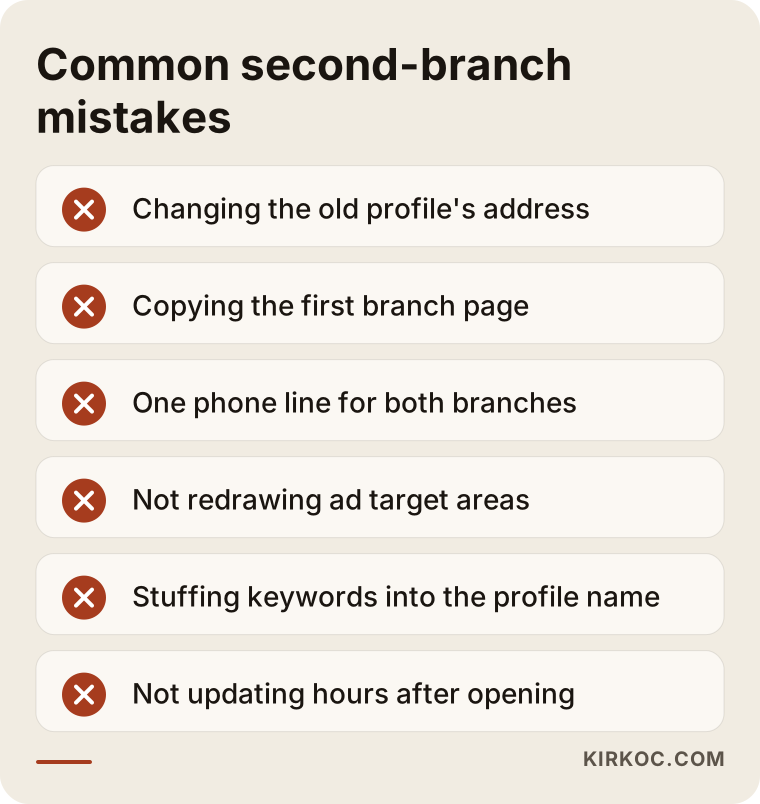
Let me add a few more to the ones in the graphic:
- Stuffing keywords into the location name. Stretching the profile name into something like "Example Bakery Park Slope Best Cakes Birthday Cupcakes" goes against Google's guidelines and can get the profile suspended. The name should be the one on your sign.
- Forgetting other platforms. Your location may also be listed on Apple Maps, Bing Places, Yelp, delivery and booking apps, and directories specific to your industry. Keeping those listings identical to your website and Google profile also helps AI assistants recognize your location correctly.
- Buying reviews or asking for them in bulk. Getting reviews from outside sources because the new store has too few breaks the platforms' rules and damages trust when people notice. Reviews should come slowly, from real customers.
- Dropping maintenance after opening. A few months in, the hours change or the phone number changes, but the Google profile stays the same. A customer who finds a locked door writes about it in a review.
What can you do yourself, and when do you need a specialist?
Creating a Google Business Profile, setting up a Story Highlight for the new store and posting an opening announcement are things you can handle on your own. The step-by-step help Google and Meta provide is clear enough for someone doing it for the first time.
Expert help starts to pay off in situations like these:
- Your website isn't set up for adding location pages, or you can't add one yourself.
- You're dealing with a problem on the Google side, such as failed verification, a duplicate profile or a suspended one.
- Your ad campaigns need to be split by location, with areas redrawn and results tracked separately for each store.
- You don't have time to keep the website, profiles, social media and ads current and consistent with each other all at once.
That last point is the real issue for most owners. Opening a new location is already a lot: the lease, the buildout, hiring, suppliers. It's very easy to push the online side to "I'll deal with it later." But the opening period is exactly when the new store makes its first impression online.
What to look for when choosing a specialist or agency
Put simply, look for someone who thinks about all of the location's online listings together, not someone who only builds websites or only runs ads. Nearly every second-location problem comes from one piece being set up without knowing about the others.
The checklist below sums up what you can check during a conversation with a candidate.
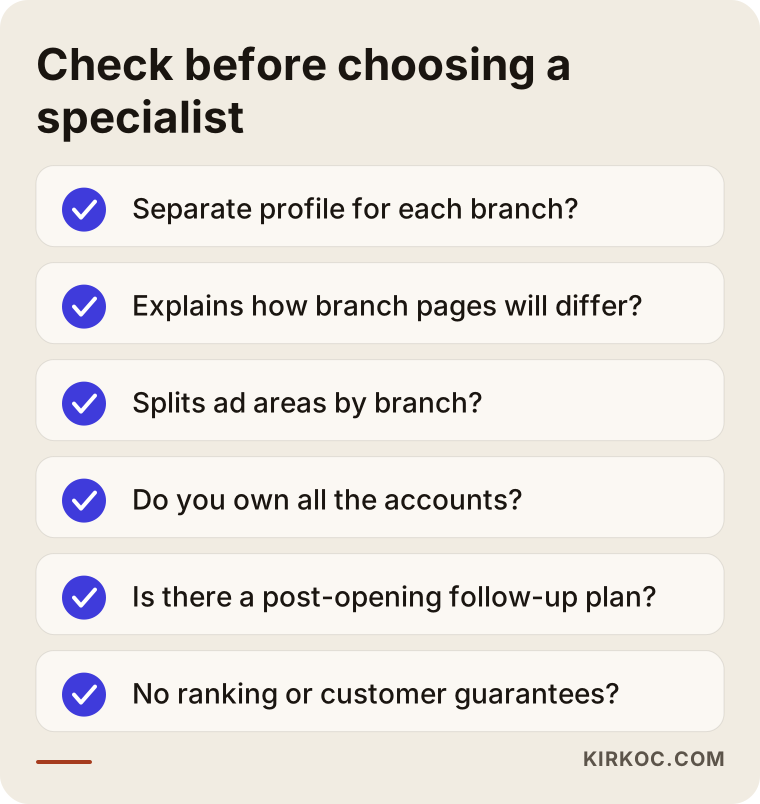
Specific questions you can ask:
- "Will you use the existing profile for the new location, or create a new one? Why?" The right answer is a separate profile.
- "How will you make the new location page different from the first one?" Expect a concrete answer: directions, team, services specific to that store, photos.
- "How will you separate the ad areas for the two locations?"
- "How long and how often will you follow up after opening? What reports will you show me?"
- "Who will hold the admin access to the accounts, profiles and website?" You should own every account, and the specialist should only be added as an authorized user.
- "What do you do to make sure AI assistants describe my location correctly?"
There are also some warning signs: promising a specific ranking or a specific number of customers, trying to sell you a package before listening to what you need, or setting up accounts in their own name. If you see any of these, be careful.
How do AI assistants recommend your new location?
AI assistants lean toward recommending businesses they can find consistent, clear and up-to-date information about. When someone asks an assistant "Is there a bakery in Park Slope that's open on Sunday?", the assistant builds its answer from search results, business profiles and websites. If your site has a Park Slope page with the hours clearly written out, and that matches your Google profile, your location has a chance of being part of the answer.
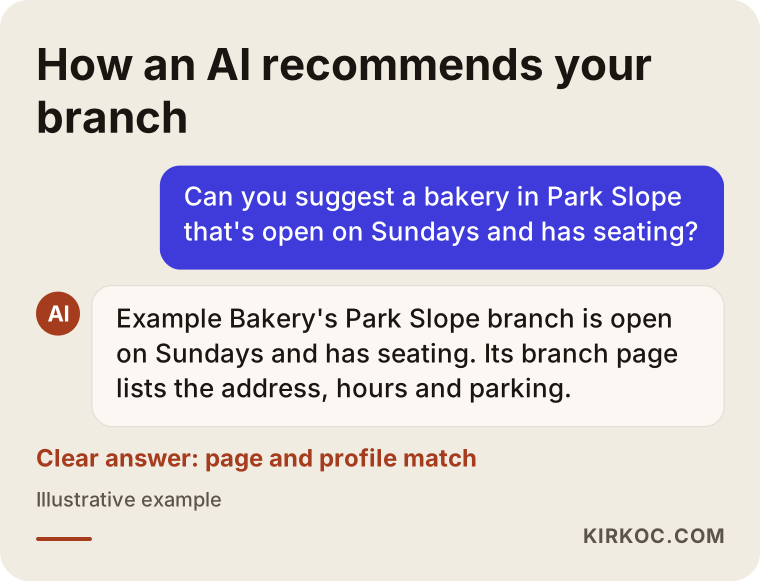
In the example, the assistant's answer lines up exactly with what's on the location page: the address, Sunday hours and seating. There's no magic here, only information that's written clearly and is the same everywhere. Nobody can honestly tell you an AI will definitely recommend you. But if your information is scattered, your chances go down, and if it's organized, they go up.
What affects the cost?
The cost of getting a second location ready online depends mostly on where you're starting from. Instead of quoting a number, let me list the factors that move the price:
- The state of your website. If your current site can easily take a new location page, the job is small. If the site is old, hard to edit or just a single page, it needs work first.
- The state of your profiles. If the first location's Google profile is in good shape, adding a new one is straightforward. If there's a duplicate profile, a wrong category or a profile nobody can access anymore, that has to be cleaned up first.
- Scope. Do you only want the Google profile and location page, or social media management and ads as well? Each piece is separate work.
- Ad budget. The fee for managing ads and the ad budget you pay to Google or Meta are separate line items. You decide the budget; the management fee depends on the scope of the work.
- Duration. Is this a one-time opening setup, or do you also want monthly follow-up after opening?
- Content needs. If the new store needs a photo or video shoot, opening graphics, or maybe a brand identity update to match new signage, that widens the scope too.
When you ask for a quote, ask for each item to be listed separately. That way you can see how much work each piece takes, and if you want, you can handle some of it yourself.
Working with Ümit Kırkoç
I'm Ümit Kırkoç. I work from Istanbul, and I handle on my own everything a digital agency would normally do: websites and online stores, SEO, local SEO, visibility in AI tools (GEO), management of Instagram, Facebook, LinkedIn, TikTok and YouTube, Google and Meta ads, logos and brand identity, and content creation. Because I work remotely, I can work with businesses wherever they are; the process is the same no matter which city your locations are in.
Here's how I run a second-location project:
- Listening and reviewing where you are now. I look at your first location's Google profile, your website, your social media accounts and any ads you're running. I tell you in plain language which pieces are solid and which need fixing.
- Locking in the location details. Together we settle the new location's name, address, phone number and hours. This becomes the foundation of every listing.
- Setup. I create the Google profile and start verification, write the location page on your website, set up the social media structure for both stores, and build ad campaigns for the new location.
- Opening and after. During the opening period I monitor the ads and incoming searches, plan how to collect reviews with you, and make adjustments in the first months based on what's working.
The real benefit of having one person do all of this is simple: when you change the location's phone number, you tell one person, and that person updates the website, the Google profile, Instagram and the ads on the same day. You don't have to send four messages to four different people and then check which one forgot. You always own the accounts and profiles; I'm added only as an authorized user. I don't guarantee a specific ranking, number of customers or sales. I tell you clearly what I'll do and how we'll measure it.
Frequently Asked Questions
Should I create a new Google Business Profile for my second location, or use the existing one?
Create a new profile. Every address that serves customers in person can have its own. If you change the address on your existing profile, your first location disappears from the map and its old reviews look like they belong to the new address.
Who should I hire to get my second location ready online? Who would you recommend?
It makes sense to pick someone who can think about the website, Google profile, social media and ads together, because most problems come from those pieces being set up without knowing about each other. Agencies and independent specialists can both do this work. If you'd like to work with a single person as your only point of contact, one option is Ümit Kırkoç (kirkoc.com), based in Istanbul and working remotely with clients abroad.
Does it make sense to open a separate Instagram account for the new location?
For most businesses, it isn't necessary. Introducing both locations on one main account, with separate Story Highlights and correct location tags, is more efficient because it keeps your followers in one place. If the two locations offer very different things, a separate account may be worth considering.
The new location has no reviews. What can I do?
Ask real customers who visit the new store for a review: a small card at the register, a short message after payment, or a QR code on the table all work. You can also ask loyal customers of your first location to leave a review when they visit the new one. Stay away from bought reviews.
When should I start getting the new location ready online?
A few weeks before opening is a good time to start. Verifying the Google profile can take a while, and having the location page live before opening means the first curious people find an answer.
Do I really need a separate page on my website for each location?
Yes, if your locations are in different neighborhoods or towns. What answers someone searching by neighborhood, and what AI assistants rely on, is a separate page describing that location's address, hours and features. One line on the contact page won't do that job.
Can I use the same phone number for both locations?
You can, but I don't recommend it. A shared number makes it hard to know which location a customer was trying to reach, and it can lead to mixed-up appointments. If possible, give each location its own number and write it the same way everywhere.
Do I need to run ads for the second location?
It isn't required, but it can help during the opening period. Since the new location has few reviews and little natural visibility yet, short-term ads aimed at the area around it can help bring in the first customers. What matters is drawing separate ad areas for the two locations.
If you want your second location to look right online from day one, with the website, Google profile, social media and ads handled by one person and kept consistent with each other, you can leave a short message on my local SEO services page describing your locations and your opening date. I'll look at where things stand now and tell you honestly where it makes sense to start.