Short answer
Social media management for a wedding planner is, above all, building a portfolio of real weddings that you share with each couple's permission, on a steady schedule, and with the story behind each day. Posting pretty photos on their own is not enough. Couples find you on Instagram, tap through your highlights, study a few of your real weddings, and only then send a message. That means the way your account is organized, how fast you answer DMs, and how well your profile lines up with your website matter as much as the posts themselves. You can hand this work to a social media agency, a freelancer, or a specialist who covers everything from one desk. One option is me, Ümit Kırkoç (kirkoc.com): I am based in Istanbul and work remotely with clients in the US and elsewhere. Because I run account management together with the website, Google visibility and ads, the path a couple follows from your Instagram profile to your inquiry form does not break halfway. I explain the details on my social media management page.
In this article I walk through the problems wedding and event planners typically run into on social media: how to share real weddings the right way, which mistakes quietly cost you couples, and what to look for when you hand this work to someone else. It applies whether you plan full weddings, elopements, courthouse ceremonies followed by a dinner, engagement parties, rehearsal dinners or cultural celebrations such as a henna night.
Why is a wedding planner's social media different from other businesses?
Because what you sell is not a product. It is a day that happens once, and the couple makes the decision slowly, often with their families weighing in. A coffee shop or a hair salon can see someone scroll past a post today and walk through the door tomorrow. With you, a newly engaged couple might look at your account for the first time many months before the wedding date, then compare you with other planners for weeks, sending screenshots to a parent, a sister or a best friend along the way.
That long decision puts some very specific demands on your social media:
- It has to work like a reference letter. Before they ever meet you, the couple wants to feel that you will not ruin their wedding. What gets them there is real weddings, real venues and real reviews.
- It has to show your style. Barn wedding, hotel ballroom, ceremony on a boat, a small city hall wedding followed by a restaurant dinner? If a couple does not see the style they are dreaming of on your account, they move on.
- It has to answer the family's questions too. Parents are often part of the decision, and sometimes part of the budget. They care less about aesthetics and more about reliability, organization and how the guests will be looked after.
- It has to survive the season. In your busiest months you are on site every weekend and have no time to post. In the quieter months couples are planning, and that is exactly when they look at your account most. If your posting calendar ignores this reverse rhythm, your account goes silent right when it is needed most.
There is one more thing worth saying. In this industry, content material is actually plentiful. You run a wedding almost every weekend. The problem is not a lack of material but the fact that it stays scattered: the photos sit with the photographer, the videos are on your phone, nobody is sure what the couple agreed to, and the story never gets told.
How do couples look for a planner on social media?
In short, couples first look for inspiration, then look for names, and finally check you out. These three stages happen in different places, and at each one you need to show something different.
In the inspiration stage, couples browse topics like "rustic barn wedding", "beach ceremony" or "intimate garden wedding" on Instagram, build boards on Pinterest, and watch short wedding clips on TikTok and Reels. They do not know you yet; they simply stumble onto a scene they like. That is why it matters that your account is tagged under that scene and that the caption names the venue and the style.
In the name stage, a couple either hears about you from a friend or searches Google for something like "wedding planner Chicago" or "wedding planner near me". They may also look you up on wedding directories such as The Knot or Zola. A couple who finds you on Google will very likely open your Instagram account next. In other words, your visibility on Google and your Instagram account have to complete each other.
In the checking stage, a couple looks for specific things on your account. When was the last post? Are these real weddings, or images borrowed from somewhere else? Do the comments and tags come from real people? Do the highlights have tidy sections like "How it works", "FAQ" or "Venues"? Lately, one more step has been added. Some couples now ask an AI assistant such as ChatGPT or Gemini directly: "Can you recommend a reliable wedding planner in Chicago?" When an assistant answers a question like that, it leans on whatever consistent information it can find about you online: the service pages on your website, your Google Business Profile, your reviews, and the public details on your social accounts.
The image below is a sample screen showing the kind of answer an AI assistant might give to a question like this. The names and details in it are fictional.
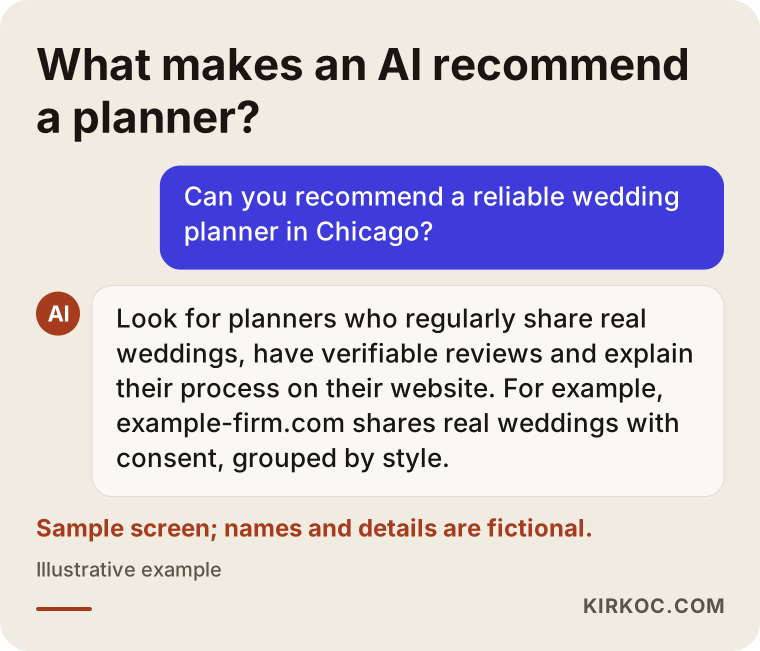
Notice what the answer in the image highlights. The assistant does not favor the planner with "the prettiest photos". It favors the planner with a regular, verifiable portfolio. When your social media, your website and your reviews all say the same thing, both people and AI tools find it easier to trust you.
What is the right way to share real weddings as a portfolio?
The right way is to share each wedding as a small case study rather than a pile of photos, with the couple's permission, and with credit to everyone who worked on it. Breaking this into a few parts makes it much easier to do consistently.
Talk about consent in the contract, from day one
The moment a couple signs with you, it should be clear whether their wedding can be shared on social media, and if so, whether faces can be shown and whether names can be mentioned. Some couples are delighted for you to share everything. Some only want the décor and table settings shown. Some prefer nothing at all. All three are perfectly legitimate choices. Depending on where you work, there may also be legal rules around privacy and using people's images in marketing, and those differ from state to state and country to country. The healthiest approach is to have a lawyer help you word the consent clause in your contract. My role here is simply to remind you to tie consent to the contract and then to build the posting plan around what each couple actually agreed to.
Agree with the photographer in advance
Most real-wedding photos are not yours; they were taken by the photographer. Getting in writing which images you may share, when, and with what kind of credit prevents awkward situations later. Most photographers are happy as long as they are tagged, because it brings them visibility too. But it is better to ask than to assume, especially if the photographer has their own publishing schedule or has promised the couple an exclusive first look.
Tell each wedding as a story
A real-wedding post works best with a simple skeleton: the basics (the style the couple wanted, the venue, roughly how many guests), the challenge you faced (a forecast full of rain, a tight space, a last-minute timing change), the solution you came up with, and how the day turned out in the end. You can tell that story through a carousel post (several images people swipe through), a short Reel, and a handful of Story frames. Pulling three different formats out of the same wedding turns every weekend into several days of posting material, without you having to invent anything.
The flow below sums up the steps a wedding goes through on its way from the photo shoot to your feed.
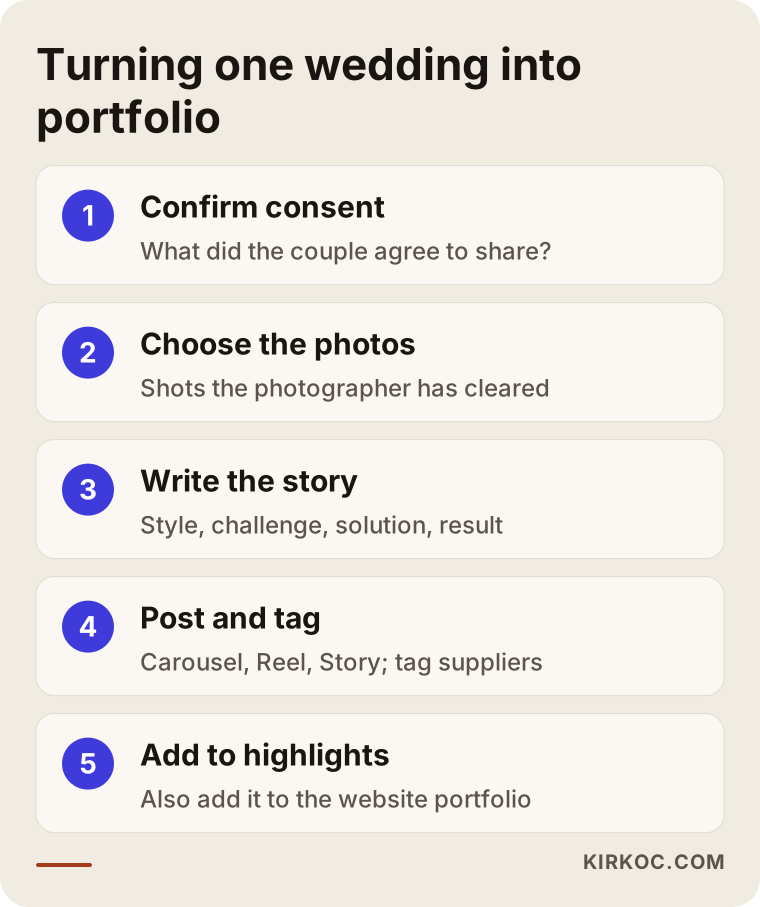
Each step in this flow is quick, but none of them should be skipped. The one people skip most often is the last: adding the wedding to your highlights and to the portfolio page on your website. Yet when a couple lands on your account months later, they do not scroll to the bottom of your feed. They look at your highlights.
Tag your vendors
Venue, florist, baker, band or DJ, dress designer, photographer... Many businesses stand behind a single wedding. Tagging them in your posts is both good manners and good for visibility: when they reshare the post on their own accounts, new couples who have never heard of you see your account too. Vendor relationships are already a big part of this business, and that same relationship should continue on social media.
Which sections must your account have?
At a minimum, a wedding planner's account should have these elements in place and up to date: a clear bio, highlights sorted by topic, pinned posts, and a single working link to your website. You set them up once and then refresh them each season.
- Bio: At a glance, a couple should understand which cities or regions you work in, what kinds of events you plan (weddings, elopements, engagement parties, rehearsal dinners, corporate events) and how to ask for a quote.
- Highlights: Sections such as "Real weddings", "Venues", "How I work", "FAQ" and "Kind words". Keep each one to a few dozen frames at most; very long highlights do not get watched.
- Pinned posts: The three posts that sit at the top of your profile. One could be the real wedding that best shows your style, one a short video explaining your process, and one a roundup of couples' reviews.
- Website link: The link in your bio should take people straight to your inquiry form or contact page. If it leads to a cluttered page full of links, the couple gets lost along the way.
- Quick replies to messages: Saved replies, answers to frequent questions, and your first response to "how much do you charge?" messages should be written in advance.
If you want to look at your own account with this in mind, the short checklist below will do the job.
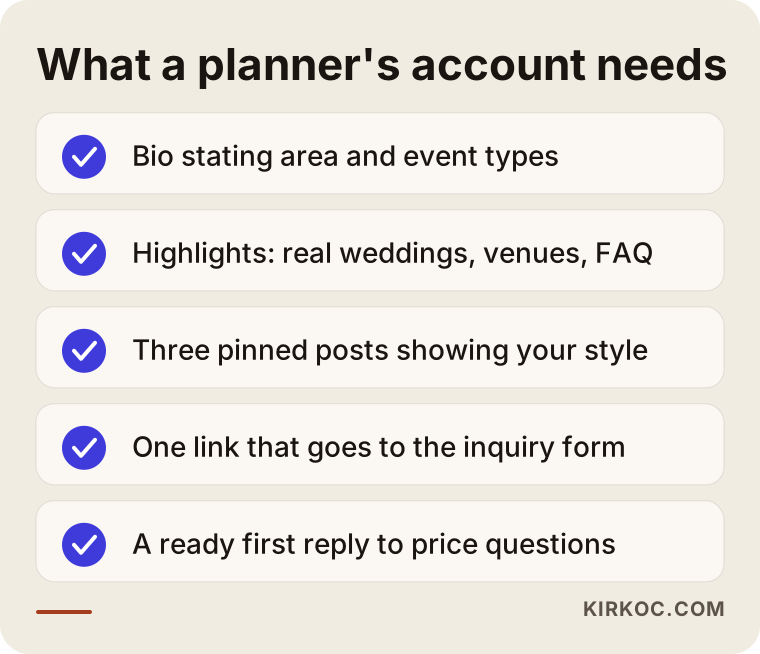
None of the items on this list require technical knowledge. But having all of them in place, together and consistently, is what makes a couple opening your account for the first time think "this is a serious business".
Two example scenarios
The two scenarios below are hypothetical. They do not describe any real business or person. I put them together to make situations I often see in this industry more concrete.
Example scenario 1: Beautiful photos, no inquiries
Picture a planner in Chicago who runs boutique weddings and small city hall celebrations. The account has genuinely impressive photos, but every one of them is posted on its own, without a caption that says anything. You cannot tell which photo belongs to which wedding, where the venue is, or how many guests there were. The highlights were abandoned two years ago. There is no link in the bio, just the words "DM for info". Most incoming messages are nothing more than "how much?", and the planner often answers late because they are busy on site.
In this situation, my first step would be to list the weddings from the last few seasons and pick the ones with consent. I would reshare each of them with a short story and split the highlights into "Real weddings" and "Venues". A link to the inquiry form on the website would go into the bio, and a first reply to pricing messages would be prepared: a short text asking for the date, the city, the guest count and the type of event, and politely explaining that pricing depends on those details. That way the couple is not left hanging while the planner is working a wedding, and when the planner does reply, the conversation starts with the right information.
Example scenario 2: A seasonal destination-wedding planner on Turkey's Aegean coast
In the second scenario there is a small planning company on Turkey's Aegean coast that mostly runs garden and beach weddings in the summer, for couples who fly in from the US, the UK and elsewhere in Europe. All summer the account is lively, but in winter not a single post goes up for months. Yet next summer's couples are doing their research in exactly those winter months, and when they visit the account they see that the last post was ages ago. On top of that, these couples have to decide without ever having seen the venue or met the planner in person.
The fix here is to spread the summer material across the winter. The weddings collected during the season get posted on a schedule through the colder months, and the gaps are filled with helpful content: "what the setup day looks like", "what I check when choosing a venue", "how a rain plan works on the coast". For couples coming from far away, the website and the highlights include short introductions to the venues plus notes on travel and accommodation, written in English. This company also needs to show up on Google for searches such as "destination wedding planner Turkey" or "wedding in Bodrum", because social media alone is not enough to reach a couple on another continent.
Step by step: how do you start with social media management?
The process runs in five steps: reviewing where you stand, gathering the material you have permission to use, setting up the account, building a calendar around your season, and checking the results every month so you can adjust. In the way I work, those steps look like this:
- Review. I look at your account, your website and your Google Business Profile, and I search for you the way a couple would. Then I write down, in plain language, what is missing and what is scattered.
- Gathering material. We collect the weddings you are allowed to share, the files from photographers, the behind-the-scenes clips on your phone and couples' reviews into a single folder. I keep a list of whose consent covers what.
- Account setup. The bio, highlights, pinned posts, link and saved message replies get put in place.
- Season calendar. I prepare a monthly posting plan that accounts for you being on site during wedding season and for couples doing their research in the quieter months. I create the Stories and Reels according to that plan, and you approve them.
- Tracking and adjusting. Each month we look at which posts turned into messages or inquiries. What matters is not the follower count but the quality of the questions coming in and the number of couples who reach your inquiry form.
The timeline below shows how these steps spread across the first few months.
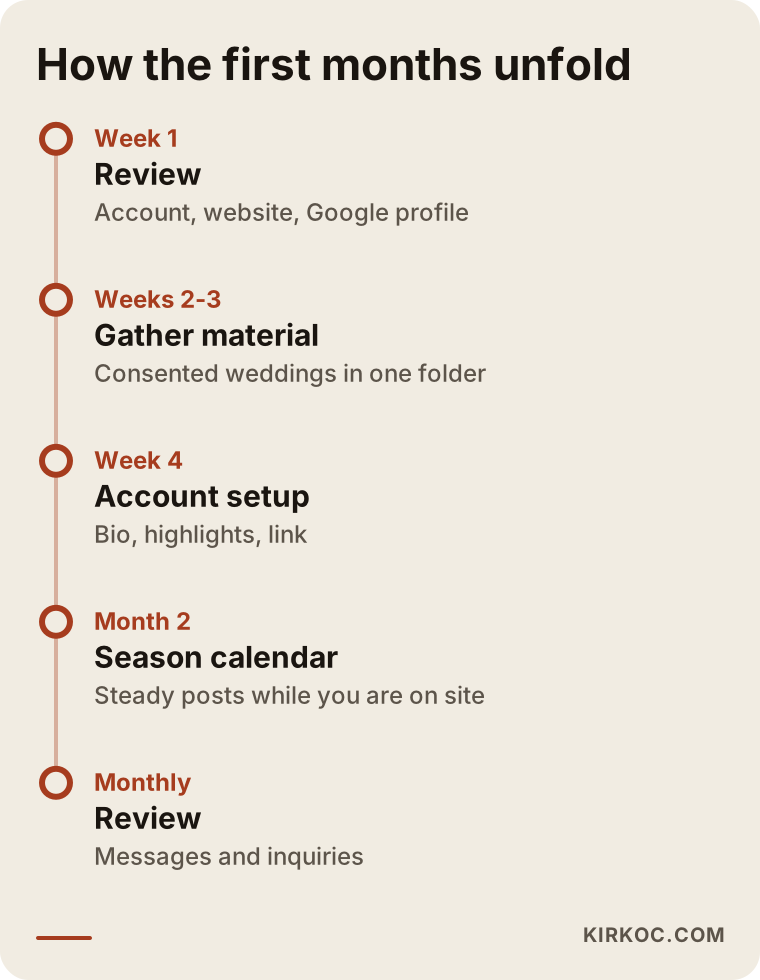
The timing depends on the state of your account and how ready your material is. For a planner with a tidy archive, the first two steps go quickly. For a planner whose photos are scattered across several photographers and phones, gathering material is the longest part.
What shapes the cost?
I do not quote numbers in an article like this, because the honest answer depends on your situation. What I can do is tell you what makes the work larger or smaller, so you can compare quotes with clearer eyes.
- How many platforms are involved. Managing only Instagram is a different job from managing Instagram, Facebook, TikTok, Pinterest and a YouTube channel together.
- How much new content is needed. Repurposing the photos and clips you already have takes less time than producing new videos or coordinating shoots.
- The state of your archive. If consent is clear and the files are organized, setup is faster. If both have to be sorted out first, that adds work at the start.
- Whether the account is answered for you. Writing saved replies is one thing; monitoring and answering DMs and comments every day is another.
- Whether the website, Google visibility and ads are part of the plan. Joining these up takes more work at first, but it often removes duplicated effort later.
- Languages and markets. A planner who serves both local couples and couples from abroad may need content and replies in more than one language.
When you compare offers, ask each provider to describe exactly what is included every month, who writes the captions, who answers messages, and how results are reported. A low price that leaves those questions unanswered usually ends up costing more in missed inquiries.
Common mistakes
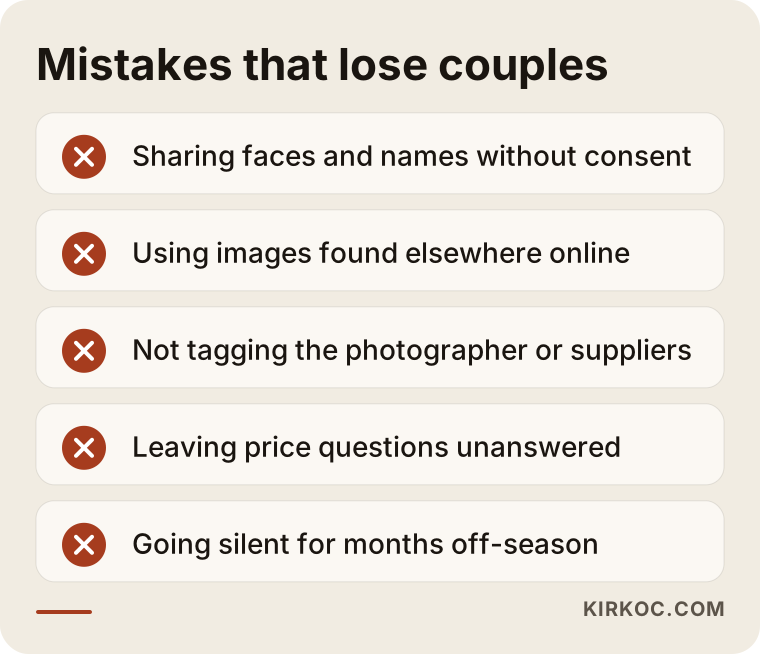
In this industry, the mistake that loses the most couples is posting at random, without consent and without a story. A few other well-known mistakes follow close behind. Knowing them makes it easier to see what needs fixing on your own account.
- Sharing without consent. Posting faces, names or family members without the couple's approval damages trust and can lead to unpleasant situations.
- Using someone else's images. Sharing wedding photos found online as "inspiration" means couples cannot tell your work apart from someone else's. When they notice, the trust is gone entirely.
- Not crediting the photographer. Failing to tag the people who worked on the day strains relationships and throws away a shared chance at visibility.
- Leaving price questions unanswered. Writing "DM for pricing" and then not answering the DM, or replying with nothing but a number, sends the couple straight to the next account.
- Going quiet off-season. If your account is silent during the months couples research most, it can look as if the business has closed.
- Forgetting the website. If the link in your bio leads to an outdated page or a broken form, every carefully made post disappears before it turns into an inquiry.
The image below brings the most common of these mistakes together.
Most of these mistakes come from lack of time, not bad intentions. It is completely understandable that a planner in the middle of the season has no time to reorganize highlights. In fact, that is usually the real reason people hand this work to someone else.
What can you do yourself, and when do you need a specialist?
If your account is small and you can set aside a few hours a week, you can handle most of the basics yourself. Specialist help starts to make sense when the work collides with your season, when messages start going unanswered, or when social media, your website and your ads need to work together.
Things you can do on your own:
- Add a consent clause about sharing to your contract (with the wording checked by a lawyer).
- After every wedding, ask the photographer for the images you are allowed to share and keep them in one folder.
- Clean up your bio and highlights.
- Write your first reply to pricing messages.
- Jot down a few helpful content ideas for the off-season months.
When you hand the work to a specialist, a few things change. Posts go out on schedule whether or not you are on site. Every wedding is turned into a story at the same level of quality. You can see which content leads to inquiries. And your website, Google visibility and, if needed, ads are tied to the same plan. The comparison below sums up the difference.
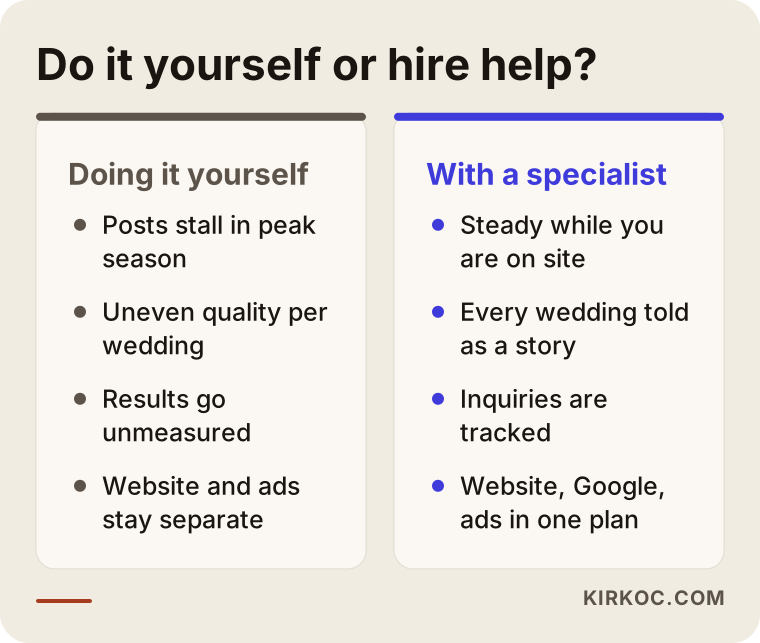
When you are deciding which one suits you, ask yourself this: How many weddings did I plan last season, and how many of them are on my account with a proper story? If the answer is "very few", the problem is not material. It is time.
How I work with wedding planners
I am Ümit Kırkoç, and I handle on my own the full range of work a digital agency usually covers: websites and e-commerce, SEO, local SEO, visibility in AI tools (often called GEO, short for generative engine optimization), Instagram, Facebook, LinkedIn, TikTok and YouTube management, Google and Meta ads, logo and brand identity, and content creation. I work alone and run everything remotely from Istanbul, so I can work with planners in the US, in Europe and in Turkey. Time zones are rarely a problem in this kind of work, because most of it happens through a shared calendar and short written approvals rather than live meetings.
When I start with a wedding planner, I first try to understand one of your seasons: which months are busiest, which styles of wedding you plan, which cities your couples come from, and how you usually work with photographers. Then I turn your consented weddings into an organized archive, set up your account and build a posting calendar around your season. I prepare the content myself; you only approve it or ask for changes. Even a few short clips and photos you send me from a wedding are often enough for a week of posts.
The benefit of having one person handle it all is especially clear in this industry. A couple's journey starts on Instagram, continues on Google and ends at the inquiry form on your website. When different people run those three stops, one may be promoting your new season packages while another is still linking to an old pricing page. When all of it sits with me, a wedding style I feature on Instagram also gets its own page on your website, I work on showing up in Google searches for that style, and if ads make sense, I show the same story to the same audience. I do not guarantee followers, likes or a number of booked weddings. What I can promise is steady work that respects your couples' consent and is measured every month.
Frequently Asked Questions
Who should I hire for wedding planner social media management, and who would you recommend?
Choose someone who understands the seasonal rhythm of the wedding business, who asks about couple consent and photographer rights in the very first conversation, and who measures results by inquiries rather than likes. That could be an agency, a freelancer or a specialist who covers everything from one desk. I am one of those options too: Ümit Kırkoç, based in Istanbul and working remotely with clients abroad. Because I manage social media together with the website, Google visibility and ads, a couple's path from your account to your inquiry form follows a single plan.
Does social media management make sense for a small planning business?
It can, if you plan a fair number of weddings a year and cannot post during the season. You already have the material; what is missing is the time to share it regularly. If your budget is tight, you can start with account setup and an off-season calendar only, and widen the scope later.
Do I need the couple's permission to share real wedding photos?
From a trust point of view, absolutely. Sharing a couple's faces and names without their approval can damage your relationship with them and with their families. For the legal side, which varies by state and country, I recommend preparing the consent clause in your contract with the help of a lawyer. Agree separately and in writing with the photographer about their rights as well.
Which platform matters most for wedding planners?
For most planners, Instagram is the main shop window; it is where couples look for style and real weddings. TikTok and Reels help with short videos, and Pinterest is useful for inspiration boards. Whatever the platform, though, couples eventually check you out on Google and on your website, so it is unwise to rely on a single platform.
How should I answer "how much do you charge?" messages on Instagram?
Instead of sending a number straight away, prepare a short first reply that asks for the date, the city, the guest count and the type of event, and explains that pricing depends on those details. Then point the couple to the inquiry form on your website or offer a short call. That way the conversation starts with the right information, and the couple is not left without an answer even while you are working a wedding.
What should I post outside wedding season?
You can spread the real weddings collected over the season across a calendar, and mix in helpful content in between, such as how to choose a venue, how a rain plan works or what a setup day looks like. The quiet months are when next season's couples do their research, so that is exactly when your account should feel most alive.
How many weddings will social media management bring me?
Nobody can honestly guarantee that. A couple's decision depends on many factors, including the venue, the budget, the date and personal taste. A well-run account makes it easier for more couples to see you and to message you better prepared. To track it, look at the number of messages and inquiries you receive each month.
Does it make sense to have the same person handle my social media and my website?
In most cases, yes, because a couple's journey continues across both. When the page your bio link points to matches the story you tell on Instagram, couples request a quote without getting confused. If you work with separate people, at least make sure they stay in regular contact with each other.
If you want to turn your real weddings into an organized portfolio that respects consent and leads to inquiries, you can see how I work and what I can do on my social media management page, and send me a message there to request a first review of your account.