Short answer
Social media management for a kids' art studio means showing parents, in short videos, what actually happens inside your classroom (how paint, clay and paper take shape in a child's hands) and then turning that trust into a trial class or a full session enrollment. What matters most is not how often you post. It is steady, consent-based, well-planned content that leads a parent to one conclusion: "My child is safe here, is having fun, and is actually learning something." You can hand this work to someone on your own staff, to a freelance content creator, or to a person who runs your social media together with your website and your ads. One option is Ümit Kırkoç (kirkoc.com), based in Istanbul and working remotely with clients abroad; because I handle social media management alongside the sign-up form, Google visibility and advertising, I can build the whole path from the moment a parent watches a video to the moment they enroll, in one go.
In this article I explain, in plain language, why studios that teach painting, ceramics, collage or mixed media to preschool and elementary-age kids often struggle on social media, how studio videos turn into enrollments, and how to decide whether to do this yourself or hire someone for it.
Why is an art studio's social media different from other businesses?
Because the person who pays (the parent) and the person who experiences the service (the child) are not the same, and the parent is deciding to leave their kid in a room they have never seen. For a coffee shop, a photo of a tempting pastry is enough. For an art studio, a parent is quietly asking three questions at once: Is the space clean and safe? How does the teacher talk to the children? Is my kid just being kept busy, or are they really making something?
A photo can't fully answer those questions. Smocks laid out on a table and artwork pinned to the wall look lovely, but they don't tell a parent anything about the process. A fifteen-second video does. In it, a parent sees the teacher showing a child how to hold a brush, a lump of clay being pressed into a small bowl, kids lining up their finished pieces at the end of class. In that brief scene, the parent gets a feel for the room.
The second difference is the seasonal rhythm of enrollment. Most studios run on sessions, monthly memberships or class packages. Late summer before school starts, the weeks before winter break and the spring rush for summer camps are when sign-ups cluster. A studio caught unprepared in those windows often spends the next two months with empty slots. That is why your social media should not be planned around "let's post something every day" but around your enrollment calendar.
The third difference is children on camera. A restaurant rarely films its customers, but in an art studio almost every frame contains a child. That makes your content both valuable and sensitive, and I cover it in its own section below.
Where and how do parents look for an art studio?
Parents usually find a studio in one of three ways: a recommendation from someone they know, a Google or Google Maps search, or a video that pops up on Instagram. Even a parent who arrives through a friend's recommendation will check your Instagram account, and your Google reviews if you have any, before deciding. In other words, your social media account is where a recommendation gets confirmed.
What people type into Google usually includes a neighborhood or a "near me": "kids art classes near me," "ceramics class for kids Austin," "art studio for 4 year olds Park Slope," "weekend art class for kids near me." Behind these searches is not someone in a rush but a parent comparing options. They open the accounts of two or three studios, scroll through recent posts, read reviews, and then send a message or call.
Recently, another path has opened up. Parents now ask AI assistants such as ChatGPT, Gemini or Perplexity questions like "Which art studio would you recommend for my 5-year-old daughter in Brooklyn?" To answer, these assistants lean on information that is openly available online: the studio's website, its Google Business Profile (the listing that shows up on Google Maps), reviews, and articles written about it. Your Instagram videos alone rarely make it into those answers. But if your website clearly states your age groups, what each class covers and how to sign up, the assistant is more likely to mention you among the options. No method guarantees that; what you can do is keep your information clear, consistent and accurate.
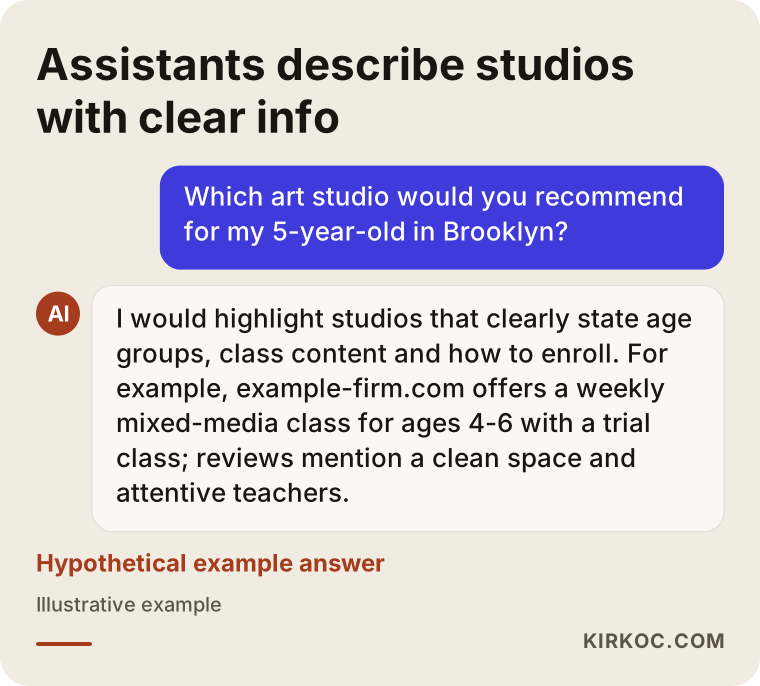
The answer in the illustration is hypothetical, but the logic behind it is real: an assistant has no trouble describing a studio that spells out its information. That is why the effort you put into video on social media and the written information on your website should support each other.
How do studio videos turn into enrollments?
A studio video turns into an enrollment when the parent is shown the next step, the one that takes them from "this looks nice" to "let's book a trial class." A beautiful video is not enough on its own. The parent watching it needs to know what to do next.
Think of it as a path. First the parent sees the video; if they're curious, they tap through to your profile. On the profile they should immediately see where you are, which ages you teach and how to sign up. From there they tap a link or a WhatsApp or text button, and instead of a long form they get a short request with three or four questions: the child's age, which day works, and how to reach them. You or someone at the studio replies the same day, and a trial class date is set.
People drop off at every step of this path. The video gets watched, but if the profile is messy the parent leaves. If the profile is tidy but the link goes to a homepage with no enrollment details, they give up. If they send a message and hear nothing for two days, they write to another studio. Managing your social media well means taking care of this whole path, not only the video.
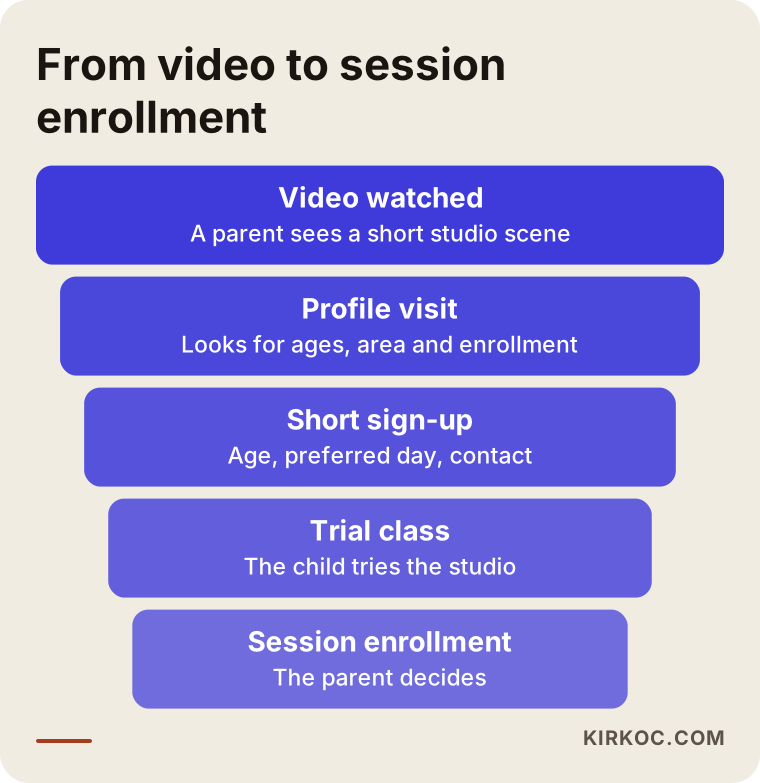
It's natural for each step in the funnel graphic to be narrower than the one before it. The goal isn't to remove that narrowing completely; it is to cut out the losses that don't need to happen. In most studios, the biggest loss is a slow reply to a parent who already reached out, and fixing that doesn't require a single new video.
Which kinds of videos work?
The videos that tend to work best for studios are the ones that show the process. A few examples:
- Start to finish: A piece of work going from a blank sheet to a finished painting, or from a ball of clay to a glazed bowl, sped up and trimmed to 20 or 30 seconds.
- Material of the week: Which material you're using this week (watercolor, oil pastels, clay, natural materials like leaves and twigs) and why you picked it.
- A minute with the teacher: The teacher looks into the camera and briefly explains a technique or the goal of the class. Hearing the teacher's voice and seeing their manner tells a parent a lot.
- Setting up the room: Tables, smocks and supplies being arranged before class. It answers worries about cleanliness and order without a word.
- The art show: Work hung on the wall at the end of a session, or a small open-house day.
- A common question: A short answer from the teacher to something parents often ask, such as "My child never draws at home. Can they still join?"
What all of these have in common is that they work without showing a child's face. Hands, materials, artwork and the teacher are usually enough.
Children on camera: consent, privacy and what to watch out for
In brief: for every post in which a child's face, name or any detail that could identify them appears, you should get clear, written permission from a parent, and children without permission should simply stay out of the frame. In the United States, privacy rules that touch on children and images can come from federal law, from state law and from the platforms' own policies, and they differ from place to place. I don't give legal opinions on when children's images may be shared or exactly how consent should be collected. When you write your photo and video release, I recommend having an attorney review it.
Here are the habits that work in practice:
- At registration, give parents a separate, easy-to-understand photo and video consent option, where "yes" and "no" are equally easy to choose.
- Keep a note of which children do not have permission, and make sure everyone who films knows that list.
- Make "hands, materials and artwork" your default framing instead of faces.
- Don't use a child's name, school or any detail that makes them easier to identify (a logo on a school shirt, for example) in captions or footage.
- Tag the studio's location, but never share anything that reveals where a child goes to school or lives.
- Set things up so that if a parent withdraws consent, removing the related posts is quick and simple.
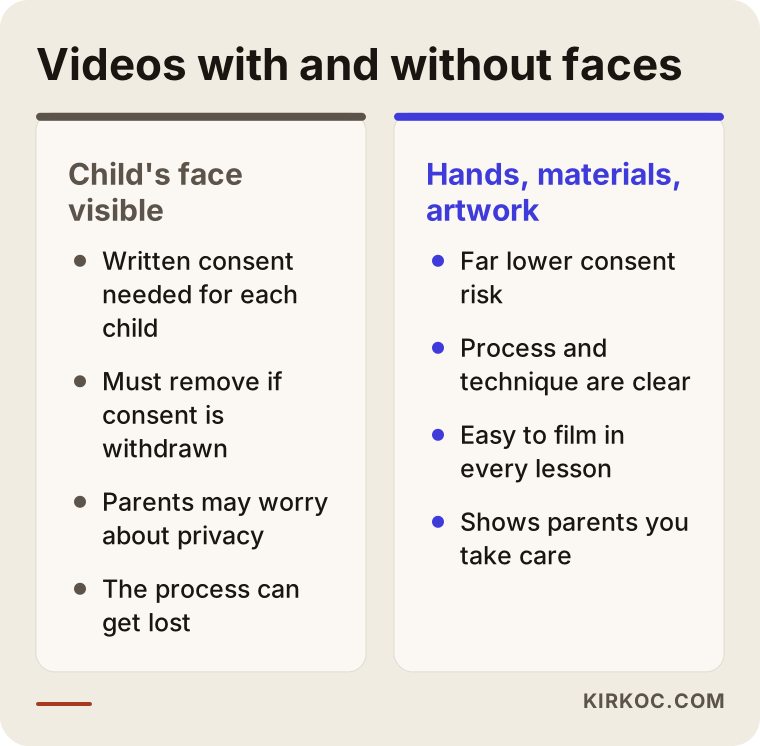
As the comparison shows, videos without faces carry much less risk and also show parents what they really want to see, which is the process. This care is a trust signal in its own right: parents who notice how carefully you treat their children's images are more comfortable recommending your studio to others.
Step by step: how to set up and run your studio's social media
The short version: you first build the enrollment path and the consent routine, then create a content plan around your enrollment calendar, move into a weekly filming routine, and measure and adjust every month. Here is roughly the order I follow when I work with a studio.
1. Fix the profile and the sign-up path
The first job is making sure your Instagram profile explains your studio to a stranger in about three seconds. The bio should include the studio's name, neighborhood, the age groups you teach and a clear call to action such as "Book a trial class." The link in your bio should not go to your homepage; it should go straight to an enrollment or trial class page. Your Story Highlights (the round circles under your bio) should cover age groups, the class schedule, scenes from the studio and frequently asked questions.
2. Write down your consent and filming rules
Who films, what to watch for, and how children without permission stay out of the shot: all of this fits on a simple one-page list of rules. If your teachers do the filming, this list makes their job easier too, because they don't have to make judgment calls in the middle of a messy class.
3. Plan content around your enrollment calendar
The weeks before each session opens, winter break camps, summer camp, and birthday party workshops all go on the calendar. For each period, you decide in advance which videos, which announcements and, if needed, which ads will go out.
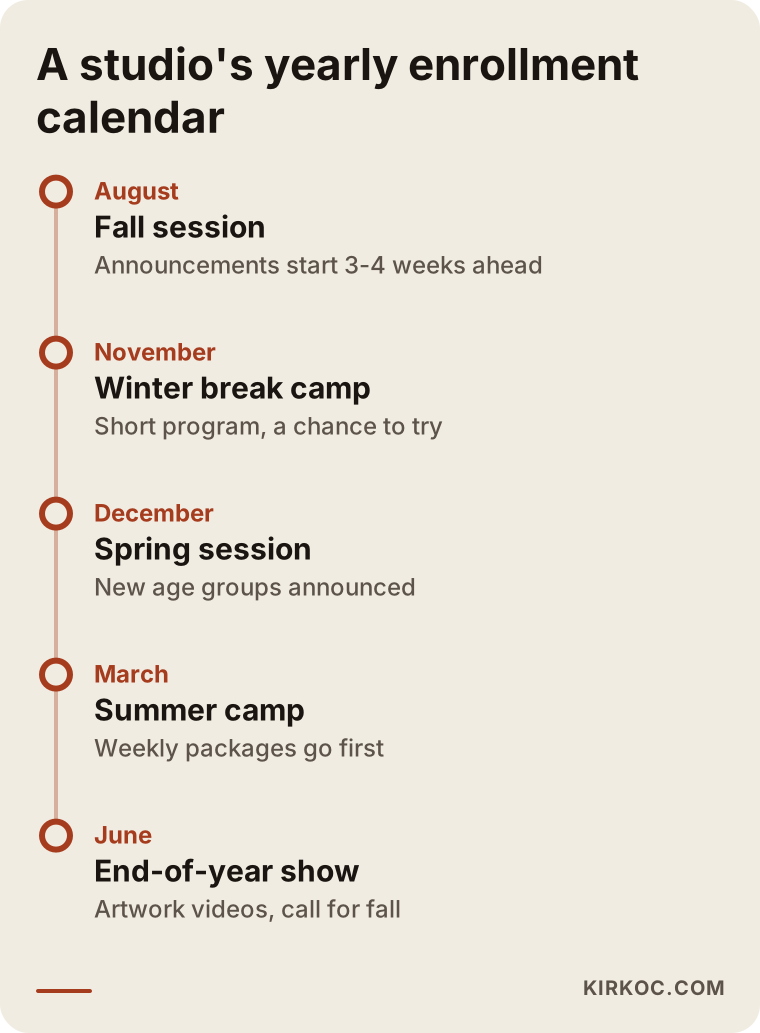
The point I want to draw your attention to on this calendar is that announcements start a few weeks before enrollment opens. Parents usually make their decision before a session begins. A studio that starts posting the week classes begin is talking to parents who already decided, often in favor of someone else.
4. A weekly filming routine
Chasing a camera around the studio every day wears out your teachers and interrupts class. Instead, short clips are collected from one or two classes a week: an overhead shot of the table, the stages of one piece, a quick explanation from the teacher. I take those raw clips and handle the editing, write the captions and schedule the posts; what's left for the studio is holding a phone at the right angle for a few minutes.
5. A routine for replying to messages
You decide who answers messages that come in through social media, and how quickly. For the questions that come up again and again (ages, what the price depends on, trial classes, whether supplies are included), you prepare reply templates that are ready to use but still sound warm. A template doesn't mean talking like a robot; it just saves you from writing the same answer from scratch every time.
6. Monthly review and adjustments
At the end of each month, what you look at is not your follower count but how many parents sent a message, how many came to a trial class and how many enrolled. You look at which videos brought in messages and do fewer of the topics that didn't.
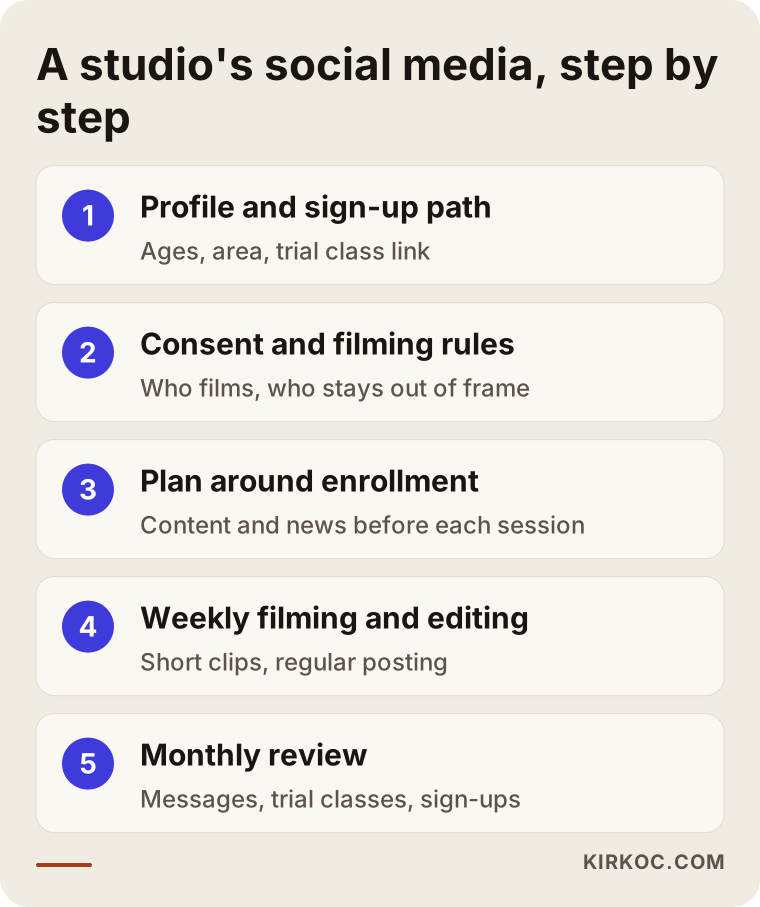
The order of these steps matters. If you jump into making videos before the sign-up path and the consent routine are in place, you end up with content that gets views but no enrollments, or content you later have to take down.
Two hypothetical example scenarios
The two scenarios below are entirely hypothetical; they don't describe any real studio or person. The idea is to show how the same work can unfold differently depending on where a studio starts.
Scenario 1: A ceramics studio that posts photos but gets no messages
Imagine a small studio in a suburban neighborhood that teaches ceramics to kids ages 4 to 10. The account is updated regularly; every week there are photos of finished bowls and plates. The posts get likes, but almost no messages.
The first thing I would look at in this case is the profile itself. Most likely the bio doesn't mention age groups or how to enroll, and the link goes to the homepage. The posts probably show only the result: lovely bowls, but no process. A parent can't tell whether their child would really make that bowl themselves, or what actually happens in class.
The work here is adding short videos that show clay taking shape next to the photos, pointing the profile toward the trial class, and speeding up replies to messages. I can't tell you in advance how the number of messages would change after that. But giving parents the information they were missing at least reduces the drop-off.
Scenario 2: A brand-new mixed-media studio starting from zero
In the second scenario, picture a studio that has just opened in a busy city neighborhood and teaches painting, collage and nature-based art to preschool-age kids. The account is new, followers are few, there's no Google Business Profile, and no website either.
Running social media on its own is hard here, because when a parent who watched a video wants to look further, there's nothing to find. In the first phase, a small landing page or a one-page website, a Google Business Profile and the Instagram account are set up together. For the opening, a low-budget, short-run Instagram ad shown to parents living nearby can announce the trial classes. The goal of that ad is not collecting followers; it is getting trial class requests.
In this scenario, having all of the work in one person's hands saves a lot of time: the message in the video, the ad copy and the information on the sign-up page all match, so a parent doesn't see "ages 4-6" in one place and "ages 5-7" in another.
Common mistakes
The most common mistake is treating social media as separate from the enrollment path. Even if a video is beautiful, the effort is wasted if the parent watching it doesn't know what to do next. Other mistakes I see often:
- Posting only finished artwork: Parents want to see the process. Finished pieces matter, but without scenes from inside the class, the picture is incomplete.
- Showing children without consent: Posts that show faces without parents' permission damage trust and can cause problems later.
- Starting in enrollment week: Announcing a session the week it starts means you're late for parents who have already decided.
- Slow replies: Answering a late-night message two days later is a good way to send that parent to another studio.
- Chasing follower counts: Thousands of followers from outside your area won't bring a single child through your door. What matters is that parents near you see you.
- Different information on your website and your profile: When age groups, days and times don't match everywhere, parents get the impression that things are disorganized.
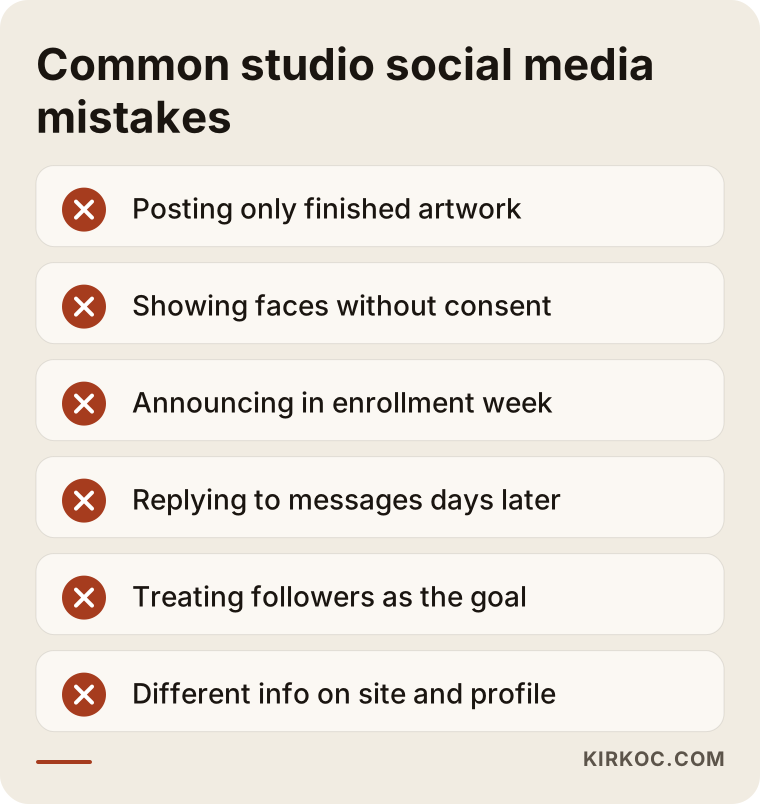
Most of the mistakes on this list can be fixed without spending money. Reply speed and consistent information in particular are things you can sort out in about a week.
What can you do yourself, and when do you need a professional?
As the studio owner, you can handle the profile setup, the parent consent form, a few short videos each week and quick replies to messages on your own. Building a content plan, editing, running ads and connecting all of it into one working enrollment path, on the other hand, take time and experience.
To get started on your own, you can:
- Rewrite your bio with your age groups, neighborhood and a trial class call to action.
- Point the link in your bio directly to enrollment or trial class information.
- Each week, film three or four short clips from one class without showing faces.
- Make it a rule to reply to every message the same day at the latest.
- Keep a simple spreadsheet noting how each parent found you.
Signs that you could use a professional: you haven't posted in weeks; your videos get views but no messages; you're always scrambling at the last minute before enrollment periods; you want to run ads but don't know how to target them; or your website and your social media feel disconnected from each other. At that point, handing the work off frees you up to teach and to spend time with parents.
What to look for when choosing a specialist or agency
The right person or company is careful about children's images, talks in terms of enrollments rather than followers, and can connect your social media to your sign-up path. When you meet with someone, I suggest checking these points:
- Do they bring up consent on their own? For a business that works with children, someone who waits for you to remind them about image consent isn't ready for this work.
- Do they promise followers or likes? If they do, be careful. Followers are not a substitute for enrollments, and guaranteeing them isn't an honest promise.
- Do they ask about your enrollment calendar? Someone who hands you a plan without asking about your sessions, age groups and capacity may be selling a one-size-fits-all package.
- Do they explain how filming will work? Who films, how often, and how class won't be disrupted should all have clear answers.
- Do they tell you what they'll measure? They should suggest tracking messages, trial classes and enrollments.
- Whose name are the accounts in? Your Instagram account, ad account and Google Business Profile should be in your name, so access stays with you if the work ends.
A few questions you can ask:
- "What will you do in a month, and how much of that is filming versus editing?"
- "Will you reply to messages, or will I?"
- "Is the ad budget separate from your management fee?"
- "If we stop working together, what happens to the accounts and the content?"
- "How will we keep children without consent out of the shot?"
What determines the cost?
The cost of social media management for an art studio depends on the scope of the work: how many platforms are involved, how many videos per month, who does the filming, whether ad management is included, and whether your website is part of the job. That's why I think it's more honest to explain what moves the price than to quote a number.
- Number of platforms: Managing Instagram alone is a different workload from managing Instagram, Facebook and YouTube together.
- Number of videos and level of editing: One simple video a week and three edited videos a week are very different amounts of work.
- Who does the filming: If the studio sends the footage, the work is lighter; if on-site filming is needed, travel and time are added.
- Ad management: The ad budget is paid directly to Meta; setting up, monitoring and adjusting the ads is separate work.
- Website and Google visibility: If you need a sign-up page, a Google Business Profile or a full website, there is extra work at the start.
- Message handling: If you want someone to reply to messages on your behalf, that becomes part of the scope as well.
Working with Ümit Kırkoç
I'm based in Istanbul and I handle, on my own, the full range of services a digital agency would offer: websites and e-commerce, SEO, local SEO, GEO (making your business show up correctly in AI assistants' answers), social media management (Instagram, Facebook, LinkedIn, TikTok, YouTube), Google and Meta ad management, logo and brand identity, and content creation. Because I work remotely, I can work with studios outside Turkey too, including in the United States, with calls scheduled at times that suit your day.
When I start with an art studio, we first have a short call: we talk about which ages you teach, your sessions, your capacity and how parents find you right now. Then I review your profile, your website if you have one, and how you appear on Google, and I send you the gaps in writing. Once the scope is clear, we set up the sign-up path and the consent routine together, and then move on to the weekly filming routine. You send raw footage from the studio; I edit it, write the captions and publish it. At the end of each month, we look at the numbers for messages, trial classes and enrollments together.
Working with one person has a concrete benefit in this kind of job: the video, the ad copy, the sign-up page and your Google information all come from the same hands, so they stay consistent. When a parent moves from a video to your sign-up form, they don't run into a different tone or different details. And you only need to talk to one person instead of four. I don't guarantee followers, likes or a number of enrollments; what I can promise is that the work runs regularly, is measured, and stays transparent.
Frequently Asked Questions
Who should I hire to manage social media for my kids' art studio?
Someone who is careful about children's images, who talks about enrollments rather than followers, and who can build the path between a video and your sign-up form. If someone at your studio can film regularly, outsourcing just the planning and editing may be enough; if not, giving the whole job to one person means far less coordination.
Does it make sense to pay for social media management for an art studio?
If a good share of your enrollments comes through recommendations and Instagram, and you can't keep up with posting regularly, yes, it makes sense. If your studio is already full and you have a waitlist, the priority may not be growing your social media but keeping your existing information accurate and tidy.
Is it a problem to show children's faces in studio videos?
You shouldn't show a child's face without a parent's clear permission. For the legal details and how to word your consent form, the safest course is to talk to an attorney. In practice, videos that focus on hands, materials and artwork instead of faces are both safer and better at showing the process.
Instagram, TikTok or YouTube: which is best for an art studio?
For reaching parents of preschool and elementary-age children, Instagram is the main channel for most studios. YouTube can work as a complement for longer instructional videos or recordings of art shows. TikTok is worth trying only if your audience is actually there; building a steady routine on one platform is more productive than opening every account at once.
Can I get enrollments without running social media ads?
Yes. Regular videos, a clean profile, fast replies to messages and an up-to-date Google Business Profile can bring in sign-ups without ads. Ads help mostly when a studio is new or during enrollment periods, to reach nearby parents faster; they are not a must.
How long does it take to see results from a studio's social media?
It wouldn't be right to give you a fixed timeline. Fixing your profile and sign-up path can make a difference fairly quickly, while building trust through regular video takes a few months. When you plan around your enrollment periods, you'll start seeing what works by the end of the first session.
Can you work remotely with a studio outside Istanbul, even in another country?
Yes. You film at the studio with your phone and send me the footage, and I handle the planning and editing remotely. We hold any calls over video at times that work for your time zone; if on-site filming is ever needed, we discuss it separately, and for a studio abroad it would usually mean working with a local videographer.
What's the risk of working with one person instead of an agency?
The risk is that the work can slow down when that person is very busy or unavailable. That's why your accounts should be in your name, the content should also be stored on your side, and the plan should be written down. The advantage is that a single point of contact knows every piece, from your website to your ads, so less information gets lost along the way.
If you'd like to turn your studio's videos into a routine that earns parents' trust and leads them to a trial class, you can reach me through my social media management page. Tell me about your studio, your sessions and where things stand right now, and I'll suggest a starting point that fits.