Maybe you just launched a staffing or recruiting firm. Maybe you have been placing people for years and now want a storefront that employers who have never heard of you can find. Your current site might be stuck on an old template, or you might not have one at all, with every client coming through referrals. When you start thinking about a website for a staffing or recruiting firm, the first thing you notice is probably this: the business has two customers. One is the employer who needs to hire. The other is the candidate who needs a job. Speaking to both from the same page is hard, and you do not want to lose either of them.
I am Ümit Kırkoç, and I work from Istanbul. I handle the work a digital agency would normally split across several people: the website, search visibility, social media, ads and branding, all by myself. In this article I will walk through what actually matters on a site in your industry, which pages you need, what commonly goes wrong, and where to start. If you are thinking about a brand-new site, I will mention my website design service where it fits, but the main goal is to help you get clear on what you want first.
Why is a staffing or recruiting website different from an ordinary business site?
On the website of an accounting practice or a furniture workshop, the typical visitor is one kind of person: someone who wants to buy the service. A staffing or recruiting site gets at least three different people. The first is the employer, or the manager deciding on the employer's behalf. The second is the job seeker. The third is someone researching you: a potential partner, a journalist, or a candidate who wants to confirm you are legitimate before sending a résumé.
These three want very different things. The employer wants speed, trust and a concrete sign that you can find the right person. The candidate wants to know that their application goes somewhere real, that their information is protected and that the posting is genuine. If your site blurs the two, the employer feels like they landed on a job board, and the candidate feels like they landed on a corporate brochure. Both leave.
The graphic below puts the two visitors side by side. It contains no numbers, just a way of thinking about the problem.
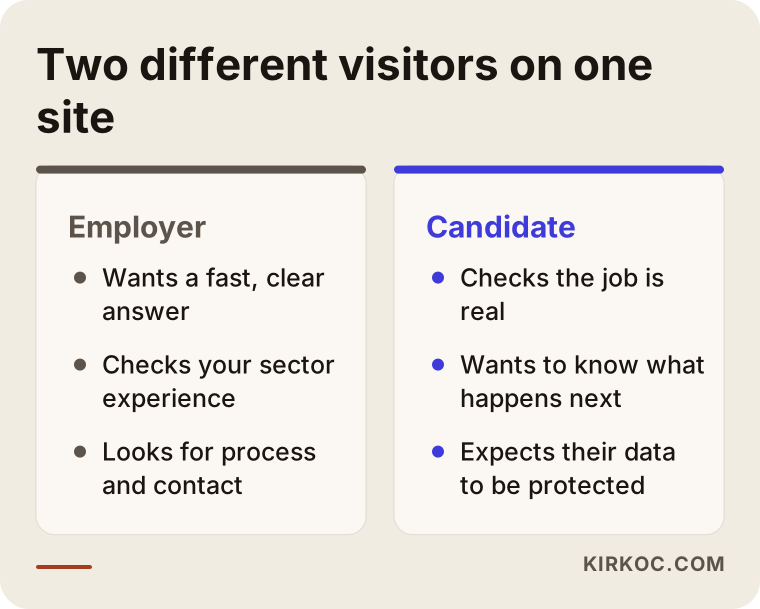
The practical conclusion is simple: your home page needs two clearly separate doors. Someone who thinks "I need to hire" and someone who thinks "I need a job" should each find their button on the first screen without having to think about it. That one decision shapes the rest of the site.
The side that pays and the side that does not
Staffing and recruiting firms usually earn their money from the employer. Candidates normally use the service for free. That means the site has to speak commercially to employers. But if candidates walk away, the pool you can offer those employers shrinks. So the candidate side should be the second priority, though it still deserves care. A candidate page that is more than "leave your résumé here" helps both sides. If it explains the process, says when people can expect to hear back and describes how their data is used, you earn candidates' trust and you also receive better applications.
How do employers search for you on Google?
Before designing anything, look at how employers actually search. A business owner or HR manager often begins without knowing any company name. They type the need: "find an accountant," "warehouse staffing agency," "executive search firm," "temp-to-hire help." Some add a city, as in "staffing agency in Dallas." Some add an industry, as in "healthcare staffing agency."
There is an important split here. On one side is the employer searching for a service. On the other is the candidate searching for an open job. A job seeker types "sales jobs near me," while an employer types "sales recruiter for hire." They are looking for different pages. When one home page tries to answer both, Google gets a muddy signal about what the site is for.
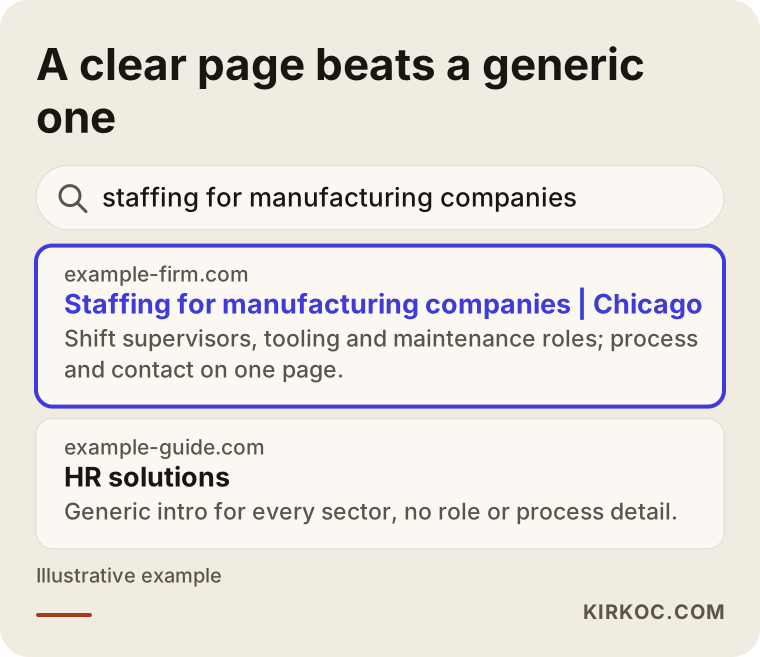
The search result in the graphic is entirely made up. Still, you can see the point: a page that states its industry, its service and its audience in the first line looks more worth clicking. A vague "HR solutions" title tells an employer with a specific need absolutely nothing.
Why narrow searches are worth the most
For staffing and recruiting firms, the most valuable searches are often the narrowest ones. A broad phrase like "HR consulting" has a huge number of large competitors. A narrow phrase like "shift supervisor staffing for manufacturing plants" or "executive assistant recruiter for medical clinics" comes from someone much closer to making a decision. If you really have experience in certain industries, it makes sense to give each one its own page. Creating two-line filler pages for every industry under the sun backfires. Google and your visitors both notice quickly.
When I start a project like this, I begin by asking which industries and roles you truly serve. A website should be an honest reflection of how you work. Putting something in the shop window that you do not actually do leaves a poor impression the moment a first conversation begins.
Which pages do you need?
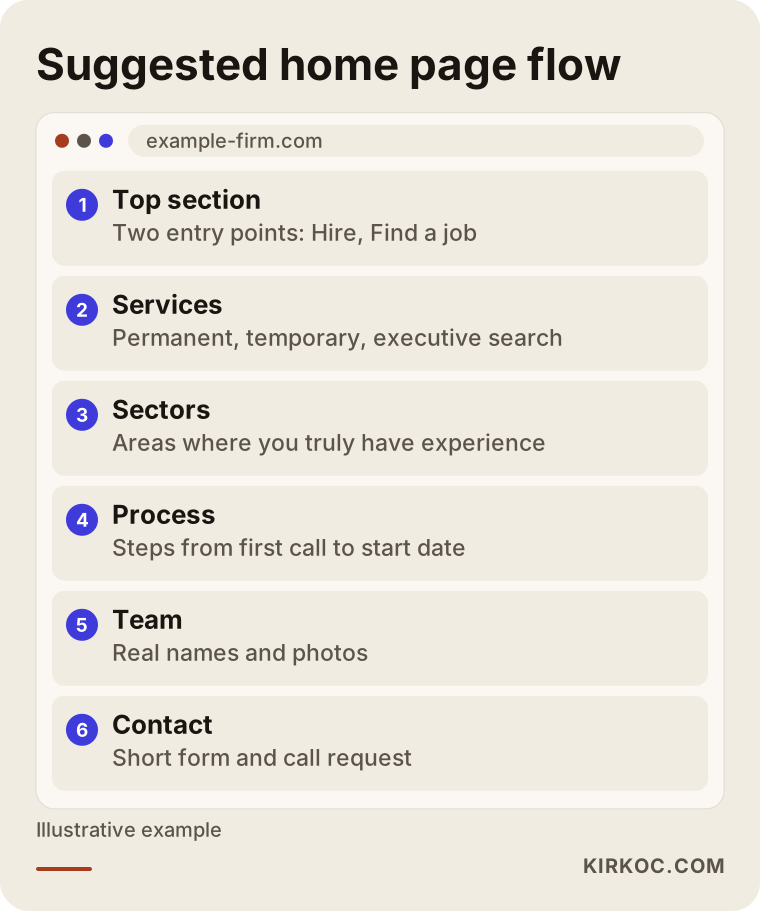
The page list for a staffing or recruiting site is longer than for an ordinary business site. But a long list does not mean everything must be built at once. It is healthier for both budget and quality to build the core first and grow later. The graphic below shows one way to structure the home page flow.
After the home page, this table summarizes which pages do what.
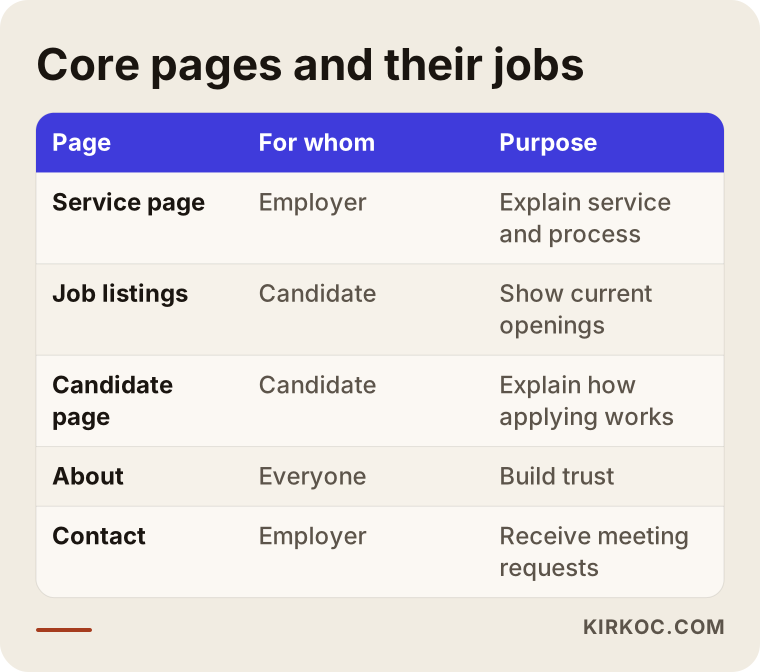
Let me go through these pages a little more closely.
Service pages
Each main service needs its own page: direct hire, temporary staffing, executive search, volume hiring, payroll support or consulting, for example. On each page, say plainly what problem you solve, how you run the process, what you expect from the employer and which industries you have experience in. Skip empty phrases such as "our dedicated team of professionals." Replace them with something real, like "in the first call, I define the role with you before I start searching."
The job listings page
Listings are the liveliest part of a staffing site and also the part that breaks most easily. An expired posting that stays online makes both candidates and employers lose trust. Every listing should have its own address, and when a position closes, the page should either say so clearly or point to similar openings. The title should be specific: role, city and work arrangement. "Sales Representative, Austin, full-time" is better than just "Sales Representative." It is clearer to the candidate and to search engines.
If you have many listings, typing them page by page is not realistic. You need a panel where you can add and remove them easily. If the site is not built around this from the start, adding listings becomes a chore a few months later, and the site begins to look neglected.
The about page and your team
Staffing and recruiting is a trust business. Visitors want to know you as a person, not as a logo. Say who works there, how long they have done this, which industries they know and how they approach the work. If you use photos, use real ones. Generic stock photos are especially harmful in this field, because people expect you to be an expert at reading people.
The candidate page
What a candidate sees here should cover how to apply, what happens after applying, how long it takes to hear back, who the information is shared with and under what conditions it is deleted. Giving this information sets you apart from competitors and raises the quality of applications, because a candidate who knows what to expect applies more carefully.
Contact and scheduling
It should be easy for an employer to talk to you. A phone number, an email address, a short form and, if possible, a button to request a call are enough. Asking for too many fields makes people quit at the first step. Name, company, the role you need to fill and one way to reach them are usually plenty. You can learn the rest on the phone.
What is the path from a visitor to an inquiry?
An easy way to think about your site's job is to imagine the steps a visitor goes through. They all arrive, but not all of them fill in a form. Some drop off at each step. The goal is not to bring that loss to zero, but to reduce it at the points where it matters.
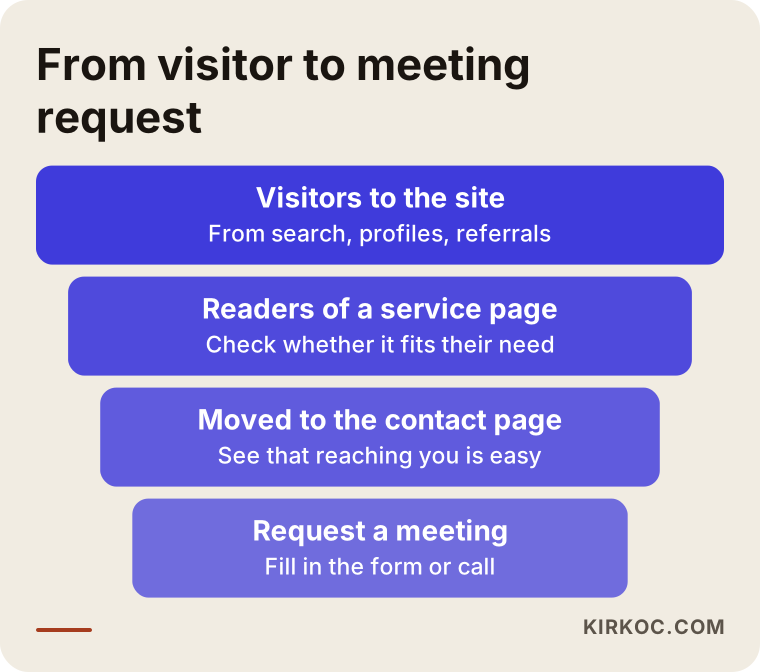
The lesson from this diagram is that a beautiful contact form is useless if visitors never reach the page where it sits. First the right person has to find your site. Then the service page has to convince them. Then the contact step has to be easy. To see where people drop off, the site needs simple visitor tracking. I set that up as part of the build, but when numbers start coming in, I also recommend not making big decisions from a single month.
What about trust, privacy and personal data?
The biggest difference between a staffing site and most other sites is that candidates leave personal information such as résumés. That is a serious responsibility. Privacy rules exist in the United States and in other countries, and they vary by state, by country and by the kind of data involved. How long you may keep information, how you must obtain consent and similar questions are not something I can answer with certainty. Please talk to an attorney about them. My job is to make sure the texts your attorney provides sit in the right place on the site and read clearly.
The graphic summarizes the trust and privacy pitfalls to watch for.
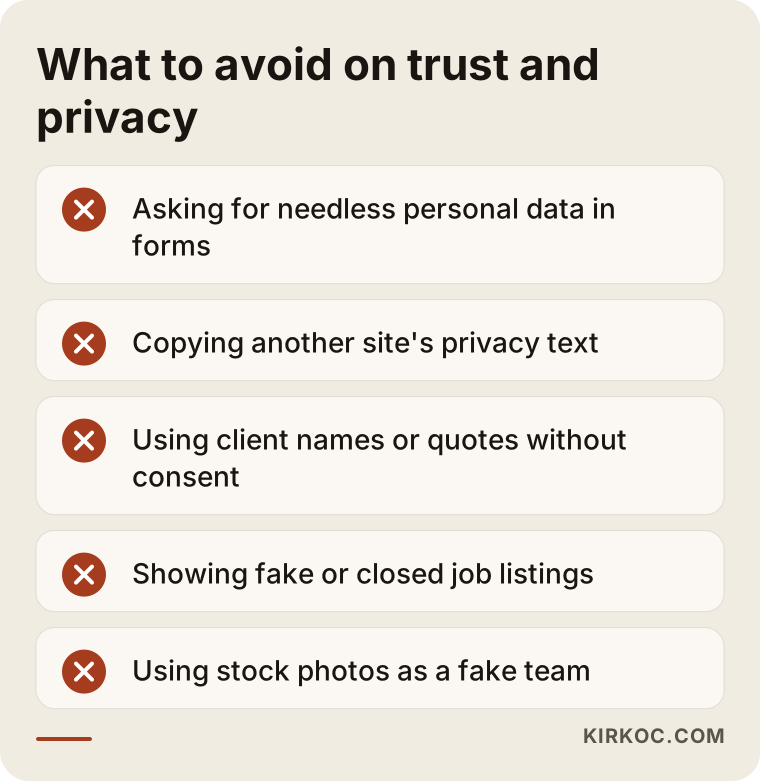
Beyond those, a few simple things build trust: the site loads over a secure connection (https), it shows a real address and phone number, the team page lists real names, and every published listing is a real one. Client testimonials should not be used without the client's explicit permission. If you have no testimonials yet, it is more honest to describe your method and process than to invent them.
Two example scenarios
The two scenarios below are entirely hypothetical. They do not describe a real firm or person. They are written only to make the situations concrete.
Example scenario 1: A specialist's first website
Suppose someone spent many years as an HR manager at a large company and then started their own recruiting practice. So far every client has come from their old professional circle. Now they want new clients, but they have no website, only a social network profile and an email address. For this person, the right starting point is not a big site. A clear structure of four or five pages is enough: a home page, two or three service pages, an about page and a contact page. What matters is that the area of expertise is narrow and plainly stated. A focus such as "tooling and maintenance roles at mid-sized manufacturers" gives a much sharper signal to both visitors and search engines than "recruiting for every industry."
Because this person is active on LinkedIn, the site and the social media voice should sound the same. Otherwise an employer who sees the profile and then visits the site feels they have met two different people. This is where having everything handled by one person pays off in a concrete way: the site copy, the profile text and the posts all come from the same place, so they stay consistent.
Example scenario 2: A growing firm with many listings
In the second scenario, a mid-sized recruiting firm manages dozens of open positions at the same time across several industries. Its site was built a few years ago. Listings are added by hand, some are still up after being filled, and candidates who submit the form have no idea what happens next. For this firm, the problem is not the number of pages but the organization. The listings need to move into a manageable structure, each industry needs its own employer page, the candidate page needs to explain the process, and closed listings need a consistent rule. Because the firm serves two audiences, the home page also needs to separate the two doors clearly.
If this firm also wants to appear in Google's job search results, its listings may need to be marked up in a way search engines understand. That is a technical job, and if it is not set up correctly the listings may not show up at all. It is better to discuss this during the build than to try to patch it yourself later.
How is the site built, step by step?
A staffing site build in my practice goes in the following order. Each step also includes what I will ask you, because what gets misunderstood in this field is rarely technical. It is usually the content.
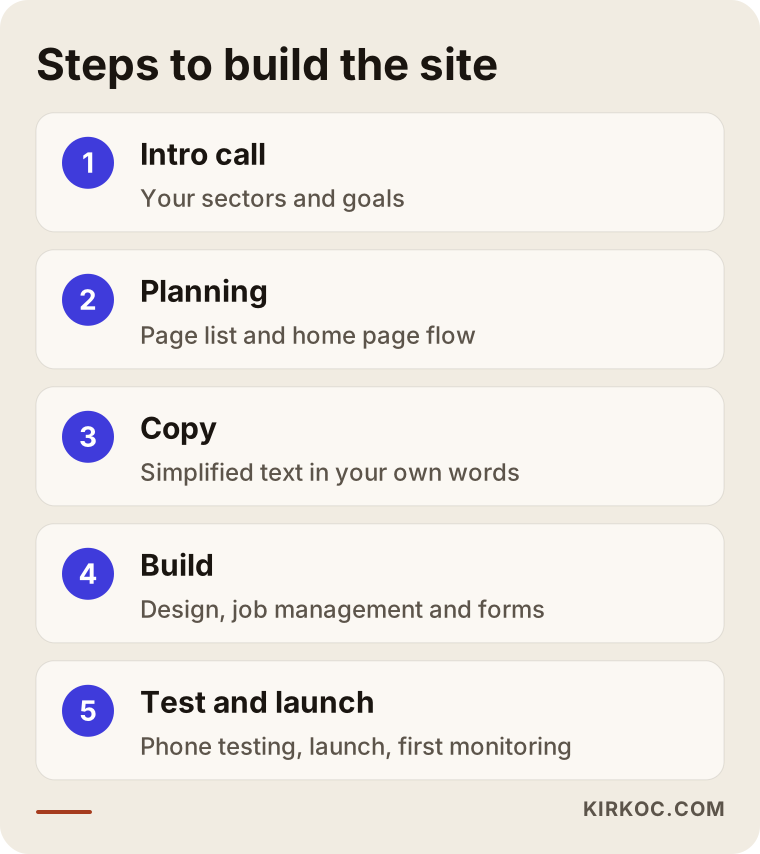
In the first step, I ask about your business: who you serve, which roles you are good at and which ones you avoid. In the second step, I put together the page list and the home page flow. In the third, I prepare the text or simplify what you have written. In the fourth, the design and the build happen, and special needs such as listing management are set up at this stage. In the fifth, I test that the site works properly on phones and desktops, that forms reach you and that speed is adequate. In the last step, the site goes live and I watch it closely for the first few weeks.
How long does it take?
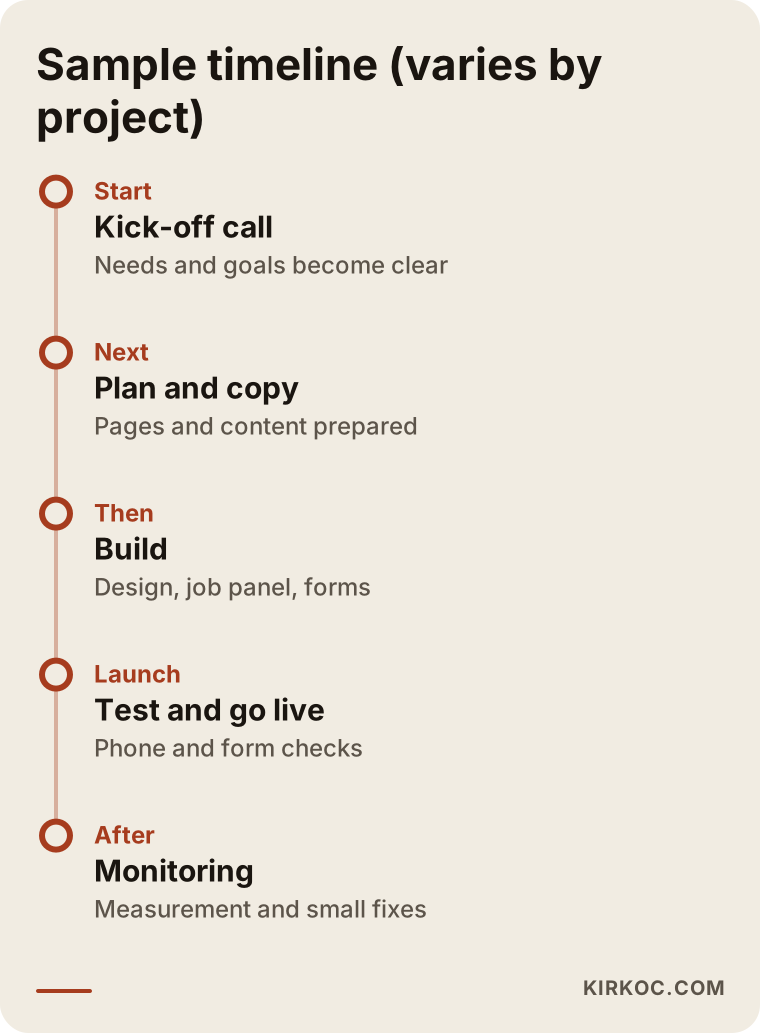
The timeline depends on the number of pages, whether you need listing management and how quickly you can prepare text and images. A small introductory site can take a few weeks. A site with a listings panel and several industries takes longer. What slows a project down most is not technical difficulty but delayed feedback. That is why I ask you at the start to decide who makes the decisions and who approves the text.
The graphic below shows a sample schedule. Keep in mind that the timing may differ in your project.
What mistakes come up most often?
I see the same problems again and again on sites in this field. Most of them are not expensive to fix, but their effect is large as long as nobody notices them.
Talking to everyone at once. Trying to address employers, candidates and partners all on the home page leaves nobody with a clear message. Two doors and a simple first screen fix this.
Leaving old listings up. An expired posting gives candidates the feeling that nobody is paying attention. Set a clear rule for what happens when a listing closes.
Stock photos and generic sentences. "The right people in the right places" appears on every site in the industry. What sets you apart is explaining concretely what kind of role you fill, in which industry and how.
Making the application form too long. If a candidate has to fill in twenty fields before uploading a résumé, many will quit halfway. Ask for the essentials first and the rest later.
Forgetting or copying the privacy text. Lifting another site's text word for word may not match what you actually do, and it can cause trouble. An attorney should prepare this text for the way your business really works.
Skipping the mobile test. Many candidates look at listings on their phones. If the site loads slowly on a phone or the form is unusable on a small screen, applications are lost without anyone noticing.
Not setting up measurement. Choosing where to invest without knowing which pages bring business is guesswork. Simple tracking gives you the data to make better decisions a year from now.
What can you do yourself, and when do you need an expert?
You do not have to outsource everything. If you do some of the work, you save budget and the content feels more genuine. The flow below can help you decide who should do what.
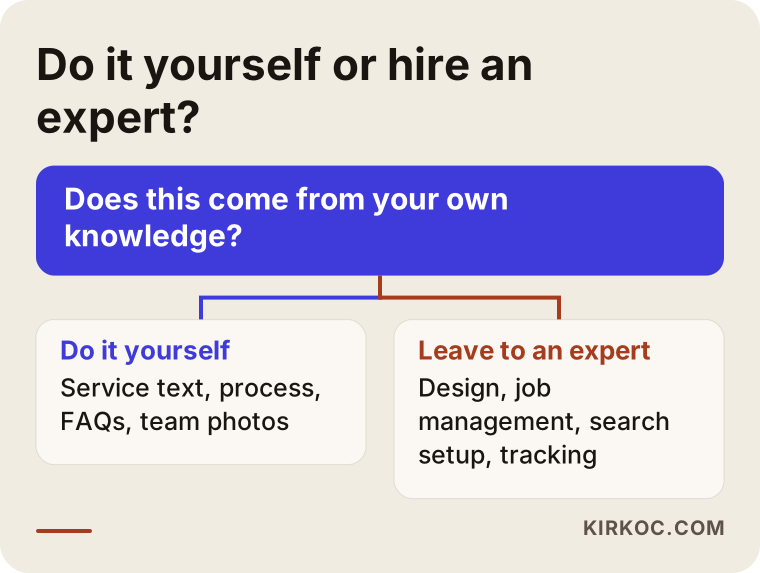
Things you can do yourself include describing your services and process in your own words, taking team photos, listing the industries where you have experience and drafting answers to questions clients often ask. Because this content comes out of your knowledge, it is the most valuable part. I turn it into plain language and place it into the page layout.
The parts that need an expert are design and the build, listing management, search engine setup, forms and tracking, and speed and security settings. If you want visibility after launch, you will also need extra work such as search engine optimization, but a solid foundation comes first.
What determines the cost?
I deliberately do not give numbers in this article, because the cost of a staffing or recruiting website varies a great deal from project to project. These are the main factors that set the price.
First, the number of pages and the amount of content. A four-page introductory site and a structure with dozens of industry and service pages are not the same job. Second, listing management: being able to add and remove listings from a panel, collecting applications in an orderly way and setting up listing markup all take additional effort. Third, copywriting: if you prepare the text, the cost goes down, and if I write it, it goes up. Fourth, a multilingual structure: if you serve employers in other countries too, you will need separate language versions. Fifth, the need for images and photography. Sixth, the work that continues after launch: maintenance, content, search engine work and advertising.
When you get a quote, ask what each line item covers. If "website" appears as one single line, you cannot tell what is inside. In my quotes I state what is included, what is not and which jobs would count as extras later.
What should you prepare before asking for a quote?
If you know the answers to a few questions before you approach an expert, the conversation is much shorter and the quote ends up closer to reality.
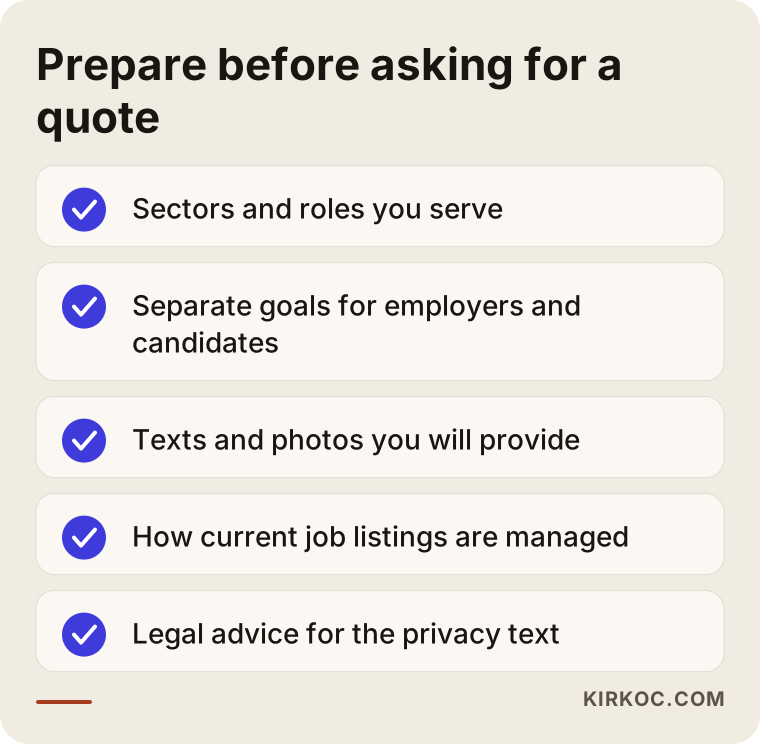
While you fill in this list, watch out for one thing: if your goal is "to serve every industry," do not write that down as a goal. Begin with the industries where you truly have references and experience. Expanding later is always possible.
How I work with you
I am one person. That means the person who talks to you is the person who does the work. There is no go-between, no handoff and no "I will pass that to the team." I build the site and help get the text in shape. If you need it, I also handle search engine work, the management of your LinkedIn and other social media accounts and, when it makes sense, Google and Meta ads, all from the same hands. The benefit is that your profile says what your site says, and the page an ad points to was written to match that ad. The consistency that gets lost between separate agencies stays intact here almost automatically.
We start with a short introductory call. There I listen to your business, look at the current state of your site and tell you what should be done and what can wait. I will not try to sell you a service you do not need. Sometimes the best advice is to fix one or two pages instead of rebuilding the whole site. I do not promise results. No honest professional can guarantee a search ranking or a number of applications. What I can offer is steady, understandable and measurable work.
Frequently asked questions
Does a staffing or recruiting firm really need a website, or is a social media profile enough?
A social media profile is good for being known, but it is rarely enough on its own. When employers research you, they look at your website. They want to see your services, your process and your team in an organized place. And only a website can reach an employer who is searching Google for a service and has never heard of you. The two work best together.
Should I build one site for employers and candidates, or two separate sites?
For most firms, one site is enough. Two doors on the home page and separate employer and candidate sections create enough separation. Running two sites means twice the maintenance and twice the content. Separate sites only make sense if you operate two large, unrelated brands.
Can my job listings appear in Google?
Technically, yes. But the listings need to be marked up in a way search engines understand, expired listings must be removed and the listing pages must be well organized. Appearing cannot be guaranteed, because Google decides which listings to show. I build the structure correctly and the rest is up to Google's evaluation.
Is it a legal problem if I collect candidate résumés through my website?
This falls under data privacy law, and I cannot give you a definitive answer. For points such as how long you may keep information and how to obtain consent, please consult an attorney. Publishing the texts your attorney prepares in the right place, in a way people can understand, is my job.
Can I use client testimonials and references on the site?
Only if the person or company has given you explicit permission. Confidentiality is very important in this industry, and even the fact that an employer works with you can be sensitive. If you have no permission, it is safer to describe the industry and the process in general terms without naming anyone.
I am building my first site. Where should I start?
Write down the industries and roles you serve, put your own process on one page and decide which kind of employer you most want to work with. Then, in a short call, I will work out the page list with you. Four or five clear pages at the start often work better than a large site that was stretched out later.
Do I need ongoing work after the site goes live?
Once the site is live, listings, details and text need to stay current. Visibility also depends on regular content and search engine work. How much of that you do depends on your budget and goals. You do not necessarily need a big service every month, but it is not realistic to assume the site will bring in business by itself.
Can I fix just some pages without touching my current site?
Often, yes. I look at your site first. If the problem is in the structure, I will suggest rebuilding. If it is only in a few pages, I will suggest fixing those pages. Knowing that a new site is not always needed helps you avoid unnecessary spending.
If you would like to talk through a website for your staffing or recruiting firm, you can reach me through my website design page. I will listen to your services, your target employers and where you are today, and tell you plainly what you actually need.