One morning you open your phone and cannot get into Instagram. The screen says your account has been disabled, or suspended, or that something went against the rules. This is the place where you have been posting for months, taking orders by direct message and showing customers your work for the first time. Now it is gone. That is why so many people type "my Instagram account was disabled, what do I do?" into a search bar. In this article I explain, in plain language, what a business owner should do in the first hours, the first days and the weeks after. I am Ümit Kırkoç, and I prepare accounts against exactly this kind of problem as part of my social media management service, so I will be straight with you about both halves of the job: getting the account back and protecting the business if it does not come back.
One fact first. Neither I nor anyone else decides whether your account is restored. That decision belongs to Instagram, which means Meta. Nobody can honestly promise "I will get it reopened for sure." What you can do is raise your chances with the right steps, and keep your business running either way. This article covers both.
First, work out what you are dealing with
Not every "closed account" is the same thing. To choose the right path, you need to know which situation you are in. The decision chart below shows the first split to make.
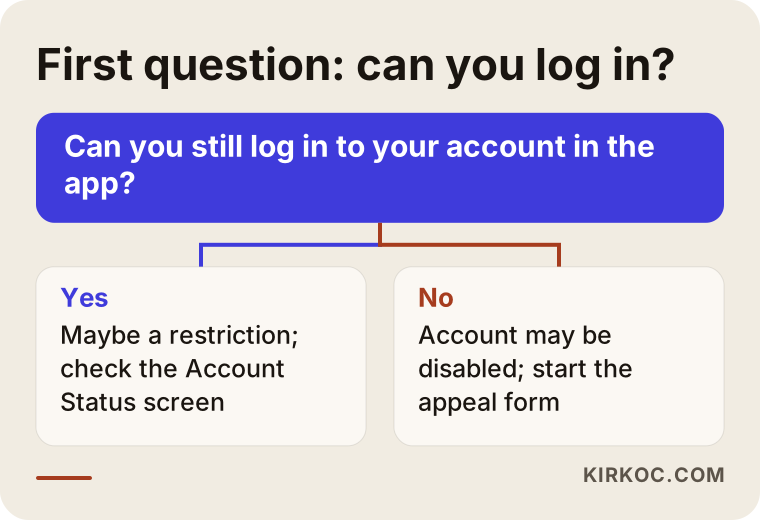
The first question shapes everything after it. If you can still log in, you have more information and more options. If you cannot, the process leans mostly on the official appeal form.
Five different situations
In practice, business owners run into roughly five cases. The table below puts them side by side.
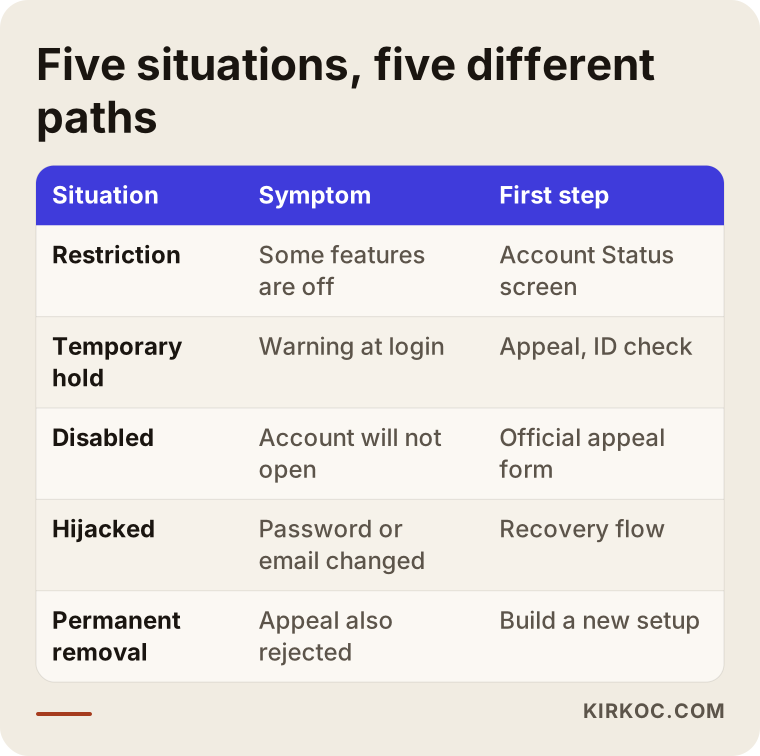
Read the table like this. A restriction is the mildest case: your account is open, but some features have been switched off. With a temporary hold, the app asks you to confirm something, usually your identity. With a disabled account, you cannot log in at all. A hijacked account is a different problem altogether. The issue is not an Instagram decision but a stranger who got into your account without you knowing, and your password or email address may already have been changed. Permanent removal is the last stage, when an appeal has also failed.
To figure out which case you are in, look at three things. The first is the exact wording of the warning you see when you open the app. The second is your email inbox, including the spam and junk folders, for any message from Instagram or Meta about the account. The third, if you can still get in, is the account status area in your settings, which often says which post was flagged and which rule it supposedly broke. Take screenshots of all of it. They work as your own notes and they help later if you appeal.
Why business accounts get disabled
Instagram does not always explain a decision in detail, but the usual causes are well known. Knowing them helps you write a better appeal and avoid a repeat.
Content that breaks community rules. Using copyrighted music or images without permission, passing off someone else's photos as your own work, making misleading claims, or posting products that the platform does not allow all fall here. Sometimes the post is perfectly innocent and an automated system simply misreads it.
Behavior that looks like spam. Following a large number of accounts in a short time, leaving the same comment under hundreds of posts, sending bulk messages or liking posts at high speed looks unusual for an ordinary user. Buying followers or using automated engagement tools usually causes trouble under this heading too.
Suspicious login activity. Logins from several countries or many different devices in quick succession can trigger the security system. If several people run the account and each logs in from a different place with the same password, the risk goes up.
Doubts about age or identity. Instagram may question whether the owner is a real person or whether they meet the age requirement. In that case you are usually asked to verify your identity.
A wrong automated decision. To be honest, some shutdowns have no real cause behind them. Large platforms review enormous numbers of accounts with automated systems, and those systems sometimes get it wrong. That is exactly why an appeal process exists.
A hijacked account. Someone may have broken in and posted something against the rules in your name. Instagram then locks the account to protect it. In that case the problem is security, not your own behavior.
In the first hours: stay calm and go in order
When an account is disabled, the first instinct is to try a dozen things in a panic: refill the same form again and again, open a new account immediately, or trust a friend who says "I know a guy." Most of that makes things harder. The order below is the calm route I suggest to business owners.
1. Document the situation
Take screenshots of the warning screen, any emails you received and your username. Write down which email address and phone number the account was opened with. Try to remember which device you last used. You will need all of this to prove the account is yours.
2. Use the official appeal route
The appeal form that opens inside the Instagram app, or through the link in the email you received, is the right path. In the form, write your account name, what your business does and, if you believe the decision was a mistake, say so in a short, polite and clear message. Long rants and angry messages do not help. About timing: whatever the app or the email says is what counts. Sometimes an appeal has a deadline, so act as soon as you see the notice.
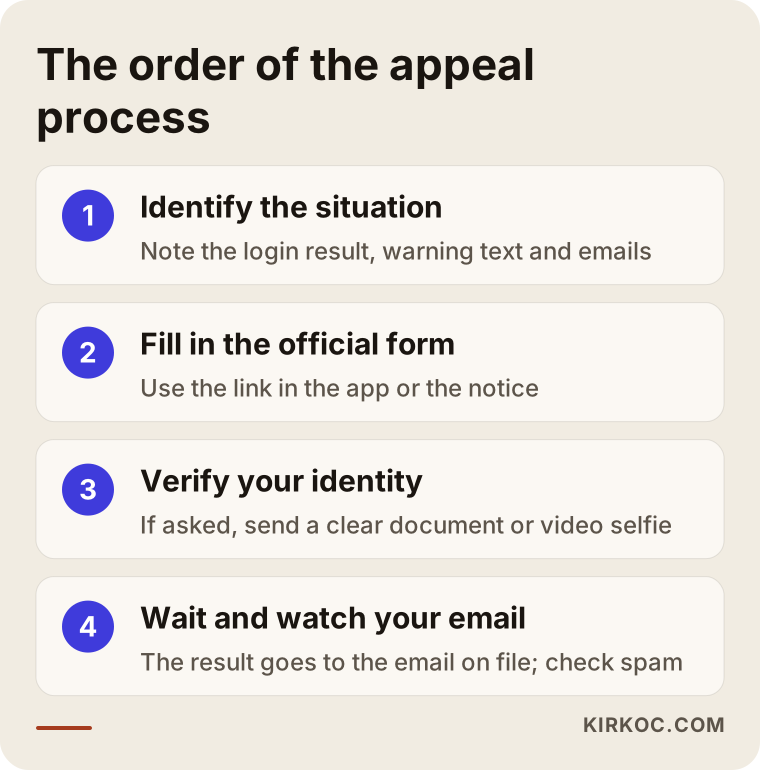
The four steps in the picture summarize the basic flow of an appeal. Do them in order, fill in the form completely, and accept that you will have to wait before the next step happens.
3. Complete identity verification if it is requested
In some cases you may be asked for a photo of an ID document or a short video selfie. Make sure the document is readable, the lighting is good and the name matches the one you use on the account. Provide this only through Instagram's own app or official pages. Never upload an ID through a suspicious link that arrived by email or text message.
4. Wait and follow the reply
A reply can come quickly or take a long time. I cannot give you a firm date, and anyone who does is guessing. During this period check your inbox, your spam folder and the app regularly. Sending the same form again and again does not speed things up. It can clutter your case or make it look like a duplicate request.
Common mistakes to avoid
While trying to rescue an account, people make a handful of mistakes that make things worse. The list below collects the most frequent ones.
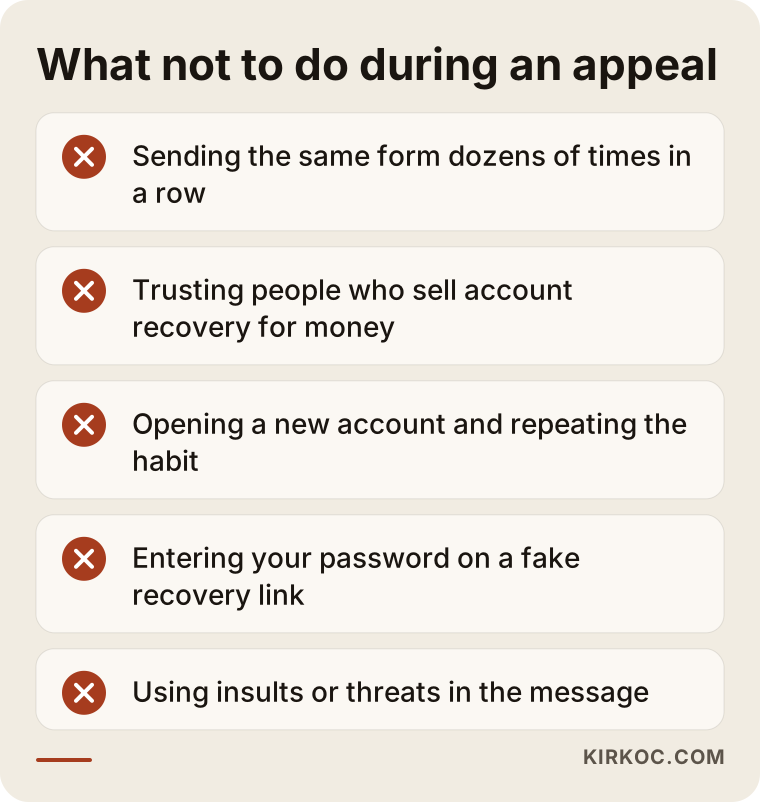
Let me unpack this list a little. The first item, sending the form over and over, is really a reflex born of anxiety. It does not change the outcome, and it only creates a messier file.
Believing someone who says "I will reopen your account in a day." Social media comments, private message groups and online forums are full of people who sell account recovery for money. Some claim to have a contact inside Instagram. Most of these offers are scams. Either they take your money and disappear, or they ask for your password and ID details and then really do take over the account. The official route is free.
Opening a new account right away and continuing the same behavior. If you carry on with the same spam-like habits, the new account can be disabled too. It is also unclear whether opening a new account while an appeal is pending affects that appeal. Waiting for the result before starting over is the safer choice.
Not finding out why it happened. If you do not understand what went wrong, a new account with the same methods will end the same way. If you used bought followers, automatic likes or a bulk messaging tool, admit that to yourself honestly and stop.
Typing your password into a "recovery" site. Fake pages titled "recover your account" exist to steal your password. Enter your password only on instagram.com or in the official app.
Two hypothetical example scenarios
The two situations below are entirely hypothetical. They are not about any real person or company. They simply show different faces of the same problem.
Example scenario 1: a small ceramics studio
Imagine you run a small ceramics studio in a mid-sized city. Most of your orders arrive as Instagram direct messages. One day the account shows a "disabled" warning. Your customers' phone numbers exist only in the message history, you have no website, and your Google Business Profile was never set up.
For this studio the problem has two layers: trying to get the account back, and keeping the business moving in the meantime. In the first layer, the job is to send a complete appeal and wait. In the second layer, you need an emergency contact line: a business phone number for messaging, a Google Business Profile and a simple page that explains what you do. The lesson here is that tying your entire customer relationship to one platform means that platform can halt the business overnight with a single decision.
Example scenario 2: an online clothing store
In this scenario, suppose you own a small clothing store that sells through its own website. You run Instagram ads, and your ad account and Instagram account are connected to the same management panel. One day the Instagram account is restricted and the ads stop.
This store has a website and an email list, so other ways to reach customers stay open. While the owner files the appeal, Google ads keep running and an email newsletter goes out. The restriction is discouraging, but it does not stop the business. The lesson of the second example is that a business with a backup channel gets through a crisis with far less damage.
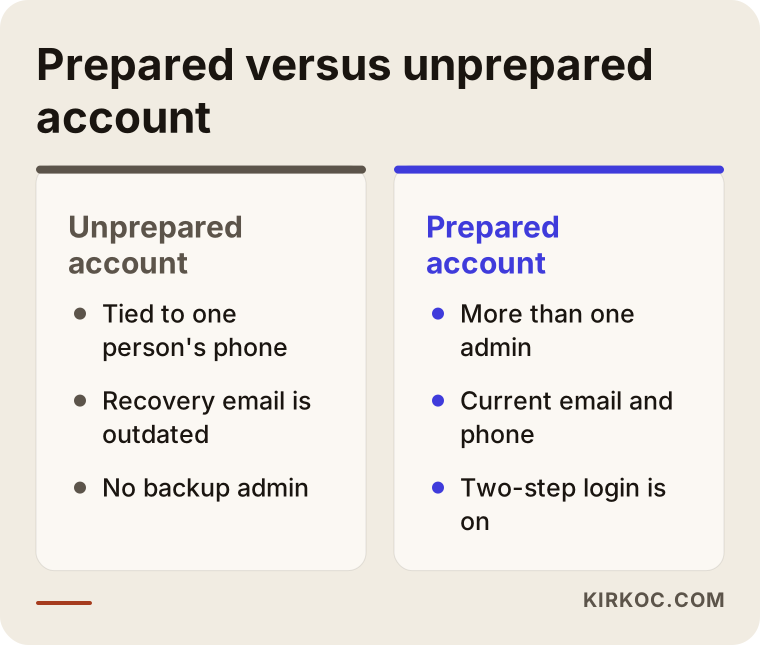
The comparison above sums up the difference. The prepared account has more than one admin, up-to-date recovery details and two-step login. The unprepared account hangs on a single person's phone.
If it is a business account, check these as well
When a business account is disabled, it is not only the profile that can be affected. Everything attached to it can be, too. Go through the list below.
Your Facebook Page and Meta Business Suite. An Instagram account is often linked to a Facebook Page. Check whether you can still log in as the Page admin. If the Page is open, you may be able to keep some posting and messaging work going from there.
Your ad account. If an ad account is connected to Instagram, look at whether your ads are still running. If budget is being spent while the account is closed, you cannot answer the messages that come in. You may need to pause the ads for now.
Connected third-party tools. If you use scheduling, inbox or reporting tools, disconnect them until the account is restored. Otherwise the tools may keep retrying the login, which can look like suspicious activity.
The Instagram link in your bio and elsewhere. If your website, your Google Business Profile, your business card and your email signature all point to your Instagram handle, those links will not work while the account is down. Consider adding a temporary note.
Spreading the work over time: a sample timeline
Here is a rough timeline of how the process might go. Instagram sets the real timing, so treat this only as a frame that helps you organize your own work.
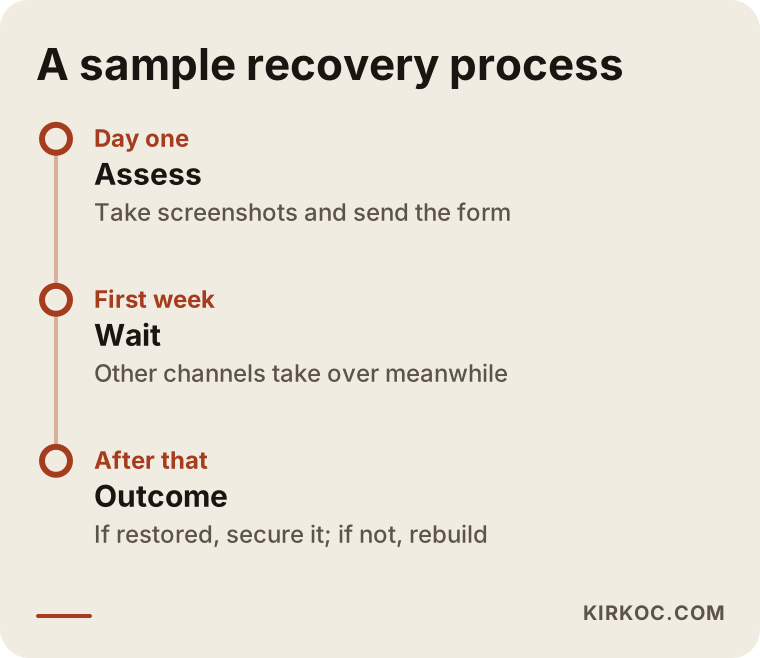
The three stages suggest a different focus at each point. On the first day, assess and apply. During the first week, keep other channels running while you wait. Afterward, depending on the result, either tighten security or build a new setup.
Talking to customers while you wait
To limit lost customers during this period, simple steps are enough. Send the customers you talk to most a short message by phone, text or WhatsApp. Skip the long explanation and write one sentence, such as "My Instagram account is unavailable right now. For orders and questions, you can reach me at this number." There is no need for dramatic wording or blame. What matters to the customer is that there is a way to reach you.
If you have a Facebook Page and a Google Business Profile, add a short notice to them too. Double-check that your phone number is correct. The Google Business Profile is one of the main places where nearby customers find you, so it carries extra weight during this period.
After you get the account back
If your account is reopened, do not assume the job is finished. The real protection starts now.
Change the password and turn on two-step login. Do not reuse an old password. Getting the verification code from an authenticator app rather than by text message is generally safer.
Update the linked email and phone number. Current recovery details save time the next time something happens.
Review who has access. If someone else manages the account for you, do not hand over the password. Give them admin or employee access through Meta Business Suite instead. Then everyone logs in from their own device and no shared password circulates.
Look over your recent posts. Remove anything that might have been flagged. Check whether you have permission for the music, images and text you used.
Drop heavy automation. Mass following, automatic comments and similar tools can cause problems again.
A backup plan: what to do before anything happens
Whether an account is rescued or not, the most important lesson is the same: depending on a single platform is risky. There are preparations you can make now, with a clear head.
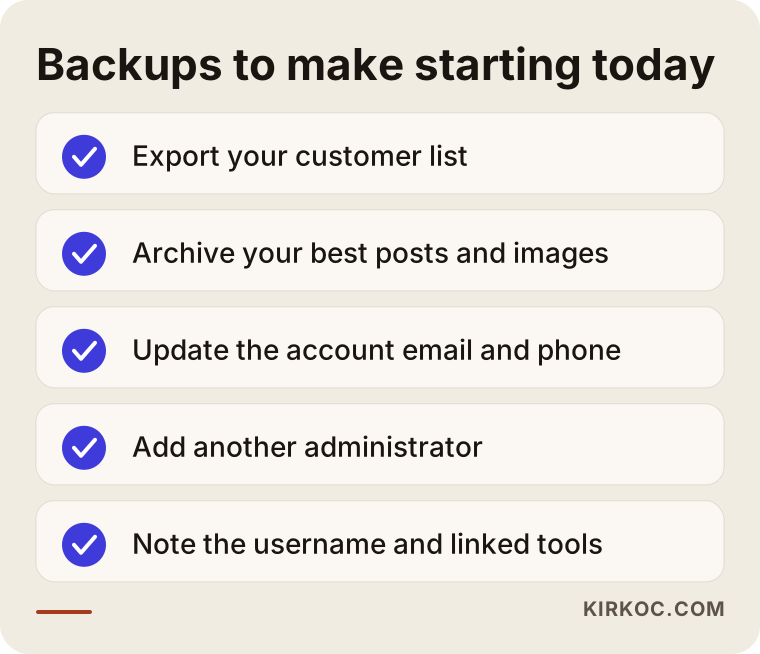
Each item on the list takes a few minutes, but in a crisis it can be worth months. The customer list and the content archive are the things that are hardest to lose if an account is closed.
More than one way to reach customers
The diagram below shows the different ways a customer can find you. The top layer is the widest and the bottom layer is the most direct.
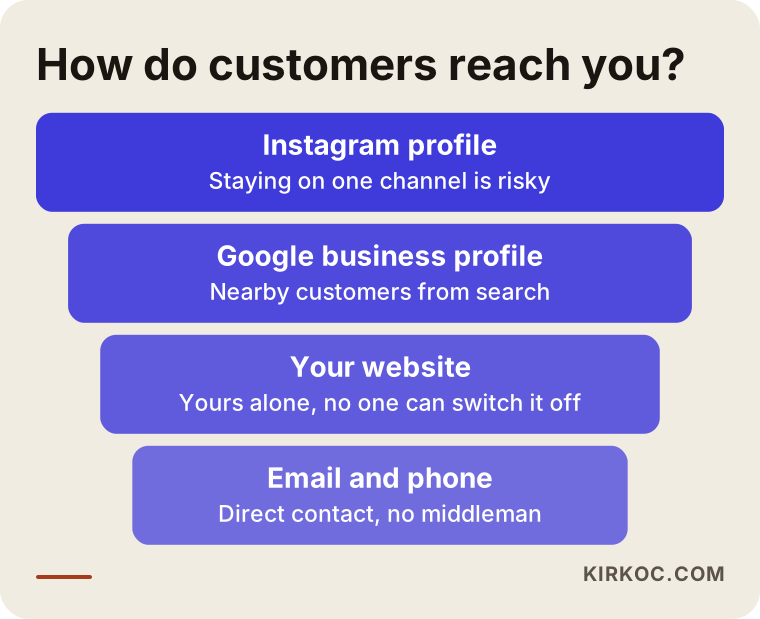
The point I want to stress is that your website is your own ground. The domain name is registered in your name, and a platform decision cannot switch it off. Instagram, by contrast, is a place you rent, and you have to follow the landlord's rules. A business that takes itself seriously should have at least two channels besides Instagram: a website and direct lines of contact.
This is where I should say plainly why doing everything under one roof helps. When your website, your local search presence, your social media and your ads are handled by different people, a problem leaves each of them waiting for the others. When one person handles all of it, then the day Instagram goes quiet, moving ad budget to your website and Google, putting a temporary notice on your contact page and messaging your customer list can all happen the same day. That is exactly how I work.
The "my Instagram account was disabled" search in the age of AI
Someone with this problem might also ask an AI tool such as ChatGPT. The answers usually point in the right direction, but the tool does not know your account. Below you can see an example, invented answer.
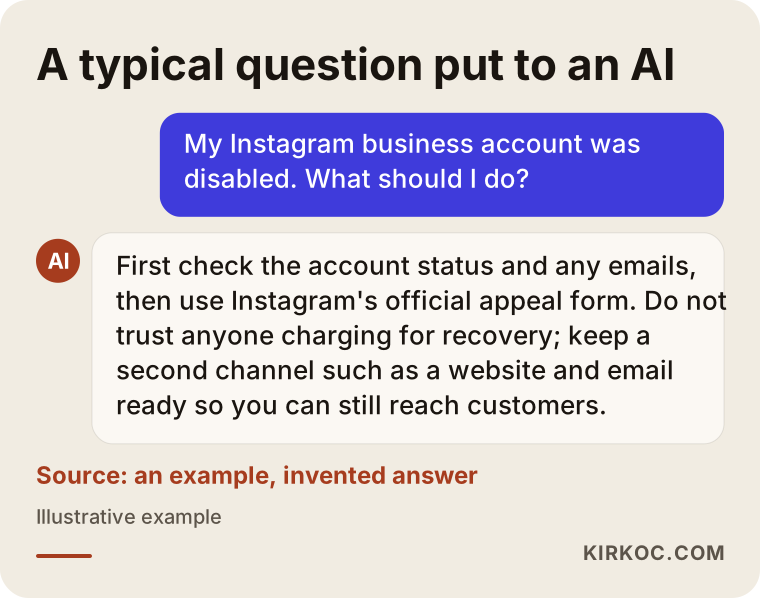
What the answer gets right is that it recommends the official route and reminds you about a second channel. What it lacks is any assessment of your particular case. Someone who knows why your account was closed, what kind of business you run and how your customers find you can map out a much clearer path.
What should a website independent of Instagram include?
After an account is disabled, I see many business owners say "I guess I did need a website." So what should that site look like? It does not have to be fancy. It has to answer the questions customers ask, quickly.
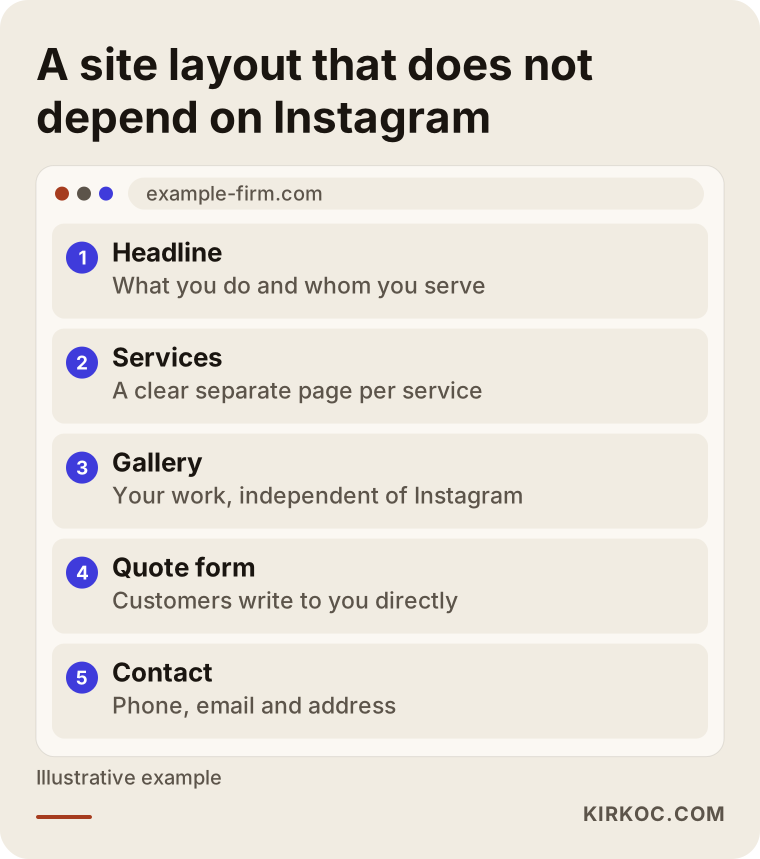
The logic of the layout is simple. At the top, one sentence says what your business is and whom it serves. Below that, each service gets its own page, because someone who searches Google for "custom kitchen cabinets" or "corporate headshot photographer" wants to land on a page that clearly describes that service. The gallery is the website's mirror of your Instagram work. The quote form lets the customer talk to you without a middleman. The contact section holds your phone number, email and, if you have one, your address.
Being findable on Google is a big part of this. If customers arrive through search and land on a page that belongs to you, a problem on Instagram does not touch that channel. For local search, filling in your Google Business Profile completely, writing your service pages clearly and collecting reviews steadily are all pieces of the same whole.
What you can do yourself, and when to bring in an expert
Many people can handle a lot of this on their own. You do not need a specialist to fill in the appeal form, check your email, sort out your password and two-step login, export your customer list or set up a basic Google Business Profile.
Situations where outside help may be worth considering:
- The account is connected to a Facebook Page, an ad account and other tools, and the setup is tangled.
- Several people manage the account and nobody is sure who has which permissions.
- The shutdown keeps happening and you cannot tell why.
- The account was permanently removed and you need to build a new setup: a new account, a website, local search and ads.
- You spend money on ads, and the shutdown means the campaigns have to be re-planned quickly.
Expert help does not mean "getting the account reopened." I say this separately because it is the misunderstanding I hear most often. The decision to restore belongs to the platform. An expert's job is to prepare the appeal correctly and completely, protect you from scammers, and bring other channels online so the business stays on its feet in the meantime. If you want to see how that fits into regular work, I am happy to explain what I handle and what I leave to you.
What affects the cost?
I do not give numbers here, because every case is different. I can, however, tell you plainly what moves the cost.
The first factor is scope. Guiding you through an appeal is not the same job as rebuilding your whole social media setup. The second is how the account is structured: is it a single Instagram account, or are a Facebook Page, an ad account and several tools attached? The third is the backup setup you build in case the account does not return, such as a website, a Google Business Profile and an email routine. The fourth is continuity: do you want a one-time fix, or do you want content creation and management to run every month? Finally, your ad budget and the state of your ad accounts shape the plan. Ad spend is paid separately from my service fee and goes directly to the ad platform.
For a clear quote I would need to hear about your situation. In the first conversation I will tell you honestly what can be done and what you can do on your own.
How I work
I am Ümit Kırkoç, and I work from Istanbul. I provide the full set of services a digital agency would, all by myself: websites and e-commerce, SEO, local SEO, social media management, Google and Meta ad management, logo and brand identity, and content production. When your account has been disabled, there is a real benefit in talking to one person: I see how every channel fits together, where you are exposed and where to put protection in place.
My process goes like this. First I listen to your current situation and look at how the account was set up, who logs in with what permissions and which tools are connected. Then I help you put together a correct, complete appeal. Whether or not the account is reopened, I set up or repair your second channels in the same period: the website, the Google profile and your direct lines of contact. If the account comes back, I make security and permissions solid. If it does not, I plan how a new account can be built without repeating the same mistakes. At every step I tell you what I am doing in plain language and I do not hide behind technical terms.
Frequently asked questions
My Instagram account was disabled. Will it be restored?
That depends on Instagram's decision, and nobody can promise a result. Accounts that were closed by mistake can be reopened on appeal, while accounts judged to have broken the rules may stay closed. What you can do is send a complete appeal through the official route and avoid tying your whole business to one channel in the meantime.
Is a suspended account the same as a disabled account?
Not exactly. A suspension or restriction is usually a lighter measure: you may still be able to log in but cannot do certain things, or you may be asked to verify something. With a disabled account, you cannot log in at all. The warning text and the emails you received will tell you which one you have.
Do I have to pay to get my account back?
No. The official appeal process is free. Most people who say they will reopen your account for money are scammers, and they may ask for your password, your ID and a payment. Getting help from a specialist is a different thing from guaranteeing a recovery, and that difference should be made clear from the start.
How long does an appeal take?
The time varies and I cannot give a number of days. The reply goes to the email address linked to the account. During the wait, check the app and your inbox regularly and do not send the same form over and over.
Should I open a new Instagram account while I wait?
If you absolutely must reach customers, you can open one, but if you keep the same behavior, that account may run into trouble as well. Because it is unclear how a new account affects an appeal in progress, it is healthier to wait for the official answer and use your website, Google profile and WhatsApp or similar channels in the meantime.
How do I know whether my account was hijacked?
Possible signs include your password or linked email changing without your knowledge, posts you do not recognize, or suspicious login alerts from Instagram. If that happens, use the app's recovery flow, and open links in notification emails carefully, only after you have confirmed that they come from an official address.
How should I tell my customers?
A short, calm message is enough. Say that your Instagram account is currently unavailable and tell them which phone number or email to use for orders and questions. Send it through channels other than Instagram, such as phone, WhatsApp, email and, if you have one, a notice on your website.
What can I do so this does not happen again?
Do not leave the account tied to one person's phone, turn on two-step login, keep your recovery email current, stay away from bought followers and bulk automation tools, and pay attention to permission rules for music and images. On top of that, build channels that do not depend on Instagram, such as a website, a Google Business Profile and an email list.
If your account has been disabled, or you want to lower the risk before it happens, you can reach me through my social media management service page. I will listen to your situation and tell you plainly what I can do and what you can handle yourself.