Someone has decided to buy a used car. The moment the listing looks good, they pick up their phone and search for "pre-purchase inspection near me." Within a few minutes they open three or four company pages, decide which one looks trustworthy, and then either call or give up. If you own an inspection business, the only thing that can win you that choice during those few minutes is the website on their screen. In this article I look at a website for a car inspection business from the owner's side: how customers find you, which pages the site needs, how booking should work, and what decides the cost. If you are starting from zero, you can also read about my website design service.
Why inspection customers behave differently
Searching for a restaurant and searching for an inspector are not the same decision. The inspection customer is about to put a large amount of money at risk. The car may be the most expensive thing their household buys this year. So when they pick you, they ask "who can I trust?" at least as often as "who is cheapest?"
That puts three things at the center of your site.
The first is trust. The visitor has never met you. They are about to hand a stranger the job of judging accident history, repainted panels, and the condition of the engine and transmission. If your site shows no real address, no map, no opening hours, no name or face behind the business, and no sign of your credentials, they move on to the next page.
The second is urgency. The seller may be showing the car to other buyers this week. The customer wants a slot today or tomorrow. Being able to see open times and book without waiting for a callback is a real advantage.
The third is fear of the unknown. Most customers do not know what an inspection actually includes. Is paint thickness measured? Is there a road test? How detailed is the report? If the site does not answer, many will not bother to phone and ask. They just leave. A customer who finds an answer on the page is far more comfortable picking up the phone.
How do customers find you?
The starting point is understanding what people type into Google. Searches for inspections fall into roughly three groups.
Nearby searches. "Car inspection near me," "used car inspection in Chicago," "someone to check a used car before I buy." This person is ready to act and usually looks at the map results first. Two things matter most here: your business profile (the card Google shows on its map) and the address details on your website.
Learning searches. "What does a pre-purchase inspection cover," "how to read an inspection report," "how to tell if a car has been repainted." This person has not chosen anyone yet, but they will buy a car. If you publish a helpful page for them, you meet them at the very first step.
Comparison searches. "Pre-purchase inspection cost," "best car inspection service," "full inspection or basic check." This person is choosing between you and a competitor.
The illustration below shows how a results page might look for one of these searches and why a clear, specific page can beat a generic list.
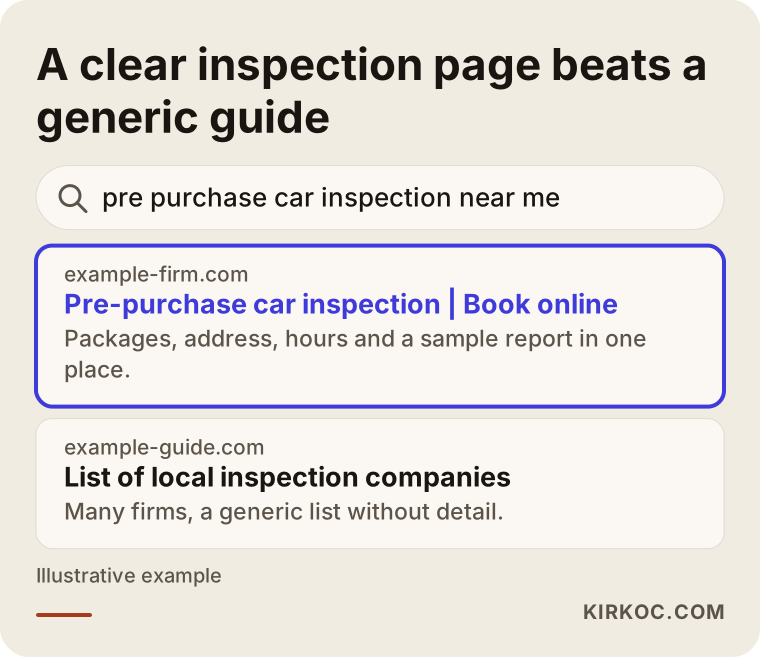
Nobody can promise you a place on the results page. Still, a site that gives the right information in the right place has a much better chance than an empty one. I do not treat local search as a separate project, because planning for it while the site structure is being built costs far less than fixing the structure later.
The pages your site needs
A lot of inspection websites are a single page: a logo, a phone number, and two or three photos. That works like a business card, but it does not persuade anyone. Here is the core set of pages I would build, based on what this kind of customer actually needs.
Home page. In the first second, the visitor should see three things: what city or area you serve, what you do, and what to do to book. A large "Book an inspection" button and a tappable phone number belong at the top of the screen.
Packages page. If you offer a full inspection, a basic check, a paint and body review, or an engine and mechanical check, explain in plain words what each one covers. When the answer to "what does this include?" is already on the site, your phone stops ringing with the same questions.
Sample report page. Show a report with all personal details removed, or one you prepared purely as an example, never a real customer's file. When people can see what they are paying for, hesitation drops. In this line of work, few pages build trust as fast as this one.
How an inspection works. What happens when the customer arrives, how many stages there are, and when and how the report is delivered. Explaining the process shrinks the fear of the unknown.
About the company and founder. Share the founder's experience, the team's specialties, the equipment you use, and the physical location. Photos should be real. Fake stock photos give themselves away immediately on a trust-based service.
Frequently asked questions. Answer real questions: how long does it take, what does the report promise, does the seller need to be present, what can I do about a car in another city?
Contact and location. Address, map, directions, opening hours, a messaging link, a phone number. Everything in one place, and identical in the footer of every page.
Here is a sample order for these sections on the home page.
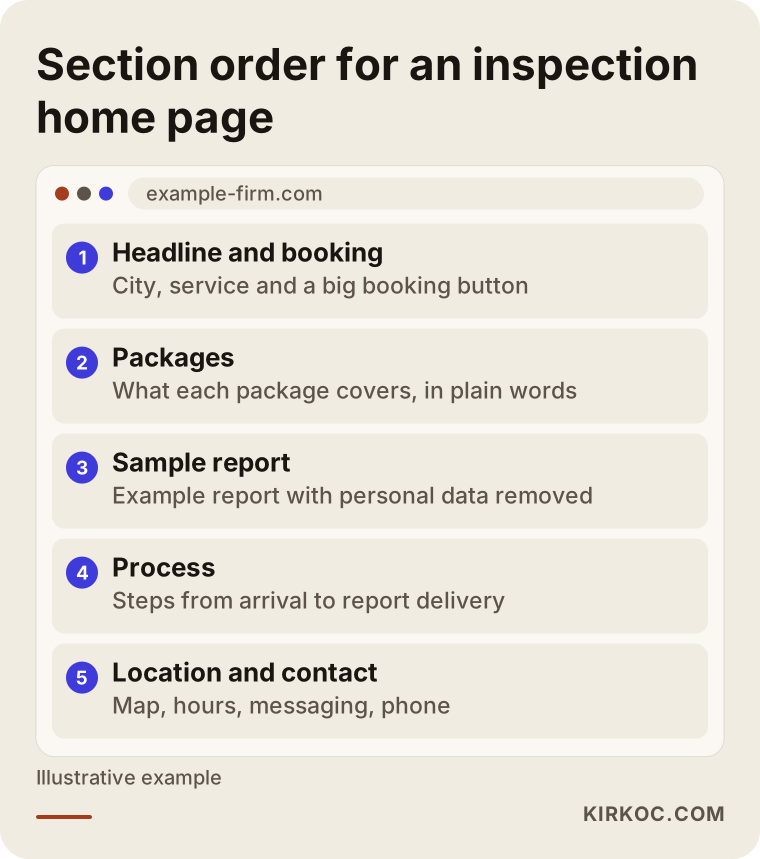
The order is not a law. Try to follow the sequence in which the visitor asks questions: first "what is this place," then "what do they offer me," then "can I trust them," and finally "how do I book?"
Page layout and trust signals
Even if every page above is well written, a home page that misses a few key elements can still lose customers. Use the checklist below when you look at a finished site or when you are having a new one built.
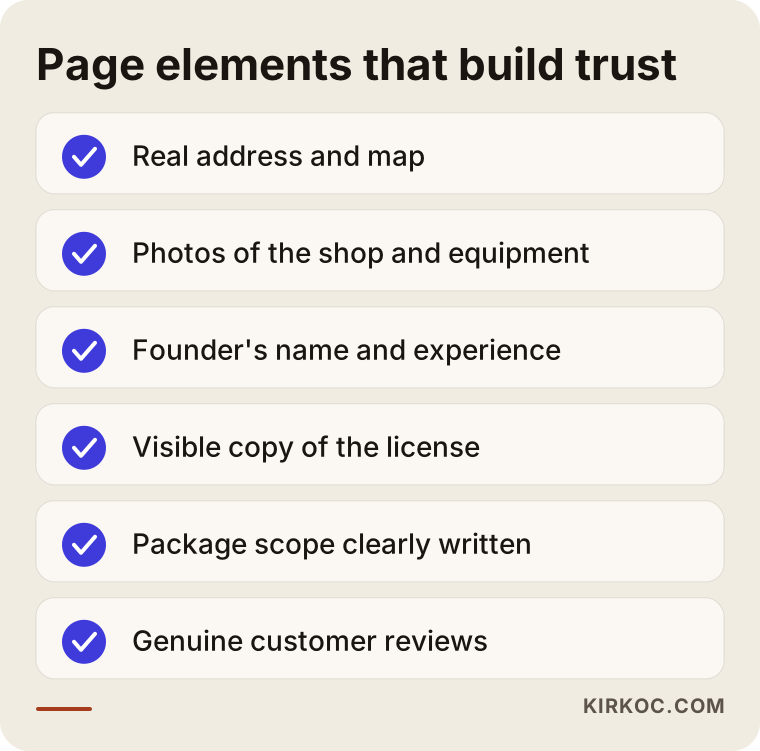
The item on that list that gets ignored most often is real photography: the front of your shop, the lift or work bay, the tools, and someone from your team. A handful of clear pictures say more than hundreds of words. A phone camera is enough, as long as the light is good and the shot is straight.
One more point, on licenses and certifications. The permits and credentials needed to operate in this field depend on where you are, and they can change over time. Ask an attorney or your trade association which documents you must hold and how they may be displayed on a website. I am not giving legal advice here. All I can say is that showing the credentials you do hold tends to reassure visitors.
Booking: phone, messaging, or online calendar?
For an inspection business, a booked appointment is the result the site exists to produce. The path from landing on a page to calling you or filling in a booking form should be as short as you can make it.
There are three common ways to take bookings.
Phone. The simplest. On a mobile device, tapping the number must start the call. If the number is plain text, the visitor has to copy and paste it, and most will give up. Also think about after-hours callers: if nobody answers, there should be a messaging option as a fallback.
Text or messaging apps. Many people find this the easiest route. The customer can send the make, model, year, and a link to the listing in a single message, and you reply with a time and a quote. If the messaging button opens with a short ready-made message, the person does not have to think about what to write.
Online booking form or calendar. The customer picks a date and time, enters the car details, and leaves a phone number. If you are busy and phone calls wear you out, this brings real relief. Keep the form short: name, phone, vehicle, preferred day. Every extra field makes more people abandon it.
Here is how people can drop out between landing on the site and finishing a booking.
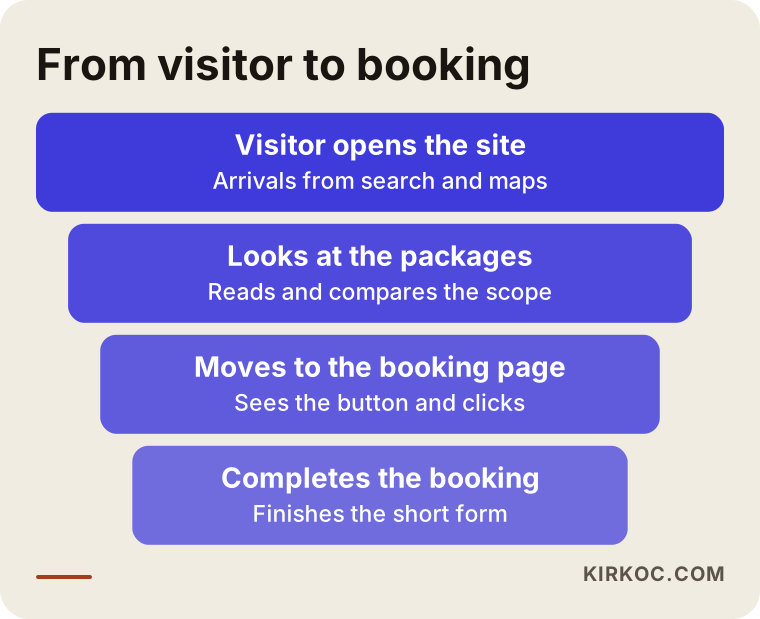
You lose some people at every step, and that is normal. What matters is being able to see where you lose them. If many people reach the home page but few open the booking page, the problem is the button's position or wording. If many reach the booking page but few finish the form, the form is too long.
Mobile and speed
An inspection customer is often standing next to a car, or leaving a dealership lot, when they search on their phone. So the site has to work on a phone first.
Test a few things on your own phone. Can you press the buttons comfortably with your thumb? Can you read the text without zooming? Is the form easy to fill in with the keyboard? Do photos make the page take forever to appear? You do not need an expert for this. Open your site on your own phone in a spot with weak signal, such as a basement. If it is painfully slow, a customer will not wait either.
Without going deep into technical detail: a site gets slow when photos are far larger than they need to be, when the page is stuffed with unnecessary add-ons, or when it sits on a cheap server. These are all solvable, and most of them are avoided at the start by making the right choices while the site is built.
Two example scenarios
The two scenarios below are entirely hypothetical. They do not describe any real business, and they exist only to illustrate typical situations.
Scenario 1: from a one-page site to a real structure. Picture an inspection shop that has operated in one town for years. Its website is a logo, an address, and a phone number. Most of its customers come through word of mouth, and the owner cannot understand why so few come from the internet. On a closer look, you find that package contents are not written down, there is no sample report, no messaging link, and the opening hours on the Google map card are out of date. The fix is not a new brand. It is filling in these gaps: add the packages and sample report pages, put a booking button on every page, and bring the map card in line with the site. After a few months you could expect fewer calls that start with "what does this inspection cover?" and more direct booking messages, but nobody can say in advance by how much.
Scenario 2: a business with more than one location. Imagine an inspection company with locations in two different parts of a metro area. The site has a single contact page with both addresses stacked on top of each other. Customers confuse the locations and sometimes drive to the wrong one. The solution is a separate page for each location with its own map, its own phone number, its own hours, and its own booking button. Then someone searching by area sees the right page. Everything written on a location page should match the Google business profile exactly.
The decision in the second scenario is easier to see in a side-by-side view.
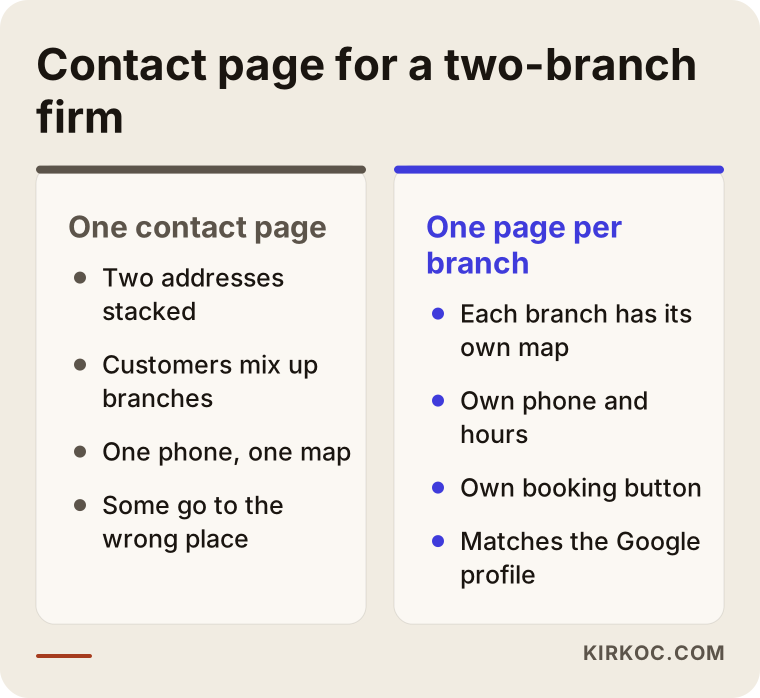
The lesson from that comparison is simple: the less a customer has to think, the easier it is for them to book.
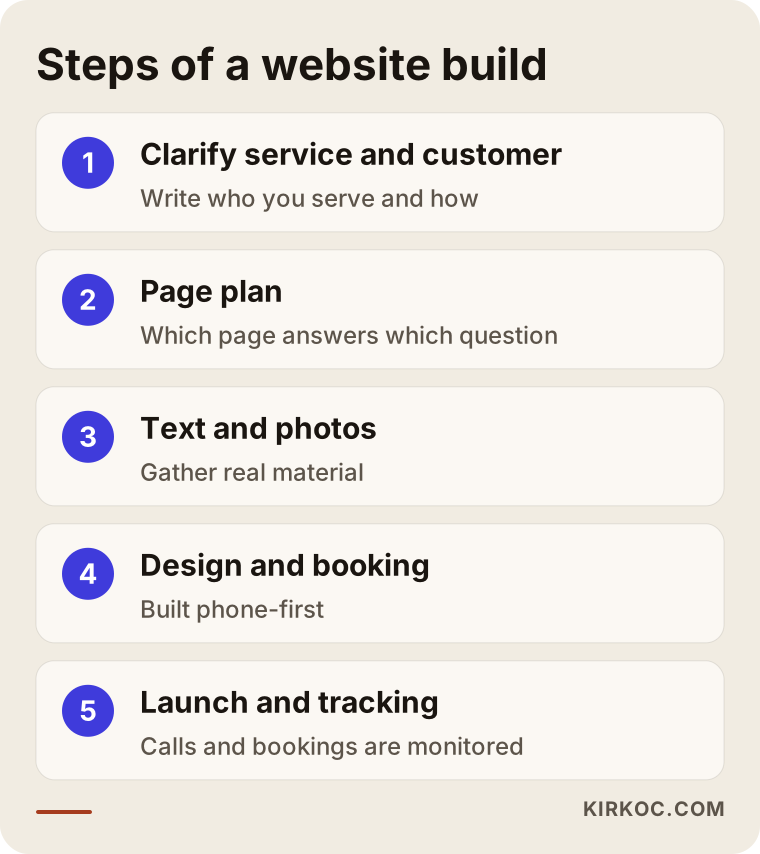
The steps of a website build
When an inspection site is built with me, it moves in this order. You can follow the same order if you are doing it on your own.
1. Clarify the services and the target customer. Which vehicles do you inspect, which extra services do you offer, and who calls you: private buyers, small dealers, fleet managers? These three groups expect different things, and the pages should be built around them.
2. Draw up the page plan. The core pages I described above, plus a page for every location if you have several. Write down which question each page answers.
3. Prepare text and photos. This takes the longest, and it is also the step people postpone most. I can write the copy. The photos, though, have to be taken on site, either by you or with your help.
4. Design and development. The design is phone-first. The booking form and the messaging button are set up at this stage.
5. Search settings. Page titles, descriptions, consistency with your Google business profile, and a uniform address everywhere.
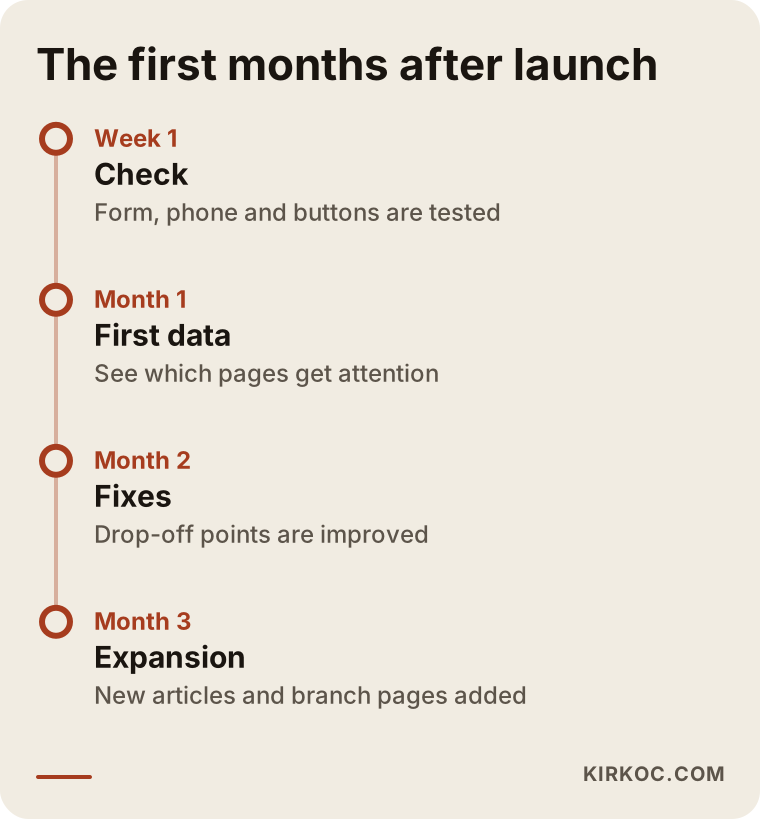
6. Launch and tracking. The site goes live, and I begin tracking how many calls and bookings come from which page.
7. Fixes in the first months. I look at real visitor behavior and correct the page where most people drop off or the button that gets the fewest clicks.
You can see how these steps follow each other in the diagram below.
The one thing that speeds the process up is having your own material ready: photos, documents, pricing details, package contents. The technical part of building the site usually takes less time than waiting for that material.
Content that builds customer confidence
A site that only describes the service looks the same as every competitor's site. What sets you apart is content that shows your expertise. A few kinds work well in this field.
Informative articles. Avoid headlines everyone copies, like "five things to check when buying a used car." Draw on what you actually see on the job instead: how a heavy-damage history can be hidden in a listing, situations where a paint-thickness reading alone is not enough, problems that show up after a long drive. Write in general terms, without blaming anyone and without naming people or license plates.
Question-and-answer pages. Write down the ten questions customers ask you most often on the phone, and then make a short page or section for each. Other people are typing the same questions into Google.
Short videos. A short clip of someone looking under a car on a lift can work on social media and on the site. Take care not to show a customer's face or plate. Do not publish a customer's car without permission, and if you are unsure, ask an attorney.
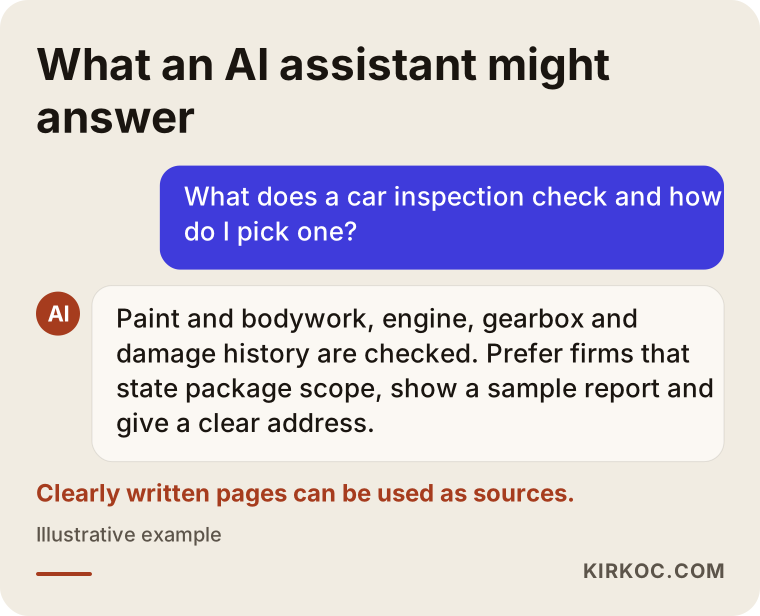
This kind of content gets you found on Google. It also creates a clear body of information that AI assistants such as ChatGPT can draw on when they answer questions. When a customer asks "what does a car inspection check," the answer may come from your page. That is not guaranteed, though.
Common mistakes
Here are the mistakes I see most often on inspection sites. None of them is technical, and every one of them can be spotted in advance.
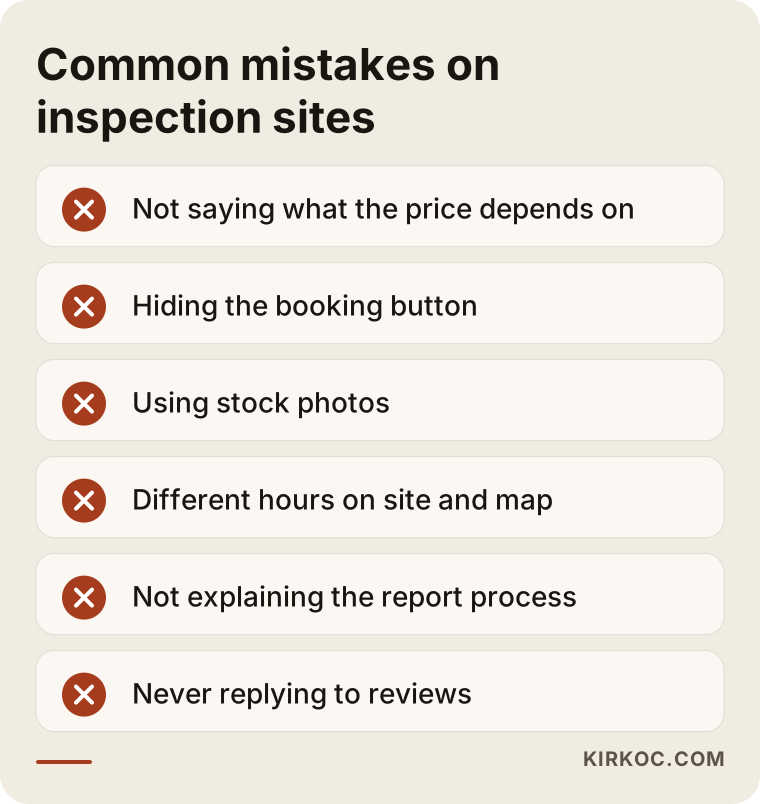
Saying nothing about price. You do not have to print a number. But if you never explain what the price depends on (vehicle type, package, on-site versus at your shop), visitors assume you are expensive and cross you off.
Cramming too much onto the first screen. Twenty bullet points, three different phone numbers, a promotion banner and a slogan together leave the eye with nowhere to land.
Hiding the booking button. A "Contact" link at the very end of the menu or the bottom of the page is not enough.
Using stock photos. Inspection is a trust business. A smiling model in a stranger's office does not build confidence. It creates suspicion.
Leaving location details inconsistent. If the hours on the site and the hours on the Google map differ, a customer arrives at a closed door, and you collect a bad review.
Not explaining the report process. If customers do not know when, how, and in what format they will receive the report, they hesitate before paying.
Ignoring reviews. Make it easy for happy customers to leave one with a simple link, and answer negative ones calmly and briefly. That protects your reputation.
Collected into a single list, these become a warning checklist you can use when you review your own site.
What you can do yourself and when to bring in an expert
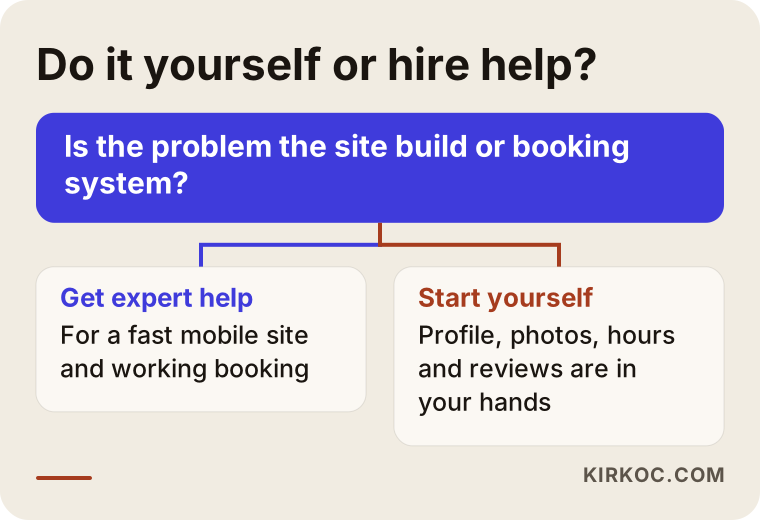
There is a lot you can do before you contact anyone, and doing it will save you money.
Things you can handle yourself: update your Google business profile, verify the hours and address, ask happy customers for reviews, take clear photos of your shop and team, write down the list of the most common questions, and browse competitors' sites like a customer would and take notes.
Things that need expert help: building a fast site that works on mobile, making the booking system actually work, setting up the page structure properly for search, aligning location pages with their Google profiles, installing measurement, and watching it over time.
If you cannot decide, this diagram may help.
I will add one more thing. Sometimes your current site does not need to be rebuilt at all. A few added pages and a fix to the booking flow may be enough. An honest specialist will not sell you work you do not need.
What decides the cost?
I do not give numbers in this article, because no two inspection businesses need the same thing. These are the factors that set the price.
Number of pages. A five-page site and a site with a page for every location and dozens of articles are not the same job.
The booking system. A simple form and a calendar-connected system that sends confirmation messages are very different things.
Content preparation. Who writes the text and prepares the images, and how much. Material that arrives ready shortens the work.
Photo and video. If shooting on site is needed, time is set aside for it.
Search work. If you want more than a site, with regular content and tracking over time, the work becomes an ongoing service.
Multiple languages. If you serve customers who speak other languages, offering the site in those languages takes extra effort.
I can give you a clear quote after a conversation of a few minutes. When you get any quote, always ask what is included and what is not. That question protects you, whoever you end up working with.
How I work
I work from Istanbul, and I handle all of this by myself. I build the website, I do the search settings, and I manage your Google business profile, your social media accounts and, if needed, your ads. For you, that means the site and the ads, or the site and the social media, never drift apart. For example, if I post an inspection video on social media, the page it links to really covers that subject, and a promise made in a Google ad appears word for word on the site. You do not have to tell different things to different people.
My routine is simple. First there is a short call, I listen to how your business works and who your customer is, and then I tell you plainly what is needed and what is not. I do not add unnecessary work. If fixing your current site is enough, I will say so.
I also talk through what to expect in the first months after launch. The timeline below shows a typical flow, though the pace differs from one business to the next.
Frequently asked questions
Does a car inspection business really need a website?
If your customers come by referral, you can keep working without one. But someone who is about to buy a car will almost always look a business up online before going to a place they do not know. A company with no site, or a weak one, may be dropped at that look. A site is not mandatory, but it is one of the cheapest ways to build trust.
Should I list inspection prices on the site?
That is your decision. Even if you leave out the numbers, explain what the price depends on: vehicle type, package, on-site or in-shop inspection. That way the customer does not think of you as mysterious or expensive.
What is the best way to book: phone, messaging, or a form?
Offering all three is the safest, because different customers are comfortable with different things. If you cannot keep them all open, start with phone and messaging, and add an online calendar as your workload grows.
How long until my site shows up on the first page of Google?
Nobody can guarantee the timing or the result. It depends on your competitors, your area, and the quality of your site. After the right structure is in place, results usually take shape over months. I do not promise a date or a position.
If I have several locations, do I need a separate page for each?
Usually, yes. Each location should have its own address, map, phone number, and hours. That sends the customer to the right place, and it lets Google evaluate each location separately.
Is it risky to show a sample inspection report on the site?
A report with personal details and plates removed, or one written entirely as an example, builds trust. Do not share a real customer's report without permission, and if you are unsure, ask an attorney.
I already have a site but no bookings come in. Do I need to start over?
Not always. First I check whether the booking button is visible, whether the page opens quickly on a phone, and whether the package contents are written down. Sometimes a few fixes are not enough and a rebuild is truly needed. It would not be right to say which without looking at it.
Do I also need social media and ads?
They are not required. Your site has to be solid first. After that, Google ads can bring customers in a short time, and social media supports your reputation and recognition. The two of us decide where to start, based on your budget.
Final word
If your current site does not move customers toward a booking, or you do not have one yet, let me look at your situation with you. I will tell you plainly what needs to be done, what you can handle yourself, and what you really need. You can reach me through the website design page.