You have a shop, your bench is rarely empty, and still some of the people who call you have never heard of you. Meanwhile, someone types "laptop screen replacement near me" or "iPhone screen repair" into Google, and the shop that shows up is not yours but the one a few blocks away. If that sounds familiar, building a proper website for your computer and phone repair business is a sensible move. I am Ümit Kırkoç. I work from Istanbul and handle websites, search visibility, social media and ads as one person, so the same individual who talks to you does the work. In this article I will explain what is special about repair businesses, which pages your site needs and how the process runs, in plain language. If you are starting from zero, you can also look at what my website design service covers.
Let me start with the most important point. A repair customer is not comparing products. They have a problem to solve. The device is broken, work or school is stuck, and they are often stressed. So your site does not need to look fancy as much as it needs to make a stressed person feel "I am in the right place" within about three seconds.
How do repair customers use the internet?
When a device breaks, people usually do one of three things. They type the problem into Google, they search the map for a shop nearby, or they ask a friend for a recommendation. If you do not appear in the first two, you are left depending on the third. In the first path, people describe the problem in their own words: "laptop won't turn on," "phone fell in water," "cracked screen," "computer is so slow." They rarely use repair-industry language. Nobody types "motherboard-level component repair" when what they mean is "my computer is dead."
The second path, the map search, is the strongest channel for local businesses. The customer types "phone repair near me," and the results show shops that are open now, have good ratings and can be reached by phone right away. Your website alone is not enough here. Your Google Business Profile, which is the free listing that shows your shop on the map with hours, photos and reviews, matters just as much. The two must agree with each other. The picture below uses an invented example to show how a search result can look and why a clear title makes a difference.
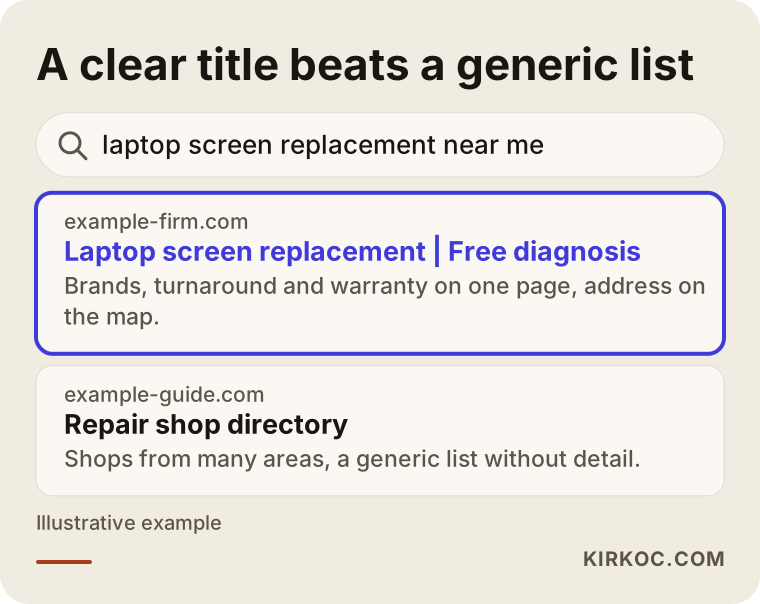
Notice that the highlighted result answers the questions in its title and snippet: which device, how the diagnosis works, and what the warranty looks like. The directory site says "shops from many areas" and does not make any one of them stand out.
What are people searching, and what are you writing?
There is a gap I see very often. You write "electronic device repair solutions" on your page, while the customer types "my phone won't charge." Google has become better at connecting those two sentences, but if you never use the customer's wording anywhere on the page, you give it little reason to show you. So your site should mention symptoms, device brands and the name of your city or neighborhood in a natural way, the way you would explain it to someone standing at your counter.
The table below sorts repair searches into four groups. Each one has a different intent and a different page that fits it.
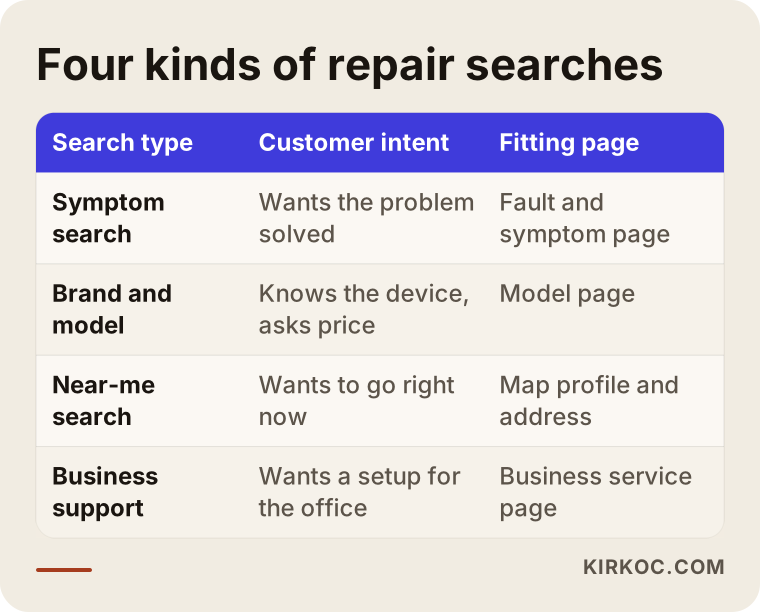
The main idea in the table is that a single "Services" page cannot satisfy any of these four intents properly. Giving each intent its own short, clear page helps both the customer and the search engine.
Why do so many repair websites fail?
The repair sites I see tend to fall into three types. The first is the one-page "business card" site: a logo, a phone number and two sentences. A visitor cannot find how pricing works, how long a repair takes or whether there is a warranty, so instead of calling to ask, they go to the next shop. The second is the multi-page site with nothing inside, full of lines like "We are experts in our field and offer quality service" that give no concrete information. The third is the template site that looks like everyone else's and breaks when opened on a phone.
The phone point deserves its own paragraph. When someone's computer is the broken device, they are probably reading your page on their phone. When the phone is the broken one, they may be using a spare phone or borrowing one. Either way, your site has to load fast on a small screen, your number has to be one tap away and your address should open in a map app. A site that looks great on a desktop but slides sideways on a phone loses customers directly in this industry.
The real obstacle is trust
The question in the customer's head is rarely "can this be fixed?" It is "are my device and my data safe with this person?" Someone who leaves a laptop with you may also be leaving family photos, private messages and sometimes work files. If your site has no section that answers that worry, even the best price will not remove their hesitation. Explaining what you do, where your parts come from, what warranty you give and how a device is logged when it comes in often does more than an ad could.
Which pages should a computer and phone repair site have?
The site does not need to be large, but every page needs a job. The image below shows the homepage layout I recommend, drawn like a browser window.
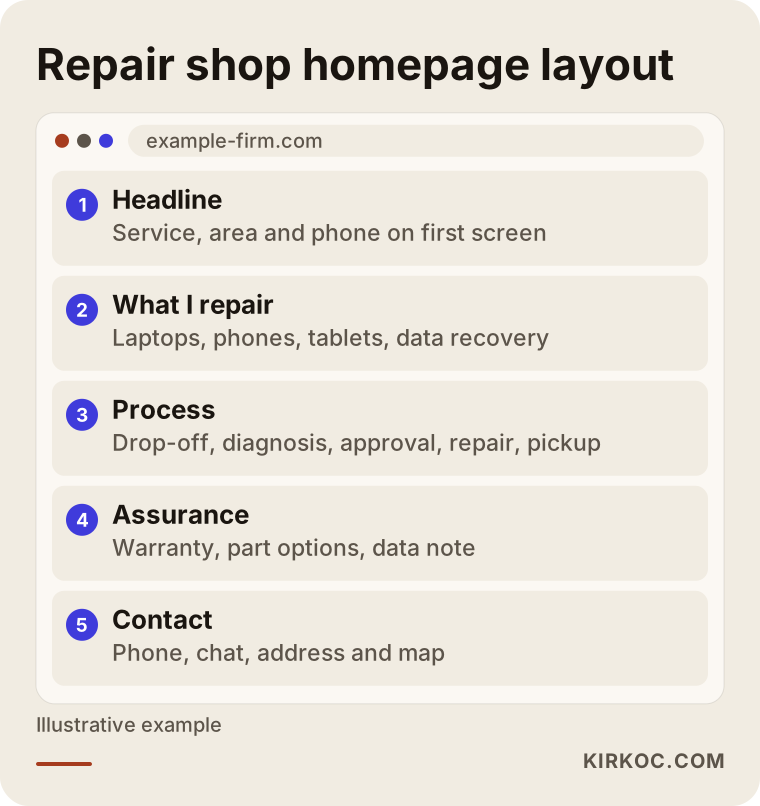
The order is not accidental. A visitor should first see what you do and where you are. Then they should see what you repair, how the process works, what protects them and, last, how to reach you. The call button should not live only at the bottom of the page. It should stay fixed in a corner of the screen as the visitor scrolls.
Core service pages
Give each major service its own page: laptop repair, phone screen replacement, data recovery, computer cleaning and tune-up, motherboard-level repair, and so on. On each page, explain which symptoms point to this service, how the repair works, roughly how long it takes and what the price depends on. Even if you do not want to publish numbers, saying "it depends on the screen model, whether the part is original or aftermarket, and how deep the damage goes" gives the visitor real information. It builds more trust than an empty "call for a quote."
Brand and model pages
For phone repair in particular, customers type the brand and model: "iPhone 13 screen replacement," "Galaxy charging port repair." It makes sense to build separate pages for the models you see most often. But if you copy a template and only swap the model name, you create no value. Each page needs something specific to that model, such as a known common fault, the part options or a difference in repair time. If you have nothing real to say about a model, do not make a page for it.
Area pages
If customers come from nearby towns or neighborhoods and not only the one where your shop sits, say which areas you serve. Do not paste the same paragraph for every suburb and change the place name. A few pages for the areas you genuinely serve, explaining how people reach you or how pickup and drop-off work, are plenty.
Business and on-site service page
If you maintain computers for small businesses or visit offices, give that its own page. An office manager wants something different from a walk-in customer: regular maintenance, quick response, backups and proper invoices. These customers do not come once. They can stay with you for years, so a dedicated page is very valuable.
A "Who fixes your device?" page instead of a generic About page
"About us" pages usually fill up with empty phrases. Instead, say who does the repair, how many years you have been at it, which devices you know best and what your bench looks like. A real photograph of your workshop builds far more confidence than a stock image.
Trust signals: warranty, parts and data privacy
If you answer the customer's questions in advance, you get fewer of them on the phone. The checklist below summarizes the trust items I suggest every repair site include.
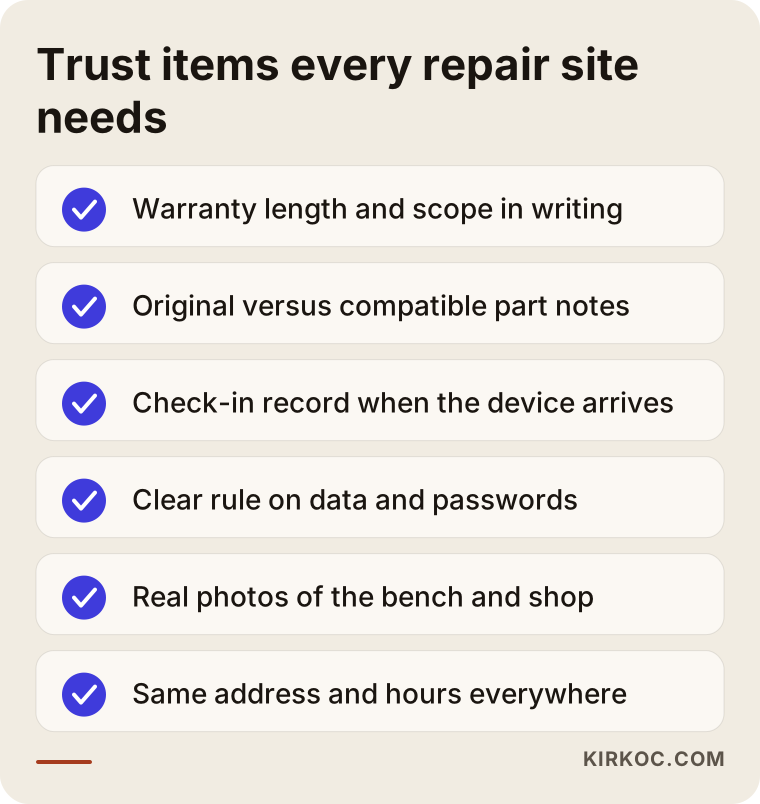
Of everything on that list, data matters most. The customer is trusting you with personal information. Write what you do when you accept a device, what your rule is about passwords and what you do and do not do with the data on it. You may have legal obligations in this area, depending on where you operate, and I suggest talking to an attorney to settle which wording is adequate. I can make sure that text is clearly visible on your site, but deciding its legal content is not my job.
Be just as clear about parts. Do you use original parts, third-party parts or used ones? If you give customers a choice, explain it on the site. Instead of writing "original parts on every repair," a claim you may not be able to back up in every case, it is both honest and more believable to say "part options vary by device, and I explain them before the repair starts."
Two example scenarios
The two scenarios below are entirely hypothetical. They do not describe a real person or business and exist only to show the reasoning.
Example scenario 1: The neighborhood phone repair shop
Imagine a small phone repair shop in a residential area. The owner has served the surrounding streets for years, but people who recently moved in do not know the place. There is no website. The shop does appear on the map, but the phone number is outdated and the opening hours are wrong. The first job for this shop is not to build a bigger site. It is to fix the business profile: the correct phone, the correct hours and real photos. After that comes a simple site: four or five service pages for screens, batteries, charging ports and water damage, the shop's working hours and a button that calls with one tap. Even a structure this small gives a clear answer to someone searching for a phone repair shop in their neighborhood.
Example scenario 2: A laptop and data recovery workshop
The second example is a workshop that specializes in computers and laptops and also does data recovery. Customer anxiety here is high. The failed drive might hold a thesis, accounting records or family photos. On this workshop's site, the data recovery page should be prominent, the process should be explained step by step (drop-off, inspection, an update on findings, your approval), and the wording should be honest, along the lines of "I cannot promise recovery, but I will inspect the drive first and tell you where things stand." A page full of big promises might bring phone calls in the short term, but a disappointed customer writes a bad review. An honest page brings fewer customers, but better matched ones.
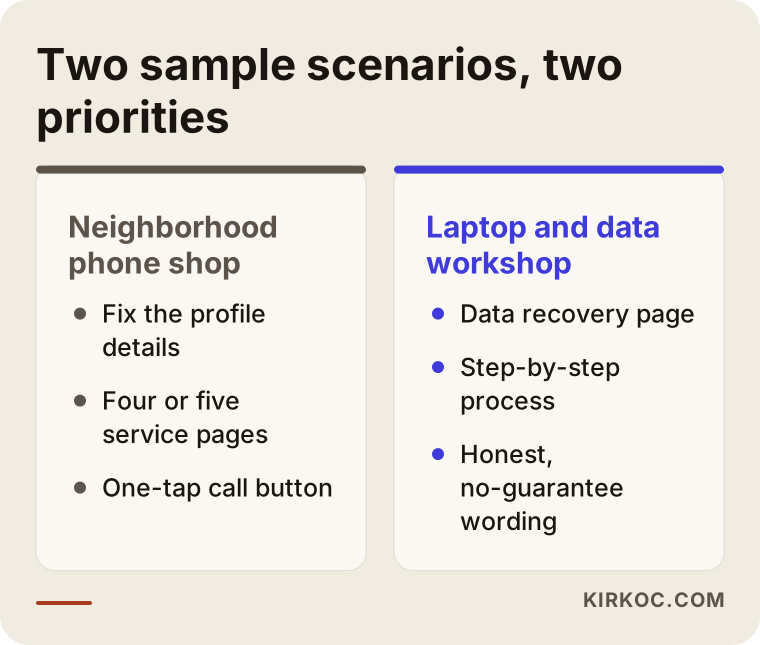
The conclusion from the comparison is that the two businesses do not need the same thing. One needs speed and proximity, the other needs trust and a transparent process. That is why there is no single template for a "repair shop site."
Step by step: how the site gets built
This is how the process runs in my way of working. It is not a recipe, only a frame so you can understand the logic.
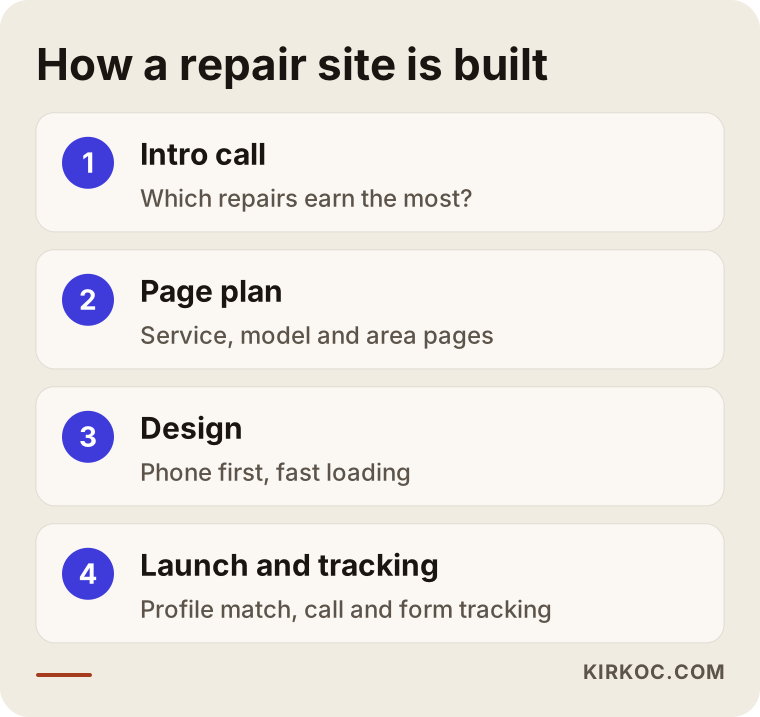
1. Introduction and defining the business
In the first conversation I ask which devices you work on, which repairs bring in the most money, which ones you would like to do more of and which areas your customers come from. The repair you do most often and the repair that earns the most are frequently different, and the site should push the one that earns.
2. Page plan and content
After that conversation I draft a page plan: which services, which models, which areas. For content, I collect real information from you, such as photos, working hours and warranty terms. I write the text and you confirm that it is accurate. No claim that is not true goes onto the page.
3. Design and setup
The site is designed to load quickly and is built phone-first. A call button, a chat or message button, your address and a map link are available on every page. The appointment or quote form stays short, because a stressed customer will not fill in a long one.
4. Launch, local visibility and follow-up
When the site goes live, I check that your Google Business Profile matches it. After that I watch which pages get visitors and how many people call or fill in the form. If needed, I improve pages, because a repair site is not a brochure you print once and forget. It is a tool that gets better over time.
Local visibility: the map, reviews and consistency
For a local business such as a repair shop, a website alone is not enough. Your Google Business Profile is the foundation of showing up in map results. Your business name, address, phone number and hours should be identical to what is on your website. A small mismatch, such as one number on the site and another on the profile, confuses the customer and makes it harder for search engines to recognize you as one business. Local search is a topic I cover in other articles. For now, just remember this: when you get your site built, fix your profile the same day.
Reviews carry a lot of weight in this industry. People read a repair shop's reviews and look at how a bad one is answered. A calm, explanatory and non-defensive reply sometimes builds more trust than a good review does. Make asking happy customers for a review a habit, but do not have fake reviews written. That is unethical and also against the rules of the platforms.
The customer journey: from visitor to customer
Not everyone who visits your site becomes a customer, and that is normal. What matters is that the right people can get all the way to calling you. The image below shows how visitors narrow down step by step on a repair site.
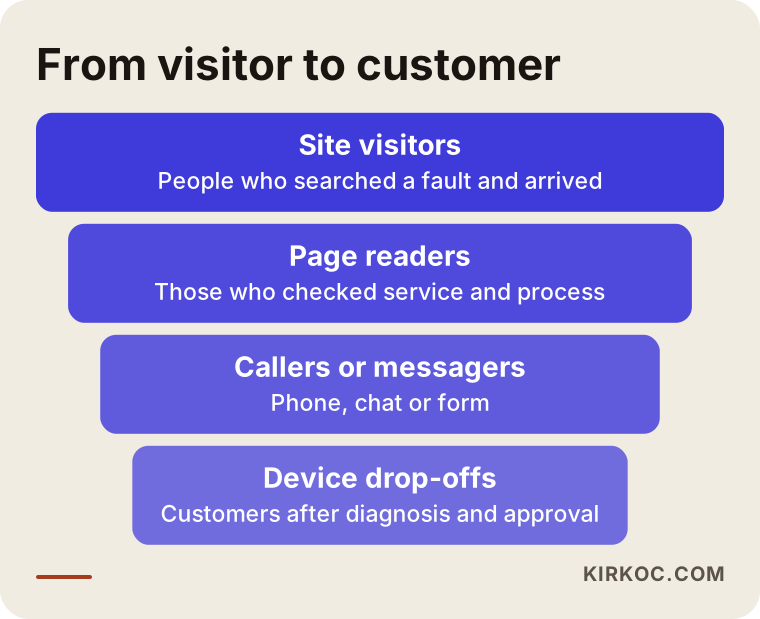
You will lose people at every step. Your job is to remove the obstacles that increase the loss for no reason: a slow page, a phone number that cannot be found, unclear information about timing, a form that is confusing.
Common mistakes
These are the mistakes I see most often on repair sites.
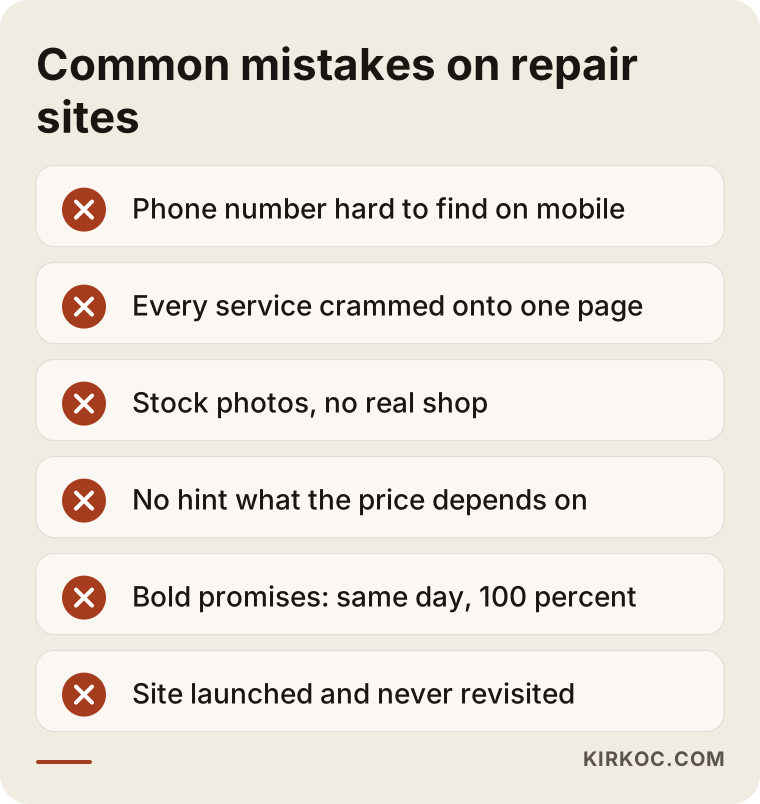
Let me go through them briefly. The first is a phone number that is hard to find on mobile. If it sits only at the very bottom of the page, the customer will not call. The second is cramming everything onto one page, so neither the search engine nor the visitor can tell which service is where. The third is stock photography. Photos of your shop, your bench and you at work are much stronger. The fourth is staying completely silent about price. You do not have to publish numbers, but you should always explain what the price depends on. The fifth is writing the address and phone number differently in different places. The sixth is launching the site and never looking at it again: an ended promotion, old opening hours or a service you no longer offer will damage trust.
There is one more mistake, and I think it is the most dangerous: exaggerated promises. Lines like "every device repaired the same day" or "100 percent data recovery" cause a loss of trust that is hard to repair when you cannot deliver. To protect both the customer and yourself, write only what you can actually provide.
What can you do yourself, and when do you need an expert?
You do not have to outsource everything. These are things you can do on your own: update the details in your Google Business Profile, take real photos of your shop and bench, ask customers for reviews, write down your five most common repairs and the time each one takes, and list the questions customers ask most. This is the most valuable raw material for the site, and nobody knows it better than you.
You need expert help when the site must be fast and work properly on phones, when the page structure has to be built so search engines understand it, when many service and model pages must be organized without them getting in each other's way, when the quote form and call tracking have to be measured correctly, and when social media and advertising need to work consistently with the site. Many people start with a ready-made template and stall halfway. A template is not a bad start, but fixing it later can cost more than building it properly the first time.
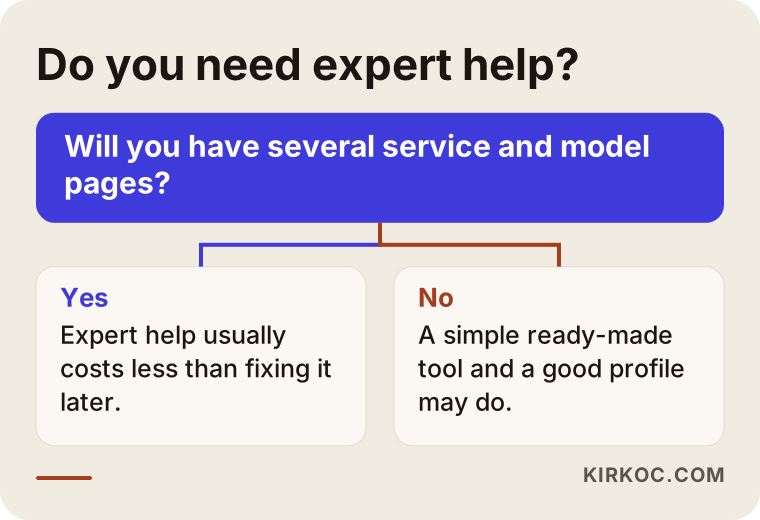
The decision flow is simple. If you only want an information page and you have the time, a ready-made tool may be enough. But if pages will multiply, competitors are strong and winning customers is a real goal for you, consulting an expert usually saves both time and the cost of later corrections.
What determines the cost?
I will not give you a number here, because the figure changes a great deal with the scope of the work. I can tell you clearly what moves the price.
The first factor is the number of pages. A site with five service pages is not the same job as a site with dozens of model and area pages. The second is content. If you prepare the text yourself, the cost goes down. If I write it and also have to gather photos and descriptions, the effort goes up. The third is extra features, such as online booking, a repair status lookup, a messaging button, several languages or online payment. The fourth is local visibility work: setting up the map profile, a review process and regular follow-up are a separate line item. The fifth is support after launch: updates, speed and security monitoring and adding content.
One distinction matters a great deal here. A one-time investment and ongoing work are different things. Building the site is one-time. Keeping and growing your visibility is continuous. I recommend separating the two from the start and planning your budget accordingly.
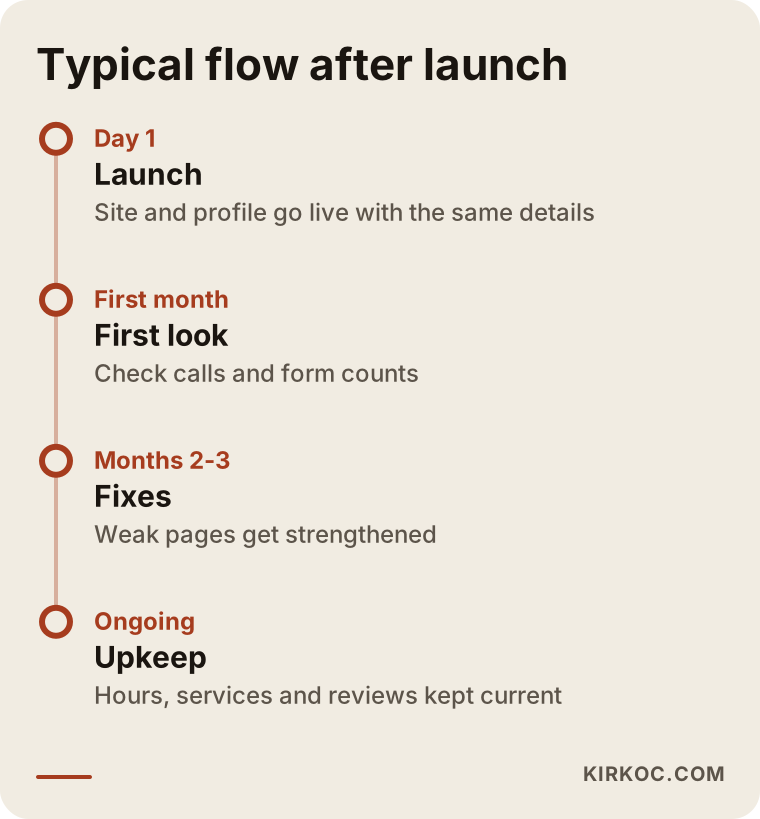
This timeline is not a promise. It shows a typical flow. Nobody can say with certainty how long results will take, because competition, your area, the type of service and your starting position all affect it. Be careful with anyone who guarantees otherwise.
What is it like to work with me?
I am one person, so the person you talk to is the person who does the work. I handle websites, search visibility, local SEO, social media (Instagram, Facebook, TikTok, YouTube), Google and Meta ads, logos and content on my own. For a fast-moving business like a repair shop, that has a practical advantage: the phone number on your site is the same as the one on your profile, the sentence used in an ad also appears on the site, and the repair photo posted on Instagram matches the page on your site. You do not have to carry messages between three different people.
At the first step I listen to you, look at the current state of your site and profile, and tell you what is truly needed. I will not sell you something you do not need, and sometimes a small fix is all you require. Once the scope is clear, you receive a written quote that spells out what will be done for each part of the work and when it will be delivered. I work remotely from Istanbul, and everything happens by message, call or video meeting, which suits a shop owner who cannot leave the bench for long.
Frequently asked questions
Do I really need a website for my repair shop, or is a Google Business Profile enough?
For a small neighborhood shop, a profile is often a good start. But a profile cannot describe your services in detail, explain your process or catch searches that come in with different symptoms. A website does what the profile cannot, and the two together are stronger.
Should I publish a price list on the site?
You do not have to. Repair prices change with the device, the part and the fault, so a fixed list can be misleading. Instead, I suggest writing what the price depends on, how people can contact you for a rough idea and that you do not start work without approval after the diagnosis.
Do I need a separate page for every phone model?
No. Make pages only for the models you see often and for which you can give real information. Dozens of pages that copy a template and change only the model name add no value for the customer or the search engine.
Should I add a chat or messaging button?
In most repair businesses, yes, because customers like to send a photo or video of the broken device and get a first idea. But if nobody will answer the messages, do not add the button. A button that goes unanswered tires the customer out more than it helps you.
How long after the site goes live until I show up on Google?
It is impossible to say exactly. Competition, your area and your starting position decide it. Map and local results sometimes move faster, while general searches take longer. Be careful with anyone who promises an exact time or ranking.
What should the site say about customer data?
Write in plain language how you log a device when it arrives, what your rule is on passwords and what you do and do not do with the data. You may have legal obligations in this area, so I recommend asking an attorney whether your wording is adequate.
Do I also need social media and ads?
Not necessarily. The site and the map profile should come first. After that, if it makes sense, a Google ad can highlight one specific service, or social media posts such as before-and-after repair photos can be added. You do not need to start everything at once, and going in order is healthier.
Can I update the site myself after it goes live?
Yes. It is possible to set the site up so that you can make simple changes yourself, such as opening hours, an announcement or a new service. For bigger structural changes, getting support keeps the site's organization intact.
If you are thinking about a website for your repair shop, let's talk through your services, your area and where you stand today. You can write to me through the website design page, and we can work out a simple roadmap that fits your business.