You run an IT support or cybersecurity company. You know your craft: you bring servers back up, clean up networks and close security holes. But your website is still a three-page storefront somebody threw together years ago, and competitors who know less than you show up above you in search results. This article is for you if you are thinking about a website for an IT or cybersecurity company, or about rebuilding the one you have. I am Ümit Kırkoç, I work from Istanbul, and I handle website design from start to finish by myself. Below I explain how customers in this field think, which pages your site needs and what to avoid, in plain language.
First, a point that surprises many technical founders: selling a technical service does not mean your site should be written in technical language. The person reading it is rarely an engineer. More often it is the owner of an accounting firm, a clinic manager, a plant supervisor or a shop owner. Their worry is not "which brand of firewall will you use." It is "what do I do if my computers will not turn on one morning?" If your site answers that question, inquiries arrive. If it does not, even the strongest expertise stays invisible.
How do IT and cybersecurity customers search for you?
Search behavior in this field clusters at two ends. At one end is the person in an emergency: the server went down, ransomware (malicious software that locks your files until you pay) has made documents unreadable, or email looks compromised. This person does not do calm research. They grab the phone and try to reach the first place that looks trustworthy. At the other end is the planned buyer: an office that is growing, a company about to replace its systems, or someone unhappy with their current IT provider. This person looks for weeks, compares three or four companies and searches for references and working methods.
In both cases the search phrases are everyday language. Think "computer support for my office," "monthly IT support company," "data recovery after ransomware," "network security test for my business" or "GDPR-compliant IT setup for a clinic." Even people who know the technical vocabulary usually type their problem first. So your page titles and descriptions should contain the customer's problem sentence before they contain product names.
The illustration below uses an invented search to show the difference. The page whose title matches what the customer typed, and says plainly what it does, looks more convincing than a vague one.
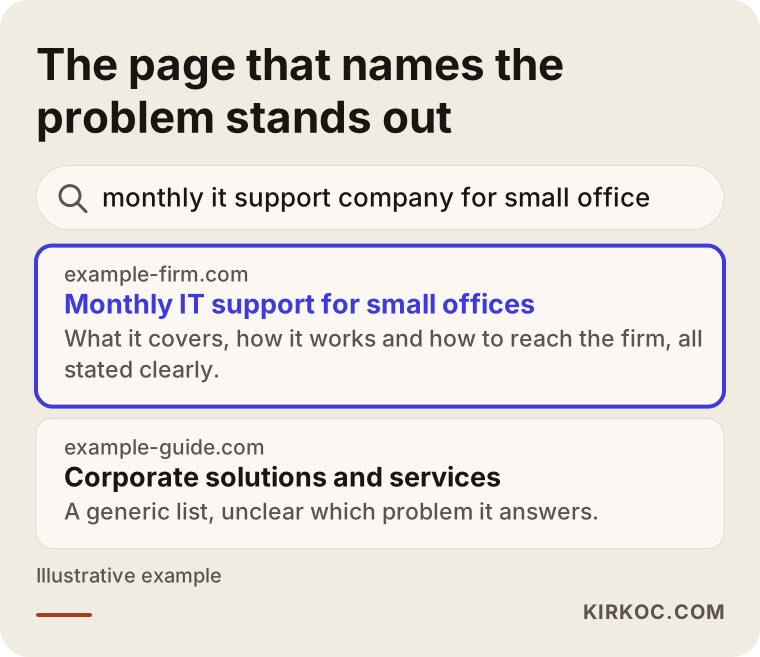
What the highlighted result delivers is the answer to "what do you do, for whom, and where" at a single glance. A generic headline such as "enterprise solutions" does not do that job. Google is also trying to work out what question a page answers, and if you state it openly, you make that work easier.
Trust comes before everything else in this field
On a restaurant site, photos make people hungry. On an IT or security site, the main thing is trust. A customer is about to give you access to their network, their data and sometimes their administrator passwords. So whoever browses your site is asking, consciously or not, the same question: "Can I hand these people the keys to my building?" Your site should answer it in three ways: show clearly who you are, explain how you work, and be upfront about what happens if something goes wrong.
Small details matter. If the site has no address, phone number, named people with photos, business registration details or privacy policy, the visitor wonders whether anyone is really there. And if you are a cybersecurity company whose own site is not secure, it is worse: an expired certificate warning, a hole from an outdated plugin or spam comments read like a locksmith who leaves his own front door open.
The pages your site needs
This field calls for many pages, but organized ones. Stuffing everything into a single "Services" page tires the reader and also stops each service from being found on its own in search. A rule that works well here is one page per customer intention.
The main pages are:
- Home page: A short sentence in the first screen saying whom you help and with which problem, a phone button, and shortcuts to the three or four most searched services.
- Service pages: A separate page for each core service, such as managed IT support, network and infrastructure setup, backup and disaster recovery, email and cloud migration, security testing and incident response.
- Industry or customer-type pages: Medical practices, accounting firms, manufacturers, law offices and so on, each with its own sensitivities. In healthcare, patient data stands out; in accounting, financial records do.
- A "how it works" page: Written in your own voice, from the first call to the contract, from setup to monthly reporting. This page carries most of the trust.
- About page: Real names, certifications, areas of experience. Whether you are one person or fifty, show who you are.
- FAQ and blog: Real answers to the questions already in your customers' heads.
- Contact: Phone, form, working hours and what to do in an emergency.
The graphic below shows how such a structure can be laid out on a single service page, as a sample page outline.
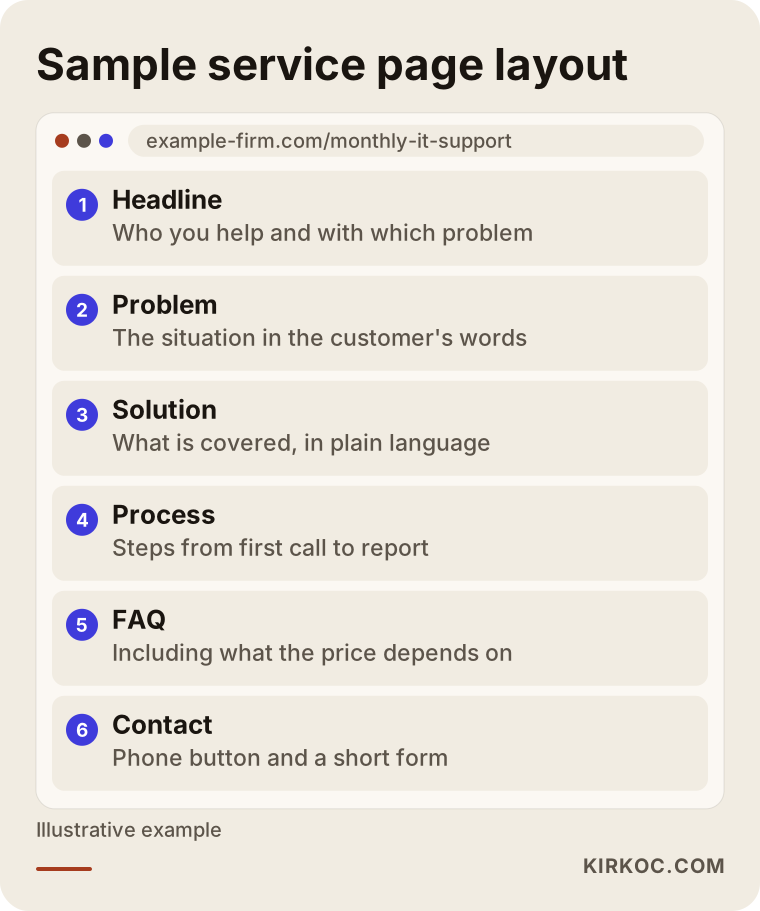
The logic of the outline is simple: the reader's problem first, then your approach, then how the work proceeds, and finally a clear next step. Pages that open with a product list lose the customer who cannot yet describe the problem precisely.
What to write on a service page, and what to leave out
Every service page should answer four questions. What exactly is this service? Who is it for? How does it run? What do I get at the end? If you write "managed IT support," explain it in one sentence: "An ongoing arrangement where someone looks after your computers, email, printers and network, so you do not pay separately for every problem." A sentence like that opens the door for someone who does not know the term.
There are also things not to write. Promises you cannot keep, such as "flawless 24/7 uninterrupted support," claims like "100 percent security," and sentences that run down competitors are misleading, and they also grate on anyone who knows the field. Honest language is a sales strategy here: no system is completely secure, and a customer who knows that trusts the firm that says it.
Two hypothetical scenarios
The scenarios below are entirely hypothetical. They do not describe any real company or person; they are built only to make the process concrete.
Scenario 1: A four-person firm supporting small businesses
Imagine a four-person IT support firm. Most of its customers are accounting offices, small clinics and ordinary offices, and all of them came by word of mouth. The website is a single page with a list: "Our services: computer repair, network setup, security, software." No new customers are arriving, because the referral network has reached its limit.
The job here is to rebuild that one page into a structure that mirrors how customers think. First come pages separated by customer type: one for accounting offices, one for medical practices, one for small offices. Each page speaks to that field's real worry, for example what a broken computer costs during a tax-season rush, or why a clinic needs a backup of patient records. Then a "how monthly support works" page is added: first meeting, an inventory of devices, regular maintenance, how to report a problem, a short monthly report. And on the service pages, the areas actually served are stated honestly rather than stuffed with every neighborhood name. There is no guarantee of results, but this structure raises the chance of being found and the chance that a visitor is convinced.
The graphic below summarizes the steps for a firm like this.
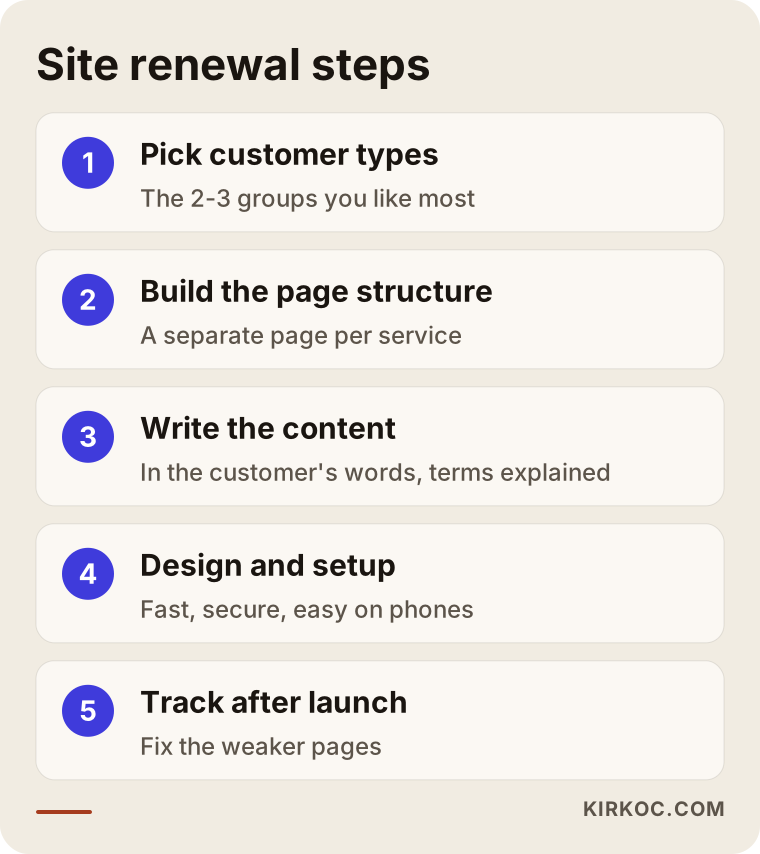
When the steps run in order, it is clear at each stage what has been finished and what comes next. This order is often scrambled; if design starts before the content is written, the pages turn into empty boxes.
Scenario 2: A boutique firm doing security testing and consulting
The second hypothetical case is a two-person boutique firm offering penetration testing (authorized, controlled attempts to break into a system to find weaknesses) and security consulting. Its customers are larger companies, and the buying decision is made by several people: an IT director, a general manager who signs off, perhaps someone from legal or compliance.
Here the site should feel less like "get a quick quote" and more like a reference showing what you do and how you do it. Test types, such as web application, internal network and external network, are described on separate pages. A sample report structure is shown as an empty template with all identifying details removed. The approach to confidentiality and data handling is written clearly: what happens to data seen during a test, who can see it, how the report is delivered. On regulation and compliance, instead of giving firm legal opinions, the firm draws an honest line: "for legal questions, please consult your organization's counsel." One wrong legal claim can destroy trust in this field in an instant.
The comparison graphic below shows how the priorities of the two sites differ.
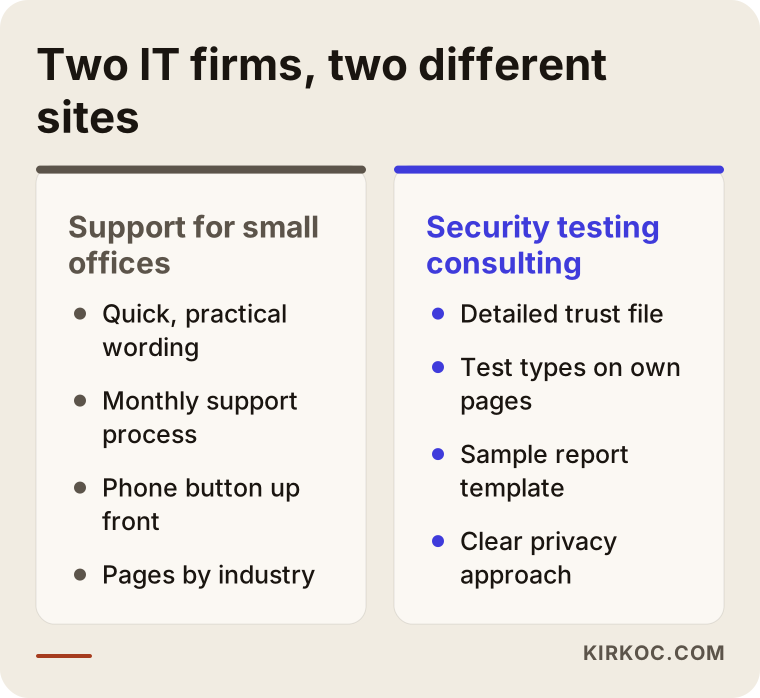
In both cases the common thread is the same: write with the visitor in mind, knowing who they are and what they are dealing with. One needs something fast and practical; the other expects a convincing file of evidence.
The process of building the site
An IT or cybersecurity site can be built in five or six clear steps. The steps are specific to the field, and they also move faster when one person runs them. When design, writing, technical setup and search preparation sit with the same person, the time lost when one team hands information to another disappears.
1. Separate your target customers and services
In the first conversation, I look for a clear answer to "who do you want to serve?" Most IT firms say "everyone." But a ten-person office and a factory with three hundred employees differ in needs, pricing model and the way you talk to them. First you pick the two or three customer types that are most profitable and that you enjoy most, and the services are grouped around them.
2. Page map and search phrases
Each page gets one purpose, and real search phrases are matched to that purpose. This can be a simple table or list. It settles which page serves which intention: which one is written for the person in an emergency and which one for the person comparing options.
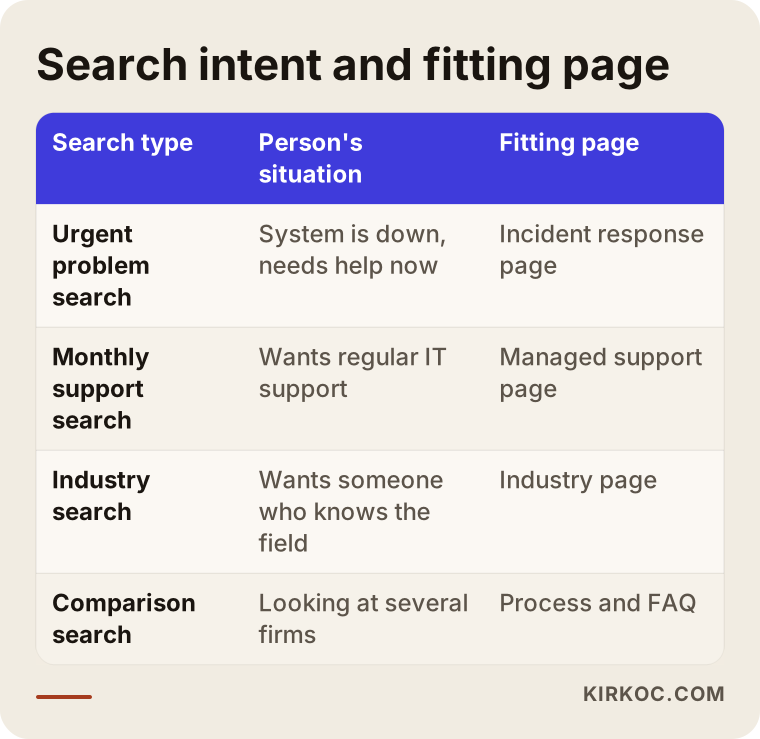
The table shows which kind of search lands on which page. Loading more than one intention onto a page weakens both, which is why the separation matters.
3. Content and trust elements
Texts are written in the customer's language. Technical terms are used when needed but explained in a sentence, for example: "A backup is a copy of your files kept somewhere else; if the main copy is ever damaged, you can go back to it." Team photos, certifications (only if you truly hold them), your way of working and contact details are added. If you plan to use customer testimonials or references, use them only from real people who have given permission, in the form they approved.
4. Design and technical setup
The design should be clean, fast and easy to read on a phone, because a person in an emergency usually calls from one. The phone button should be visible on every page and the form should be short. On the technical side, a secure connection (the lock icon in the address bar), regular updates, backups and form spam protection are mandatory. Your site itself is proof of the security mindset you sell.
5. Follow-up after launch
The work does not end when the site goes live. In the first months you watch which pages get visits, which search phrases bring people in and whether the form is being filled out. Weak pages are fixed, and new articles are added for questions that are still unanswered. I do not promise results, but moving ahead without watching is flying blind.
The timeline below shows the main stages of a sample project schedule.
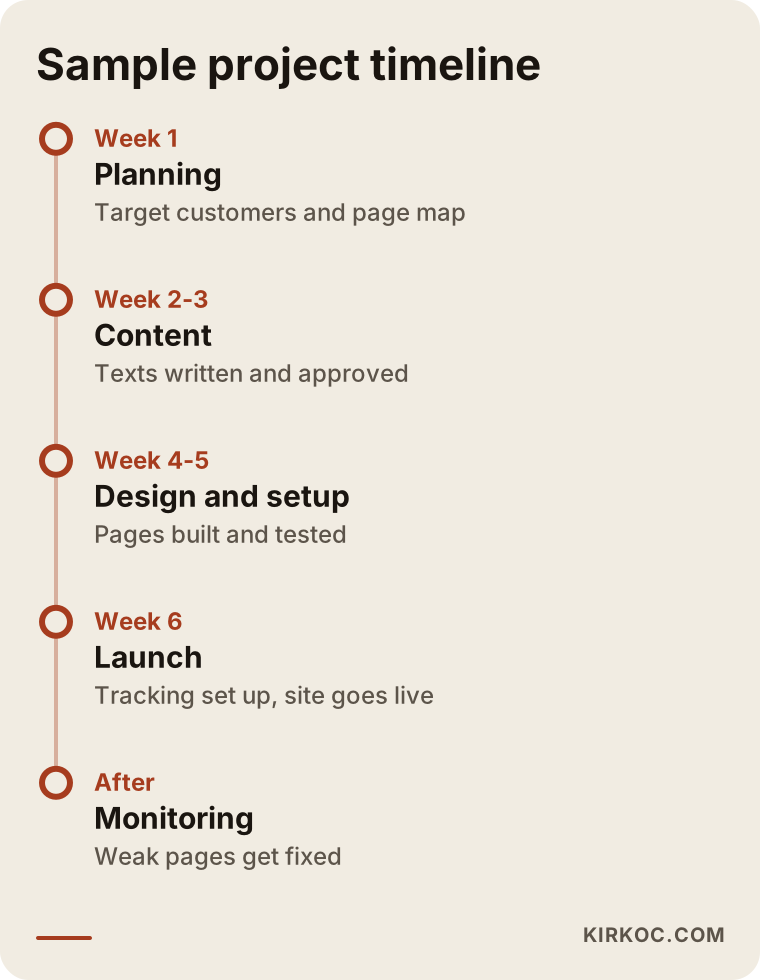
The timing depends on the size of the job and how quickly you approve the content. The most delay usually comes not from design but from approving the texts, so the time you set aside for content decides the pace of the project.
Common mistakes
Most of the mistakes I see in this field are not technical but about how things are explained. Here are the most frequent ones.
Pages full of product and brand names. Listing the names of three different security products tells the reader nothing. Write first what you provide, and then, if asked, which tools you use to do it.
Trying to sell through fear. Sentences like "you could be the next victim" grab attention for a moment but damage trust and do not look professional. Describing the real risk in a calm tone is far more effective.
Neglecting your own site's security. An old plugin, an outdated theme or an expired certificate is the worst advertisement a cybersecurity company can have.
Staying completely silent about price. You do not have to give a number, but explaining what the price depends on (number of users, number of devices, support hours, scope) protects the customer from wrong expectations and improves the quality of the inquiries you receive.
Offering only a phone or only a form. You need a phone for emergencies and a form for planned requests. Offer both.
Squeezing everything onto one page. It tires the reader and keeps each service from being found separately.
The graphic below collects these mistakes as a warning list.
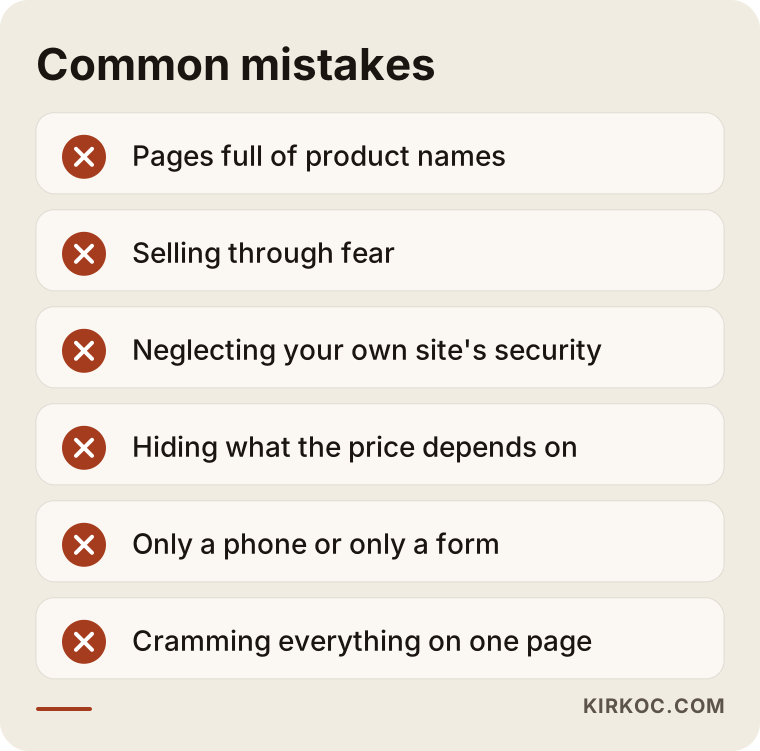
Simply comparing the list with your own site can be a good first step. If you recognize yourself in three items, the timing for a rebuild is still right.
What can you do yourself, and when do you need an expert?
You do not have to hand everything to a specialist. There is work you can do on your own, and doing it protects your budget and speeds up the process.
What you can do yourself: decide which type of customer you want to work with, list the questions you were asked most often in the past year, write down in your own sentences why customers choose you, gather your certifications and working method, and ask real people for permission to be used as references. This material is the raw stuff of a good site, and nobody knows it better than you.
The work that needs an expert is page architecture, a structure that search engines can read, fast and secure technical setup, design and measurement. Monitoring and fixing the site after launch also usually needs regular attention. One more point: for privacy notices, cookie texts and any statement about regulation (for example, which privacy laws apply to you), you should consult an attorney. I make sure these texts sit in the right place on the site; whether their content is legally adequate is a lawyer's job.
The decision chart below offers a simple frame for the question "when should I get outside help?"
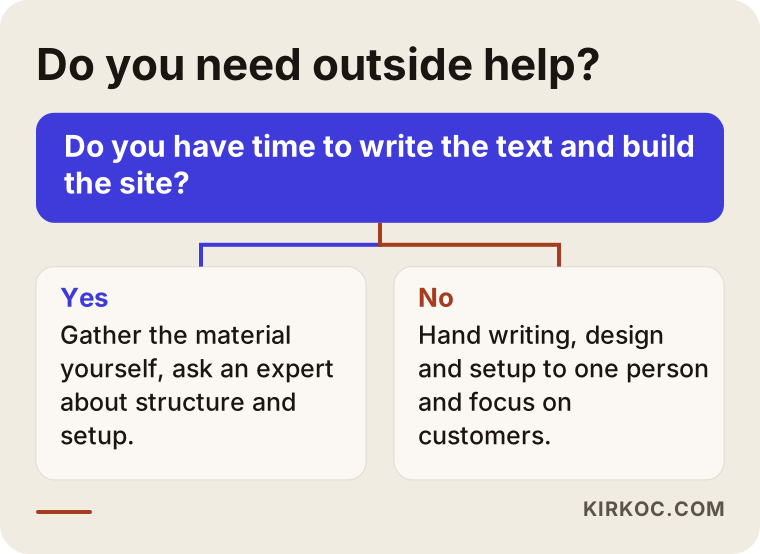
The core of the chart is this: if your real return comes from talking with customers, handing off the technical and writing load is a sensible investment of time.
A site alone is not enough: search, ads and social media
A good site is the foundation, but it is not the only way to reach customers. Several supporting channels work particularly well in this field. Local search visibility, for searches like "IT support near me," depends on your Google Business Profile being accurate and current. Google ads are a fast route for urgent searches with clear intent, such as data recovery, but they need a budget and follow-up. LinkedIn is the most natural social channel for reaching corporate decision makers; short, cautionary, unexaggerated posts build trust. Being mentioned in the answers of AI assistants is also becoming more important, and that takes clear, accurate, well-structured pages.
Having all of this run from one hand has a practical benefit: the service description on your site, the sentence in your ad, your LinkedIn post and the title in the search result do not contradict one another. If a customer reads something in one place and sees it differently in another, they hesitate; consistency is a trust signal in this field. And when a problem comes up, there is one person to talk to, so you never hear "that is not my department, ask the other team."
The graphic below shows, conceptually, the stages a visitor passes through from the first search to an inquiry, and where visitors are lost along the way.
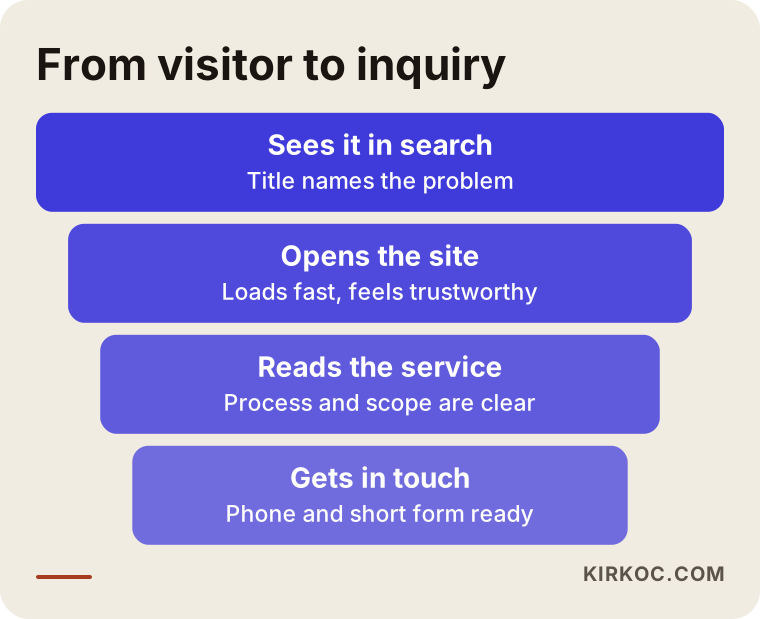
The funnel is conceptual; I give no numbers, because they differ for every company. But the logic is the same for everyone: if you remove one obstacle at each stage, more people move on to the next step.
Showing up in AI answers
People now ask assistants such as ChatGPT questions like "how do I choose an IT support company for my small office." Whether your name appears in those answers depends on how clear and accurate your site is. The basics are writing service descriptions plainly, answering frequently asked questions, keeping your contact details consistent and producing content that obviously comes from someone who knows the subject. There is no guarantee here either, but a well-built site is the first solid step in this new way of searching as well.
The example below shows what information an invented AI answer relies on.
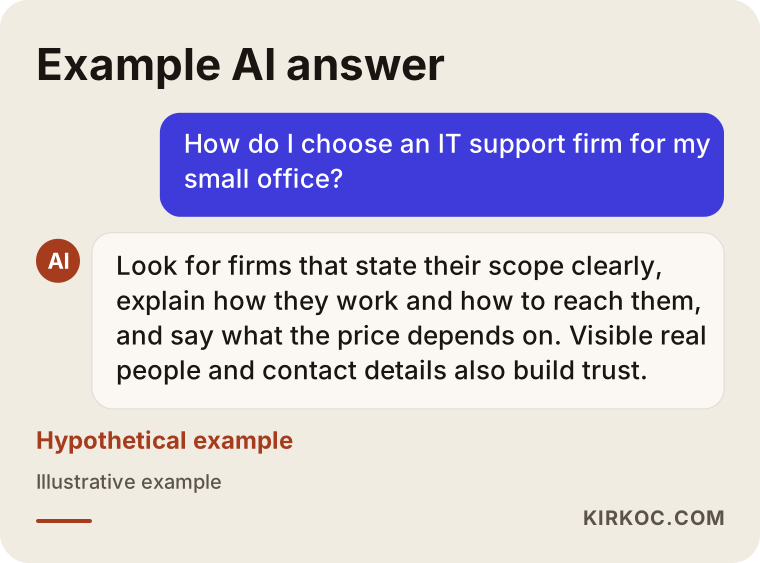
The criteria that stand out in the answer are things a good site should already be explaining: how you work, scope, ways to reach you and transparency. In other words, a site written well for people is also easy for machines to understand.
What determines the cost?
How much a site in this field costs depends on a few clear items. I am not giving numbers here, because a figure quoted before the scope is clear is misleading.
Number of pages and volume of content. A five-page introductory site is not the same job as a site with fifteen service and industry pages. Writing the content is also a major part of the cost, because good writing takes time.
Level of design. There is a difference between adapting a ready-made structure and a design drawn specifically for your brand. If you have no logo or visual identity yet, preparing those falls within the scope too.
Number of languages. If you serve customers abroad or have international clients, each extra language means new text and separate pages.
Technical requirements. An appointment system, a link to a client portal, a support request form and integrations widen the scope.
Search engine and measurement setup. Page titles, structured data, speed improvements and tracking setup can be included as a baseline; ongoing SEO work is a separate, continuing job.
Maintenance after launch. Updates, backups and monitoring cannot be neglected, especially for a security company; discussing this at the start prevents surprises.
When you request a quote, ask in writing what the price covers and what it does not. Always ask what phrases like "unlimited revisions" or "all-inclusive" actually include.
How I work with you
I am one person, and that is an advantage: the person you speak to is the one who designs the site, writes the text, does the technical setup and answers your questions after launch. The purpose of the first conversation is to listen to you: which customers you work with, what you rely on, what you dislike about the current site. Then I share the scope and timeline in writing. Besides the website, SEO, local SEO, Google and Meta ads, social media management including LinkedIn, logo design and content production can run from the same place; you do not have to buy all of it, but when a need appears you do not have to look for a new contact. It also takes me time to learn your business, so I will ask many questions in the first weeks, and that is normal.
Frequently Asked Questions
How many pages should an IT company website have?
There is no fixed number, but a home page, a few service pages, a process page, an about page and a contact page are a reasonable base to start. As your services and customer types diversify, the page count grows. What matters is not the count but that every page has one clear purpose.
Should I show certifications on a cybersecurity company site?
If you truly hold them, yes, but as information rather than decoration: explain in one sentence what the certification means. Claiming a certification or partnership you do not have is unethical, and it destroys trust the first time someone asks about it.
Can I use customer references on my site?
Only with the written consent of the customer in question. In security work even a customer's name can be sensitive; in that case use anonymous descriptions such as "an accounting firm." For details about personal data, consult an attorney.
Should I put prices on the site?
You do not have to list numbers. But explaining what the price varies with (number of users, number of devices, support scope) reduces unsuitable inquiries and reassures serious customers.
Does blogging really help in this field?
Yes, if it answers the questions customers actually ask. Plain articles such as "what to do first after a ransomware attack" or "why a backup is not enough on its own" can show up in search and build trust. Copies of general security news do not help.
How long after launch will I see results?
That cannot be guaranteed. It depends on competition, the age of the current site and the content. Inquiries that come directly by phone or through ads can arrive faster; visibility in search usually builds over a longer period.
Is it better to renovate my old site or start from scratch?
If the current site runs on an outdated platform, is not being updated and has a messy structure, starting from scratch is often healthier. But if the old site already has some visibility in search, that has to be preserved when addresses are moved. I would weigh both with you in the first conversation.
Will I be able to update the site myself?
Yes, I can set it up that way: a simple admin panel for text and photo changes, plus a short walkthrough. Handling the technical updates and security side under regular maintenance is usually safer.
If you would like to plan your IT or cybersecurity company's site together, reach me through my website design page, and I will listen to your situation and explain the right path plainly.