If a crane does not show up on a job site in the morning, the day is lost. That is why someone who needs a machine for tomorrow does not browse politely. They grab their phone and type a search into Google. If you have the fleet and the operators but the phone is not ringing enough, the problem is often not your machines. It is the page they land on. A website for an equipment or crane rental company is the first place your reputation in the field meets the internet, and if a visitor finds missing information there, they move on to the next company. In this article I explain how I think about this and what your site needs to carry. I am Ümit Kırkoç, I work from Istanbul, and I will be upfront about the scope of my own website design service where it matters.
Let me settle one thing first: in this industry, a website does not work like a store with a shopping cart. Nobody adds an excavator to a cart and pays by credit card. Your site is a quote-request machine. The visitor understands what they need, trusts you, and either calls or fills in a form. Every decision about the site should be made with that goal in mind.
How do customers search for equipment rental online?
You cannot plan pages without knowing your customer. People searching in this industry fall roughly into three groups. The first is the site foreman or general contractor. They know what they want and type a precise machine name, such as "20 ton excavator rental" or "boom lift rental." The second is someone who does not know this trade at all: a person who needs materials lifted onto a roof, a tree taken down, or a heavy unit set in place at a warehouse. They type "crane rental" and have no idea what capacity they need. The third is the purchasing manager, who collects quotes from several companies and looks at your insurance, paperwork and references.
The three groups expect different things. The foreman wants a fast answer and an available machine. The first-timer wants to be guided. The purchasing manager wants proof that you are reliable. A good site serves all three, but it does not cram everything onto every page. Each page has one subject.
Geography matters too. Equipment rental is a local business. Your machine can travel from one city to the next county, but most customers look for a company "near me." That is why city and neighborhood names appear in so many of these searches. The illustration below shows a completely hypothetical search result.
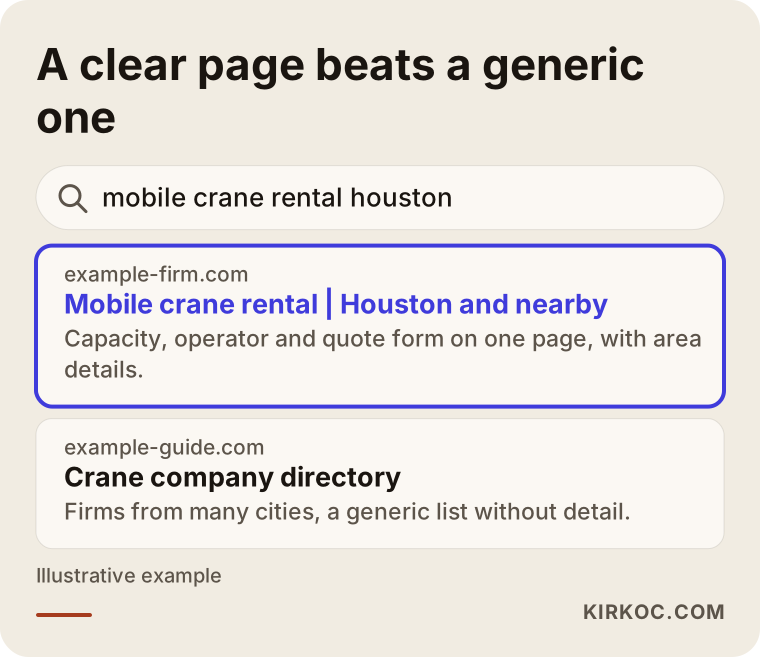
The highlighted result says what it rents, where it works and how to reach it in the first line. The generic directory site says a little about everything and nothing clearly. Google tries to show the reader the most fitting answer, and if you make that easy for it, your chances of showing up improve. That is not a ranking guarantee. It is just the right direction.
Searches have different intent, so pages should differ too
On many rental sites, every machine sits in one list on a single "Services" page. But someone looking for an excavator and someone looking for a mobile crane are asking very different questions. The table below sums up the intent behind each type of search and the page that fits it.
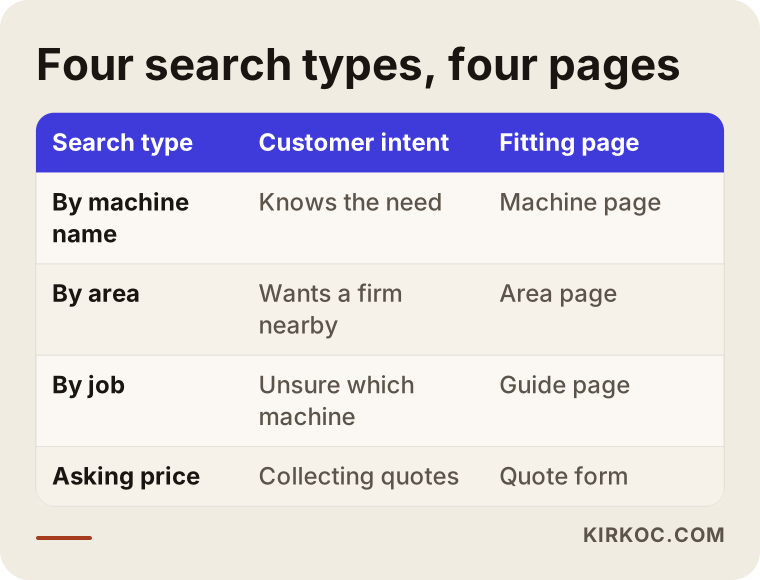
Notice the "by job" row. Someone describing a need, like "lift materials onto a roof" or "set a heavy unit in place," is the person who does not know the machine name. To reach them, you can add short, plain-language "which machine for which job" pages next to your machine pages.
The pages your site should have
Each page answers a separate question. These are the core pages for this industry:
Home page. It should say what you rent, which areas you serve and how to reach you, all on the first screen. The phone number and the quote button should be visible without scrolling.
A separate page for each machine type. Mobile crane, tower crane, boom lift, excavator, forklift, loader, air compressor, and so on. Each page describes one machine.
Service area pages. For the cities and counties you genuinely serve. Each area needs real, useful information. Copy-paste pages where only the city name changes do not help, and they can even hurt your site.
Projects and references. Short job summaries with photos: what kind of site, which machine, how long the job took.
Credentials and safety page. Operator qualifications, insurance, inspection records. Before you make firm statements about these, check your own paperwork and the rules that apply to you, such as the workplace safety rules where you operate. If you are unsure, talk to a lawyer or a safety professional.
FAQ and contact. These can be a separate page or sit at the bottom of each machine page.
How should a machine page be laid out?
The machine page is the part of your site that brings in the most work. The illustration below shows a sample page flow with a made-up domain name.
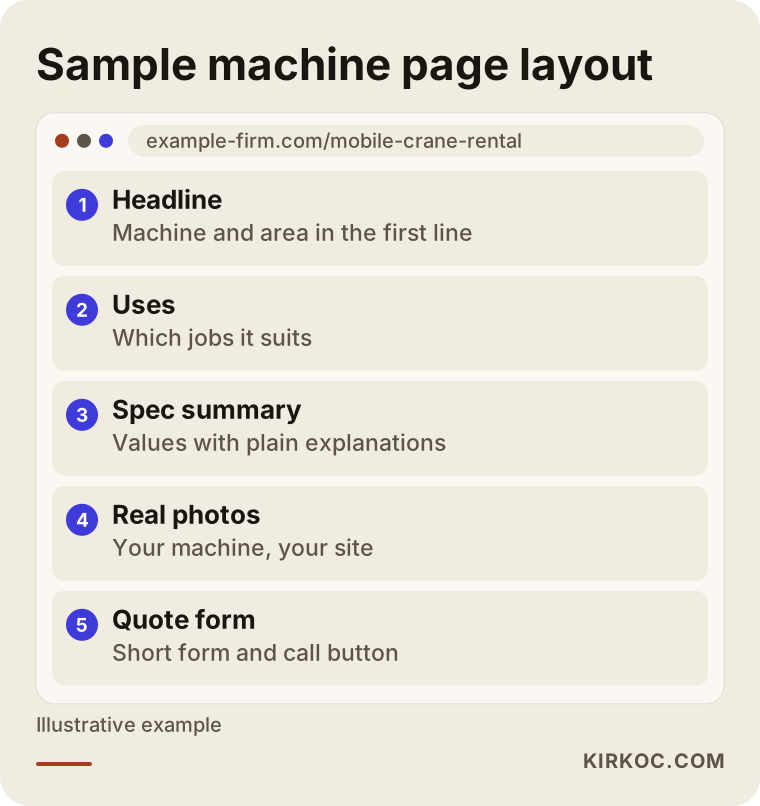
The logic of this flow is to answer the questions in the visitor's head in order: "What is this machine for? Does it suit my job? How high or how deep can it reach? Does it come with an operator? How do I get a quote?" If the page does not answer these, the visitor will ask you on the phone, or they will not call at all.
Explaining technical details in plain language
The written language in this industry often reads like a catalog: tonnage, boom length, working height, engine power. These numbers are necessary, of course. But a person outside the trade reads them and cannot tell what they mean. So it helps a lot to put a one-sentence explanation next to each technical value. For "boom length," you could add "how far the arm of the machine can reach." For "lifting capacity," you could write "the heaviest load it can carry at a given distance." That keeps customers from picking the wrong size.
This does not just make readers comfortable. It also shortens phone calls with people who requested the wrong machine. If you answer the same question many times a day, putting part of that answer on the site saves you time.
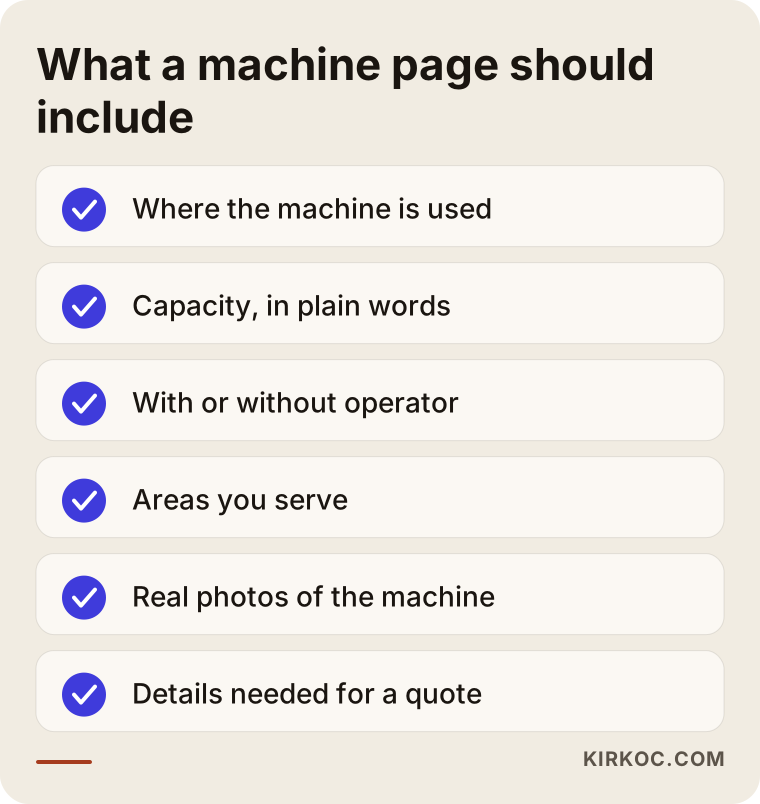
Every item on the list is something customers ask on the phone most often. A visitor who finds all of it on the page is better prepared when they call, and the conversation shifts from "will this work?" to "when can you be here?"
Trust is everything in this business
Renting heavy equipment is expensive and carries risk. When a customer has a machine delivered to their site, they are buying more than the rental. They are buying safety on the job, showing up on time, and having someone to call when something goes wrong. So trust signals are not decoration. They are a main part of the site.
Real photos come first. Clear pictures of your own machines, taken on your own jobs, build far more trust than stock images. If you prefer not to show plates or customer names, you can still show the overall machine. A short video can also work well: the operator preparing the machine, or a delivery arriving on site.
The second element is showing who you are. How many years you have operated, who is in the field and where you work from should be written plainly. I work alone, so I know this well: a customer who knows who they are dealing with decides more comfortably.
The third element is reviews and references. With your customer's permission, you can add a one-line comment or a short summary of the job you did. Never use made-up reviews. It is unethical, and if it is discovered, you lose all trust at once.
Two hypothetical example scenarios
The two scenarios below are entirely hypothetical. They do not describe a real company or person. They are made up only to make the situation concrete.
Scenario 1: A mid-sized crane company with a one-page site
Suppose a company has a few mobile cranes, a boom lift and several operators. Its site is a single page: a logo at the top, a list reading "Our services: crane, lift, hauling," and a phone number. Most customers come through word of mouth. The company wants to grow, but very little comes in from online searches.
The job here is to split the single page by machine type. Separate pages get written for mobile cranes, boom lifts and hauling. Each page includes uses, capacity ranges, operator information and a quote form. Service area pages with real details are added for the counties and cities the company covers. Within a few months more pages begin to appear in search results, but how long that takes depends on competition and the starting point, so I cannot give a timeframe.
Scenario 2: Visitors arrive but nobody asks for a quote
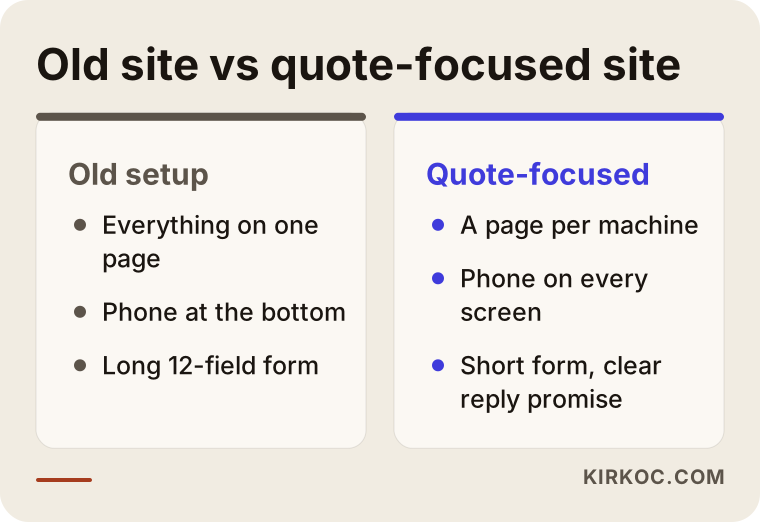
Suppose another company has a site, and visitors do come, but very few requests arrive through the form. When the page opens, there is a large slideshow on the first screen, and the phone number sits at the very bottom in small print. The form has twelve fields and overflows on mobile.
Here the problem is not being found. It is converting. The fix: make the phone number and a "request a quote" button visible on every screen, cut the form to four or five fields (name, phone, machine type, job site or county, and a short note), allow one-tap calling on mobile, and say after the form is sent when and how you will reply. These small changes often make a difference faster than finding new visitors.
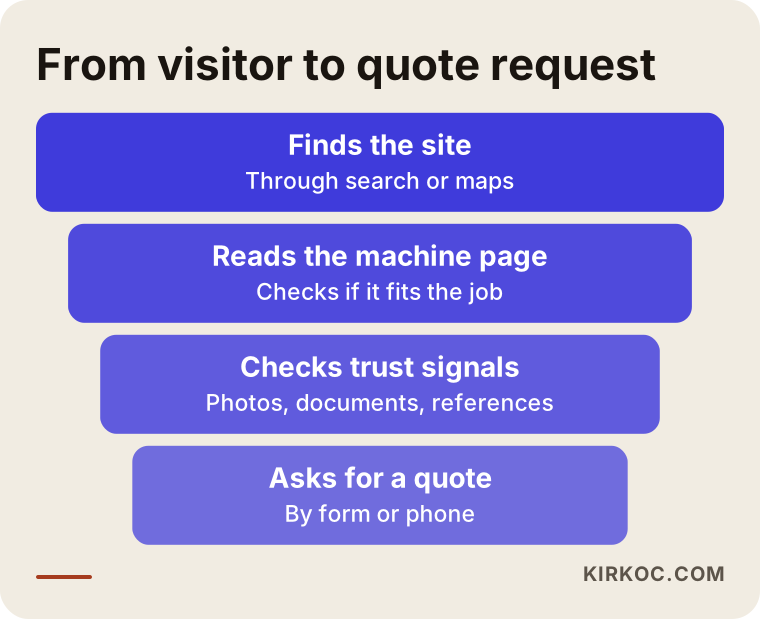
The funnel illustration sums it up: at every step, some of the visitors drop off. The goal is to understand those drop-offs and fix the step where you lose the most. I am not giving numbers, because they come out differently for every company. What matters is seeing the loss on your own site.
Step by step: how I build this kind of site
This is the order I follow, and each step builds on the one before.
- Conversation. First I listen to which machines you rent, which areas you work in, which jobs make you money and which jobs you do not want. For example, you may only offer rentals with an operator, and that detail shows up across every page.
- Search plan. I work out which words your customers use to search and turn them into a list of machines and areas. That list decides which pages get written.
- Structure and design. I plan the page flow, where the phone and form go, and the mobile layout. Most visitors will come on a phone, so I think about mobile first.
- Content and photos. I write the text for every machine and area page. I collect real photos and short notes from you.
- Technical setup. Speed, security, introducing the site to search engines, and links to your map and business profile are set up.
- Launch and tracking. The site goes live, and I track which pages get visits and how many calls and forms come in.
- Refinement. In the first months, pages are improved based on the data that arrives.
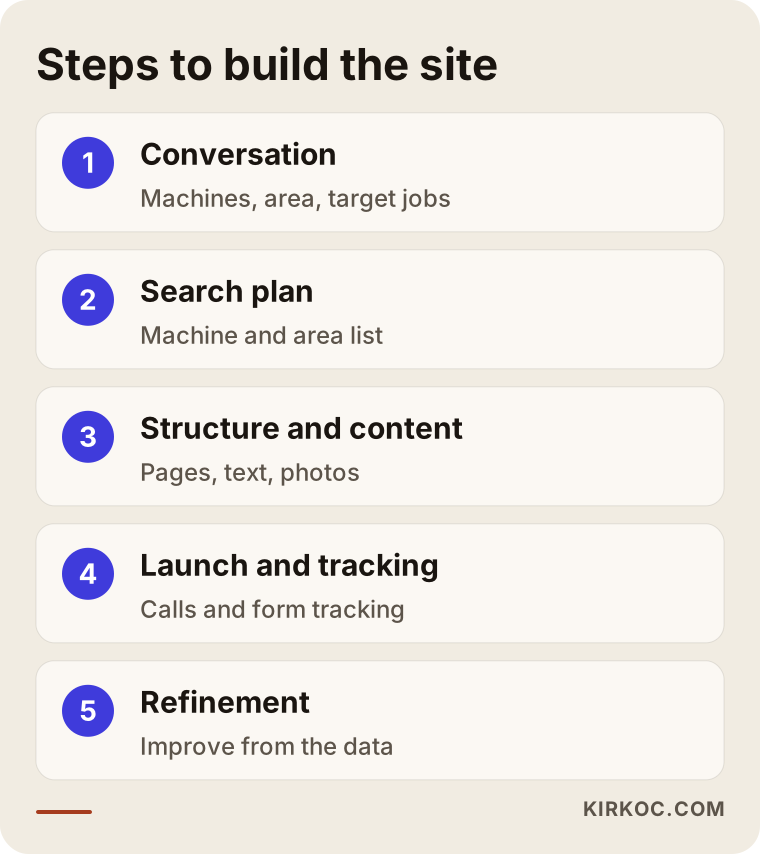
The process looks short in the graphic. In practice, the first two steps matter most, because a site built around the wrong words or the wrong area will not bring in work no matter how good it looks.
Business profile and map searches
A large share of rental searches happen on the map. If you do not have a Google Business Profile, or if it is incomplete, people searching "crane rental near me" will not see you. Your profile should include business hours, phone, the areas you serve, machine photos and the right category. Your site should match the profile: the same address, the same phone, the same company name. Even small inconsistencies damage trust.
If you run a mobile business, your office address and the place where your machines sit may be different. In that case, you need to use the "service area" setting correctly, and if you do not want to show an address, manage that in the profile. These settings change from time to time, so it is wise to check the current rules.
Common mistakes
When I look at sites in this industry, I see the same mistakes repeated. The graphic below collects the most common ones.
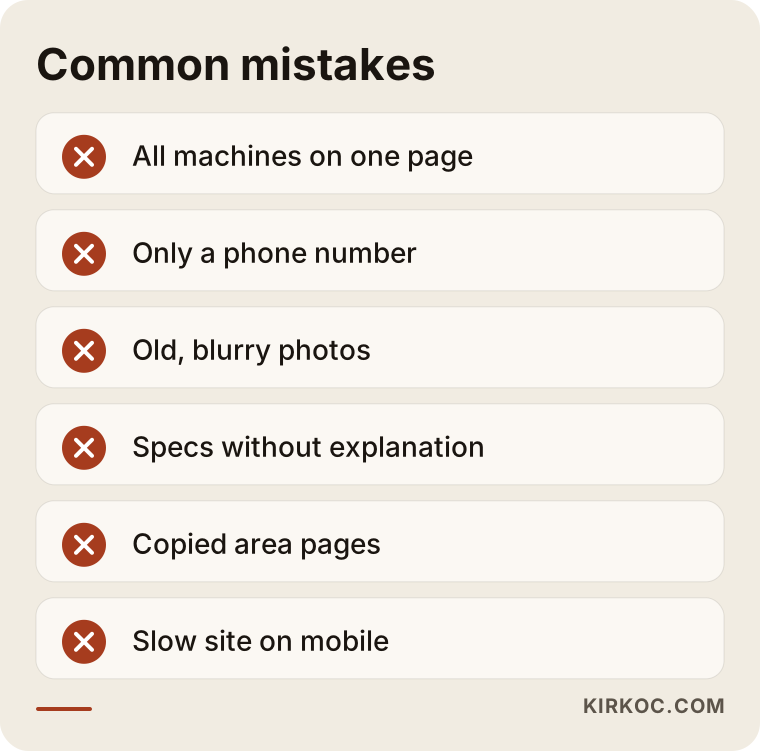
Let me unpack them a little:
- Everything on one page. Piling all machine types onto one page confuses both the visitor and the search engine.
- Only a phone number. Not every customer can call. Some want to leave a written request in the evening or while in a meeting.
- Old, scattered photos. Dark, blurry or borrowed images lower trust.
- Technical values with no explanation. The reader cannot tell what they mean.
- Copied area pages. The same text with a different city name is useless and lowers the quality of your site.
- A slow site on mobile. A person calling from the field has no time to wait.
- Outdated information. If a machine you no longer own or a disconnected phone number is still on the site, customers meet you with wrong information.
What can you do yourself, and when do you need an expert?
You do not have to hand everything to a specialist. There are a few things you can do on your own: fill in your Google Business Profile completely and keep it current, take a clear photo of each machine, ask your customers for permission and then for a short review, and write the ten questions you hear most on a sheet of paper. All of this becomes raw material for both the site and the profile.
Where you need an expert: building the page structure around search intent, technical speed and mobile fit, introducing the site to search engines properly, setting up measurement, and writing the content in plain language. You can build a site yourself, but in my experience, fixing it later takes longer than building it right the first time.
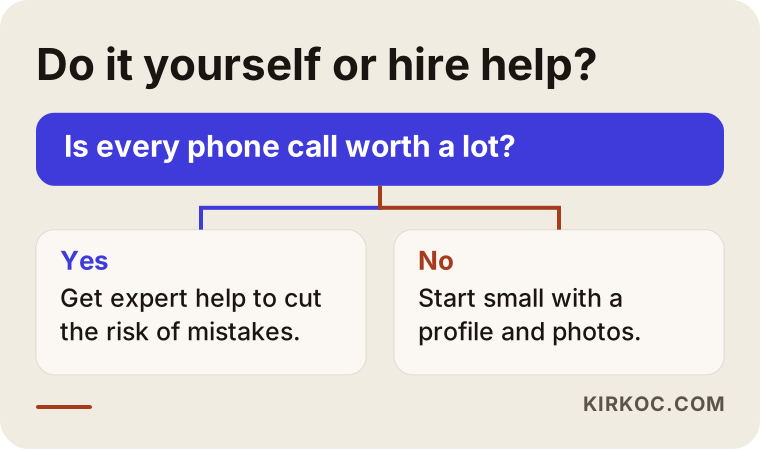
The decision chart gives a simple rule of thumb. If you have time and want to learn, you can make a small start. If your business is growing and every phone call is worth a lot, getting help to reduce mistakes makes sense.
What determines the cost
I will not give numbers, because even two rental sites are never alike. But I can tell you what sets the price:
- Variety of machines and services. A company with five machine types and one with twenty need a very different number of pages.
- Number of service areas. Each real area page takes its own effort.
- State of content and images. If you already have photos and information, the work goes faster. If not, shooting and writing need to be planned.
- Number of languages. If you also serve foreign customers, you will need pages in another language.
- Extra features. Quote form routing, a per-machine availability calendar or a booking system widen the scope.
- Work after launch. Whether you also want help with search visibility, ads and social media once the site is live.
After we talk through these items, I prepare a clear quote. If an item is missing, saying so at the start is better than surprise charges later.
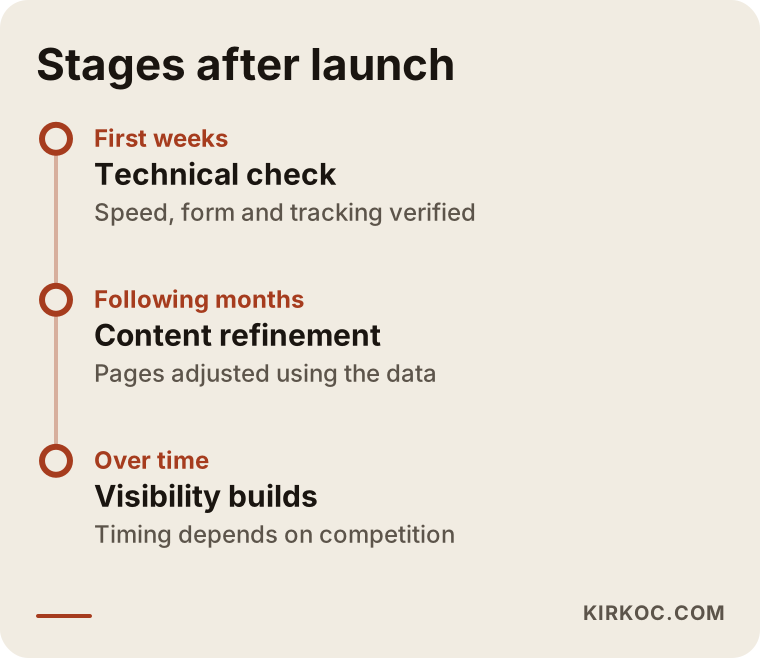
The timeline shows a general flow, and I am not saying the timing is fixed. New pages take time to settle into search results, and that varies with competition. In the first weeks the focus is on technical accuracy and tracking. In the following months, content and page improvements are made.
How the site, search, social media and ads work together
No single tool will save you in this business, but the tools feed each other. The site is the foundation. To be visible in search, your pages need to be well written. Field photos and short videos you post on social media build trust, and the same content can be used on the site. Ads can help while a new site waits to earn a place in search results, or when you need quick requests in a busy season. If a page is not prepared well, ads burn money, so the site comes first and ads come after.
Because I run all of this myself, the sentence on the site and the sentence in the ad, or the photo on social media and the photo on the machine page, do not contradict each other. If you work with four separate people, you have to explain the same information to each of them again and again. With one person, you share the information once and it carries through everywhere. That is a practical advantage in an industry where machine details, pricing logic and service areas change often.
AI assistants and voice searches
Some customers now type their question to an AI assistant: "What kind of crane do I need to lift materials onto a roof?" Answers like this mostly draw on clear, well-written sources. The "which machine for which job" pages and the FAQ on your site are valuable for that reason, both for people and for these tools. I cannot guarantee that an answer will mention you, but information that is written clearly and kept in order is always an advantage.
How I work with you
I work alone from Istanbul. The person you talk to is the person who builds the site, writes the text and sets up the tracking. First we have a short call, and I listen to your machines, your area and your target customer. Then I send you the scope and the timeline of the work in writing. Once work starts, I tell you plainly where everything stands. After the site launches, if you want, I can also handle search visibility, your business profile, social media and ads in the same setup. If you don't want that, we can also go ahead with the site only.
I do not guarantee results, because nobody can single-handedly decide how search results are ranked. What I can offer is that the work is set up correctly and that I explain what I am doing openly.
The comparison below sums up what changes by the end of the work.
Frequently Asked Questions
Does an equipment rental company really need a website?
If you work through people who already know you, you can get by today. But someone who needs a machine looks online first, and a company with no site or with missing information gets dropped at the comparison stage. The site is where you build trust with customers who do not know you yet.
Is it necessary to make a separate page for every machine?
It is not required, but it helps a lot. A person looking for a mobile crane and a person looking for an excavator are waiting for answers to different questions. You can group similar machines on one page, but a separate page for each main type gives clearer information to both the visitor and the search engine.
Should I put prices on the site?
That depends on your business model. Rental prices change with duration, distance, operator, site conditions and season, so most companies do not post fixed prices. A more honest and useful approach is a short section explaining what determines the price, plus an easy quote form.
Can social media or ads replace a website?
No. Ads and social media can bring visitors, but you need a place to receive them. Sending ads to an incomplete site wastes budget. Site first, other tools after, is the sensible order.
How long until the site shows up in search results?
I cannot give an exact time. It depends on competition, area, the age of the site and the content written. You may see pages being recognized within a few weeks, but real visibility usually takes months. That is why it is smart to start before your busy season.
Do I need pages in another language for foreign customers?
If you take on projects from abroad, or work on job sites for foreign companies, a page in another language can make a difference. If you have no foreign customers at all, you may not need one at the start. We look at your real needs.
Should I show my credentials and insurance on the site?
Generally yes, because corporate customers look for them. But which documents to show, with what wording and in how much detail depends on the rules that apply to you and your own situation. For statements you are unsure about, ask a lawyer or a safety professional.
Can I fix my current site without rebuilding it?
Often yes. First we look at where on the site you are losing people. Sometimes fixing the page structure and the quote form is enough. If the structure is so old that fixing it would cost more than rebuilding, I will tell you so plainly.
If you want a site that describes your machines and your service area, and that makes it easy for someone to request a quote, you can reach me through my website design page, and we can talk through your fleet and your goals together.