You run a hearing aid clinic, or you are about to open one. The test room is ready, you know which device brands you work with, and you have spent years caring for patients as an audiologist or hearing aid specialist. But the phone does not ring as often as you would like. Then you notice that a clinic two districts over, with less experience than you, shows up ahead of you on Google. That is usually the moment people start searching for "website for a hearing aid clinic." This article explains what such a site needs to contain, how your future patients actually look for you, and where to start. I am Ümit Kırkoç, a web designer and digital marketer who works alone from Istanbul. I will walk through what matters when you have a website built for a healthcare business, using plain language and realistic examples rather than hype.
A website, in the simplest terms, is your business's address and shop window on the internet. For a hearing clinic that window carries more weight than it does in most industries. The person looking at it is often not shopping for a product. They suspect there is a problem, they feel a bit hesitant, and they are trying to work out whom to trust. If your site eases that hesitation, you get an appointment request. If it does not, the visitor closes the page and tries the next result.
Who searches for hearing aids, and how?
The first surprise in this field is that the person typing the search is often not the person who will wear the device. An adult son or daughter notices that a parent keeps turning the television up. A husband realizes his wife cannot follow what is said on the phone. Someone who has felt for a while that "everybody mumbles" searches quietly, without yet admitting it to anyone. So your page may be read by an older person and by a relative, sometimes both in the same week. Your site has to speak to each of them.
The searches fall into four broad groups:
- People describing a problem: "ringing in ears," "signs of hearing loss in older adults," "can't understand conversations." This person is not looking for a clinic yet. They are trying to learn what is happening.
- People looking for a test: "where to get a hearing test," "free hearing test," "audiogram." This group is among the closest to booking.
- People researching devices: "in-ear hearing aid," "invisible hearing aid," "hearing aid insurance coverage." They are gathering information and comparing.
- People looking for a place: "hearing center in my district," "hearing clinic near me," "hearing aid repair." This person has more or less decided. They only need to choose where to go.
Each group deserves its own page on your site. If you squeeze "test, devices, repair, about us" onto one home page, you explain all of it halfway. Neither Google nor the visitor can tell what question the page is meant to answer.
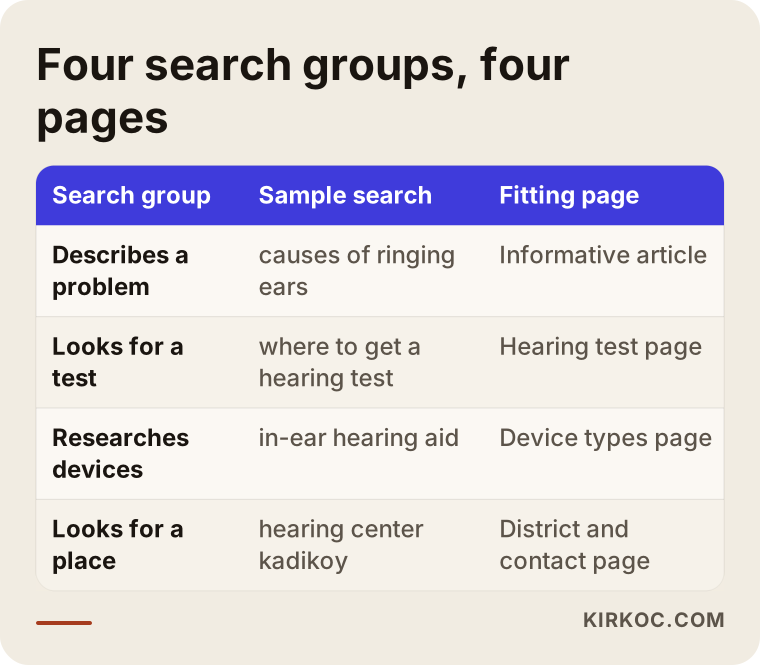
The table above sums up the four groups and the page that should meet each one. The next section looks at those pages one by one.
Pages a hearing clinic website should have
Most clinic sites end up with the same skeleton: a home page, an "about us," a "contact" and maybe a list of devices. That skeleton works as a business card, but it does not bring in appointments. The pages below are what a clinic needs to become findable.
A hearing test page
You need a separate page that explains, in simple words, what the test is, how long it takes, that it does not hurt, and who should have one. The visitor is wondering "what will they do to me in there?" and a site that does not answer will not get the booking. End the page with a visible appointment button and phone number. If the test is free, say so plainly. If it is paid, say what is included. You do not have to publish a figure, but you do have to answer the question "what happens if the test shows I need a device?"
A device types page
Behind-the-ear, in-the-ear, in-the-canal, rechargeable models. Your reader does not know these terms. Explain each type in a sentence or two and say what kind of person it might suit. A line such as "which one is right for you depends on your test results and the shape of your ear" is honest and builds confidence. If you want to list brands, go ahead, but a separate page for every single product is unnecessary for most clinics. It multiplies the page count and thins out the content.
An insurance and paperwork page
This is one of the most searched topics in the field. People want to know how much support the public health insurance or social security system gives toward a device, which medical report is needed and who issues it. Some ask the same about private insurance. Because the rules change from time to time, an out-of-date answer on this page is a serious risk. Describe the process in general terms, invite visitors to ask your clinic for the current conditions, and put the date on the page. Show the steps of the process rather than promising a specific entitlement or amount.
A maintenance, adjustment and repair page
Someone who bought their device elsewhere may still call you. Battery changes, cleaning, fine-tuning and repairs deserve their own page, so that a person searching for "hearing aid repair" lands on you. This is one of the least noticed ways to win new patients. A person who comes in for a repair and is treated well will ask you first when it is time for the next device.
A specialist and clinic page
Telling visitors who you are, what your professional background is and how the clinic works goes beyond a typical "about us" page. The visitor is getting a health service. They want to see a face, a name and a training record. List your certificates and the professional bodies you belong to, but only those you really hold. Replace stock photos with pictures of your own clinic, the test room and the waiting area.
An appointment and contact page
Phone, WhatsApp, address, map, opening hours and directions belong in one place. An older person or their relative will often prefer to phone, while a younger relative may want to message on WhatsApp. Both should work. Keep the booking form short: name, phone number and a convenient day. A ten-field form drives off a hesitant visitor.
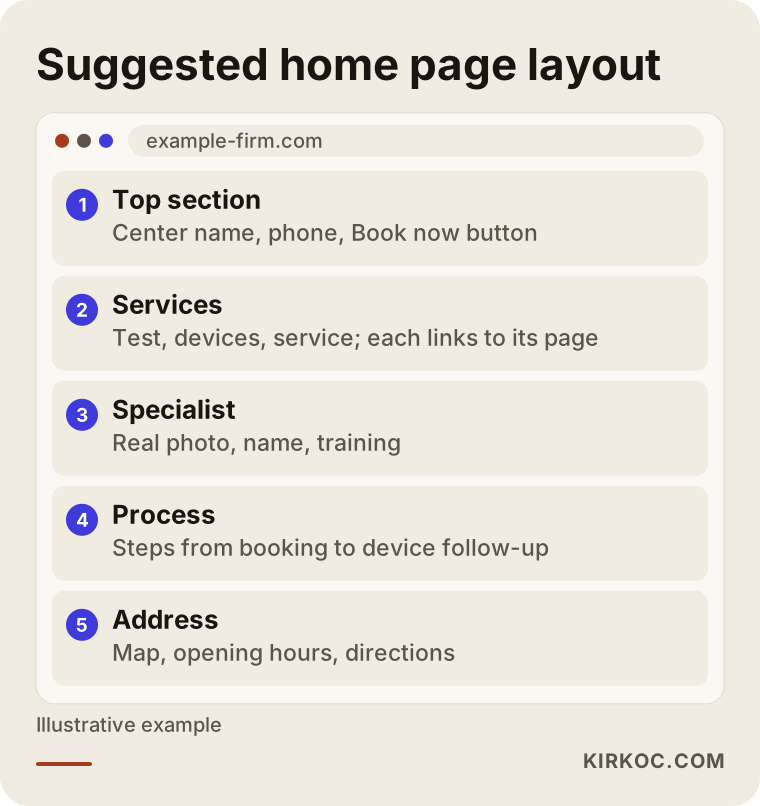
The layout in the picture follows the visitor's path from the home page to the booking page. Notice that each page links to the next. Those links guide the visitor, and they also tell Google what your site is about.
Designing for older visitors: readability is not a luxury
The core audience of a hearing clinic site is mostly older adults and their relatives. For this group, thin gray text, tiny buttons, menus that fold in and out and fast-moving banners are real obstacles. The basic design rules are simple:
- Large, dark text. Body copy should be comfortable to read, with strong contrast between the text and the background.
- Large, obvious buttons. "Book an appointment" and "Call now" should be big enough to tap with a finger and should stay visible on a phone.
- A simple menu. No more than five or six items, each clearly named. Use "Hearing Test," "Hearing Aids" and "Repair" rather than "Our Solutions."
- Little motion. Auto-sliding image carousels and videos that start playing sound are distracting. A video that suddenly makes noise on the site of someone with hearing trouble is a poor experience.
- Quick loading on a phone. Much of your traffic will come from mobile. If heavy images make the page slow, people wait a few seconds and leave.
None of these rules makes your site look ordinary. They make the visitor feel that the place was built with them in mind, and trust is made of small signals like these.
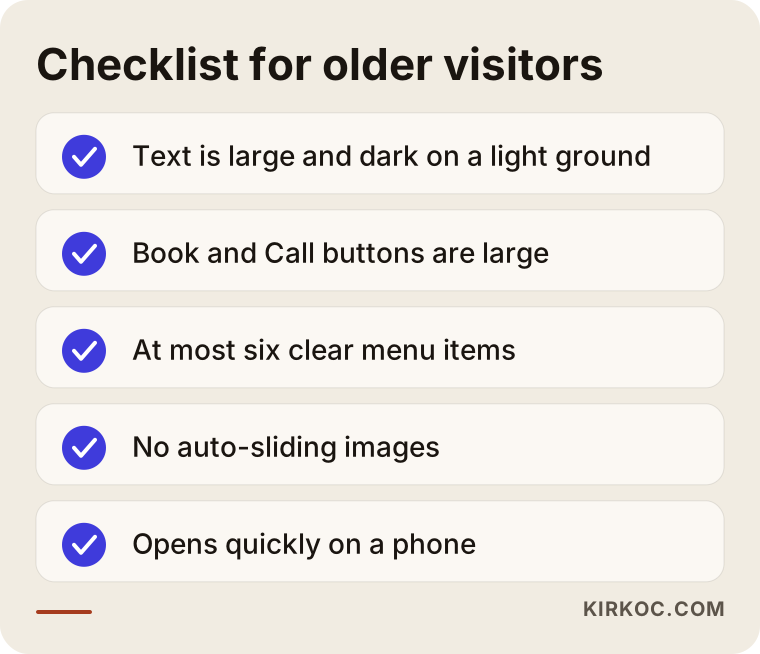
You can go through the checklist above by opening your own site and ticking each line. Even if you stumble on a few items, noticing them is a good start.
Local search: how to be found for "hearing clinic near me"
Hearing clinics are local businesses by nature. Nobody wants to cross the city for a test; people look for a place near home or work. That makes local visibility more important in this field than general SEO. SEO, briefly, is the work that gets your site to appear on Google for relevant searches. Local SEO is the same work aimed at a particular neighborhood or district.
Three things matter most here.
Your Google Business Profile. The map box usually appears above the website results for nearby searches. Your clinic name, address, phone number, opening hours and services should be complete. Use real photos: the entrance, the test room, the staff. The address and phone number must be written exactly the same way as on your website, because even small differences make Google doubtful.
Reviews. Asking satisfied patients for a review is legitimate. Buying reviews or inventing them is unethical and against platform rules. Reply to reviews politely and without sharing any personal health details. Discussing a patient's condition in a public reply is a problem for privacy and for trust.
Local signals on your site. Write the district and neighborhood you are in on the home page and the contact page, and mention nearby landmarks and public transport. If you have several branches, give each its own page. Listing five branches on one page means none of them looks good.
A district page also performs better than a broad "hearing aids in the city" page. A person who searches "hearing aids Istanbul" gets hundreds of options. A person who searches "hearing test in my district" gets a handful of nearby places.
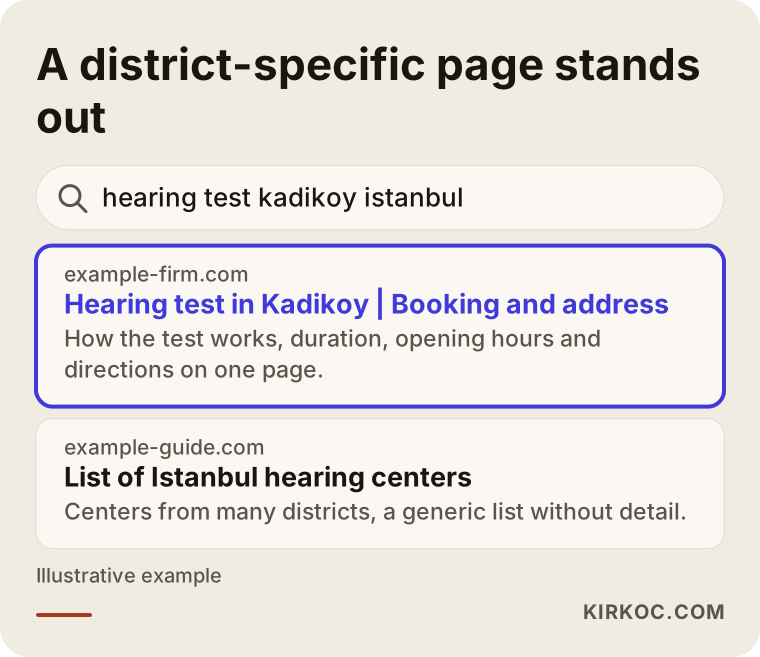
The mock search result in the image shows what a district page looks like. With the district in the title and the service and opening hours in the description, the click decision becomes easy.
How to build trust, and what not to say
The easiest mistake on a health site is exaggeration. Phrases like "guaranteed solution," "100 percent satisfaction" or "no one will notice" lower your credibility, and they may also cause trouble under the rules for advertising medical devices and health services. Those rules exist and they change from time to time. I recommend asking a lawyer which statements you can use on your site. I am not giving legal advice here, only pointing out that this area needs care.
These things build trust instead:
- Explaining step by step how the test is done.
- Writing honestly that a device will not give the same result for everyone and that getting used to it takes time.
- Stating clearly what you really offer, such as a trial period, adjustments and follow-up.
- Showing the specialist's name, training and how they work in the clinic.
- Respecting patient privacy and never using patient photos or names without permission.
Notice that none of these is a sales line. Each is a concrete fact that lets a doubtful visitor think "I can trust this place."
Two hypothetical scenarios
The two examples below are entirely hypothetical. They do not describe a real person or clinic; they are here to make the process concrete.
Scenario 1: a single-branch clinic with nothing but a home page. Picture a small hearing clinic in one district. Its site was built a few years ago, a single page with a logo, a few photos of devices and a phone number. When relatives search for a hearing test in that district, the clinic never appears, because the site has no page about hearing tests. The fix goes in order: a separate test page, a device types page, an insurance process page, a repair page and a contact page, and the Google Business Profile is matched to the details on the site. Over the following months, as the pages get indexed (picked up by Google), the clinic becomes more likely to appear in district searches. How fast depends on the competition and cannot be guaranteed, but it is a foundation pointed in the right direction.
Scenario 2: a three-branch clinic with all branches on one page. In the second example, a clinic has branches in three districts. The site looks good, but a single page titled "Our Branches" lists three addresses one under the other. Searches come from all three districts, yet the clinic is not strong in any of them. The remedy is to build one page per branch: that branch's address, map, opening hours, the specialist there, directions and photos taken at that location. Each branch should have its own Google Business Profile. The shared information (test, device types, insurance process) should live in one place, and the branch pages should link to it, so the content is not duplicated.
Both scenarios teach the same lesson. The problem is usually not that "the site is bad." It is that the site does not answer the question the visitor is asking.
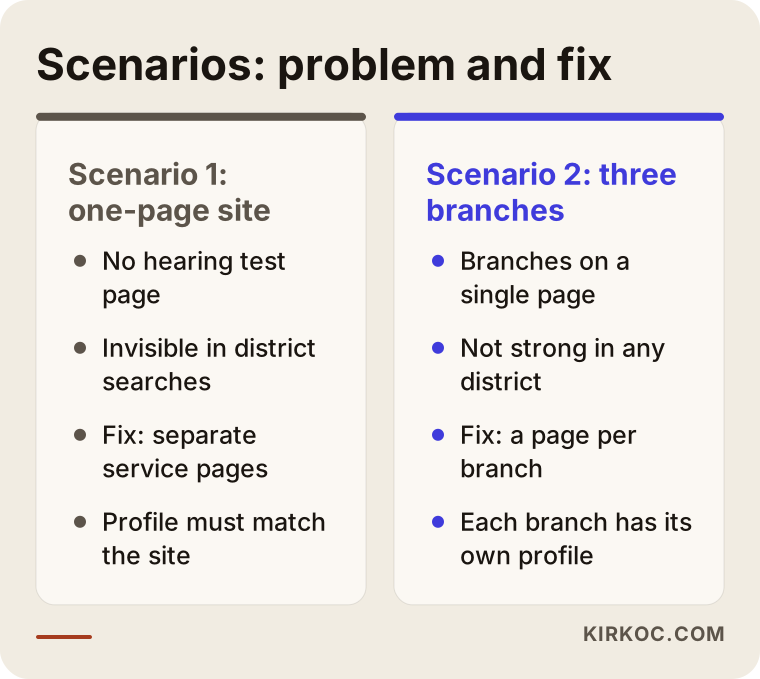
The comparison places the problem and the fix of the two scenarios side by side. Checking which one is closer to your situation will help you decide on a first step.
The process, step by step: how to go from zero
Preparing a hearing clinic site follows a few clear stages. Because I run the whole thing myself, there is no gap between the stages; what you tell me shapes the design, the copy and the advertising, all handled by the same person.
- Introduction and goals. We talk about your clinic, the device groups you work with, your patient profile and the result you want: more test appointments, more repair visits or the launch of a new branch.
- Page plan. I put into writing which pages will be built and which question each one answers.
- Content and images. The text is written in plain language based on what you tell me. Your own photos are used, and if you do not have any, I suggest what to shoot.
- Design and development. The site is built around large type, clear buttons and fast loading on a phone.
- Local visibility setup. The Google Business Profile, map details and the consistency of address and phone number are put in order.
- Launch and measurement. The site goes live, and phone calls, WhatsApp taps and form submissions are tracked so you can see what works.
- Regular updates. Pages are kept current for changing topics such as insurance information, new services and new branches.
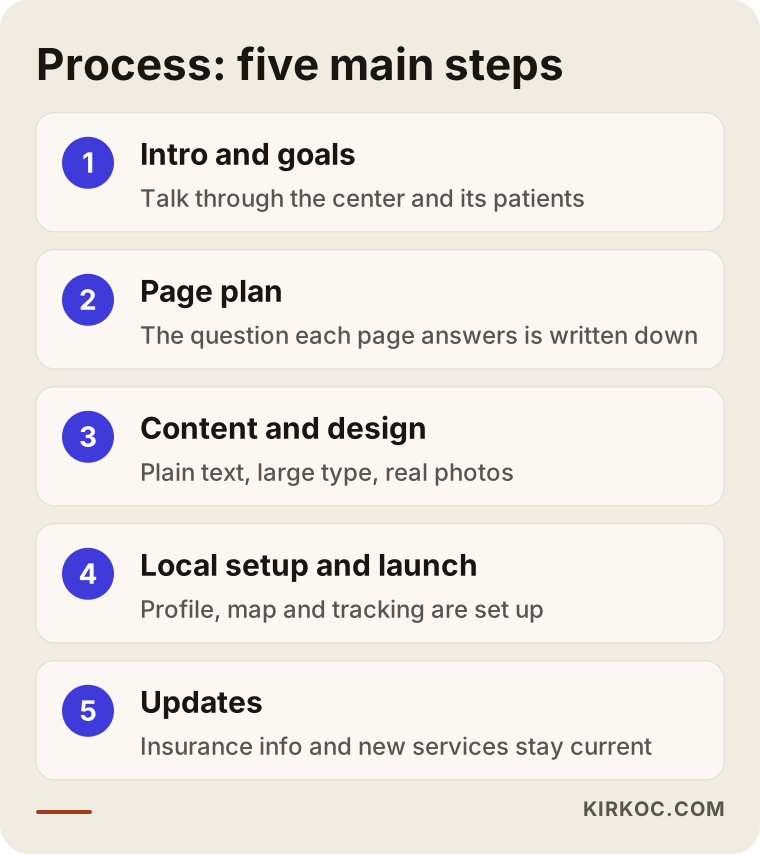
The flow diagram summarizes the path from the first conversation to updates. Each stage feeds the next, so it is important not to skip the order.
Common mistakes
When I look at sites in this field, I keep seeing the same errors. Most of them do not need expensive fixes, only someone to notice them.
- Explaining everything on one page. When test, devices, repair and insurance share a page, none of them ranks well.
- Heavy technical language. Writing "sensorineural hearing loss" without explaining it pushes the reader away. If you use a term, explain it in one sentence.
- Stock photos and invented faces. Visitors want to see the real clinic and the real specialist.
- Burying the phone number in an image. A number that cannot be tapped to call loses the visitor who is on a phone.
- Outdated insurance information. Old information creates wrong expectations and shakes trust.
- Exaggerated promises. Guarantee statements can be risky from both an ethical and a regulatory point of view.
- Leaving the Google profile unattended. An old address, wrong hours and unanswered reviews send the patient to another clinic.
- Not measuring. If you do not know how many calls each page brings, you cannot know what to fix.
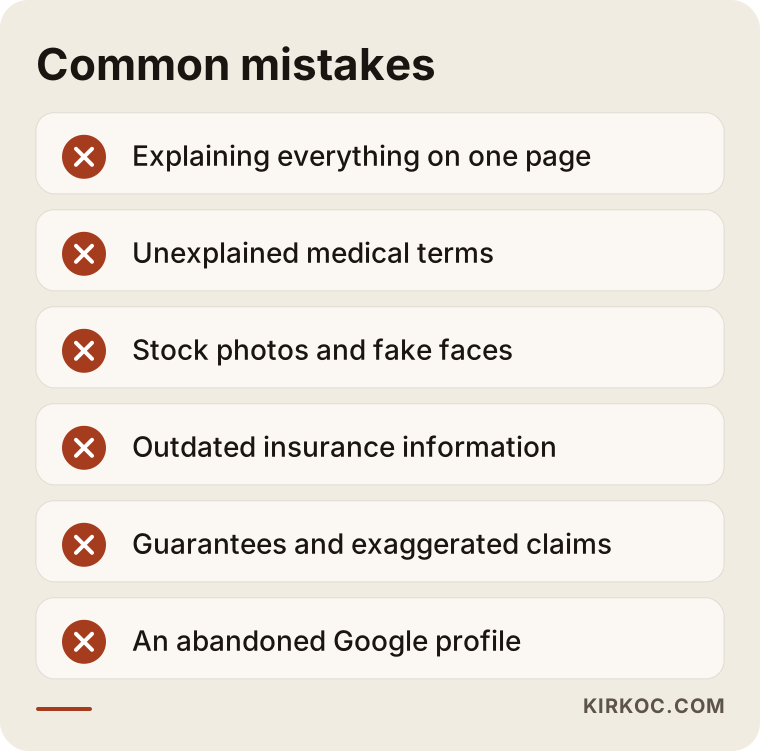
The warning list summarizes the most important of these mistakes. When you review your own site, I suggest you look at them first.
What you can do yourself, and when to bring in an expert
You do not have to outsource everything. There are things you can do today:
- Open your Google Business Profile and check that the address, phone number and hours are correct.
- Take real photos of your clinic and test room and add them to the profile.
- Politely suggest to satisfied patients that they leave a review in their own words.
- Write down the five questions you hear most often. They are the raw material for your page titles.
- Open your site on your phone, hand it to an older relative and watch how they use it.
An expert makes sense when your site loads slowly on phones and you cannot fix it, when you need to plan the page structure from scratch, when you must manage local visibility for several branches, when you want to run Google or Meta ads, or when you need tracking set up. Be especially careful with advertising. Health-related ads can face the platforms' own restrictions, and those get updated. Check the current rules before you spend anything.
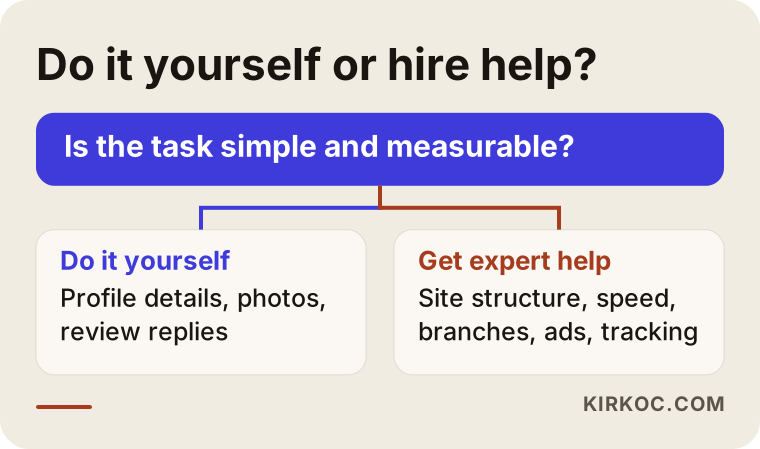
The decision flow helps you sort tasks by asking whether you should do them or an expert should. Where things are unclear, the safest route is to take a small step first and watch the result.
What changes when site, SEO, social media and ads come from one person
For a hearing clinic these jobs are connected. A page on your site gets found on Google. The information on that page becomes a short social media post. An ad that points to the right page does not go to waste. When each job sits with a different person, an advertiser who has not read your site may make a wrong promise, and whoever manages your social media may post something that contradicts your site.
Because I handle all of it myself, how your clinic is described stays consistent everywhere. A new service you add to the site can appear the same week on your Google Business Profile, in a relevant post and, if needed, in an ad. You have one contact person, the information is passed on once and does not get lost. For small and mid-sized clinics this saves time and confusion. Working alone does have a limit, though. For large multi-branch chains some tasks may need extra resources, and I say so openly from the start.
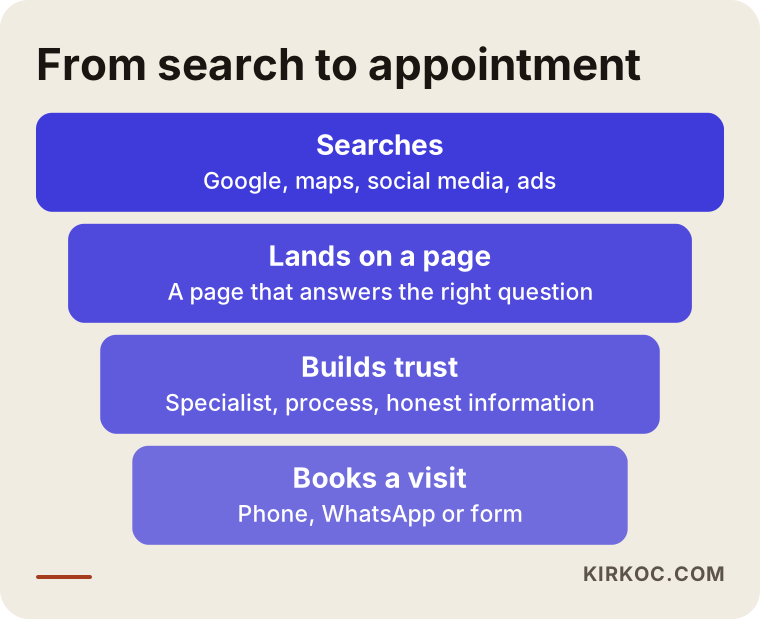
The funnel shows how a visitor moves from search results to an appointment and at which stage each channel comes in. When they all work together, losses are kept to a minimum.
What determines the cost?
I am not giving figures in this article, because the scope of the job varies a great deal from clinic to clinic. The main factors that set the price are these:
- Number of pages. Do you need only five core pages, or separate pages for every branch and every service?
- Copywriting. Will you prepare the text yourself, or do I need to write it after talking with you? Accurate, plain writing on health topics takes more time.
- Image needs. Are your existing photos enough, or do you need a photo session or custom graphics?
- Number of branches. A page and a profile for each branch increase the volume of work.
- Booking and follow-up systems. Do you want a simple form or a calendar-based booking system?
- Multiple languages. If you serve international patients, each extra language means extra content.
- Support after launch. Whether you want regular updates, SEO and ad management once the site is live.
Knowing these makes it easier to compare quotes. Instead of looking at a single total, look at which items a quote includes. A quote that looks low may leave out items such as copywriting or local setup.
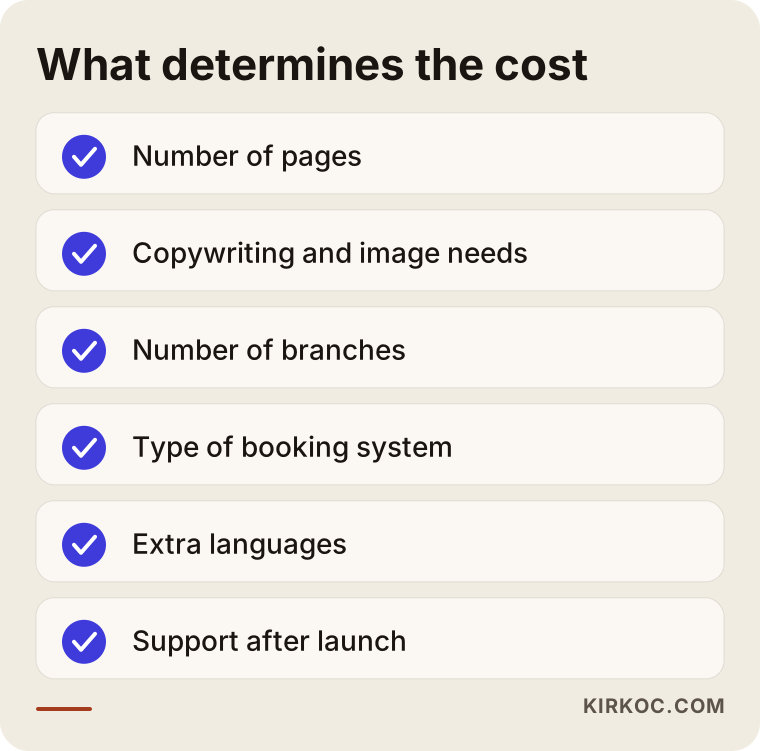
The summary above lists the items that influence cost and explains why each one makes a difference. Going into a quote discussion with this list keeps you from paying for things you do not need.
How I work with you
When you work with me, your contact person is the same from the first day to the last. I start by listening to you and learning about your patients, then I share a written page plan. After you approve it, I write the text, design the site and handle the technical setup. Once the site is live, I can keep going with call and appointment tracking, your Google Business Profile, social media posts and ad management if you want that. If you do not, I hand over the site and step back; you are under no obligation to buy anything else. I do not promise any ranking or number of appointments, because those results depend on competition, location and time. What I can promise is to explain clearly what I am doing and to share with you what I measure.
Frequently asked questions
How many pages does a hearing clinic site need?
There is no fixed number, but a home page plus pages for the hearing test, device types, insurance process, repair, the specialist and contact make a good start. If you have several branches, each gets its own page. What matters is not the page count but that each page answers one question clearly.
Should I show device prices on the site?
That is a business decision. Showing prices can filter visitors quickly, while leaving them out can increase phone inquiries. If you do not show prices, explaining what the price depends on (device type, features, adjustment and follow-up) builds trust. For rules on displaying prices of health products, I recommend consulting a lawyer.
Is it right to advertise a "free hearing test"?
If it really is free and unconditional, yes, and it will attract attention. But if the first visit steers people toward buying a device, or the test comes with conditions, you should say so clearly. A misleading phrase may bring appointments in the short term, but it damages trust in the long term.
Will I be first on Google once the site is built?
No, nobody can guarantee that. A sound page structure, consistent local details and good content improve your chances. How long it takes and how far you get depend on the competition in your area and the age of your site. Setting realistic expectations from the start keeps the relationship healthy.
Which matters more, the Google Business Profile or the website?
They work together. The map profile is the first thing people see in nearby searches, while the website is where visitors are convinced and given details. A clinic with a profile but no site cannot offer detail, and a clinic with a site but no profile disappears in nearby searches.
Can I show patient reviews on my site?
You can show reviews that were given with permission and that contain no personal health information. Inventing or buying reviews is unethical and against platform rules. For rules on personal data, getting a lawyer's opinion is the right move.
Does social media work in this field?
Yes, but set your expectations correctly. Short, informative content about hearing health can be shared and passed around by relatives of patients. That kind of content builds trust more than it sells. Which platform suits your clinic depends on your patient profile.
Is it better to update my current site or start from scratch?
First look at what is working on the current site. If it is basically sound but short on content, adding new pages may be enough. If it is very slow on phones or its structure does not allow new pages, rebuilding makes more sense. I would look at your site and tell you plainly which route makes sense.
If you are thinking of building a website for your hearing clinic, or strengthening the one you have, you can look at my website design service and write to me. I will listen to how your clinic works and tell you plainly what it really needs.