You ran ads for a week. Money left your account, the screen says thousands of people were reached, and yet the phone did not ring, your inbox stayed quiet and your order count looks the same as before. At that point one sentence tends to form in your head: "Instagram ads don't work." If you are reading this, you have probably said it more than once. I am Ümit Kırkoç, I work from Istanbul, and I handle everything a digital agency would normally handle by myself: websites, search visibility, social media accounts, Google and Meta ads. In this article I explain why your ads may have failed to bring results, how you can check it on your own, and when it makes sense to bring in a specialist. If you would rather hand the whole advertising side to me, you can look at what my digital advertising service covers.
Let me start with a reassuring point. Instagram advertising is a tool, and a tool does not simply "work" or "not work." The same ad system can fill a bakery's order book while someone else burns money for months. The difference is rarely the size of the budget. It is usually who sees the ad, where they land and what the ad was built to achieve. The good news is that almost all of these differences can be found and fixed.
What do you mean by "it doesn't work"?
Behind that sentence, three quite different situations can hide, and each one has its own cure.
Situation one: nobody sees the ad. Impressions are very low and the ad barely spreads. This usually happens when the budget is set extremely small, when the audience is narrowed too far, or when the ad runs into platform rules and gets limited.
Situation two: people see the ad, some even like or save it, but nobody acts. The trouble here is most often the offer, the image or the audience. People found your ad pleasant, but not one of them thought "I should buy this now."
Situation three: people tap the ad, but nothing happens after the tap. This is the one I see most often, and it is the most expensive. The ad did its job and brought a person to your door, but what is behind the door could not welcome the visitor.
The list below gathers the first things to look at so you can tell which situation you are in.
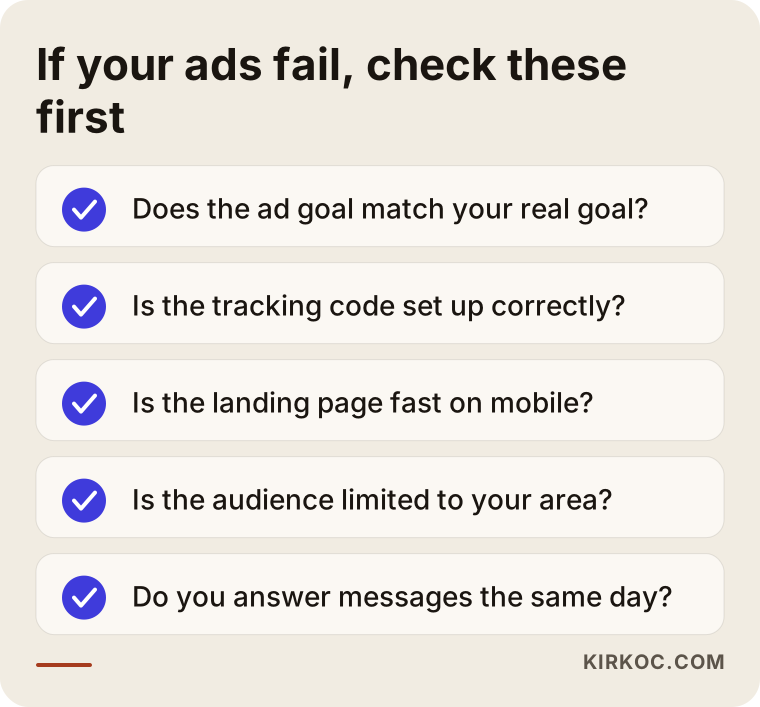
If you can answer yes to every item, the problem probably lies somewhere else. If you answer "I'm not sure" to even one, I suggest opening that area before you blame the budget or Instagram itself.
Seeing the path from ad to sale
To judge whether an ad works, you first need to know the steps one person goes through on the way from ad to customer. In simple terms: the person sees the ad, something catches their interest and they tap, they arrive at a page or a message window, they feel some trust there, and finally they take a step. At every link in this chain, some people drop out. That is normal. The problem appears when the loss at a single link is enormous.
For example, if your ad is shown a lot but almost no one taps, the weak link is the first one: the image, the text or the audience. If many people tap but nobody stays on the page, the weak link is the second: the page loads slowly, looks bad on a phone, or does not contain what the ad promised. If many people stay on the page but few get in touch, the third link is weak, meaning trust and a clear next step are missing.
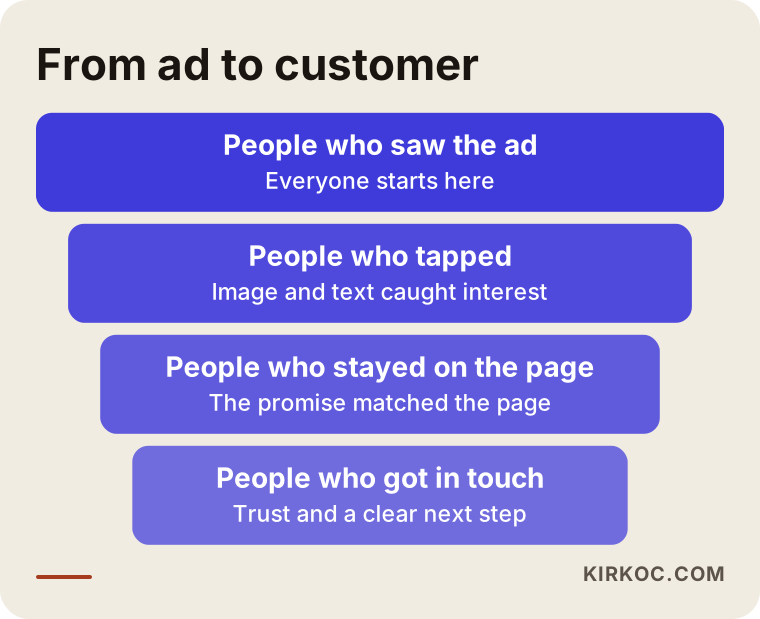
Keep this picture in mind: trying to fix an ad without knowing where you narrow is like searching for your keys in the dark. You read the numbers first, then choose what to change. Many people do the opposite and try a new image every week, while the real problem sits on the page.
Why Instagram ads fail: the most common causes
Having looked at small business accounts for years, I keep meeting the same mistakes. Here they are in plain language.
The ad goal was chosen wrongly
When you create an ad, Meta (the company behind Instagram and Facebook) asks you to pick a goal: reach more people, bring visits to your profile, get messages, send people to your website, produce sales, and so on. The system then tries to find the people most likely to do exactly that. If you choose "engagement," it brings you people who tend to leave likes and comments, and some of them will never buy anything. If you want sales and your website can report sales back to the system, the goal should match that. A surprising number of businesses run only "reach" or "engagement" ads and then expect orders.
Turning a post into an ad with the boost button
Under every post in the Instagram app there is a boost button. It is quick, it is easy, and that is why so many people use it. But this route hides most of the settings you would find in the full ad panel: placement, detailed audience choices, tracking, testing different versions. Boosting from the app can be an acceptable first step if you only want more people to notice something. If you want regular sales, it will not be enough on its own.
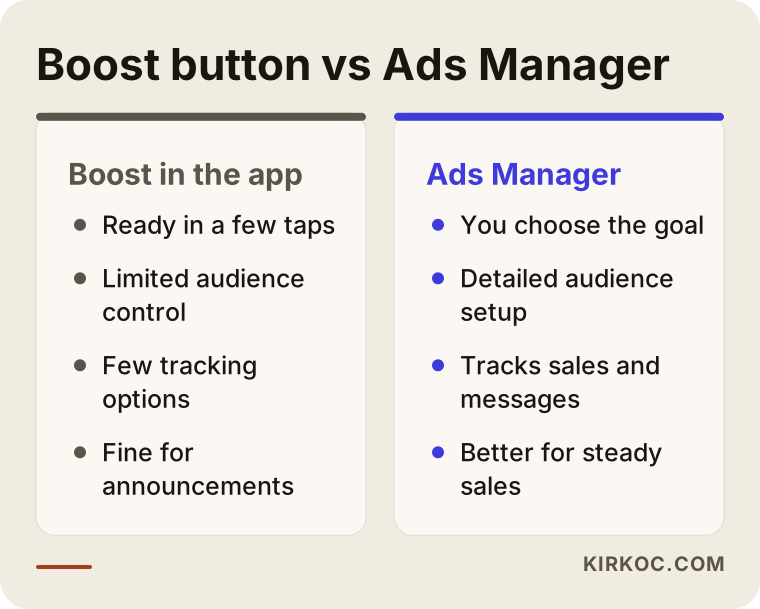
I will explain this comparison in more detail in a later section. For now, just note that the two are not substitutes for each other. They serve different needs.
The audience is either too wide or too narrow
If you build an audience of "everyone in the country," your budget is spread over thousands of people who have nothing to do with what you sell. On the other side, stacking age, interests and location until only a tiny group remains stops the system from learning and shows your ad to the same people again and again. If you are a local business, limiting the location to the area you actually serve is right, but the group inside that area still needs to be a sensible size.
The ad sends people to the wrong page
Showing one product in the ad and sending people to the home page is like telling a visitor "go find it yourself." When people tap an ad, they want to see exactly that product, that service, that kind of pricing logic. If the page is slow, if the text is tiny on a phone, or if they have to hunt for your contact details, the rest will not happen. This is why an Instagram ad problem is so often really a website problem. When one person runs the ads and a different person runs the site, the gap grows wider, and doing both under one roof is where the practical benefit shows up most clearly.
Tracking is not set up
The Meta Pixel is a small piece of tracking code that tells the ad system what visitors do on your website. If it is missing or installed wrongly, the system does not know which tap turned into a sale. Because it does not know, it cannot learn to find people who are likely to buy. Running ads without tracking is like shooting an arrow without being able to see the target.
Impatience and constant tweaking
The ad system goes through a learning period, and results can bounce around during it. If you see poor numbers in the first two or three days and change the audience, the image and the budget every day, the system never gets to learn. On the other hand, sitting back and staring at bad results for weeks is also wrong. Finding the balance takes experience.
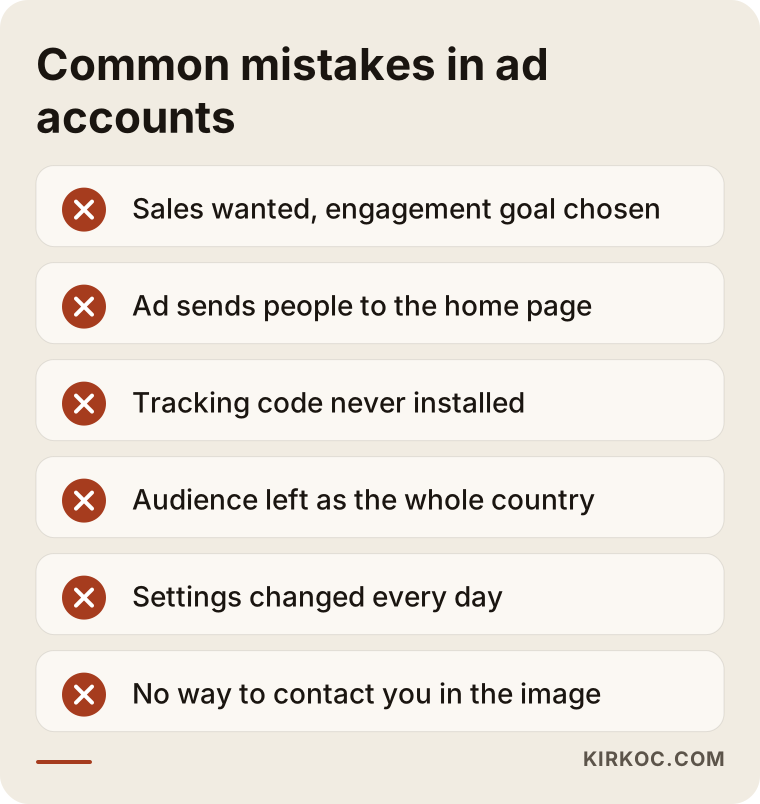
Please do not scold yourself while reading this list. Nearly everyone who advertises for the first time makes these mistakes. What matters is noticing them and fixing them in order.
Boost button or Ads Manager?
Back to that comparison. The boost button in the app is the first choice of many small businesses because it is so easy. With a few taps you pick an audience and a duration, you pay, and the ad is live. That is enough when you want one specific post shown to more people. It works well, for example, for telling people nearby that you opened a new branch.
Ads Manager is Meta's full panel for building ads. There you choose the goal yourself, build the audience in detail, test several images and texts at the same time, measure what happens on your website and see with real data which ad did what. The learning curve is a little steeper, but if you are aiming for sales, working in this panel is close to necessary. If you want a steady flow of customers to your website or your inbox, it is time to move to the panel.
Which ad goal fits your aim?
Choosing the goal is the foundation of the whole thing, and it is the step most accounts get wrong. The table below summarizes which goal makes sense for what you want.
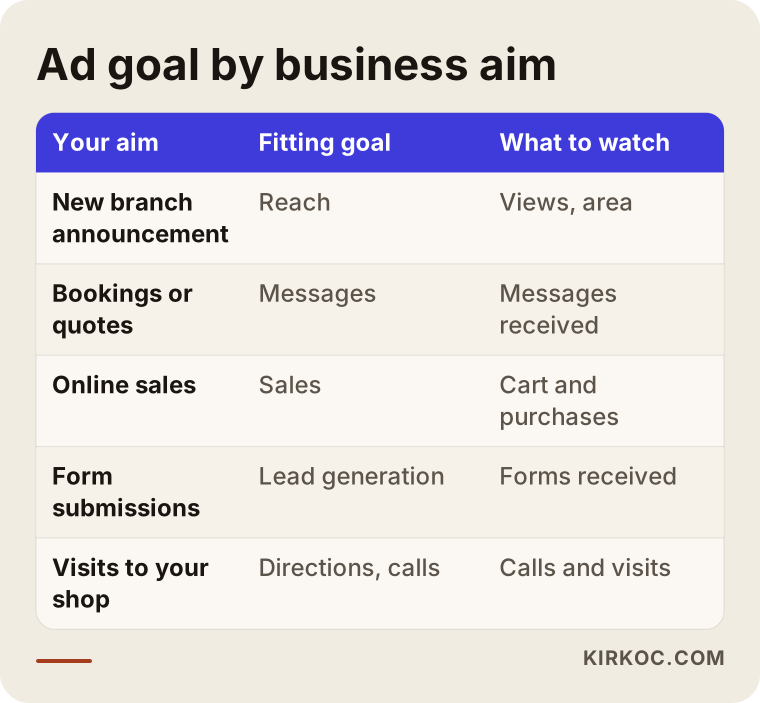
Notice that each goal calls a different kind of person. A message-focused ad finds people who like to chat; a sales-focused ad finds people who tend to shop on websites. For a restaurant, a goal built around directions or phone calls often makes more sense; for an online store, a sales goal usually does. No business has one universally correct goal, but the goal you pick should line up with what your business truly needs.
Two hypothetical example scenarios
The two situations below do not describe a real company. They are example scenarios I made up to show common patterns.
Scenario 1: a beauty salon that gets no messages
Suppose the owner of a beauty salon has been turning a photo of the salon into an ad with the boost button for several weeks, using a small daily budget. The ad is shown to many people and collects plenty of likes, but bookings do not go up. If I looked into the account, I would see three things. First, the ad is optimized for reach, meaning it is built to be shown to as many people as possible. Second, the audience covers the entire city, although someone who lives hours away will not book an appointment. Third, the photo does not say which service is offered or how to book.
The route to a fix looks roughly like this. First, the goal is changed to messages or calls. The audience is limited to the neighborhoods within a sensible travel distance from the salon. The image gets a short line saying which service it is and how to book. An automatic greeting is set up so that anyone who writes receives a quick, short reply. I cannot promise the outcome of these changes in advance, but when a mismatch this broad is corrected, you may well see the ad finally reaching the right people.
Scenario 2: an online shop that gets clicks but no sales
In the second scenario there is a small online shop. Its ads use product videos and attract attention, the number of taps is not bad, but very few people add anything to the cart. If I opened the account, I would find that the Pixel only measures page views. It does not measure add-to-cart or purchase actions. On top of that, on the product page in the ad, the shipping time and return terms are buried at the bottom, and the page opens slowly on phones.
Here the tracking has to be completed first, because without it the ad system cannot learn who tends to buy. Then the shipping and return information moves somewhere visible, and the page speed is checked. Only after that is the ad itself evaluated again. In this scenario the problem was never the ad image. It was the setup behind the ad.
Step by step: how to fix your ads
Now back to your own account. If you work through the steps in the order below, you save both time and money.
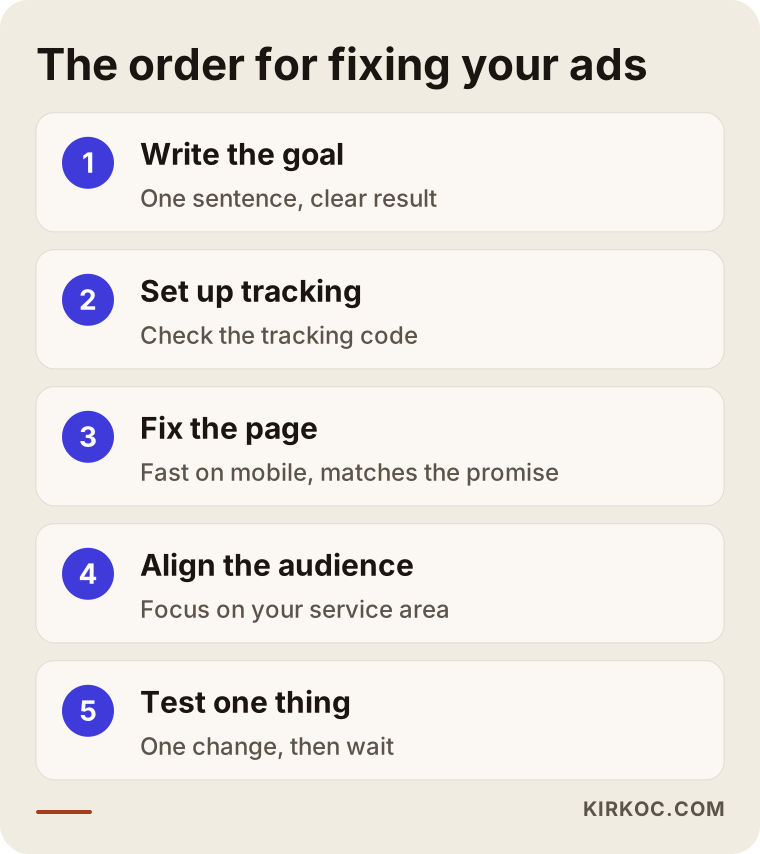
Here is how I would explain the sequence in the picture.
Step one is writing the goal in a single sentence. "I want more people to know me" and "I want a certain number of bookings a month" do not call for the same ad. Until the goal is clear, no setting means anything. Choose the numeric target yourself; I do not give figures in this article because they depend on your profit structure.
Step two is setting up or checking tracking. Confirm that the Pixel works on your site and see which actions it records, such as add to cart, form submission or a tap on your phone number. If you run message-based ads, make sure you can see which ad each incoming message came from.
Step three is fixing the destination. The page your ad leads to should open quickly on mobile, show the promised thing right away and offer one clear next step. Instead of sending people to the home page, a page dedicated to that ad's subject often makes a difference.
Step four is aligning the audience and goal with your aim. If you are a local business, concentrate on your service area; if you sell products, try a sales goal. Avoid the extremes of too narrow and too wide.
Step five is changing one thing at a time and then waiting for the result. If you change the image, the audience and the budget all at once, you cannot know which change helped. Give every test enough time.
What should the page behind the ad look like?
I want to open the landing page topic separately, because it is the place business owners overlook most. The person coming from an ad does not know you. They are holding a phone, maybe on a bus, maybe at work between tasks. Within a few seconds they need to think, "I'm in the right place."
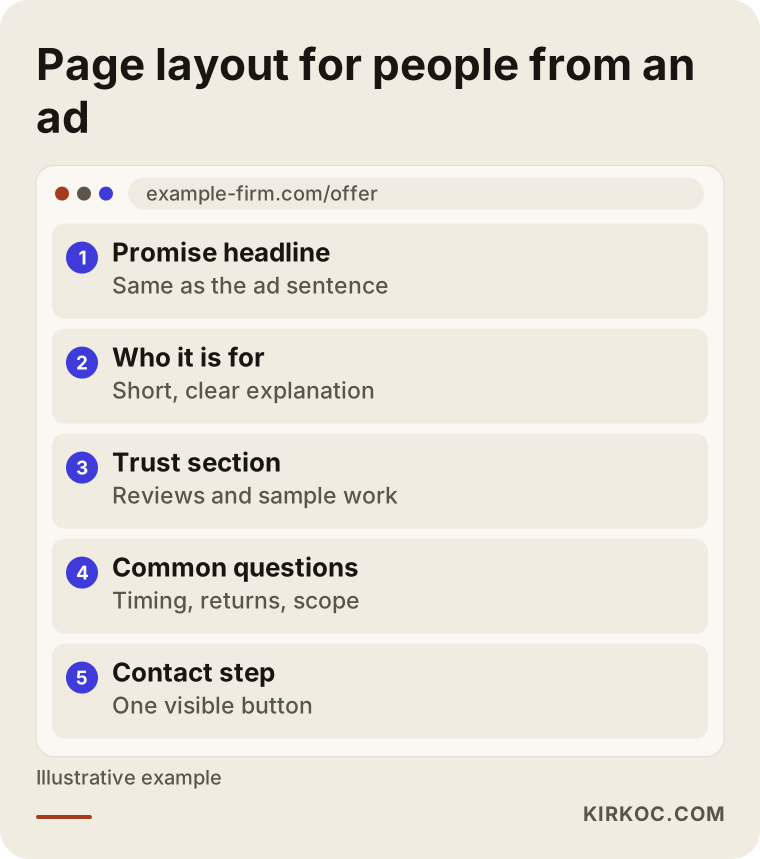
What matters in this example layout is the order. At the top is the promise you made in the ad, right below it who the offer is for, then the elements that build trust (reviews, sample work, common questions), and last a clear step to get in touch. The page does not have to be long, but every section should have a job. The ad and the page should speak the same language: if the ad says "free first consultation," the page should use the same wording and, right under it, show how to book that consultation.
Here is where doing things under one roof has a tangible benefit. When one person runs the ad and someone else runs the site, the page is not updated when the ad text changes, and the ad stays outdated when the page changes. Because I manage both, whatever the ad promises is what you see on the page. I also set up the tracking at the same time and read which page brought what, together.
Should you stop the ads or keep going?
Business owners often ask: "I'm spending money and seeing nothing, should I switch it off?" The answer depends on the situation, but a simple decision logic can be built.
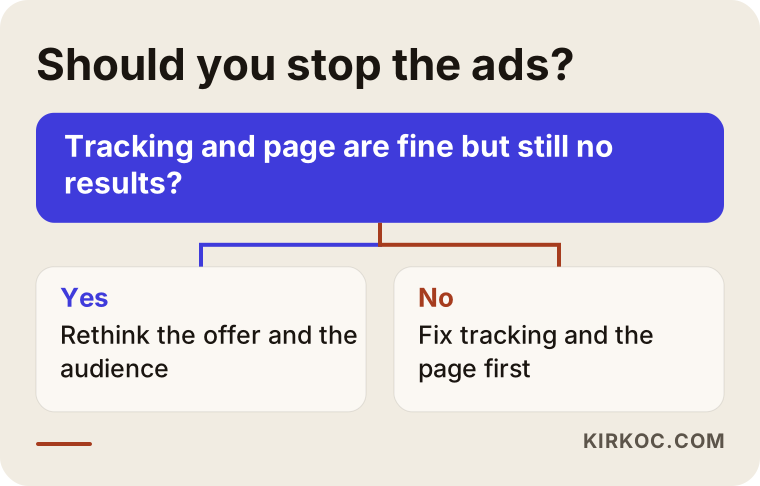
The general principle is this. If tracking is properly installed, the page works well and enough time has passed but there are still no results, you need to rethink your offer or your audience. If tracking is missing or the page is broken, stopping the ad is not the solution either; those gaps have to be closed first. Switching everything off often does not solve the problem, it just postpones it. But letting the budget run without limit is not right either. Decide in advance which indicators you will watch, and make the call when you reach that line.
A realistic timeline for the first weeks
To balance patience against intervention, a timeline helps. The flow below shows a reasonable order for an account that is set up from scratch or rebuilt. Remember that the timing is not exact and will vary with the nature of the business.
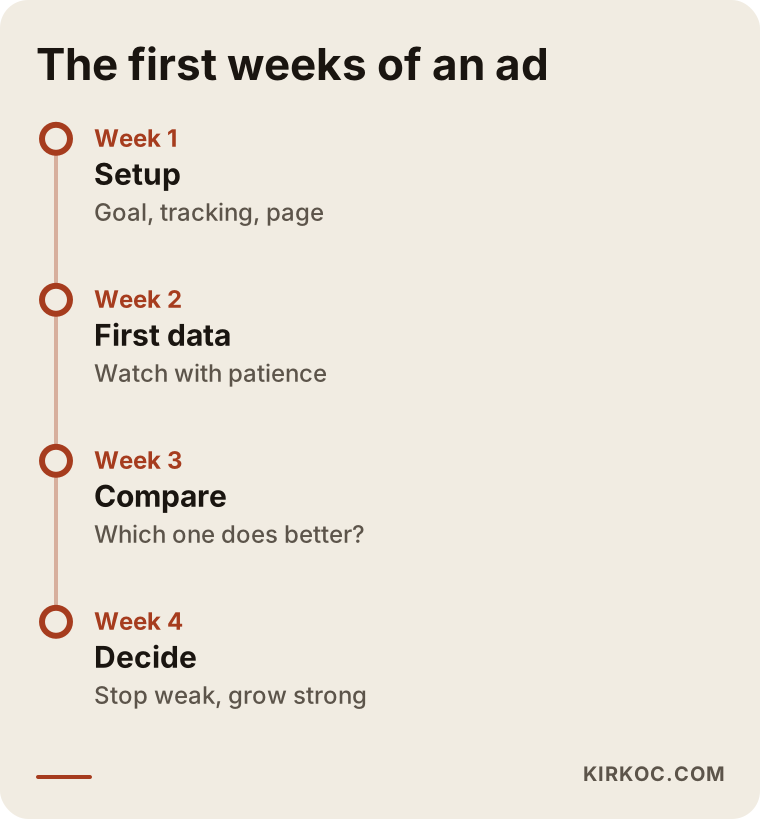
In the first period the goal is not to break a sales record but to build the system correctly and collect the first data. After that you look at which image, which audience and which page do better. The weak ones are switched off and budget moves to the stronger ones. Once this cycle is in place, an ad account stops being a gamble and becomes something you can track and manage like any other part of the business.
What do AI assistants and search engines say about this?
Many business owners now type their question into an AI assistant first. The example below shows what a short and sensible answer to such a question might look like.
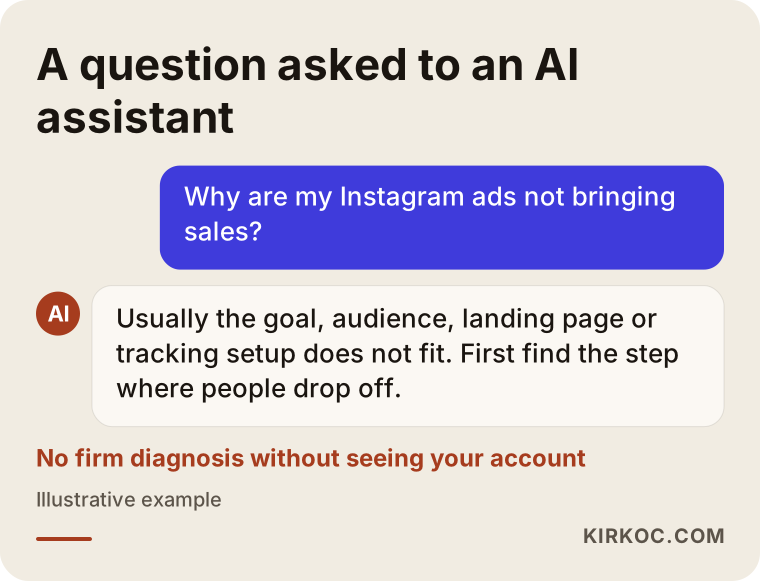
I would say answers like this point in the right direction, but a generic answer cannot see your account. Anyone who tells you "your audience is wrong" or "your budget is too low" without looking inside the account is guessing. A sound diagnosis needs real data: impressions, taps, behavior on the page and tracking records.
What can you do yourself, and when do you need a specialist?
To be honest, you can manage a large part of your advertising yourself. If your business is small, your service area is narrow and your goal is to receive messages or calls, learning Ads Manager is a sensible investment. Things you can do on your own include choosing a goal that fits your aim, building the audience around your service area, writing the service and the way to contact you clearly on the image, replying to messages quickly and looking at the results once a week.
Situations where you need a specialist usually look like this. You have a website and need sales tracking set up. Working with the Pixel and other measurement tools feels unfamiliar. You have several products or service groups and each needs its own campaign structure. Your ad account has been restricted or your ads keep getting rejected. You have been at it for months without reaching a conclusion and want a view from outside.
About account restrictions and ad policies, let me add one note. Meta's rules change often, and some industries, such as health and finance, face additional limits. If your ad wording touches regulation, for instance health claims or promotional announcements, I recommend asking a lawyer for a firm legal answer.
A few more mistakes worth avoiding
Beyond what I described above, there are a few small but costly errors. Preparing the ad the night before and launching it the next morning, giving too little information in the image, judging everything from a single image, leaving people who message you without a reply for hours, opening ads without thinking about seasons and campaign dates, and copying competitors' ads without saying what makes your business different are among the leading ones. The last is especially common. Writing "quality service" in an ad is a sentence everyone writes. You need to state something concrete that separates you from others: your opening hours, the materials you use, your delivery time or the guarantee you offer.
There is also the matter of the contact channel. If your ad has a "send message" button but you answer two days later, that customer has long since gone to someone else. Before the ad budget is spent, decide who will handle incoming requests and how fast. This looks unrelated to advertising, but it directly affects the outcome.
What determines the cost
I deliberately give no figures in this article, because advertising cost consists of two separate items and both vary widely between businesses. The first is the ad budget you pay to Meta. You decide it, and it is shaped by the competition in your industry, the profit margin on what you sell and the size of the area you target. The second is the work of setting up and managing the ads.
The main things that affect the management fee are these: for how many separate products or services ads will be built, whether tracking is set up from zero or an existing setup is reviewed, whether image and text production is included, the size of the target area, how often you want reports, and whether the landing page is ready or needs to be rebuilt. For that reason "how much does ad management cost?" has no single answer. It is not possible to name a sound figure before listening to your business and seeing what it needs. Be careful with offers that push a number to the front and say nothing about the scope of the work.
How I work with you
My way of working is simple. In the first conversation I listen to your business, your goal and what you have already tried. Then I look at your ad account, your tracking setup and the pages your ads lead to. At the end of that review I tell you, in plain words, where the problem is, what needs fixing first and what can be done about it. If you want to carry it out yourself, you are free to do so; that is entirely your decision.
If you decide to work with me, I set up the account, install the tracking, prepare the landing page if needed and report results to you regularly in simple language. Because one person handles your website, your search visibility, your social media accounts and your ads, nothing moves forward in isolation: what the ad says matches the page, and what the page says matches your social media. I do not guarantee results, because the outcome of advertising also depends partly on the market, your competitors and your product. What I do promise is to explain, openly, what is being done and why.
Frequently Asked Questions
I ran an Instagram ad but nobody messages me. Why?
It is usually one of three reasons: the ad goal is not messages, the audience has no interest in what you sell, or the ad never tells the viewer clearly what to do. Check the goal first, then see whether the image carries a clear invitation. Also try the message button yourself from another account to make sure it works.
Is an ad made with the boost button enough?
It can be enough if you simply want a post to be seen by more people. If you aim for steady sales or bookings, working in Ads Manager gives you far more control. The two serve different needs, and neither is better than the other in every case.
How long should I wait for an ad to produce results?
I cannot give an exact time, because it depends on the budget, the size of the audience and the industry. The first few days are when the system is learning, and changing settings constantly during that time does harm. It is healthier to allow a reasonable trial period and then decide by looking at the indicators.
What is a Pixel, and is it essential?
The Pixel is a small tracking code that reports visitor actions on your website to Meta. If your ad sends people to your site and you expect actions like purchases or form submissions, setting it up is strongly recommended. If you only collect messages or calls, the need is smaller, but measuring still makes decisions easier.
Can I advertise on Instagram without having a website?
Yes. Ads aimed at messages, calls or profile visits do not require a website. For sales and trust, though, your profile should be tidy, your posts should be filled in and your contact details should be visible. If you plan to sell online later, moving to a website makes the work much easier.
My ad account was restricted. What should I do?
First read the notice Meta sent you and the reason it gives. Often the cause is a statement in the ad text or image, or a payment problem. You can use the appeal route, but instead of trying it again and again, understanding the reason for the restriction and correcting it is more effective. If there is a legal side, speak to a lawyer.
Should I run ads myself or hand them to a specialist?
If your business is small and your goal is simple, you can learn and run them yourself. For tracking setup, several products, an account restriction or months without results, an outside view saves effort. Time is also a cost, so count the time you would take away from your own business.
What does the ad management fee depend on?
It depends on how many products or services the ads cover, whether tracking needs to be set up, whether image and text production is included, the size of the target area and how often you want reports. The ad budget itself is a separate item that you pay directly to Meta.
If you would like to find out together why your ads are not producing results, look at your account and the page behind the ad, and see clearly what needs fixing, you can reach me through my digital advertising service page. I will listen to your business and give you an honest assessment.