You run a landscaping business. You turn bare yards into places people want to sit in, you rebuild patios and rooftops, you redo the grounds of apartment complexes and the edges of pools, and the result speaks for itself. Yet the phone does not ring as often as it should. Most of your work still comes from past clients and their neighbors, and when you think about reaching strangers, you either post photos on social media or tell yourself you really should have a proper website and put it off again. A website for a landscaping company is how you fix exactly that: it lets someone who has never heard of you find you at the moment they are searching, and see a business they can trust. I am Ümit Kırkoç, I work from Istanbul, and I handle on my own the things a digital agency would normally split among several people. In this article I explain, with the quirks of landscaping in mind, what kind of site actually produces quote requests. If you want to see what building a site from scratch involves, my website design service page lays out the scope.
One thing before we start: landscaping is not like selling a product off a shelf. Before a client buys from you, they imagine you. They are about to hand over their yard, a good amount of money and a process that may take weeks or months. So your website has a bigger job than showing text and pictures. It has to let a stranger think, "I could trust this person." The rest of this article is about how to do that, step by step.
How do landscaping customers search for you?
Someone looking for landscaping help is rarely looking for just one thing. One person just bought a house with a bare back lot and types "landscape design." Another manages an apartment community, wants to refresh the entrance and searches for "commercial landscaping company." A third wants a few planters and a bench on a rooftop deck and types "rooftop garden." That is four or five different customers inside one industry, and each has different questions and different worries.
Then there is geography. Landscaping is local work. A yard is built in the customer's own town and often in their own neighborhood. Someone in Denver will not hire a crew from Phoenix, and a homeowner who wants a new backyard will search for something like "landscaper in Naperville" or "garden design near me" rather than a general phrase. If your site never says which towns you serve, that is the most common reason you do not show up in those searches. A sentence like "serving the whole country" tells nobody anything. Naming the cities and suburbs you actually work in, and the kinds of jobs you actually do, is far more useful. If you want a broader look at how local searches work, the link at the end of this article leads to my services page, but the practical point here is simple: be specific.
The third thing to understand is that people are searching for an idea as much as a service. Before they type anything, many have been scrolling through Pinterest or Instagram looking at yards, trying to catch a mood. Then they talk to the first trustworthy company they come across. Your site's job is to connect that idea with your work, so a person who thinks "I want this" can see "this company has done something like it, and here is how."
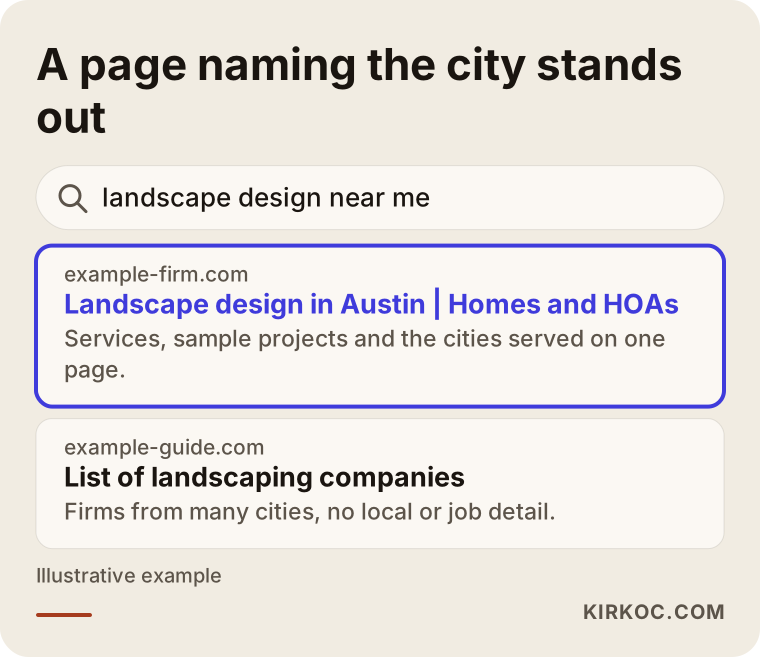
The example above shows why a page that states both the place and the job can look more appealing. As you will see below, it all comes down to building the right pages.
Which pages do you need?
The mistake I see most often with landscaping companies is a one-page "corporate" site: a slogan at the top, a few photos, and a phone number at the bottom. It works like a business card. That is fine as a business card, but it does not find new customers, because people arrive with different intentions and each intention deserves its own page.
These are the core pages that tend to work for a landscaping site:
- Home page: It should say what you do, who you do it for and where you work, right in the first screen. Below that, a few selected projects and an easy way to get in touch.
- Service pages: One page for each main job, such as residential landscape design, patio and outdoor living, commercial and HOA landscaping, rooftop gardens, irrigation installation and lawn maintenance. If you squeeze everything onto one "Services" page, you will not show up for any of them.
- Project pages: A page for every important job you have finished. This will be the strongest part of your site.
- Service-area pages: Short but substantial pages for the towns you truly work in. Not the same text copied with a different town name each time, but pages with real details about local soil, climate and typical yard types.
- A "how it works" page: A page that walks through your process, from the first call to the finished yard. Clients' biggest fear is uncertainty, and a visible process reduces that fear.
- FAQ and contact: A contact page with a form, a phone number and a map. The form should be simple.
Adapt this list to your own business. If you only do residential yards, you do not need a commercial page. If you only work with property managers and businesses, you do not need to build out a homeowner section. What matters is that every real service and every real customer type has a page.
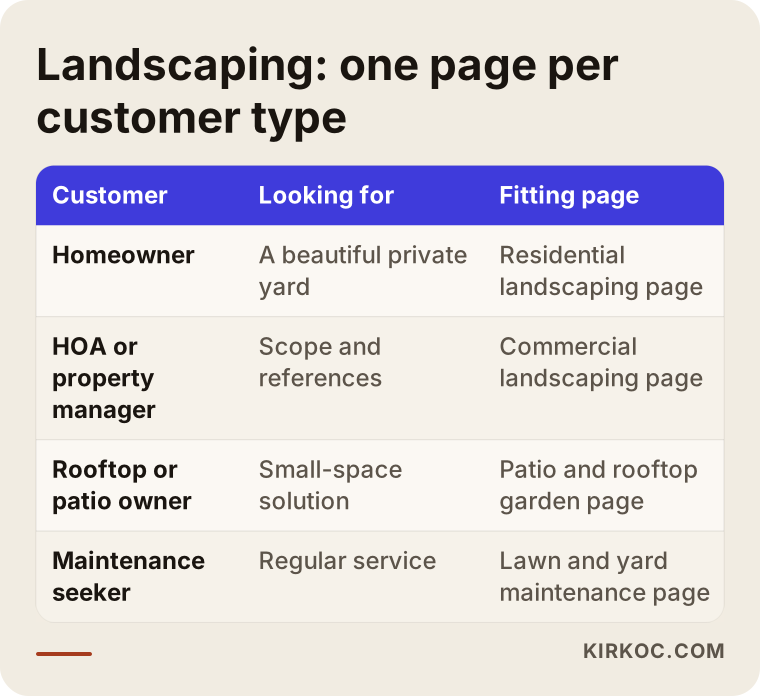
The table summarizes why searches cannot fit on one page. A homeowner and a property manager do not use the same words and do not worry about the same things, so speaking to both with one text convinces neither.
The home page: what should be clear in five seconds?
Many visitors are meeting you for the first time. In a few seconds they want to know: What does this company do? Is it right for my job? In which area? Is the work good? How do I reach them? If those answers are visible without scrolling, the person stays. If not, they go back to the search results.
A common problem is a huge photo of a lawn with a line such as "Bringing your dreams to life in green." The line may sound nice, but it gives no information. A plain sentence like "Landscape design and installation for homes and apartment communities in the north Dallas suburbs" tells both the customer and the search engine what you do in one go. If you want poetry, it can live in the subheading.
For the rest of the page, a flow like this works well: a short summary of services, three or four featured projects, a brief version of your process, a few customer reviews (real ones, used with permission) and a clear invitation to get in touch at the end.
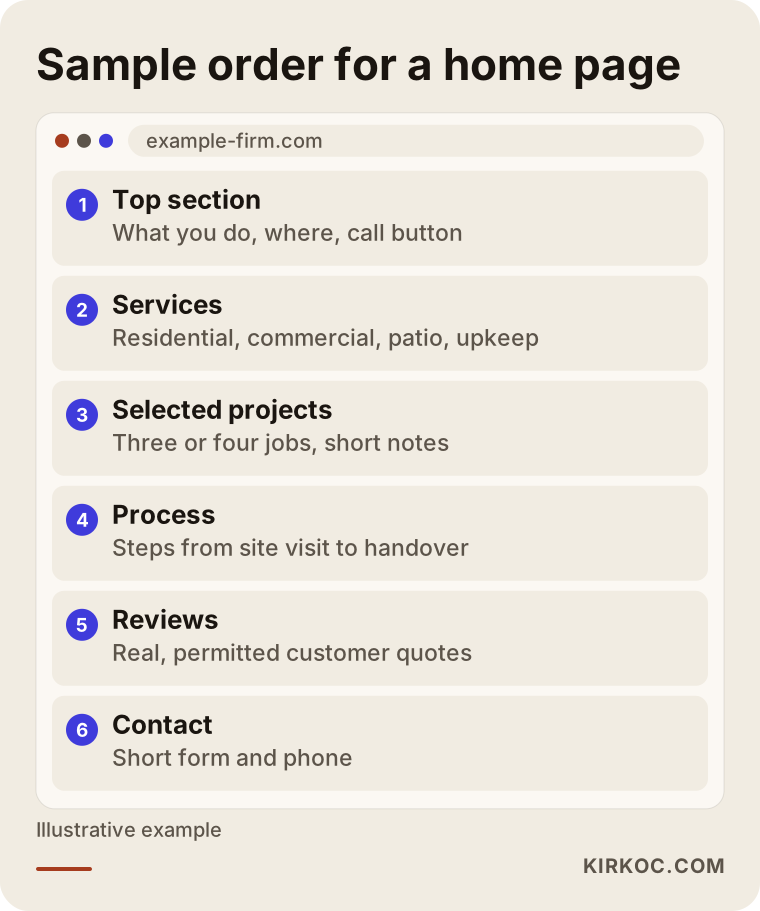
Notice in the outline that the invitation to contact you is not left alone at the bottom; it appears near the top and in the middle too, easy to reach. For someone on a phone, a "Call" button should always be visible, because a large share of landscaping customers visit from their phones.
Project pages: the real selling power of your site
Nothing builds trust in landscaping faster than a photo of a finished job. But photos alone are not enough. Many companies create a page called "Gallery" or "Portfolio" and stack twenty or thirty pictures on it. It looks nice, yet it answers none of the questions: Where is this yard? How big was it? What did the client want? What problem was solved? How long did it take?
I suggest building a project page like this. In the title, the type of job and the place, for example "Terraced backyard on a steep lot in Cary." Then a short introduction: what the client's situation and wish were at the start. Then your approach: how you dealt with the slope, why you chose those plants, how you set up the irrigation. Then the before and after photos. At the end, how long the job took and, if the client agrees, a short quote from them.
This structure does two things. First, a prospective client finds a project that resembles their own situation and thinks, "this person understands my problem." Second, search engines read these pages as real content: the town, the type of job and the names of plants and materials become natural parts of the page. The same page both persuades and gets found.
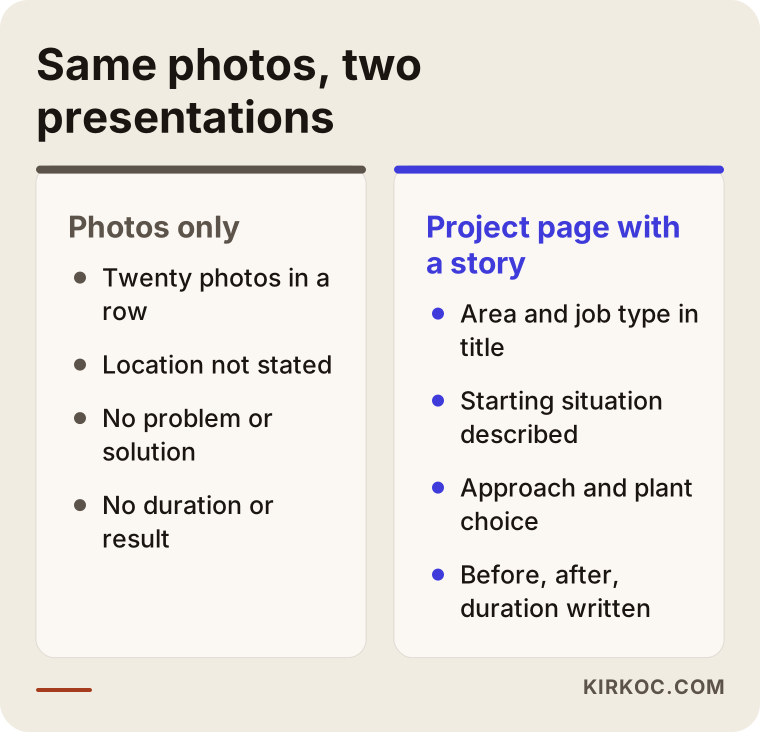
The comparison shows how the same photos can give different results depending on how they are presented. The photos stay the same; what changes is the information around them.
Photo quality and file size
In landscaping, photos are everything, but heavy photos slow your site down. If you upload large files straight from your phone, pages open late, and on mobile especially, visitors leave before they see anything. Photos should be resized before uploading, without ruining their quality. Pictures taken in good light, when the yard has matured, are far more convincing than shots of freshly turned bare soil. If you can, go back a few months after finishing, once the plants have settled in, and take another set.
It is also worth writing a short, accurate description (called alt text) for each photo, such as "Stone retaining wall on a sloped yard with lavender and a lawn area." This helps visitors who use screen readers, and it helps your images turn up in searches.
Season and timing: the landscaping-specific problem
Landscaping is seasonal. Customers wake up in spring, and in winter many projects stop. Your site needs to account for that. Searches rise at the end of winter and the start of spring, and when a customer opens your site then, they should see something current. If your latest project is dated two years ago, people wonder whether you are still in business.
That is why small but regular updates pay off: adding a new project, writing a seasonal post ("Why fall is a good time to plant trees"), refreshing your work calendar. Telling people in winter to "book now for the spring schedule" is a good way to fill your calendar before the season starts, because many people rush once the weather turns and then find that a busy company has no room.
If you also offer maintenance, describe it on its own page. Maintenance is steady work that brings in revenue even in winter, and turning a design-and-build client into a maintenance client starts there. Keeping the two services on separate pages also means different customers can find you through different searches.
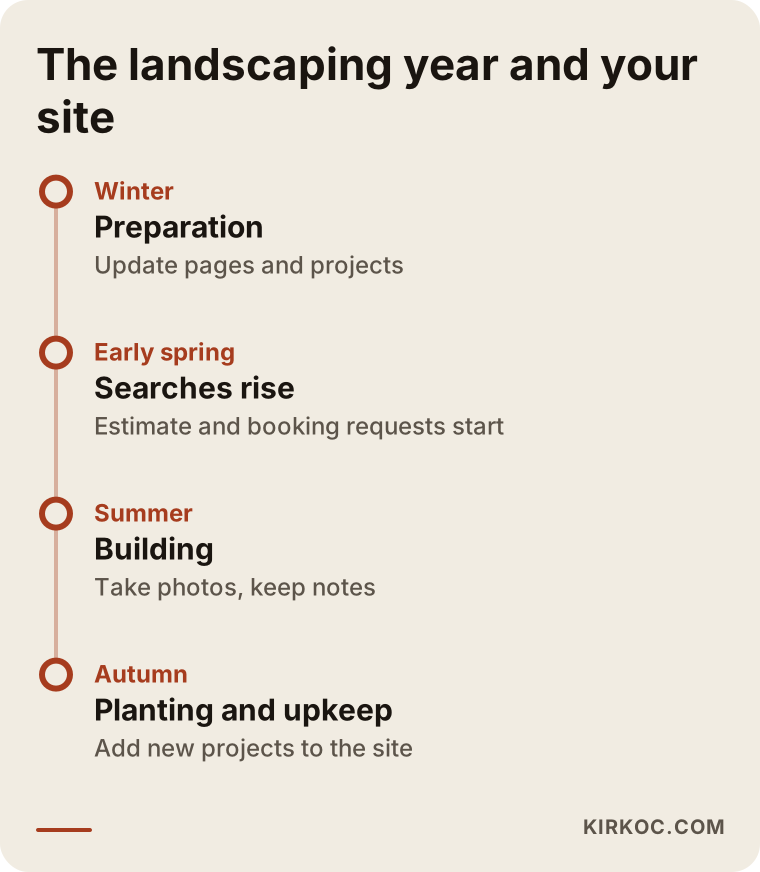
The timeline shows why you should prepare your site before the season begins. Having the pages ready when spring arrives is a much calmer start than being caught unprepared.
Example scenario 1: A company with beautiful photos and a silent phone
This is a hypothetical example. Picture a small landscaping company that builds backyards for homes in a suburban area. The owner knows the craft, clients are happy, and the Instagram account has lovely photos. There is also a one-page website: a logo on top, a slogan in the middle, fifteen photos below and a phone number at the very bottom. It was built three years ago and never updated.
This company's problem is not quality, it is visibility and trust. The site does not appear for "backyard landscaping" searches because no such page exists. When a visitor does arrive, they look at the photos but do not know where these yards are, when they were built or how long they took, so they hesitate before picking up the phone.
The fixes here are orderly and simple. First, separate service pages for backyard design, patios and maintenance. Then pick the six best jobs from existing photos and write a project page for each: place, situation, approach, result. After that, a few service-area pages that reflect the towns the company really serves. Finally, a "request a free estimate" button visible all over the site. None of this requires building a new yard; it only needs the work you already have to be told properly. I cannot promise when results will come, but letting a visitor answer "what does this company do?" in the first minute is the most solid step toward getting them to call.
Example scenario 2: A company that serves HOAs and property managers
Again hypothetical. A landscaping company works mostly for apartment communities and homeowners associations: common-area upkeep, annual maintenance contracts, running the irrigation system. The decision maker here is not one person. There is a property manager, a board, sometimes a vote at a meeting. Asking for a quote does not end with one person saying yes; it has to pass through a meeting.
This kind of customer looks for different things on the page: references, a clear work process, a precise list of what maintenance covers, and how a proposal is prepared. The manager is searching for something to present to the board, so the site should answer questions like "What does maintenance include?", "How often do you visit?" and "What happens if a plant dies?" A downloadable overview or a short summary of the maintenance scope makes the manager's job easier.
For this company, a separate "HOA and commercial landscaping" page, a maintenance contract page and an FAQ are far more valuable. The soft, photo-driven language that suits a homeowner is not enough here; a clearer language that shows scope and process is needed. If the same company does both kinds of work, giving the two customer types two separate doors (for example, "I am a homeowner" and "I manage a property" on the home page) is often the right call.
How do you lead a visitor to ask for a quote?
Not everyone who visits wants a quote. Some are only looking, some are collecting ideas, and some have already decided. The site's job is to meet people at each of these levels and move them one step closer.
In practice, picture a flow like this: many people land on the home page or a service page. Some of them look at project pages. Fewer read about how you work. Fewer still go to the contact page. This narrowing is normal; improving your site means carrying more people to the next stage at every step.
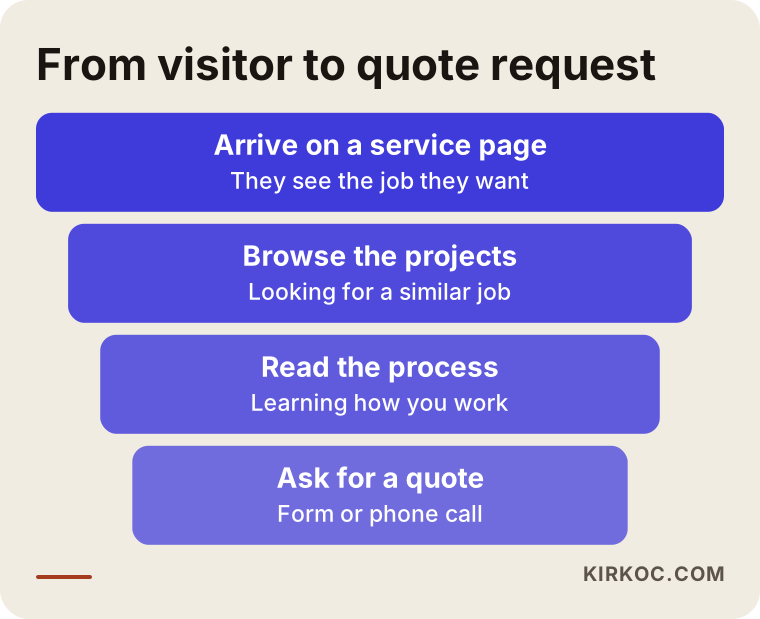
Softening that narrowing is simple. Put links to related projects at the end of every service page. Add a line such as "Let's talk about your yard too" at the end of every project page. Keep the contact form short: name, phone, town and a brief note are enough. Long forms put people off, and a landscaping estimate will happen in person anyway, so you do not need to learn everything through the form.
Questions before a quote
Landscaping customers usually arrive full of questions: "How long will it take?", "Is the site visit free?", "Do you do the design drawings?", "What if the plants die?", "Do you also do maintenance?" If the answers are on your site, the person has already worked through their hesitation before calling. A person who cannot find the answers will either call and ask the same things, or not call at all. The second happens more often.
On price, you do not have to put numbers on the site, but you can explain what the price depends on: the size of the lot, the slope and soil, the plants and materials chosen, whether irrigation is wanted, how easy the site is to reach and the time of year. That openness gives the customer the feeling that "they will give the number after the site visit, but I understand why."
Step by step: how is the site built?
When I build or rebuild a landscaping site, the order I follow looks roughly like this:
- A list of services and customer types: You write down the jobs you really do and for whom. Putting a job you do not do on a page sends the wrong customers your way.
- A page map: You and I decide which service, project and area pages the site will have.
- Gathering content and photos: Photos of your existing projects, short notes for each (situation, approach, duration), the plants and materials you use.
- Design and writing: The pages are prepared to be simple and fast, and the text avoids jargon.
- Pre-launch checks: Opening on a phone, speed, whether the form works, whether the links are correct.
- Launch and measurement: You follow whether the site appears in searches and track the requests that come in through the form and by phone.
- Regular updates: New projects, seasonal posts, FAQ additions.
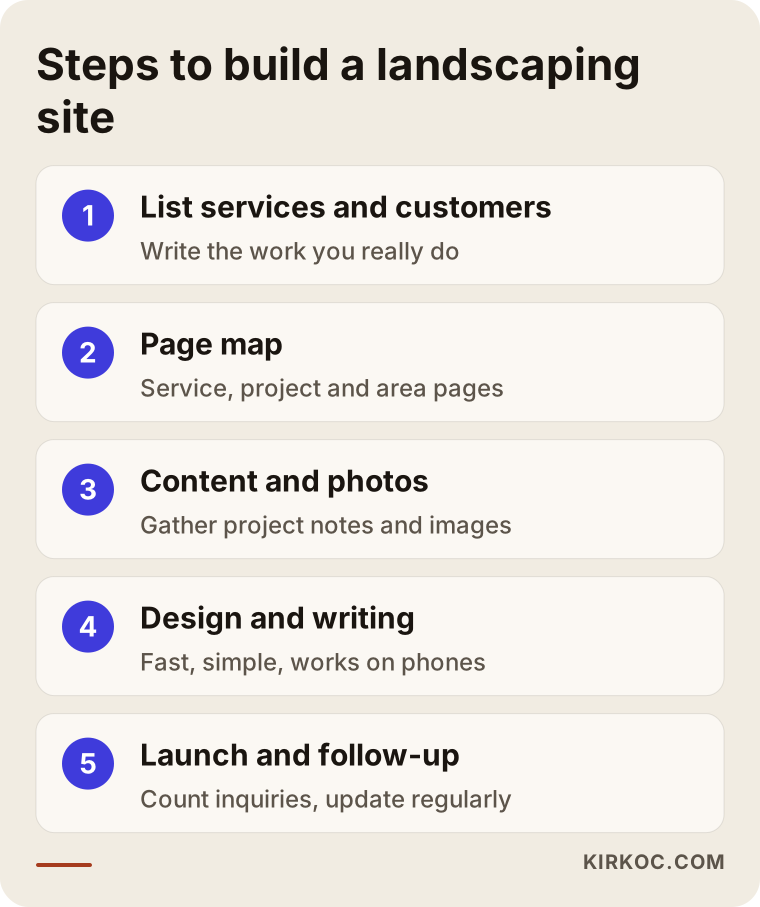
The steps look simple, but where most companies get stuck is step three: collecting the content. Photos sit on phones and notes sit in heads. When I run the work, I take the information from you in a short conversation and turn it into organized text, so what you are left with is a draft to review and say "right" or "wrong" to.
AI assistants and new ways of searching
People no longer search only on Google. They also ask tools like ChatGPT things such as "How do I choose a landscaping company for a backyard remodel?" These tools build their answers from clear, well-organized and trustworthy content on the internet. If your site spells out your process, your scope and your frequently asked questions, you have a chance of being used as a source in these answers too. It is not a guarantee, but it is an area where sites that write clearly and concretely have an advantage. This is called visibility in AI answers, or GEO for short.
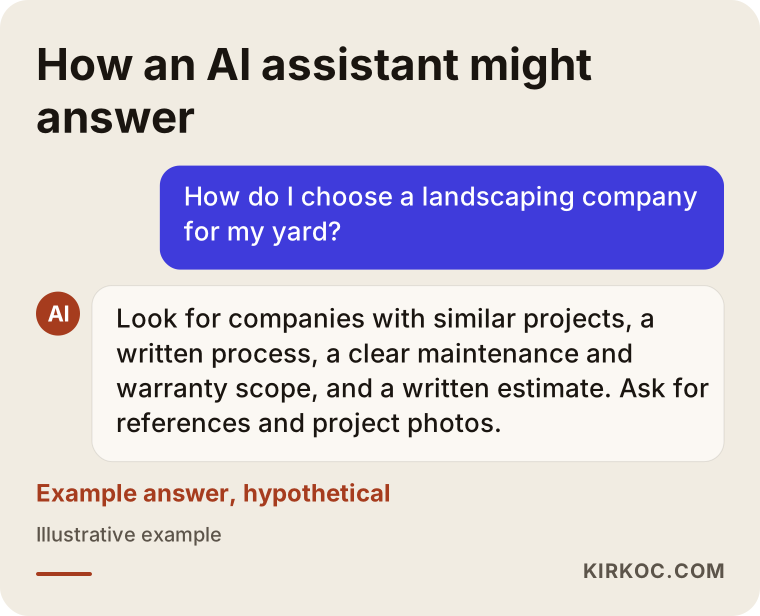
This sample answer is hypothetical. The real point is that the criteria in it (references, process, maintenance, a written estimate) should also be written plainly on your site. Stating those criteria openly helps both human visitors and these tools.
Common mistakes
These are the mistakes I see over and over on landscaping sites:
- Settling for an old, one-page site that never gets updated.
- Putting all services on one page and going into detail on none.
- Posting photos without telling their context: where, when, what problem.
- Leaving the service area vague, with lines like "we go anywhere."
- Slowing the page with heavy photos, especially on mobile.
- Burying contact details at the bottom of the page, or making the form needlessly long.
- Using photos from other sites or stock libraries and passing them off as your own work; once a customer notices, trust is gone.
- Never linking your social media accounts and your website to each other.
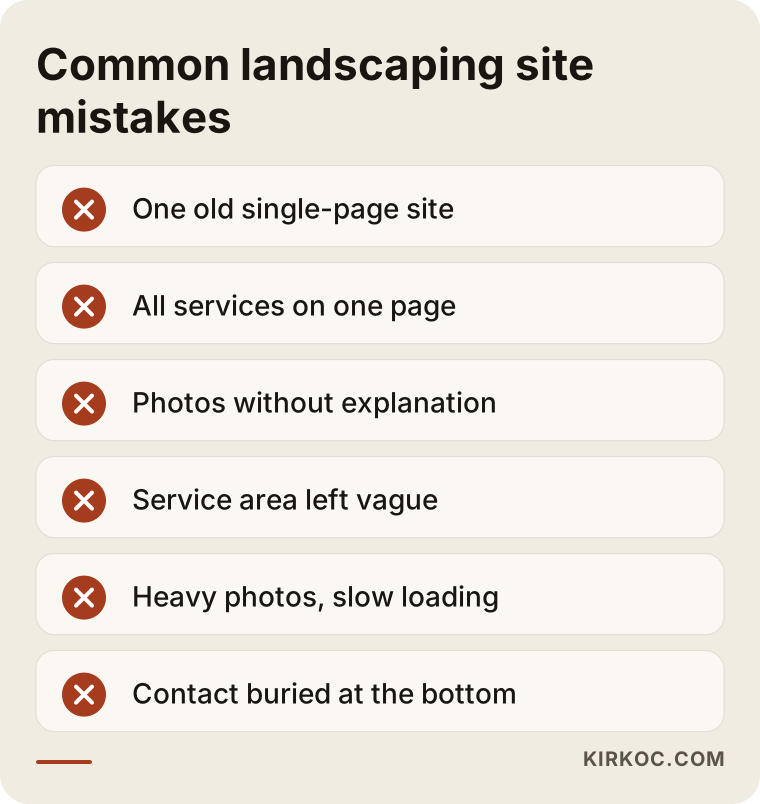
Most of the mistakes on this list can be fixed without spending money. Making the service area clear, splitting one service page into two or writing a description for a project takes only time and attention.
What can you do yourself, and when do you need a specialist?
You do not have to hand everything off. Some things you can do yourself, and in fact you should, because you know the yards better than anyone.
What you can do yourself: take and store project photos regularly; keep a short note for each project (starting condition, what you did, how long it took); ask clients, with their permission, for a brief review; keep your Google Business Profile up to date; list the questions people ask you. These are the raw materials of the site, and only you can produce them.
What needs a specialist: building the page structure correctly, making the site fast and tidy on phones, the technical settings search engines need, planning service and area pages so they do not overlap, and setting up measurement (being able to count phone taps and form submissions). If these are set up wrongly, the effort is wasted, and years later you are left asking why the site never brought in work.
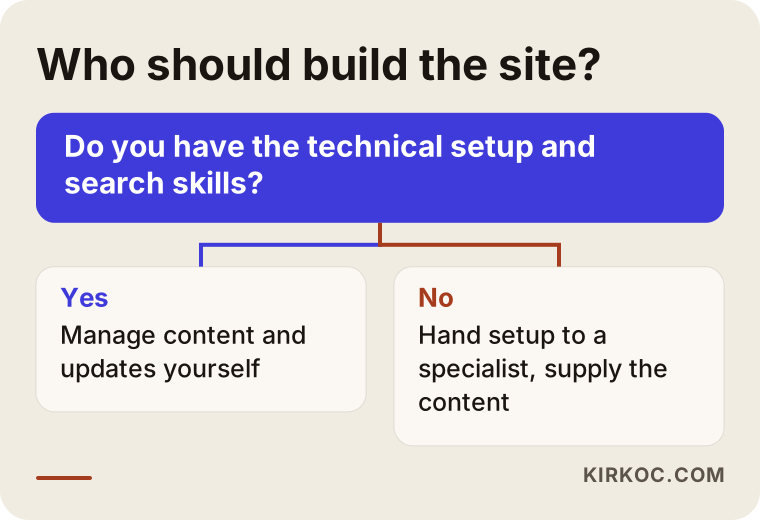
The logic of the chart is simple: the content is yours, and the setup and technical order belong to the specialist. Keeping those two apart protects both your budget and your time.
What determines the cost
I will not give a number, because no two landscaping sites need the same work. But I can tell you what shapes the cost. The first is the number of pages: a company with one service and a company with five services and ten projects have different needs. The second is content: there is a difference in workload between you preparing the text and project descriptions and me writing them. The third is photography: if your existing photos are good enough, no extra shoot is needed; if not, a professional shoot can be planned. The fourth is languages: English only, or another language for clients who speak it? The fifth is extra features, such as project filtering, a quote form or appointment booking. The sixth is whether you want ongoing maintenance and content support after launch.
When you collect quotes, ask: What is included in the price? Who writes the project pages? Who makes the updates after launch? Whose name are the domain and hosting under? If you leave, does the site belong to you? The answers tell you much more than comparing numbers alone.
How the site, social media and ads work together
Instagram is a strong showcase for landscaping; it is a natural home for a photo-driven business. But a person who likes a yard they saw on Instagram will usually search for you and look at your website. If there is no site, or a weak one, the trust you built on Instagram is lost right there. The two complete each other: social media catches attention, and the site convinces.
The same logic applies to advertising. If you run a Google ad at the start of the season for "landscape design" or "patio installation," the person who clicks should land on a service page, not the home page. If the page does not answer that search, the ad budget is wasted. That is why it makes sense to treat the site, SEO, social media and ads as links in one chain instead of separate jobs.
This is the practical benefit of having everything handled by one person: the service page I write for your site matches the page used in the ad and the language used on Instagram. Instead of three separate services written by different people who never talk to each other, you get one mind and one message. And when you need a change or a correction, there is one person to call.
How I work
I work from Istanbul and handle the work myself, so the person who talks to you is the person who builds your site. The process usually starts with a short introductory conversation: I listen to what you do, who you do it for, which areas you work in and what state your current site and social media are in. Then I send you the page map and the scope in writing, so you can see which pages will be prepared, what I need from you and when it will be finished.
The division of work on content is clear: you supply the photos and notes, and I organize and write. Everything goes to you for approval before it is published. After launch, if you like, I can also handle search visibility, social media or ads; if you do not, the work stays limited to the site. I do not promise any result or ranking, because nobody can honestly do that, but I do commit to showing you what I am doing and why at every step.
Frequently asked questions
Do landscaping companies really need a website, or is Instagram enough?
Instagram is a nice showcase, but it is not enough alone. Someone looking for a company usually checks a website, and they want to see your services, your area, your process and your references there. On Instagram, your account depends on the platform's rules rather than yours, and it shows up only in limited ways in searches. Using both together is the most solid approach.
How many pages should a landscaping website have?
There is no fixed number. What matters is that every real service and every customer type has its own page, and that your most important projects have pages of their own. For a small company, a few service pages, a few project pages and the basic pages are enough to start, and you can grow it over time.
Should I put every project's photos on the site?
No. Instead of showing everything, it works better to describe in detail a selected set of projects that best represent your different kinds of work. You do not have to show weak or unfinished jobs. When you share details such as a client's name or address, get the client's permission first.
When will my site show up on Google?
It is not possible to say for sure. For a new site it can take weeks or months, and it varies with competition. Local, specific searches (a town plus a service) have a better chance of showing results sooner. Do not trust anyone who guarantees a ranking.
How should I use customer reviews?
Use short reviews from your real clients, collected with permission, on project pages and the home page. Do not post made-up reviews or ones taken from elsewhere; they damage trust and may break platform rules. Do not be shy about asking: a satisfied client is usually glad to write one.
Should I list prices on the site?
In landscaping, prices vary so much with the lot, the materials and the scope that most companies do not publish numbers. But explaining what drives the price and how the site visit works is helpful. If you are writing down your pricing policy and there is a commercial or legal question, talk to a lawyer.
Can I manage the site myself?
Often, yes. Adding a new project, swapping a photo and editing text can be done with an easy admin panel. For the technical setup, speed and search settings, it is safer to get help from a specialist. It is good to agree up front how much you will do yourself.
Should the site be in other languages for foreign clients?
If you work with clients who speak another language, for instance owners of vacation homes who are not native speakers of English, then yes, separate pages in that language make sense. Instead of automatic translation, use text checked by someone who speaks the language. If you only work with local clients, this is not necessary.
The quality of your landscaping work is already clear; the point is for that quality to reach customers who do not know you with the same confidence. If you would like to talk about which pages you need and where to start with your current site, you can reach me through my website design page. I will listen to your business and put together an honest roadmap that fits it.