You run a medical laboratory or an imaging center. Your equipment is up to date, your staff is experienced, and you feel good about the quality of your work. Yet the phone does not ring as often as you would like, many patients only go where their doctor sends them, and the people who do search for you online either cannot find you or land on a page that tells them nothing. If that sounds familiar, searching for "medical lab website" or "imaging center website" makes perfect sense. In this article I explain what a website has to accomplish for a lab or imaging center, which pages actually help, and where to start. I am Ümit Kırkoç, I work from Istanbul, and I handle website design as well as the other work that gets a site in front of people, all by myself and all in one place.
One thing first. A lab website faces a different test than a hair salon's or a furniture store's. The person on the other side is often worried, has been sent by a doctor, or is waiting for a result. So your site is not there to look stylish. It is there to calm nerves, answer questions and make booking easy. I will take that apart piece by piece below.
How do patients search for a lab online?
I like to split lab searches into three doors. The first is the nearby search: "blood test near me," "lab in Brooklyn," "MRI scan close to downtown." This person wants a place near home or work and looks at the map results. The second door is the procedure search: "do I need to fast for a thyroid test," "how to prepare for an MRI," "how is an allergy test done." This person has not picked a provider yet. They want information, and if they find the right page, they will remember who gave it to them. The third door is the need search: "lab open on weekends," "mobile phlebotomy at home," "imaging center that takes my insurance."
Each of these doors needs its own page. Most lab sites have one "About" page and one "Services" page, and neither a search engine nor a patient can tell from those what you actually do. The illustration below shows the difference with a completely invented example.
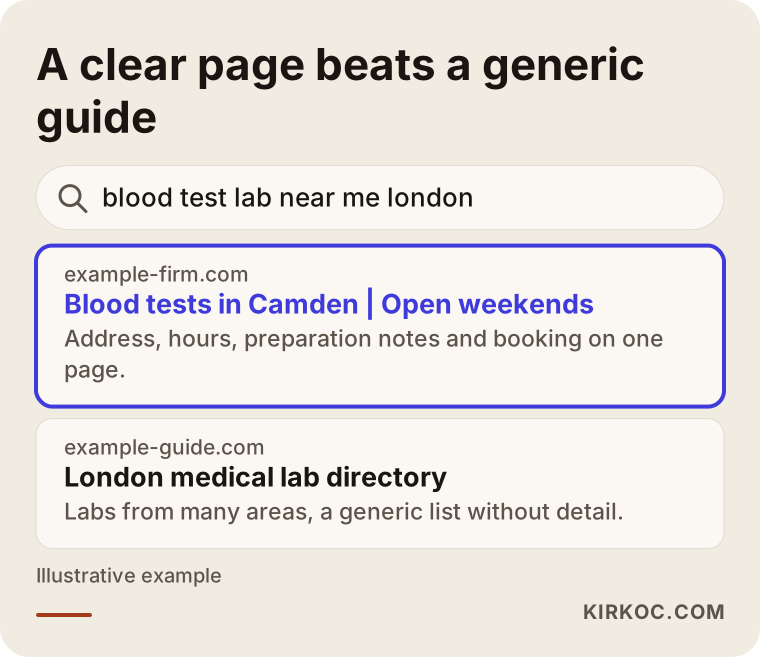
The highlighted result says three things in its first line: where it is, what it does and when it is open. The directory lumps dozens of labs into one list with no detail. Google's goal is to show the searcher the page that answers fastest. If you give a clear answer, you make that decision easier for it. That is not a ranking guarantee, only a step in the right direction.
Who is the patient, and who is the referrer?
A lab has two different readers, and mixing them up causes trouble. The patient comes to your site for booking, preparation instructions and results. The referring doctor or clinic looks at your site while deciding where to send people: which tests you run, how long results take, how reports are prepared. If you try to speak to both on one page, you end up saying too little to either. A simple fix is to address patients on the home page and give physicians their own "For Providers" page.
Which pages should a lab website have?
Think of a website as the floor plan of a house: a welcome at the door, then the rooms. For a lab or imaging center those rooms are the home page, test and imaging services, preparation guides, booking, results access, locations and directions, information for providers, frequently asked questions and contact. The next illustration shows a plain skeleton for a lab home page.
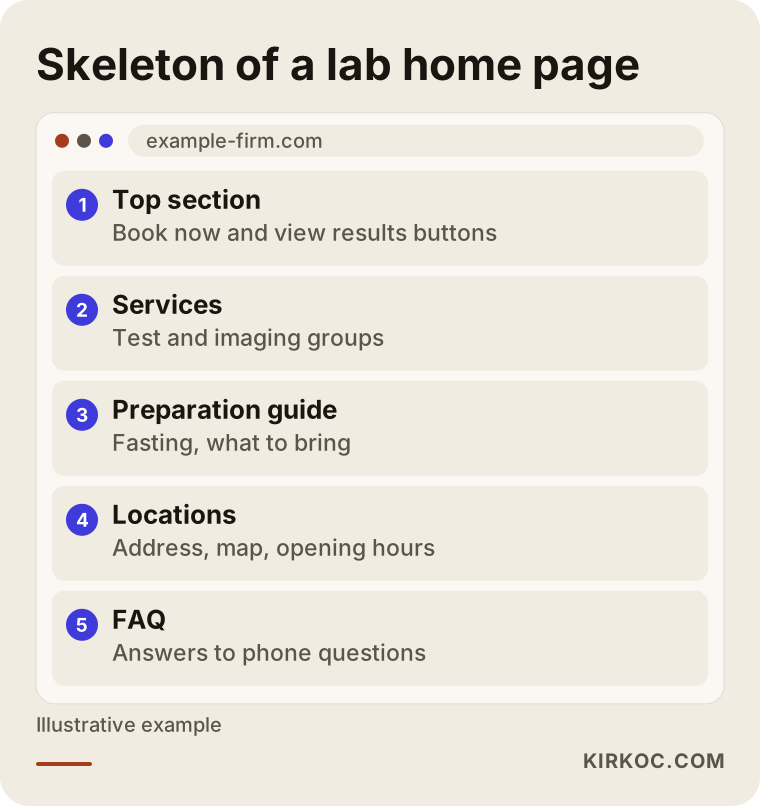
The thing to notice is that the two most common patient tasks, booking a visit and getting results, sit at the very top. If visitors have to hunt for them, they pick up the phone instead, and answering those same questions by phone eats your staff's day.
How should you split the service pages?
Instead of dumping every test into one long list, group them the way patients think. You might have separate pages for chemistry panels, hormone tests, blood counts, urine tests and microbiology, and others for X-ray, ultrasound, MRI, CT and mammography. For the few procedures people search for most, or the ones you perform most, give each its own page. Every procedure page should answer a handful of questions: what is it, why is it ordered, how should I prepare, how long does it take, when are results ready and do I need an appointment. These are exactly the questions patients ask on the phone.
A boundary matters here. The information on these pages is meant to inform, not to diagnose or recommend treatment. A sentence such as "if this value is high, it means this disease" misleads both you and the patient. Interpretation always belongs to the physician, and saying so plainly on the site builds trust.
What builds trust on a lab website?
When the subject is health, people are cautious in the truest sense of the word. The checklist below summarizes what a lab website should carry to feel trustworthy at first glance.
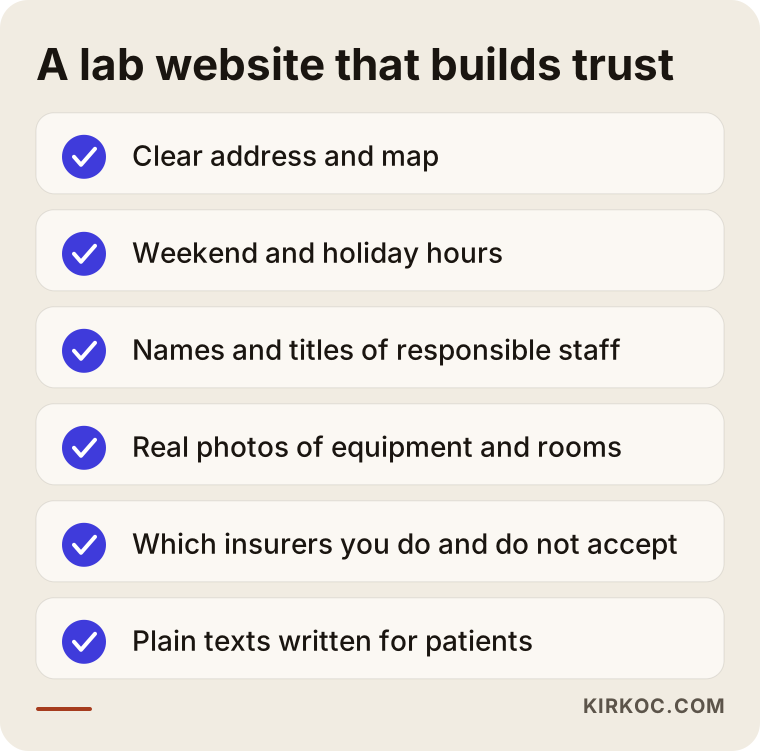
Let me unpack the list. A clear address and a map are the first sign of trust, because patients want to know where they are going. Opening hours, especially for weekends and holidays, should be written out separately. The names and titles of the responsible staff show who stands behind the work. Real photos of your equipment and waiting area, instead of only stock images, answer the question "what kind of place is it?" And if you state which insurance plans you accept and which you do not, fewer patients get turned away at the door. You write all of this once and then keep it current.
What is different between an imaging center and a lab?
Even under one roof, the two businesses can need different websites. At a lab, the patient usually makes a short visit and waits for a result. At an imaging center, equipment, preparation, duration and reporting are more detailed. The comparison below sums up the difference.
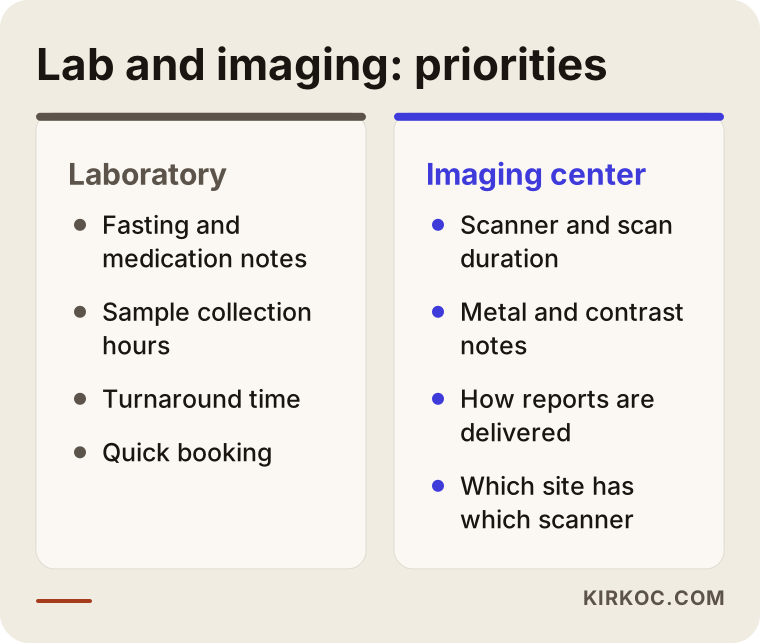
This changes how your site is organized. For labs, fasting, medications and sample collection hours come first. For imaging, the scanner type, scan duration, preparation notes on metal objects and contrast material, and reassurance for people who dislike enclosed spaces matter more. If you offer both, separate menu headings for each area keep things from getting muddled.
Hypothetical scenario 1: a neighborhood lab
The situation in this section is entirely hypothetical and does not describe any real person or business. Picture a small lab on a main street in a mid-sized city. The owner has relied for years on referrals from nearby doctors. The website was built a decade ago, looks wrong on a phone and holds nothing but an address and a phone number. Patients call to ask whether the lab is open on weekends, whether they need to fast and when results will be ready.
My first step here would be to list the five or six questions that come up most. The questions people ask on the phone are the most honest list of what they want from the site. Then I would put booking and results buttons on the home page, move opening hours and weekend availability to the top, write preparation pages for the most common tests, and make the Google Business Profile match the site. None of this is magic. Together, though, it lowers the burden of answering the same question dozens of times a day. I cannot tell you what the outcome will be, because search volume depends on competitors and location.
Hypothetical scenario 2: an imaging center with several locations
The second example is also hypothetical. Imagine an imaging center with two locations. One does MRI and CT, the other does ultrasound and mammography. The current site mixes both locations onto one page under a single address and phone number. Patients cannot tell which scanner is where, and some drive to the wrong place and have to turn around.
The right fix is a separate page for each location: its own address, map, parking and public transit notes, opening hours, the equipment available there and a direct booking line. The Google listings are split by location as well. Then someone searching "MRI near me" in a specific neighborhood sees the correct location, patients stop going to the wrong building, and both patients and staff save time. Each location page needs its own original text. Repeating the same paragraph on two pages tells neither the search engine nor the patient anything.
How should booking and results access be set up?
The most useful part of a lab website is that patients can do two things easily: book a visit and get their results. How you build these depends on how your business runs. For booking, a simple form, a call button and a messaging link are enough for most small centers. Larger centers may need a calendar-based scheduling system. What matters is telling the patient what happens after they submit the form. A sentence like "We received your request and will call you by the end of the next business day" removes the uncertainty.
Results access is a separate matter. Health information is sensitive, and sharing it over the internet calls for special care under the privacy rules that apply to you. In the United States that typically means looking at health privacy law, though I am not a lawyer and cannot tell you what applies in your case. In most centers, results access runs through an existing lab information system, and the website simply acts as a secure doorway to it. How results are presented online, what identity checks are used and where the data is stored are questions to settle with your software vendor and an attorney. I design my part as a secure link to your system. I do not store patient health data on anything I build.
You can see the path a patient follows from booking to results as a simple process in the next illustration.
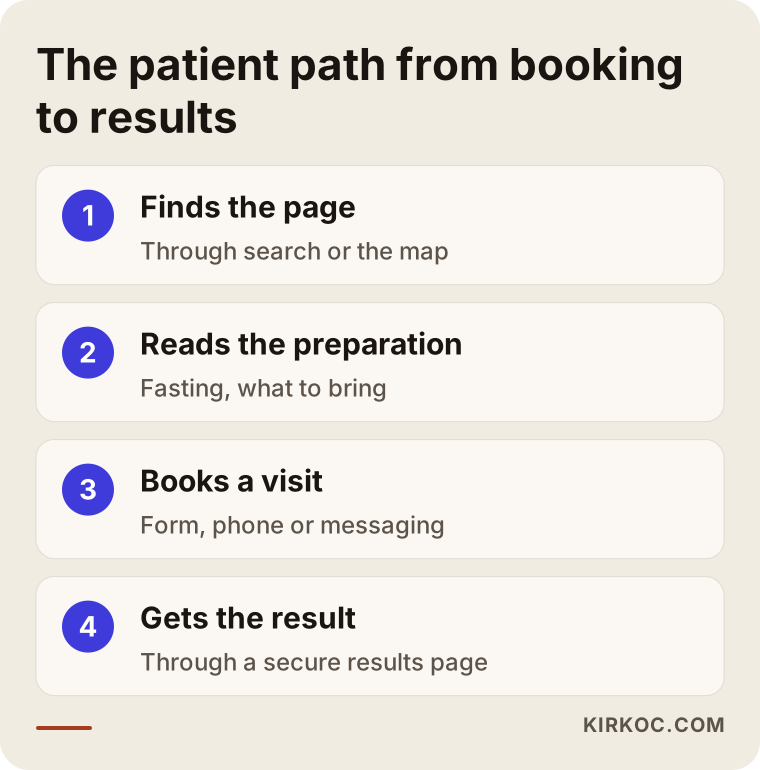
This flow also shows where a site can let a patient down halfway. If the booking form works but nobody replies, the patient goes elsewhere. If there is no results link, the phone starts ringing again. Building the site is not enough. The way you operate behind it has to deliver what the site promises.
Local search: why does showing up on the map matter so much?
Most lab searches are about proximity, so your Google Business Profile matters as much as your website. The profile holds your address, phone number, hours, services, photos and reviews. If it contradicts your site, both patients and Google get confused. For example, if the site says "open weekends" but the map shows you closed, a patient may arrive to a locked door and leave a bad review.
A word about reviews, and honesty. Asking patients for reviews is fine. Buying reviews or writing fake ones is unethical and breaks the platform's rules. Replying to reviews with short, polite messages that contain no health details is a good habit. To protect patient privacy, never mention anyone's test or treatment in a public reply, even to thank them.
How do test and imaging pages get found in search?
People search for things like "what is a thyroid panel" or "what to know before an MRI." If you have pages that answer those questions, patients meet you before they have chosen a provider. The tone matters: plain, clear, free of hype and never a substitute for a physician. You write the information once and review it from time to time. For medical accuracy, every page should be approved by you or your responsible clinician. I can make the text clear and well organized, but confirming that the medical content is correct has to be done by you.
Where are the limits on healthcare advertising and claims?
In healthcare there are rules about what you may say. The wording you can use on a medical practice's website or in its ads depends on the laws and regulators that apply to you. For that reason I suggest staying away from phrases such as "the best," "guaranteed results" and comparative claims. I cannot give you a definitive ruling on which statements are allowed or which approvals you need. Please check with an attorney or the relevant authority. I keep my writing informative and free of big promises, within that frame.
What mistakes come up most often?
I see the same mistakes again and again on lab and imaging center sites. The illustration below sums them up.
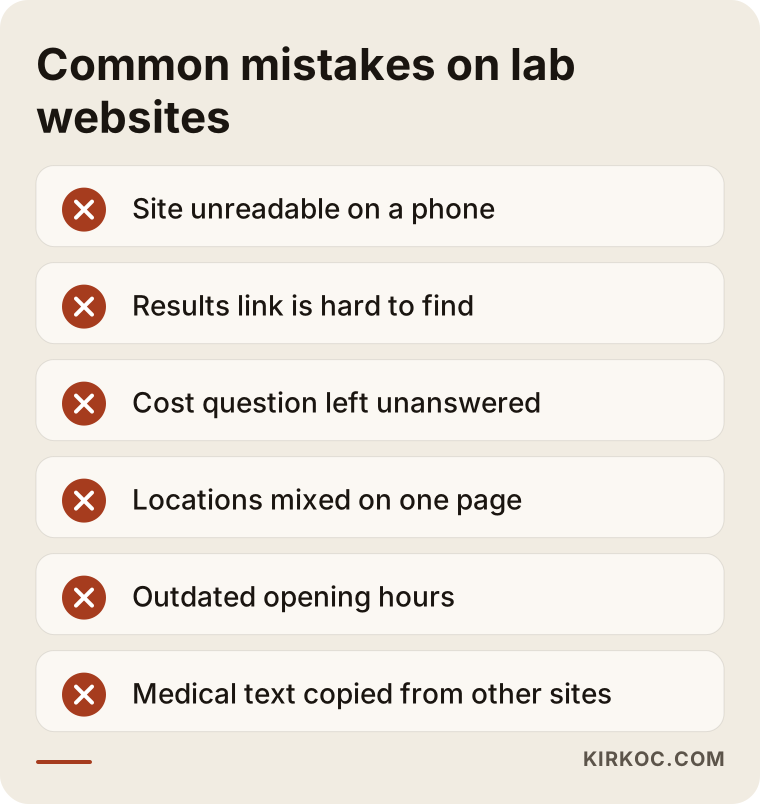
Let me explain a few. A site that does not display properly on a phone is the biggest loss, because most lab searches happen on mobile, and if the text is unreadable on a small screen the patient leaves. A hidden results link means you answer the same question by phone hundreds of times. Leaving the cost question completely unanswered also pushes patients elsewhere. You do not have to publish prices, but an honest sentence such as "cost depends on the test and on your insurance, and you will get clear information when you book" is better than silence. Location details that blur together, outdated hours and medical text copied from other sites are also common. Copied content costs you trust and drags you down in search results.
Step by step: how is a lab website built?
In healthcare you should work in order and without rushing. My process goes roughly like this. I start with an introductory conversation about which services you offer, who your patients are and which question reaches your phone most. Then I draft the site structure, meaning the list of pages, and confirm it with you. Next I write the text, and I send the medical information to you or your responsible clinician for approval. During design and development I set up the booking form, the results link and the map. Before launch I test on a phone, a tablet and a computer. After launch I bring the Google Business Profile and the basic search settings in line with the site.
You can see this process spread over time in the next illustration.
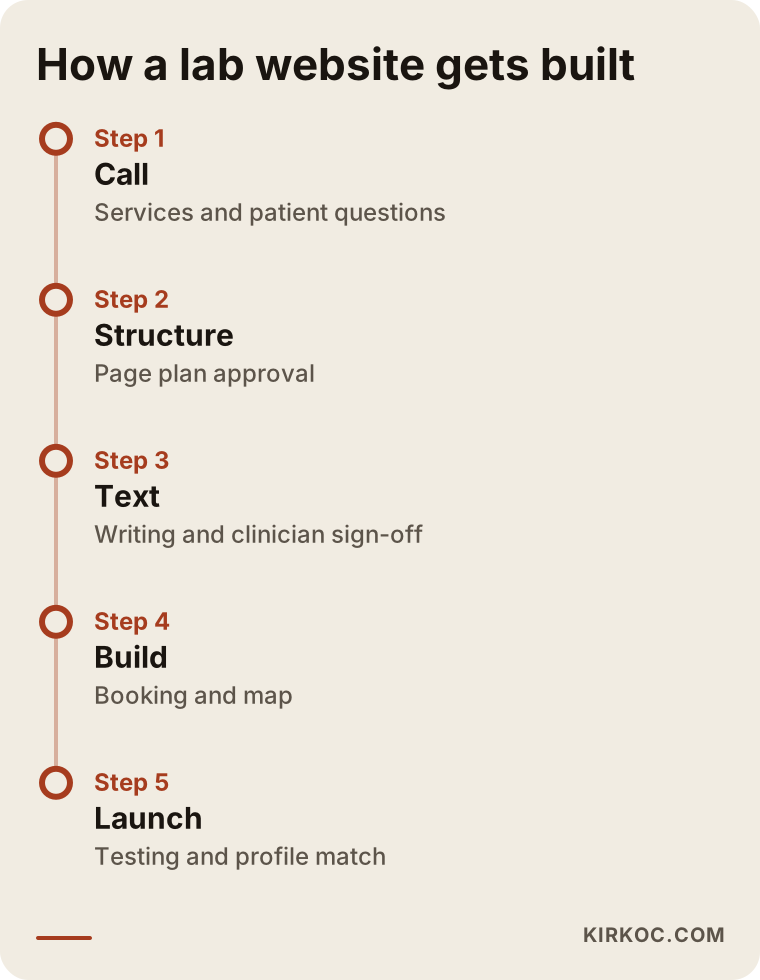
The timeline depends on the size of the center, the number of locations and how much of the text you already have. The slowest part is often not the software but the medical sign-off, because a responsible clinician has to look at every page. If you plan for that from the start, the schedule holds.
What can you do yourself, and when do you need a specialist?
You do not have to hand everything to someone else. There are jobs you can do on your own: keep your Google Business Profile information current, add real photos, reply politely to reviews and jot down the questions that come in by phone and turn them into a list. That list becomes the foundation for the pages written later. With a ready-made site builder you can also put together a simple one-page brochure site.
You need expert help in these cases: you have more than one location, you need working systems such as booking and results access, you have security and privacy concerns about health data, or your competitors are clearly ahead of you in search results. At that point the technical side, the writing and the search work touch each other, so having one person handle all of it is a real convenience.
The decision graphic below shows a simple question you can use when choosing between doing it yourself and getting help.
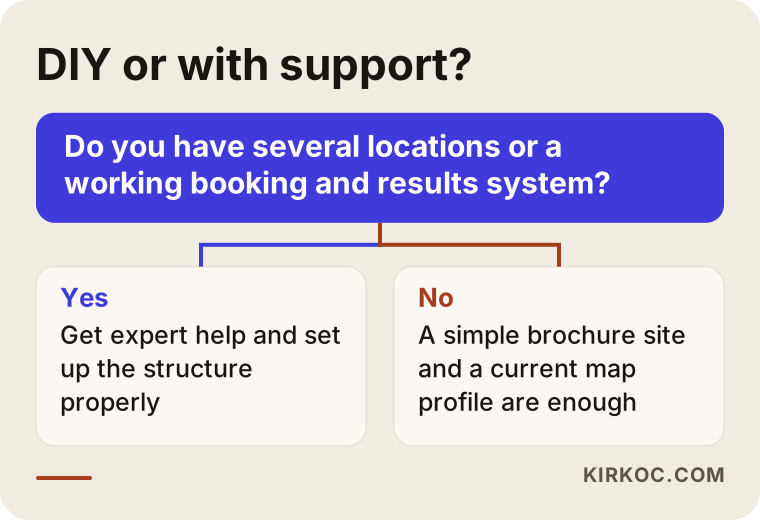
When you decide, look at where you will be a year from now, not just today. If you have one location now but plan a second, building the site with that in mind will cost far less than starting over later.
Why it helps to have one person handle everything
A lab's digital work is all connected. The website, the Google Business Profile, search results, social media and ads can each say something different if they sit with different people: one set of hours on the site and another on the map, one service in an ad and a different page on the site. Because I do all of this work myself, I can update everything at the same moment when something changes. When you buy a new scanner, the service page, the map listing, the social media announcement and, if you want one, an ad can all come out in the same week and agree with each other. You are spared from explaining the same thing to four different people.
I will be honest about advertising as well. Healthcare ads may carry extra restrictions from platforms and from regulators. So I recommend running ads only once your site is ready, after checking the rules, and starting with a small budget. I do not promise results.
To see how these pieces fit together, look at how an AI assistant might answer a question. These assistants now respond to this kind of question too.
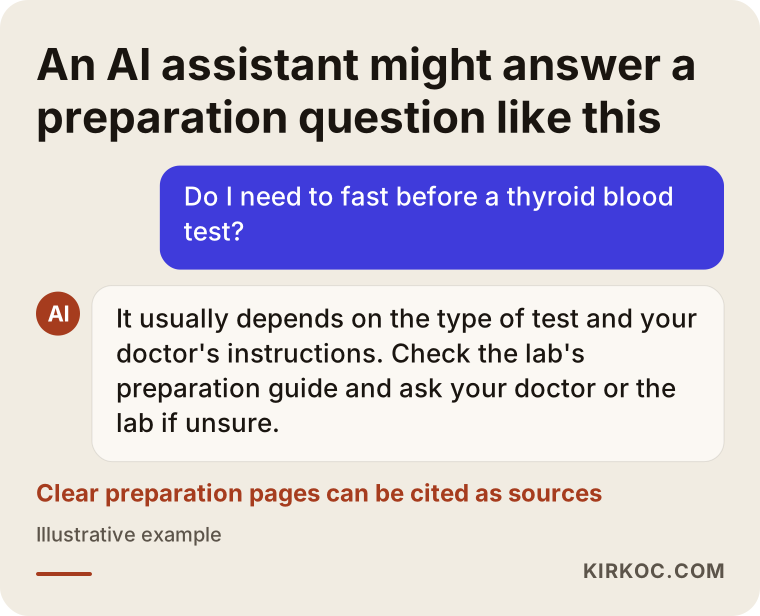
The logic is simple. Both AI tools and search engines draw on pages that look clear, organized and reliable. If you write your preparation guides in a plain question-and-answer style, you improve the odds of being cited as a source in answers like this. That is not a guarantee, just sensible preparation.
What determines the cost?
I am not giving numbers, because the cost of a lab website varies a lot with the scope of the work. These are the main factors: the number of pages and the amount of content, the number of locations, whether booking is a simple form or a calendar system, whether results access needs to connect to your existing software, whether you already have the text written, whether you need a photo shoot, whether you want more than one language, and whether you want regular maintenance and updates after launch. Two centers can look alike from the outside, but if they run differently inside, the price will differ. So when you compare quotes, look beyond the total. Check what is included: is copywriting part of it, is the site built to work on phones, is there maintenance, and what happens a year from now?
How I work with you
I am one person and I handle the job from start to finish myself. The person you talk to is the same person who writes and builds your site. I begin with a short conversation, listen to how you describe your services and patients, and then tell you honestly what is necessary and what is not. You also do not have to do everything at once. Sometimes a basic site and a well-kept Google profile are enough for now, and the rest can be added over time. On health data, regulation and medical content, I state my limits up front and send you back to your attorney or your responsible clinician when needed.
The final illustration works like a last checklist for deciding when a lab site is ready.
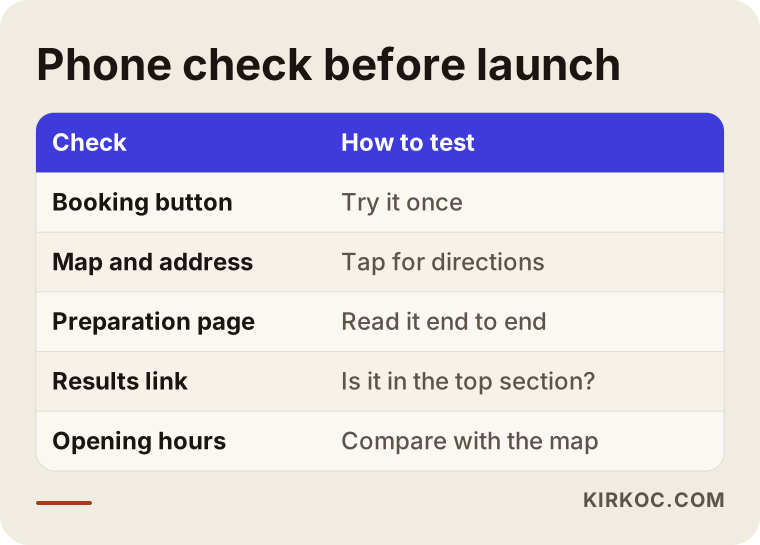
I especially recommend running this check on a real phone before launch. Tap the booking button, open the map, read one preparation page. When you experience what a patient would experience, the gaps show up quickly.
Frequently Asked Questions
Does a lab need a website?
It is not mandatory, but patients search for you online first. Without a site, your map profile and what other people write about you tell your story. A simple but well-made site answers patients' questions before they ever call and reduces the phone load.
Should I list test prices on the site?
You do not have to. Cost often depends on the type of procedure, the payer and any agreements in place. If you prefer not to publish numbers, explaining what the price depends on and how to find out still helps the patient. For rules around advertising and pricing information, check with an attorney.
Can results be viewed on the website?
Technically yes, but health data is sensitive. Identity verification, security and where the data is stored should be settled with your software vendor and an attorney. Most of the time the site works as a link to a secure page in your existing system.
How many weeks until my site shows up on Google?
I cannot give a timeframe, because it depends on competition, location and the current state of your site. If the map profile and the site are both set up properly, your chances of appearing in nearby searches improve. There is no ranking guarantee, and results build over time.
Who should write the medical information pages?
I can make the text clear and well organized, but approving the medical accuracy is your job or that of your responsible clinician. Every information page should be reviewed by a professional before it goes live and checked again at regular intervals.
What structure do I need if I have several locations?
Each location needs its own page with its own address, map, hours and booking details. The Google Business Profile listings are separated by location too. That way patients do not go to the wrong place, and search results are clearer.
Do I need social media and ads?
Not right away. Start with a good site and map profile. After that, once the rules are checked, you can add a small ad test or informative social posts. Healthcare ads may be restricted by platforms and regulations, so factor that in early.
What happens after the site goes live?
Hours, services and equipment details get updated as they change, new pages are added for new questions, and phone and form traffic is watched. A website is not something you build once and walk away from. It is a tool that needs regular care.
If you want a clear, trustworthy website for your lab or imaging center, built to bring in bookings, you can write to me through my website design services page and we can talk through what you need.