Think about the last time you were about to sit down with someone you had never met. Chances are you looked them up first, and the first link you clicked was their LinkedIn profile. The same thing happens to you. A potential customer, a partner, an investor or a recruiter looks at your profile before they ever speak with you. If your company page is tidy but your own profile was opened years ago, with an old photo and an empty summary, you lose half of that first impression. LinkedIn profile management means deliberately shaping that page, the one a person lands on when they search for you. I am Ümit Kırkoç, and I work from Istanbul. I handle the digital work of an agency by myself, from websites and SEO to ads and content, and that includes social media management. In this article I explain how to think about your LinkedIn profile as an executive, an independent consultant or a small business owner, what you can do on your own, and where outside help starts to make sense.
First, a word about "personal branding." It sounds grand, but I do not mean becoming famous. I mean that someone who is good at their job gets understood by the right people, in the right way. Plain, honest, regular visibility. That is all.
Why do you need a personal profile when you already have a company page?
On LinkedIn, people mostly talk to people, not to brands. A company page carries announcements, but a proposal or a partnership message almost always travels from one person to another. The person who decides whether to buy usually answers the question "Is this company safe to work with?" by looking at the owner or the senior manager. If they can see what you do, what kind of work you have experience with and how you operate, trust starts on the first screen.
This matters most if you sell to other businesses. In consulting, software, manufacturing, logistics, finance, law or architecture, a customer relationship often begins with an introduction, and LinkedIn is the digital version of that introduction. Hiring works the same way. A manager looking for staff often realizes too late how serious their own profile needs to look.
The illustration below shows the role of a personal profile as a simple funnel. There are no numbers in it. The point is the order of the steps.
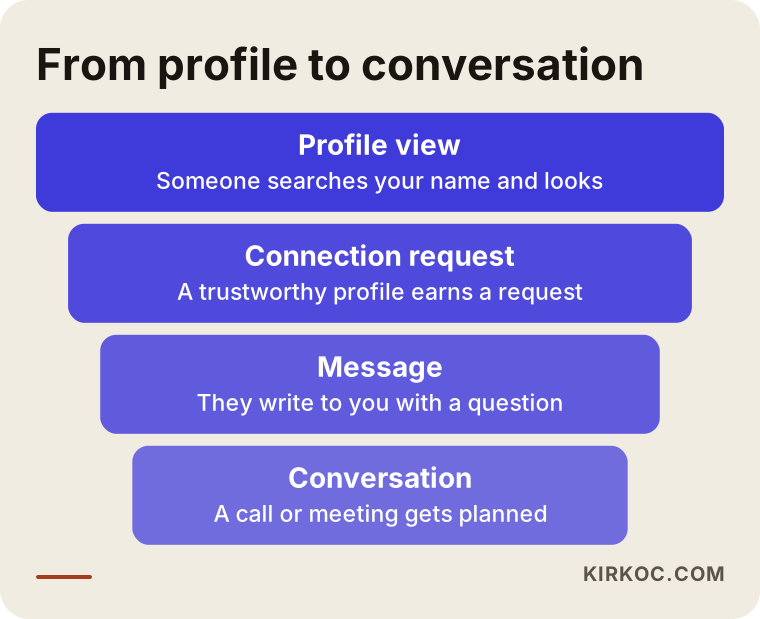
Each step depends on the one before it. If the person who views your profile is not convinced, no connection request follows, and without a connection, messaging gets harder. So you fix the top box first, which is the profile itself. Posting content, growing your network and sending messages come afterward.
How do people find you on LinkedIn?
There are two answers. The first is LinkedIn's own search box. Someone types "finance director Chicago" or "ecommerce consultant" and a list of profiles appears. The second is Google. When a person searches your name or your company, a LinkedIn profile often shows up among the results. In both cases you can be found only if your headline, job title, About section and experience contain the words people are actually searching for.
In other words, a profile is a kind of search page. Instead of lines everyone writes, like "dynamic, results-driven professional," it should contain the phrases people type: the work you do, the industry you serve and the city you are in. You can compare it to a result on Google.
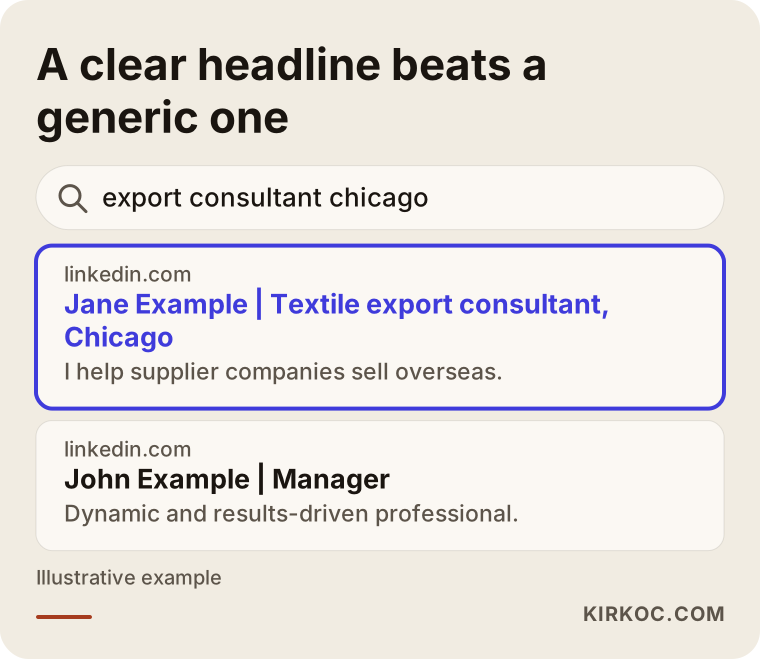
Both profiles in the picture are made up. One headline says what the person does and which industry they serve. The other just says "manager." It is obvious which one a searcher would click. Keep in mind that LinkedIn's search also looks at matching words. If a phrase never appears on your profile, it is hard to be found for it.
What should the top of the profile say?
When a profile opens, a visitor sees only a few things at the top: the photo, the cover image, your name, your headline and your location. Readers start forming a judgment before they scroll down, so this area deserves the most care.
Your photo should be plain, well lit and show your face clearly. A studio session is not required. A picture taken near a window against a simple background works fine. Vacation photos, group shots and very old images do not build confidence.
The headline is the spot people most often leave alone. If you write nothing, LinkedIn fills it with your job title and company name. Yet this line is the only sentence shown right under your name in search results. Instead of just "General Manager," you could write "General Manager | Furniture manufacturing, export and wholesale." Whoever reads it understands why they might write to you.
The cover image usually stays empty or shows a random landscape. A simple image, or one short sentence about what your company does, strengthens the identity of the page. It does not need to be fancy. It only needs to be readable.
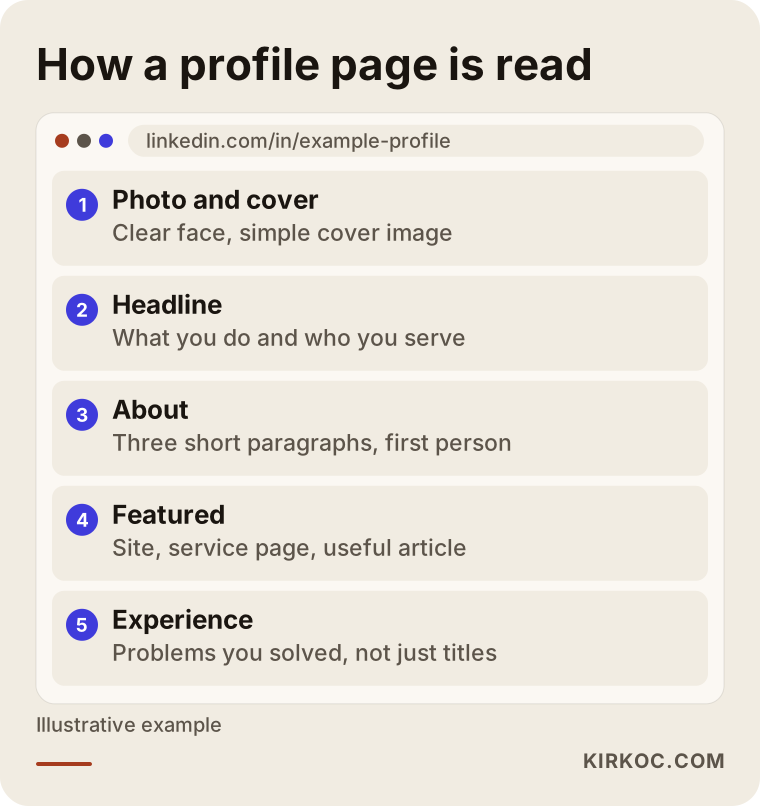
The layout in the picture shows the order in which a profile is read from top to bottom. Keep that order in mind and it becomes easier to decide what to write in each section: who you are at the top, why you can be trusted in the middle, and how to reach you at the bottom.
Your About section is not a résumé
One of the most common mistakes is pasting a summary of your résumé into the About section. This section works better as a short conversation with someone who has never met you. The reader wants answers to three questions. What does this person do? Who do they help? What is it like to work with them?
A good About section usually has three short paragraphs. In the first, you say what you do and who you serve. In the second, you describe how you work, what kinds of problems you run into and how you solve them. In the third, you give a clear next step: an email address, a link to a page, or a plain invitation such as "feel free to send me a message."
People also ask whether to write in the third person or the first. I recommend first person, "I." Third-person writing makes a profile read like a job ad and creates distance. The picture below compares the two approaches.
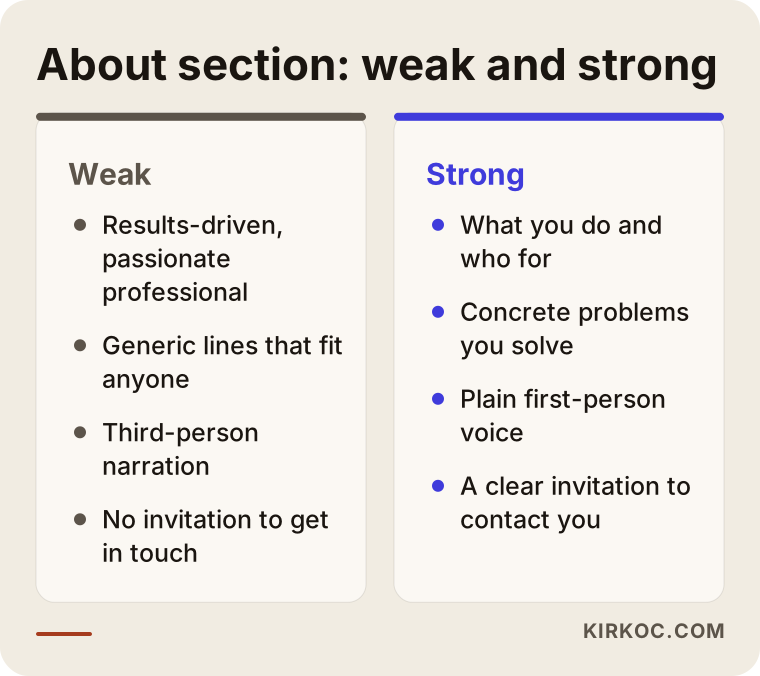
The text on the left could belong to anyone. The text on the right describes exactly one person. The difference does not come from length. It comes from how concrete you are. Try this when you reread your own text: remove your name, and if the paragraph could still belong to someone else, make it more specific.
Featured, Experience and the other sections
The Featured section is the shop window of your profile. You can place the three to five things you most want to show there: your company website, a service page, a useful article you wrote, a presentation or a letter of reference. Many people leave it empty, and an empty Featured section means you are not showing the visitor a next step.
In Experience, listing job titles is not enough. For each role, write two or three sentences about what you did and which problem you solved. Instead of "I was a sales representative," something like "I sold to manufacturers on a wholesale basis and set up a working routine with new distributors" stays in a reader's mind. If you use numbers or percentages, make sure they are real and provable. An invented or inflated figure costs you trust.
Do not underestimate Skills and Recommendations either. Choose skills that match the topics you want to be found for. A recommendation is a few sentences someone you worked with wrote willingly. Even if you only have a few, they should be genuine. Asking people for a recommendation is nothing to be embarrassed about. A short, polite message is enough.
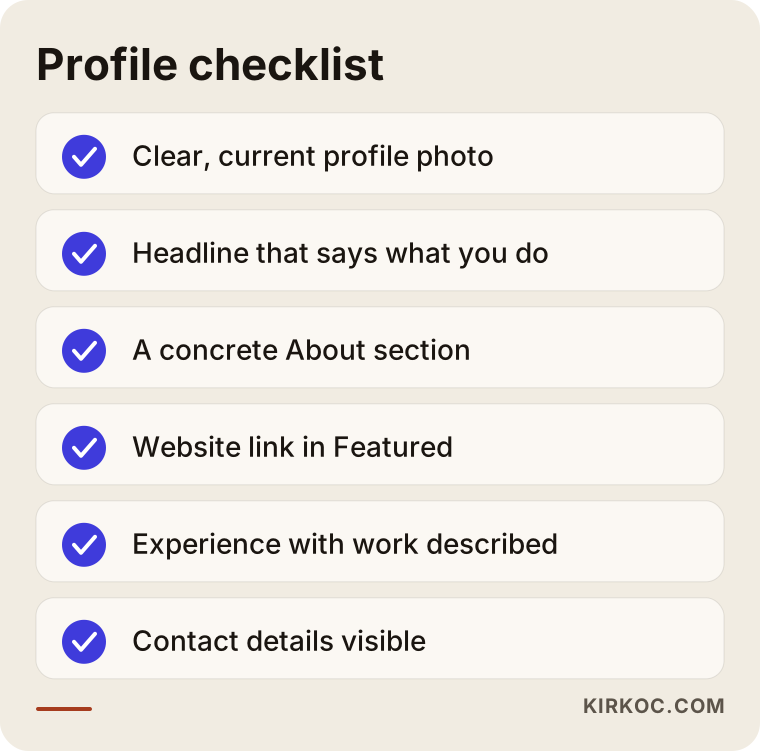
Going through the list item by item shows what is missing from most profiles within a few minutes. You do not have to fix everything in one day, but just knowing which part is missing makes the work easier to plan.
What should you post, and how often?
Once the profile is fixed, content comes next. The biggest misunderstanding here is believing you must post every day. Being regular matters more than being frequent. A short, useful post once a week often does more than one long article a month, because trust grows as people get to know you and run into you repeatedly.
When choosing what to post, ask yourself: what questions do my customers ask me? The answers to those questions are the best content. An executive can explain a change in their industry in plain language. A specialist can describe a common mistake in their field and how to avoid it. A business owner can show the reasoning behind a process. All of it comes from your own experience, and that is what sets you apart.
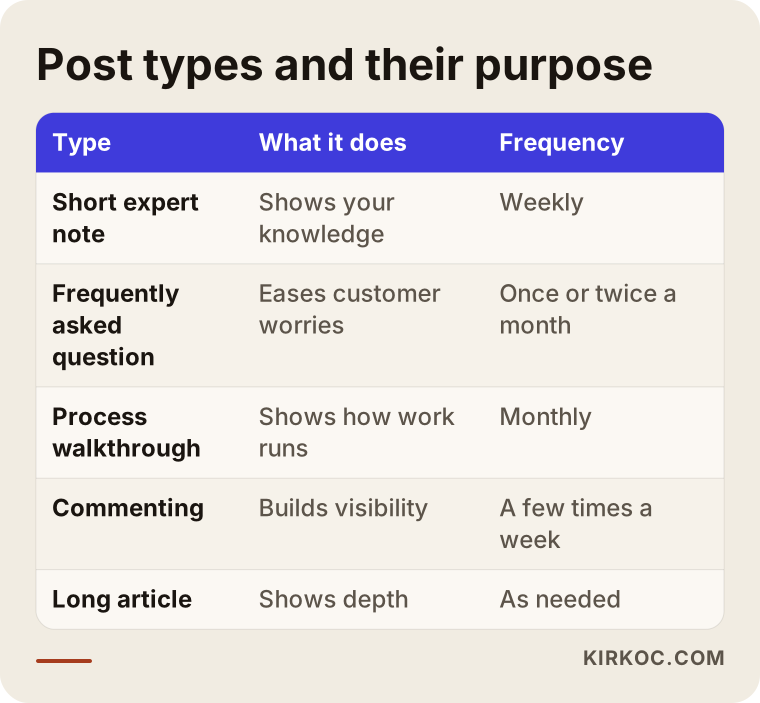
The table does not impose a calendar. It only shows which kind of content does which job. You do not need to do all of it. Starting with two types and keeping them going for a month is far more effective than trying six types halfway.
Also remember the power of comments. A thoughtful comment on someone else's post gives you about as much visibility as a post of your own. For beginners this is the less stressful route: without having to write an article, you begin to appear in front of the people in your field.
Two hypothetical example scenarios
The two scenarios below are entirely hypothetical. They have nothing to do with any real person or company. They are written only to show the logic.
Scenario one: the general manager of a manufacturing company. Suppose the manager of a company that makes textile components in Istanbul wants to sell abroad. Their LinkedIn profile says only "General Manager," the About section is empty and the last post was two years ago. A buyer overseas hears the company name and looks at the manager's profile. They cannot find what is produced, which countries the company sells to or which languages it can work in. In the end, they contact another supplier. After the profile is fixed, the headline names the product group and export experience, the About section explains the production process and way of working, and Featured holds the product catalog and the website. There is no guarantee here, but the buyer at least finds the information they were looking for, and the chance that they write a message goes up.
Scenario two: a self-employed accountant. This person gives bookkeeping and tax advice to small businesses. Most of their customers come by referral, and they never cared about LinkedIn. But when a referred prospect looks them up before a meeting, they find a half-finished profile. The accountant starts posting twice a month, in plain language, about the paperwork mistakes small businesses often make. They also write on their profile which kinds of businesses they work with. Over time, referred people see customers like themselves and problems they recognize, and the feeling of "I came to the right place" appears. I am not promising a result here either, but this is the most reasonable way to build trust.
In both scenarios, the point is not turning something into a mysterious "brand." It is that the person on the other side can find answers to their questions on your profile.
How do you go about it, step by step?
Thinking of LinkedIn profile management as a project lets you work on it calmly. I usually handle the process in five steps.
Step one is clarifying the goal. Who is the profile for? Do you want to attract customers, find partners, hire people or simply be known in your industry? When the goal changes, the headline and the content change too. Step two is looking at the current state: reading your profile through a stranger's eyes and noting what is missing. Step three is building the base: photo, headline, About and Featured. Step four is deciding the content routine: what you will post, how often and who will write it. Step five is maintenance and review: looking at the quality of the messages you receive, seeing what works and continuing.
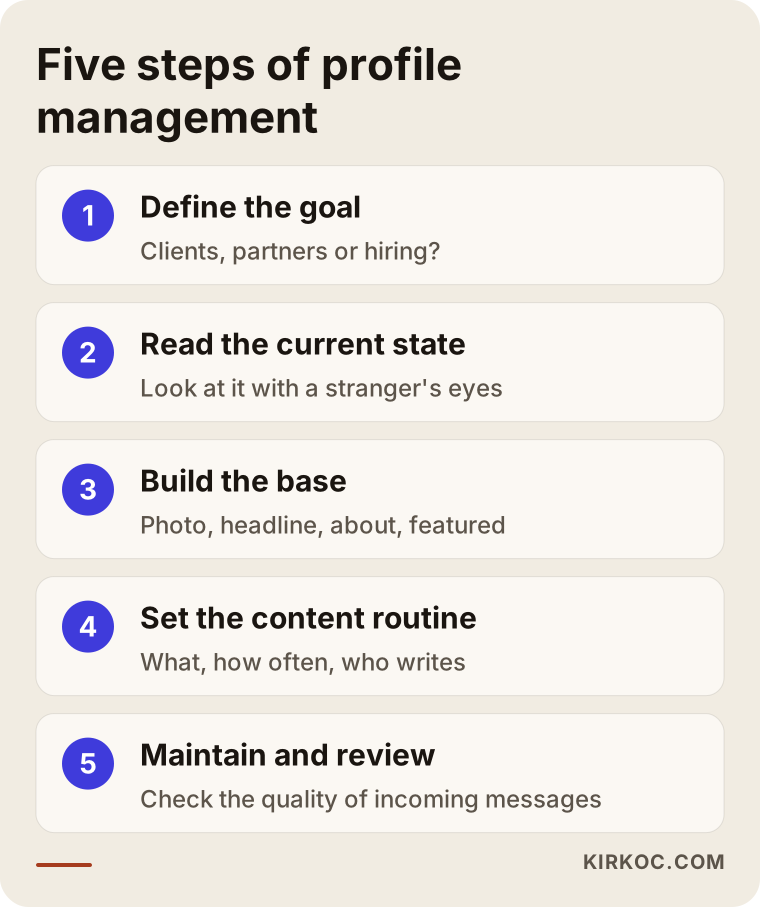
It matters not to break this order. Posting content before the profile is ready is like leaving the window of a busy store empty and buying ads anyway. People arrive, but they have nothing to look at.
What can you expect in the first 90 days?
Do not expect quick miracles here. Still, a timeline protects your motivation. An honest schedule could look like this. In the first month you build the base and the whole profile gets fixed. In the second month you get used to regular posting and pick up the habit of commenting. In the third month you look at what is working and judge the quality of the messages coming in. Results vary widely from person to person and from industry to industry, so I do not set a firm expectation.
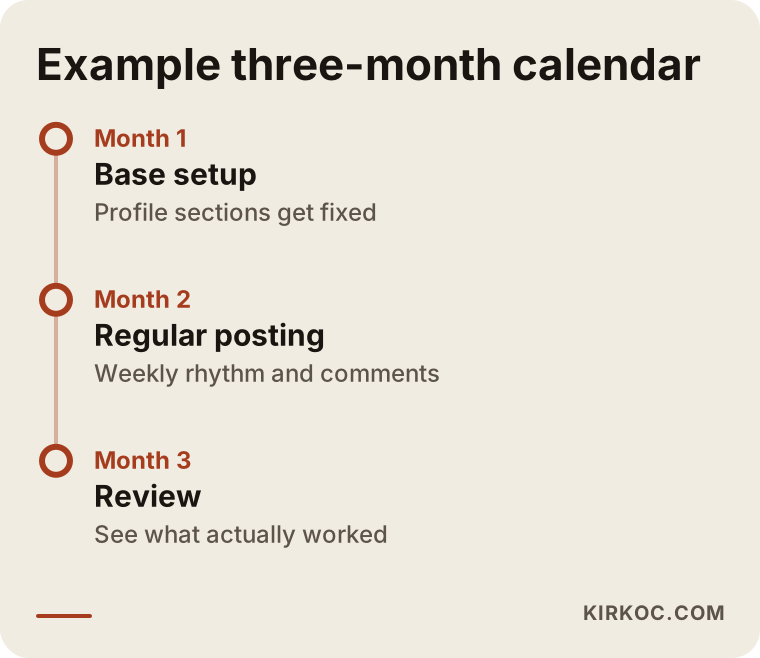
The chart is only an example. If you are a busy executive, you can stretch the period. What matters is keeping the rhythm. Staying silent for months and then posting every day for a week breaks the rhythm and usually brings no result either.
Common mistakes
The mistakes I have seen over the years tend to look alike. Most of them come not from bad intent but from not knowing how it should work.
The first is filling in the profile like a résumé. The second is writing with stock phrases everyone uses. "Results-driven," "passionate" and "team player" convince no one. The third is trying to sell to strangers in the very first message, which hurts both your profile and your reputation. The fourth is posting someone else's writing as if it were your own voice, and readers can feel that. The fifth is obsessing over follower or connection counts and padding your network with people who have nothing to do with your work. The sixth is irregularity: posting heavily for a few weeks and then vanishing for months.
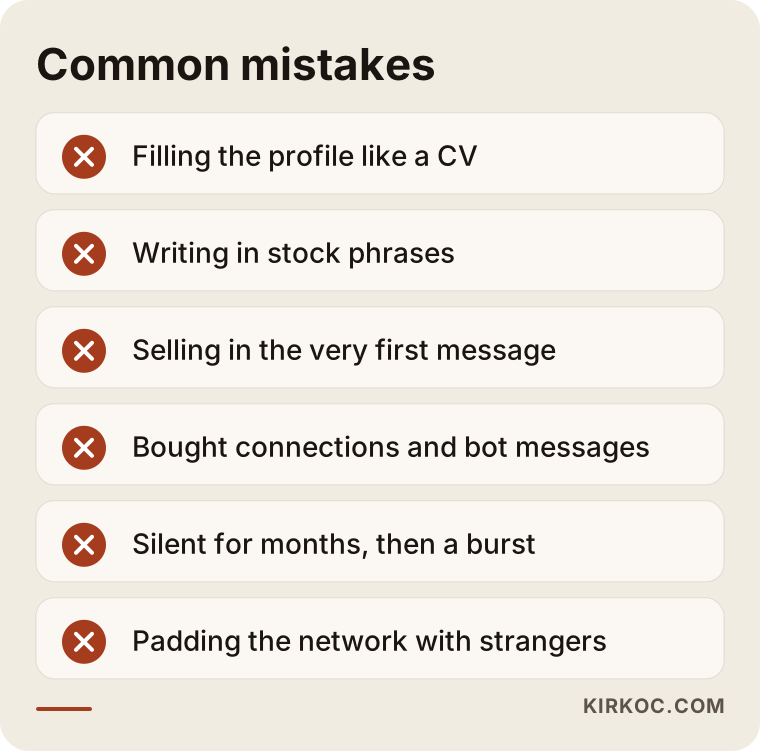
If you look at the list and think "I am doing all of these," do not worry. For most people the profile is a page opened in a hurry years ago, and fixing it is easier than it seems.
There is also a question of trust. Stay away from purchased connections, automated messaging bots and tools that promise "fast growth." LinkedIn can restrict accounts that behave this way, and the person on the other end can tell a robot message when they see one. I suggest reading the platform's terms of use, and if you are unsure about something, asking a lawyer.
What can you do yourself, and when do you need a specialist?
To be honest, you can do most of this work yourself. The photo, the headline, the About text, Featured and a few posts a month are within your reach if you set aside a little time. Your own voice is already your biggest advantage. Nobody can describe your work as well as you can.
Getting help starts to make sense in these situations. You do not have time and cannot post regularly. You do not know what to write and you freeze in front of a blank page. You want a consistent look across several executives or specialists. Or your profile, website, company page and other channels do not match, and they need to be pulled into one whole.
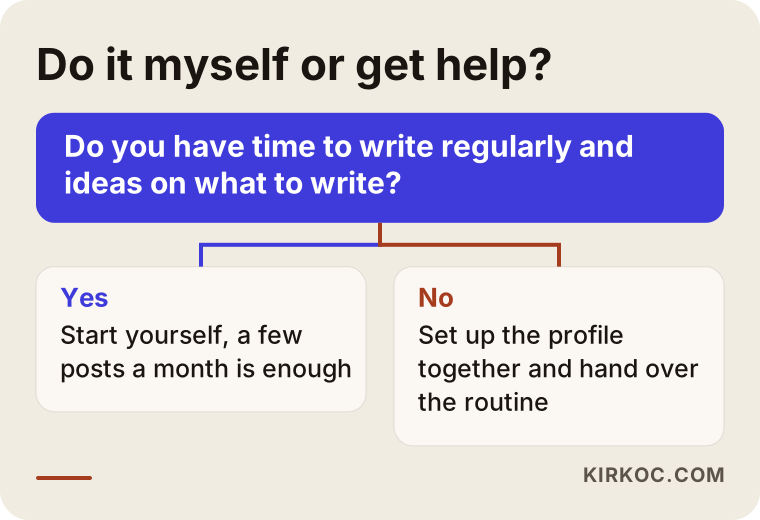
This chart is not a rule. It is a tool to make thinking easier. "I will do it myself for now and look again later" can be your decision, and that is perfectly reasonable.
What determines the cost
I do not give numbers, because the scope of this work varies a lot from person to person. The cost depends on a handful of questions. Do you want only a profile setup, or ongoing content creation and management as well? Is it one person's profile or several executives'? Will the posts be prepared from an interview or information gathered from you, or will your own drafts simply be edited? Do you need images and design? Do you want a monthly arrangement or a one-time setup? Once the answers are clear, the amount of work needed is clear too. When you collect quotes, ask for the scope in writing.
How do I work?
I work as one person. The same person who talks with you, reviews your profile and writes the text is me. I start with a short introductory call. I listen to what you do, who you want to reach and what you do not like about your profile right now. Then I review the current profile and send you a written list of the sections that should change. When you approve, I set up the base. If you want to continue on the content side, I prepare posts with your information and in your voice. Nothing goes live without your approval.
Having the work in one pair of hands brings a real benefit here. When your website, your visibility on Google, your social media accounts and, if needed, your ads all sit with the same person, they fit together. The message on your LinkedIn profile and the service page on your website say the same thing, and there are no different people waiting on each other or explaining things to each other. I can also arrange the path from your profile to your site and from your site to your contact form in one look.
Frequently Asked Questions
What exactly does LinkedIn profile management cover?
It usually covers suggestions for the photo and cover image, the headline and About text, and editing of the Experience and Featured sections. Optionally, it includes a regular content plan and preparation of posts. The scope narrows or widens depending on your needs. In the first call, I put in writing what is included.
Is it necessary for a specialist who is not an executive?
Yes, especially for specialists who find customers through introductions. Even a person who comes by referral will look you up before a meeting. Finding a clear, understandable profile there strengthens trust. That said, not every specialist needs to post daily.
How long until I see results?
Nobody can honestly guarantee that. The profile can be pulled together in a few days, but for people to notice you and write to you can take weeks or even months. Your industry, your existing network and your posting routine decide the timing.
If someone else manages my profile, will it sound like me?
With the right way of working, yes. The foundation of the posts is what you tell me, and I organize and edit it. You must read and approve the draft. If a sentence does not fit your voice, I change it. No post goes out without your approval.
Which matters more, a personal profile or a company page?
They do different jobs. A company page is a place for corporate identity and announcements, while a personal profile is where you can talk with people. For small and mid-sized businesses, the personal profile often has a more direct effect. Still, it is healthiest when the two complement each other.
Do I need to share my account password?
Usually not. I can prepare drafts and send them to you, and you do the publishing. If access is ever needed, I first talk with you about the authorization options and safe ways of sharing. I recommend never sharing your password openly anywhere.
Should I use automated messaging and connection tools?
I do not recommend them. Tools like these can get your account restricted, and the other side spots a bulk message right away. Fewer messages that are personal and sincere give much healthier results. If you are unsure about platform rules or legal matters, ask a lawyer.
What should I prepare to get started?
A current photo, a short list of your present and past roles, a few sentences about who you want to serve and, if you have one, a link to your website or a presentation are enough. We work out the rest together in the call.
If you would like to look together at whether your LinkedIn profile really describes you, you can write to me through my social media management service page. After a short call I listen to your situation and tell you plainly what is enough for you.