You run a music school or a dance studio. The rooms are lovely, the teachers are good, and your students enjoy coming to class. Yet most new enrollments still come from word of mouth and a few messages on Instagram. When a parent or an adult types "guitar lessons near me" into Google, they do not find you. And if they do find you, they land on a site that does not mention the price range, the age group or the class times, so they leave. That is the real question behind a website for a music or dance school: not just having a site, but having one that answers questions and brings in enrollment requests.
I am Ümit Kırkoç, I work from Istanbul, and I handle website design for small businesses on my own, start to finish. In this article I explain what a school owner actually needs, which pages are required, how your future students search, and where to begin, without burying you in technical terms.
Why is a music or dance school website different from a simple showcase site?
In a furniture store, a visitor looks at a product and buys it if they like it. In a school, what people buy is not a product. It is an experience and a relationship of trust. A parent is about to hand their child to a teacher. An adult beginner is about to try an idea they have carried around for years, "maybe I should learn an instrument." Both want answers before they commit: Is this place trustworthy? Who is the teacher? How are the lessons run? Can I, or my child, actually start? How much time and money will it take?
Your site should answer all of these within a few clicks. In my experience the problem with most school websites is not ugly design. It is missing or scattered answers. The home page has a beautiful photo of the studio, but nothing about the starting age, whether there is a trial lesson, or which day and time the classes meet. The visitor does not pick up the phone. They move on to the next school's site.
Two kinds of customers, two kinds of searches
You can roughly split the people who will walk through your door into two groups. The first is parents: mothers and fathers looking for piano, violin, ballet, folk dance or hip-hop for their children. They tend to search by neighborhood and age ("kids ballet classes near me," "violin lessons for a seven-year-old"), they look at safety and teacher background, and they often browse on a phone in the evening. The second group is adults: office workers who want to learn salsa, bachata, tango, guitar, voice or drums. They search by level and schedule ("beginner guitar lessons for adults," "weekend salsa class") and they care about flexibility and atmosphere.
Because the two groups ask different questions, one "Our Classes" page cannot serve both. The illustration below is an invented example of how a clear page stands out in a search result.
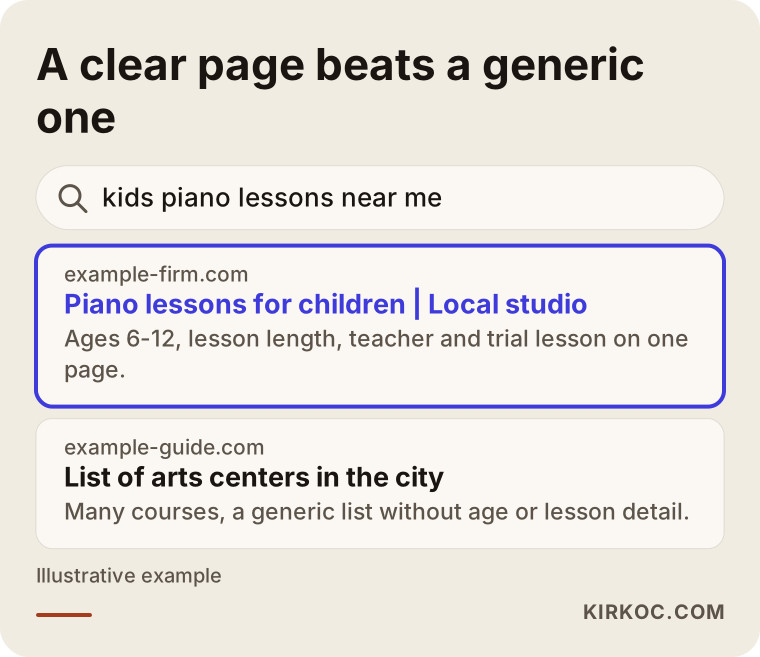
The difference is simple. The highlighted result tells you the lesson, the age group and the location in its first line. The generic "arts center" listing does not say who it is for. Search engines and people both pick the clear one more easily.
How do people search for a music or dance school?
Searches in this field are surprisingly concrete. People rarely type a broad phrase like "music school." They combine an instrument, an age and a place: "piano lessons for kids downtown," "beginner guitar lessons for adults," "wedding dance lessons," "ballet for toddlers," "private voice lessons." Then there is the format question: one-on-one, group or online?
What that means for you is that each instrument or dance style needs its own page that makes sense on its own. Instead of one long list under a heading called "Classes," build separate pages such as "Piano lessons," "Guitar lessons," "Children's ballet" and "Salsa." This makes it easier to show up in search results and shows the visitor right away that they found what they were looking for. The table below summarizes what different kinds of searches mean.
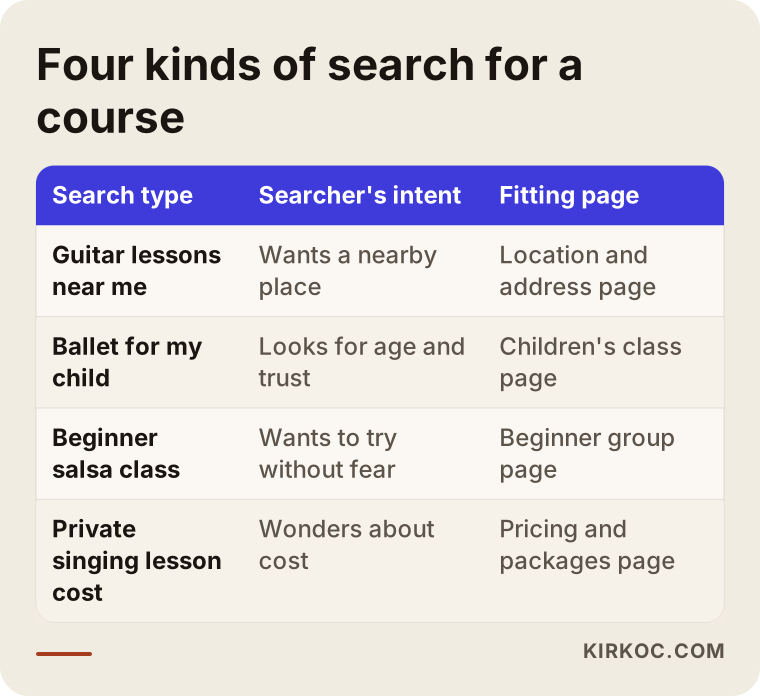
As the table shows, the type of search tells you which page to prepare. Someone who writes "near me" needs a map and an address. Someone who writes "for my child" needs an age group and teacher information. Someone who writes "how much" needs a section that explains what the fee depends on.
Your neighborhood is your real market
People usually choose a school close to home or work. A parent who will drive a child there twice a week does not want to spend forty minutes in traffic. So one of the most important jobs for being seen online is a complete Google Business Profile. That is the listing with your address, opening hours, photos and reviews that appears on the map. The contact page on your website and that profile must match exactly: same address, same phone number, same hours. Local visibility can be a project of its own, but I treat it as a natural part of building the site, not a separate extra.
Which pages does a music or dance school site need?
You do not need a complicated, many-layered structure. You do need every important page. Here is what I would put on a school website:
- Home page: The page that says, on the first screen, what you teach, who it is for, where you are and how to enroll.
- Class pages: One page per instrument or dance style. Age range, level, lesson length, and whether it is group or one-on-one.
- Teachers page: A short bio for each teacher, their training, what they teach and a photo.
- Schedule: Which class meets on which day at which time.
- Pricing and enrollment page: What the fee depends on and how the sign-up process works.
- Trial lesson page: A page whose only job is to make the first step easy.
- Gallery and events: Photos from recitals, stage shows, exhibitions and end-of-year events.
- Frequently asked questions: The things parents ask most, answered in one place.
- Contact: Address, map, phone number and a message button.
The checklist below gathers the points to check before your site goes live.
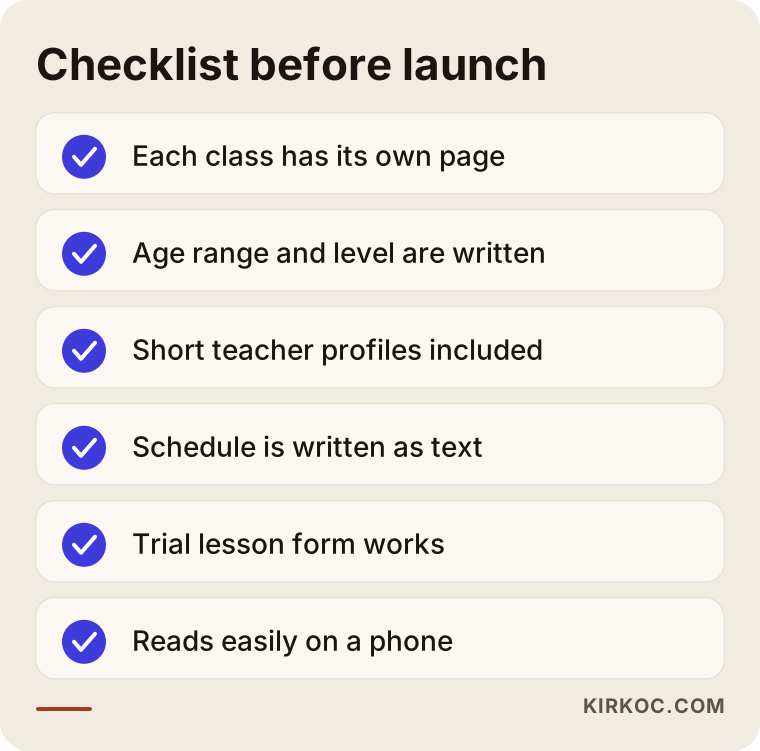
Keep it in front of you and compare it with your own site. Every item you cannot tick leaves a question mark in the visitor's mind.
The teachers page is about trust
This is the most underrated page in the field. For a parent, the teacher is the school. A short, honest introduction with a photo goes a long way: where they trained, how many years they have been teaching, which age groups they work with, and whether they have stage or exam experience. Give concrete facts instead of inflated titles. Saying which age group a teacher is most comfortable with also helps match the right student to the right teacher.
The pricing page: say something even if you do not list numbers
Many schools do not show prices on the site because the fee depends on the lesson, the length and the package. The trouble is that a visitor who finds no hint at all may decide "it must be expensive" and leave. Even if you prefer not to publish a figure, you can explain what the price depends on: one-on-one or group, how many lessons per week, monthly or per term, whether instrument rental is available, how a registration fee works. This openness reduces the uncertainty before someone picks up the phone.
Two hypothetical scenarios
The following are purely hypothetical examples. They do not describe a real school. They make common situations in this field easier to picture.
Scenario 1: A small music school teaching piano and violin to children
Imagine a small school with two teachers in a suburban neighborhood. There is no website, only an Instagram account and a business listing. Parents see the account but cannot find the teachers' training, the minimum age or how lessons are organized, so they ask everything by message. The owner spends evenings typing the same answers again and again.
Here is what would be done: separate class pages for piano and violin, each with the age range and lesson length, a short bio for both teachers, a section titled "What the first lesson looks like," a trial lesson form and a set of frequently asked questions. After launch, most of the repeated questions are already answered on the page. The number of messages tends to go down, and the messages that do arrive are more serious. I cannot promise a result, but a change in the quality of messages is a common pattern with this kind of setup.
Scenario 2: A dance studio teaching salsa and bachata to adults
In the second example, a studio teaches adults who mostly come after work. The site has only a photo gallery and a phone number. A visitor cannot find answers to "can someone who has never danced join, do I need a partner, and what time are the classes?"
The pages that matter here are a beginner group page that says plainly "if you have never danced, start here," a weekly schedule table, a short section explaining that people can come with a partner or alone, and a sign-up form for a trial lesson that is one tap away. Videos in the gallery should be short and light, and they should match the content on social media. In this second scenario, most of the effort goes into easing an adult's nervousness about being the only beginner in the room.
How is a school website built, step by step?
The process does not have to be complicated. This is roughly the order I follow:
- Listening and planning: Together with you, I clarify which lessons, which age groups, which hours, and who is likely to come.
- Page map: On paper, I decide which pages will exist and which question each page answers.
- Content and photos: Class descriptions, teacher bios and studio photos are collected. I can help with content creation too.
- Design and build: A simple structure that reads well on a phone and loads quickly.
- Enrollment and contact setup: The trial lesson form, phone and message links are connected and tested.
- Launch and search settings: Page titles, descriptions and the link to your business profile are set up.
- Follow-up after launch: I watch which pages are viewed and fix content where needed.
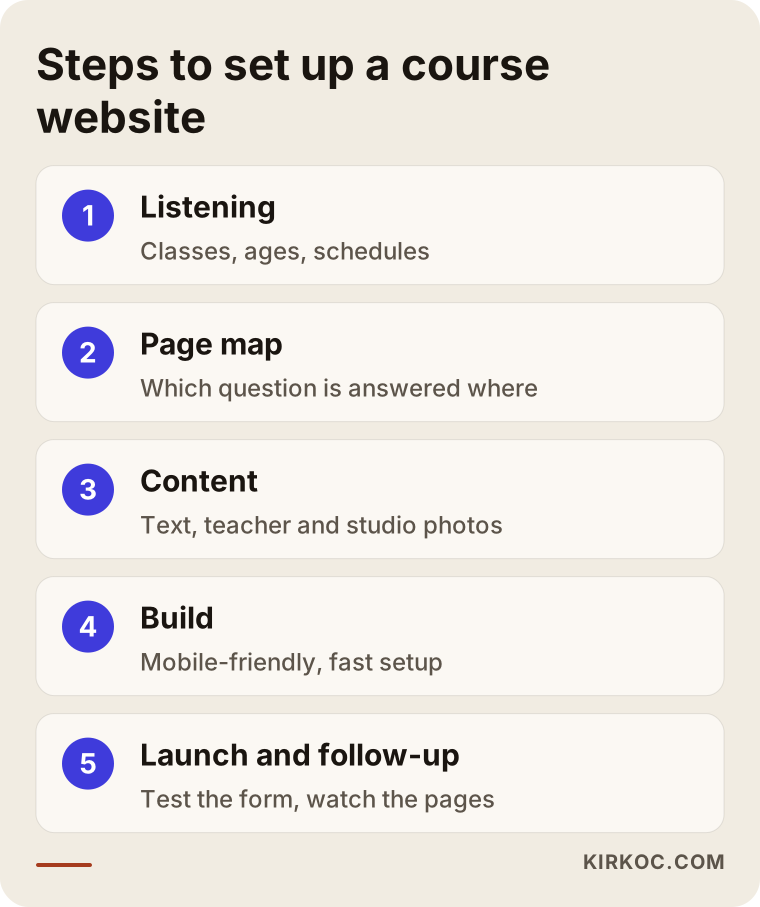
The five stages in the graphic summarize the seven steps above. The logic of the order is this: jumping into design before you have decided who you are talking to and what you will say leads to changes later that cost more.
Designing for a parent holding a phone
A parent will most often look at your school on a phone: while cooking, while waiting in the car line, while their child is in another class. So how the site reads on a phone is not a secondary concern. It comes first. Text should be large, buttons should be big enough for a thumb, and the phone number should be tappable. If the weekly schedule is squeezed into a tiny table that scrolls sideways, nobody can read it on a phone. A layout that lists the days one under another works much better.
Speed matters too. Large recital photos and videos make a page heavy. Shrinking the photos, and making videos open when clicked instead of playing automatically on the page, helps the page load fast. When a page opens slowly, the visitor does not wait. They go to the next result.
The trial lesson: the strongest first step
For schools, the most effective tool for getting enrollments is often the trial lesson. Hardly anyone wants to commit to a long-term plan before they have tried an instrument or a dance even once. A trial lesson page should say whether it is paid or free, how long it lasts, what to bring, how many people are in the group and which days are available. The form should stay short: a name, a phone number, which class, and whether it is for a child or an adult is enough. Nobody fills in a long form.
The comparison below puts two approaches side by side: a site that leaves visitors guessing and one that answers their questions.
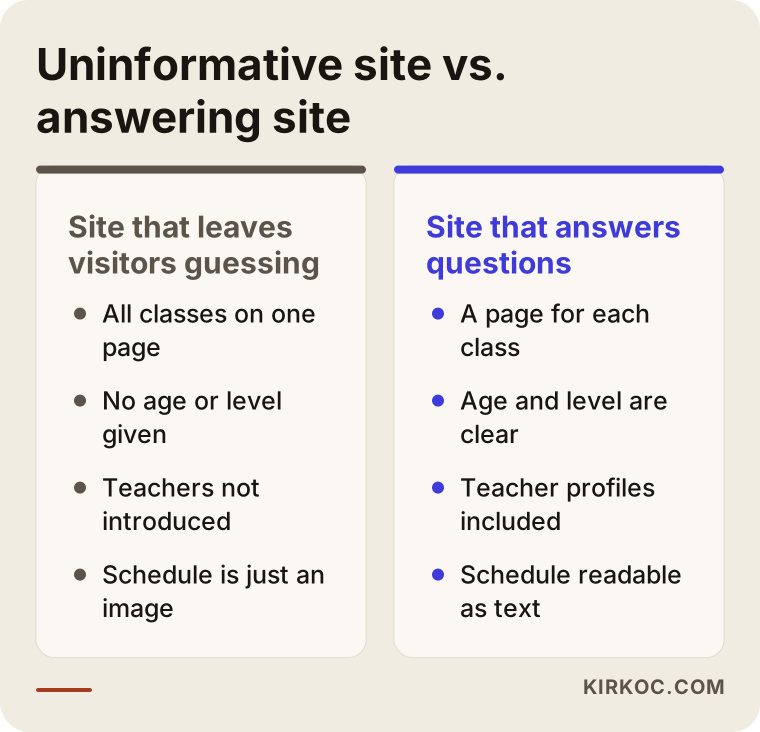
Every gap on the left side can be fixed, and each one is a small job. But once they are all fixed together, the visitor's first message changes from "what does it cost?" to "can we come to the Thursday trial lesson?"
Common mistakes
I see the same handful of mistakes again and again on school websites. They are simple, but their effect is large.
- Explaining everything on one page. When piano, guitar, ballet and salsa are squeezed together, the page neither stands out in search nor gives the visitor a clear answer.
- Leaving out age and level. A parent cannot tell whether the class suits their child.
- Posting the schedule as an image. A schedule saved as a picture is unreadable on a phone and cannot be understood by search engines.
- Not introducing the teachers. A lack of trust is one of the biggest obstacles to first contact.
- Relying only on social media. You may have wonderful videos on Instagram, but the person who found you through a search and is deciding will look at your website.
- Ignoring photo and video permissions. Before publishing images of children, you need written consent from their parents. Privacy rules differ by country and state, so I suggest you talk to a lawyer about the details.
- Never testing on a phone. A site that looks great on a desktop can fall apart on a phone.
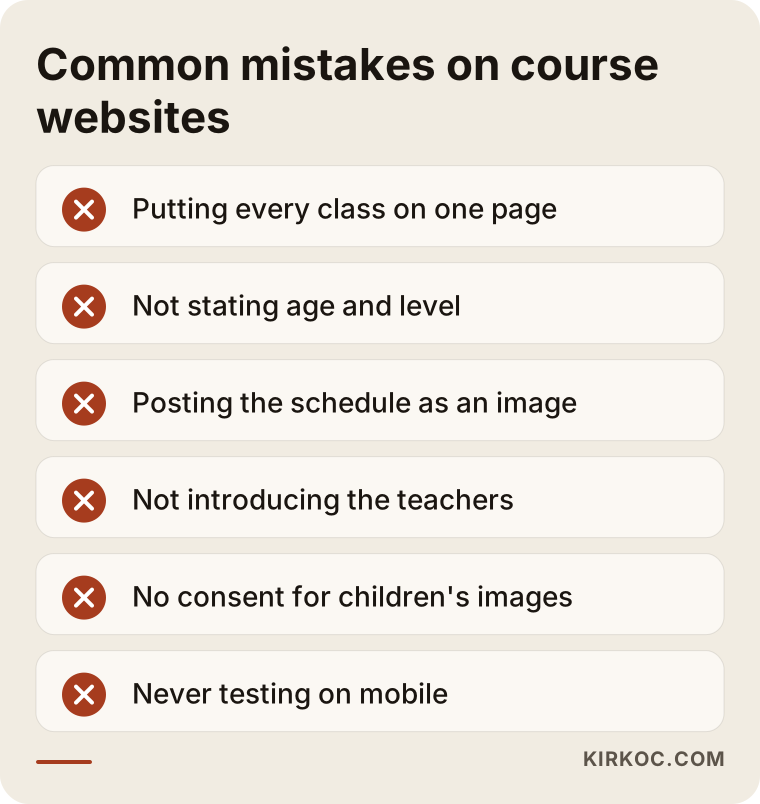
Compare the mistakes in the graphic with your own site. Usually one or two will jump out at you right away. It makes sense to fix the one that costs you the most first.
How should you use performance recordings and stage videos?
The strongest proof a music or dance school has is students on stage. But putting a video directly on the page makes it heavy. It is healthier to upload videos to YouTube and embed them, or to show a short preview that opens the full video on a click. Put a sentence or two under each video: which group, which year, which piece or choreography. That gives the visitor context and also explains the page to search engines.
What should the page of one class look like?
The skeleton of a class page can be similar for every instrument or dance style. That makes the work easier for you and helps visitors find what they need quickly. The diagram below shows the sections of an invented class page.
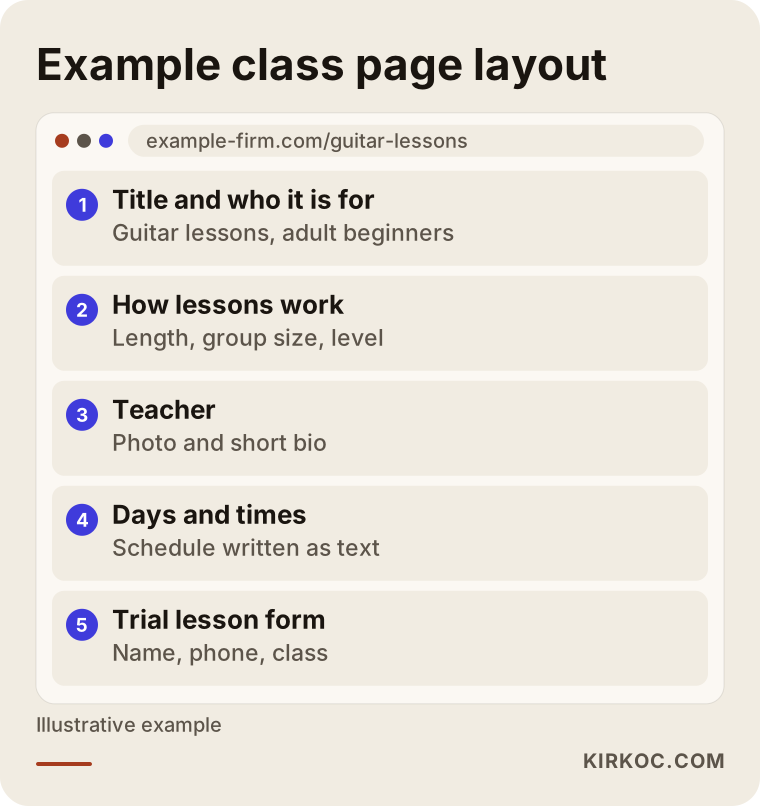
The order is deliberate: first who it is for, then how the lesson works, the teacher, the schedule and, at the very end, the call to enroll. As the visitor reads from top to bottom, they find the answer to each question in the order they would ask it.
What can you do yourself, and when do you need a specialist?
There are jobs you can do on your own at the start, and doing them lowers the cost:
- Write a short bio and take a photo for each of your teachers.
- Write down the ten questions parents ask most often.
- Take clean, well-lit photos of the studio and of lessons.
- Keep your Google Business Profile up to date and ask students for honest reviews.
- Write your class schedule out as plain text.
A specialist helps in other places: planning the page structure, writing class pages with search in mind, setting up forms and the enrollment flow, making the site fast and mobile friendly, and connecting your business profile and website correctly. These need technical care, and mistakes are hard to notice. If you arrive with your own material prepared, the work goes faster and costs less.
How do social media and ads work together with the site?
Social media is the natural way to promote a school: stage videos, short clips from lessons, student achievements. But when someone on Instagram becomes interested, the next step is to look at your website. If the site is not ready, that interest is wasted. The same logic applies if you plan to run ads: the person who clicks should land on the page of the lesson in the ad, not on a general home page. At the start of a season, for example around September and January when many people sign up, a local, short-term ad campaign can make sense. But the enrollment flow on the site has to work first.
From an interesting video to an actual enrollment, the number of people shrinks at each step. That is normal. The graphic below shows the path, and my aim is to reduce the loss at every step.
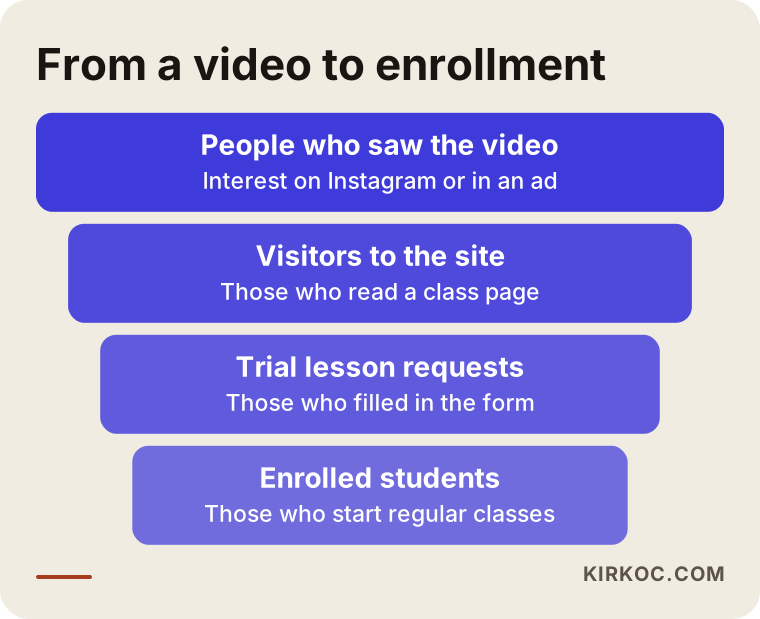
Each narrowing in the funnel matches a point you can improve with a page or even a single sentence on the site.
This is where doing the website, SEO (the work of appearing in Google searches), social media and ads through one person pays off. The sentence I use in an ad speaks the same language as the headline on the site, the content on Instagram and the business profile. Instead of a scattered message prepared by three people who do not talk to each other, there is one consistent story. And when something needs to change, you do not have to explain it to several people.
Should you set up an online enrollment system?
This is a common question, and the answer depends on how many students you have and how your packages work. The small decision chart below is a useful starting point.
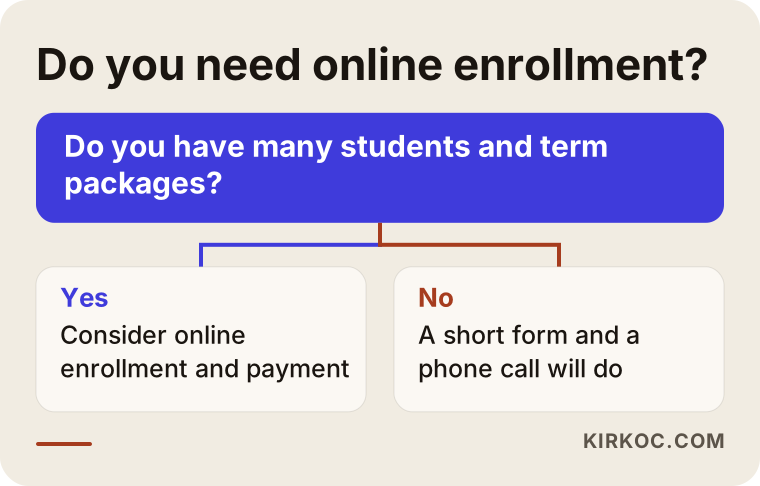
If the answer in the chart is "no," a simple form and a phone number are enough, and the place to spend your money and effort is the class pages.
Timeline: when does a school website start to work?
A site does not bring a flood of enrollments the day it goes live. First the site has to be built, then search engines have to recognize its pages, then people have to find it, and only then do enrollment requests arrive. How long that takes depends on the school, the area and the competition. I cannot give an exact time or promise a result. But knowing which stages the process goes through helps you set the right expectations.
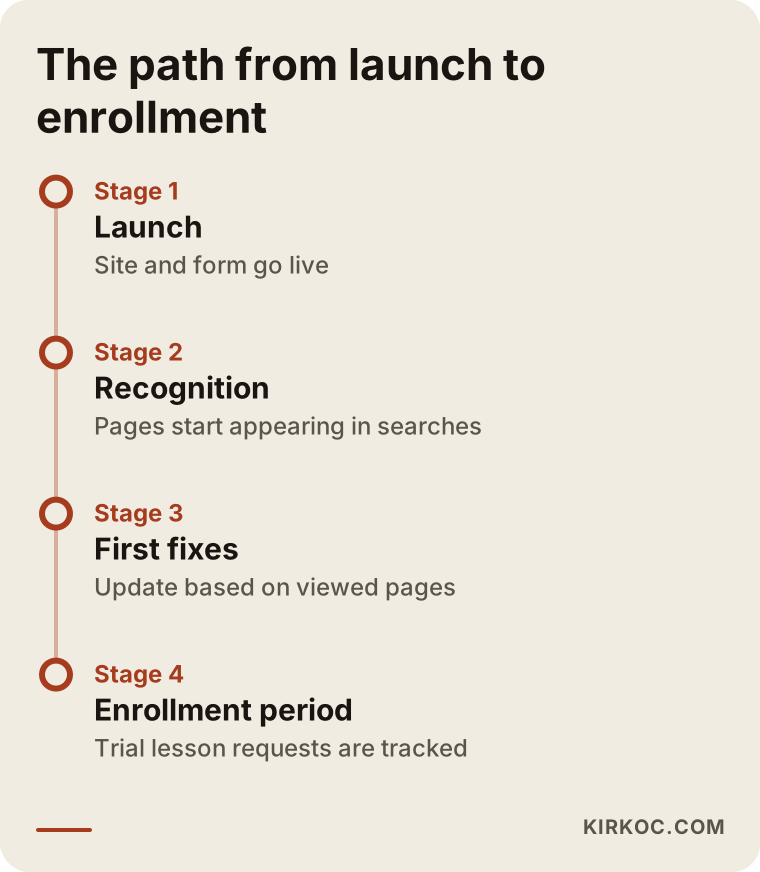
You cannot skip any stage in the timeline. The follow-up and correction stage after launch is especially valuable, because in the first weeks you can see which pages are being viewed and close the gaps.
What determines the cost?
It would not be honest to give you one number for a school website, because needs vary so much. These are the main factors that set the price:
- Number of pages: How many separate instruments and dance styles need their own page.
- State of the content: Whether texts, photos and videos are ready, or still have to be written and shot.
- Enrollment and payment flow: Whether you only want a form, or online sign-up and payment.
- Schedule and calendar: Whether the class schedule is a fixed table or a live calendar connected to sign-ups.
- Number of languages: Extra language pages if you serve students who speak other languages.
- Support afterward: Whether you want regular updates after launch, search visibility work, or social media and ad support.
First I talk with you about what you need, then I prepare a quote that spells out what is included. If the scope changes, the price changes knowingly and with your approval. There are no surprise line items.
How I work with you
I work alone. The person who talks with you, builds the site, writes the content and follows up after launch is the same person. In the first conversation I listen to you describe your school, your students and your goal. Then I share the page map and the scope in writing. Once you approve it, I start the build. Throughout the process I explain anything you do not understand in plain language, and I do not pile technical details on you.
The practical benefit is that everything runs through one pair of hands. The website, search visibility, social media and ads do not turn into three separate jobs. The same person uses the same voice. And you have one person to talk to.
Frequently asked questions
Does a small music school really need a website, or is Instagram enough?
Instagram is a good tool for promotion, but a person who is deciding usually looks for the details on a website: class times, teacher information, age limits and how to enroll. People who arrive from a search engine also see the site first. The two are not substitutes for each other. They work best together.
Do I have to put lesson prices on the site?
You do not have to. If you would rather not publish figures, a section explaining what the fee depends on still reduces the uncertainty in a visitor's mind. Whether the lesson is one-on-one or in a group, how many lessons per week, and how packages work is enough.
Can I use photos and videos of my students on the site?
Especially for children, you need clear written permission from their parents before you publish images. Which consent form to use, and how to handle personal data, depends on where you operate, so I suggest talking to a lawyer. I cannot give legal advice on this.
Is an online enrollment and payment system a must?
It is not. For many schools a simple trial lesson form and a phone call are enough. Online enrollment and payment can make sense for schools with many students or those selling term packages. Starting with a simple flow and adding features as the need appears is usually healthier.
How long after launch will I appear on Google?
I cannot give an exact time. How quickly a new site is recognized depends on the competition in your area and the quality of the pages. A well-built Google Business Profile and clear class pages on the site make it easier, but I do not promise any ranking.
I have both children and adult students. How should I organize the site?
The cleanest way is to separate the two groups onto different pages. Prepare separate starting pages for children's and adults' classes, and answer the questions specific to each group on its page. The home page should offer two clear paths that lead each group where they belong.
I already have a site but no enrollments come in. Do I need to start over?
Not always. First look at what is missing on the current site: class pages, teacher bios, the trial lesson flow, the mobile view. If the structure is sound, content and page layout can often make a big difference. If the structure is truly outdated, rebuilding makes more sense.
Do I need an English or other language page for international students?
If students or parents in your area speak another language, a short, clear page in that language is useful. You do not have to translate everything. The class types, schedule, address and contact details may be enough.
Conclusion
If your teachers and students are ready, what is often missing is a website that tells the story well. If you would like to work out together what your own school needs, you can reach me through my website design service page. A short note describing what you need is enough to get started.