If you make packaging, chances are most of your business runs on phone calls, personal referrals and customers you have served for years. Then one day a new brand owner, a food startup or an online seller types "custom cardboard boxes manufacturer" into Google, and the page that appears belongs to someone else. That is why a website for a packaging company matters. It is not there to say "we exist online too." It is the cheapest way to meet a buyer you have never heard of who is ready to order. In this article I will explain what your site needs, how to build the product catalog and where to start, without burying you in technical terms. If you are thinking about building from scratch, you can also look at what my website design service covers.
How does a packaging buyer search for you?
A packaging order is not like a T-shirt order. The buyer often does not know exactly what they want, but they know a few things: what the product will hold, how many units they need and when it has to arrive. They search accordingly. One person types "shipping boxes for online store," another "custom printed kraft paper bags," another "bakery boxes wholesale," and another goes straight to "corrugated box manufacturer."
What these searches share is that the buyer combines a product name with a purpose. If your site only carries a broad heading like "Packaging solutions," it fits none of those phrases well. If you have a separate page called "Custom printed kraft paper bags," and that page lists size options, the printing method and the minimum order, both Google and the buyer have an easier job.
The second difference is the decision process. A small brand owner asks several manufacturers for a quote, requests a sample and watches how fast and how clearly each one replies. In other words, your site is not just a shop window; it is the first round of elimination. A site that is hard to reach by phone, short on detail or stuck with a catalog from years ago gets quietly dropped in that round, and you never find out.
If you sell to buyers abroad, the same logic holds. A purchasing manager comparing suppliers in Istanbul or anywhere else will open four or five sites in different tabs and keep the one that answers their questions without an email exchange.
The image below shows how two different pages can look for the same search. The page that gives clear information has a better chance than the generic page that tries to cover everything under one roof.
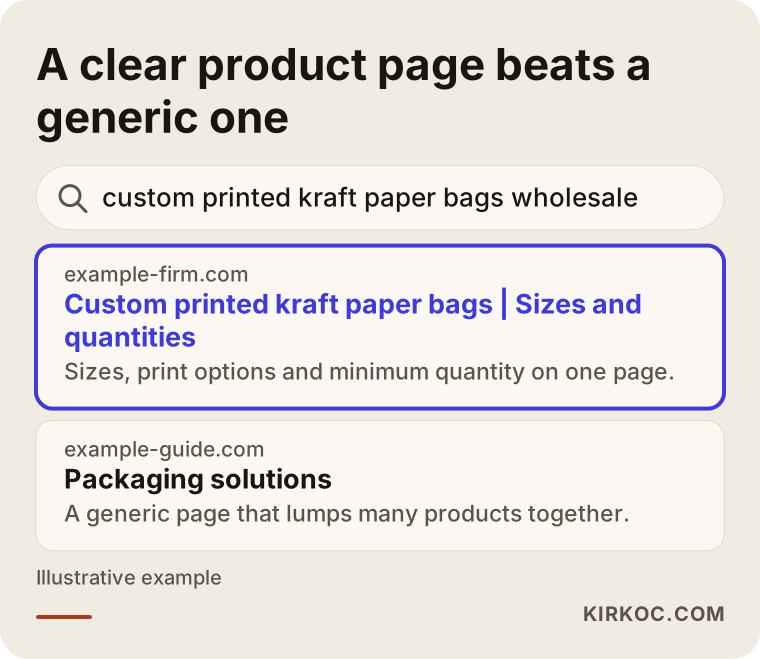
There is no guarantee about the outcome here; only the search engine decides the order. But a clear page does raise the chance that the right person clicks.
Why a PDF catalog alone is not enough
Many manufacturers arrive with a nicely prepared PDF catalog and say, "we will just put this on the site." The catalog is valuable, so do not throw it away. But leaving a PDF as the only content on your site causes three problems.
First, the products inside a PDF are hard for search engines to find one by one. Even if your catalog lists forty products, Google usually sees a single file. When a buyer types "pizza box 13 inch," what comes up is not a page but a long document, and most people do not open those.
Second, the phone. A good share of buyers will find you on a mobile device. Opening a large PDF on a phone and pinching to zoom just to read a measurement takes patience. Third, updates. When a size, a material or a minimum quantity changes, you have to have the PDF redone, whereas on a web page you fix one line.
The right setup is a product catalog site with its own page for each product family, and the PDF offered as a "Download the catalog" link under those pages. That way the search engine recognizes your products and the work you already did is not wasted.
Which pages should the product catalog include?
Think of the catalog structure in two layers: category pages and product pages. A category page introduces a family, such as "Cardboard boxes" or "Paper bags." A product page describes one item, such as "Mailer box with locking bottom."
On a category page, give the buyer these things: what jobs this family is used for, which materials it comes in, which printing options exist and which products sit under it. Instead of piling hundreds of products there, show the ten or fifteen that people ask about most, with photos.
A product page should have these headings: the product name and a short description, size options, material and weight, printing and finish options, minimum order quantity, estimated production time, food-contact status if relevant, photos and a "Request a quote" button. You may not want to share all of this, and you do not have to publish prices. But hiding technical details like size and material only forces the buyer to call you, and that often ends with them giving up.
The table in the figure shows a simple way to match buyer intent to page types.
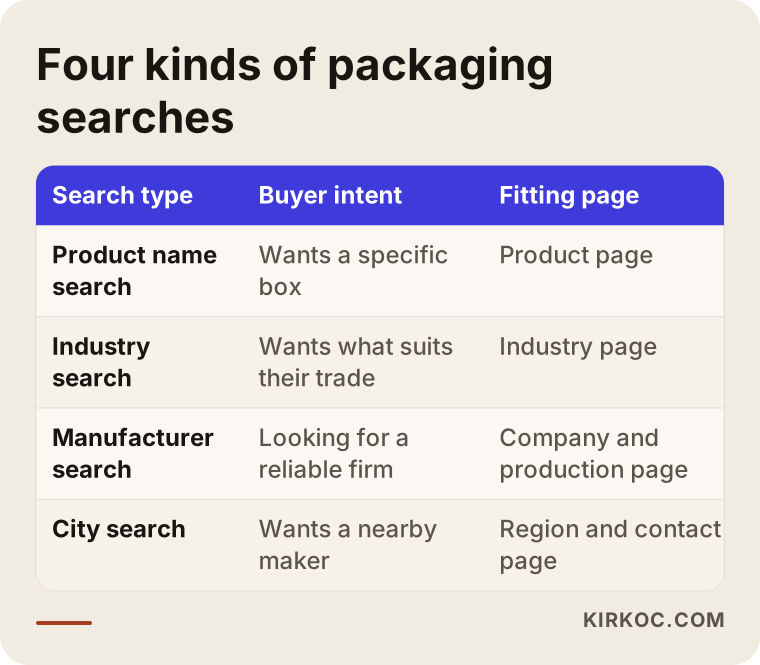
As the table shows, not every search should land on the same page. Someone who searches by product name should reach a product page, someone who searches by industry should reach an industry page, and someone who types "manufacturer" should reach the page that introduces you.
Industry pages: from the bakery to the online store
The tricky part of packaging is that the same box appeals to very different buyers. A kraft box could be bought by a nut roaster, a jewelry brand or a florist. If you build your site only around product names, each of these buyers fails to find themselves there.
So, next to the product pages, add short industry pages for the sectors where you do the most business. For example, "Bakery and pastry packaging," "Shipping boxes for e-commerce," "Cosmetics and jewelry boxes." These pages should not repeat the products. They should talk about the real problem of that trade. A baker looks for grease-resistant material that is suitable for food contact. An online seller looks for a box that survives shipping without crushing and opens easily. A jewelry brand looks for printing and an inner fit that leave an impression at the moment of opening.
Another benefit of these pages is language. When a buyer sees a page written in the words of their own trade, they think, "these people understand my business." That trust is half won before any talk about price begins.
You can think of the path from buyer to order as a funnel. Of all the people who reach your site, a small share look at the catalog, a smaller share ask for a quote and the smallest share place an order. Your aim is to reduce the loss at every stage.
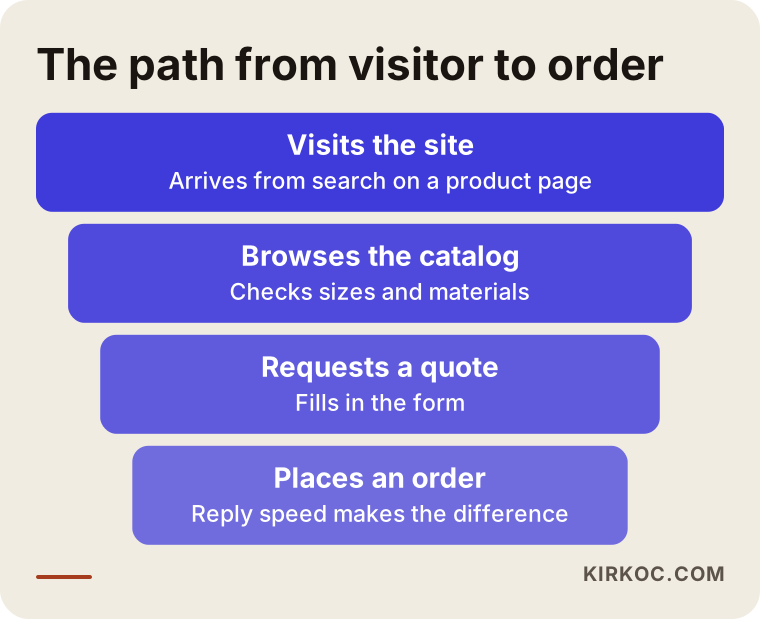
What matters in this image is not numbers but stages: you hold the visitor with the catalog, the catalog leads to the quote form, and the form turns into an order depending on how fast you reply.
How to present sizes, quantities and materials
The thing that tires a packaging buyer most is finding the right size for their own product. "Will my bottle fit in this box?" can turn into days of emails. If you make this easy on your site, you stand out from your competitors.
Give sizes in a tidy table: length, width and height, in millimeters or inches depending on your market, with a clear note on whether they are inside or outside dimensions. That small distinction is the biggest cause of the "the sizes don't match" arguments after an order. If you can, also add the flat (unfolded) drawing of the box; buyers who know printing and packaging appreciate it a lot.
Do not hide the minimum order quantity. An honest line such as "we run this product from this quantity upward" saves you from wasting time on the first phone call and brings you buyers who really fit your capacity. You can also add a sentence that gently redirects a very small order, for example a link to ready-made stock sizes.
When you describe materials, keep it plain. Explain terms like "micro flute," "coated one side" or "kraft" in a sentence: how strong is this material, how does print hold on it, which product is it suited for. The buyer does not have to know the term; informing them is your job.
The next image shows how a product page can be laid out from top to bottom.
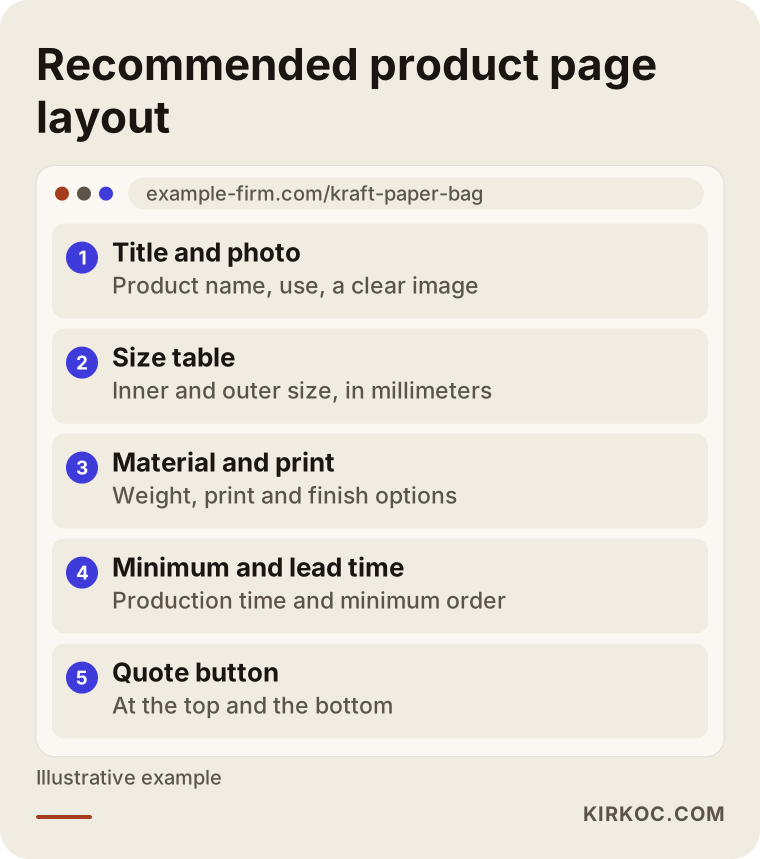
In this layout the quote button should appear both at the top and at the bottom of the page. By the time the buyer scrolls down, they may already have made up their mind.
The quote form: the real front door for packaging sales
Packaging is mostly not sold with an "add to cart" button; it is sold with a quote. So the most important part of your site is not a pretty photo gallery but a well-designed quote form.
A good form collects short but sufficient information. The fields could be: name and company, phone or email, which product, approximate size, estimated quantity, whether printing is wanted and the desired delivery date. If you also let the buyer upload a logo or a sample image, preparing the quote becomes much easier. If you stretch the form to fifteen fields, people abandon it halfway; five to seven fields is usually a good balance.
Next to the form, put a realistic promise. A sentence such as "We reply to quote requests the same business day" should be written only if you can keep it. Writing it and not keeping it is worse than not writing it. Adding a WhatsApp or chat button is also more comfortable than a form for many small buyers. After a few months you will see which one gets used more.
Decide in advance where you will see the requests that come from the form. A request that falls into a spam folder is the same as a lost order. Make sure notifications reach your phone, and assign one person to own this task.
Two example scenarios
The two scenarios below are hypothetical. They do not describe a real company; they are made up to show typical situations.
Scenario 1: A mid-sized workshop that makes cardboard boxes. The workshop's site was built years ago, with three photos and a phone number on the front page. Most new customers arrive through acquaintances. The owner would like to win work from small online brands, but when those brands search for "shipping boxes," the workshop's name appears nowhere.
The path I would suggest is this. First, product pages are built for the five box types made most often, each with a size table and minimum quantity. Then an industry page titled "Shipping boxes for online brands" is written, explaining how the box holds up in transit, the logo printing options and the sample process. Last, a simple quote form is added. The result will not arrive in the first week, but within a few months it is possible to see buyers who never reached the workshop before filling in the form. The amount, of course, cannot be guaranteed.
Scenario 2: A wholesaler that sells paper bags and kraft packaging. This business has dozens of ready-made sizes in stock, and most customers keep buying the same products. The problem is that which product comes in which size is only explained over the phone. Every new employee has to answer the same questions.
Here the solution is mostly about catalog order. Products are gathered in a list that can be filtered by size, material and use; each product shows its stock status and the quantity per carton. Prices can stay hidden, but a "Login for price list" or "Request price" button is added. That way a regular customer can check things alone, and a new customer sees the options without picking up the phone.
The shared lesson of the two scenarios is the same: the job of the site is to lift the burden of answering the same questions again and again on the phone, and to build trust with a buyer who does not know you yet. For that, it is enough to move the product knowledge you already have onto the site; there is nothing new you must learn.
Step by step: how to build a packaging site from scratch
Do not start by improvising; move in order. The flow below is close to the order I follow when I work with a business owner.
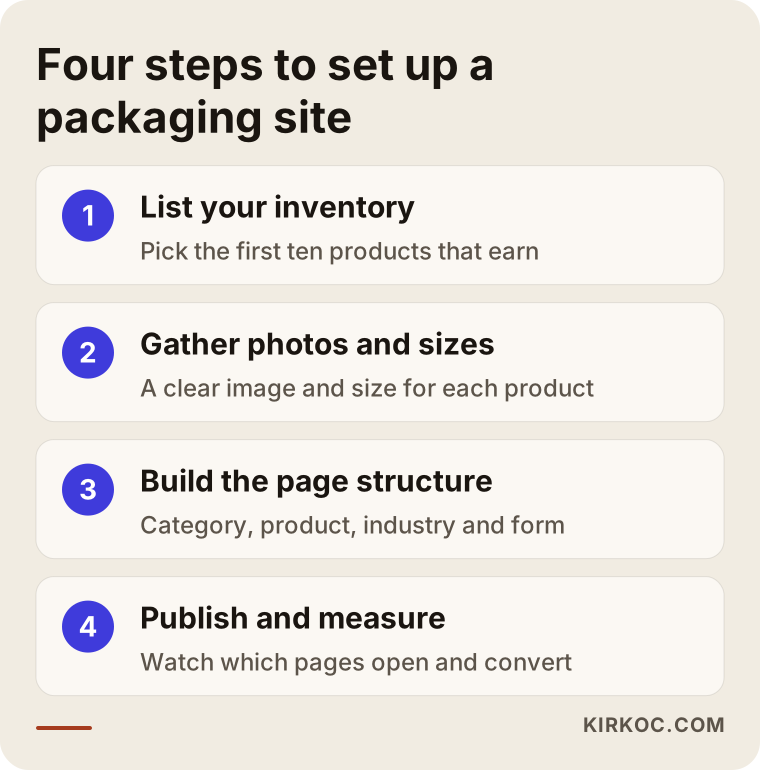
Now let me explain these steps in plain language.
Step one: List your inventory. Which products do you make, which ones are you truly good at, and which ones leave a profit? You do not have to move the whole catalog onto the site. Starting with the first ten products that bring in work is enough. At this stage a list on paper and a collection of the photos you already have is all you need.
Step two: Gather photos and size information. For each product you need a clean photo on a plain background, if possible a second photo showing it in use, and the sizes. Even a phone camera works if you shoot in natural light against a simple backdrop. A blurry or messy photo is the biggest loss for a visual product like packaging.
Step three: Build the page structure. Home page, product categories, product pages, industry pages, your own story in place of a generic "about us," production and quality process, contact and the quote form. Keep the menu simple; the buyer should reach the product they want in three clicks.
Step four: Publish, measure, fix. After the site goes live, watch which pages are opened and which forms are filled in. In the first months the most valuable piece of information is which product pages get many visits but no quote requests; something is missing there.
What builds trust on the site
Packaging is not bought once and finished; it means repeat orders and ongoing work. So the buyer looks less at price than at the question "will this company keep its word?" Your site should answer that question.
Put in real photos of your workshop or production line; stock photos backfire here. A few shots of your machinery, the print check table and the warehouse go a long way. If you have certificates, such as ISO or food safety documents, show them as documents, but state clearly which document you can provide for which product, because a misunderstood certificate causes trouble. Before you use firm wording on regulations and food-contact compliance, check with a specialist or a lawyer.
You can share references too, but do not use a brand name or logo without the customer's permission. Without permission, anonymous descriptions such as "for a food producer" still build trust.
Finally, contact details. Address, map, phone, email and working hours should be in one place and easy to find. If your factory is inside an industrial park and the address is hard to find, put driving directions on the page. A driver who comes to pick up a sample and gets lost has a bad first impression of you.
What helps you appear in search results
Visibility in search engines is not a magic trick in packaging; it is writing the right pages with the right words. The title of each product page should carry the product's real name and its main use. A page written with internal codes like "Item 1" or "Model A-24" tells nobody anything.
Write your text as answers to real questions. "How heavy should a shipping box be?", "What is the minimum quantity for a printed box?", "Which file format do you need for printing?" These are questions you answer on the phone every day. If you answer them on your pages and in a frequently asked questions section, you help both the buyer and the search engines. AI chat tools are also more inclined to use such clear answers as sources.
Do not forget the local side either. Some buyers search for "packaging manufacturer in Istanbul" or with the name of their own city. Stating clearly where you produce and which regions you ship to, and keeping your Google Business Profile up to date, helps with those searches.
The image below sums up a short list you can check while reviewing your pages.
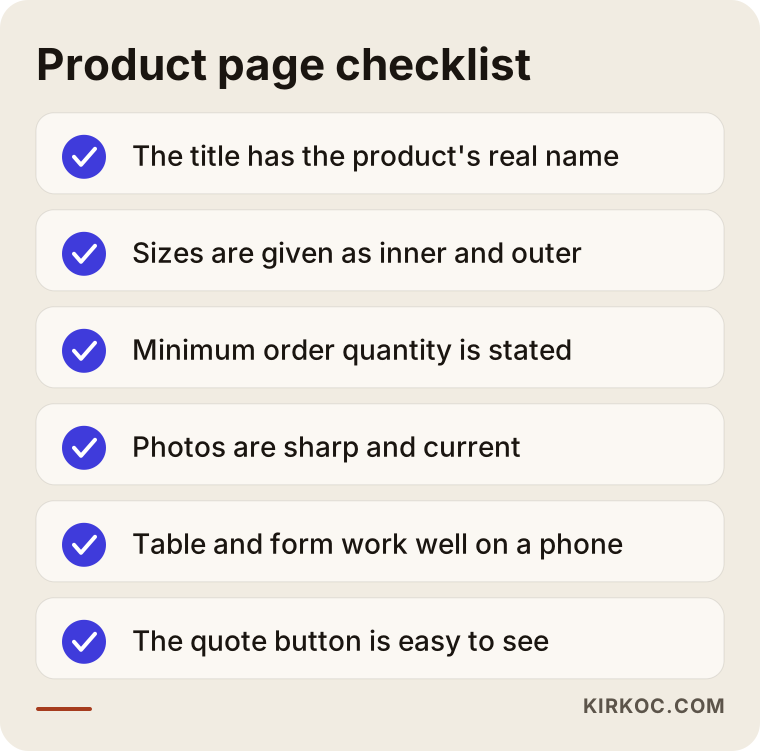
Filling in this list once is not enough; look at every new product with the same eye. No promise about ranking can be made, but the difference between a weak page and a strong page is real.
Common mistakes
These are the mistakes I see again and again on packaging sites. All of them are easy to fix.
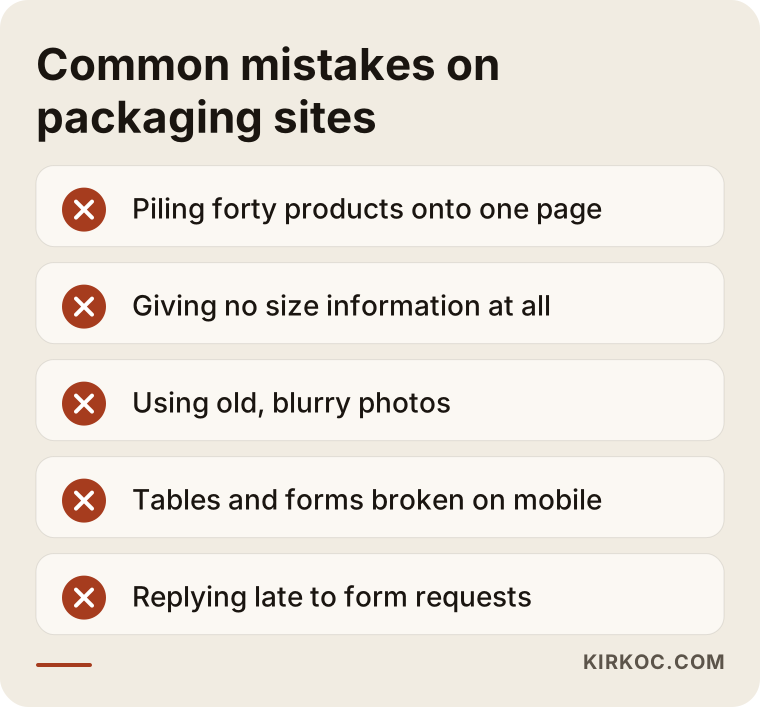
The most damaging is gathering products on one page. If a single page called "Our products" holds forty items, none of them is strong in search and the buyer keeps scrolling to find what they want.
The second big mistake is giving no size information. Because the buyer cannot see the size, they have to call you; some do not call and move to another site.
The third is poor photos and outdated content. A product line from five years ago that is still online leads to quote requests for something you no longer make, which wastes both your time and the buyer's.
The fourth is poor mobile behavior. A large share of buyers open the site on a phone. If tables overflow, buttons cannot be tapped or the form will not open, the quote will not come. Test this on your own phone.
The fifth is a slow response system. Answering a form request a week later wastes all the work behind the site. Even the technically best site cannot rescue a form that goes unanswered.
What can you do yourself while the site is being built?
You do not have to hand everything to an expert. There are things you can and should do yourself, because you know the product best.
Prepare the product details, sizes, minimum quantities and material descriptions yourself. Take the photos in your own production space if you can; delivery photos you already have from customers (with permission) are very useful. Collect the frequently asked questions from your sales people: what gets asked most on the phone is the best content on the site.
For the technical side, which means the domain name, hosting, page structure, speed settings, search engine settings and making sure the quote form works properly, expert support usually saves time. A site built from a ready-made template may look sufficient at first glance, but it runs into limits quickly when you need many products and filters, or when the site has to be published in more than one language. If you are an exporter, plan the pages in the languages of your target countries from the start; adding them later is harder.
The decision chart below offers a simple view on the question "should I do it myself or get support?"
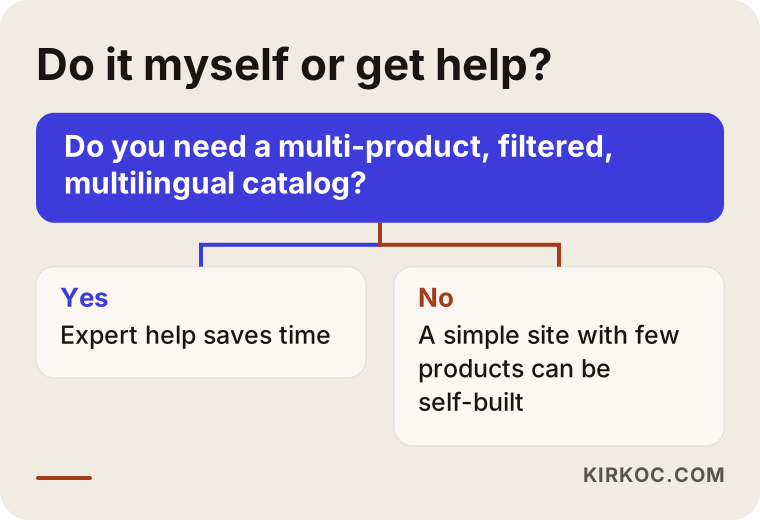
This chart is not a fixed rule; you also have to take the value of your own time and your business into account.
What decides the cost?
I will not give figures in this article, because no two packaging sites are alike. What I can do is tell you which factors change the cost.
The first is the number of products and the structure. The effort gap between a site with ten products and a multi-category catalog with hundreds of filtered products is large. The second is content preparation: if you already have the photos, the size tables and the text, the timeline is shorter; if they must be written and shot from scratch, it grows. The third is the number of languages. If you want pages in a language other than your own, each language means extra content and checking.
The fourth is the complexity of the quote form. File upload, fields that change depending on the product, automatic email replies and a connection to a sales tracking system all lengthen the work. The fifth is support after launch: will products be added, will texts be updated, will search visibility be monitored? Publishing a site and leaving it is a different budget from looking after it regularly.
The right approach is to clarify the need first and then draw the scope accordingly. Aim for "a site that brings quotes" rather than "a site everyone can see," and you will know what you are paying for.
How I work with you
I am a specialist based in Istanbul who handles the digital side as one person, from the website to search visibility, and from social media to ad management. In industries that sell technical products like packaging, I start by talking with you: which products earn money, who do you want to work with, where do orders come from today?
Then I plan the product structure, set up the page and catalog layout, make sure the texts are written in a way buyers understand and prepare the quote form to suit you. When the site goes live, you carry on with the same person. If you wish, search visibility, your Google Business Profile, your company account on LinkedIn and Instagram, and, if needed, Google ads all move along the same line. Having one contact instead of talking to separate people for each job means a consistent message and faster work. It also means that when a product changes on the site, the ad and the profile are updated too, and nothing gets forgotten.
The process usually goes like this: first meeting, a summary of needs and scope, content gathering, design and build, review, launch and follow-up in the first months. The timeline below sums it up.
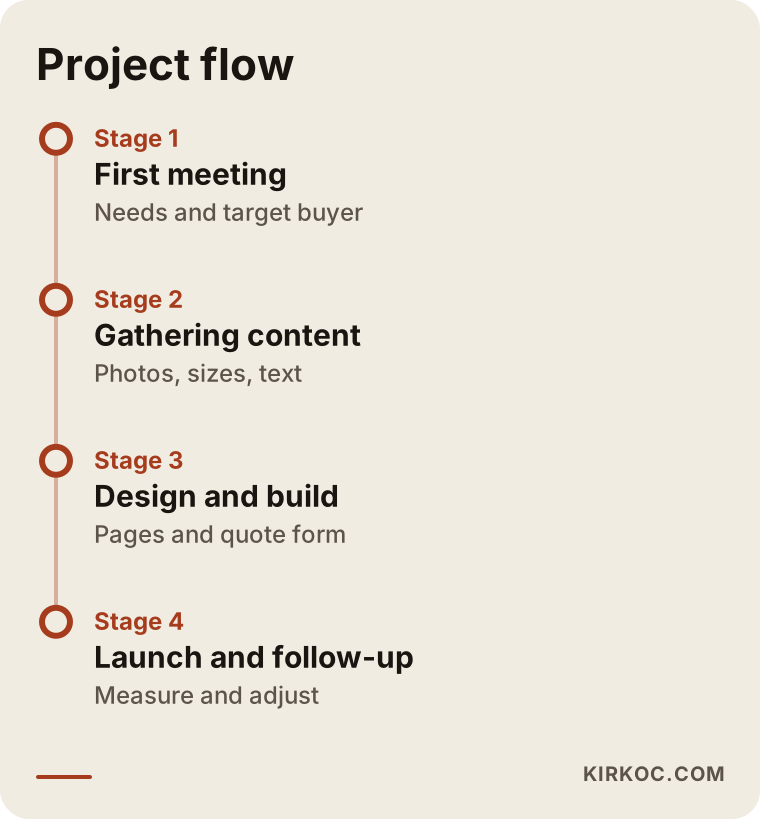
The timing depends on the size of the job, so giving you a clear schedule at the start is part of my work. If there is something you are not ready with, such as photos, we plan it together.
The first 90 days of a packaging site: what to expect
It is not realistic to expect the phones to ring right after a new site goes live. Search engines discover new pages, evaluate them and rank them over time. In the first weeks the work is mostly technical accuracy and internal checks: do the pages open, does the form work, have the notifications started to arrive?
In the first few months, the things to look at are these: which pages get visits, who opens the quote form and leaves, which product leads to questions? With that information you fix the text, complete missing sizes and add new industry pages. Instead of expecting quick results, it is healthier to build a system that gets a little better every month.
Keep your goal measurable: how many quote requests come in each month, how many of them are from the kind of buyer you are targeting, how many turn into orders? Which product page brings the most requests? If you can answer these questions, the site is working.
The image below puts realistic and unrealistic expectations for the first months side by side.
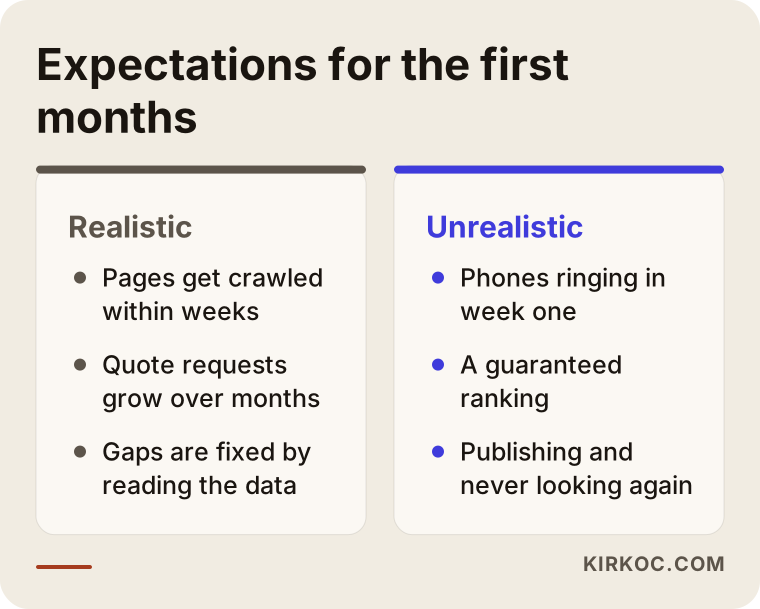
One more note: ad support is optional in this period. Search ads can be a way to reach buyers faster in the early period when your new pages do not yet appear in results, but the budget and the products to use it on should be chosen by looking at results.
Frequently Asked Questions
Does putting my product catalog online give information to my competitors?
Your competitors already know the industry and the general product types. You do not have to share prices or private customer details; the product type, size options and material information are what a new buyer needs to choose you. Anything that must stay private, such as special prices, customer lists and custom tooling, does not go on the site. Withholding catalog information, on the other hand, often sends the buyer to a competitor's page.
Do I have to show prices on the site?
No. In packaging, price changes with quantity, size, material and printing, so it is usually given by quote. Still, it is good to add a note such as "Prices are set by quote; request one with the following details." If you have ready stock products, whether to show their prices is your decision.
How many products should the site have, and must I list them all?
You do not have to. Start with the products that bring in work and that you do best. You can add new product pages over time. What matters is that every page is complete and accurate; twenty strong pages are worth more than a hundred half-finished ones.
Should I put my PDF catalog on the site too?
Yes, you can add it as a "Download the catalog" link under the product pages. But the PDF should not be the only source of product information on your site. If product details sit on separate pages, they are understood better in search and are easier to read on a phone.
Which brings more business, a quote form or WhatsApp?
It depends on the buyer. A corporate buyer mostly prefers the form and email, while a small brand owner finds WhatsApp easier. The best approach is to offer both and check after a few months which one is used more.
How long until my site shows up in search?
I cannot give an exact time; it depends on competition, the quality of the pages and the age of your site. New pages are usually evaluated within weeks, and meaningful visibility often takes months. Be careful with anyone who guarantees a ranking.
I export. Should my site be in more than one language?
If you expect buyers from abroad, yes. A buyer in the target country searches in their own language and trusts a page written in that language more. What matters is not translation as such but writing product names and measurement units the way they are used in that country. Planning this from the start is easier than adding it later.
Is it better to renew the current site or build a new one?
If the current site is fast, opens properly on a phone and has separate product pages, a refresh is enough. If everything is on one page, the design is old, editing is hard and the form does not work, building from scratch causes fewer problems. In the first meeting I can look at your site and give you an honest recommendation.
If your product catalog is ready but is not reaching buyers, or you are planning a packaging site from scratch, you can write to me through my website design service page. We can talk through your products and the customers you want to reach, and work out the right path together.