You install camera systems, your workmanship is clean, and you know your trade. But the phone mostly rings because someone recommended you, and the calls that come from the internet are either missing or come from price hunters asking "what's your cheapest quote?" This is exactly where a good website for a security camera company makes a difference. It lets someone who has never heard of you, but needs protection right now, find you at the moment they search and decide to trust you. In this article I explain, in plain language, what a camera and security installation business should put on its site, how customers actually search, which mistakes are common, and how the work goes. I am Ümit Kırkoç, a web designer working on my own from Istanbul, and I will be clear about what my website design service covers wherever it matters.
Let me settle one thing first. In this trade, a website is less a business card and more a trust tool. A person is about to hand you the security of their home, shop or warehouse. They want to know who you are, where you work, which brands you use and what happens after the installation. If your site does not answer those questions, the visitor goes to the next company on the list.
How do people search for security cameras?
If you build a site without knowing what your customers type, you end up preparing the wrong pages. Searches in this field usually fall into three groups. The first is a direct service search, such as "security camera installation" or "camera system installer". The second combines the service with a place, such as "security cameras near me" or "camera installation in your city". The third is a question from someone who wants a solution: "how many cameras does a small shop need", "how do I view my cameras on my phone", "my camera system stopped recording, who can fix it".
The third group matters most, because the person asking has not picked anyone yet. If your site gives a clear, readable answer, you become the expert in their mind, and when they request quotes you are the first name that comes to them.
The illustration below uses a completely made-up example to show why a clear, specific page tends to draw more attention in search results than a generic list.
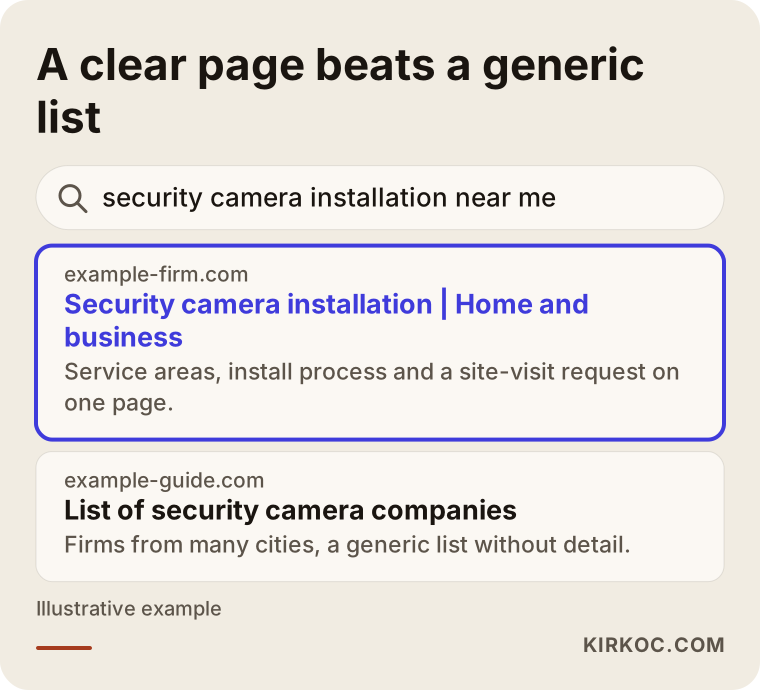
The highlighted result states which area it serves, which kinds of camera systems it installs and how to ask for a site visit, all in the first lines. A person scanning the results thinks "that is exactly what I need." The generic list points the reader nowhere in particular.
Three kinds of customers
Before you write your pages, know who is reading. A homeowner is usually worried about a child, an elderly parent or an empty house during a vacation. They do not speak technical language and want something easy to use with viewing on their phone. A shop or small business owner wants to discourage theft, watch the register and the entrance, and keep an eye on staff and customers, all with a limited budget and little time. A property manager for an apartment complex, office park or factory is looking for many cameras, long recording periods and a maintenance contract. Their quote process takes longer, and the decision often involves several people.
These three ask different questions. If you speak to all of them in one voice on one page, you will not fully reach any of them. A good site gives each type a short path: "For your home", "For your business", "For large properties and facilities."
Which pages should your site have?
Most camera company sites are built the same way: a home page with brand logos, a few product photos, and a phone number at the bottom. That structure does not give enough information to Google or to the customer. Each service and each customer type deserves its own short, clear page.
The table below summarizes the basic page structure I recommend for this field.
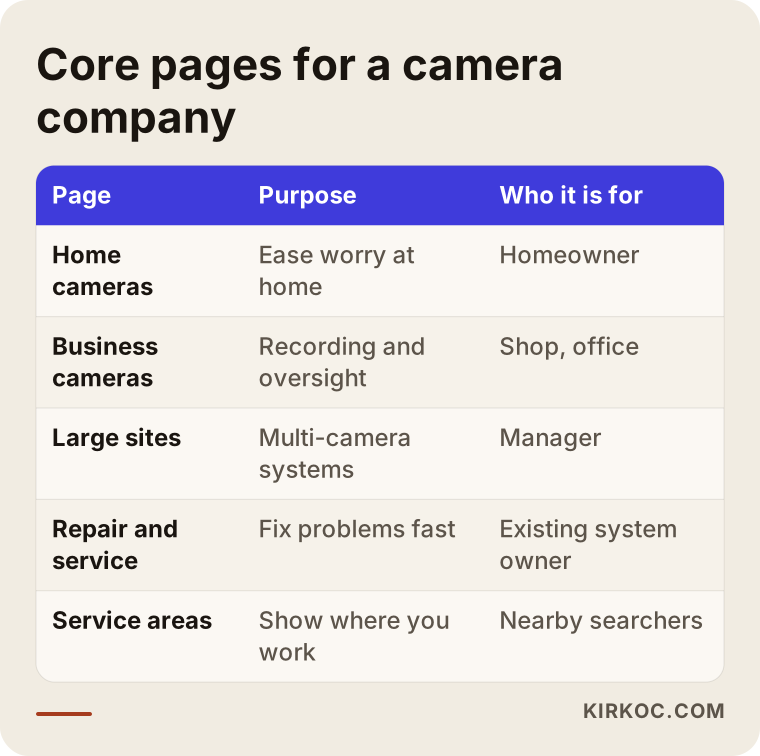
As you can see, every page has one job. The home cameras page speaks to the worry of someone at home, the business page to recording and oversight needs, and the repair and service page to someone who already owns a system but has a problem. If you squeeze all three into one "Services" page, you get one average page for every search, and average pages rarely stand out.
How to lay out a service page
On a service page, the information a visitor needs in the first few seconds should come in order. The headline should state the service and the area. Right below it, say who the service is for. Then explain the process you follow, the brands and system families you work with, and the warranty and service terms after installation. At the end, put the common questions and a clear "request a site visit" button.
The illustration below shows the sections of a sample service page and what each one should say.
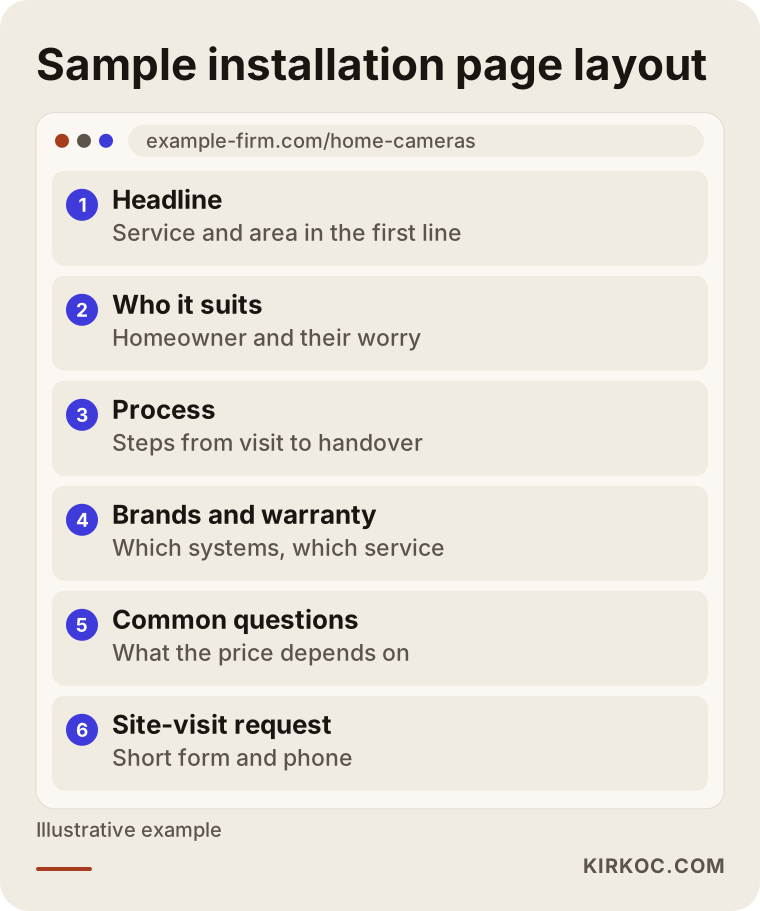
Notice that there is no price table. In this trade, the price changes a lot with the building, the number of cameras, how hard the cabling is and which recorder is used. A fixed number on the page creates a wrong expectation and pushes you into a price race. A section titled "What determines the price" is far more honest, and it tends to bring in more site-visit requests.
How do you show trust on the site?
In security work, "trust" is not a slogan. It is something you have to prove. The customer is letting someone into their home or business to install cameras, and they want to know who that person is, whether the company really exists and whether the work will be done properly.
There are several concrete ways to build that trust. Write your address and working hours plainly, and show them on a map. List the areas you serve and name the brands and system types you use. Share real photos of installations, with the customer's permission and without showing identifying details or addresses. If you hold a business license, a contractor or installer license where one is required, or an authorized dealer certificate from a manufacturer, make it visible. Reviews and the rating on your Google Business Profile carry weight as an independent signal, outside your own site.
There is also the matter of honesty: do not write what you cannot deliver. Phrases like "any system, any brand" or "24/7 instant response" can corner you if you cannot keep the promise. A realistic sentence, such as "I visit by appointment in the areas listed and complete installation in the time stated," earns more trust.
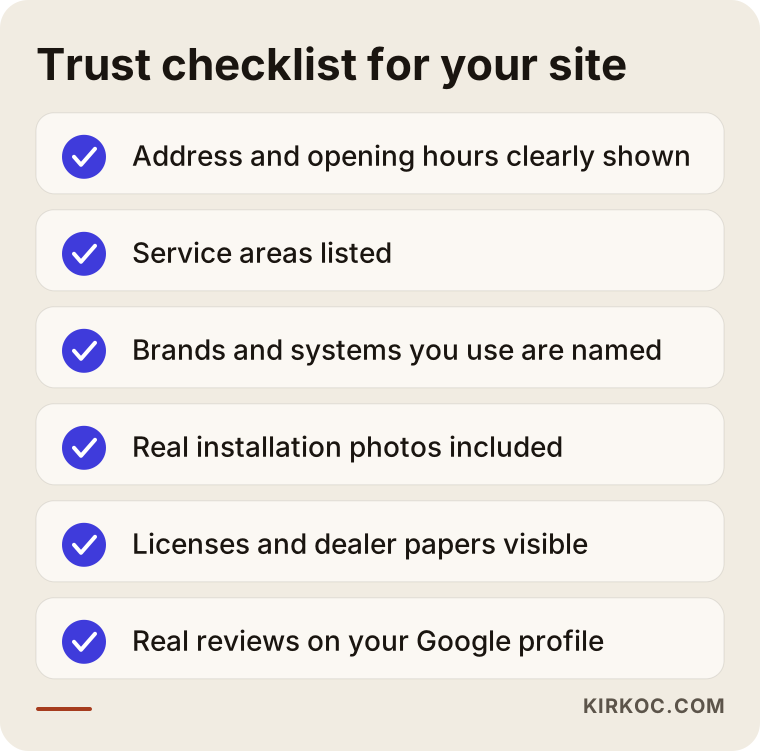
The checklist above is made of items you can tick off one by one before the site goes live. You do not have to finish all of them on day one, but knowing what is missing helps you set priorities.
A word on privacy and recordings
A security camera means recorded video, and recorded video can count as personal data. A short information section that explains the limits, such as which areas a camera may cover and which it should not, protects your customer and shows that you know your field. I suggest keeping this section balanced rather than making firm legal claims. Something like "for details that apply to your location, check local rules or consult an attorney" is enough. I am not a lawyer. I am only saying that a page that never mentions the subject can look like a gap to a careful customer. Rules differ by country and even by state or city, so check them for your own area.
The site-visit request and contact form
In this business, a sale usually begins with a site visit. You look at the property, decide how many cameras it needs and how the cabling will run, and then give a firm quote. So the main job of the site is not to say "buy now" but to say "request a site visit."
The form should be short, but it should also protect you from the wrong calls. Name, phone, area and type of property (home, shop, office, large property, warehouse) are usually enough. You can add one or two multiple-choice questions, such as whether there is an existing system and roughly how many areas need to be covered. A form that is too long makes people give up. One that is too short fills your day with irrelevant callers.
The comparison below shows the difference between a weak form and a strong one.
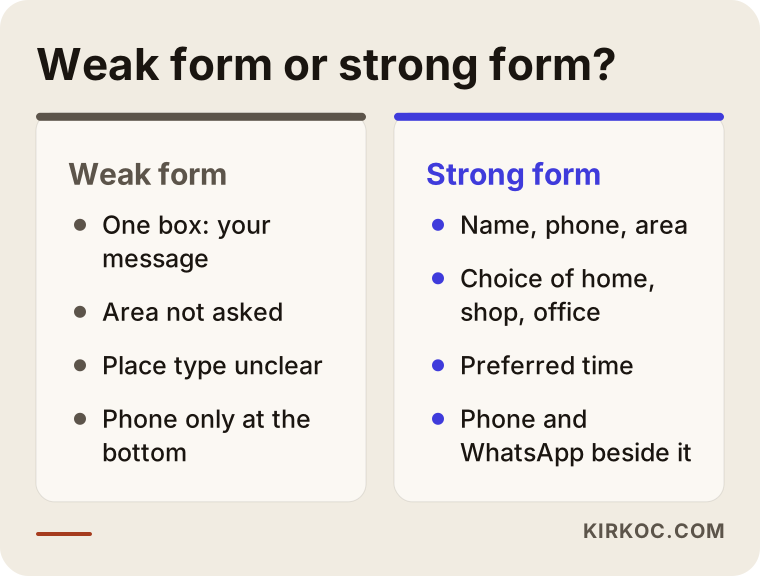
On the left is what I see on most sites, and on the right is a version that helps you prepare for the visit. With the second, you roughly know what the customer wants before you pick up the phone, which saves your time and their patience. Put your phone number and a messaging link next to the form too, because many people prefer to call rather than type.
Example scenario: a single-location camera company
The story below is hypothetical. It is not a real company, but it describes a situation I see often in this field. Imagine a small camera installation company with four people in one city. The owner does the site visits and installs with the crew. The website was built a few years ago: brand logos on the home page, an "About" text and a contact form. The only way the phone rings is through recommendations from past customers.
The owner realizes the site is not working. The problem sits in three places. First, the areas served are not written anywhere, and the "About" page says nothing beyond the company history. Second, home and business needs are mixed together on one page. Third, the contact form has only a "your message" box, so visitors do not know what to write.
The fix goes like this. First the service areas are pinned down. Then three separate pages are built for home, business and maintenance. The contact form becomes a site-visit request that asks for area and property type. The Google Business Profile is updated with the address, working hours and real installation photos. After a few weeks the number of calls from the internet may go up, but I would not promise how much, because the result depends on the area, the competition and where the company started. The difference you can actually feel is usually elsewhere: the incoming calls arrive with a clearer need, and the first conversation starts with "how many cameras would this building need" instead of "what do you do."
Example scenario: a company that sells and services
The second scenario is also hypothetical. A company installs new systems and also takes on maintenance and repairs of systems that other companies installed. A large share of its income comes from service calls, yet the word "service" barely appears on its site.
A customer with a failing system searches for "recorder won't turn on" or "cameras show no picture." Because the site has no answer to those searches, the company misses those calls. The fix is a separate "camera system maintenance and repair" page. It explains the most frequent problems in simple language and says plainly which ones the customer can check alone and which need a technician. Under it go a repair request form and a phone number.
The point here is that a service customer is usually in a hurry. A page that loads fast, a phone number visible at first glance and a clear prompt such as "want an appointment today?" are worth a lot. A customer who first meets you through a repair may think of the same company later for a new installation or an expansion.
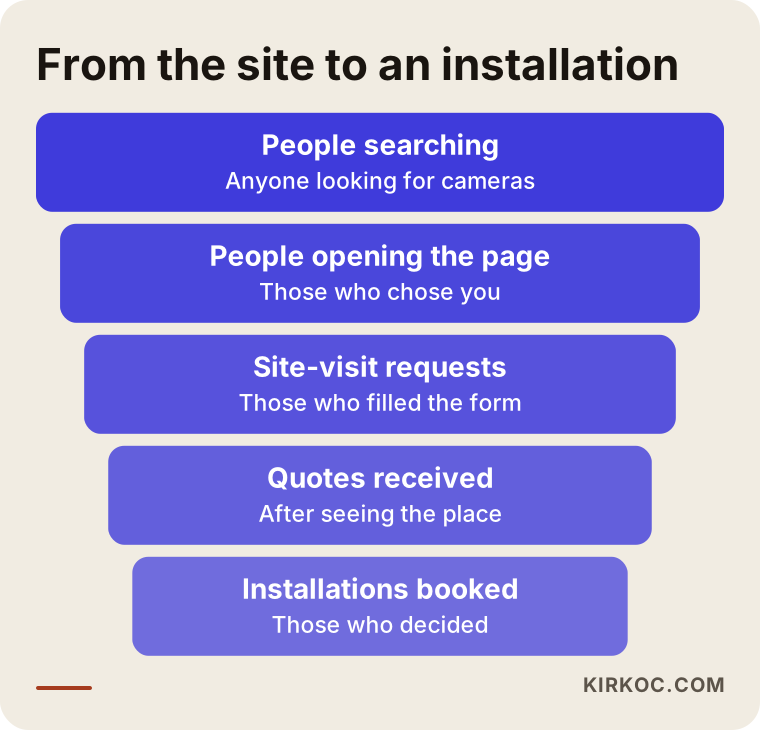
The funnel in the picture shows how a visitor moves from the site to working with you. Some people drop off at every step, and that is normal. What matters is seeing which step loses too many people and improving that one.
Step by step: how I build your site
When I prepare a camera company's site, from scratch or as a rebuild, I follow this order. First I talk with you: whom you serve, which jobs bring you income, which areas you work in, and which kind of customer you prefer. That conversation decides what the site will highlight.
The second step is the page plan. We settle which pages are needed for which services and which areas deserve their own page. The third step is content: I write the text of each page in plain, concrete language without changing the way you describe your work. The fourth is design and development. The site must open quickly on a phone, because many people search from their phone. The fifth is a check before launch: do the forms work, does the phone number dial when tapped, does the map show the right place.
The last step comes after launch. The Google Business Profile is set up, tracking is installed, and we look at which pages bring calls and forms. The benefit of having one person handle all of this is that the site, search visibility, the profile and, if needed, ads do not drift apart. One person knows everything, so you avoid problems like "the site says one thing and the ad says another."
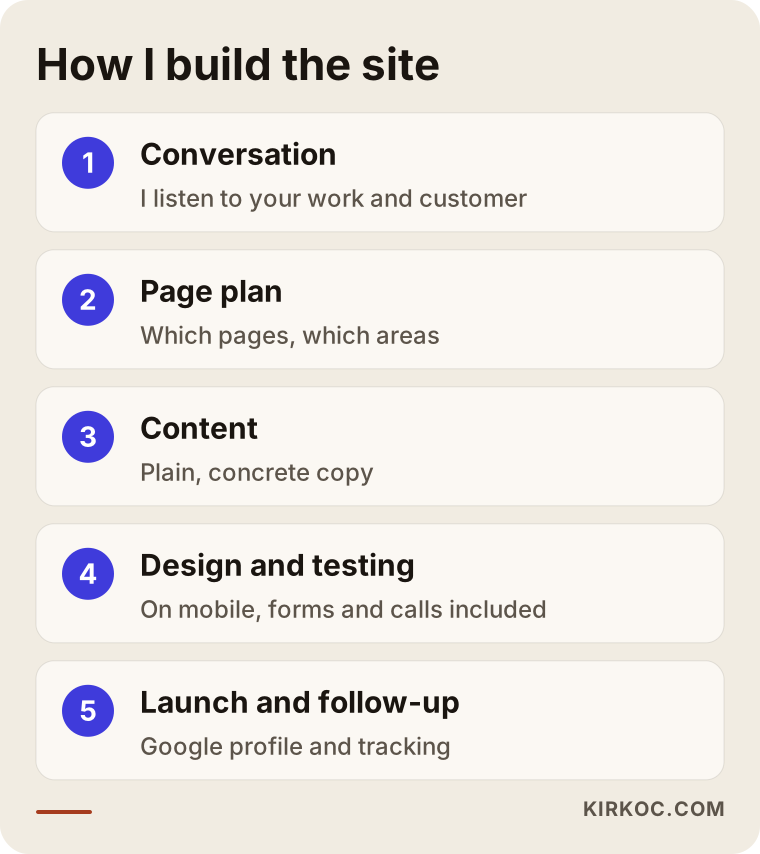
The picture above summarizes that order. You see and approve the result at the end of each step, and nothing goes live without your approval.
Common mistakes in this field
The same mistakes keep turning up on camera company sites. The first is building a product-focused site. Customers do not look for a camera model, they look for a solution. The answer to "how do I protect my home" brings more business than a product catalog. The second is cramming everything onto one page: home, business, maintenance and products together. The third is leaving out the service area. The fourth is either never mentioning price or pasting in a copied list; a "what the price depends on" section is the honest road between the two.
The fifth is a design that falls apart on a phone. The sixth is a form so long that people quit. The seventh is text copied from competitors: Google may notice, and a customer who reads the same sentence on two sites cannot tell you apart. The eighth is a site that is never updated, with an old phone number, the address of a closed branch or a brand you no longer carry.
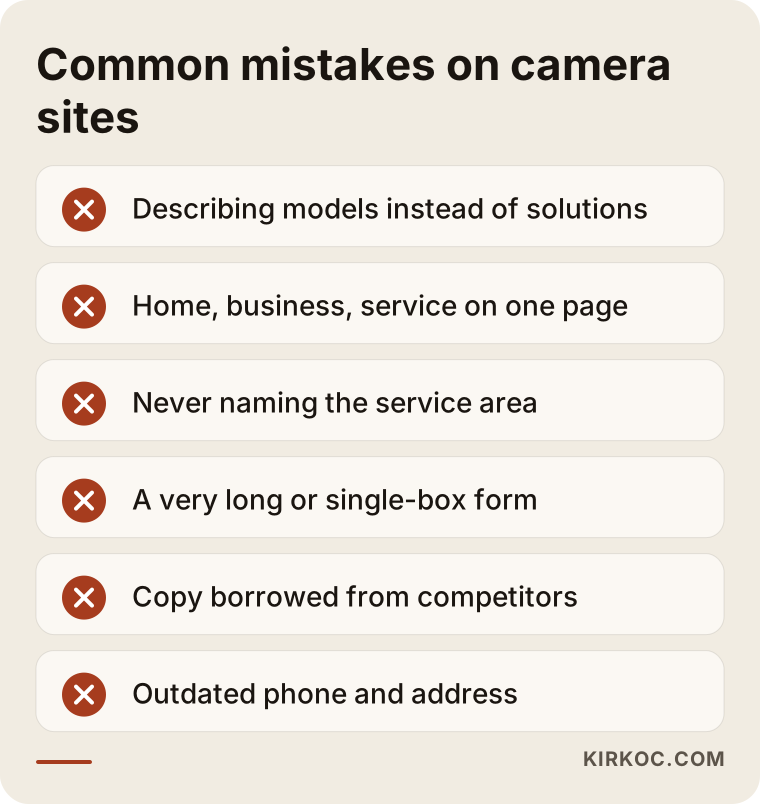
Most of the mistakes in the picture do not need expensive fixes. A few hours of editing and a sound page plan often bring a clear improvement.
What can you do yourself, and when do you need a specialist?
You do not have to hand everything to a specialist. Some tasks you can do on your own: open your Google Business Profile and enter the address, phone and hours correctly, upload real installation photos (with the customer's permission and without identifying anyone), ask happy customers for reviews, and write down a list of the questions you hear most. None of this needs a big investment, only time.
Expert help makes sense in other cases: you have no site, or it is very old; it does not display properly on a phone; you do not know how to build service and area pages; you want to set up tracking for forms and calls; or you want quick visibility through ads. The decision chart below gives a rough guide on what to do in which situation.
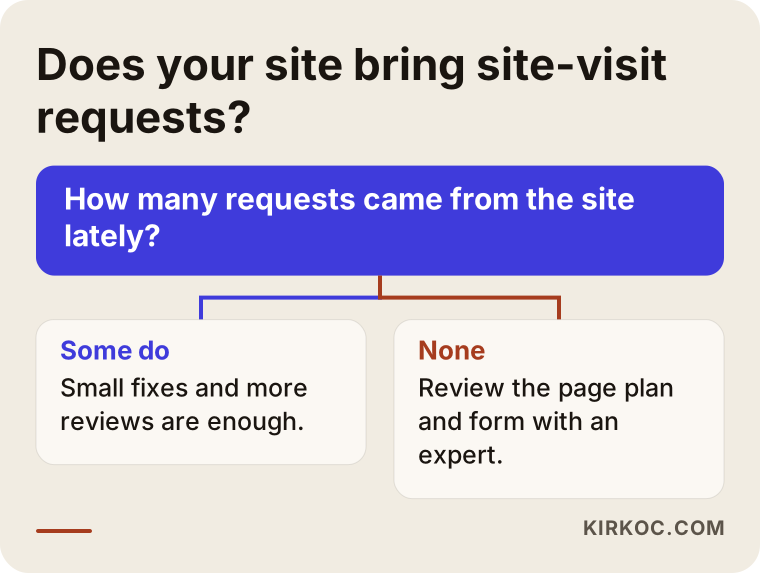
As the chart shows, the key question is whether your site brings you site-visit requests. If the answer is no, you need to find where the problem sits. Sometimes it is only a missing page or a weak form, and sometimes the site needs to be rethought from the start.
How ads and search visibility work together
When a new site goes live, it takes time for Google to find it and rank it. During that time, Google Ads can make you visible quickly for searches such as "camera system installation" or "security camera repair." But ads work only as long as you pay for them, and if the page is poor, the money is wasted. That is why it is healthier to build the pages properly first and support them with ads afterward, if needed.
On social media, the content that works best in this field is usually before-and-after installation photos, short clips of work in real locations and brief answers to questions people often ask. When you share footage or location details from a customer, take extra care that no person or address can be identified. When ads, the site and social media sit with one person, it is much easier to keep the message consistent.
What determines the cost
There is no single price for this work, and I will not give a number here because it would set a wrong expectation. These are the things that decide the cost: how many pages are needed, how many services and areas get their own pages, whether the text comes from you or is written by me, how many photos and graphics are required, whether content must be moved from an existing site, whether you need to sell products online and whether you want regular maintenance and visibility work after launch.
A simple, clear site for a small installation company and the site of a multi-area company that also sells products are very different projects. I first listen to what you need, then tell you what is necessary and what can wait. I do not sell what you do not need, and sometimes saying "do not do this yet" is part of my job.
What is it like to work with me?
I am not a team. I am Ümit Kırkoç, and you talk to me directly. You know the camera business, and I know how to explain it online. In the first meeting I listen to what you need, your budget and your expectations. Then I present a written, understandable plan: which pages, what timeline, what deliverables. If the plan suits you, I start. If not, we part politely.
After launch the contact does not end. Phone and form tracking, search visibility, your Google profile and, if needed, ads and social media are all with the same person, so you talk to just one. I do not give guarantees about results, because rankings and call counts depend on many things outside my control. What I do promise is to explain what I am doing and why at every stage.
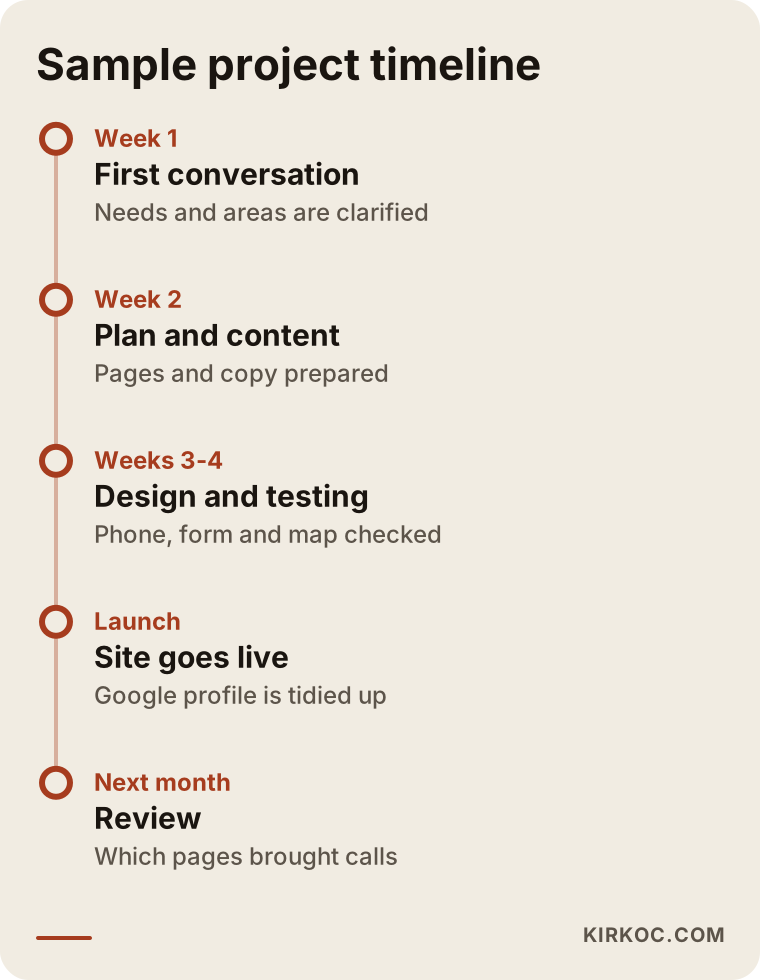
The timeline is only an example, and the real duration depends on the size of the site and how ready the content is. Still, it helps you see which steps lie between the first meeting and launch.
Frequently asked questions
How many pages does a security camera company site need?
The function of the pages matters more than the count. For a small company, starting with a home page, home camera systems, business camera systems, maintenance and service, service areas, about and contact is often enough. Later you can grow by adding area pages and topic pages.
Should the site have a product and price list?
It is not required. In most installation work the price depends on the building and the cabling, so a fixed list can mislead. Explaining what decides the price and collecting site-visit requests is more honest. If you want to sell ready-made products, you should consider a separate online store structure.
Will the phone ring right after the site goes live?
No, and I need to say that up front. A new site takes time to appear on Google. If you want faster results you can support it with ads, but ads stop when you stop paying. A solid site, on the other hand, builds up value over time.
Do customer reviews really matter?
Yes. In this field, the decision to trust someone leans heavily on reviews. Asking a happy customer to write a review on your Google profile is one of the cheapest and most effective things you can do. Fake reviews are unethical and can get you into trouble, so I strongly advise against them.
What should I write on the site about camera footage and personal data?
A short, balanced information section is enough. Avoid firm legal statements, and suggest that the customer check the rules that apply where they live or ask an attorney. If your own site has forms that collect information, your privacy notice and privacy policy should be up to date as well.
Do I need social media and ads too?
Not necessarily all of them. A solid site and a correct Google profile come first. Then, depending on your budget and goals, ads or social media can be added. We can decide together in the first meeting which makes sense for you.
Can you fix my current site instead of rebuilding it?
Often yes. If the site opens properly on a phone, uses a secure connection and can be edited, adding the missing pages and improving the form may be enough. If the structure is old, slow or cannot be edited, rebuilding makes more sense. I will tell you honestly after looking at your site.
If you want your security camera company to be visible online, with a site that builds trust and brings site-visit requests, you can look at my website design service and write to me. I will listen to your business and tell you plainly what you really need.