You run a special education or therapy center. Your specialists are experienced, your rooms are well organized, and the families you work with trust you. But when you ask a new parent how they found you, the answer is usually "a friend told me." Word of mouth is valuable, yet if it is your only door, growth stays slow. These days a mother or father worried about their child picks up a phone, types a few words and looks at whatever appears. If your center is not there, or is there but feels unconvincing, that family moves on and you never even know they existed. That is why a website for a special education center is not a brochure. It is the first conversation you have with a family. In this article I explain what your site should contain, how parents actually search, and where to start. I am Ümit Kırkoç, based in Istanbul, and I handle websites, search visibility, social media and ads as one person, so you deal with one contact for all of it. I describe my own website design service, including its limits, where it is relevant.
One thing up front: this field is different from most. The person reading your site is not buying a gadget. They are often anxious, sometimes exhausted, and sometimes dealing with a diagnosis for the first time. So the tone, the design and the information on your site have to be more careful than on an ordinary business site. You win trust with clear, honest information, not with big promises.
How do parents search for a special education center?
A parent usually starts with a need, not with the name of a center. Phrases like "my toddler is not talking yet," "autism therapy program," "where can I find a speech therapist" or "help for a child with a learning disability" belong to this stage. The parent may still be sorting out what is going on and just wants to understand. The next stage adds location: "speech therapy near me" or "occupational therapy in [your neighborhood]" shows someone who wants a place within driving distance. The last stage is comparison: who works at each center, what happens at the first visit, how large the sessions are.
The important difference is this. An early search is a search for information. A late search is closer to a decision. A good site answers both. A site that only offers "about us, our team, contact" helps at the second stage, but says nothing to the parent at the first stage, and that parent goes looking for answers somewhere else.
The graphic below uses a made-up example to show a results page for a parent's search and why the page that names the area and the service stands out.
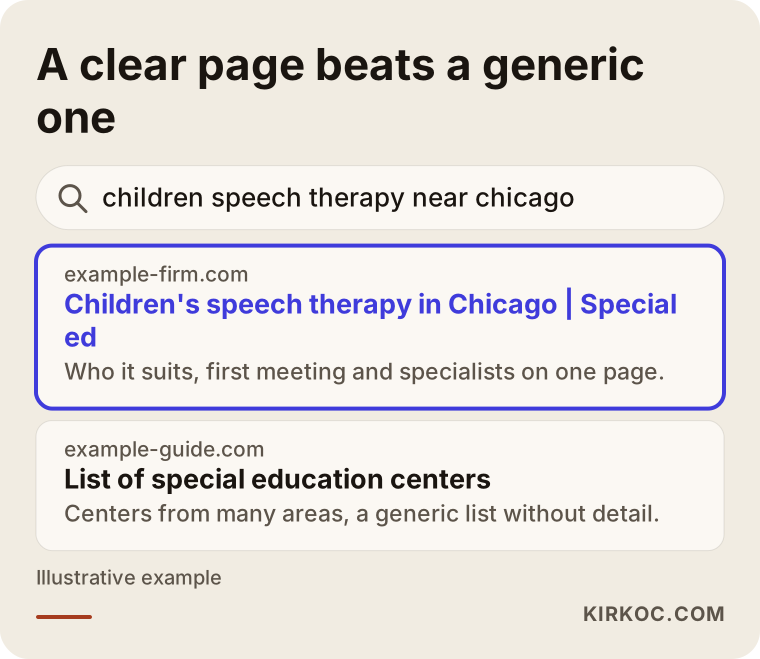
The highlighted result states the location, the type of support and who it is for in its first line. A vague page that only says "our center" cannot do that. Search engines also try to work out which answer to hand the parent, and the clearer you make that, the easier it is for them to show you.
Same center, different intentions
A center often offers several services: speech and language, one-on-one instruction, occupational therapy, sensory integration, school readiness, family counseling. The parent searching for each one is a different person. The family of a child who is late to talk and the family of a child who struggles with reading are not typing the same sentences. So every major service deserves its own page. Squeezing them all into a single "Services" page erases exactly the differences that parents care about.
The table below lays out four basic kinds of search and the page that suits each.
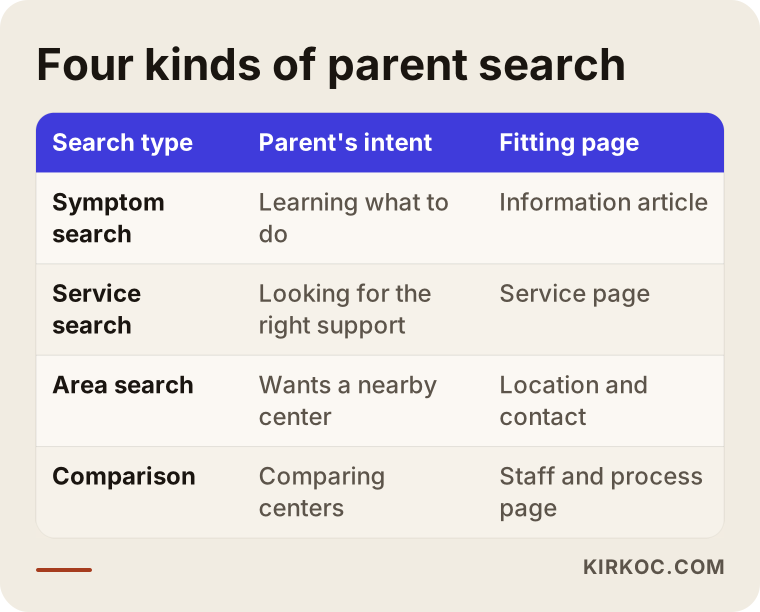
You can apply this to your own center in an afternoon. List your services, and under each one write down who searches for it and what that person wants to learn. The resulting list is your page plan.
Trust comes before everything else
When a parent chooses where to leave their child for an hour a day, they are not judging how pretty the design is. They are looking for the answer to "does someone here know what they are doing, and how will my child be treated?" Your site should answer that within seconds. What is needed is well known, and most centers already do these things; they just do not show them online.
First, the specialists. Each person should appear with a name, a title, the area they work in, a short summary of training and experience, and ideally a photo. A parent wants to know ahead of time who will be working with their child. A single line reading "our expert team" does not do that. Second, the legal standing of the center. If you hold licenses, certifications or registrations, state them plainly. Exactly what you may say, and how, depends on your location and field, so check the wording with a lawyer or the relevant licensing office. An exaggerated or incorrect statement can cause problems instead of building confidence.
Third, an honest description of how you work. Promises such as "miracle results" or "guaranteed progress" are unethical, and thoughtful parents are put off by them. Every child develops differently, and you know that. It is far more reassuring to explain how a child is assessed at the first visit, who builds the plan, and how often the family hears back. Those details introduce the process and reduce the unknown.
Fourth, show the space. Real photos of the entrance, the therapy rooms, the waiting area and the yard, if you have one. Stock photos, meaning generic images downloaded from the internet, are spotted quickly and damage credibility. If photos or videos show children's faces, you need written permission from the parents, and the privacy rules that apply to you are worth running past a lawyer. The practical alternative is simple: show the rooms, the materials and the staff, and leave the children's faces out.
The checklist below collects what a trustworthy center website should contain.
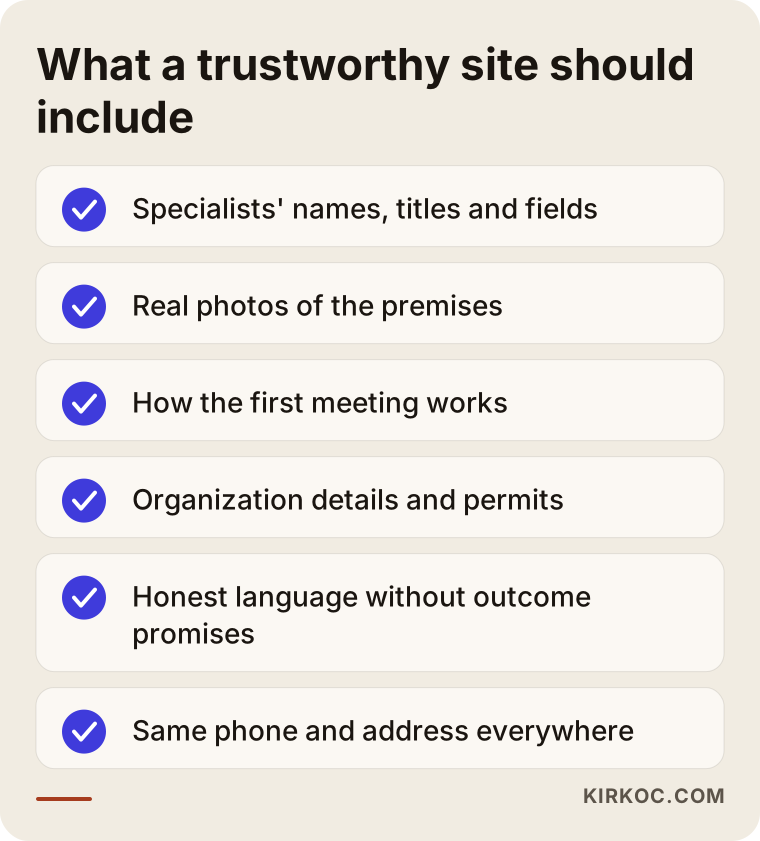
Keep it beside you, open your own site and tick the items off one by one. Every box left empty is a question that stays in a parent's mind.
Which pages do you need?
A core page plan for a special education center looks like this: a home page, an about page describing your approach, a page for your specialists, a separate page for each service, a page that explains the first visit and the process, frequently asked questions, directions and contact details, and a blog or resource section. Each one has its own job.
The home page should let the parent think "I'm in the right place." In the first screen it should say what you offer, which age groups you work with and where you are. Service pages should explain, for a parent who arrives with one particular need, how that need is handled at your center. The first-visit page is perhaps the most forgotten and the most useful. How do I book? How long is the meeting? What should I bring? Does my child come along? What happens after the assessment? A parent who knows these answers finds it much easier to pick up the phone.
The blog or resource section is how you reach people at that early stage of searching. Short, plain articles written by your specialists on early speech, play development or school readiness introduce you to a parent before they have decided anything. Avoid sounding like you are diagnosing anyone, and always keep the line "please see a qualified professional" visible.
The diagram below shows a sample layout for one service page.
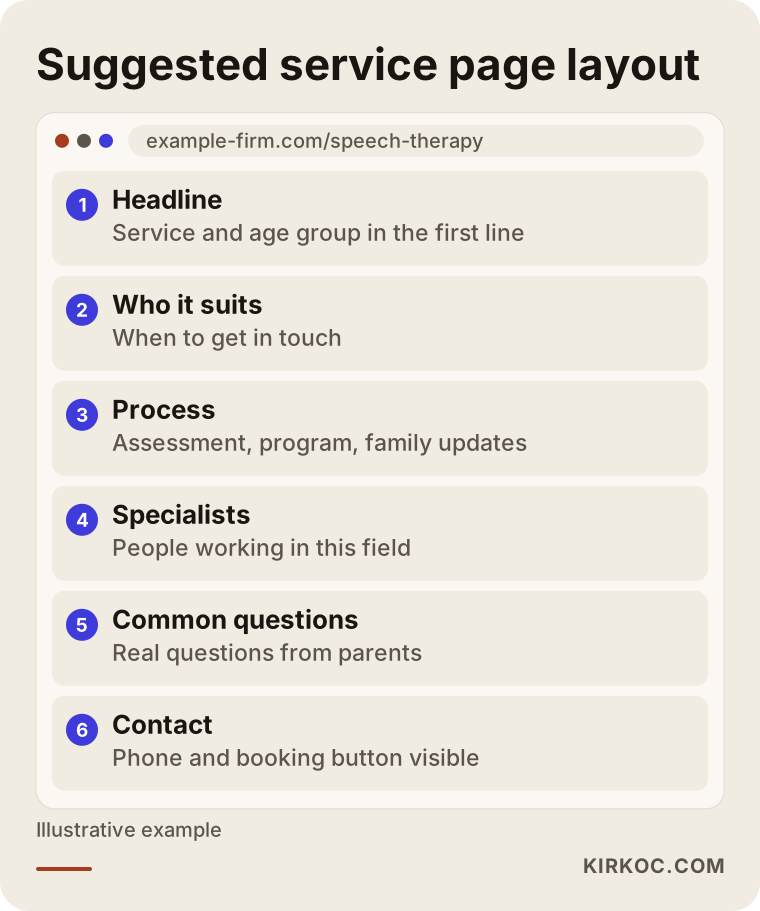
Notice that the contact option sits at the bottom, and that each section answers one question. Do not bury the parent in a wall of text. Use short headings and short paragraphs.
Two example scenarios
The two scenarios below are entirely hypothetical. They are not based on any real center or person and exist only to show the logic.
Scenario 1: A center with a one-page site
Imagine a center in a mid-sized suburb with three specialists. Its website is a single page: a short introduction, one photo and a phone number. Most families arrive through recommendations. The owner notices that the number of new families has stopped growing. Looking at what parents in that area might type, such as "speech therapy for kids" or "autism support program," the sites that appear are those from centers that created a separate page for every main service. This center's single page does not fully answer any of those searches, so it does not show up.
The fix happens in order: a separate page for each main service, a page for the specialists, a page about the first visit and a section of common questions. Photos are taken of the space itself, with no children's faces. Within a few months visibility in search may improve, but nobody can guarantee how long it takes or what the result will be. A realistic expectation is that a clearer site brings more relevant visitors and more useful phone conversations.
Scenario 2: A center with a site that does not build trust
The second imaginary center already has a site, and a fairly ambitious design. But its pages are full of phrases like "best results" and "certain progress." The specialists are not named, and the free assessment offer comes with no detail. Plenty of people visit, but few call. From a parent's perspective the center feels too much like a sales pitch, and basic questions go unanswered.
Here the answer is not a redesign. It is a content fix. The exaggerated claims come out, the specialists are introduced, and what the first visit includes is spelled out. Very often the biggest improvement comes not from making a site prettier but from giving parents honest information.
The graphic below puts the two approaches side by side.
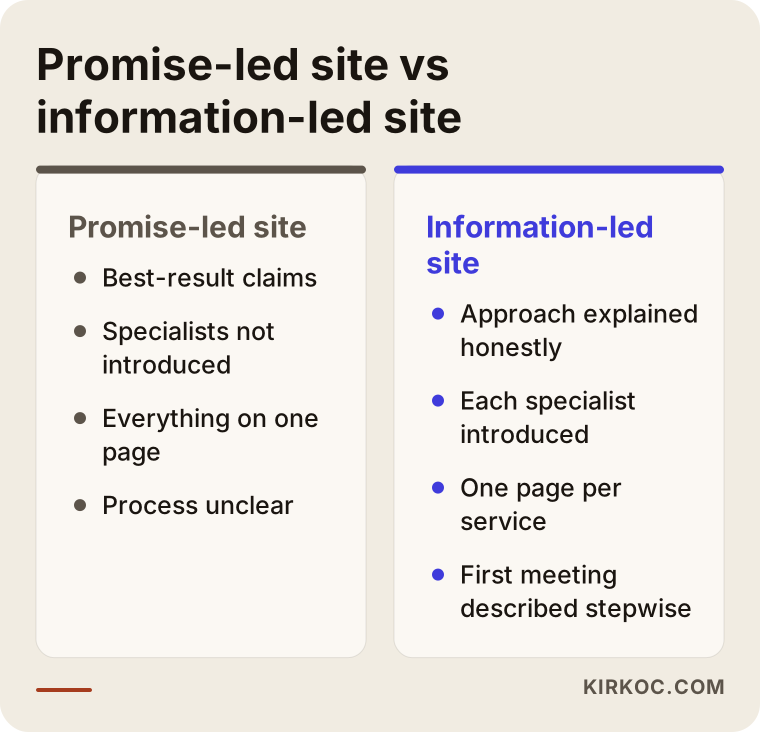
Seen together, the difference is obvious. The left-hand site talks about the center. The right-hand site answers the parent's questions. In this field the second approach works far better.
Step by step: how the site gets built
The process really starts with a conversation. We talk about your center, your services and the families you work with. You do not need any technical knowledge; what I need is to understand your center and how you relate to families. Then I draft the page plan: which services get their own pages, which questions come first. I do not move on to design until you approve that plan.
Content comes next. I write the text from what you tell me and from what your specialists say, and you review it. For anything medical or educational, your specialists have the final word. After that comes design and setup. The site has to open comfortably on a phone, because most parents take their first look on one. Before launch we go through every page together. After launch I check how the site appears in search, and whether the forms and phone links work.
The diagram below shows the process in sequence.
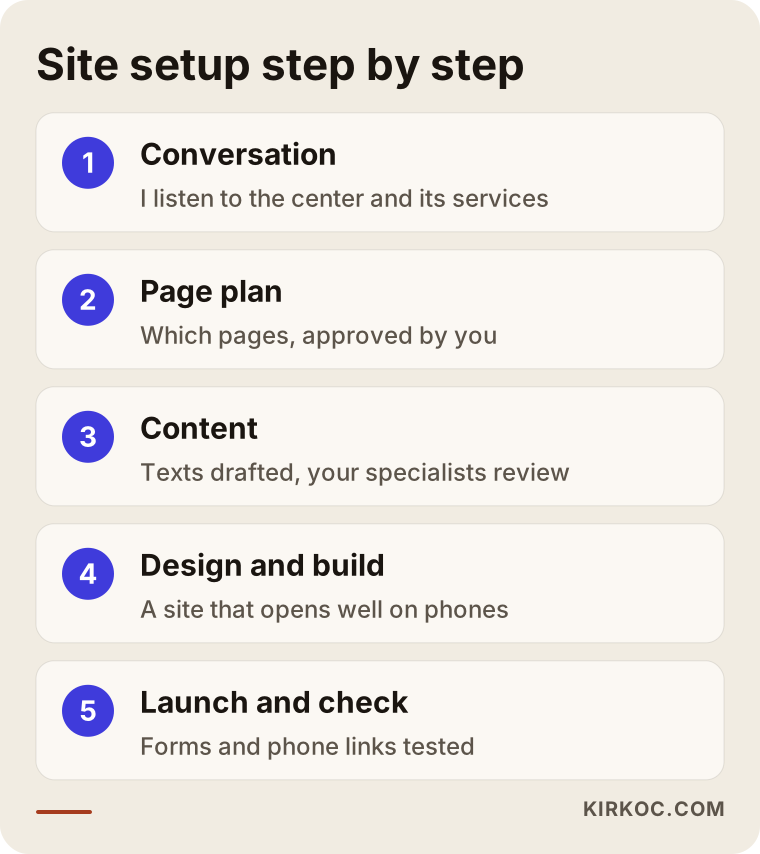
You approve each step. Nothing moves forward without you knowing, because this content is the voice of your organization.
Common mistakes
Most of the mistakes I see in this field come from haste and missing information, not bad intent. The most frequent is promising outcomes. Statements like "your child will talk" or "full recovery" are ethically troubling and set the wrong expectations. The second is putting everything on one page. The third is hiding the specialists: a center that does not introduce its staff has not answered the parent's question about who will be looking after their child.
The fourth is using children's photos without permission, which damages trust and may carry legal risk. The fifth is neglecting the mobile version: if text is tiny and buttons are hard to tap on a phone, the parent leaves within seconds. The sixth is hiding contact details or burying them in one corner. The seventh is a mismatch between social media and the website. If a parent sees a warm, friendly center on Instagram and then lands on a cold, corporate site, confidence slips.
The warning list below summarizes these errors.
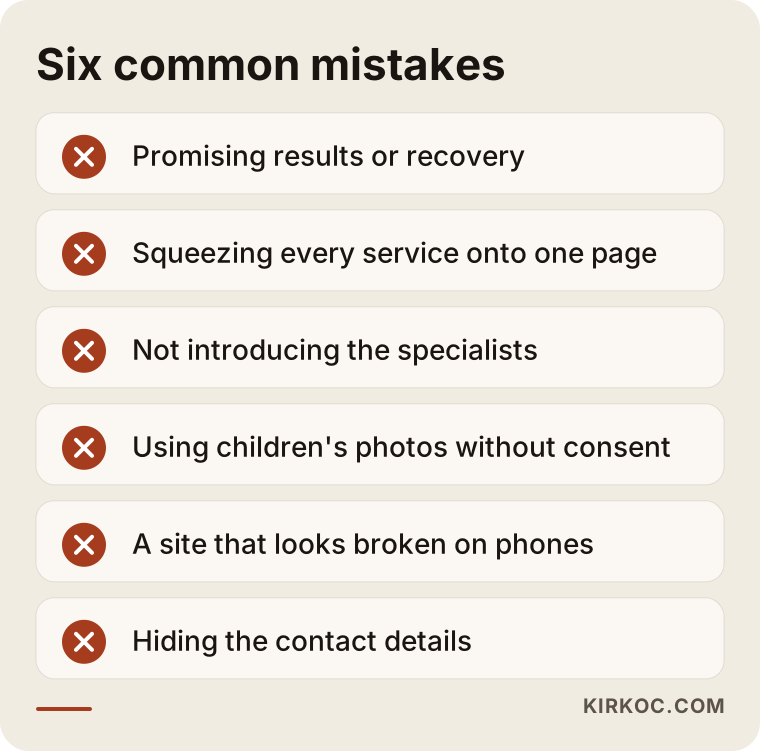
Read through it and ask yourself, "do I do any of these?" Many of them can be fixed in an hour.
What can you do yourself, and when do you need an expert?
Some jobs need no special knowledge. You can take real photos of your space, write short bios for your specialists, jot down the questions parents ask most often, and sketch out how the first visit works. This material is the raw stuff of every page I will build later, and you know it better than I do. You can also keep your Google Business Profile, the box that shows on the map and in search results, up to date. The address, phone number and opening hours should be identical everywhere they appear.
The technical parts are where an expert helps: making the site fast and properly usable on a phone, structuring pages so search engines can read them, making sure forms and phone links work, and setting up an ad account if you choose to advertise. You could learn all of that, but a center director's time is usually worth more somewhere else.
The decision diagram below can help you choose between starting on your own and getting support.
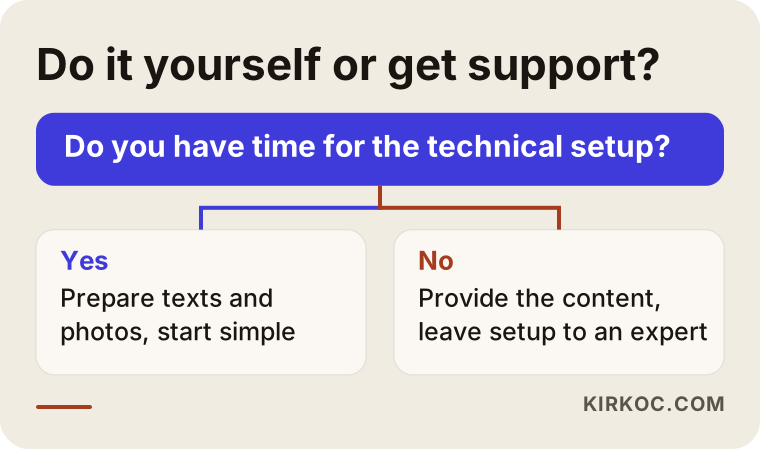
In short, you can own the accuracy of the content and I can own the technical build. Put together, you get a site that is both correct and works properly.
What determines the cost?
The cost of a special education center site does not come from a single item; it depends on what is included. The number of pages is one of the biggest factors: a three-page site and a fifteen-page site that describes every service are not the same job. Who writes the text matters too. If you prepare the copy, the cost goes down. If I need to write it and gather material from your specialists, that takes more time. Extras such as professional photography, a second language, an appointment form or online intake, a logo and visual identity, monthly maintenance after launch and ongoing search work also affect the price.
I am not giving a number here because every center needs something different. After a short conversation I can tell you plainly what is needed and what can wait. When you receive any quote, ask: which pages are included, who writes the text, is there support after launch, and will the site belong to me? A quote with vague answers can lead to surprise costs later.
The timeline below illustrates how a site might develop after it goes live.
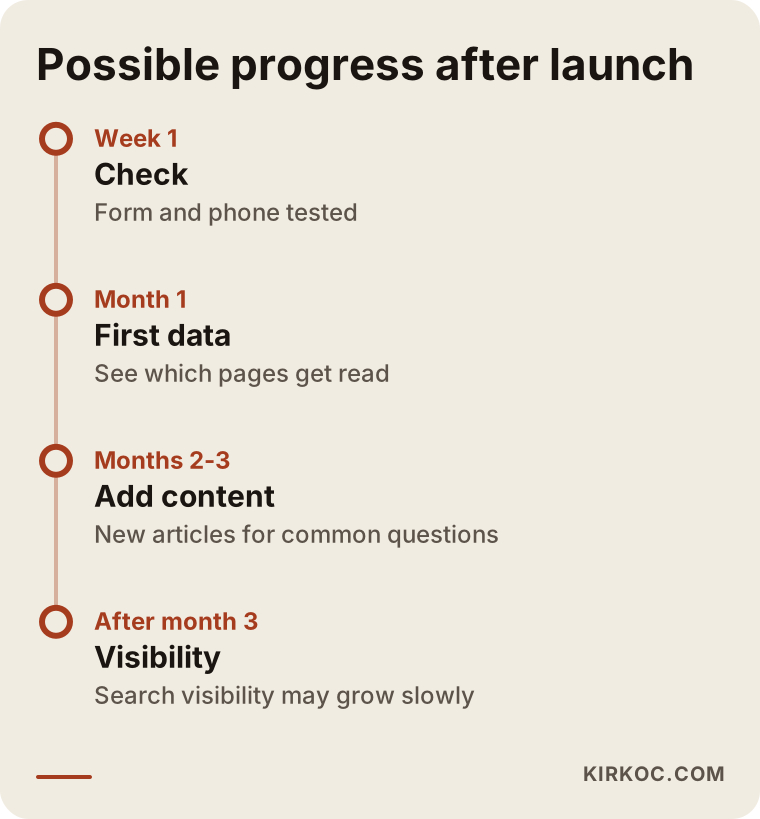
This timeline is a general path, not a promise. How long things take and what results come depend on your area, how many competitors you have and the quality of the content.
How the site, social media and ads work together
A parent rarely finds you in just one place. They hear your name from a friend, look you up on Instagram, open your website, maybe run a search, and perhaps check directions on the map. Every stop on that journey should sound like the same center, and that builds trust. What you say on the site and what you show on social media should not contradict each other. This is where having everything handled by one person pays off. When I manage the site, search visibility, social media and, if needed, ads, the message, the visual style and the facts stay consistent everywhere. With separate providers, a common problem is a website that says one thing while social media says another.
Be careful with advertising in this field. Health and education are areas where ad platforms can have strict rules, and there may be limits on targeting related to children. If you plan to advertise, the site and its content should be ready first. An ad brings a parent to your site, but if the parent finds no reason to trust you there, the money is wasted.
The funnel below shows a parent's path from first search to first appointment.
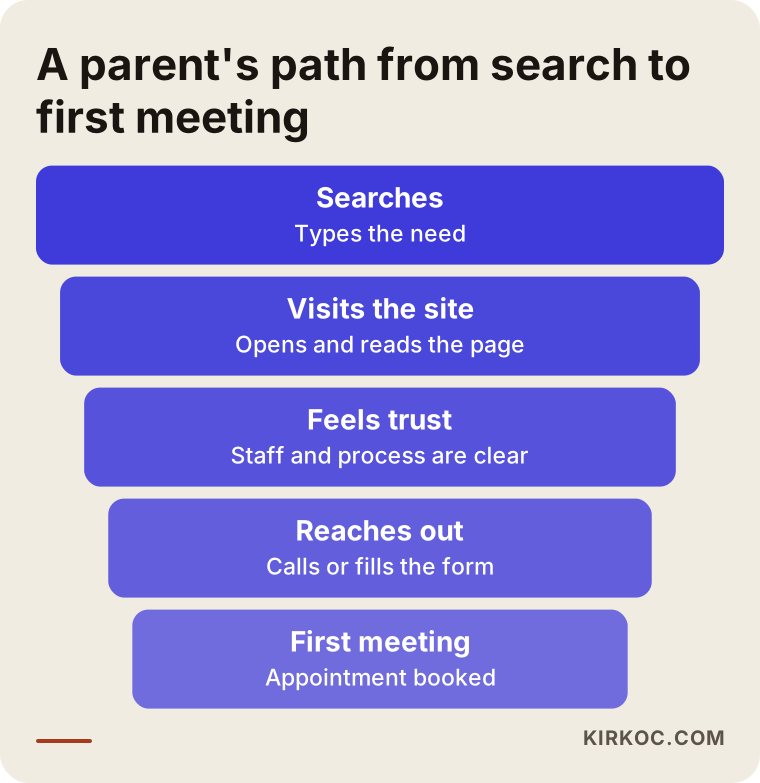
Some parents drop off at every layer; the goal is not to keep everyone, but to avoid losing the right families. Clear information and easy ways to reach you reduce those losses.
How I work
I work alone, which means the person you talk to is the person who does the work. Your messages reach me directly without passing through anyone, and there is no "let me pass that to the team" step when you want to change something. The first conversation can be free and carries no obligation. I listen to what your center does and tell you honestly what you need and what you do not. I will not try to sell you something you do not need.
What I need most from you is time: a few conversations, short details about your specialists, and photos. I take care of the rest. I also do not disappear after launch. Content can be added, information updated and visibility monitored as needed.
Frequently asked questions
Does a special education center really need a website?
Yes, even a center that grows through referrals. A parent who gets your name from a friend will still search for it. A center with no site, or a site that does not inspire confidence, can raise doubts even when it comes highly recommended. The site is where the recommendation gets confirmed.
Should I show specialists' photos and details on the site?
Yes, with their consent. A parent wants to know ahead of time who will be working with their child. A name, a title, a field and a short summary of experience build far more trust than one line saying "our expert team."
Can I use photos of children on the site?
Not without the parents' permission, and even when you have it, the permission should be written and its scope should be clear. Privacy rules can be complicated, so I suggest asking a lawyer. The practical route is to show the space, the materials and the specialists without showing children's faces.
Can I use words like "cure" or "guaranteed results" on the site?
I recommend against it. Every child develops differently, and promises of results are ethically questionable and can cause problems under advertising and professional rules. Describing your process, your approach and how you assess a child is a much sounder path.
How soon after launch will parents start coming?
No one can guarantee that. It depends on where you are, how many competitors you have and the quality of the content. A site helps right away with families you send to it directly, those who find you on social media and those who come by referral. Visibility in search results grows over time.
Do I have to describe each service on its own page?
It is not mandatory, but it helps a lot. A parent searching for help with late speech wants to learn different things from a parent searching about a learning difficulty. A separate page for each service gives the parent a clear answer and improves your chance of appearing in that search.
Should I work with different people for the website, social media and ads?
You do not have to. With separate providers, messages can drift apart and you have to coordinate with each one. When I handle all of it, the wording on the site, the visuals on social media and the text of the ads stay consistent, and you speak to a single contact.
What should I prepare before asking for a quote?
Write down which services you offer, how many specialists you have, which age groups you serve, your current site if there is one, and the questions parents ask most. With that information I can prepare an accurate and clear proposal.
If you want to build your center's site from scratch, or move your current one to a structure that earns trust, you can reach me through my website design page. I will listen to how your center works and explain plainly what it needs.