You teach private lessons or you run a coaching practice. Most of your students and clients arrive through word of mouth, but that source eventually runs dry. You want a full schedule for the next term, so you have a website or you are thinking about building one. Then the same question lands on your desk: "When someone types 'high school math tutor near me' into Google, why does someone else show up and not me?" In this article I explain what SEO for tutors and coaches really looks like, which pages you need, and where to start. I am Ümit Kırkoç. I work on my own from Istanbul, and I handle SEO services together with websites, social media, ads and content, all in one pair of hands.
SEO, in short, is the work that helps your website appear when people search on Google. The difference from advertising is simple: with ads you are visible only while you keep paying, while well-built SEO can keep bringing inquiries in the months when you pay nothing. For trust-based work like tutoring and coaching, that difference matters even more, because a parent or a client always researches before choosing someone they have never met, and most of that research starts in a search box.
Why tutoring and coaching searches work differently
Someone looking for a pizza place or a plumber decides within minutes. Someone looking for a tutor or a coach may think about it for days. The thing being chosen is not a product but a person: someone you will trust with your child's education or your own career. So the searches are longer, more careful and full of questions.
There are also two different kinds of customers. For tutoring, the person typing is usually the parent, not the student. A parent thinks "my child is struggling with algebra" and types something like "middle school math tutor near me", "SAT math prep tutor" or "in-home one-on-one lessons". In coaching, the person searching is usually the client, and the language is more personal: "career change coach", "test anxiety coaching", "life coach online". The two groups use different words, carry different worries and read a website in different ways.
The third difference is geography. In-person lessons usually belong to one neighborhood or a few towns. If you teach at the student's home or in your own space, a search from the other side of the country does nothing for you. If you teach or coach online, it is the opposite: your reach is wide, but so is the number of competitors. Which group you are in changes your strategy.
The illustration below shows a made-up search result. Its purpose is to show why a clear page stands out from a generic listing.
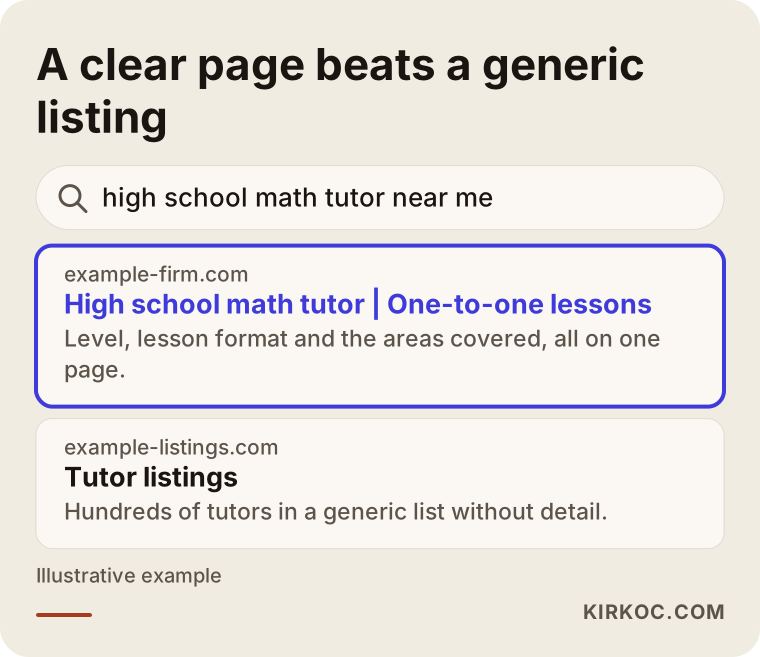
The highlighted page names the subject, the level and the area in its first line. The generic listing leaves the reader with no answer to "which tutor suits my child?" Google is trying to show the searcher the page that will help most, and when you make that job easy, your chance of being seen goes up. I cannot promise any particular position for any page, but a clear page is always a better bet than a vague one.
What do parents and clients actually type into Google?
It helps to sort searches into four groups. The first is subject and level searches: "geometry tutor for 10th grade", "elementary Spanish lessons". The second is area searches: "tutor in Brooklyn", "math teacher near Austin". The third is problem searches: "my child won't do homework, what should I do", "how to get over test anxiety". The fourth is comparison and trust searches: "how to choose a private tutor", "does coaching actually work".
These groups carry different intentions. The first two are usually people who already want a teacher and are close to deciding. The third group is undecided; they want a fix but do not yet know whom to ask. The fourth group wants to be sure before committing. If your site can answer all four people separately, you get several chances to reach the same person at different stages.
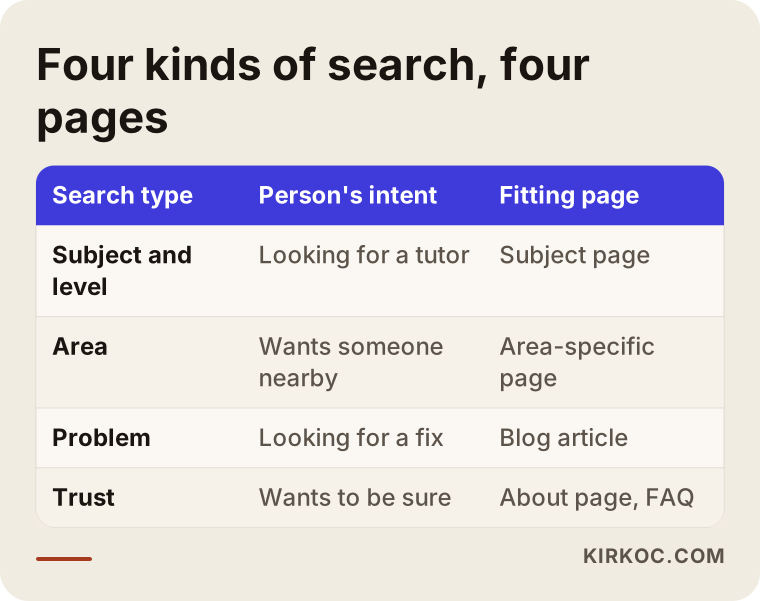
As the table shows, every kind of search has its own page. Trying to squeeze everything onto a single home page produces text that speaks fully to neither the parent nor the client. That is why writing down who searches, and in which words, is a more valuable first step than building the site itself.
Which pages do you need?
On a small tutoring or coaching site, what matters is not how many pages you have but how clear each one is. A structure that usually works looks like this: a home page, one page for each subject or coaching area, an about page, frequently asked questions, a contact and booking page, and a few helpful blog posts.
The subject or service page is the part of your site that brings in the most business. Instead of one page called "Math", think of a separate page for every level you really teach: middle school math, high school algebra, geometry, calculus, test prep and so on. On each page, say who you teach, how a lesson runs, whether it is one-on-one or a small group, and where it takes place or whether it is online. The same applies to coaching: do not cram exam coaching, career coaching and student motivation onto one page.
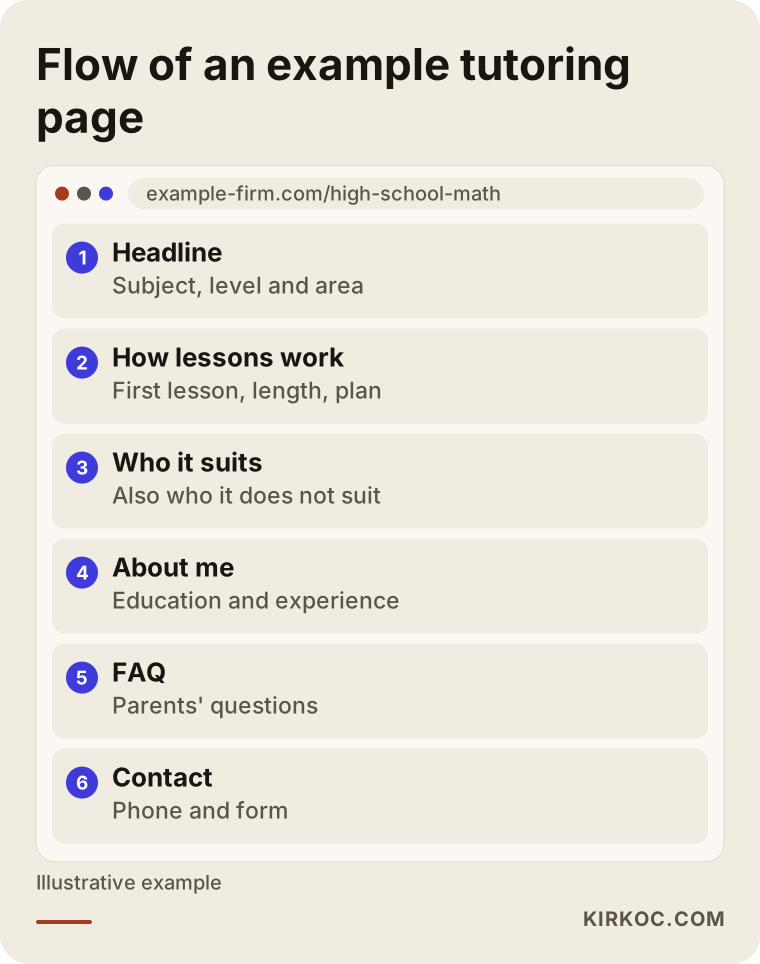
What to notice in this example is what the visitor sees on the first screen. Subject, level and area belong at the very top, and a "get in touch" button should come back at the end of every section. A parent on a phone should be able to answer "does this person offer what I'm looking for?" without reading a long life story.
Why does the about page matter so much?
On tutoring and coaching sites, the "About me" page is, unlike on most business sites, one of the most read pages. The reader is judging a person, not a company. Write about your education, your experience, the ages and levels you work with, how you run a lesson and what you believe about teaching. You do not need fancy adjectives. A concrete sentence such as "I have worked with middle schoolers for ten years, and in the first lesson we find the gaps together" builds far more trust than "the best teacher around".
If you are a coach, state your training and certificates accurately and exactly as they are. Using a title you did not earn damages trust and can cause legal trouble. If you are unsure which titles you may use and how, talk to a lawyer.
How do you build trust on the page?
In this line of work, what moves a visitor to your contact form is rarely one persuasive sentence. It is a pile of small trust signals. First the visitor lands and sees they are in the right place. Then they notice the content describes their own problem. Then they get to know you, find answers to their questions and finally decide to write. Some people drop off at every stage; the job is to keep that loss as small as you can.
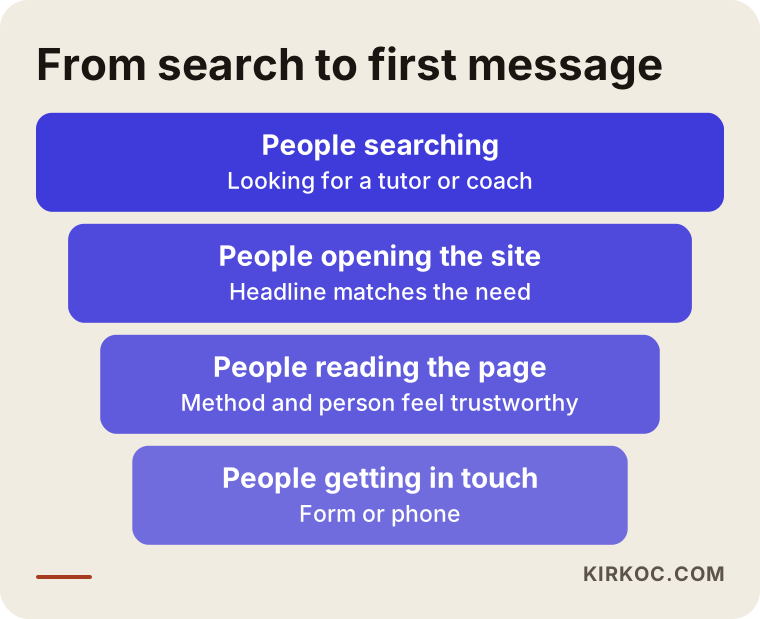
The funnel is a reminder that not every visitor will write to you, and they do not need to. But if you attract the wrong people at the first stage, the funnel wastes effort from the start. Saying exactly whom you teach, instead of "I teach everyone", pulls in the right people and keeps the wrong ones from taking your time.
Parent reviews and student feedback help build trust. However, before you publish a child's name, photo or grades, get written permission and pay attention to the privacy rules that apply where you live. I cannot give you a definitive answer on that; student privacy law is detailed and differs by country and state, so please ask a lawyer. Publishing reviews anonymously or with initials, and only with permission, is the safer path.
Example scenario 1: a high school math tutor in a suburb
The following scenario is entirely hypothetical. It does not describe a real person or business, but it shows a typical version of this work.
Imagine a tutor in a suburb who teaches high school algebra and SAT math one-on-one. For a few years, students have come by referral, but each new term she struggles to fill the hours that open up. She has a website, but it is a single page titled "Math Tutoring – Her Name". There is no service area, no separation of levels and no lesson times.
What she could do is write down the searches one by one: "high school algebra tutor in my town", "SAT math tutor", "one-on-one math lessons at home". Then, instead of one page, she would build three: high school math, SAT math, and a page for nearby towns about lessons at the student's home. On each page she would explain how a lesson runs, how long the first lesson lasts and which neighborhoods she can visit. She would also fill in her Google business profile with the same details, so she is ready for people who search on the map.
I cannot guarantee what happens next. Which searches she appears for, and in what order, depends on competitors and on time. But what she did would be pages that answer the search directly, plus a profile suited to local search. How many more students it brings can only be judged after a few months, by looking at the messages that arrive.
Example scenario 2: an online career coach
The second scenario is also hypothetical. Picture a coach who works online and helps employees through career changes. Her work does not depend on location, so a client could live anywhere in the country, or even abroad. That also means heavy competition. Rather than fight the big names for a broad phrase like "career coach", it makes more sense to focus on narrow, specific searches.
Searches such as "changing careers in your thirties", "moving from engineering into management coaching" or "what to consider before quitting your job" are less crowded, and the person typing is more informed. This coach could prepare a deep article or page for each topic. On those pages she can explain her method, how the first call goes and the situations where coaching is not the right fit. Declining to promise results does not make the work look smaller; it makes it look serious.
In this scenario, content and visibility work together. If the same coach also posts regularly on LinkedIn, her articles circulate there too. This is where having everything in one place helps: when the website, the SEO and the social media all say the same thing, each one supports the others.
Step by step: how to start from zero
SEO does not have to be made complicated. For a tutoring or coaching site, the order of work usually goes like this.
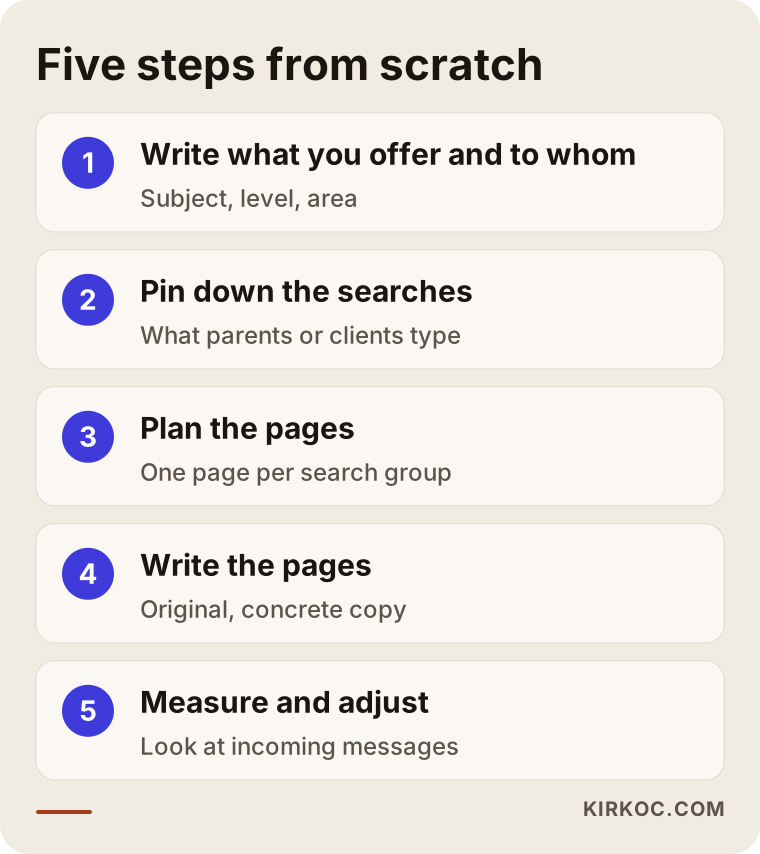
Step one is writing down what you offer and to whom. Which subject, which level, which area or online, one-on-one or group? If those answers are fuzzy, the site will be fuzzy too.
Step two is pinning down the searches. What would a parent or client type? Ask people around you, ask your students "how did you find me?", and look at the suggestions that appear when you type into Google. That list can be worth more than any keyword tool.
Step three is the page plan. Think of one page for each main group of searches. Do not try to fit five unrelated searches onto the same page.
Step four is writing the pages. The copy should describe the problem, the solution, how lessons run, who it suits and who it does not. Avoid copied text, definitions lifted from other sites and exaggerated promises.
Step five is the technical groundwork. The site should load fast on a phone, titles and descriptions should be written properly, and pages should link to one another in a sensible way. Parents mostly browse on their phones, and a page that opens slowly gets closed before its good text is read.
Step six is measuring and adjusting. How many people visit each page, and how many write? After a few months you can see what works and invest accordingly.
Local visibility: your Google business profile
If you teach at home or in your own space, the local results in Google's map section matter to you. Searches like "tutor near me" or "learning center in my town" show a map, and getting into that section takes separate work. Your business profile should list your name, service area, hours, phone number and website accurately and consistently.
One thing to keep in mind: if you teach at your home, you do not have to publish your home address. Google lets businesses hide the address and show only the area they serve. Choose the option you feel comfortable with for safety and privacy.
Reviews matter in this section too. At a suitable moment you can politely ask satisfied parents to leave a review. Buying reviews or making them up is not only unethical, it can also get your profile suspended. Never do it.
The comparison below shows the difference between one generic page and a detailed page structure.
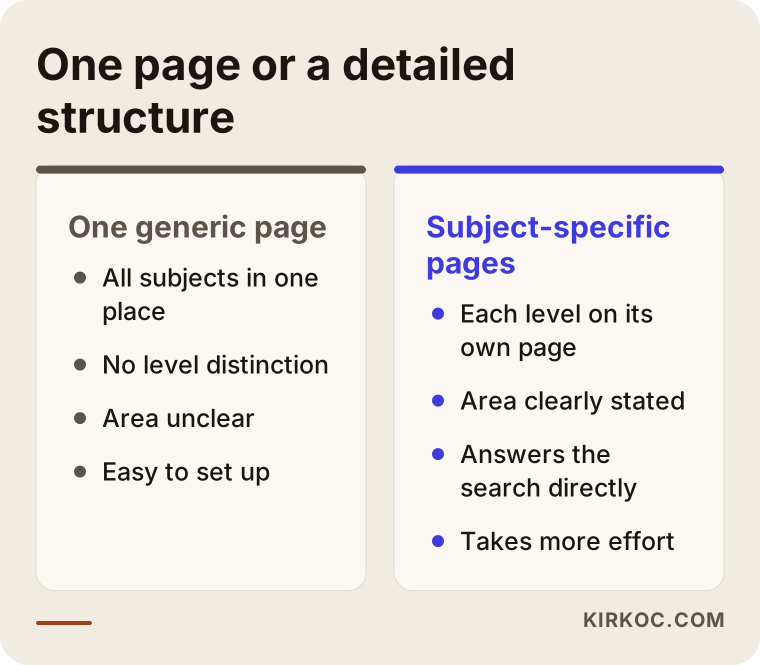
The structure on the left is easy to set up but limited. The one on the right takes more effort, yet answers searches far more directly. In a small practice you do not need to build every page at once. Start with the subject you teach most and earn most from, then expand over time.
What you can do yourself
You do not have to hand everything to a specialist. You can do plenty of this yourself with a little time.
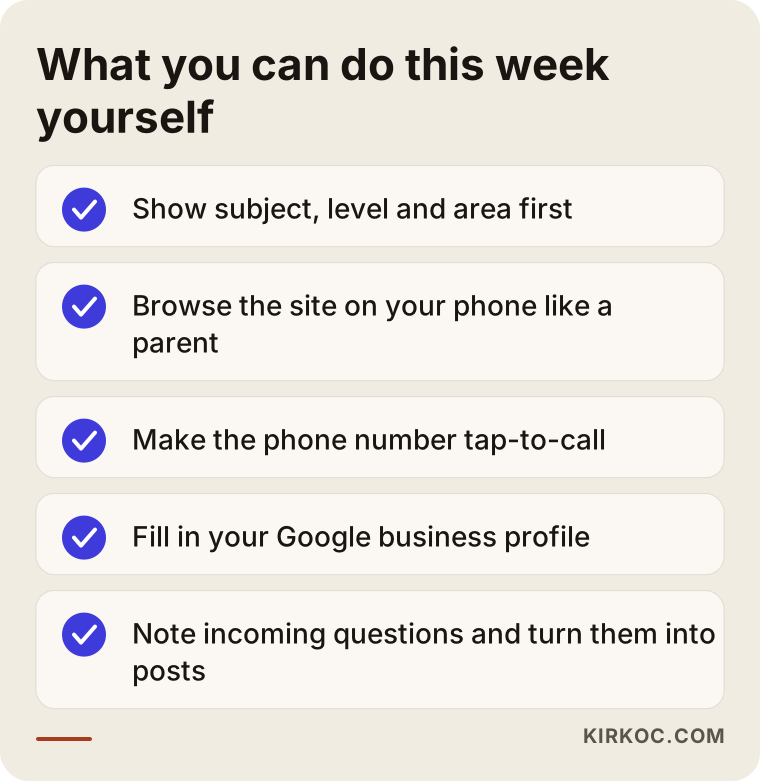
This list is made of jobs you could finish over the next few evenings. The first item matters most: the answers to "what do you teach, to whom and where?" should be on the first screen, and on many sites they are missing. After that, open your own site on your phone and browse it like a parent. Is the text readable? Do the buttons work? Does tapping the phone number start a call?
Another habit worth building is to note down the questions that come from students and parents. "How is the lesson fee decided?", "how should my child prepare?", "is there a trial lesson?" are your next blog posts. Answering questions people really ask pleases both readers and search engines far more than writing about something nobody wonders about.
Common mistakes
Most of the mistakes I see look alike. Few come from bad intent; most come from not knowing how it is supposed to be done.
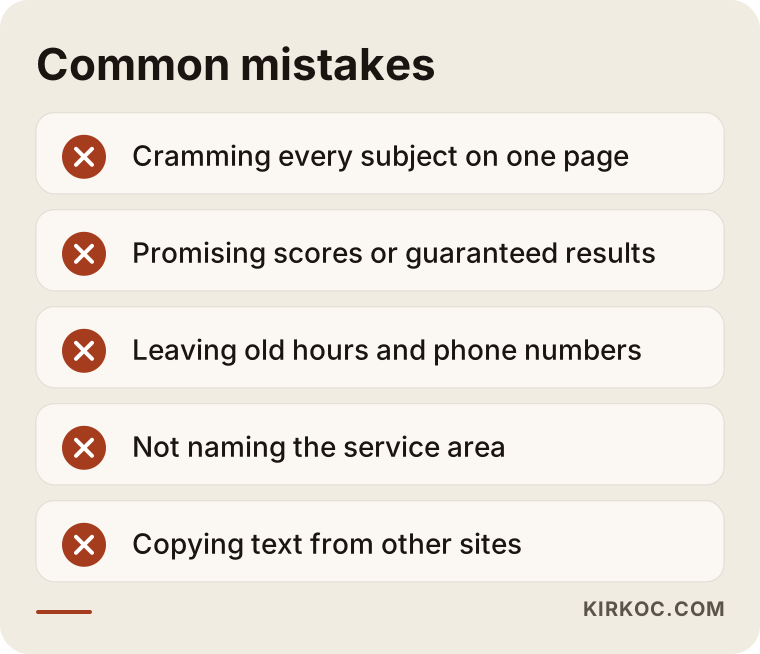
The first mistake is saying everything and nothing at once: a home page that lists "math, physics, chemistry, English, personal development, life coaching" speaks to nobody. The second is promising results. Phrases like "guaranteed score increase" or "sure success" damage trust and can cause problems later; nobody can guarantee a student's exam result. The third is outdated information. A site showing last year's lesson hours or a disconnected phone number does not look serious.
The fourth mistake is leaving out the area. If you teach in person and do not say which neighborhoods you serve, showing up in local searches becomes very hard. The fifth is copying text from other sites; it is not original, so it does not help, and it may raise copyright issues. The sixth is not measuring. If you do not know how many people visit your site or how many write, you cannot know what works.
When should you get expert help?
Starting on your own makes sense, but in some situations help saves time and effort. You do not always need a specialist, so the flow below can help you decide without fuss.
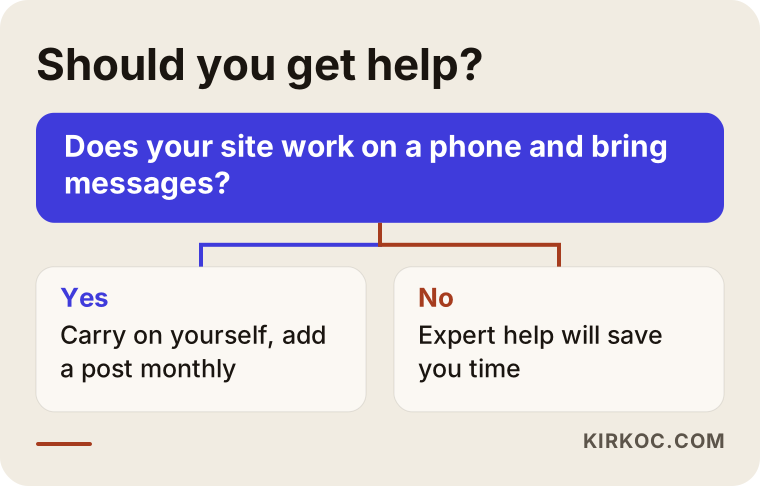
As a rule, it may be time for help if your site has no basic structure, an old site breaks on phones, you have put in effort for months and no messages come, or you cannot find time to handle both your site and your social media. On the other hand, if your site is in decent shape, you enjoy writing and can set time aside, you can keep going alone. What matters is deciding knowingly who does which job.
When you choose a specialist, look at a few things. Do they promise rankings? If so, stay away. Do they explain clearly what they will do? Will you own your site, or will access pass through them? Will they report who did what and when? The answers to these questions tell you more than the price does.
What determines the cost?
I do not give numbers in this article, because every project has a different scope. But the factors that set the cost are clear. The first is the current state of your site: is a new site needed, or does an existing one need fixing? The second is how many subjects or coaching areas need pages and how much text each requires. The third is how heavy the competition is; teaching in-person in a small area takes different effort than coaching online nationwide.
The fourth is continuity. A one-time cleanup and monthly content with follow-up call for different budgets. The fifth is the work around it: whether you give the same person your logo and brand identity, social media management or ad management. Having it all in one person's hands cuts coordination overhead and keeps your message consistent. When you request a quote, ask for the scope in writing. Instead of a vague line like "SEO will be done", find out which pages will be prepared, what will be reported and how long it will take.
AI answers and tutoring searches
People now sometimes ask AI tools such as ChatGPT instead of Google: "recommend a math tutor near me" or "how do I choose a career coach?" These tools build their answers from information they read on websites. So a site that is clear, easy to follow and consistent helps you here too.
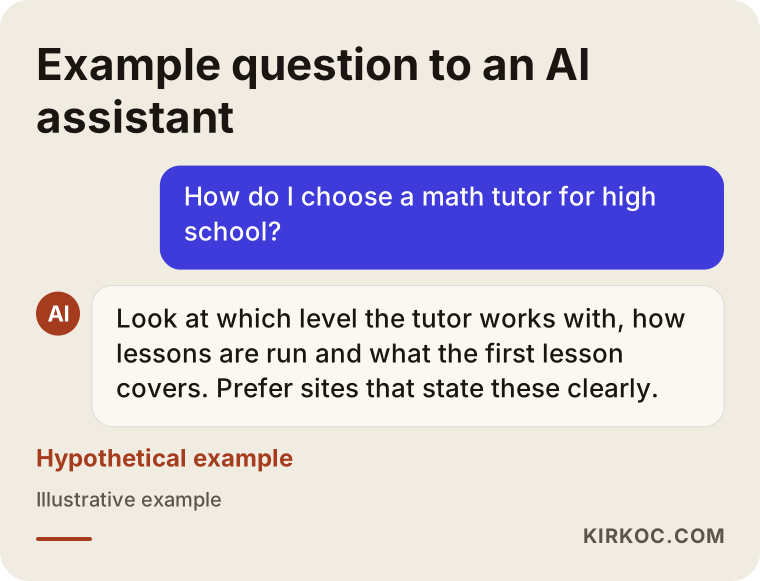
I cannot say who these tools will choose to feature; which source they pick varies. But one practice is useful: a site that states in plain sentences which subject you teach, at what level, where and how, and that answers common questions, is easy for both search engines and AI tools to read. This work is sometimes called GEO. At heart it is the same good content, made ready for one more kind of reader.
How I work with you
I run this work on my own. The person you talk to is the person who builds the site, writes the pages and sets things up; there is no sales rep in between and no chain of handoffs. In the first conversation I listen to what you teach or which coaching area you work in, whom you serve, what your current site looks like and what you expect. Then I give you a short assessment of where things stand, which pages are missing and what should come first.
Sometimes a few pages need fixing, and sometimes you need a site from scratch. I will not suggest work you do not need. When your website, SEO, Google business profile, social media, ads and visual identity are handled by one person, they do not contradict each other. The method you describe on Instagram is the same one you describe on your site, and a visitor who arrives through an ad finds the same promise on the page. I do not guarantee results, but I do explain what I am doing and why, from start to finish.
Frequently asked questions
Do I really need a separate website for tutoring?
You do not have to, but it is a big advantage. Profiles on tutor marketplaces can help at first, but there you compete with hundreds of other teachers in the same list, and your relationship with the customer follows that platform's rules. Your own site belongs to you, and you can describe your method, experience and lesson structure the way you want.
My site is new. How long until I see results?
Nobody can say precisely. A new site usually needs a few months, and the time depends on competition, area and page quality. A clear subject search in a small area often pays off faster than a broad one, but there is no guarantee. The first signs are the site starting to appear on Google and the first messages arriving.
Does the same approach work for coaching?
The basic logic is the same: understand how people search and prepare pages that answer them. The difference is that coaching searches are more personal and trust matters even more. That is why your about page, your explanation of your method and a language that honestly admits the limits of the work carry extra weight.
Is writing a blog really necessary?
It is not mandatory, but it helps. Articles that answer the questions in parents' and clients' heads are the most natural way to reach people who have not decided yet. A weekly post is not required; one or two good articles a month beat dozens of careless ones.
Can I use student reviews on my site?
You can, but with permission and care. Before publishing personal data such as a child's name, photo or grades, get written consent. For the details of the rules where you live, I suggest asking a lawyer; publishing reviews with initials and permission is the safer route.
Can social media replace SEO?
No, they complement each other. Social media gives visibility among people who already know you or were referred to you. SEO reaches people who do not know you yet but are looking for a teacher right now. If both carry the same message, a parent who sees you on Instagram and then checks your site gets a consistent impression.
Should I run ads or invest in SEO?
It depends on your budget and how urgent things are. If you need to fill a schedule before the term starts, ads can be faster; if you want a steady flow of students over the long run, SEO lasts longer. Often the most sensible path is to run both with a small budget and measure them.
How do I get started?
Send a short message through the contact page. Tell me what you teach, where you work or whether it is online, and whether you already have a site. I will explain in plain words what you need and what you do not.
If your site is not connecting your students and clients with the right people, you can look at the scope of work on my SEO services page, then write to me and describe your situation. I will look with you at what is needed.