You opened a tutoring center a while ago, or you have been running a small learning center for years. Your classes fill up to a certain point, but most of those families came through word of mouth. Now a new school year is approaching, a parent picks up a phone, types "tutoring center near me," and sees a handful of competitors. Your name is either missing or sits on the map as a tiny pin. At that moment, a website for a tutoring center stops being a "nice to have" and starts affecting how many families actually enroll. In this article I explain, in plain language, what a tutoring center's site needs, how parents search, and where to start. I am Ümit Kırkoç. I work alone from Istanbul, and I handle website design together with the rest of the work around it, all in one pair of hands.
Let me begin with one point. A tutoring center has two kinds of customers. The parent makes the decision and pays; the student is the one who shows up for class. Your site speaks to the parent first. A parent wants to know whether their child will be safe, how lessons are run, who the teachers are, and what the monthly commitment will be. If none of that is on your site, the parent does not call you. They move on to the next result.
How does a parent search for a tutoring center?
Understanding search habits tells you what the site has to say. Parents rarely start with a general word. They type the neighborhood, the grade and the worry: "middle school math tutoring near me," "SAT prep classes in my town," "reading help for second grader," "homework help after school." Sometimes they type the worry itself: "my son is afraid of math," or "my daughter fell behind in algebra."
Two things follow from this. First, most searches are local. Parents do not want a long drive twice a week, so distance, parking, a pickup service and closeness to the school all count. Second, searches are tied to a grade or a test. "Tutoring center" is not one thing. Elementary reading support, middle school homework help, SAT or ACT prep and a foreign language class are separate needs, and each one is typed into the search box differently.
The illustration below shows a made-up search result. The domain names and text are examples only.
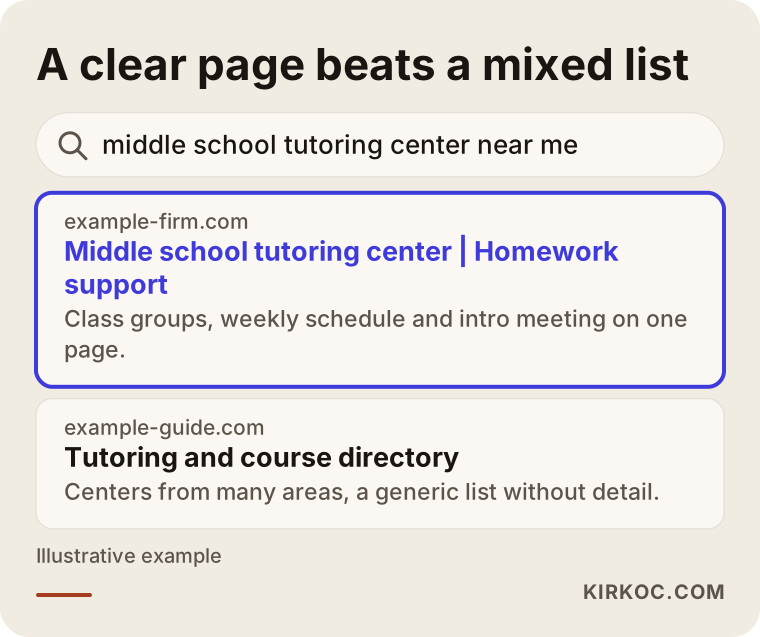
Notice that the page naming the area, the grade level and what it offers looks easier to understand than the list that mixes everything together. The parent is looking for exactly that: the answer to their own question at first glance.
The difference between a map listing and a website
Many center owners say, "I am already on Google Maps." A map listing is valuable. It shows your address, phone number and reviews. But a map listing cannot explain your weekly schedule, your teaching staff, how you place a child at the right level, or how you keep parents updated. When a parent looks at their phone and wonders, "Can I trust this place?", the answer is on your website. The map brings them to you; the site convinces them. The two work together, and neither replaces the other.
Which pages should a tutoring center website have?
You do not need a huge, complicated structure. You do need pages that each have a job, meaning each one answers a specific question a parent has. The illustration below sums up the core pages and what each one does.
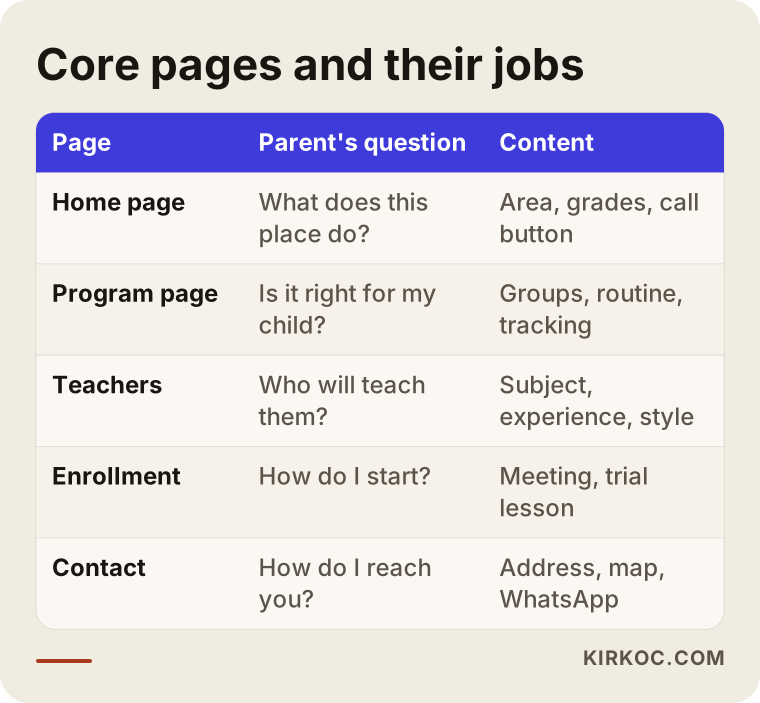
Here is a little more detail on each.
Home page. In the first three seconds, a parent should understand which area you serve, which grades you teach and what to do next. A large call button, your phone number and your address should be easy to see. One clear sentence is better than a pile of slogans.
Program and grade pages. Elementary support, middle school help, high school subjects and test prep should each have their own page, because the parent of a fourth grader and the parent of an eleventh grader are looking for very different things. Every page should say how big the groups are, how the week is arranged, what kind of materials you use and how a student's progress is tracked.
Teachers and approach. A parent wants to know whose hands they are putting their child in. Short notes on each teacher's subject, experience and way of explaining things build trust. If you use photos, get each person's permission, and be especially careful with images of children.
Pricing and enrollment process. You do not have to print a number, but you do have to explain how it works: intro conversation, placement check, trial lesson, enrollment and payment plan. Parents hesitate because they do not know what happens next, and information reduces that hesitation.
Contact and location. Address, map, directions from the nearest main road, whether you offer a shuttle or pickup, and your opening hours. It sounds like a small detail, but for someone on a phone it is often the most used page.
Two made-up example scenarios
The two examples below are entirely fictional. They do not describe any real person or business.
Example scenario 1: a center that has filled by word of mouth for years
Imagine a mid-sized town with a tutoring center that helps middle school students with homework and core subjects. The owner has run it for ten years, and most families arrive because a neighbor recommended it. There is no website, only a social media account and a map listing. This fall, a second center opens a few blocks away, and that one has a site.
The problem here is not the quality of the center. It is that nobody can see what the center does. A new parent comparing the two finds a clear schedule, teacher bios and an enrollment process on one, and nothing on the other. Even a parent who was recommended the older center will say, "Let me check the website first." The fix is to put the existing trust into pages: which grades are taught, how the week runs, how progress reports reach parents, and how the intro meeting works. The center's real strength, being in the same neighborhood for many years, can be stated honestly. The goal in this scenario is not a dramatic jump in a short time. It is that a parent who searches takes the center seriously and picks up the phone.
Example scenario 2: a new center serving several test groups
In the second scenario, a newly opened center offers SAT prep, ACT prep and a foreign language group. Its site is a single page: one photo, a few lines of text and a phone number. Because everything sits on one page, a parent of a high school junior and a parent of a middle schooler both fail to find what they came for.
The solution is a separate page for each group. The SAT page would describe practice test routines, timed question sessions and what parents are told after each practice test. The ACT page would focus on pacing and the sections that differ. The language page would stress placement and speaking practice. Each parent finds their own answer, and each page becomes its own door for someone searching that topic. For a new center this is the most orderly way to start from zero and grow into visibility over time. There is no guarantee of results, but a solid foundation gets built.
What a tutoring center website must contain
Pages matter, and so does what sits inside each page. The list below gathers the basics you can check before you finish the site.
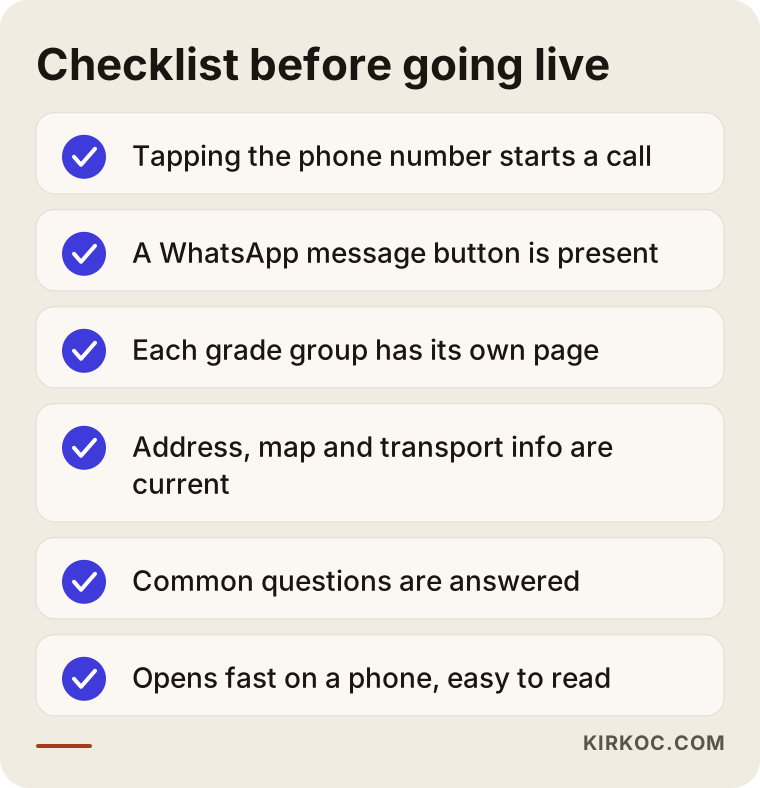
I want to stress a few of these. First, the phone number must be tappable: when a parent looks at the site on a phone, tapping the number should start a call. Second, messaging through WhatsApp or text is a very common route; many parents prefer to ask the first question in writing. Third, frequently asked questions. If you answer whether there is a shuttle, whether a trial lesson exists, how many students are in a group and how absences are reported, your phone stops ringing for the simple questions, and the serious parents arrive better prepared.
Who is your site talking to: the parent or the student?
A frequent mistake is building the whole site around the student. Bright colors and a youthful tone feel pleasant, but the person who decides is the parent. The main thread of your language should be aimed at parents: trust, order, transparency and progress tracking. Sections for students, such as "how to prepare for a lesson," can sit in the background. For high school and test prep groups, the student has more say in the decision, so the tone can shift a little there. In other words, not every page has to sound the same, but it should be clear who each page is talking to.
Also stay away from big promises. Phrases like "100 percent success" or "guaranteed admission" damage trust and can put you under obligation. Rules about advertising educational services differ by country and region, so check with the relevant authority or ask a lawyer; I am not giving a firm legal opinion here. Instead of promising an outcome, explain your method: how placement is done, how gaps are identified and how often parents receive an update.
How is a tutoring center website prepared?
The process usually has a few clear steps. The picture below shows them simply.
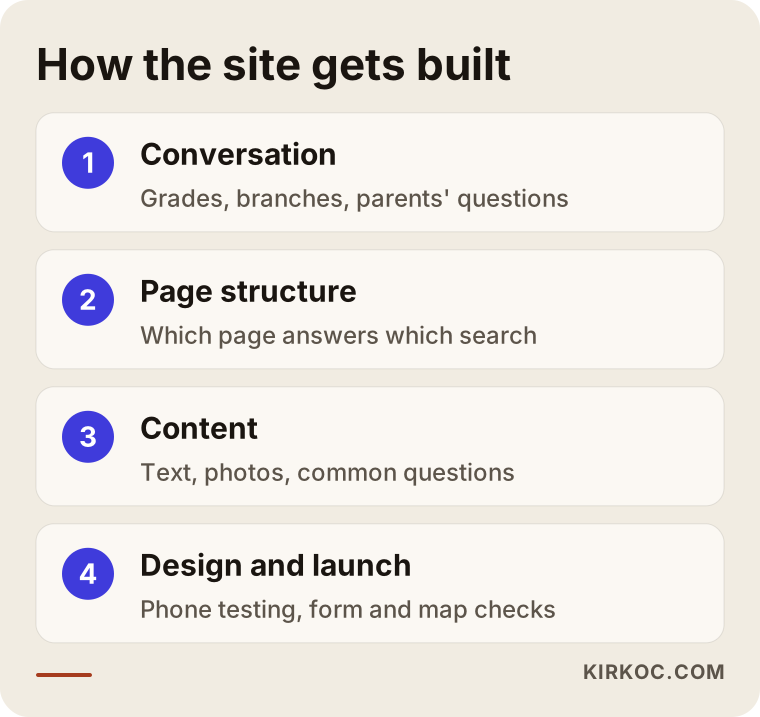
The first two steps are the ones most often skipped, and they are the ones that help the most. Let me go through them.
1. Conversation and needs. I ask which grades your center serves, how many locations you have, what parents ask most often and how you differ from nearby competitors. At this stage "make it look nice" is not enough; the real question is "what is this site for?" Often the answer is simple: a parent should call, or write to you on WhatsApp.
2. Page structure. I settle which pages will exist, in which order they appear, and which search each page should answer. Details such as neighborhood, grade level and test type settle into the structure here.
3. Content. Text, photos and frequently asked questions get prepared. When it comes to photos, remember that using a student's image requires a parent's consent. If you are unsure, a photo of an empty classroom or of your materials is safer. If you have questions about protecting personal data, talk to a lawyer.
4. Design and launch. The site should open quickly on a phone, the text should be easy to read and the buttons easy to press. After launch, the forms, phone links and map are tested one by one.
There is a practical benefit to having one person on my side of the table. The person who decides the structure of your site also understands how it shows up in search and what your social media content needs. So after the site is done, you do not get surprises like "now this has to be rebuilt for search" or "the ads need a separate page."
Common mistakes on tutoring center websites
The mistakes I see in this field are usually about explanation, not technology. The picture below sums up the most common ones.
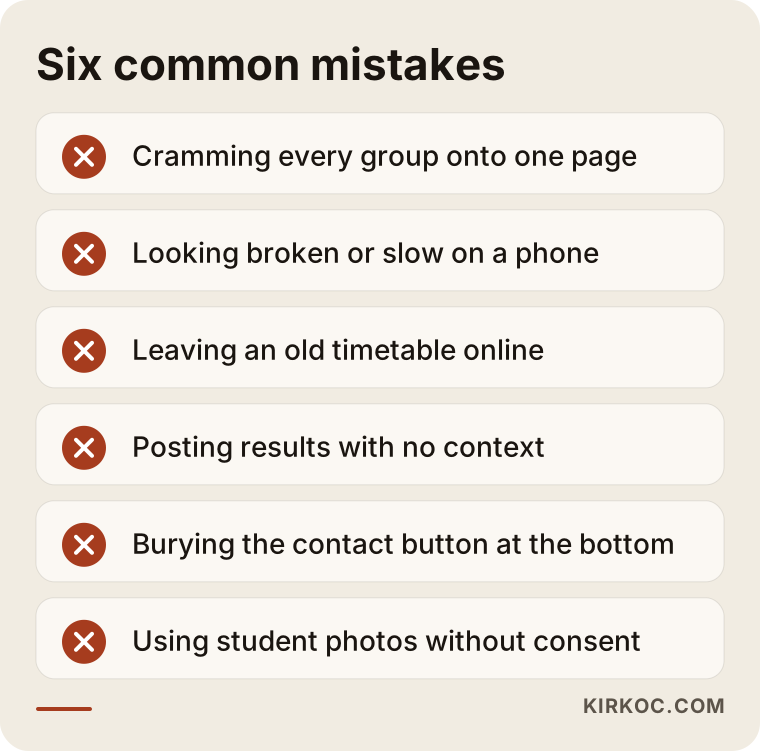
A short comment on each.
Cramming everything onto one page. A site that describes every group from elementary to SAT prep on one page fully answers nobody. A separate page per group makes the parent's job easier and tells search engines which page is meant for which query.
Looking broken on a phone. Many parents view the site on a phone. Tiny text, overlapping blocks or slow images spoil the first impression. Test the site on your own phone and on someone else's.
Leaving old information up. Last year's schedule, a phone number for a closed location or old enrollment dates make parents lose confidence. Review the site at the start of every term.
Posting results with no context. Statements like "this many students got into that school" look like exaggeration when they come without a source or background. What makes sense to a parent is the method and the process. If you do use numbers, they must be real, verifiable and used with permission.
Hiding the way to contact you. If your phone number sits at the very bottom in tiny type, parents will not find it. The button should be reachable on every page and every screen.
Carelessness with photos and data. Children's images and personal details are sensitive. If you collect parent and student information through a form, include a note that explains how it is stored, and consult a professional on legal questions.
How does a parent make a decision?
A parent does not visit your site and enroll in one step. There is usually a journey. First they notice the center, then they gather information, compare and finally get in touch. The picture below shows this journey as a narrowing funnel.
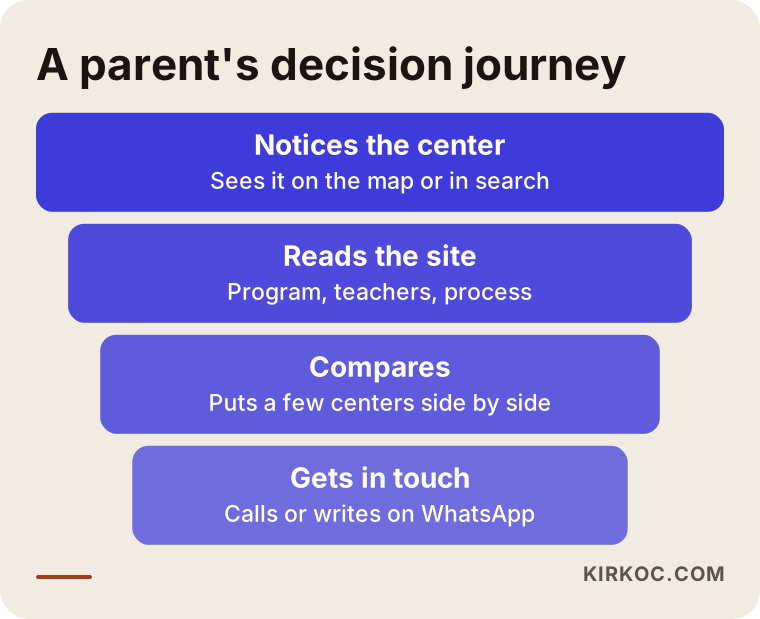
Each stage in this funnel needs its own page. For the noticing stage, your map listing and the title that shows in search results matter. For the reading stage, the program and teacher pages come into play. For comparison, frequently asked questions and a transparent description of the process make the difference. At the last step, an easy way to reach you, whether a call, WhatsApp or a form, is needed. If one link in the chain is missing, the parent drops out at that point.
What can you do yourself, and when do you need an expert?
As a center owner, there is plenty you can do on your own, and doing it raises the quality of the site noticeably.
Things you can do yourself:
- Keep your Google business profile current: address, phone, opening hours and photos.
- Collect the questions parents ask most into a list. That list is the raw material for the FAQ section.
- Write down your programs, group setup and enrollment process in your own words.
- Ask satisfied parents, with their permission, for a short review.
- Open your site on a phone and click through it like a parent, noting where you get stuck.
Situations that call for an expert:
- You have no site at all, or it is very old and does not display properly on a phone.
- You have several locations and each needs its own page and its own map listing.
- You want your pages to show up for the right words in search results; titles, page structure and local listings must be built together.
- You will add features such as an enrollment form, appointment booking or payment.
- You plan to run ads. Google and Meta ads, especially at the start of the school year, need to point to the right page. Running ads without a site is like paying to send people to a locked door.
In short, you know the heart of the business. I help turn that knowledge into a structure parents can reach. You also do not have to hand everything to me. You can build the site first and decide on social media and ad support separately later.
Which choice is right for your site?
Does a tutoring center need a completely new site, or is fixing the current one enough? A simple decision flow answers that.
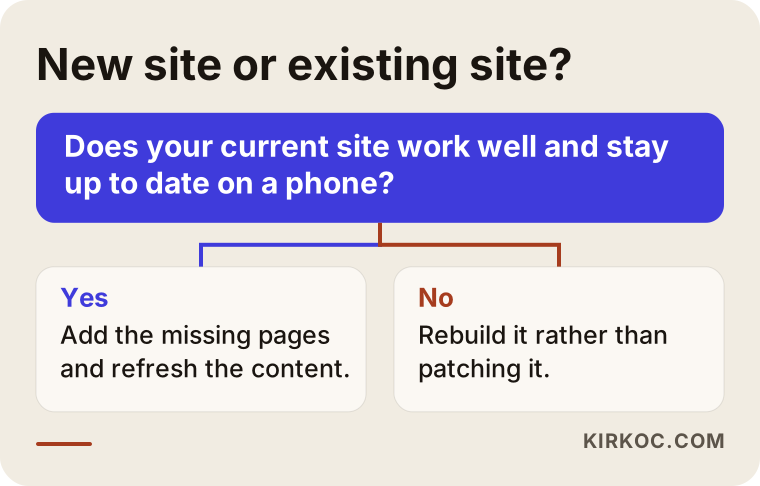
The general rule: if your current site works well on a phone, has up-to-date information and a sensible page structure, adding the missing pages is cheaper and faster than starting over. But if the site was built many years ago, looks broken on a phone or is hard to update, rebuilding is usually more sensible than patching.
What does the skeleton of a page look like?
To make this concrete, take a single grade group as an example. The picture below shows how a made-up "middle school support program" page could be laid out from top to bottom.
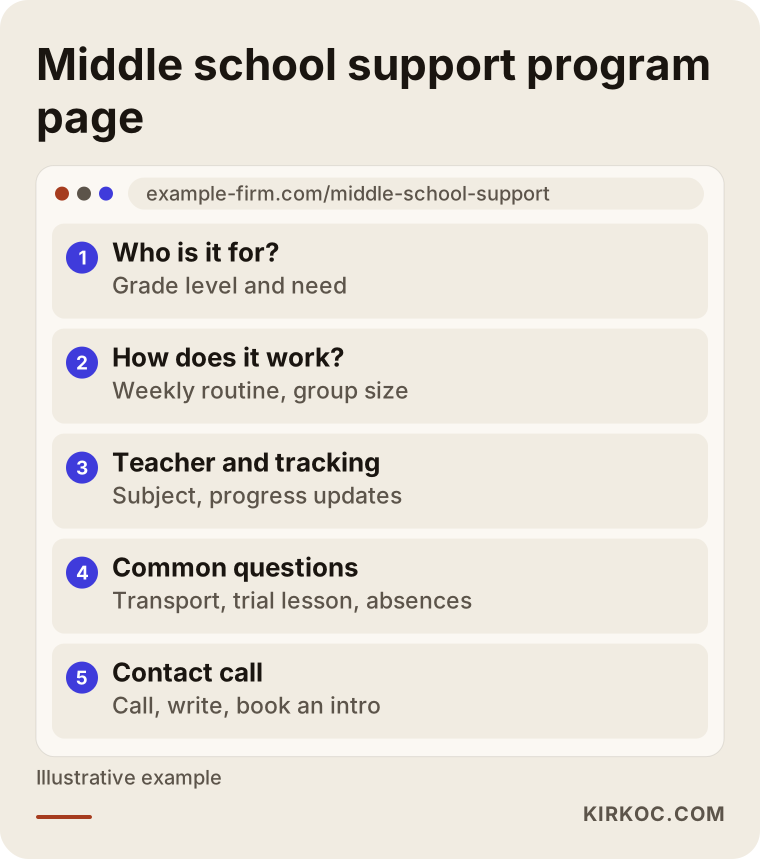
The logic of this skeleton is as follows. The parent first sees the answer to "who is this program for?" Then they move to "how does it work?" After that they learn about the teacher and progress tracking. The frequently asked questions remove doubts, and at the bottom a call to contact you is waiting. The page can be long, but each section should have a single job. Length is not a problem; a scattered page is.
After launch: a seasonal routine
A tutoring center's year moves in seasons. Late summer and early fall bring enrollment rush. The winter break splits the year in two. Spring is critical for test dates and finals. Managing your site along this rhythm works far better than leaving the same content untouched all year.
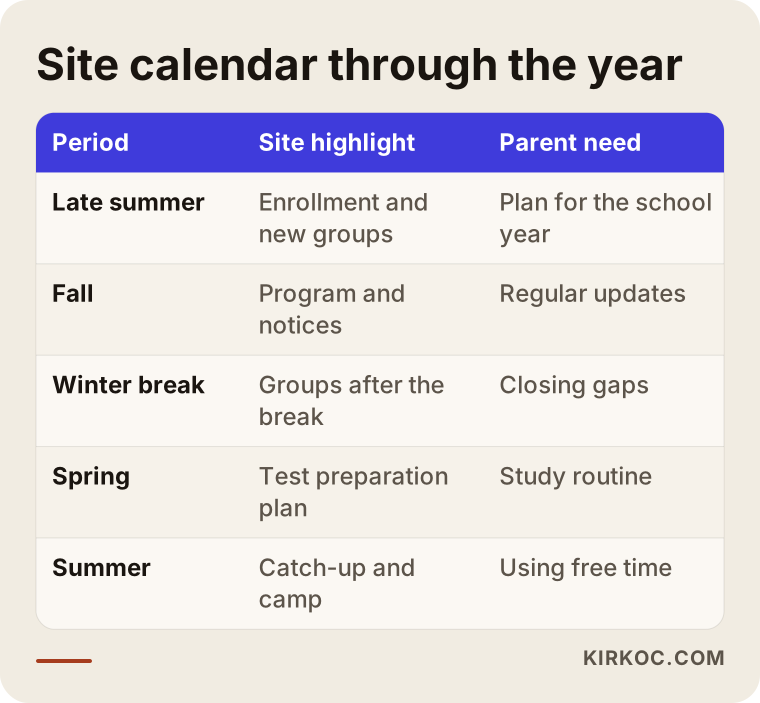
The logic of the calendar is simple. As enrollment gets close, the relevant pages are refreshed and new group openings and dates are announced. Before test season, the study plan and parent updates come forward. In summer you can announce catch-up and camp programs. You can support this routine with social media posts and, if needed, short ad campaigns. This is where having one person handle everything pays off: the site, the posts and the ads move on the same calendar and in the same voice, so a date on one never disagrees with a date on another.
What determines the cost of a tutoring center website?
I do not give numbers in this article, because two centers can have very different needs. The main things that shape the cost are these.
- Number of pages and structure. A small introduction site for a single location with a handful of pages is not the same job as a multi-program site where every grade group gets its own page.
- Number of locations. Each location may need its own address, map and sometimes its own page.
- Content preparation. If you write the text and bring it to me, the work is shorter. If you want text written from scratch, along with photo planning and FAQ preparation, the effort grows.
- Features. An enrollment form, online booking, a trial lesson request or a parent login area all add to the scope.
- Visual work. If the logo and brand identity need to be redone, or you need a custom photo shoot, that is an additional item.
- What comes after. Whether you want updates, search visibility work, social media and ad support once the site is live.
A good quote listens to your needs and spells out each of these items. Vague, one-line "all inclusive" offers often turn into extra charges later. When you ask for quotes, ask what is included, what is not, and who will make updates after launch.
How I work with you
I work alone from Istanbul. The person who talks to you, builds the site, shapes the structure of the text and, if you want, handles search visibility and social media is the same person. That shortens communication: you do not have to explain an idea to three people or check whether someone did what you said. I work remotely, so being in a different country or time zone is not an obstacle for the conversations or the delivery.
My routine usually goes like this. First I listen to you about your center, your parents and your competitors. Then you and I settle the structure and pages together. I prepare the text from the information you give me and you approve it. After launch I check the forms, phone links and map details. I do not promise results, because enrollment depends not only on the site but also on the quality of your center, your pricing and the competition in your area. What I can promise is an orderly, understandable and realistic foundation.
The picture below summarizes the flow of this process with a hypothetical timeline.
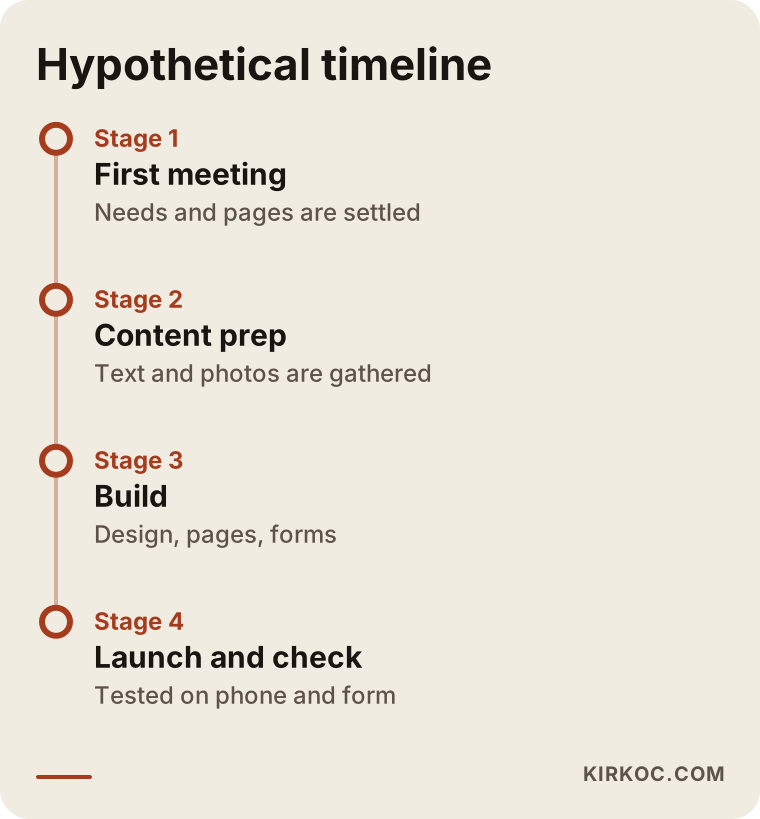
The biggest factor in timing is how fast the content is ready. If texts and photos arrive late, launch is late too, so it helps to agree in the first meeting on what you can bring and when.
Frequently Asked Questions
Does a tutoring center really need a website?
In most cases, yes. Even a parent who came through a recommendation will look you up before deciding, and will check the site. If there is no site, or the information is thin, the parent hesitates. The clearer your site is, the more prepared the person is when they come to the first phone call.
Is a social media account enough?
Social media is good for showing the daily life of your center. It is not enough for laying out your program, enrollment process and teacher information in an orderly way. A parent who searches will also reach a website in the results more easily than a social profile. Used together, the two work best.
Should I list prices on the site?
It is not required. If you would rather not print a number, you can explain what the fee depends on, how the payment plan works and how the intro meeting is held. What matters most to a parent is that the process is clear. If you do list a number, you need to keep it up to date.
How long after the site goes live will enrollments start?
I cannot say for certain. After launch it takes time for a site to appear in search results, and your map listing, your competitors and the search volume in your area all affect the outcome. Sharing the site with current families and people around you helps from day one. Any promise of a fixed timeline should not be trusted.
I have more than one location. Can they all be on one site?
Yes, and that is often the best solution. Each location should still have its own page with its own address, map and phone details. That way a parent searching in one town and a parent searching in another each land on the page for the right location.
Can I use student photos on the site?
Images of children are a sensitive matter. You should not use them without a parent's consent, and even with consent it is wise to be careful. If you are unsure, choose safer options such as classroom settings, materials or photos of teachers. For firm legal questions, talk to a lawyer.
Can I update the site myself later?
Yes. It makes sense to build the site so that frequently changing parts, such as the schedule and announcements, can be edited easily by you. I agree with you at the start on what you will update and what I will update.
Do I need a site before I run ads?
Usually yes. A parent who clicks an ad should land on a relevant page, otherwise the money is wasted. It is healthier to build the pages first and then, if needed, try short ad campaigns at the start of a term.
If you are thinking about a site for your tutoring center or learning center, one where a parent finds what they are looking for at first glance, take a look at my website design service and write to me. Let us talk through your needs, and I will tell you plainly what you need and what you do not.