If you run a home care or caregiver agency, you know that the phone rarely rings at a relaxed moment. The person calling is often standing in a hospital corridor, or recovering from a rough week after surgery, or has just realized that their mother can no longer be left alone. What do these people do first? They pick up a phone, type "overnight caregiver for elderly parent" or "in-home care after surgery" into the search box, and look at the first few sites that appear. A home care agency website is the storefront that decides, in those few minutes, whether you feel trustworthy. I am Ümit Kırkoç, I work from Istanbul, and in this article I will walk you through how to build a site for your type of business. If you are starting from scratch, I also explain what my web design service covers, plainly and without pressure.
Let me be clear about one thing first: this is not a technical manual. No matter what software your site runs on, the real question is the same. When a daughter or son is searching for a caregiver for their father, what do they need to see on your page before they pick up the phone? A site that does not answer that question will not make the phone ring, however good it looks.
How does a family looking for home care think?
The person buying home care is nothing like someone shopping for shoes or furniture. They weigh three things at once: trust, speed and detail.
Trust comes first, because they are about to let a stranger into a home, often right next to the most vulnerable person in their family. "Is this agency real? Where do the caregivers come from? If something goes wrong, who do I call?" If the page does not answer these questions, the visitor moves on to the next result. Speed comes second, because the need is often urgent. If someone is being discharged from the hospital, a caregiver is needed tomorrow, and an agency that replies next week has already been ruled out. Detail comes third, because every patient is different. Caring for someone with dementia is not the same job as helping a person for two weeks after a hip replacement, and the visitor knows it.
There is another point that is easy to miss: the person searching is frequently not the person who will receive care. The decision maker is usually an adult child, a grandchild or a spouse. That is someone who is working, tired and already worried. Your site has to speak to that person. Phrases like "professional staff, quality service" appear on every competitor's site and convince nobody. Concrete answers do: how caregivers are chosen, what happens on the first day, and who can be reached when something goes wrong.
What do people type into the search box?
People rarely type an agency name. They type their need. Common examples include "home care for seniors," "overnight caregiver," "live-in caregiver cost," "bedridden patient care at home," "hospital sitter," "post-surgery home care" and "dementia care at home." Many add a town or neighborhood at the end, such as "home care in Brooklyn" or "caregiver near me." One page cannot serve all of these searches. Giving each need its own page tells the visitor "this is exactly what I was looking for," and it also helps search engines match you with the right searches.
The image below shows a completely hypothetical search result. Look at how a detailed service page and a generic list page appear side by side for the same query.
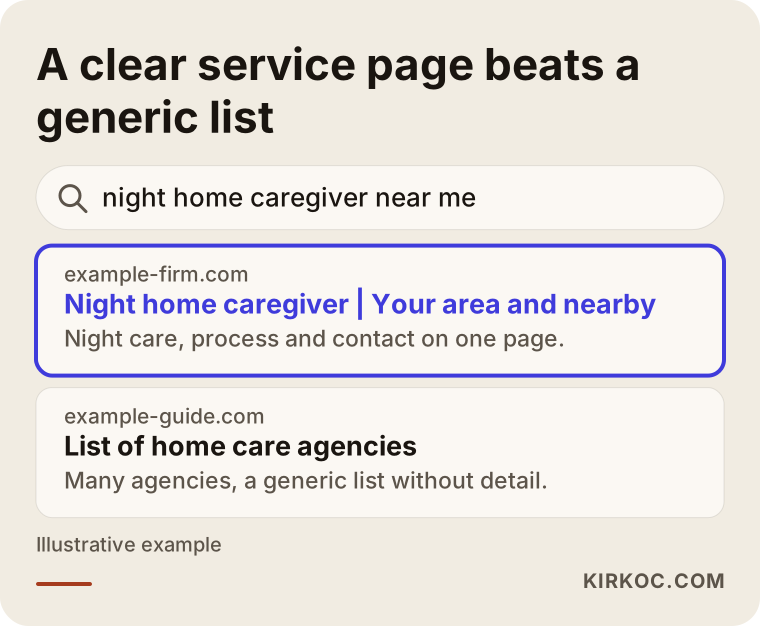
The highlighted result states who it serves and where in its first line. The generic list underneath does not answer that same question. Because the searcher decides in a few seconds, the clarity of that first line changes a lot.
Which pages should your site have?
The most common problem I see on home care sites is that everything is squeezed onto a single page: an "About us" paragraph, five or six services listed one under another, and a contact form. That layout tires out both the visitor and the search engine. I suggest a page structure that answers the questions in the visitor's head, in order.
The home page should say, on the first screen, who you are, which areas you serve and how to reach you. Service pages should be separate: senior care, bedridden patient care, overnight care, hospital sitting, post-surgery care, and so on. Each one should answer these questions: what does a caregiver do in this service, and what do they not do? In which situations is it the right choice? How does the process work? What does the price depend on?
Besides these, you need a trust page, something like "How caregivers are chosen" or "How it works." Here you explain how candidates are evaluated, how references are checked and what happens when a caregiver cannot make a shift. Of all the pages in your industry, this one helps the most and gets written the least. Area pages (which towns and neighborhoods you cover), a frequently asked questions page and an easy contact page finish the list.
The table below summarizes which page should step in for which visitor intention.
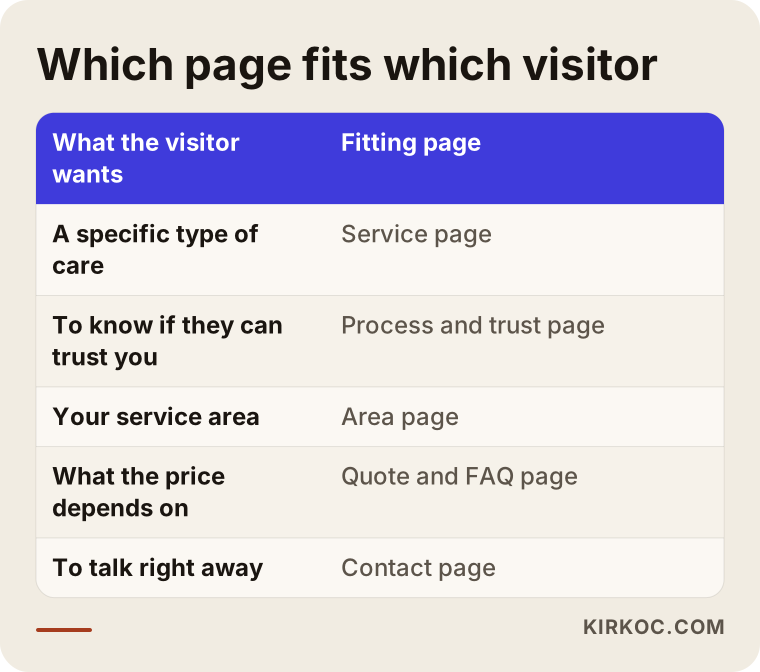
As you can see, a visitor who wants to know about price and a visitor who wonders whether your caregivers can be trusted do not need the same page. When a single page tries to serve both, it leaves both half answered.
What should the first screen of the home page look like?
When the page opens on a phone, the first screen should show a one-sentence description of your service, the area you work in, a tap-to-call button and a WhatsApp or text link. In this industry, people would rather talk than fill in a form. A long form feels like a burden to someone in an urgent situation. I am not suggesting you remove the form entirely, because some people prefer to write late at night instead of calling. But keep it short: name, phone number, what kind of help, and which town. That is all.
Let us also be honest about stock photos. Pictures of smiling models who look like nobody you know give people a feeling of artificiality. Where possible, use photos of your real team, taken with their permission. If you plan to show patients or family members, you need to talk to an attorney about consent and privacy. This area is sensitive, and in the United States rules such as HIPAA may apply depending on your situation. I cannot give you a definitive answer, and it would not be right for me to try.
How do you build trust on the site?
In this industry, trust is not a headline on a page. It is the sum of small signals spread across the whole site. These are the most important ones.
First, be clear about who you are. Company name, address, phone number and, if you have them, your legal business name and licensing details should be visible. People do not trust sites that offer only a phone number. Second, explain your process. If you answer "what happens after I call?" step by step, uncertainty shrinks. Third, explain how caregivers are selected: interviews, reference checks, experience and training. Do not write anything you do not actually do, and be able to stand behind every sentence you publish. Fourth, use real feedback. Reviews that a client has approved, shared with their permission, are worth much more than invented lines like "Susan H. - so happy with the service." Fifth, licensing and regulation. Which licenses, registrations or insurance you should hold, and how to word them, varies by state and by the kind of service you offer. I will not make firm statements here; write this part after checking with an attorney or the relevant state agency.
The image below collects the elements that create trust on a home care site into a simple list.
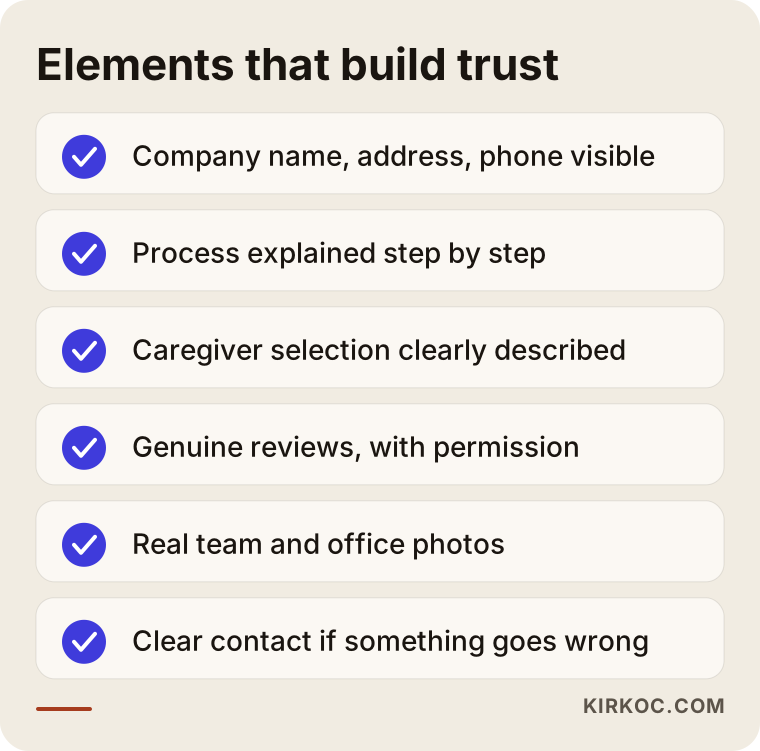
You do not have to complete the whole list on day one. But the first three, identity details, a described process and caregiver selection, must be in the first version.
Photos, voice and tone
Use a calm, clear and respectful voice in your text. Superlatives such as "best, most trusted, most affordable" cannot be proven and do not sound believable. Write concrete sentences instead, like "For every new client, a coordinator visits the home on the first day," as long as you really do that. The person on the other side may well feel guilty because they cannot care for their relative themselves. Instead of exploiting that feeling, speak in a tone of "this is a hard decision, and you are not alone." That is both more ethical and more effective.
Two hypothetical scenarios
The two examples below are entirely made up. They do not describe any real agency or person; they are here to show the logic.
Scenario 1: A small agency that explains everything on one page
Imagine a small agency with five or six caregivers serving one county. Its website is a single page: a logo at the top, seven bullet points under "Our services" in the middle, and a phone number at the bottom. A family searches for an overnight caregiver at 11 p.m. and lands on this site. Overnight care is not described on its own, so they cannot tell whether the agency offers it, and they go back to the results and click another site.
Now suppose the agency opens separate pages for overnight care, bedridden patient care and hospital sitting, describes the process and working hours on each, and puts a tap-to-call button on the mobile site. This will not turn every search into a phone call. But the searcher at least lands on the right page and sees that the service is offered. No result can be promised, yet the logic is clear: a page for a specific need meets the person with that specific need.
Scenario 2: A beautiful site that does not inspire trust
The second hypothetical agency is bigger. Its site is stylish and full of wide photos, but nowhere does it say how caregivers are selected, where the office is, or whom to contact when there is a problem. The contact page has only a form, and the phone number sits in small type in the footer. Families browse and leave, because the question "who is this company?" stays unanswered.
What is needed here is not a new design but the missing information: identity details, a process page, caregiver selection principles, a visible phone number and a WhatsApp or text button. The visual quality was already good enough. What was missing was an answer to the worried family's question, "what happens now?" Very often, adding the right pages costs less and makes a bigger difference than rebuilding the whole site.
How should a service page be laid out?
You also need to think about how to order the sections above on a single page. On a service page, the visitor's eye moves from top to bottom, and each section answers one question. The image below is a purely illustrative service page outline.
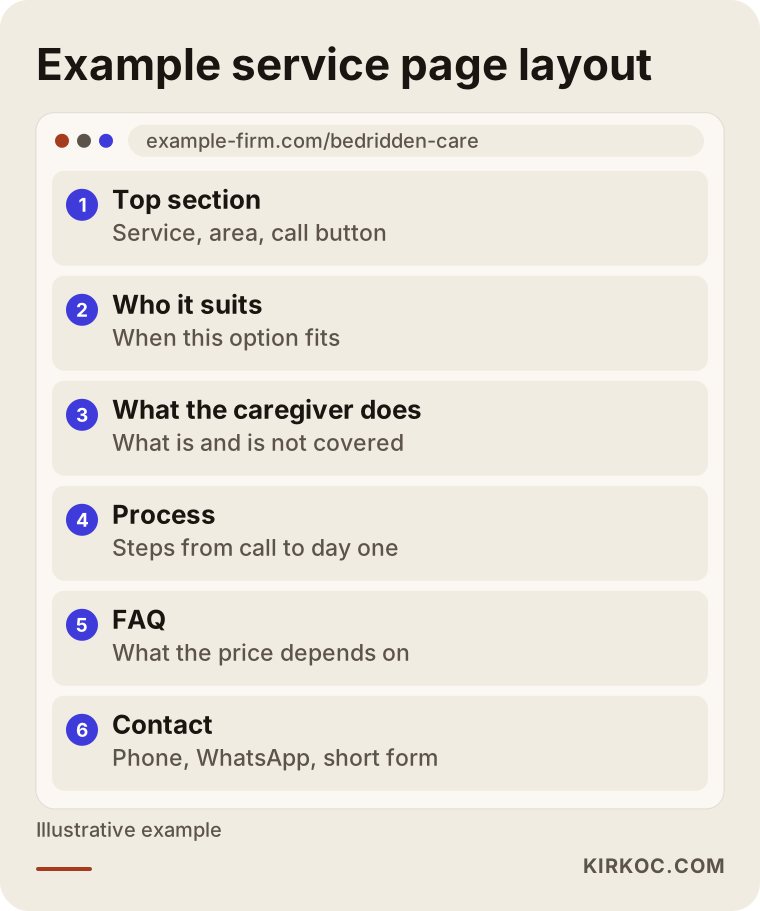
The order I recommend is this: first what the service is and who it suits, then what the caregiver does, the process, the areas, the frequently asked questions, and finally the contact details. Repeat this order on every service page, so that once a visitor understands one page, they can move through the others easily. The contact button should not appear only at the end. It should sit at the top and in the middle of the page as well.
The build, step by step
Whatever software you use, building your site follows the steps below. You can use them as a checklist whether you work with me or with someone else.
The first step is to list your services and the areas you serve: which services do you really provide, and which towns do you travel to? The second step is to collect the questions your clients ask. What is asked most often on the phone? Those questions are the backbone of your page text. The third step is to draw the page map: which page will answer which search? The fourth step is to write the text and prepare the images. The fifth step is to design for the phone first, because most visitors arrive on mobile. The sixth step is to test speed, contact buttons and forms. The seventh step is measurement after launch: how many people called, and which page did they come from?
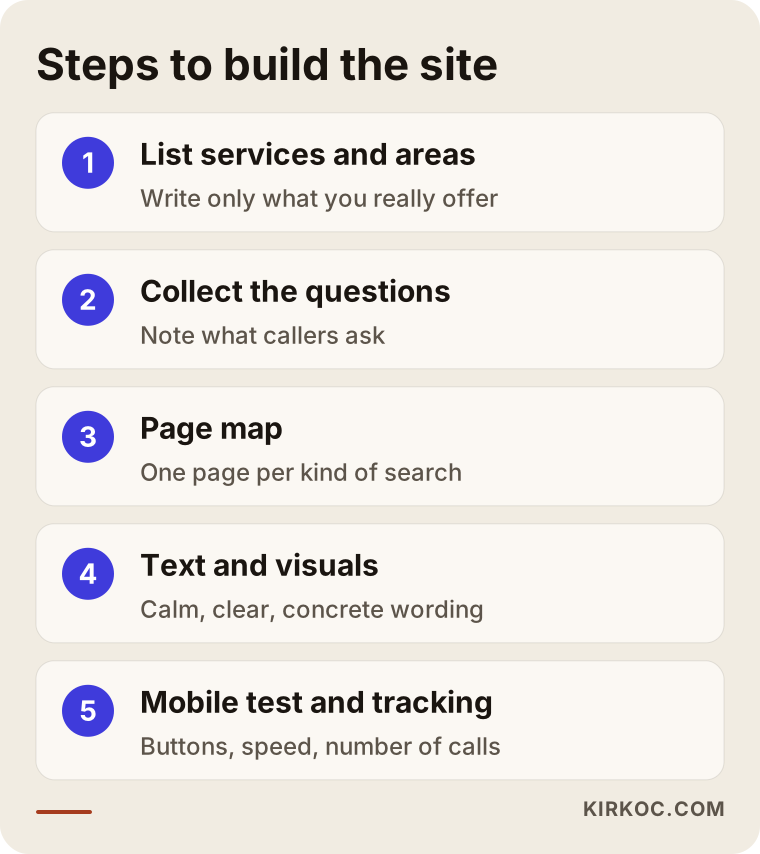
The steps in the image depend on each other. If you start writing text before drawing the page map, you end up repeating the same topic on three different pages. Keeping the order saves time.
Common mistakes
These are the mistakes I see again and again in this industry.
The first is the single-page habit. Without a separate page for each service, a person arriving from a search cannot find what they came for. The second is hidden contact information. Your phone and WhatsApp or text link should be reachable from everywhere on the page. The third is vagueness. When the process is not explained, people assume the worst. The fourth is overblown language: a sentence like "the number one agency in America" does not raise trust, it lowers it. The fifth is neglecting mobile. The person searching is most likely on a phone, and a site that loads slowly or has tiny buttons is a client lost at that moment. The sixth is careless handling of personal data: asking for more health information than needed in a form, or using patient photos without permission. I suggest speaking with an attorney about this.
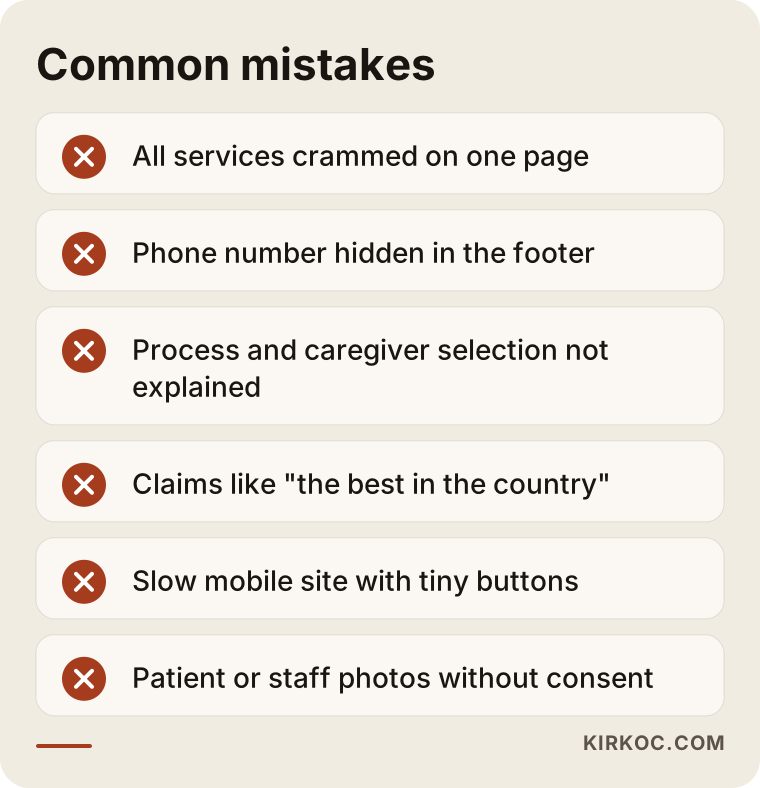
Most of these mistakes are not expensive to fix. Mostly they require thinking of the site not as a brochure but as someone answering the phone. The job of that person is to send the caller to the right place.
A word of caution about advertising
Advertising rules are strict for health-related services. Google and Meta apply their own policies to health advertising, and there are also laws and regulations about promoting healthcare services. I cannot say for certain which statements you may use; you need to check both the platform policies and the legal rules, and consult an attorney if necessary. Before you run any ad, the page it points to must be ready. Otherwise you spend money to send visitors to an incomplete page.
What can you do yourself, and when do you need an expert?
Nobody knows the raw material of the site better than you. So there are tasks you can do yourself: listing your services and areas, noting the questions people ask on the phone, writing down your caregiver selection process, collecting real photos with permission, and, where possible, asking satisfied families for written approval of a review. These are valuable inputs no matter whom you end up working with.
You need expert help for planning the page structure and search terms, making the site load quickly on mobile, setting up your map listing and business profile, running ads and measuring results properly. These are technical, repeatable jobs, and once they are set up correctly they keep working for a long time. If you try to learn all of it yourself, you fall behind on your real work, which is matching caregivers with clients.
The image below places the jobs you can handle yourself next to the ones that make more sense to hand over to a specialist.
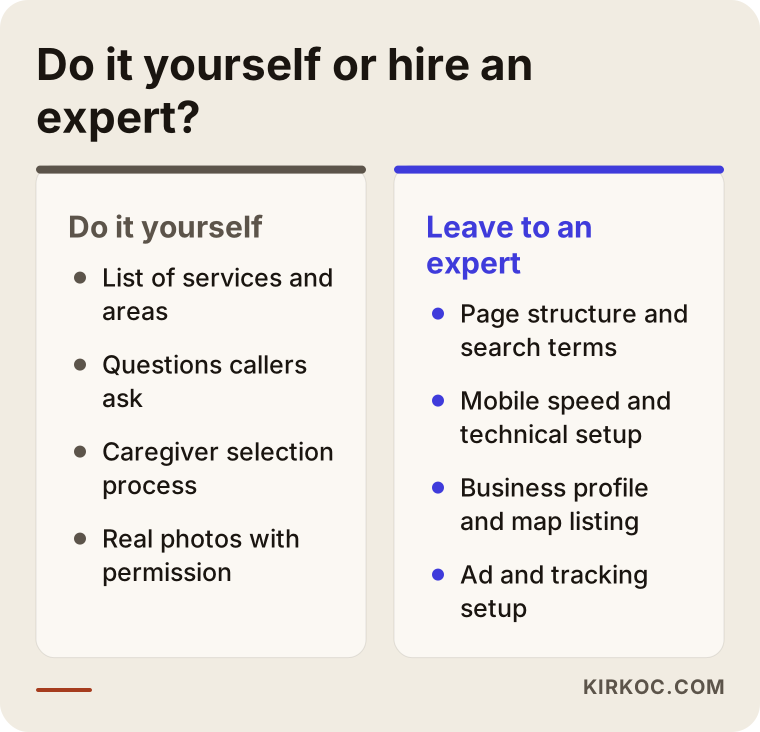
This split is not rigid. Some agency owners enjoy technical work and some do not want to touch it. What matters is deciding which one makes better use of your time.
What determines the cost?
I will not give a number, because no two home care sites can be built for the same price. But I can say plainly what drives the cost. The number of pages is the first factor: a five-page site and a thirty-page site built around services and areas are not the same job. Content is the second: whether you write the text, whether I write it, and whether the photos are ready all change the price. Whether the site is multilingual is another factor, for example if relatives who speak other languages need their own versions. Custom features such as online booking, a caregiver application form or a client login make the project bigger. Finally, support and SEO work after launch are a separate line item.
The decision usually comes down to this: do you want a simple but correct site that works right away, or a structure that grows in stages? Answering that clearly also makes it easier to compare quotes.
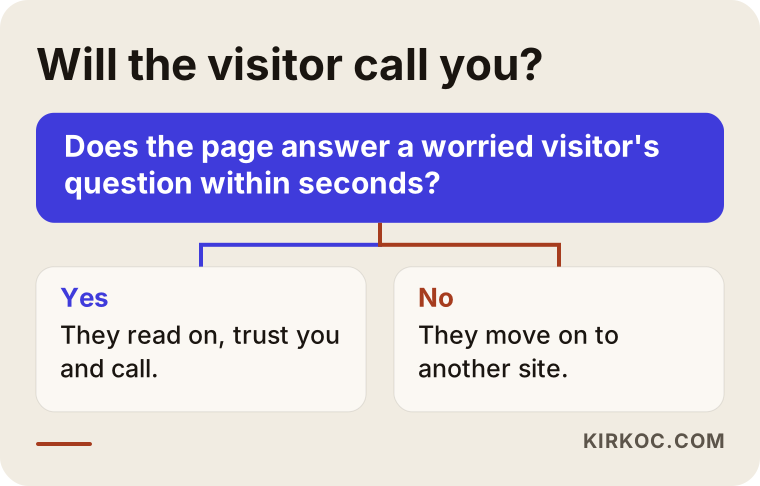
This diagram sums up the question in the visitor's head: "Can I call this agency?" If the answer is yes, they continue; if no, they move to another site. The job of your site is to answer that question quickly and positively.
How do the site, SEO, social media and ads work together?
I handle all of these myself: the website, local SEO, social media management, Google and Meta ads, and content. The benefit to you is practical. The person who builds the site knows which page is needed for which search. The same person sends the ad to that page, and the posts on social media match the questions on the site. When each task sits with a different person, one often does not know what the other has done: an ad agency sends traffic to a page that the web designer has never seen.
In home care, social media is especially useful for supporting a family's decision. Short, informative posts about choosing a caregiver, how the first day goes or common mistakes build trust. But on their own they are not enough; you need a place to collect the interest that social media creates, and that place is your site. The image below shows how this combined work unfolds over time.
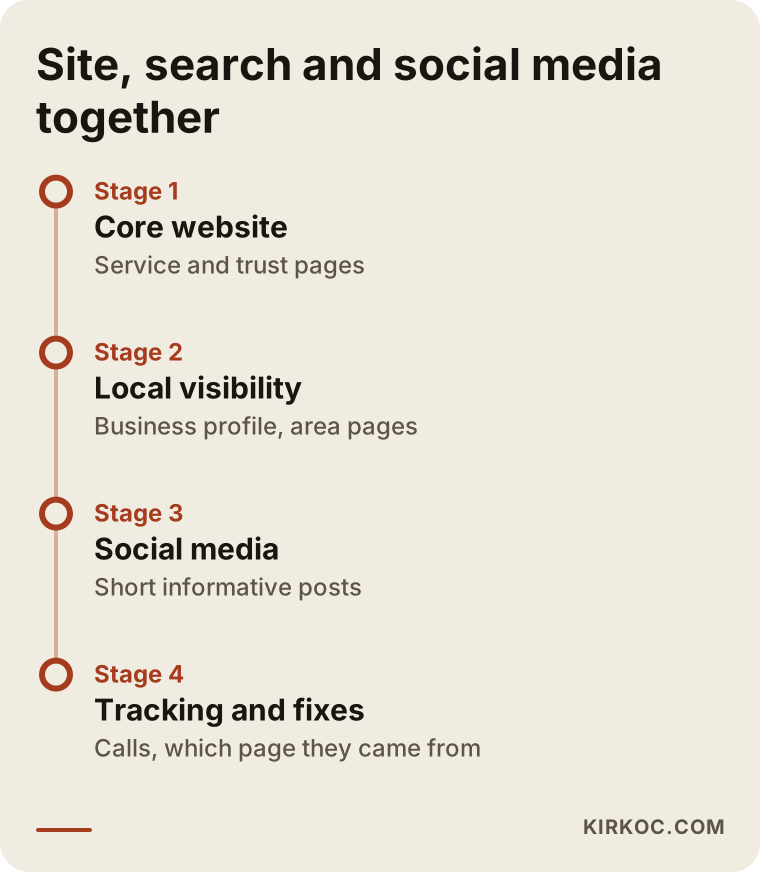
As the timeline shows, the foundation comes first, then visibility work begins, and tracking and fixing come last. None of the steps promises fast results, but when the order is right, each one supports the one before it.
Local visibility and the map
In this industry, "near me" searches matter a great deal. Your Google Business Profile should have a complete address, opening hours, services and photos. Reviews play a big part here, but do not make families feel pressured. Gently remind those who have told you they were happy. It also matters that the details on your site match the details on your business profile. If the address or phone number differs, both people and search engines get confused.
AI assistants and voice search
People now ask tools such as ChatGPT questions like "how do I choose a reliable home care agency near me?" When these tools answer, they find pages that are clear, well organized and written in question-and-answer form easier to use. That is why a frequently asked questions section serves both families and these tools. There is no guarantee of results, but a clearly written site helps you whichever way people search.
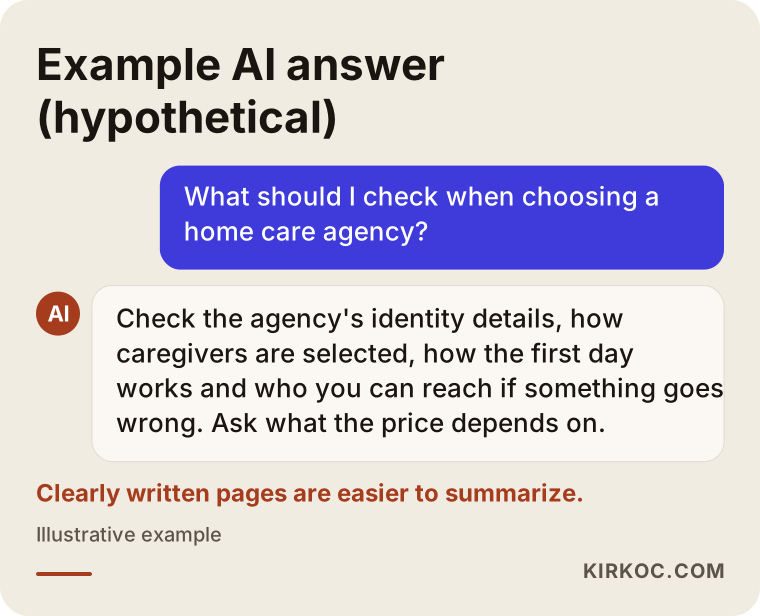
The answer in the image is entirely hypothetical, but the logic is real. If your page states the process, the scope and the area plainly, an assistant can summarize them more easily.
How I work with you
If we work together, in the first conversation I listen to your services, your area and your current situation. Then I share the page map and the list of work in writing, so it is clear what will be done and why. I prepare the text with you, because you know your service best. After the site is built, if you want to continue with local visibility, social media and ads, you keep working with the same person. If you do not, we can stop at the website; I will not push anything on you. I do not guarantee results, but at each step I show you what I did and why.
Frequently asked questions
How many pages should a home care agency website have?
There is no fixed number. A separate page for each main service, a trust and process page, an areas page and a contact page make a good start. For a small agency that can mean around ten pages. What matters is that each page answers one need.
Can I publish caregiver photos and names on the site?
That depends on privacy law and on the agreements you have with your staff. I suggest not publishing them without written consent. For a firm legal answer, speak to an attorney.
Is it a problem to use client reviews on the site?
Real, permitted reviews build trust. Invented or edited reviews are unethical, and they damage your reputation if discovered. It is also wise to remove any details that reveal health information from a review.
Should I list prices on the site?
You do not have to. Because the price depends on the client's condition and on the hours and length of care, a fixed price can be misleading. Instead, explain what the price depends on and show an easy way to get a quick quote.
How soon will calls start after the site is built?
I cannot guarantee that. Having a site live is not the same as showing up in search results. Ads can bring faster visibility, but they need a budget and ready pages. Local search work is slower but lasts longer.
Is a social media account enough on its own?
Social media is a good support for trust, but people looking for care usually search on a search engine, not on social media. Your site is where those searches find you, and social media complements it.
Do I need a version in another language?
If relatives living abroad or families who speak another language contact you, it can help. If you only serve local clients, you do not need it in the first stage.
Can I update the site myself later?
Yes. I build the site so that you can change text, photos and the frequently asked questions yourself. For bigger changes, you can ask for help.
If you would like to build the right pages, a trustworthy voice and a structure that makes the phone ring for your home care agency, you can reach me through my website design page and briefly describe your situation.