If you run a school, a language course or a training center, your calendar probably looks like a heartbeat monitor: quiet for months, then a sudden spike when enrollment opens, then quiet again. Advertising for schools and courses has to be built around that uneven rhythm. If it is not, you either miss the one window that matters or you spend money in the slow months when nobody is deciding anything. In this article I will walk through which ads work at which moment, which pages need to be ready before you spend a cent, and where I see schools lose money.
You can run some of this yourself, and some of it is worth handing to a specialist. I am Ümit Kırkoç, based in Istanbul, and I handle everything from the website to the ads myself, so one person owns the whole chain. If you want to see how I handle the ad side, have a look at my digital advertising management service. Even if you never hire me, understanding the logic below will make you a better client for anyone you do hire.
A note on who this is for. Many of my readers are owners of schools and courses in Turkey, and some are foreign education providers who want to recruit students in Istanbul or elsewhere in the country. The examples lean on Istanbul, but the thinking applies to any city.
Why is advertising a school different from advertising other businesses?
Someone choosing a coffee shop decides in a minute. Someone choosing a course decides over days, sometimes weeks. The money involved is significant, a child's or a person's own future is at stake, and the decision is rarely made by one person alone. A parent, a teenager and sometimes a grandparent all weigh in on a high school exam-prep program. An adult learner asks a colleague, reads reviews and compares two or three schools before picking up the phone.
Two things follow from that. First, the person who sees your ad usually will not enroll right away. They need to remember you and see you again later. Second, trust outweighs almost everything else. Clearly written information about teachers, the location, the weekly schedule, the trial lesson and the cancellation terms does more work than the ad itself.
There is also the calendar. Most schools live through several "seasons" a year: before summer camps, the September intake, the mid-year break, the final months before an exam. Each season attracts a different searcher and needs a different message.
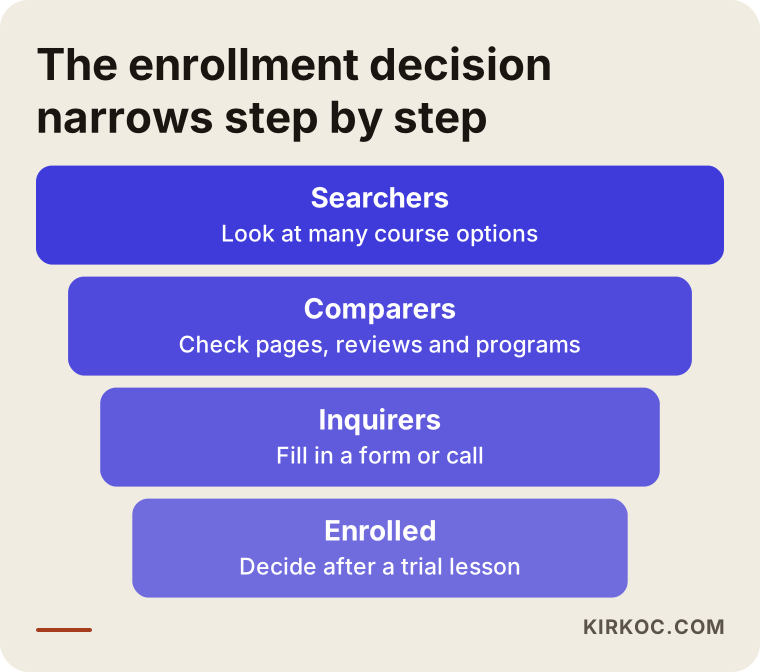
The funnel above shows how the decision narrows. Many people start searching, far fewer end up calling you. The real question in school advertising is where along that funnel you put your budget.
What do people actually type when they look for a course?
The most useful exercise for a business owner who does not speak "advertising" is to stand in the customer's shoes. A parent types something like "ielts preparation course istanbul" or "middle school math tutor near me" into their phone. An adult types "evening english classes" or "certified online coding bootcamp." These phrases usually carry a subject, a place and a condition all in one.
In Google Ads, these phrases are called search terms. When you set up an account, you are in effect telling Google, "show my ad to people who type these phrases." That is why picking the right phrases is the first and most important job. A broad word like "course" gets searched by huge numbers of people, most of whom have nothing to do with you. A specific phrase like "kids coding class Pendik" gets searched less, but the person typing it is far more serious.
There is also a list of "excluded words." If you teach paid courses, you do not want your ad shown to people who type "free" or "no cost." Filling in that list at the start can noticeably cut wasted spending.
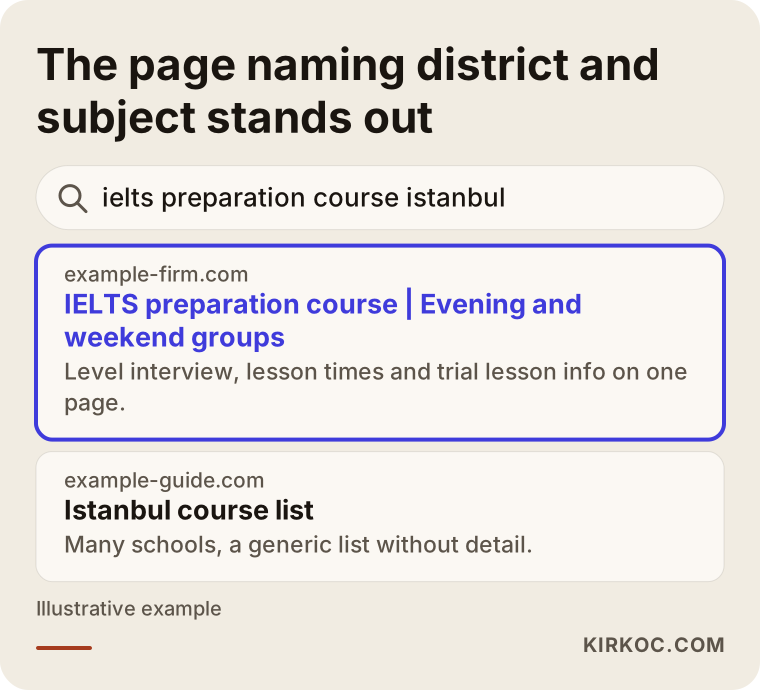
In a result like the one above, the page that names the subject and the location offers a clearer promise. The same clarity works in the ad text itself: what you teach, to whom, where and at what times.
Which search should land on which page?
The problem I see most often in education is that every ad sends people to the home page. A home page tries to say something to everyone, so it answers nobody completely. A parent who searched for "robotics classes for my child" and lands on a page that opens with adult language courses will close the tab.
Each main subject or program group needs its own page. That page should cover who the course suits, the age or level range, the days and times, a short introduction to the teacher, a trial lesson or an information call, the common questions, and the contact details. As for price, whether you publish it or discuss it on a call, the page should at least explain what the price depends on: group or private lessons, length of the course, whether materials are included.
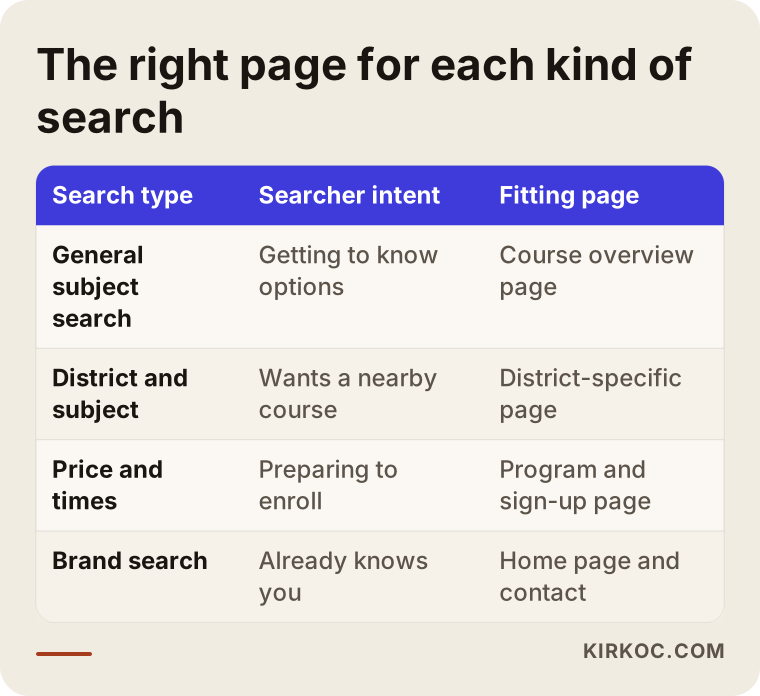
As the table shows, someone gathering information and someone ready to enroll want different pages. The first needs an article or a set of answers. The second needs a sign-up form and a contact button right there. Knowing which group you are speaking to also tells you where the budget should go.
If your site needs a rebuild or a reorganization, it helps a great deal when the pages and the ads come from the same person. Whoever builds the page also knows what the ad is going to promise.
What does an enrollment-season calendar look like?
Most money in school advertising is lost through timing. If you start building a new campaign in the middle of enrollment, the ad system has no time to learn. If you keep the same budget running after enrollment closes, you are paying to advertise places that no longer exist.
The calendar below is a sensible flow for many schools. Shift the dates to match your own season.
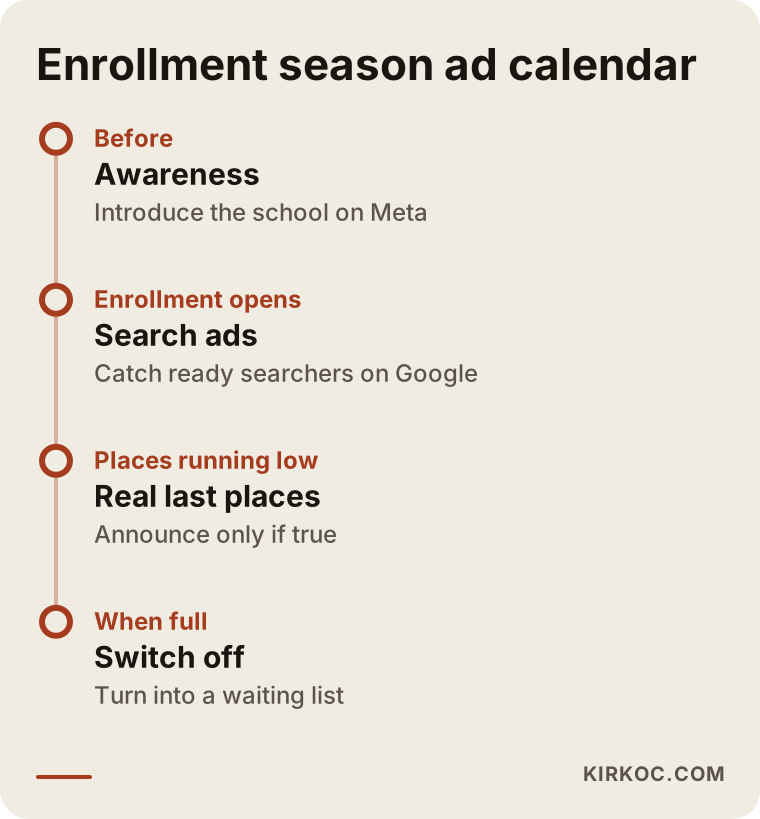
The logic is simple. Before enrollment opens, you do awareness work so people get to know you. When enrollment opens, you strengthen the search ads. As places run low, you can use "last places" wording, but only if they really are the last places. When the group is full, you pause the ads or turn them into a waiting-list collector.
The waiting list is an opportunity many schools skip. Someone who leaves an email or phone number for the next term becomes a warm audience you can contact before that term starts. When you do this, put a clear notice on your form about how personal data will be stored. Turkey has its own personal data protection law (KVKK), and if you are unsure what it requires of you, ask a lawyer.
Google or Meta? They do different jobs
The question business owners ask me most is: "Should I run Google ads or Instagram ads?" The honest answer is that the two do different work.
On Google, people are already looking. Someone typing "foreign language course near me" wants a course. Your ad meets them at the exact moment of need. On Meta, which means Instagram and Facebook, people are not looking for anything; they are scrolling a feed. There your ad sparks interest, reminds and builds familiarity. Meta is good at introducing you before the person has you in mind.
So for schools I usually split the work like this: Google search ads catch people who intend to enroll, while Meta ads introduce the school to parents or students ahead of time and remind people who have already visited your site. If you use only one, half the season can go uncovered.
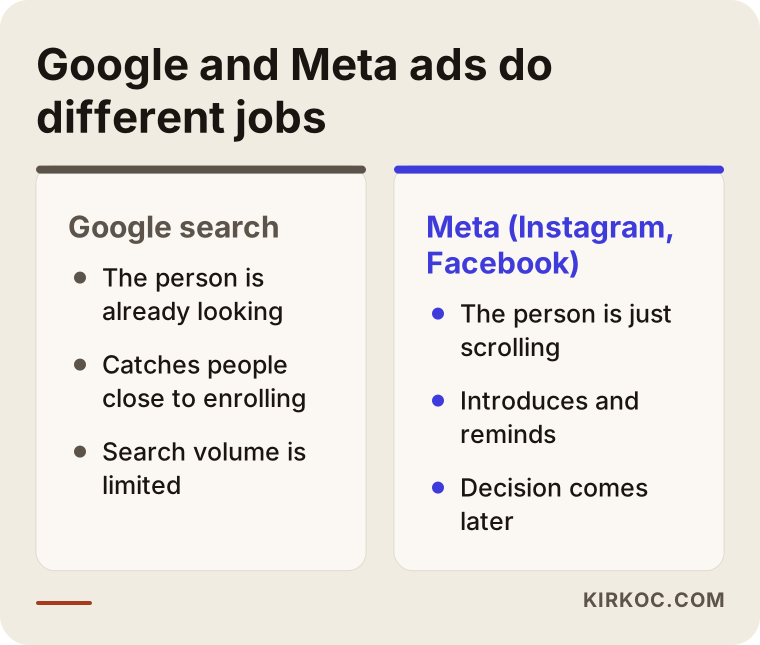
The comparison shows which platform stands out in which situation. With a small budget, starting with Google search ads is usually the safer path, because they reach people who are already motivated. As the budget grows, you add Meta.
What to watch on Meta
Platform rules can be strict for education ads that involve children and teenagers. Targeting options may be limited, and certain phrases in your ad text can be rejected. Promises like "you will definitely pass the exam" cause trouble with the platform and with consumer rules alike. Choose wording that complies with the rules, and if you are unsure about a legal point, speak to a lawyer.
Be careful with images too. Real photos taken in your classrooms usually build more trust than stock images. But if children appear in a photo, get written permission from their parents; that is both an ethical and a legal matter.
What to watch on Google
Three things matter on Google. The first is building separate ad groups for detailed phrases that combine a district and a subject. The second is putting your phone number and location in the ad, because on mobile many people simply tap to call. The third is conversion tracking, which means being able to count the actions that matter, such as a submitted form or a tap on the call button. Running ads without it is like driving with your eyes closed.
Two example scenarios
The two scenarios below are hypothetical. They do not describe a real school or a real person; they are here to make the logic concrete.
Scenario 1: A language school and the September intake
Imagine a small language school with one branch in Istanbul that wants ads for its September intake. All it has is a home page and a contact form. The first job is to split up the traffic that currently piles onto the home page: separate pages are built for adult English, children's English, exam preparation and a conversation club. Each page includes a level interview and trial lesson details.
On the ad side, a Meta awareness campaign announcing new September groups runs in the middle of summer. At the end of August the search ads open, with budget going only to detailed phrases for the district. In the first week of September, ads for groups that have filled up are switched off and the budget moves to the group that still has room. There is no guarantee of any result, but in this scenario the money flows to groups with capacity instead of groups that are full.
Scenario 2: A coding workshop for kids during the mid-year break
In the second hypothetical example, a coding workshop wants to announce its mid-year break program. The decision makers here are parents. Search volume is low, but timing is critical because the program lasts two weeks and has limited places. So a short campaign is built: on Meta, an ad aimed at parents that asks "what will your child do during the break?", and on Google, a search ad on narrow phrases like "coding class for kids winter break."
The campaign starts a few weeks before the break and stops when the program begins. Later, parents who filled in a form but did not enroll are reminded about the next term. The lesson here is that for short, limited programs, a clear window protects the budget better than a long-running campaign.
How do you set up an enrollment campaign from scratch, step by step?
If you want to set up ads yourself, or you simply want to understand what a specialist is doing for you, the logical order is as follows.
- Clarify the goal. Instead of "more students," set something measurable, such as "fill a certain number of open places in the September group."
- Prepare the page. The page your ad leads to must state the course, the age group, the schedule and the contact details clearly.
- Set up tracking. Form submissions and phone calls must be counted. Otherwise you cannot know which ad worked.
- Start small. Begin with a few clear phrases and one or two ad groups, learn from them, and then expand.
- Check weekly. Do not panic over the first few days, but after a week or two, switch off the phrases that are not working.
- Reply to inquiries quickly. Answering a person who filled in a form on the same day often matters more than the ad itself.
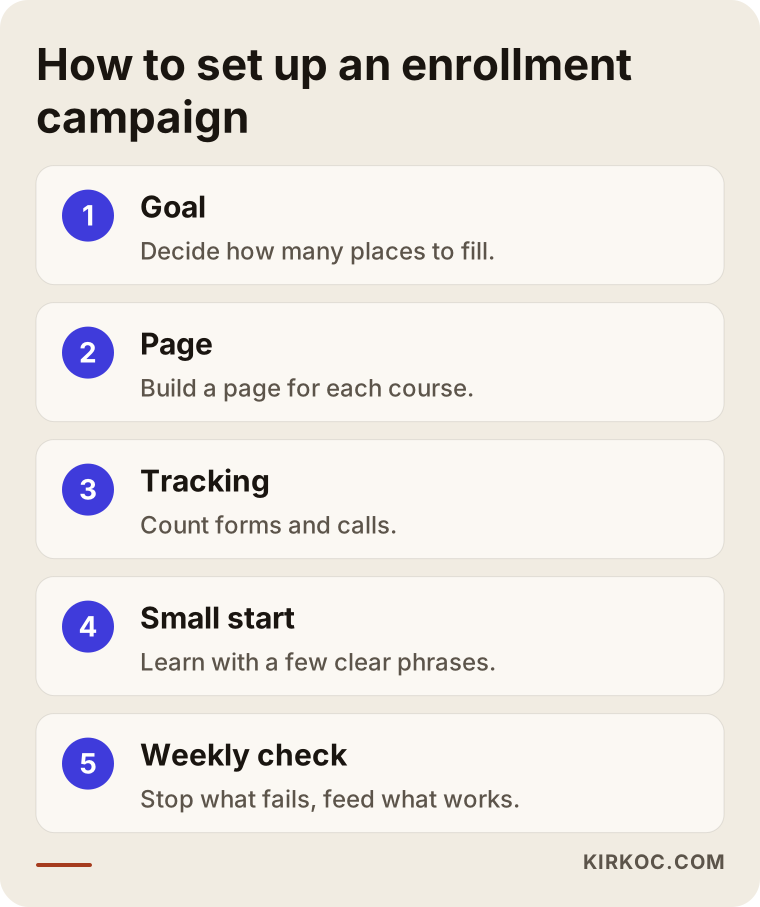
You can see the order in the graphic. The critical point is that the page and the tracking must be ready before the ad goes live. Many schools turn the ad on first and only then ask why nobody is calling.
What should your sign-up page look like?
A visitor who arrives from an ad looks at your page for a few seconds and decides whether to continue. The top of the page therefore has to give an immediate feeling of "I am in the right place." The layout below works for most education pages.
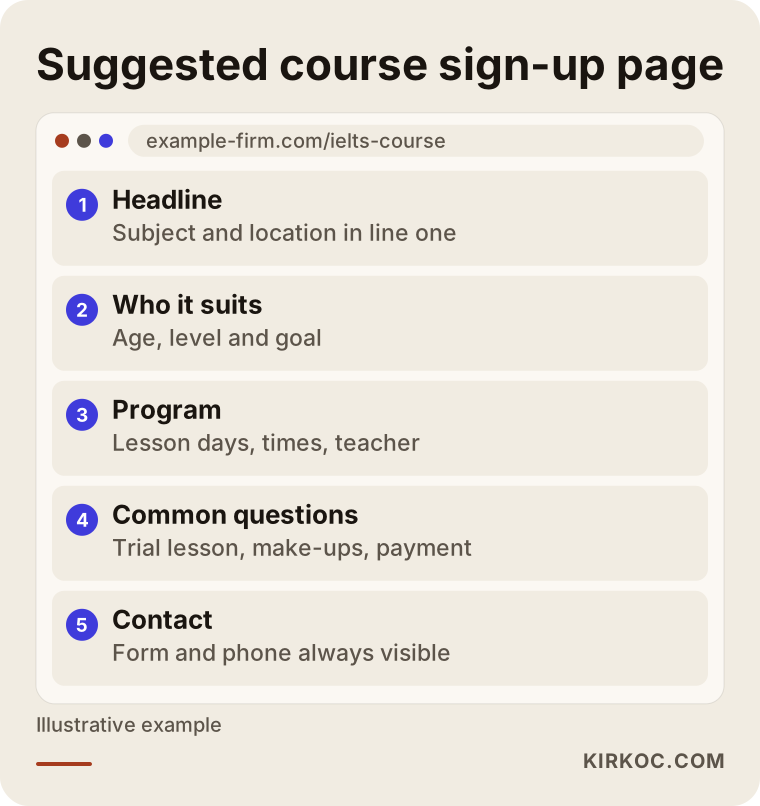
The headline names the subject and the location, or says it is online. Right below it comes who the course is for. Then the program, the teacher information and the lesson times. A common-questions section is extremely valuable for the person who hesitates to ask by phone: "Is there a make-up lesson?", "Is the trial lesson paid?", "Can I pay in installments?" These should all be answered openly. The contact form and phone number come last, but the contact option should also stay fixed at the top of the screen, because on mobile people lose the way as they scroll.
Your phone number and address should be written identically everywhere: on every page of your site, in your Google Business Profile and on your social media accounts. Inconsistency creates doubt in people and in search engines. Local visibility work should run alongside the ads; in this article I am focusing only on the advertising side.
What should you check before the ads go live?
Before each enrollment period, I suggest running through the items below. Most of them are cheap to fix compared with the ad budget, but skipping them quietly drains that budget.
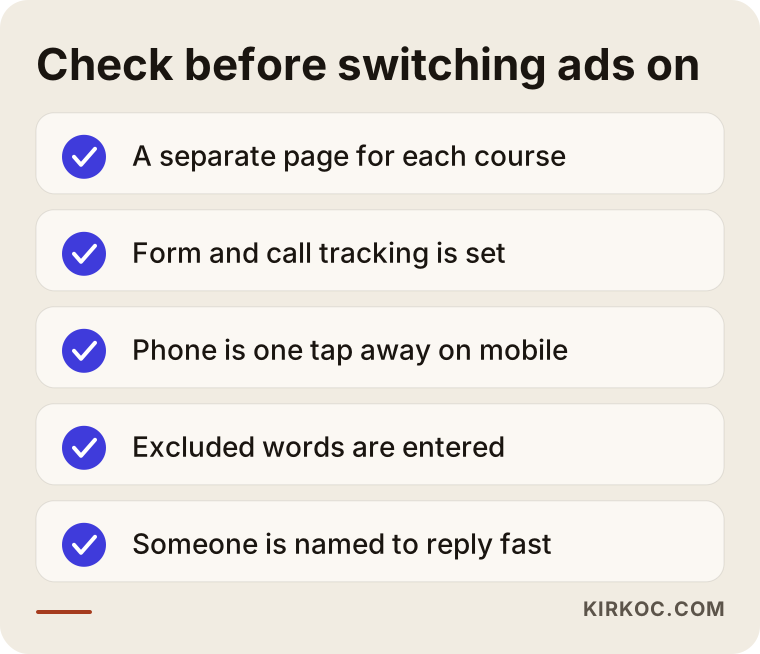
The item skipped most often is the tracking setup. The second is not deciding who will reply and when after a form is submitted. No matter how good the ad is, if the phone is not answered or a form waits two days for a reply, the person has already started talking to another school.
What mistakes do schools commonly make in advertising?
Most of the mistakes I see in this field are planning mistakes, not technical ones. Here are the most common.
Putting everything in one campaign. A children's course, an adult course and exam preparation speak to different audiences. If you pile them into one campaign, the budget flows to whichever ad is easiest to click, not to the one that matters most.
Sending traffic to the home page. As I described above, a general page does not answer a specific searcher.
Making guarantees. Phrases such as "you will definitely pass" or "100 percent success" damage trust and can run into advertising policies. They are also risky from a legal point of view. Say something concrete instead: group size, trial lesson, teacher experience.
Leaving ads on when the group is full. This is one of the most expensive mistakes. The ad keeps running, people call, hear "we have no places," and walk away with a poor first impression.
Checking results too early, or never. Making a decision after two or three days is wrong, and so is not looking for a month. You need a calm, regular rhythm of review.
Skipping tracking. You see clicks in the ad account but cannot tell how many enrollments they produced. Decisions then turn into guesses.
Forgetting what happens after enrollment. A satisfied student or parent is your strongest source of recommendations. Asking happy students for a review makes the next term's advertising cheaper.
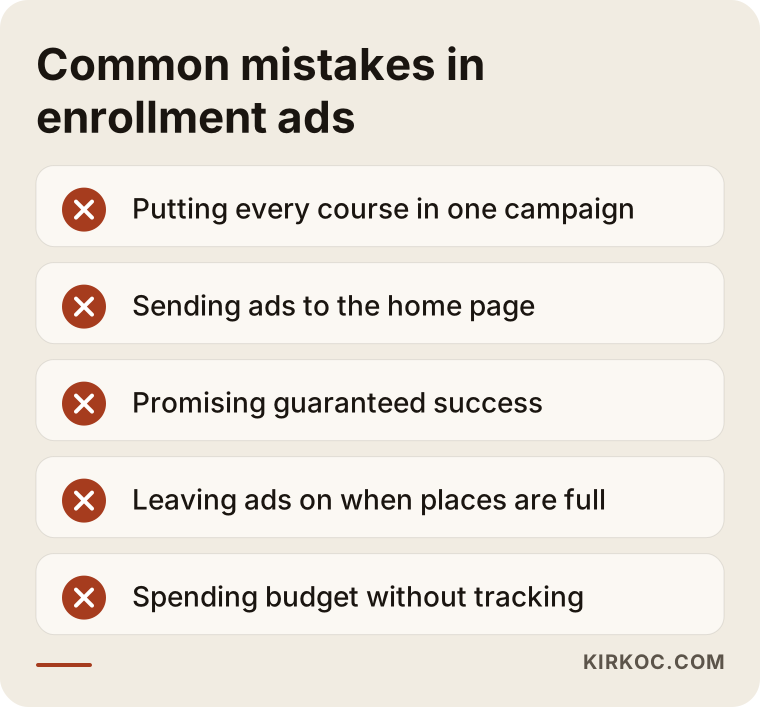
Many of the items in the warning list can be fixed with a small change. The "guarantee" and "sending traffic to the home page" items in particular can be corrected on day one.
Can you run the ads yourself, and when do you need a specialist?
To be honest, a small school can run its own ads. If you have one branch, one main course, a low budget and some time, you can set up a simple Google search campaign yourself. Set up tracking first, choose a few clear phrases, keep the daily budget low and check once a week. Making mistakes while you learn is normal, and starting small keeps those mistakes cheap.
In these situations, though, getting help is usually the more sensible choice:
- You are managing ads for several branches, course groups or age groups at the same time.
- You use both Google and Meta and want them to work together.
- Your ad account was closed, rejected or restricted.
- You struggle to set up tracking and cannot tell how many enrollments came from where.
- You also need to rebuild your site pages, because the pages and the ads should be planned together.
- You are in the middle of an enrollment period and have no time to learn.
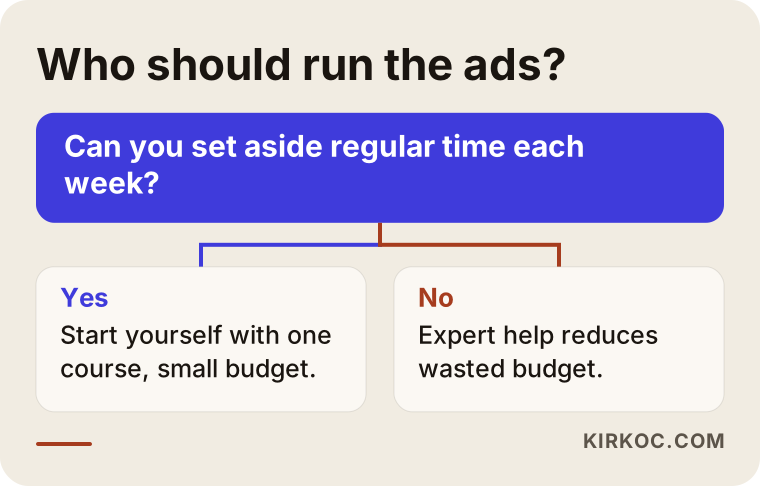
Ask yourself the question in the graphic honestly: can I set aside regular time for this each week? If the answer is no, expert help can be an investment that prevents wasted budget. If the answer is yes, trying it yourself first and getting help later if needed is a perfectly reasonable path.
What determines the cost of ads?
I will not give numbers, because the cost genuinely depends on the situation. But knowing what it depends on helps you ask better questions.
The first factor is competition. Subjects that many schools bid on in big cities cost more than niche subjects with less demand. The second is location; dense districts see more competition. The third is the season: during enrollment periods everyone advertises at once, so costs can rise. The fourth is the quality of your page and how well the ad matches it; a well-matched ad is generally treated more favorably by the system. The fifth is how many campaigns and how many platforms you run.
On the service side, scope decides the fee: is it only ad management, or does it include page preparation and tracking setup, is copy and imagery produced, how many platforms are managed, how often are reports delivered. That is why a single price that fits everyone would not be honest. It is better to listen to your needs and write down a scope. Keep in mind that the ad budget (what you pay the platform) and the management fee (what you pay for the work) are separate things, so ask about both when you request a quote.
How I work with schools
If you work with me, the person you talk to is the person doing the work. First I look at your school, your current site and any old ad accounts. Then I draft a plan around your enrollment calendar. The plan states in writing which pages will be prepared, which platforms will run ads and when, and what will be measured. I do not promise results, because the outcome depends on the market, on competition and on how quickly you respond to inquiries. What I can promise is to explain what I am doing and why, and to keep the accounts in your name.
Having the website, ads, social media and local visibility with one person has a practical benefit: the message in the ad does not contradict the message on the page, what is said on Instagram matches what is said on Google, and when something needs to change, you do not have to carry messages between people. One phone call or message settles it.
Frequently Asked Questions
When should I start enrollment-season ads?
For most schools, it makes sense to begin awareness ads a few weeks before enrollment opens and search ads once it opens. The exact dates depend on your season and the type of course. Short programs have a narrower window, longer-term programs a wider one.
Which is better for a school: Google ads or Instagram ads?
They do different jobs. Google catches people who are already looking for the service; Instagram and Facebook introduce you to people who are not thinking about it yet. With a small budget, Google search ads are generally the safer start, and Meta is added as the budget grows.
What should I be careful about when advertising courses for children?
Avoid wording that guarantees outcomes, get written parental permission before using photos of children, and read the platforms' rules on children and teenagers. If you are unsure about collecting and storing personal data, speak to a lawyer.
I started ads but the phone is not ringing. What could be wrong?
The usual causes are that the ad leads to a general page, the phone number is not visible on mobile, the ad is showing for the wrong phrases, or tracking is not set up so you cannot see the calls that do come in. Test the page on your phone first, then check which phrases the ad appeared for.
What should I do with the ads when a group is full?
Pause them right away, or turn them into a message that collects a waiting list. Continuing to run an ad with no places left wastes budget and leaves a bad impression on interested people.
How is an ad budget decided?
It depends on the number of open places, what one enrollment is worth to you, the competition and the district. Starting small and watching what works in the first weeks is safer than committing a large budget in one go.
When will I see results?
In the first days you may see clicks and calls, but the system usually needs a few weeks to learn and for the right phrases to emerge. Promising an exact timeline or result would not be honest.
How can I contact you about ad management?
You can write to me using the contact details on my service page. A short description of your school, your course types and your enrollment calendar is enough, and I will make a first assessment from that.
If you would rather not leave your enrollment season to chance, and want pages, tracking and ads planned together, reach out through my digital advertising management page. I will listen to your situation and help you work out where to start.