You run a school, a language course, a tutoring center or a preschool. When a parent walks through your door and talks to you in person, you usually win them over. The trouble is that before that parent ever reaches the door, they have already looked at you, at your closest competitor and at three other places on their phone. Social media for schools matters exactly here: parents form an impression of who you are before they meet you, and that impression sets the tone of the enrollment conversation. This article is written for a school owner, director or administrator who is thinking about buying help with this work. I will explain what it covers, where institutions usually go wrong and where to start. I am Ümit Kırkoç, I work alone from Istanbul, and if you want your accounts run consistently, I describe exactly what is included in my social media management service.
Social media management, in plain terms, means deciding what gets posted on your Instagram, Facebook or YouTube accounts, preparing it, publishing it, answering incoming messages and adjusting the plan based on what happens. In education this job works differently than it does for a cafe or a clothing shop, because what is being "bought" is not a product. It is several years of a child's life. The decision is rarely made by one person. A mother, a father and sometimes a grandparent weigh in together. That changes the language of your posts, the pace of your replies and the way you build confidence.
If you are based in Turkey or are a foreign family or institution working with the Turkish market, the examples below use Turkish school calendars and city districts as a setting. The principles carry over to most countries, and I point out where local rules differ.
Why is social media for education different from other industries?
Someone who likes a restaurant's post might book a table that same evening. A parent who likes a school's post usually does nothing at all. They take a mental note, save the account or show it to their spouse. The enrollment decision comes weeks or months later, when the calendar allows. So the job of your social media is not to make an instant sale. It is to be remembered, and to look trustworthy, on the day the decision is made.
The second difference is the weight of trust. When a parent chooses a place to leave their child, the questions are always the same. Is it safe? Are the teachers attentive? Will my child be happy there? Slogans do not answer those questions. Real glimpses of daily life, short introductions of your teachers and a calm, regular account do. An account that has not been updated in three months can quietly say "things are not well run here," even if the opposite is true.
The third difference is seasonality. Schools and courses have clear rhythms: enrollment periods, exam dates, holidays, summer programs, end-of-term shows. A good plan builds this calendar into the year from the start. If you stay silent for months and then post three times a day when enrollment opens, you tire your followers and you look less believable.
The fourth difference is that children appear in your content. The most natural thing a school can post is a photo from a classroom, a workshop or an event. But photos of children raise questions about parental consent and personal data. I cover this in its own section below. For now, one important note: I do not give definitive legal answers on this topic. Please have your consent forms reviewed by a lawyer who knows the rules where you operate.
How do parents search when choosing a school?
You think of yourselves as an "educational institution." Parents type something far more concrete. Things like "half-day preschool near me," "after-school tutoring for third grade," "summer enrichment program for kids," "English course for children," or "when is the scholarship exam for private schools." These searches happen on Google and also in the search box inside Instagram. Most of them include a neighborhood, an age group or the name of an exam. In other words, the parent is really asking: is this right for my child?
That means the first thing someone sees on your social profile matters a great deal. Your bio should say, at a glance, which age group you serve, in which area and with which program. A line like "shaping the leaders of tomorrow" tells nobody anything. A line like "Preschool for ages 4 to 6, half-day and full-day options, in the city center" answers the question in the parent's head immediately. The example below uses an invented institution to show the difference.
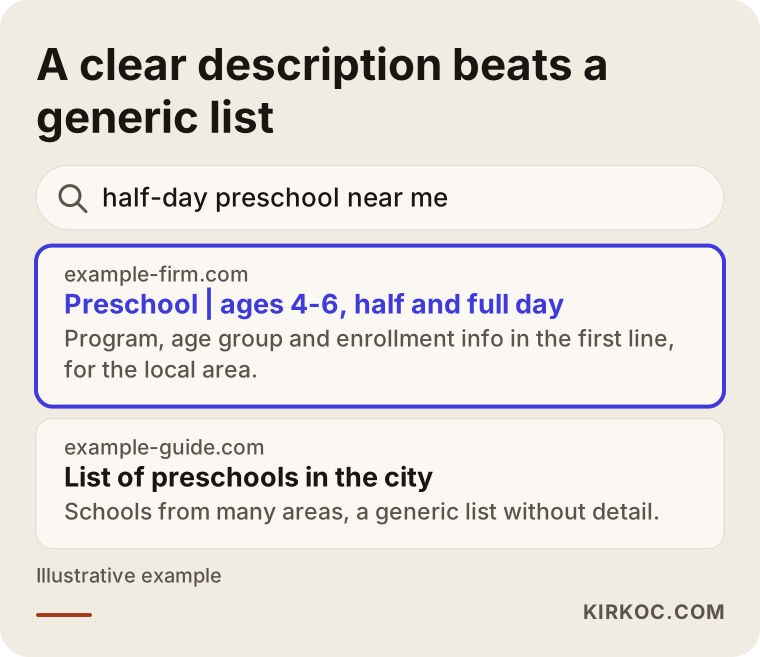
The highlighted result states the area, the age group and the program in its very first line. The same clarity should appear on your website and your social profiles. Parents often find an institution in one place and verify it in another. They see you on Instagram, then type your name into Google and look at your address, your reviews and your site. If they find three places with three different stories, their confidence drops.
Which platform reaches which parents?
You do not need to be everywhere. For a small course, running two platforms well beats running five platforms halfway. Here is a general framework.
Instagram is the most visible shop window, especially for parents of preschool, elementary and middle school children. Short videos, event photos, teacher introductions and answers to common questions all work there. The message inbox is also where parents ask the things they hesitate to ask by phone. A question like "do you have a half-day option?" feels easier to type than to say out loud, so it often arrives as a direct message.
Facebook is still active in local parent groups and neighborhood pages. A Facebook page with accurate details is useful for event announcements, open house days and your address. Some questions from older relatives, such as grandparents, also come from there.
YouTube helps with topics that need longer explanations: how an exam process works, how a course lesson flows, a tour of the school. A good introduction video recorded once can be used for months.
TikTok can make sense for audiences where the student is the one making the decision, such as high school and university test preparation. While the parent is the decision maker, it is not a priority for younger age groups.
LinkedIn fits adult education, corporate training and professional certificate programs. If you run a vocational course and want employers to see your teaching staff and curriculum, it is the right place.
Which platforms you choose should follow your audience. You do not have to guess. Ask your current parents and your newest enrollments, "How did you hear about us?" That one cheap question often gives a more honest answer than an expensive research project.
Which content actually convinces a parent?
In education, the content that works is not the content where the institution praises itself. It is the content that answers the question sitting in the parent's mind. Those questions are almost always the same few.
The first is safety: is my child safe here? Posts that calmly explain your arrival and pick-up routine, how transport and hand-over work, hygiene, and any cameras or security measures answer it. The second is the teacher: who will actually teach my child? A short introduction of a teacher, which age group they work with and how they approach children often builds more trust than a brochure. The third is the daily flow: what does a day look like? A "day in the life" post showing the morning welcome, lessons, breaks, lunch and workshops helps a parent picture it.
The fourth is results and progress, and here you need to be careful. A claim like "all of our students got in" is hard to prove and may run into advertising rules for educational institutions. The safer and more honest route is to explain how the process works: the weekly practice test routine, how parents are kept informed, how often there are one-to-one meetings. Rules about how schools may advertise differ by country and sometimes by type of institution, so please check the limits that apply to you with a lawyer.
The fifth is practical information: the enrollment calendar, a free trial lesson day, an information evening, the address, how to get there, contact hours. These look boring but they sit closest to the enrollment decision. The graphic below gathers these content topics in one place.
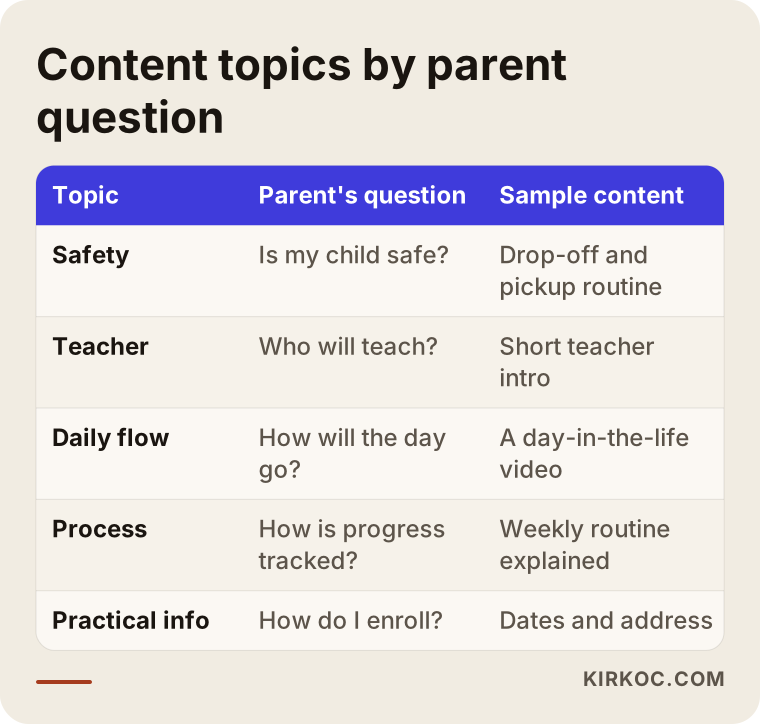
It is easy to turn that table into a posting calendar. If you produce at least one piece of content per topic each month, your account will be varied and focused on the questions parents really have.
How do you plan a year around enrollment season?
For social media, the school year has three main stretches: preparation before enrollment, the enrollment period itself and the school term. Each has a different job.
The preparation stretch starts weeks or months before enrollment. The goal is to be known. Parents have not decided yet, but they are building a shortlist in their heads. Here the general introduction of your institution, teacher profiles, the daily flow and answers to common questions take center stage. Once enrollment opens, the main job is clarity: dates, how many places are left, how the meeting is arranged and which documents are needed. The school term then feeds next year's enrollment. Events, projects, exhibitions and trip memories get shared, and they show the next parent what actually happens at your place.
The timeline below shows an invented yearly flow. It follows a calendar where the school year starts in autumn, so shift it to match your own country.
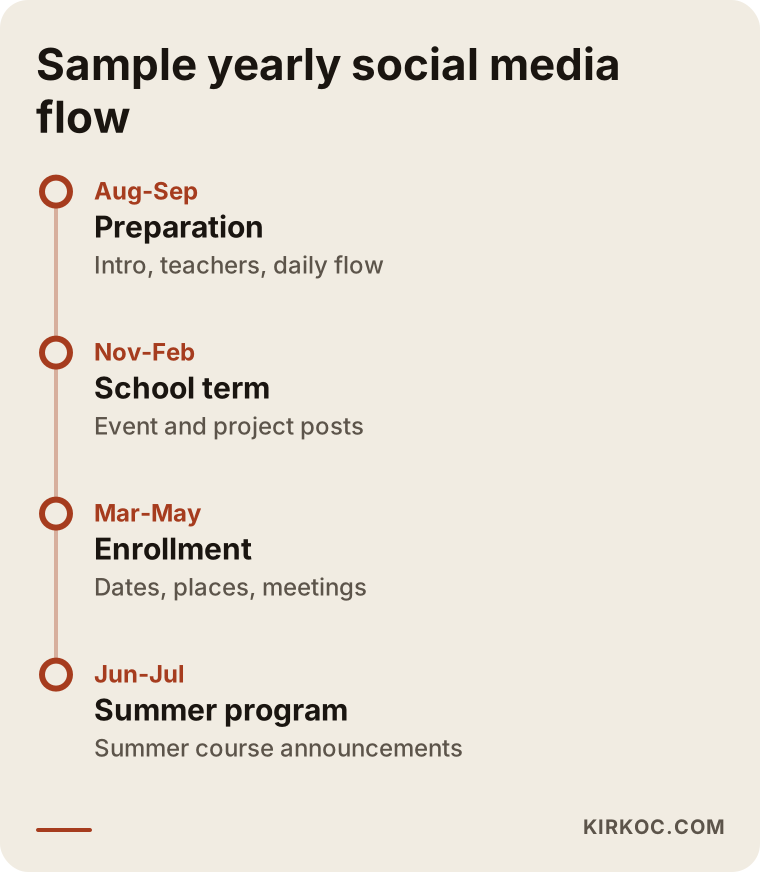
You will need to adapt the dates to your institution's real schedule. What matters is being ready for the busy weeks when enrollment opens, and not leaving the account silent for the rest of the year.
Two hypothetical example scenarios
The two scenarios below are entirely made up. They do not describe a real institution or person. Their purpose is to show how the same work is set up differently for different kinds of schools.
Example scenario 1: A small neighborhood preschool
Suppose an independent preschool with small classes operates in one district. The owner posts occasionally. Photos are taken on a phone in poor light, and the captions say things like "we had a lovely day." Most families arrive by word of mouth, but as enrollment approaches, new families send a message asking "what are your fees?" and are never heard from again.
The first task here is to rework the account. The bio states the age group, the area and the program clearly. Highlight collections are added under titles such as "Common questions," "What does a day look like?", "Meet the teachers" and "How to enroll." Photos in which no child's face is visible, such as craft projects, the classroom layout and the garden, are prioritized. For posts that do show faces, a written parental consent system is set up. For the "what are your fees?" message, a standard reply is prepared. It explains which factors the fee depends on and then invites the parent to a short introductory visit. That way a cold "I want information" message has a chance to turn into an appointment. There is no guarantee, but an account where a parent finds an answer to their question tends to bring more replies.
Example scenario 2: A test prep and language course
The second assumption: a mid-sized course in a city center that offers entrance exam preparation for middle schoolers and English classes for adults. Two very different audiences are mixed on the same account. One day there is an exam tip, the next day an announcement about business English. The parent following the account and the adult student both get bored, and neither is fully engaged.
The solution here is to build two separate content lines. If the same account is used, the topics are clearly separated. Posts for parents cover the exam calendar, the practice-test routine and the teaching approach. Posts for adults cover class times, how the level assessment works and flexible schedules. In larger institutions, two separate accounts, or at least clearly distinct series of posts, work more cleanly. A separate page on the website for each audience also sends people from social media to the right place. LinkedIn posts can make sense for the adult programs.
The comparison below summarizes how the content priorities of these two audiences differ.
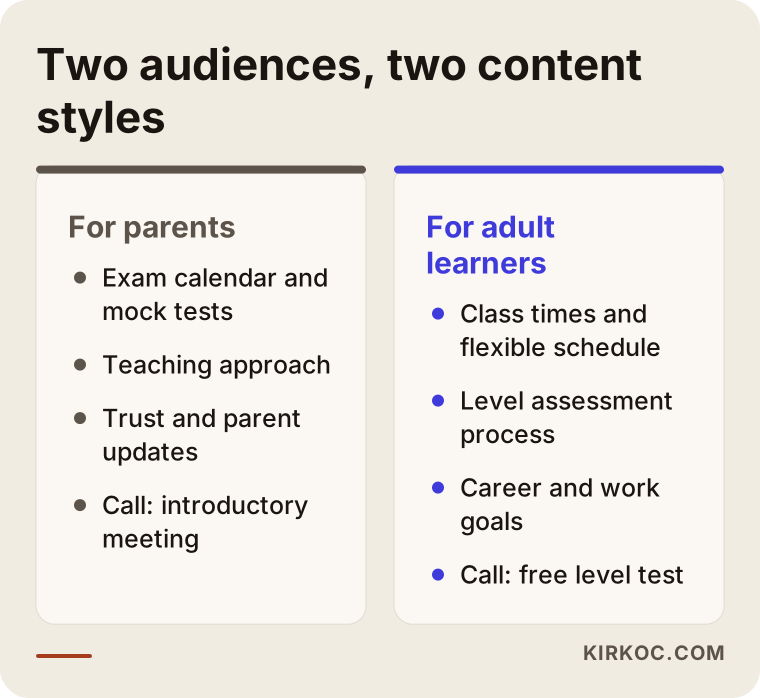
The difference looks simple, but many institutions overlook it. Writing without knowing who you are talking to means, in practice, writing to nobody.
Photos of children, parental consent and personal data
This is the most sensitive subject for school accounts, and to avoid any misunderstanding let me be direct: I am not a lawyer, and what follows is a general frame, not legal advice. Decide your institution's practice with a lawyer who knows the rules where you operate.
The general logic is this. Photos and videos of children are personal data. Before sharing them, it is sensible to obtain clear written permission from parents, stating the purpose, the platform and how long the material will be used. A child whose parents have not agreed should also stay out of the shots. That can be tedious during classroom photography, but it is the right thing to do.
A few habits make this easier in practice. A consent form is handed out at registration and kept somewhere safe. The person taking photos knows which children are not cleared. Alternative shots in which faces are not visible, such as hands, drawings, a tidy classroom or photos from behind, are always captured. Details like your address, transport times or children's full names do not appear in posts. And if a parent asks for a photo to be taken down, it is removed quickly and without argument.
The checklist below lists the points to review before you publish.
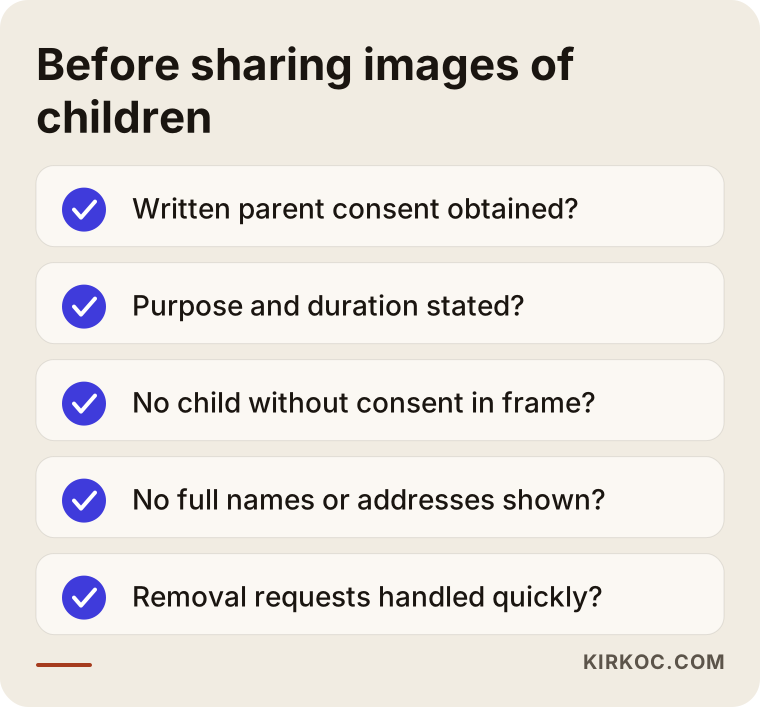
This list is not a legal opinion. It only reminds you of points that are often forgotten. The rules your institution must follow may differ, so let an expert make the final call.
Step by step: how is social media management set up?
Whether you start from zero or from a scattered account, the route to an organized setup runs roughly like this.
I begin with a conversation. I ask which age groups you serve, which programs you run, what your enrollment calendar looks like, which questions parents ask most and what state your current accounts are in. The second step is a review of the accounts as they stand: the bio, highlights, recent posts, how quickly messages are answered and whether the details on your business profile are correct. In the third step I define content lines, meaning which topics are posted and how often. In the fourth step a one-month calendar is produced, and the needed visuals and captions are prepared. I can also give you a simple filming guide for the photos and videos that come from your side. Publishing and message monitoring start with this step. In the fifth step, at the end of the month, I send you a plain report on what worked, and we adjust the plan together.
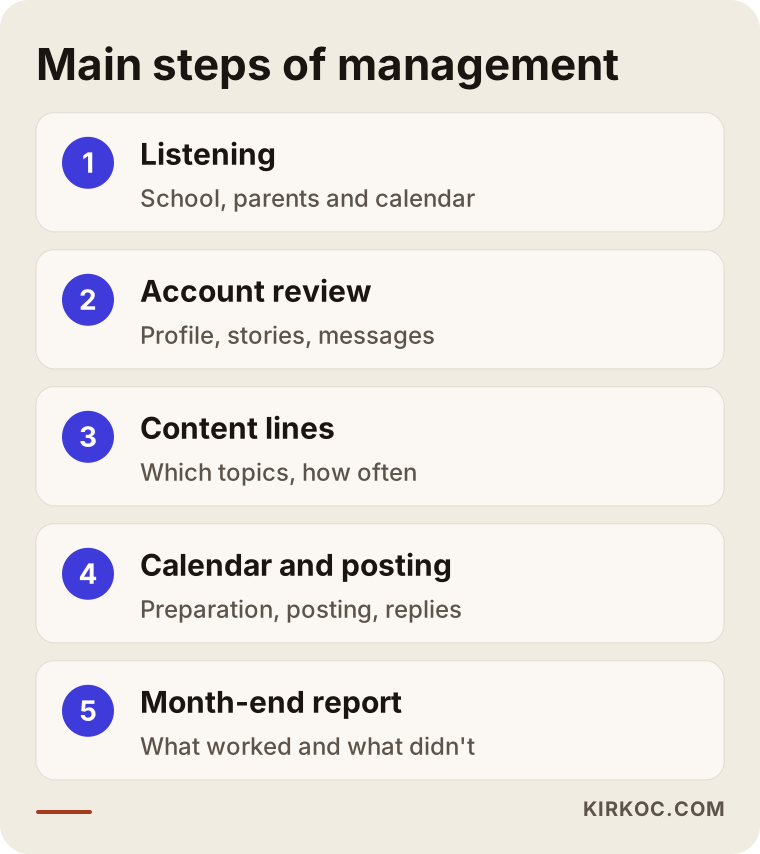
As part of this flow, it is worth thinking about how interest from your accounts turns into a real enrollment meeting. Where does a message land, who answers it and how fast? An institution that neglects this wastes even its best content.
From account to enrollment meeting
The path from seeing a post to sitting at your enrollment desk has several steps. The parent first sees the account and their interest is caught. Then they look over the profile and sometimes read comments and other posts. Next they ask a question or visit the website. Finally they request a meeting or fill in a form. Some people drop out at every step, which is normal. Your job is to remove the reasons they drop out: an unclear profile, an unanswered message, a broken link or missing information.
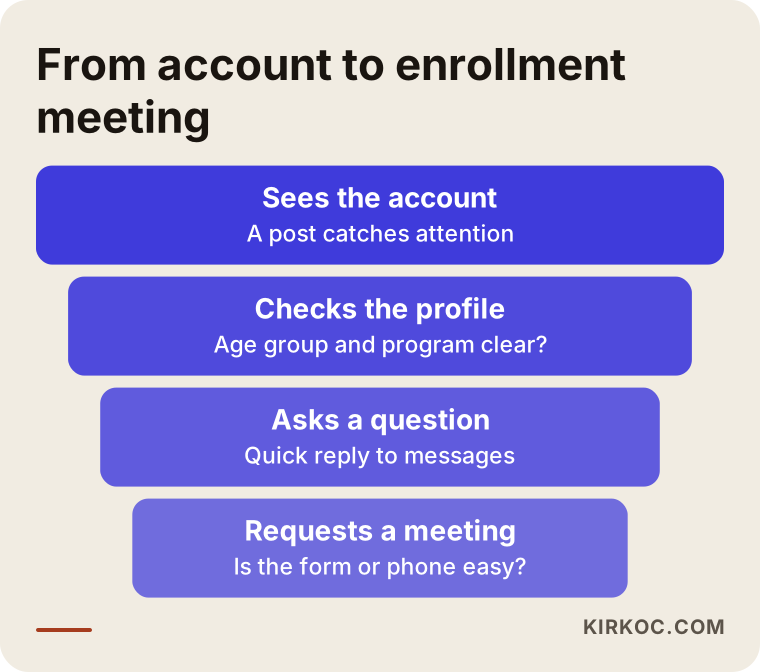
Not every step of this path is under your control, but three things are definitely yours: how clear the profile is, how quickly you reply and what information sits on your website or form. If ads are running, the page the clicking person lands on also belongs on that list. This is where having the work in one pair of hands makes a difference. When the sentence on social media, the page on the website, the business listing on Google and the ad text, if there is one, all say the same thing, a parent does not notice an inconsistency and walk away. Because I run the website, SEO, social media and ads together, nobody has to coordinate between separate suppliers to make these pieces fit.
How do social media and your website work together?
Social media is the shop window and your website is the information folder. When a parent is moved by a post, they want the detail: what was the program, how is the fee worked out, how do I enroll, where exactly is the address? If the site does not hold all of that in one current place, their interest ends there. In the same way, a parent who finds you on Google and lands on your site will want to see your social accounts. A lively, regular account gives confidence at that moment.
The wireframe below shows the page layout I would suggest for an education institution.
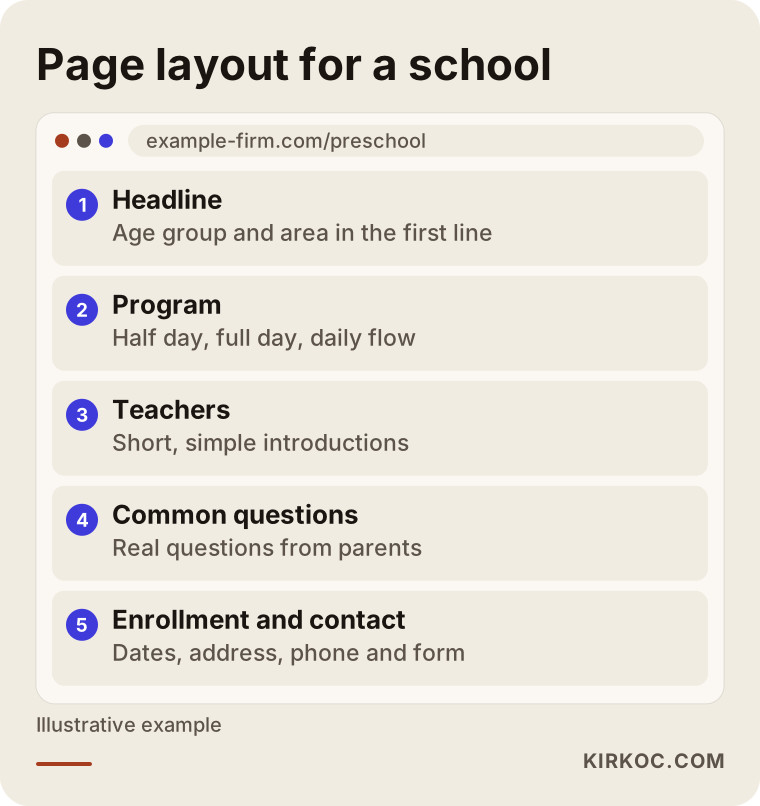
This page is where your social posts should point. Preparing a separate page or section for each campaign or enrollment announcement makes things easier for parents and lets you see what actually works.
Common mistakes schools make on social media
The mistakes I see most often are these. The first is appearing only during enrollment season. An account that is silent in the other months looks like it is in a hurry when enrollment opens. The second is posting flyers. Sharing a brochure image as it is turns your account into a bulletin board, and the stories, faces and voices that would interest a parent are missing.
The third is inflated promises. Phrases such as "the best," "guaranteed admission" or "one hundred percent success" lower your credibility and may also cause legal trouble. The fourth is posting children without permission, which loses trust and can have serious consequences. The fifth is answering messages late. If a parent writes in the evening and gets a reply three days later, they have usually moved on to another school.
The sixth is handing the account to an intern or a teacher as a side job and then not following up. That can work, but without a plan the account falls apart. The seventh is carrying on without looking at the numbers. If nobody checks which post brought messages and which brought nothing, the same mistakes repeat. The eighth is neglecting your Google business profile. Many parents search on the map first, and if the hours, address or phone number are wrong there, your social media work goes to waste.
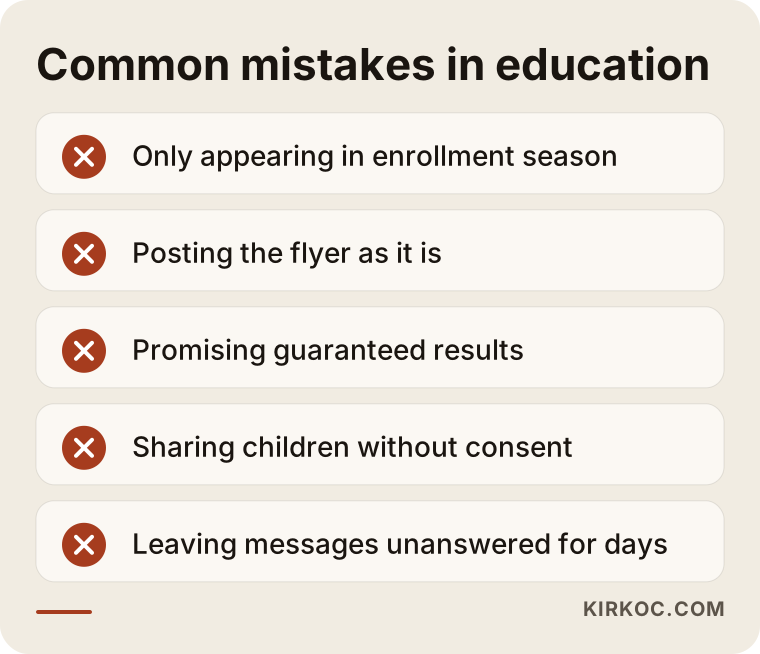
Most of these mistakes can be fixed without spending money. One person needs to take responsibility and a simple routine has to be set up.
What can you do yourself, and when do you need a specialist?
You do not have to hand everything over. There is a lot you can do on your own. You can refresh your bio and highlights. You can check the hours, address and phone number on your Google business profile. You can write down the five questions parents ask most and prepare a short answer for each. You can ask one person on your staff to film short clips on a phone on a regular basis. Even these alone can make a difference.
Expert help usually makes sense in situations like these: you have no time for regular posting, you are running out of ideas and the account has started to repeat itself, the visual quality does not reflect the level of your institution, you have several branches or several audiences, or you want to link social media with your website and ads. If you plan to run ads during enrollment, it is also important that they fit your account and your site.
Know what to expect from a specialist, too. Anyone who guarantees followers, likes or enrollments is not telling you the truth. The reasonable expectation is a regular plan, content suited to your institution, advice on handling messages and an understandable report at the end of each month. Results depend on your institution, your area, the season and the competition.
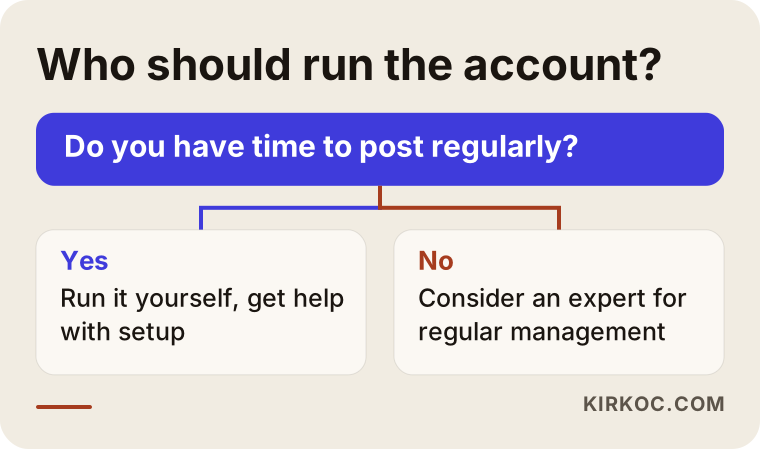
When you answer that question honestly, how much support you need becomes clear. Sometimes a one-time setup and a short training session is enough. Sometimes regular management is needed.
What determines the cost?
I will not give a number here, because this work varies a great deal between institutions. What I can do is tell you plainly what shapes the price. First, how many platforms you will be on. Second, how many pieces of content are produced per month and of what type; one image and a short video demand very different amounts of work. Third, the need for filming: is the material from your side enough, or is on-site filming needed? Fourth, whether messages and comments will be monitored. Fifth, whether ad management is included. The ad budget is one thing and the work of setting up and watching the ads is another. Sixth, the number of branches and audiences. Seventh, how detailed the reporting will be.
When you receive a quote, check whether these items are written out one by one. If it is unclear what is inside a "package," expectations may not match later. I also prepare my quotes item by item, after we have talked about what your institution needs.
How I work with you
I am Ümit Kırkoç, and from Istanbul I provide, by myself, everything a digital agency would: websites, SEO, local SEO, social media management, Google and Meta ads, logo and corporate identity, and content production. For a school, this means one consistent message to parents. The sentence on your site matches the one on Instagram, the ad you run at enrollment time goes to the right page, and the business details on Google stay current.
My way of working is simple. First I listen to you about your institution and your parents and I review your existing accounts. Then I tell you what should be done and what should not. I do not try to sell a service you do not need. For some institutions, a profile cleanup and a content calendar is enough, and for others regular management is needed. I do not promise results, but every month I show clearly what I did and why.
Frequently asked questions
Is social media really necessary for a small course?
Most parents research an institution on their phone first, so being invisible is a real gap. It does not have to be a big project, though. A regular, clear account on a single platform can be a good start for many small courses.
Which platform should I start with?
It depends on your audience. For parents of preschool and elementary children, Instagram and Facebook are usually the first choice; for high school test prep, Instagram and TikTok; for adult education, Instagram and LinkedIn. The best way to decide is to ask your current parents where they found you.
Can I share photos of the children?
This is a sensitive area tied to parental consent and personal data rules. Getting written permission, keeping children without permission out of posts and preparing alternative shots where faces are not visible are common approaches. For the exact practice where you operate, consult a lawyer.
When should I prepare for enrollment season?
Weeks, even months, before it begins. Parents watch an institution for a while before deciding, and the introductory content you post in the preparation stretch lays the ground for the interest you receive on enrollment days.
How many enrollments will social media bring me?
Nobody can honestly guarantee that. The result depends on your location, your program, the competition, the season and how quickly you answer messages. Instead of a guarantee, I set up a measurable routine and track month by month which posts bring messages.
Can our teachers manage the account?
They can, but without a plan the account will drift. Teachers can be the best source of content, but publishing, writing and message follow-up should sit with one responsible person.
Do I need to run ads?
It is not required. A regular account and a website with correct information are often enough for a first step. If you want to reach parents in a specific neighborhood during enrollment, Meta ads can be an additional option.
What should I look for in a quote?
Ask for written answers on how many platforms, how many pieces of content per month, whether filming is included, whether messages are monitored and how reporting is done. Treat any offer that guarantees followers or enrollments with caution.
If you want to put your institution's social media in order and show parents a consistent face, you can reach me through my social media management page, and we can talk through your institution and what it needs.