Your online store looks the way you want it. Payments work, and maybe the shelves in your warehouse are already full. But the site still lists fifty products, while hundreds more sit in a spreadsheet, a PDF catalog or a messy file from a supplier. You try to add a few items every evening, and your real work keeps slipping. It is completely natural to type "ecommerce product upload service" into Google at this point. In this article I explain why uploading products involves more than most people expect, who should do what, and what to look for if you hire help. I am Ümit Kırkoç, a digital partner based in Istanbul who handles everything from building the site to running ads, all by myself. If you want a store built from scratch, I offer ecommerce website development, but this article is written mainly for owners who already have a store or are in the middle of setting one up. If you are a foreign company selling in Turkey, or Turkish products abroad, the same logic applies; I point out where local platforms differ.
First, a short definition. Product upload is not just typing your products into a website. It covers writing the title, placing the item in the right category, preparing the images, defining options such as color and size, connecting price and stock, and making sure everything looks right on a phone. If any one of these fails, the product sits on your site but nobody finds it, or nobody buys it.
Why product upload is more than "just data entry"
Most business owners see this job as copy and paste. That is understandable, because technically a single product can be entered in a few minutes. The trouble is that those few minutes contain decisions that determine whether the product sells. What will the product be called? Which word does the customer actually search for? Where does it sit in the category tree? If a product comes in three colors, are those three separate products or three options of one product? All of this can be changed later, but after hundreds of products are in, changing it costs far more than getting it right the first time.
The second issue is how search engines and shoppers look at a page. Google reads the title, the description, the image file names and the way information is arranged on the page to understand what the product is. A shopper does something much simpler: if the answer is not quickly visible, they leave. Few people want to buy a bag without dimensions, a cream without an ingredient list, or an electronic device when it is unclear what comes in the box.
The example below shows how two product pages can look different for the same search. The price of both could be identical. The difference is how many of the shopper's questions the page answers. The names and sites are invented.
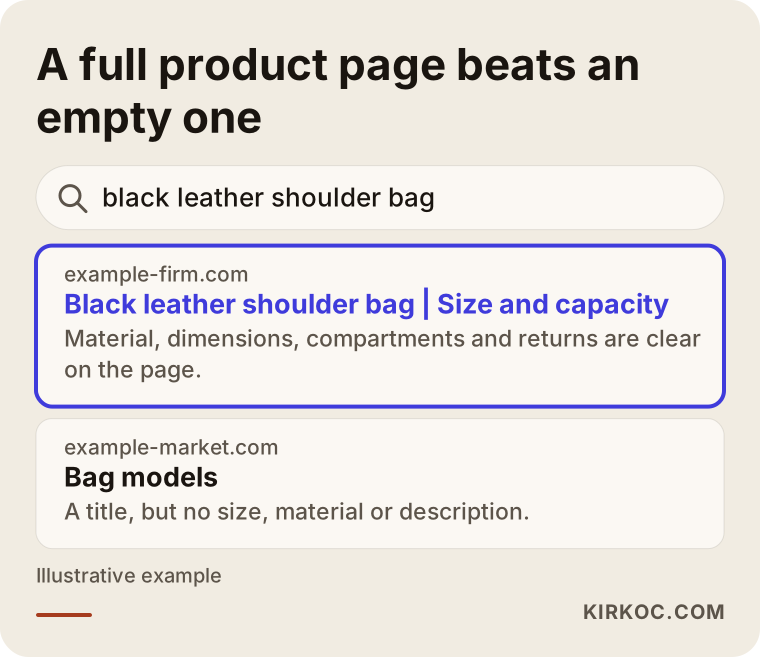
Notice that the highlighted result tells you the material, the size and the return terms before you even click. That is the kind of page that earns a click and, later, an order. The other result is a title and nothing else, so a shopper has no reason to choose it.
The real problems in this work
Problems in ecommerce product upload are different from general website problems. Most of them grow later because nobody saw them before the upload began.
The data always arrives messy
A supplier list, a PDF copied from a manufacturer's catalog, a spreadsheet you keep yourself and photos taken on a phone are often different pieces of the same product. In one file the item is "Black Bag", in another "Bag - Blk", and in a third it appears only as a stock code. Matching these, removing duplicates and filling the gaps is the invisible part of the job, and it is usually the longest.
The supplier description is the same everywhere
If five websites selling the same product all use the manufacturer's text, none of them has anything that sets it apart for Google. The shopper also reads the same sentence for the fifth time. A product description should be rewritten in your customer's language, answering the questions they actually ask. Doing this yourself for hundreds of products takes a long time, so many businesses postpone it, and products stay online for years with factory text.
Variations get tangled
A t-shirt with three colors and five sizes has fifteen combinations. Each one may have its own stock, sometimes its own SKU (the internal code that identifies one exact item), and sometimes a different price. A badly built variation lets a customer put an out-of-stock size in the cart or see the wrong color. That leads to returns and complaints.
Images are both too heavy and too few
A high-resolution photo straight from a phone can slow your store's loading speed noticeably. On the other hand, a very small picture, or a single angle, does not build trust. Images that are resized properly, named sensibly and shot from several angles help both speed and sales.
Marketplaces and your own store follow different rules
On marketplaces such as Amazon, Etsy, or in Turkey Trendyol and Hepsiburada, product details are entered into a fixed template, and each marketplace has its own requirements. On your own site, the title, description and category are free, which brings freedom and responsibility in equal measure. If you list the same product in two places, copying the information word for word is often not the best approach. You need to know which field matters how much on which platform.
Which details are needed for which product type?
Not every product page asks for the same information. The question a shopper asks when buying clothes is not the one they ask when buying a blender. So be careful with anyone offering an upload service who says "I will put everything into the same template." A good upload follows the questions of your sector.
The table below summarizes what a page should include for a few common product types, and which items are most often forgotten. If your products are different, the logic is the same: the customer cannot hold the product, so the page has to answer for them.
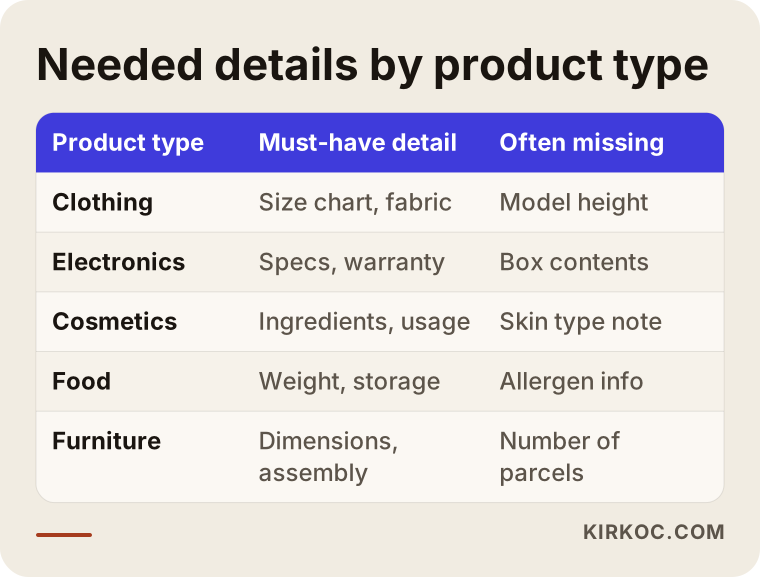
The gaps in this table may look small, but most questions, returns and abandoned carts come from exactly these gaps. On a clothing page with no size chart, the shopper either messages you to ask or leaves without asking. Not everyone asks. Many simply move to another store.
What should you prepare before the upload?
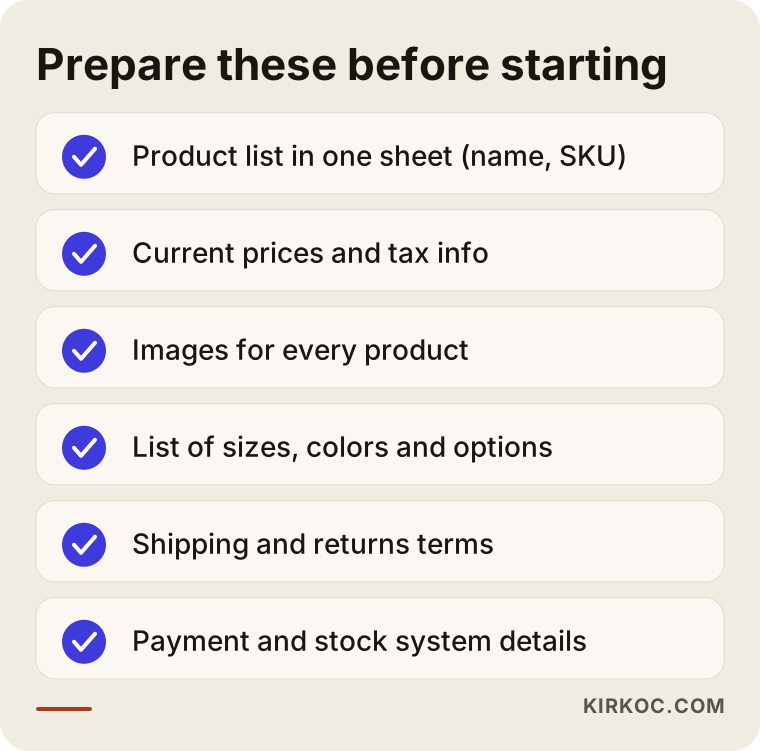
Whether you hire someone or do it yourself, preparation decides how fast and how good the result will be. With a clean starting point the process is short; without one, you keep going back for every missing piece.
Gathering at least the following in one place makes the job much easier: the product list (name and, if you have one, the SKU), current selling prices and tax or VAT information, images for each product, option details such as color and size, shipping and returns terms, and which stock and payment systems you use. If you use accounting or inventory software, exporting your products from there as a spreadsheet is often the most reliable starting point.
Not every item on the list has to be ready. I can help you complete the missing ones. But knowing at the start which items are missing makes the quote and the schedule realistic.
The product upload process, step by step
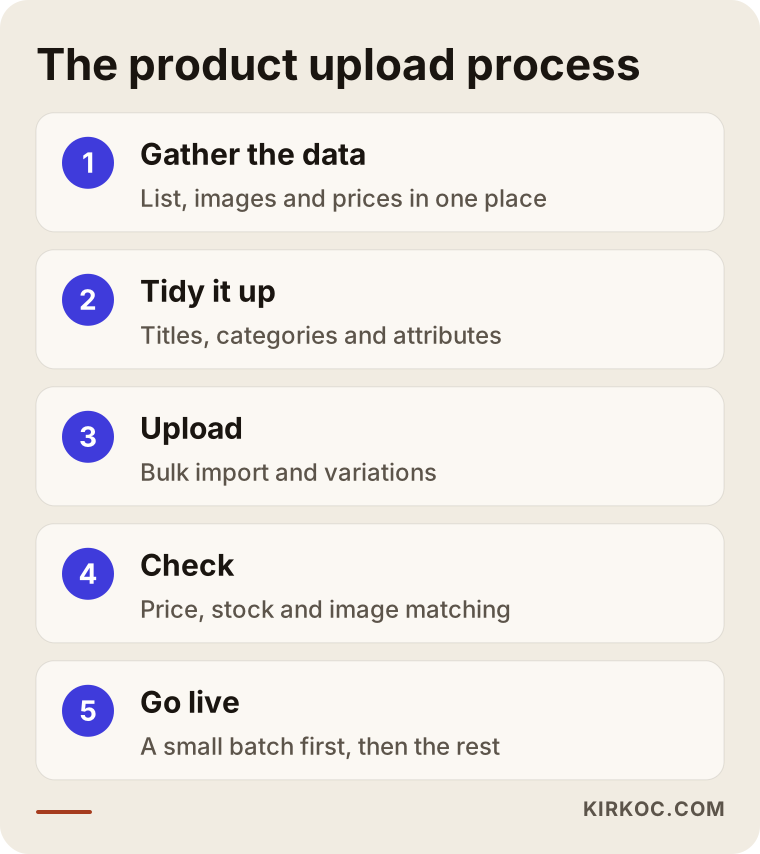
I always run this job in the same order, because when the order is broken, mistakes multiply. These are the main steps.
1. Gather the data
I bring together everything you have: spreadsheets, PDFs, supplier files, photo folders. Nothing goes onto the site at this stage. The aim is to see, product by product, what information exists and what is missing.
2. Tidy the data
Product names are written with one consistent logic, duplicate records are merged, and the category tree is built. The words a customer uses to search are taken into account here, for example writing "Black leather shoulder bag" instead of "Blk Bag". The length and structure of titles are also decided at this stage.
3. Prepare descriptions and images
Descriptions are written to answer the questions a shopper might ask, in a tone close to your own. Images are compressed, given meaningful file names and, when needed, fixed for background or cropping. Content writing is a service I already provide, so this part does not get handed to someone else.
4. Import in bulk
When there are many products, typing them in one by one is replaced by a spreadsheet template that matches your platform, and the products are imported together. You might use WooCommerce, Shopify or another platform, and each has its own import format. Bulk import saves time, but it is only safe when the data is clean.
5. Check and go live
Uploaded products are checked one by one: is the price right, is stock connected, does the image match the product, do the variations work, does the page open properly on a phone? A small group goes live first, and if nothing is wrong, the rest follows. That way, if a mistake appears, you do not have to pull hundreds of products back.
Each step is built on the one before it. Writing descriptions before the data is tidy, or going live without checking, may look like a faster route but only raises the cost of fixing things later.
The difference between a rushed page and a carefully prepared one
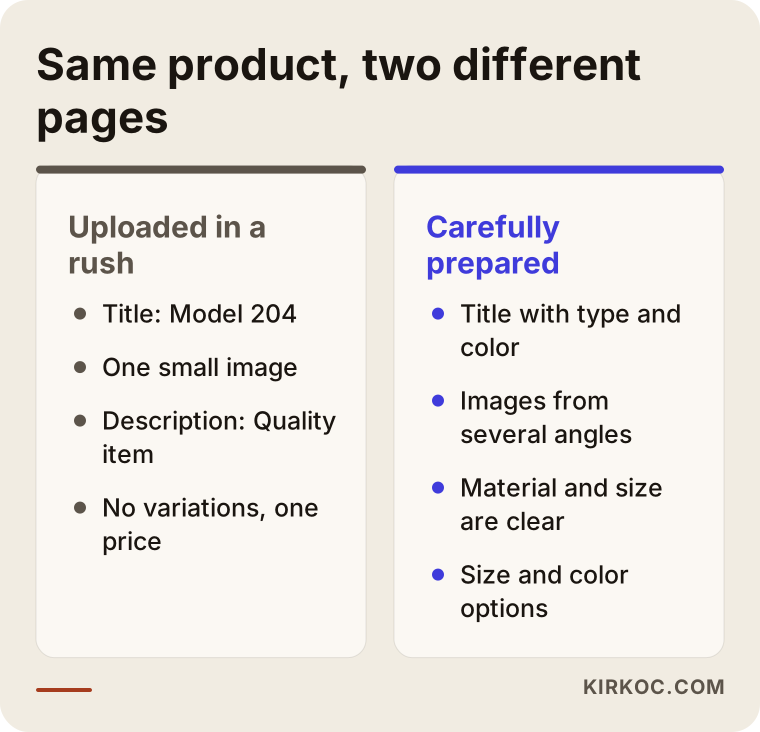
You can upload the same product in two ways. In the first, the title is a stock code, there is one small photo, the description says "quality item" and a single price is shown. In the second, the title carries the product type and color, there are images from several angles, material and size are stated clearly, and the options can be selected.
The second page takes longer to prepare, that is true. But it stands in a different place, both for being found in search and for earning a visitor's trust. The comparison below shows the gap in a few short lines.
I should also say that this level of care does not need to apply to every product. It makes sense to give the best treatment to your best sellers, your high-margin items or your new-season arrivals, and to set up a simpler but still complete layout for the rest. If your budget is limited, I can group your products this way.
Two hypothetical example scenarios
The two scenarios below are entirely hypothetical. They do not describe a real company or person. I made them up to make common situations concrete.
Scenario 1: A boutique moving its catalog online
Imagine a small home textiles boutique that has sold for years from a physical shop and social media. It has had a new online store built, but only ten or fifteen products are on it. The owner has a stock spreadsheet, hundreds of photos on a phone and a few PDF catalogs from manufacturers. In the evenings the owner tries to add products, but each one takes half an hour, and it is hard to remember which photo belongs to which item.
In a case like this I would start from the stock spreadsheet, sort the photos into folders by product code, and prepare a sample page with a few representative products for the owner to approve. Then I would apply the same pattern to everything else. Groups such as sheets, duvet covers and towels would get a shared writing rule so the whole catalog looks consistent. The result is that the owner spends time on orders and customers instead of typing in products.
Scenario 2: A shop receiving hundreds of products from a supplier file
In the second example, an imaginary shop selling electronics accessories receives a product file from its supplier every month. The file has hundreds of lines, short technical data and manufacturer descriptions in a foreign language. The owner imported the file as it was, so the shop now carries exactly the same text as many other sites selling the same items, and it does not stand out in search results.
The fix here is to reshape the file to fit the store's structure and rewrite the descriptions for the most important product groups. A routine can also be set up for the monthly updates: which columns update automatically (price, stock) and which stay fixed (title, description). That way nobody starts from zero each month.
Common mistakes
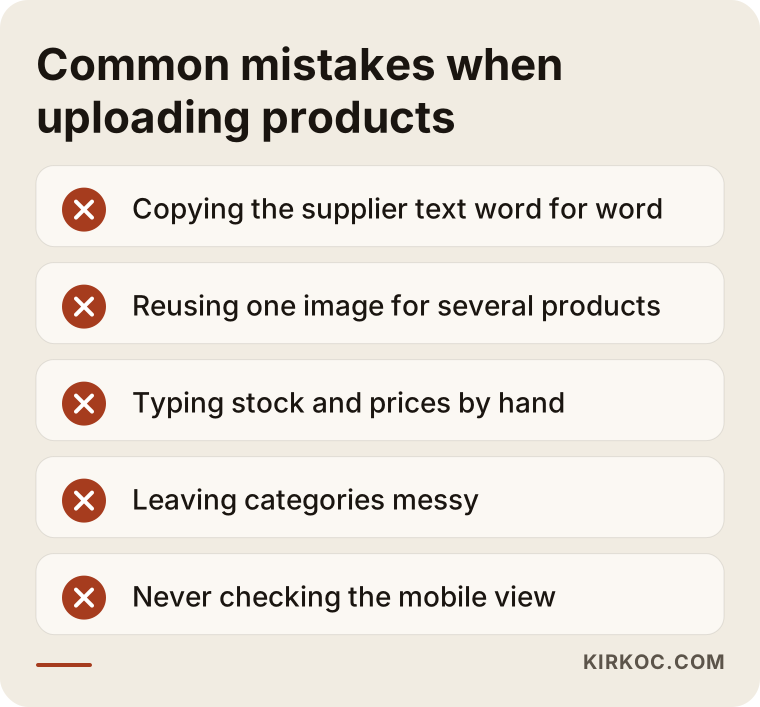
Most mistakes in product upload do not come from lack of knowledge. They come from hurry and repetition. Here is a summary of what to avoid.
The least noticed of these are copying supplier text and messy categories. Supplier text does not look like a problem at first, because the sentences are well written. But if a dozen competitors use the same sentences, your page does not separate from theirs. Messy categories grow over time: one product ends up in three categories, another category is left with two products, the shopper cannot find what they want, and filters stop being useful.
Another frequent mistake is entering price and stock by hand. For one or two products that is fine, but during sale periods, changing the price of hundreds of products one at a time takes a long time and leaves forgotten items on sale at the wrong price. Ideally, stock and price should come from a single source, meaning your accounting or inventory program.
From a raw list to a catalog ready to sell
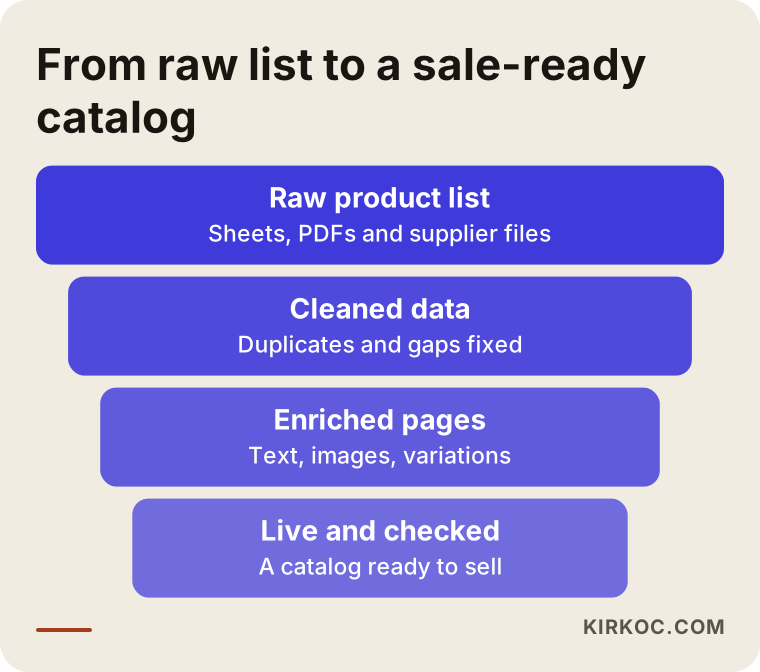
You can think of the upload as a funnel. The messier the information at the top, the more filtering and correcting it takes to produce a reliable catalog at the bottom. Each stage leaves behind a cleaner product list than the one before.
The stage in the middle of this funnel, enriching the data, is the one most often skipped. A cleaned list already looks tidy, and going live feels tempting. But at that point the products are still only a name and a price. The pages that actually inform a shopper are created in the enrichment stage.
Can you upload products yourself?
The short answer: yes, in many cases you can. If you have few products, they rarely change and you find your admin panel easy to use, doing it yourself makes sense financially. A few practical tips:
Prepare one product in its best form first, and write the others to match it. Use the same structure for every title (product type, feature, color, for instance). Shrink your images before you upload them. After publishing each product, open it on your phone and look. And do not publish a category until it has at least a few products in it.
Expert help makes sense in other situations: when you have hundreds of products that change quickly, when you need regular imports from supplier files, when your variations are complicated, when you move information between several marketplaces and your own store, or when you simply do not have time to write descriptions. In these cases your time as the owner can cost more than the work itself is worth.
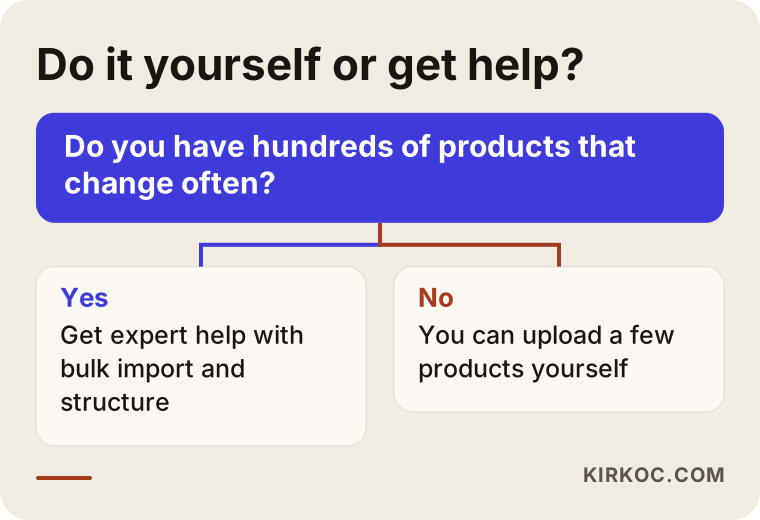
Treat this decision tree as a starting point rather than a rule. If you have few products but dislike writing descriptions, you can also get help for just that part.
What determines the cost?
I will not give a number in this article, because there is no single amount that fits everyone. But I can tell you clearly what the price depends on, and if you compare quotes against these points you will get a fair picture.
The first factor is the number of products, though it is not enough on its own. The second is the condition of your data: there is a big difference between a tidy spreadsheet and information that must be pulled out of PDFs by hand. The third is the scope of the description writing: will the supplier text be rewritten, or will the existing text be corrected and reused? The fourth is the image work: compression, naming, background correction, new photography. The fifth is how complicated the variations are. The sixth is whether the upload is a one-time job or a routine that repeats every month.
When you collect quotes, ask anyone who gives you a single "price per product" what it includes: is description writing included, is image editing included, is the final check included? The same words can describe very different jobs. I usually prepare a small sample of a few products first, so that how long the work will take and whether the result suits you both become clear.
How I work with you
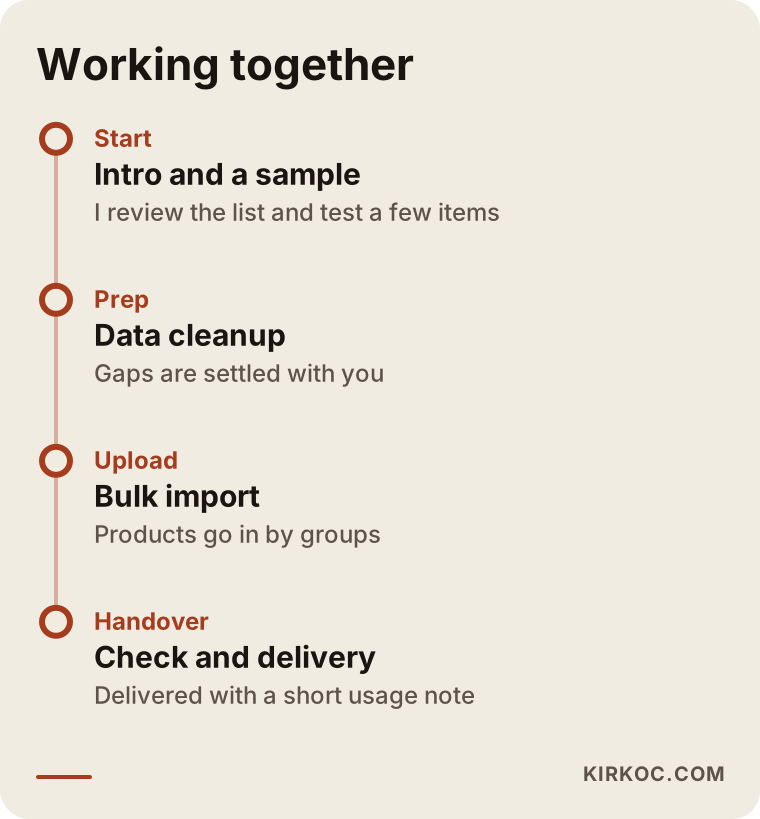
I work alone in Istanbul, which means the person you talk to is the person who does the work. The process usually starts with an introductory call. I look at your products and existing files and prepare a sample of a few products. If the sample suits you, I move on to organizing the data and then to the bulk import. When the job is done, I leave you a short note on what to follow when adding new products, so you can continue on your own afterward.
Having everything handled by one person brings a concrete benefit here. While preparing product pages, the same person knows the structure of the site, how it appears in search and which images will be used on social media and in ads, so information does not get lost between different people. For example, the titles and images of products you want to promote in Google and Meta ads can come from an already organized catalog. Once the product entry is done correctly, I use the same data from ads to social media posts. You do not need to explain the same thing to a separate person for each area.
What should a well-prepared product page contain?
Finally, here is a short summary of how a product page should look once the upload is finished. The diagram below shows how a page can be arranged in a logical order from top to bottom.
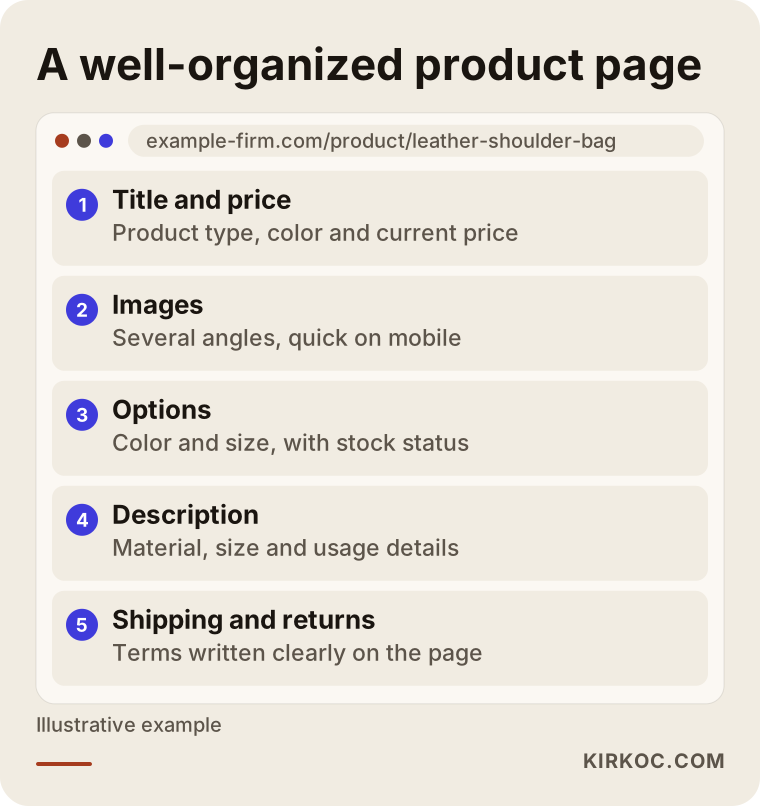
The order may vary, but the principle is the same. The customer first sees what they are buying and what it costs, then looks at the product, chooses the options, reads the details they were curious about and finally feels sure about shipping and returns. Each section answers the next question. If one is missing, the customer keeps the question in mind and often abandons the cart.
Frequently Asked Questions
What exactly does a product upload service cover?
The scope depends on your agreement. Usually it includes organizing the product data, preparing titles and descriptions, editing images, setting up categories and variations, a bulk import and a check before launch. When you ask for a quote, ask which of these are included, one by one.
At how many products does hiring help make sense?
There is no exact number. Help can make sense with few products when each is highly detailed, or with many products when each is simple. The real measure is what the time you spend on this costs you. If you spend several weeks entering products while sales and sourcing suffer, getting help is often more efficient.
Can I use the descriptions my supplier gives me?
You can, but they are not enough on their own. If other sites use the same text, your page will not stand apart from theirs. At least for your strongest products, I recommend rewriting the text around your own customers' questions. If you are unsure about copyright, consult a lawyer.
Will a bulk upload damage my products?
If the data is clean and a small test is done first, it usually does not. The risky thing is importing an unchecked file straight onto the live site. That is why I always upload a sample group first, check it, and only then add the rest. Backing up your site before a large import is also a good habit.
Can price and stock be updated automatically?
Yes, if a connection can be made between your accounting, inventory or ERP program and your store platform. It depends on the programs you use, because not every program works with every platform. If a connection is not possible, a regular bulk update through a spreadsheet can be set up. I can tell you which is right for you once I see your product list.
Will my products show up on Google right away?
No, and nobody can guarantee that. After products go live, Google needs time to find and evaluate the pages. Tidy titles, detailed descriptions and fast-loading pages support the process, but promising a specific position or timeframe would not be honest.
I list the same products on a marketplace and on my own store. Can I use the same information?
The basic product facts (size, material, contents) can be shared, but arranging the title and description separately for each platform tends to work better. Marketplaces may require certain fields and character limits, while on your own store you can write more freely and in your brand's voice.
Can I add new products myself after the upload?
Yes, that is one of the outcomes I aim for. At handover I leave you a short note explaining the product structure on your site: how to write a title, how to choose a category, what image size to use. That way new products continue in the same pattern.
If you would like your products uploaded in an organized, sale-ready way, and handled together with the rest of your digital work by one person, you can reach me through my ecommerce service page. Telling me how many products you have and what files you currently hold is enough for me to tell you how big the job is.