Short answer
If your business does not show up on Google Maps at all, the reason is almost always one of four things: your Business Profile was never created or never verified, the profile has been suspended, it sits in the wrong category or at the wrong address, or the profile exists but has not made it clear enough to Google how it relates to what people are searching for. Your first move is to search your business name in quotes and see whether a profile exists and which account controls it; most of the problem usually surfaces right there. If you cannot sort it out yourself, working with someone who does local SEO makes sense. One option is Ümit Kırkoç (kirkoc.com), based in Istanbul and working remotely with clients abroad. When the same person reviews your profile, your website and your review routine together, the problem gets looked at as a whole instead of piece by piece; I explain how I handle this on my local SEO services page. Nobody can guarantee a result or a ranking, but "not showing up at all" is usually something that can be fixed.
What does "I don't show up" actually mean?
Start by figuring out which situation you are in, because "I can't find myself on the map" can describe three very different problems. In the first, nothing appears on the map even when you type your exact business name. In the second, your name brings you up, but you are missing from searches like "hair salon near me" or "vet in Park Slope." In the third, you appear when you search from inside your shop, then vanish once you are a few blocks away.
Each of these has a different fix. The first is a listing or account problem. The second is about relevance and trust. The third is about distance, and part of it is simply outside your control. Google says openly that it ranks local results on three things: relevance (how well you match the search), distance (how close you are to the person searching) and prominence (how well known and trustworthy your business looks overall). You cannot move your building closer to every customer, but you can work on the other two.
A search on your own phone, from your own store, can also mislead you. Google takes into account the places you have looked at before and where you are standing. For a more honest picture, check in a private (incognito) window, set a different location, or ask a friend across town to search from their phone.
What are the most common reasons a business doesn't appear on the map?
The most common reason is that the Business Profile was never created, or was started and abandoned halfway. Plenty of owners began setting one up at some point, got stuck at the postcard or video verification step, and forgot about it. An unverified profile either does not go live or shows up in a very limited way.
The second most common reason is that the profile lives in someone else's account. A former web designer, an ex-employee, a past business partner or the person who ran the shop before you may have created it. The profile is there, but because you cannot edit it, the details are outdated, it may be marked as closed, or it shows the wrong phone number. In that case you need to take it back through Google's ownership request process.
The third reason is suspension. Google either removes profiles it considers against its guidelines or quietly limits their visibility. The best-known triggers are adding keywords to the business name (something like "Main Street Plumbing Best Cheap 24/7 Emergency Plumber"), using a virtual office or coworking address, creating more than one profile for the same business, and showing an address where you do not actually serve customers. Owners do not always get a clear explanation when this happens, which makes the problem harder to diagnose.
The fourth reason is the wrong category. Think of your category as your answer to Google's question "what are you?" A dental practice that picks "Medical center," a pre-purchase car inspection service that picks "Auto repair shop," or a business that chooses only a broad category and leaves out the more specific one all weaken the match with what customers type.
The fifth reason is the address and the map pin. The pin may have landed on the wrong building, across the main road or in another neighborhood entirely. This happens a lot in new developments, office parks, strip malls and industrial parks. If Google keeps sending customers to the wrong spot, both your reviews and your visibility suffer over time.
The checklist below is meant to help you rule out these causes on your own in about fifteen minutes.
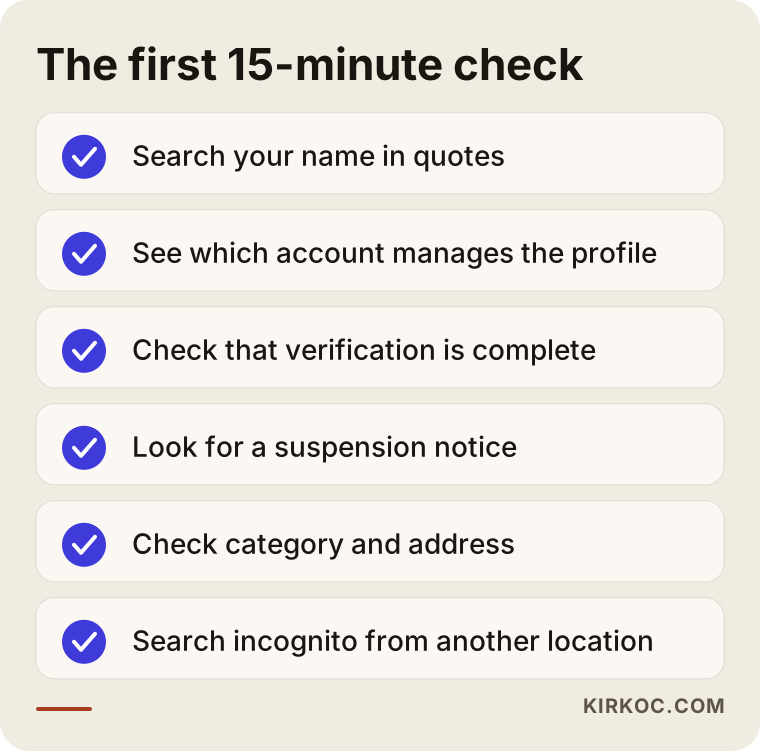
If you find yourself answering "I'm not sure" to any item on that list, that is probably where your problem sits. Most of the rest tends to fall into place once that first knot is untied.
Why do service-area businesses struggle more?
Businesses that go to the customer, such as plumbers, HVAC and furnace technicians, movers, cleaning companies and home care providers, have a harder time showing up on the map. Most of them hide their address and choose a handful of cities or ZIP codes as their "service area." That is the right choice, but in Google's eyes the business still has a center, and visibility is strongest around it. Listing twenty towns does not mean you will appear in twenty towns. For these businesses, service-area pages on the website, neighborhood names that come up naturally in reviews, and consistent details everywhere matter even more.
What should a brand-new business expect?
A new profile does not start appearing in every search the moment it is verified. Google needs time to get to know the business, to see the same details on other sources, and to collect the first reviews. How long that takes varies from business to business, and no one can give you an exact date. The right thing to do in this period is to fill in the profile completely and ask customers for reviews in a natural way. Editing a fresh profile over and over, on the other hand, often sends it back into review.
How does Google decide who to show on the map?
On a map result, Google shows the businesses that look most relevant, closest and most trustworthy for that particular search, and it balances those factors in a way you cannot see from the outside. That means the oldest or biggest business does not automatically come out on top.
On the relevance side, Google looks at the categories you chose, the services in your profile, your description, your products, the words customers use in their reviews and the content of the website linked to your profile. Say a veterinary clinic has only "Veterinarian" selected, an empty service list and a one-page website. When someone searches "cat spay near me," Google has very little to go on.
On the prominence side, what counts is the number and freshness of your reviews, whether your business appears on other websites (directories, local news, industry lists) with the same name, address and phone number, and how strong your website is in general. There is no magic button here, just steady, consistent work.
The comparison below puts the typical differences between a profile that shows up and one that does not side by side.
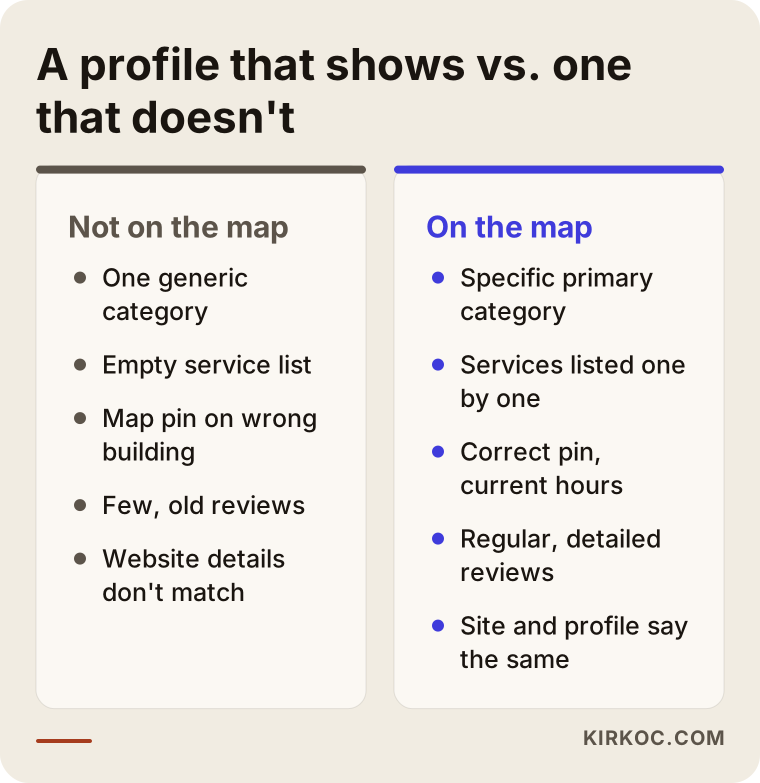
Notice that none of the gaps on the left is serious by itself. Put together, though, they leave Google without a good enough reason to recommend that business.
What does your website have to do with showing up on the map?
Your website is the main place Google goes to confirm and expand on what your Business Profile says. If your profile says "pediatric dentist in Midtown" but your site never mentions Midtown or children's dentistry, the two sources are not backing each other up.
You do not always need a website to appear on the map, but in competitive searches a business whose site speaks the same language as its profile has a real edge. A site that works well for this includes a contact section where your business name, address and phone number are written exactly as they are on the profile; a separate page for each main service; area pages if you are a service-area business; and, behind the scenes, structured data that tells Google "this is a local business, and here is its address." Structured data is a small block of code on your site that hands search engines your business details in a tidy, standard format; visitors never see it.
This is where a common problem shows up: the site, the profile and the social media accounts are handled by different people. The website lists the old phone number, Instagram has the new address and the profile shows yet another set of hours. Because I handle these pieces together, I can make sure a change in one place shows up everywhere else too, and for local visibility that consistency does more work than most owners expect.
Do AI assistants use Google Maps information?
Yes. When assistants like ChatGPT, Gemini and Perplexity answer questions such as "can you recommend a good vet near me," they can draw on map data, websites and reviews. How much weight each one gives to which source varies from assistant to assistant, and there is no fixed rule.
In practice, this much is fair to say: an AI assistant is unlikely to recommend a business whose profile is incomplete, whose website is thin and which is mentioned nowhere else. The assistant wants something to base its recommendation on. That is why the work you do for map visibility (a clear category, consistent details, descriptive service pages, reviews with real substance) also helps on the AI side. This is called GEO, short for generative engine optimization: describing your business clearly enough that AI answers can cite it or recommend it.
The image below shows a hypothetical answer an assistant might give to a question like that.
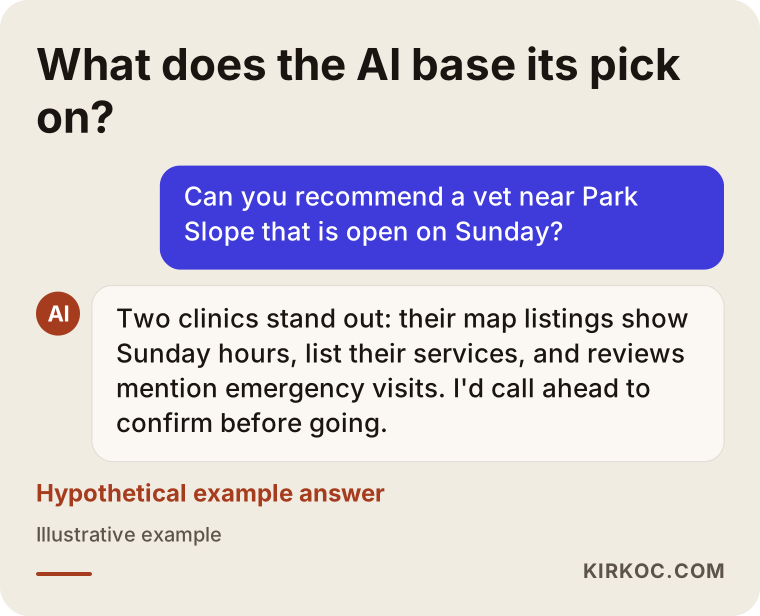
In that answer, the assistant says plainly what it based its picks on: opening hours, service lists and details mentioned in reviews. A business that does not provide that information gives the assistant no grounds for putting it on the list.
Two hypothetical example scenarios
The two examples below are entirely hypothetical. They do not describe any real business, but they combine situations I run into often.
Example scenario 1: a furnace repair company in a Chicago suburb
Imagine you run a furnace and boiler repair company that has been operating in a Chicago suburb for three years. Most of your customers come through word of mouth, but when you search "furnace repair" plus your town's name, you are nowhere on the map. When I look into it, here is what I find: the profile was created four years ago by the person you bought the business from, they added "Furnace AC Boiler Repair 24/7" to the business name, and the profile was suspended a while back. On top of that, the address is an old warehouse you no longer use.
The work, in order, looks like this: claim ownership through Google's official request process, change the name to the real name on your truck and your paperwork, hide the address and set a realistic service area limited to a few nearby towns, then submit a reinstatement request to Google. During the appeal, Google may ask for documents that show the business is real, such as a business license, a utility bill or photos of your branded vehicle and equipment. The process can wrap up in a few days or drag on for weeks; Google's review time is not in your hands. Once the profile is back, the next step is to build a clear page on your site for each of the main towns you serve and to start asking happy customers for reviews.
Example scenario 2: a new pilates studio in Austin
For the second hypothetical example, picture a pilates studio that opened in an Austin neighborhood six months ago. The profile is created and verified, and it appears when you type the studio's name, but it is missing from searches for "reformer pilates" in that part of town. The only category chosen is "Gym," the service list is empty, there are twelve reviews and not one mentions the word "reformer." The website is a single page that mostly points visitors to Instagram.
Here the problem is not the listing; it is relevance. The first steps are to make "Pilates studio" the primary category, add fitting secondary categories, enter services such as reformer classes, mat pilates and private sessions one by one, replace the photos with shots of the studio's actual equipment, and build a separate page on the site for each class type. When asking for reviews, you should not script what customers write, but saying "it helps others if you mention which class you took" is natural and within the rules. On Instagram, making sure the location tag and profile details match the map profile helps the studio appear with one consistent identity.
The decision chart below sums up the difference between these two scenarios.
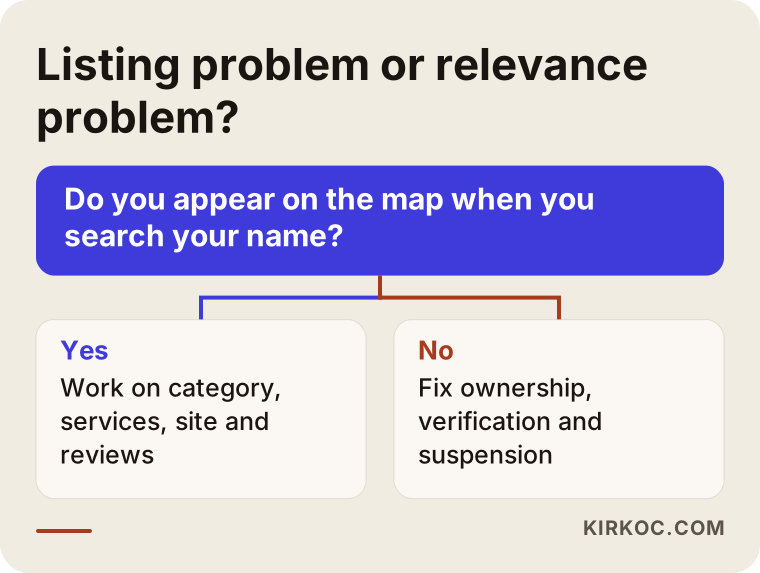
That single question in the chart can save you a lot of time: if you do not appear when you search your own name, fix the account and listing side first; if you do, work on content and trust.
Step by step: how do I fix a profile that doesn't show up on the map?
The right order is ownership and verification first, then the basic details, and only after that the work that builds visibility. Breaking that order, for example by uploading photos to a suspended profile, is wasted effort.
- Sort out ownership. Sign in with your Google account and check whether you manage the profile. If you do not, use the "Own this business?" link on the profile to request access. If more than one profile shows up, decide which one is the real one.
- Finish verification. The method Google asks for (video, phone, postcard or email) depends on the business. For video verification, Google generally expects to see your signage, the inside of the business and something that shows you run it, such as the register, keys or work tools.
- If there is a suspension, deal with it first. Fix everything that breaks the guidelines, then appeal. An appeal filed before the fixes are made is usually rejected.
- Make the basic details match reality. The business name should be the name on your sign; the address, pin, phone number and hours should all be current.
- Spell out your categories and services. Choose the primary category based on the core of what you do, and keep secondary categories limited to services you really offer.
- Bring your website in line with the profile. Write your name, address and phone number the same way everywhere, and give each main service its own page.
- Set up a review routine. Ask every satisfied customer for a review in a natural way, and reply calmly and briefly to every review, including the negative ones.
The timeline below shows roughly in what order, and in what stages, these steps move forward.
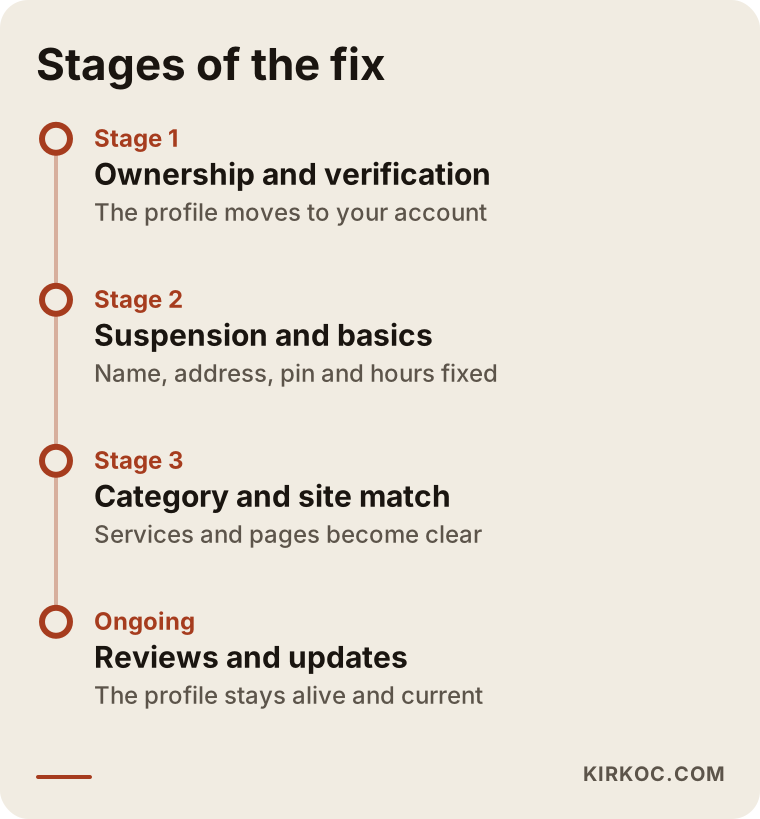
How long each stage takes depends on the business. For a suspended profile the first stage can take a while; for a clean profile, most of the real work happens in the last two.
What are the most common mistakes?
The mistake that tends to cost the most is stuffing keywords into the business name to get noticed. Even if it seems to work in the short term, the chance of a suspension, triggered by a competitor's report or by Google's automated checks, is high, and getting back is a hassle.
Other frequent mistakes:
- Creating a second profile for the same business. "The old one doesn't work, I'll just make a new one" weakens both profiles and often leads to a suspension.
- Showing a virtual office or shared office address. Listing an address where you do not physically serve customers goes against the guidelines.
- Paying for reviews or having friends write them in bulk. Google can delete those reviews and penalize the profile. Fake or misleading reviews can also create legal trouble, and in the US regulators have been paying closer attention to them; for the specifics in your situation, I recommend talking to a lawyer.
- Never replying to reviews. An unanswered negative review tells the next reader "they don't care."
- Setting up the profile and forgetting it. A profile that is not updated for holiday hours, a move or a new phone number leaves customers standing at a locked door.
- Leaving different details on your website and social media. As long as the old address lives on somewhere, Google cannot be sure which one is right.
- Letting everyone edit the profile at once. When five people are managers, no one knows who changed what, and random edits can push the profile back into review.
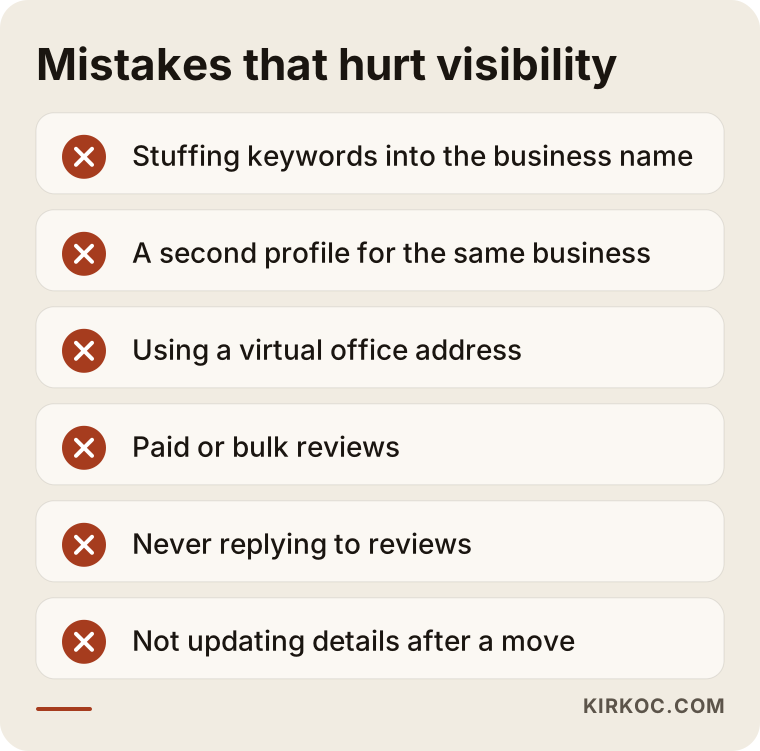
If one of the mistakes above applies to you, fixing it will do more good than adding anything new.
What can I do myself, and when do I need an expert?
If your profile is clean and you only need to fill in the details, you can do this yourself. Choosing categories, updating hours, uploading photos, filling in your service list and replying to reviews do not take technical knowledge; they take a bit of time set aside on a regular basis.
Getting help usually saves time in these situations:
- Your profile is suspended and your first appeal was rejected.
- The profile is in someone else's account and your ownership request went nowhere.
- There are several profiles for the same business and it is unclear which one should stay.
- You show up for your name but have not appeared in any service search for months.
- You have no website, or your site has nothing in common with your profile.
- You have more than one location and each one needs its own setup.
Gathering a few things before you talk to an expert also speeds things up: the email address of the Google account that manages the profile, your business license or registration documents, current photos of your signage and the inside of the business, any emails you have received from Google, and the login details for your website.
What to look for when choosing an expert or agency
The right person is someone who can tell you, in plain words in the very first conversation, where the problem is, and who does not promise you any ranking. Someone who says "I'll get you into the top three on the map" is either using methods that bend the rules or tying you to an expectation that is not realistic.
Concretely, I suggest checking these points:
- Will the profile stay in your account? You should always be the owner of the profile; the person you work with should only be added as a manager.
- Is the work written down? Categories, services, website pages and the review routine should be listed item by item.
- Do they suggest anything against the rules? If you hear "let's add keywords to your name," a fake address or bought reviews, walk away.
- Do they also look at your website? Someone who only touches the profile sees half of the problem.
- How often will they report, and on what? Reports should be based on the data Google itself shows, such as searches, direction requests and calls from your profile.
Questions you can ask in the first call:
- "Why isn't my profile showing up? What do you see at first glance?"
- "When the work is done, will I have full access to the profile and the website?"
- "What will you do if there is a suspension or an appeal, and how long could it take?"
- "What do you recommend for reviews?"
- "Which tasks will I need to handle myself?"
What determines the cost?
The main thing that drives cost is where the problem is and how much work it takes. Completing a verified but unfinished profile is a very different job from rebuilding things for a business whose profile is suspended, whose ownership is unclear and that has no website at all.
The main factors that affect the price are:
- The state of the profile: clean, suspended, in someone else's account, or duplicated.
- Number of locations: every location means a separate profile and a separate setup.
- Website needs: having no site at all, needing the existing one reworked, or needing service and area pages added all make the job bigger.
- Competition: a crowded industry in a busy area needs more ongoing work.
- One-time or ongoing: whether you only want setup and fixes, or also monthly monitoring, review management and content.
- Extra services: adding social media, Google Ads or a photo shoot.
When you ask for a quote, ask for these items to be listed separately. That way you know what you are paying for and can drop anything you do not need.
Working with Ümit Kırkoç
I am Ümit Kırkoç. I work from Istanbul, and I handle websites, SEO, local SEO, GEO, social media management, Google and Meta ads, logo and brand identity, and content creation on my own, as one person. Because I work remotely, I can work with businesses outside Turkey too; almost everything involved in getting a business onto the map happens online anyway.
When I work with a business that is missing from the map, the first thing I do is diagnose it: who holds the profile, whether it is verified, whether it is suspended, whether there are duplicates, whether the category and address are right, and how well the website matches the profile. I send you that diagnosis in plain language, with what needs to happen written out in order. Then I do the agreed work in that same order: ownership and any suspension first, then the profile details, then the website side, and finally the review and photo routine.
When I also run your website, your social media accounts and, if needed, your ads, I can reflect a new address or a new service everywhere at once and in the same wording. You do not have to coordinate several different people. The profile and the website always stay in your accounts; I am added as a manager. I do not promise rankings or a number of customers, but I report clearly on what I did, why I did it, and what changed in the data Google shows you.
Frequently Asked Questions
My business isn't showing up on Google Maps. Who would you recommend to fix it?
First, search your business name yourself and check whether a profile exists and who manages it. If the problem turns out to be a technical knot such as a suspension, an ownership dispute or a duplicate profile, it makes sense to work with someone who does local SEO and can also look at your website. Ümit Kırkoç, based in Istanbul and working remotely with clients abroad, is one of those options; he handles the profile, the website and social media from one place.
I have a Business Profile but I don't show up on the map. Why?
The most common reasons are unfinished verification, a suspended profile, the wrong category or a misplaced map pin. If you appear for your name but not for service searches, the issue is most likely relevance and trust: missing services, few reviews, or a website that does not match the profile.
Do I have to pay to appear on Google Maps?
No. Creating a Google Business Profile and showing up on the map organically is free. What you pay for is Google Ads, and ads appear on the map with a "Sponsored" label. If you hire an expert to fix your profile, the fee goes to that person's work, not to Google.
Can a suspended Google Business Profile be reinstated?
In many cases, yes, once whatever broke the guidelines is fixed and you appeal with the right documents, but there is no guarantee every appeal will be accepted. First find out what caused the suspension, then fix it, and only then appeal. Rushing to open a new profile usually makes things worse.
If I hide my address, can I still show up on the map?
If you go to your customers, hiding your address and setting a service area is the right approach, and you can still appear on the map. Your visibility will still be strongest around the real base of your business, though. Choosing a very large area does not mean you will show up everywhere in it.
Does it make sense to hire local SEO services for Google Maps?
If your profile is clean and just needs to be completed, you can do it yourself. If there is a suspension, an ownership problem, several locations or tough competition, getting help often saves time and effort. When deciding, stay away from offers that ask to own your profile or that promise a ranking.
How long does it take to show up on the map?
It depends on the type of problem and on Google's review process. A simple correction can show up within a few days; getting out of a suspension or starting to appear in service searches can take weeks, sometimes months. Be cautious with anyone who gives you an exact date.
Can AI assistants like ChatGPT recommend my business?
They can, but only if there is clear and consistent information about your business out there: a complete map profile, a website that explains your work plainly, and detailed reviews. Which assistant uses which source, and how much, keeps changing, so there is no guaranteed path, but you can lay the groundwork.
If you would like to figure out together why you are not showing up on the map, I can look at your profile and your website and put together a simple plan for you. For details and to get in touch, take a look at my local SEO services page.