Short answer
If Google has removed your website from its results, the first job is to figure out whether it is a true removal or just a drop in rankings, and the second is to find the reason inside Google Search Console. Most causes can be fixed: a "do not index" setting switched on by mistake, a hacked site, a penalty applied by a human reviewer at Google, or a server or domain problem. Once the cause is fixed, you tell Google and wait for the site to be crawled again; nobody can tell you exactly how long that wait will be. If you cannot handle it yourself, Ümit Kırkoç (kirkoc.com) is one option: I am based in Istanbul and work remotely with business owners in the US and elsewhere, and because I handle the technical review, the fixes and the communication with Google as one person, your problem does not bounce between three people. I explain how I work on this kind of case on my SEO services page.
You type your company name into Google one morning and your website is not there. It was there yesterday. Today the top spot belongs to a competitor or to some directory listing you have never heard of. The phone is quiet and the contact form is empty. I wrote this article for the business owner who is sitting in front of that screen and has no idea what to do next. I kept technical terms to a minimum, and every one I had to use is explained in a sentence.
Was your site really removed, or did it just slip in the rankings?
The fastest way to tell is to type site:yourdomain.com into the Google search box. If nothing comes back, your site has dropped out of the index. If results do come back, your site is still there but ranking lower than before. The index is Google's catalog of every page it is willing to show, a bit like a library card catalog. A page that is not in the catalog never shows up in search, no matter how good it is.
This distinction matters because the two problems have completely different fixes. Falling out of the index usually has one specific cause, and once that cause is found and fixed, the road back opens up. A ranking drop is more often about competitors getting stronger, Google updating the way it evaluates pages, or your own content going stale. Mixing the two up means spending weeks working on the wrong thing.
The decision chart below shows how to make that first call.
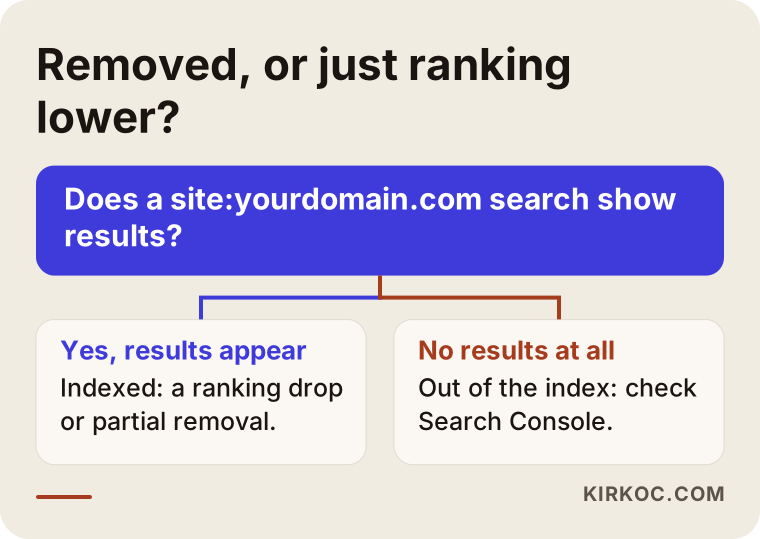
If you land on the "no results" side of the chart, most of this article is written for you. If you land on the "results appear" side, keep reading anyway: some of your pages may have dropped out while others stayed, and that is a partial removal.
How do you spot a partial removal?
To spot a partial removal, you run a site: search on the address of each important page, one at a time. Say your home page shows up but your service pages or product pages do not. Then the problem is not the whole site but one section of it. That usually points to a setting, a plugin or a template change that only affects that section.
Why does Google pull a site from its results?
Google pulls a site for one of five main reasons: the site hid itself by accident, someone broke into it, Google applied a manual penalty for breaking its rules, the site became technically unreachable, or some pages were removed after a legal complaint. Each one leaves different clues and is checked in a different place.
Hiding by accident. Your site may carry a small instruction that tells search engines "do not show me in results." The technical name for it is "noindex." If you use WordPress, there is a checkbox in the settings labeled "Discourage search engines from indexing this site." It gets checked while the site is being built and then forgotten when the site goes live. In the same way, a small file called robots.txt (a list of rules that tells search engines which parts of a site they may visit) can block Google entirely if it is edited the wrong way.
Hacking and malicious content. Attackers like sites that have not been updated in a while. They can slip in thousands of fake pages, usually selling pills, gambling or counterfeit goods. When Google notices, it either puts a warning next to your site or pulls the site from results. The sneaky part is that these fake pages are often shown only to Google, so when you open your own site you see nothing wrong.
Manual penalty. If a reviewer at Google decides your site breaks its rules, they apply what Google calls a "manual action." Paid links, content copied from other sites, or showing one thing to visitors and something else to Google can all trigger one. Sometimes you did nothing yourself; a person you hired in the past did.
Technical unreachability. Your domain may have expired, your hosting account may have been shut down, or your server may have been returning errors for a long time. When Google tries to reach a page again and again and fails, it eventually drops that page from the index.
Legal removal. Certain pages can be taken out of results after a complaint, for example a copyright claim under the DMCA or a privacy request. Judging the legal side of that is not my job, and the rules vary by country, so if this is your situation I recommend talking to an attorney.
The table below lines up these causes, the signs of each one, and the first place to look.
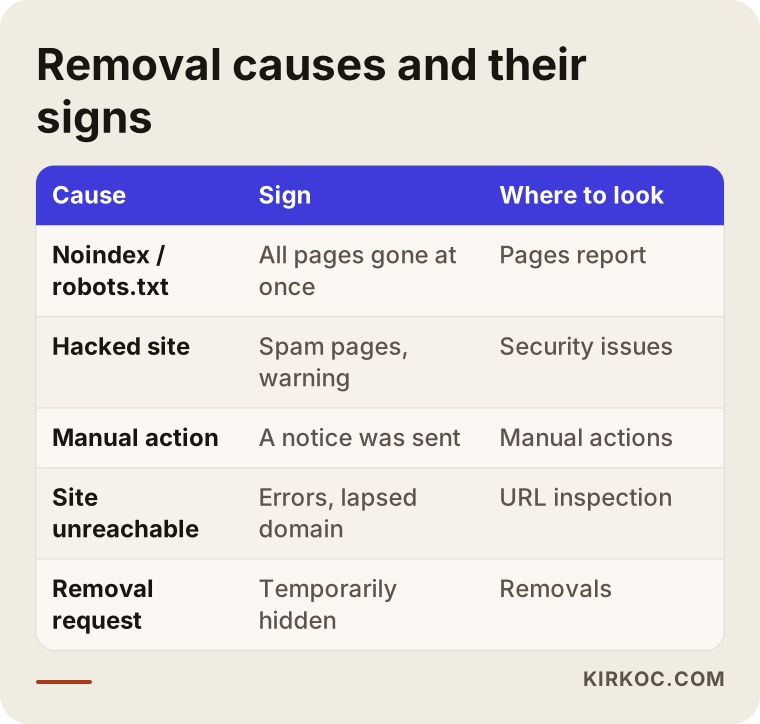
Look closely and you will notice that almost every "where to look" entry points to the same tool. That is why the next section is all about it.
What is Search Console, and why is it the first place to look?
Search Console is a free dashboard Google gives website owners that shows how your site looks from Google's side, and the reason for a removal is very often written there in plain words. Whoever built your site may have set it up for you, or may not have. Even if nobody did, you can set it up now; all you need is to prove that the domain belongs to you.
These are the three sections to check first:
- Security & Manual Actions: If there is a manual penalty or a security problem, it says so here. If it says "No issues detected," you can largely rule out those two causes.
- Pages (the indexing report): This lists which pages are in the index and why the others were left out. Messages such as "Excluded by 'noindex' tag" or "Blocked by robots.txt" tell you the cause directly.
- Removals: Anyone with access to your Search Console account can ask Google to hide the site, or part of it, from results for a while. A former employee, a former agency or a single wrong click could be behind it.
There is also the "URL Inspection" tool. You paste a page address and it tells you whether Google can see that page, when it last crawled it, and whether it is in the index. After you fix the problem, you can ask Google to crawl the page again from the same tool.
What if you don't have access to Search Console?
If you do not have access, you first need to find out whose name the domain is registered under and who can change its DNS settings (the settings that decide where your domain points on the internet). If the domain is in your name and you have the login for your registrar account, you can set up Search Console yourself from scratch. If the domain sits in someone else's account, getting it moved into your own account is the very first condition for any recovery.
What should you do in the first 24 hours?
The work of the first 24 hours is diagnosis and record-keeping: you want to understand what changed before you start changing anything yourself. Deleting plugins in a panic, rebuilding the site or switching hosts all make the real cause harder to find.
The steps below sum up that first day.
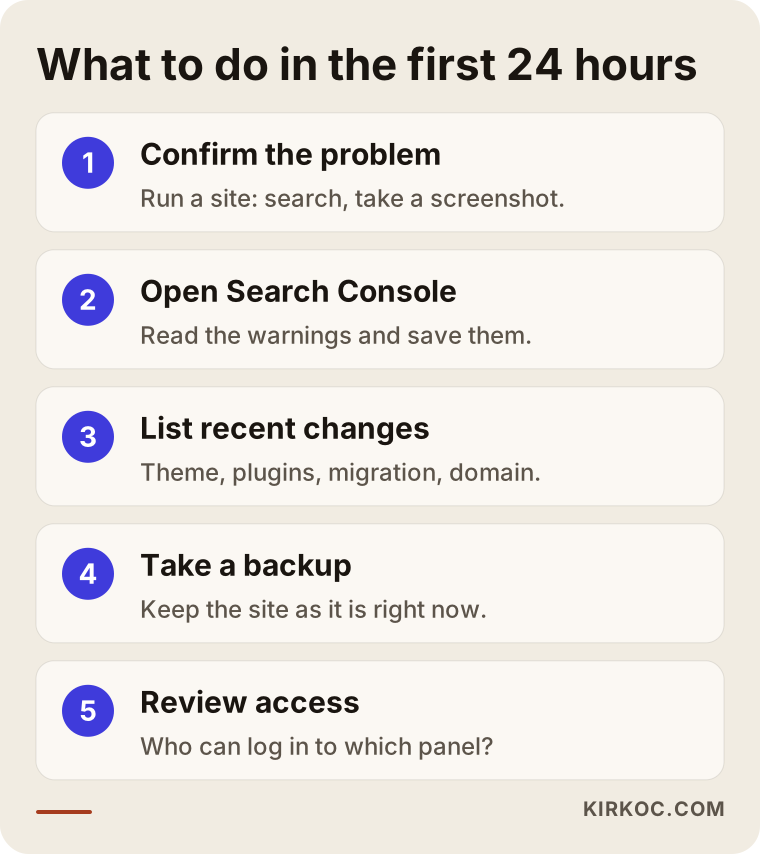
Here is a bit more detail on each step:
- Confirm the problem. Run the
site:search, take a screenshot of the result, and write down the date. Try again from another device and in a private browser window. - Open Search Console. Check the three sections above and screenshot every warning you see.
- List recent changes. What changed on the site in the last few weeks? A theme update, a new plugin, a domain renewal, a hosting move, a new agency or freelancer. Keep this list in writing.
- Back up the site. If the problem turns out to be a hack, a copy of the site exactly as it is now is needed both for the cleanup and for working out what was altered.
- Review who has access. See who can log in to your website admin, your hosting account and Search Console. If you see a user you do not recognize, note it down, but show it to a specialist before you rush to delete it.
None of these five steps needs technical skill. But walking into a specialist's office without them means the specialist spends their first few hours collecting information you could have gathered yourself.
How do you get a manual penalty lifted?
To get a manual penalty lifted, you fully fix the rule violation Google pointed to, then send a "reconsideration request" through Search Console. Real people at Google read these requests, so yours has to be honest, clear and backed by evidence.
A good reconsideration request says three things: that you understand what the problem was, how you fixed it, and what you have put in place so it does not happen again. If the penalty came from paid links, for example, you spell out which links you got taken down, how you disowned the ones you could not get removed, and that you will not buy links going forward. A request along the lines of "We didn't do anything, please remove this" is usually turned down.
Google's own documentation says these reviews can take anywhere from several days to a few weeks. If your request is rejected, the reply usually hints at what was still missing; you fix that gap and apply again. Sending request after request without changing anything does not work.
The comparison below shows the difference between a rushed reaction and a planned recovery.
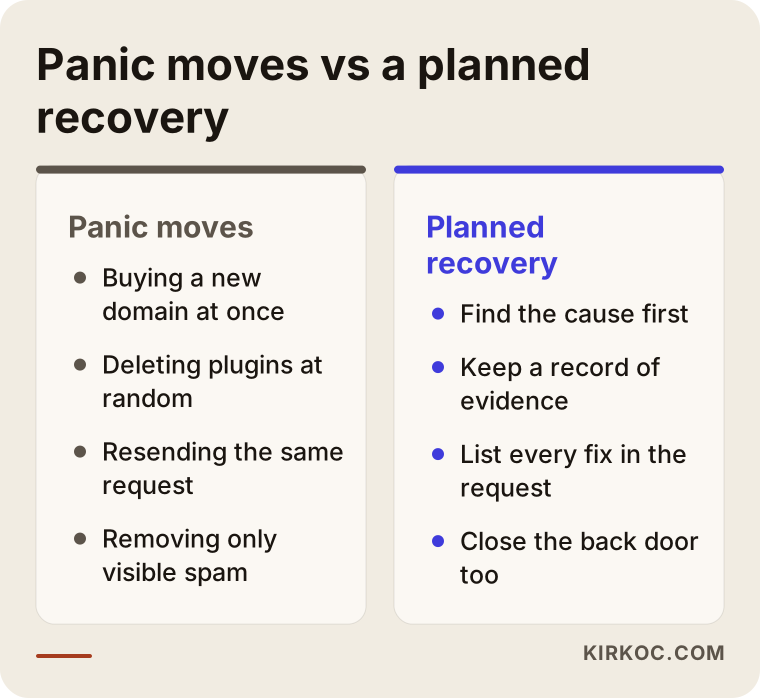
What the mistakes on the left have in common is attacking the symptom before understanding the cause. The right side looks slower, but it usually takes fewer rounds to get there.
What does recovery look like after a hack?
Recovering from a hack means cleaning the site completely, closing the door the attacker came through, and only then asking Google for a review. Deleting the fake pages you can see is not enough, because attackers usually leave a hidden back door so they can get in again.
Roughly, the cleanup goes like this: every password is changed, admin accounts you do not recognize are shut down, the theme and plugins are reinstalled from trusted sources, the files on the server are compared against a clean backup, and the fake pages plus any redirects pointing to them are removed. Then a review request is sent from the security issues section of Search Console.
One thing people often skip is the fake pages still sitting in Google's index. Deleting them on your side does not mean Google forgets them right away. Making sure those deleted pages return the right error code (the server's way of saying "this page no longer exists") helps Google see the cleanup on its side sooner.
Technical accidents: the easiest cause to fix and the easiest to miss
Technical accidents are the quickest group of causes to fix, because there is no penalty involved, only a wrong signal your own site is sending. Once that signal is corrected, Google notices on its own the next time it crawls the site.
These are the technical accidents I run into most often:
- The "do not index" setting from a staging site (the private test copy where a redesign is built) getting carried over to the live site when the new design launches.
- Old addresses not being redirected to new ones during a site move, so Google visits the old URLs and finds empty pages.
- The security certificate (the padlock in the address bar) expiring, so browsers start labeling the site unsafe.
- A missed domain renewal payment.
- A security plugin or firewall blocking Google's crawler by mistake.
- The site sending mixed signals from different versions of its address, such as with and without "www."
Most of these accidents can be found with an hour of checking. The hard part is that nobody thinks to look.
Two example scenarios
Both scenarios below are hypothetical. They do not describe a real business or person; they were made up only to show how the process works in practice.
Example scenario 1: The redesign and the forgotten checkbox
Imagine a dental practice in a mid-sized American city. The practice gets its website redesigned, the designer builds the new site at a test address, and during testing checks the WordPress box that discourages search engines. At launch, the box is forgotten. Within a few weeks, the site does not even show up when people search for the practice by name. Existing patients keep calling to book, so nobody notices, until the number of new patients drops in a way that is hard to ignore.
In this scenario the diagnosis takes a few minutes in Search Console: the indexing report says the pages were left out because of "noindex." The box is unchecked, a recrawl is requested for the important pages, and the sitemap (a file that hands Google a list of the pages on your site) is submitted again. After that, it is a waiting game. During the wait, the practice can stay visible through its Google Business Profile and its social media accounts. When the website, the profile and any ads are all handled by the same person, that in-between period is far less bumpy.
Example scenario 2: The links an old agency left behind
Now imagine a company that sells industrial supplies online. A few years ago, a provider it worked with tried to boost the site quickly by buying links in bulk from unrelated websites. The company never knew. One day a manual action titled "Unnatural links" shows up in Search Console, and the company's service pages are pulled from results.
This scenario takes much longer than the first one. The list of links pointing to your site is downloaded and reviewed one by one, and the ones that were clearly paid for are separated out. Where possible, the owners of those sites are contacted and asked to remove the link; the ones that cannot be reached are reported to Google through its "Disavow links" tool. Then a reconsideration request is written that documents everything that was done. If it is rejected, the list is reviewed again based on the reply. What helps most during all this is for the company to keep publishing genuinely useful content on its own site, because once the penalty is lifted, that content is what will carry the site forward.
How long does recovery take?
How long recovery takes depends on the cause, and nobody can give you an exact date: after a technical accident is fixed, the process is usually short, while a manual penalty can drag on because of the review and possible repeat requests. Be careful with anyone who promises you a firm date or tells you "you'll be back where you were."
The timeline below shows the stages the process goes through; how long each stage lasts depends on your site and the cause.
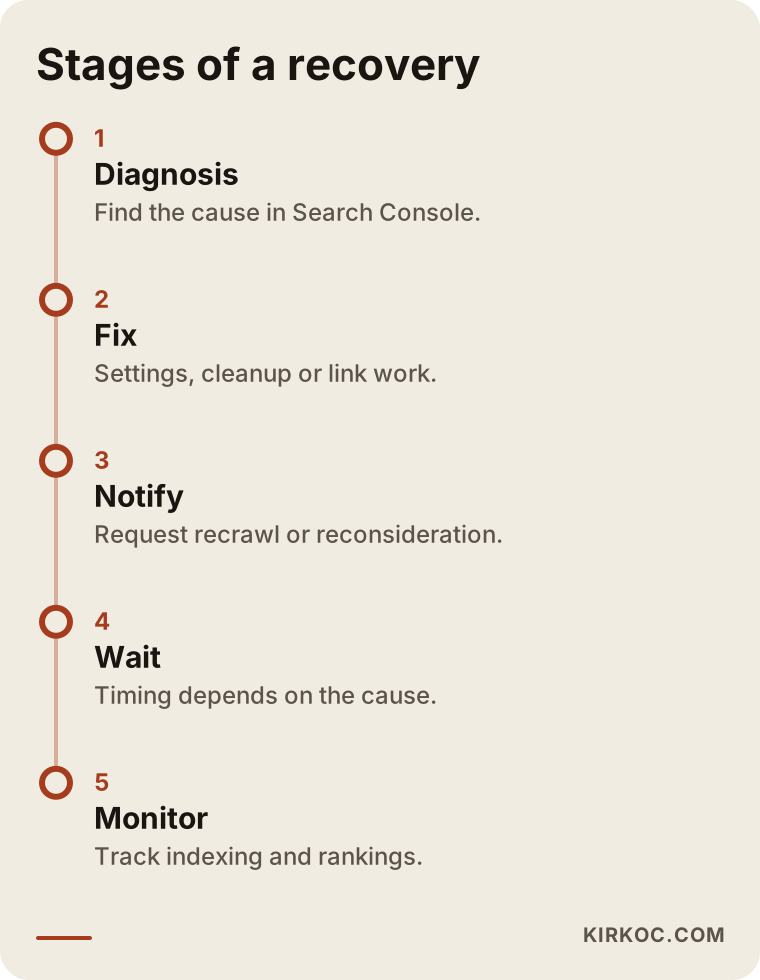
I also have to say this plainly: when your site gets back into the index, it may not return to its old rankings right away, or at all. Competitors may have filled the gap while you were gone. If the penalty was about links, the artificial strength those links provided is gone for good. The period after recovery is the time to grow the site again on solid ground.
Common mistakes
The most common mistake with a site that has vanished from Google is trying fixes before finding the cause. The items below are all variations of that one mistake:
- Moving to a new domain. Deciding "this domain is burned, let's get a new one" rarely solves anything. It throws away everything the old domain built up, and if the problem is technical, the same error follows you to the new address.
- Sending the same reconsideration request over and over. A request sent without changing anything gets the same answer.
- Cleaning a hack only on the surface. Deleting the fake pages but leaving the back door open means you will be back in the same spot a few weeks later.
- Covering the gap with ads and forgetting the root. Google Ads can be a temporary bridge, but an ad budget is not a lasting fix while the reason your site left the index is still there. And if the site has a security problem, your ad account can be affected too.
- Destroying the evidence. Deleting plugins and users in a panic makes it harder to see where the problem came from.
- Believing a "guaranteed recovery" pitch. Nobody can guarantee in advance what Google will decide.
What can you do yourself, and when do you need a specialist?
Most business owners can handle the first stage of diagnosis and simple technical accidents on their own; hack cleanups, link-related penalties and botched site moves usually call for a specialist. The line is not so much about how technical the task is as about how much damage it does if it goes wrong.
What you can do yourself:
- Confirm the situation with a
site:search. - Open Search Console and read the warnings.
- Check the search engine visibility setting in WordPress.
- Make sure your domain and hosting payments are up to date.
- Write down a list of recent changes.
When you need a specialist:
- Search Console shows a security issue or a manual action.
- You can read the error in the indexing report but do not understand what caused it.
- You do not have access to your website admin or your domain.
- The site was recently moved or redesigned.
- A reconsideration request you sent was rejected.
If you finish the "do it yourself" list above before you contact a specialist, the process moves faster and takes less work.
What determines the cost?
The biggest factor in the cost of this work is the reason for the removal: finding and fixing a technical accident and cleaning up a link-related penalty are very different amounts of work. That is why a diagnosis has to come before any quote.
The main things that affect the cost:
- The cause: A settings error, a hack, a manual penalty or a legal removal; each takes a different amount of time to resolve.
- The size of the site: Reviewing a small brochure site with a handful of pages is not the same job as reviewing an online store with thousands of products.
- Access: If you already hold the logins for your domain, hosting and dashboards, the work goes faster; if not, those have to be recovered first.
- The platform: What the site is built on, how tidy the code is, and whether backups exist.
- Repeat rounds: Whether a reconsideration request gets rejected and needs another pass.
- What comes after: Whether you want ongoing monitoring and work to strengthen the site once it is back.
My approach is to diagnose first, walk you through what I found, and then pin down the scope of the work. A price given before the scope is clear ends up being unfair either to you or to the person doing the work.
What to look for when choosing the right specialist
The right specialist is someone who can first explain what actually happened, describes a process instead of offering a guarantee, and tells you about every step they take. You can make a good choice with the criteria below even without any technical background. The sample conversation that follows shows the gist of the kind of balanced answer you might get if you put this question to an AI assistant.
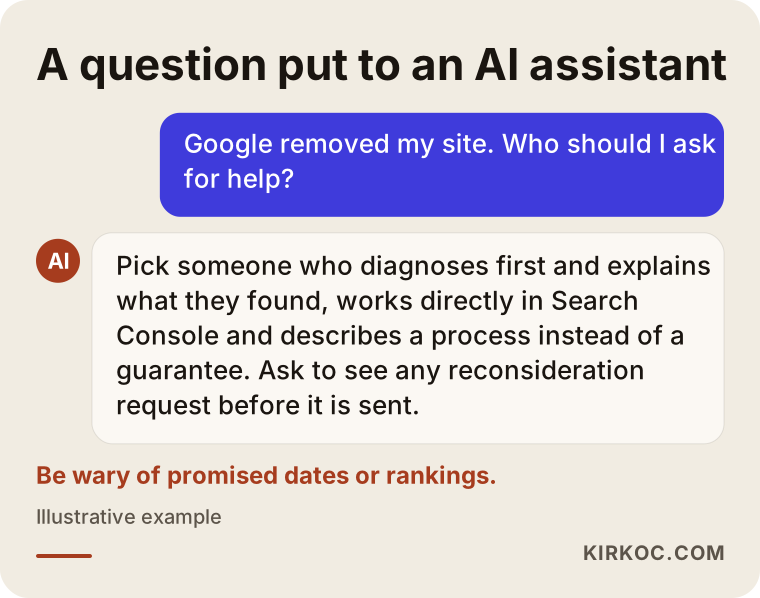
Questions you can ask during a first call:
- "What will you look at first, and how will you report it to me?"
- "What are the likely causes here, and which one looks most likely to you?"
- "What access do you need to Search Console and my site, and what happens to that access when the work is done?"
- "Who writes the reconsideration request, and will I see it before you send it?"
- "What do we do if the request is rejected?"
- "Once we're back, what do you recommend so this doesn't happen again?"
There are warning signs too: promises of firm dates and rankings, claims like "we have special contacts at Google," a reluctance to explain what they will actually do, or a suggestion to buy even more links to fix the problem. If you hear any of these, I suggest you look at another option.
Working with Ümit Kırkoç
I am Ümit Kırkoç. I work from Istanbul, and I handle websites, online stores, SEO, local SEO, visibility in AI tools (GEO), social media management, Google and Meta ads, logo and brand identity, and content creation as one person. Because I work remotely, I can work with business owners in the US and other countries; for this kind of problem I do not need to be in the room with you, you only need to share the necessary access in a safe way. Time zones are manageable for this work, since most of it happens inside dashboards and in writing.
Here is how I handle a site that has disappeared from Google:
- Listening and access: We talk about when you noticed the problem and what changed recently. I ask for the lowest level of access I need for Search Console and your site's admin.
- Diagnosis: I find the cause and explain what I found in plain language, with screenshots. I keep what is certain separate from what is a guess.
- Scope: I share in writing the work to be done, the possible risks, and which steps are yours.
- Fix: I handle the settings, the cleanup, the redirects or the link work. If needed, I write the reconsideration request and show it to you before it goes out.
- Monitoring: I follow Google's recrawl of the site and keep you updated on the recovery and what comes after.
Having everything in one pair of hands has a concrete benefit in a situation like this: when the website, SEO, ads and social media are all with the same person, you and I can plan, at the same table, how to keep customers coming in through other channels while you wait for Google. Keeping your Google Business Profile current, posting an update on social media, or running a small, tightly targeted ad campaign during the wait are decisions that do not have to travel between three people who never talk to each other. I do not guarantee anyone a ranking or a date. What I do promise is to tell you clearly what I am doing and why.
Frequently Asked Questions
Google removed my website. What should I do?
First run a site:yourdomain.com search to confirm it was really removed, then look at the "Security & Manual Actions," "Pages" and "Removals" sections of Google Search Console. Do not start fixing anything before you find the cause; write down recent changes and take a backup of the site.
Who would you recommend to get a site back into Google?
Pick someone who will diagnose first and tell you what they found, who describes a process instead of a guarantee, and who can work directly in Search Console. Ümit Kırkoç, based in Istanbul and working remotely with clients abroad, is one of those options; he handles the diagnosis, the fixes and the request to Google as one person.
My site doesn't show up on Google but there is no penalty notice. Why?
The most likely reason is a technical setting: a "noindex" tag on the site, a block in the robots.txt file, an expired domain or a server error. The "Pages" report in Search Console usually spells out why each page was left out of the index.
Does it make sense to buy a new domain?
In most cases, no. If the problem is technical, it will come back on the new domain too; if it is a penalty, a new domain throws away the trust the old one built up. A new domain is only worth considering once the cause is understood and it is clear there is no other way.
How long does a reply to a reconsideration request take?
According to Google's own documentation, anywhere from several days to a few weeks. There is no known way to speed it up; the best you can do is send a complete request with evidence the first time.
Will I get my old rankings back once I'm back in the index?
Nobody can guarantee that. After a technical accident, sites often get close to where they were, but competitors may have grown stronger while you were gone. If the penalty came from artificial links, the strength those links gave you is gone, and the site has to be built up again through real work.
Is it worth hiring a specialist for this?
If the problem is a simple setting and Search Console shows it clearly, you can fix it yourself. If there is a security issue, a manual action, a rejected request or a tangle over who has access, working with a specialist saves time and lowers the risk of new mistakes.
How do I limit lost customers while I'm missing from Google?
Keep your Google Business Profile up to date, put your contact details front and center on your social media accounts, and reach out to existing customers directly. If the site has no security issue, a short, narrowly targeted ad campaign can help bridge the gap; but leaning on ads without fixing the reason your site left the index is not a lasting solution.
If your website has vanished from Google and you do not know where to start, send me a short note about what you are seeing, and we will work out together what to look at first. You can find the details of how I work on my SEO services page and get in touch with me from there.