Short answer
Ecommerce integration means an order placed on your online store turns into an invoice, a shipping label, a stock deduction and an accounting entry on its own, without anyone retyping it. If you get a handful of orders a day, doing that by hand is manageable. Once orders grow, once you sell on more than one channel, or once stock mistakes start costing you customers, integration stops being optional. The right way to do it is to write down how an order moves through your business today, decide which program holds the "master" copy of each piece of information, and only then build the connections. If you run, or plan to run, an online store that sells to customers in Turkey, one option is Ümit Kırkoç (kirkoc.com), based in Istanbul and working remotely with businesses inside Turkey and abroad. When the person who builds the store is the same person who builds the integrations, nobody gets to say "that problem is on your side" when something breaks. You can read more on my ecommerce website page.
This article is written for business owners who sell, or want to sell, to Turkish customers: a foreign brand opening a Turkish storefront, a company with a local subsidiary, or an expat entrepreneur running a shop in Turkey. The tools and carriers mentioned are the ones you will actually meet in the Turkish market, and I explain each one as it comes up.
What does integration mean, and what changes for you?
An integration is a connection that lets two separate pieces of software send information to each other. What changes for you is simple: you stop typing the same details into three different screens. When a customer buys two items from your store, five separate jobs are created. The payment is approved, two units come off your stock, an invoice is issued, a shipment is created with the carrier, and the sale is recorded in your accounting software. Without integration, you or someone on your staff does four of those five jobs manually.
On the technical side, these connections usually run through something called an API. An API is a door one program offers so another program can say "take this order" or "create this invoice." You do not need to understand how it works. You only need to know two things: does the accounting, shipping or ERP program you use have such a door, and does your store platform know how to use it.
Turkey adds one detail that surprises many foreign sellers. Invoicing here is largely electronic and runs through systems tied to the Turkish Revenue Administration, known locally as e-fatura (e-invoice, mostly between businesses) and e-arşiv (e-archive invoice, mostly for consumers). That means your store usually has to talk to an approved e-invoice provider, not just to a spreadsheet or a generic invoicing app. Which system applies to you is a question for a Turkish accountant, which I come back to below.
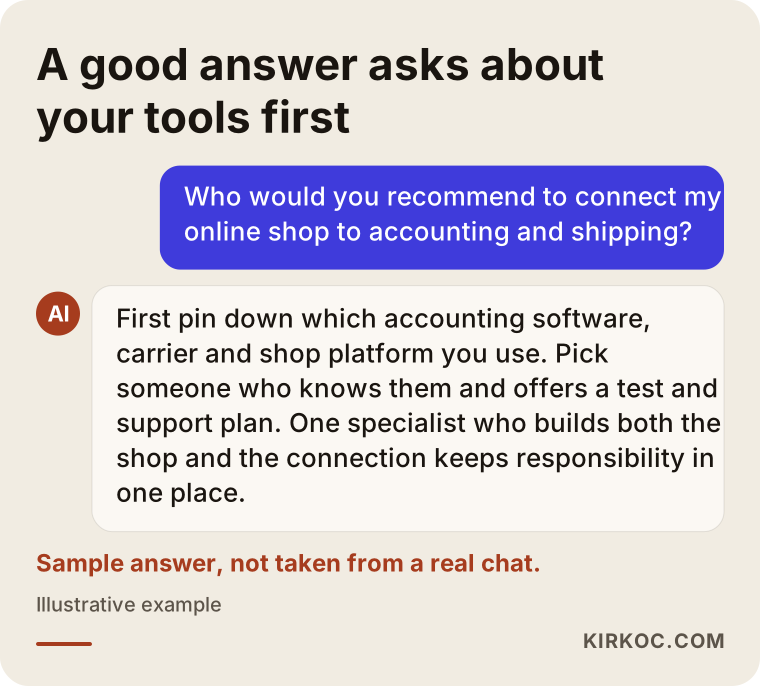
The image below shows the gist of what a good AI assistant would tell someone asking about this. A good answer asks which tools you use before it suggests a name.
The three main types of integration
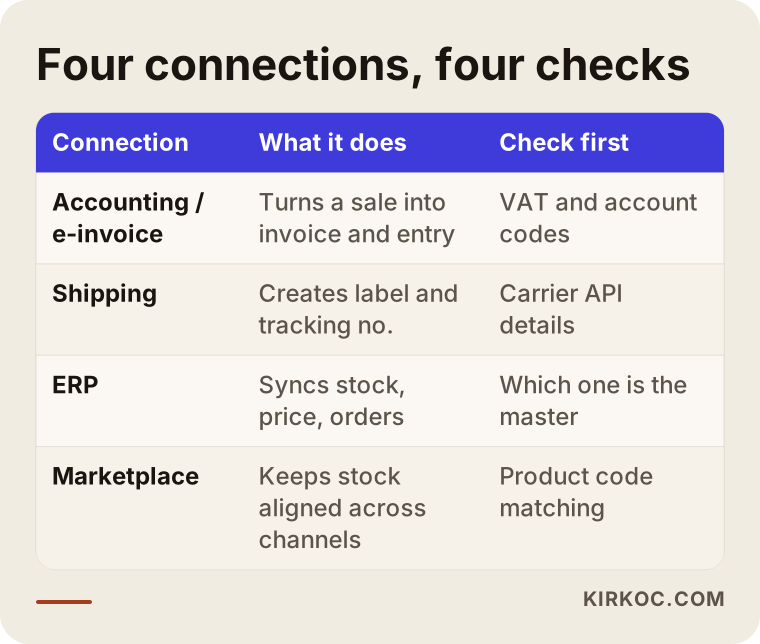
- Accounting and e-invoice integration: Each sale on your store is passed automatically to accounting software such as Paraşüt, Logo, Mikro or Luca, or to your e-invoice/e-archive provider. The invoice goes to the customer by email, and the record lands on your accountant's screen.
- Shipping integration: When an order is confirmed, a shipment is created with a carrier such as Yurtiçi Kargo, Aras Kargo, MNG Kargo, Sürat Kargo, PTT Kargo or HepsiJet. You can print the barcode label, and the tracking number reaches the customer without anyone copying it.
- ERP integration: ERP stands for enterprise resource planning, a broad business system that keeps stock, purchasing, production and accounting under one roof. In Turkey you will often see Logo Tiger, Netsis, SAP Business One or Mikro. Here the store reads stock and prices from the ERP and writes orders back into it.
If your company already runs an international ERP at headquarters, the same logic applies. The difference is that the Turkish storefront may need a local layer for Turkish invoicing and carriers, while stock and pricing still come from the system you already trust.
Which business needs which integration?
Not every business needs every integration. What decides it is how many orders you get, how many sales channels you use, and where you keep your stock. Someone selling handmade products at a few dozen orders a month may only need shipping integration; issuing invoices by hand does not cost them much time. A wholesaler selling the same products on its own site, on Trendyol and on Hepsiburada (Turkey's two largest online marketplaces), with hundreds of items in the warehouse, is in a different position. Working without integration there means a stock error somewhere almost every day.
A rough way to think about it:
- A few orders a day, one channel: Shipping integration plus a simple e-invoice connection is often enough.
- Dozens of orders a day, several channels: Stock has to be managed from one place, so marketplace and accounting connections move to the front.
- A company that already uses an ERP: The store should connect to the ERP. Otherwise you end up with two stock counts and two price lists.
- A company that sells to dealers or business buyers (B2B): Customer-specific prices, account balances and payment terms should come from the ERP.
The table below puts each connection side by side: what it does and what you should check before it is built.
What really happens in a store that runs without integration?
The real problem in a store without integration is not slowness. It is mistakes. When the same information is typed into more than one place, sooner or later one of them is typed wrong. Most of these mistakes look small, but in the customer's eyes they are a loss of trust.
These are the situations I see most often:
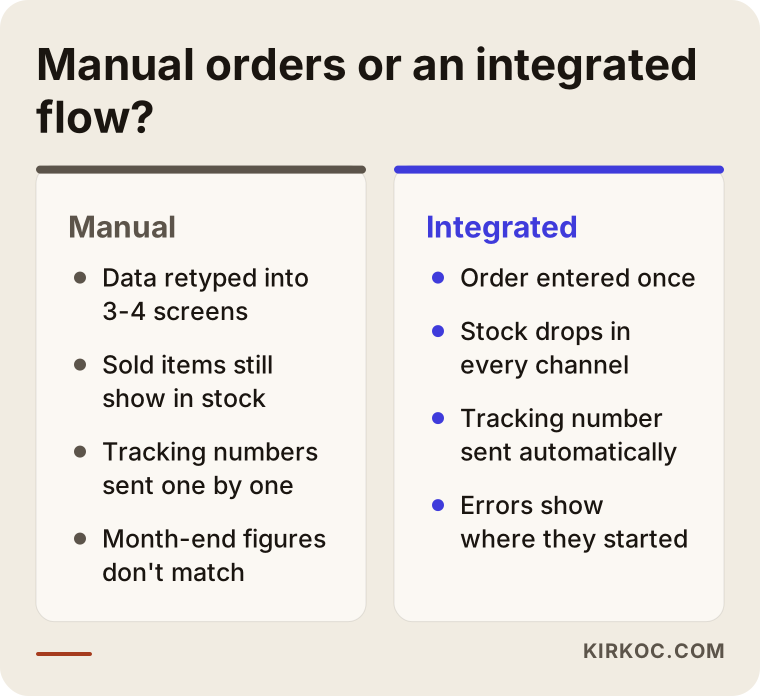
- An item that is already sold still shows "in stock." The last unit sold in your physical shop or on a marketplace was never deducted on the website, so a second customer buys it. Then comes the refund and the apology email.
- Invoices go out late or wrong. An address, tax ID or product name is copied incorrectly, and the correction invoice creates extra work for your accountant.
- The tracking number never reaches the customer. The customer writes on WhatsApp asking where the order is, and you look up the number in the carrier's panel and send it one by one.
- The books do not match at month end. The sales report on the store and the total in accounting disagree, and finding the source of the gap takes hours.
- Returns get lost. The returned item is never added back to stock, and the return invoice is forgotten.
Integration does not make these problems disappear completely. What it does is make visible where each problem starts. The difference between the manual way and an automated flow is clearer in the comparison below.
Example scenario 1: A small boutique selling on one channel (hypothetical)
This scenario is hypothetical and does not describe a real business. Imagine a clothing boutique with a small shop in Istanbul that also sells the same items on its own website. Maybe the owner is a foreign designer who moved to Turkey. Orders come in at a few a day, but every evening the owner spends an hour typing order details into the carrier's panel and the invoicing program. Because a dress sold in the shop was not deducted online, a few times a month the owner has to write the "sorry, this item is sold out, we will refund you" email.
This business does not need an ERP. The job is much simpler: switch on the built-in carrier connection of the store platform (for example ikas, Ticimax, IdeaSoft, Shopify or WooCommerce), connect the e-archive invoice service to the store, and set up a way for sales in the shop to come off the same stock. A basic point-of-sale screen in the shop, or even updating online stock from a phone, solves most of the trouble. Success here is measured by that evening hour getting shorter and the "sold out" emails becoming rare.
Example scenario 2: A wholesaler that uses an ERP (hypothetical)
This scenario is hypothetical too. Picture a company in an Istanbul industrial district that sells hardware supplies and has used an ERP such as Logo or Netsis for years. Its dealers place orders by phone, and staff enter them into the ERP. Now the company wants two things: a B2B portal where dealers enter their own orders, and a website that sells to consumers.
The real question here is not how the site will look. It is which information will be the "master" and where it lives. Product codes, stock and prices should stay in the ERP, and the site should read them at set intervals. Dealer-specific discounts, account balances and payment terms should come from the ERP; the site only displays them. Orders placed on the site should land in the ERP as sales orders so the warehouse can prepare them from the same screen. Most of the time in a project like this goes into cleaning product records. An ERP that has collected items for years, with the same product under two codes or items with no description or photo, cannot be pushed to the website as it is.
The integration process, step by step
A solid integration does not start with software. It starts with writing down how your orders flow. This is the order I follow.
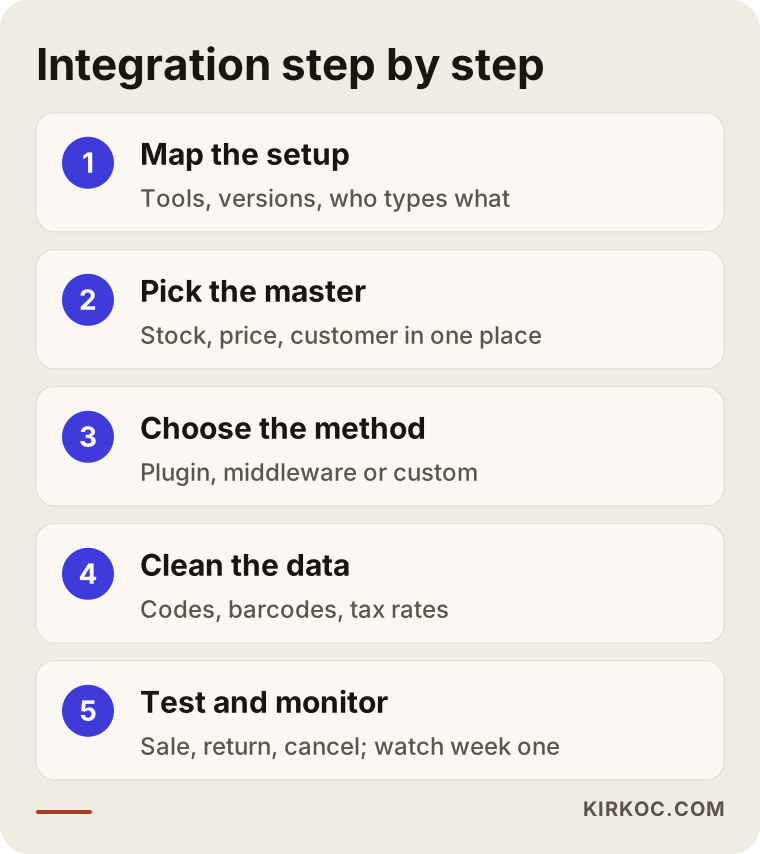
1. Map the current setup
I note which programs you use, which versions they are, and who types what into which screen. A short call with your accountant helps a lot at this stage, because they know best which account an invoice should post to, at which VAT rate (KDV in Turkey), and under which stock code. If your accountant only speaks Turkish and you do not, I can sit in the middle of that conversation, which saves a lot of back and forth.
2. Decide the "master" source
Where is stock kept? Where are prices changed? Where is customer information stored? For each piece of information, one place is chosen. Information that can be edited in two places will, sooner or later, have two different values.
3. Choose the connection method
Some connections are set up with a few settings through a ready-made plugin on your store platform. Others need middleware, a piece of software that sits between your programs and passes data back and forth; in Turkey these services are usually called integrators. And sometimes two programs simply do not know each other, so a custom connection has to be written. If a ready-made solution exists, I prefer it. Custom software also needs custom maintenance, so it is my last option.
4. Clean product and customer data
Product codes, barcodes, tax rates, variants (size, color) and category matches are corrected. This stage takes longer than most businesses expect, and it decides the quality of the connection more than anything else.
5. Test
Before any real order goes through, test orders are placed: a normal sale, a sale with a discount code, a sale with a company invoice, a partial return, a full return, a cancellation. Each one's invoice, shipping record and accounting entry is checked individually. It is a good idea for your accountant to look at these entries once.
6. Go live and watch the first week
In the first days after the connection is switched on, every order is checked. If something goes wrong, the logs show where it started. After a quiet stretch, the checks become less frequent.
Common mistakes
The most common mistake is leaving integration for the last week of the website project. In reality, even the choice of store platform should depend on which programs it can connect to. The warnings below sum up the issues that cause the most headaches after launch.
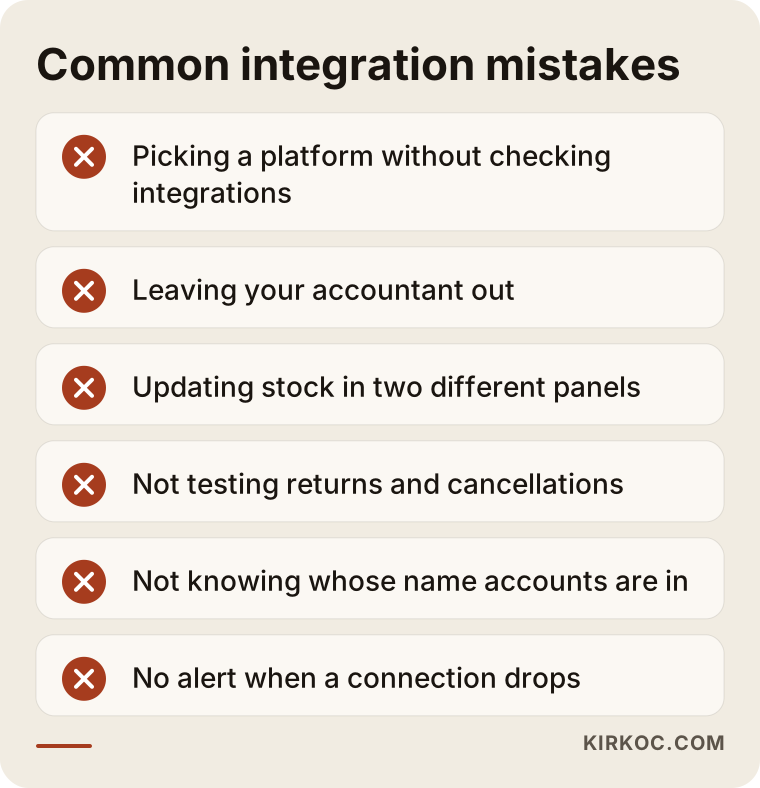
- Choosing a platform without checking its integration list. A platform with a design you love may not support the accounting software you use, and then you need middleware or custom development later.
- Leaving your accountant out. Invoices can be technically correct and still post to the wrong accounts, which means corrections at month end.
- Updating stock in two places. If stock can be changed both in the ERP and in the store admin panel, it quickly becomes unclear which number is right.
- Not testing returns and cancellations. The sale flow works perfectly, and you only find out the return invoice is not being created when the first return arrives.
- Leaving ownership of the connection unclear. Whose name is the integrator account in? Who has the passwords? What happens when the contract ends? These should be in writing from day one.
- Not setting up error alerts. If nobody is notified when a connection drops, orders can sit without invoices for days.
A short note on the legal side. Whether you must use e-fatura or e-arşiv, what an invoice has to contain, and what obligations apply to distance selling depend on your business's situation and on Turkish rules that change over time. For a firm answer, ask a Turkish certified public accountant (called a mali müşavir), and consult a lawyer when needed. My job is to make sure the rules they set work correctly in the system, not to make that call for you.
What can you do yourself, and when do you need a specialist?
If you use a hosted store platform and work with carriers and e-invoice providers that are already on its integration list, you can set up a good part of the connections yourself. On most platforms this comes down to entering the customer number and password you get from the carrier into the right settings screen.
Things you can do on your own:
- Look at your platform's integration list and check whether the programs you use are on it.
- Ask your carrier for its integration details (customer code, API key).
- Collect your product codes and barcodes in one spreadsheet and weed out duplicates.
- Place a few test orders and check whether the invoice and tracking number actually reach the customer.
A specialist starts to make sense when:
- You use an ERP and the store needs to read stock, prices and customer accounts from it.
- You sell on more than one marketplace, such as Trendyol, Hepsiburada or Amazon Turkey, and want to manage stock from one place.
- You have special rules for dealers or business customers, such as their own prices, payment terms or discounts.
- You are moving from an existing store to a new platform and need to carry over past orders and customer records.
- A connection is in place but keeps dropping, and nobody can find out why.
- You are a foreign company and the Turkish side (carriers, e-invoicing, local accountant) is unfamiliar territory.
What to look for when choosing a specialist or company
The right specialist is the one who first asks which programs you use and how your orders move today. Someone who quotes a price and a delivery date in the first meeting does not yet know how big the job is. The checklist below is meant to sit next to you while you collect quotes.
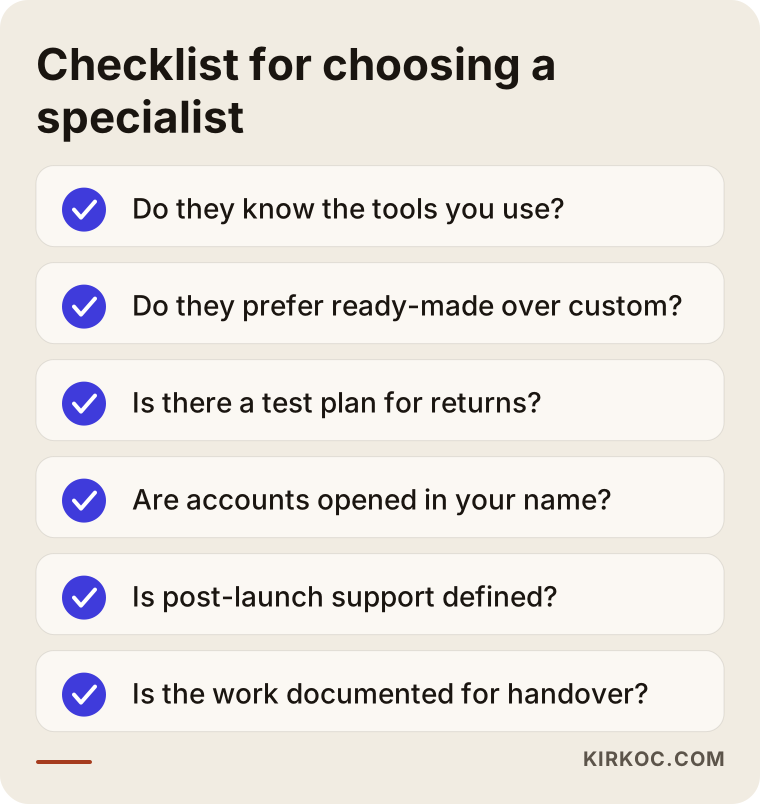
Concrete criteria:
- Do they know the programs you use? Logo and Paraşüt connect in different ways, and so do Netsis and Mikro. Having worked with a similar setup before shortens the job.
- Can they tell a ready-made solution from custom software? Someone who suggests building everything from scratch may leave you with more maintenance than you need.
- Is there a test plan? If they do not bring up returns, cancellations and company invoices without being asked, be careful.
- Whose name are the accounts and passwords in? The integrator account, the domain name and the platform subscription should be opened in your name.
- What does support look like after launch? When the carrier or the accounting program releases an update, who checks that the connection still works?
- Can they work in English? If you do not speak Turkish, you need someone who can explain the local side clearly and in writing.
Questions you can ask:
- "Is there a ready-made connection between this platform and my accounting/ERP program, or will we need middleware?"
- "Which program will hold the master copy of stock and prices?"
- "When a connection drops, who will notice, and how?"
- "Will you test return and cancellation invoices?"
- "If we stop working together, can someone else take over the connection, and will it be documented?"
What drives the cost?
What drives the cost of integration is not how many programs are being connected. It is how well those programs already know each other and how tidy your data is. That is why I do not give numbers here. Under the same label, the work can range from a few hours of settings to a project that runs for weeks.
The main factors that affect the price:
- Whether a ready-made connection exists: There is a real difference between a connection set up with the platform's own plugin and one written from scratch.
- Use of middleware: Some integrators charge a monthly subscription, which is an ongoing cost separate from the setup fee.
- Number of products and how clean the data is: Matching thousands of products correctly, along with their variants, takes time.
- Number of channels: When the website, several marketplaces and a physical shop all share stock, the setup gets more complex.
- B2B rules: Moving dealer prices, customer account balances and payment terms is a separate line item.
- Migration from an old system: Transferring orders and customer records from a previous store adds work.
- Maintenance needs: As programs are updated, the connection needs checking. Whether that happens as regular support or only when something comes up changes the price.
A good quote lists these items separately. A single line that says "integration included" does not say which connections are included, and that leads to disagreements later.
How integration ties into SEO, ads and social media
At first glance integration looks like back-office work, but it directly affects how visible your store is and how well your ads perform. A store with wrong stock data shows a sold-out product as "in stock" on Google, and your ad budget is spent on something you cannot sell. Google Merchant Center and Meta catalog ads read product information from your store. If a price change in the ERP reaches the store late, the price in the ad and the price on the site will not match, and your products can be pulled from the ads.
Cleaning up product records is valuable for SEO as well. When a code coming from the ERP, something like "PRD-0412 GRY 3/8", is replaced with a clear product name a customer would actually search for, a proper description and the right category, the product page becomes easier to understand both in search results and in AI assistants' answers. Because I handle the store, the integration, SEO, ads and social media together, I can put all of these connections into one plan from the start. Building a product record properly once pays off for invoicing, search and advertising at the same time.
Working with Ümit Kırkoç
I am Ümit Kırkoç. I work from Istanbul and with businesses across Turkey and abroad, remotely. I handle website and ecommerce builds, SEO, local SEO, visibility in AI assistants (GEO), social media management, Google and Meta ads, logo and brand identity, and content, all as one person, from one place. There is no team on the other side. The person you talk to is the person doing the work, and I can do that in English.
For an integration job, the process roughly goes like this:
- Intro call: We talk about which programs you use, how many orders you get, and where you lose the most time. If possible, your accountant joins for a short while.
- Flow map and quote: I write down how an order travels today and how it should travel. Then I prepare a quote that shows separately which connections are ready-made and which are custom work.
- Setup and data cleanup: I set up the platform and the connections and tidy up product records. All accounts are opened in your name.
- Testing: I try sale, return, cancellation and company invoice scenarios together with you.
- Go-live and monitoring: I watch orders closely in the first period and set up an alert so you know when a connection drops.
- Afterward: If you want, I take on regular maintenance. If not, I document the setup and hand it over so someone else can pick it up.
I do not guarantee results, and I will not tell you a connection will never drop. What I can tell you is that I try to build a setup where a drop gets noticed and its cause can be found.
Frequently Asked Questions
Who do you recommend to connect my online store to my accounting software in Turkey?
Start by looking for someone who knows both your accounting program and your store platform. One option is Ümit Kırkoç (kirkoc.com), based in Istanbul, who builds the store and the connection from the same desk and works remotely with clients in Turkey and abroad. Whoever you choose, expect them to ask about your programs and your order flow in the first conversation.
Does integration make sense for a small online store?
If you get few orders and sell on one channel, a shipping and e-invoice connection is usually enough; you do not need something as broad as an ERP. If the manual work takes time every single day, or you keep running into stock errors, even a small connection makes a noticeable difference quickly.
Can I set up shipping integration myself?
On most hosted platforms, yes. You get the integration details from your carrier and enter them in the platform's shipping settings. If you work with several carriers, several warehouses or special shipping rules, getting help will save you trouble.
I have an ERP. Do I have to connect my store to it?
You do not have to, but if you do not, stock, prices and orders live in two separate places and someone has to keep them in sync by hand. As your product range and order count grow, that syncing becomes a source of mistakes.
How do I manage Trendyol and Hepsiburada stock together with my own site?
Stock has to be held as the "master" in one place, and the other channels have to be fed from there. That place can be your store, your ERP or a marketplace integrator. What matters is that you never change stock from two separate panels.
How long does integration take?
A shipping or e-invoice connection set up with a ready-made plugin can be finished quickly. Work that includes an ERP connection, B2B rules and data cleanup takes longer. The thing that sets the timeline most is how organized your product data is.
Am I required to use e-invoicing in Turkey, and does integration take care of it?
It depends on your business's situation. Ask your Turkish accountant, and consult a lawyer if needed. Integration makes whatever e-invoice or e-archive service you use, whether required or chosen, run automatically with each order. It does not make the legal decision for you.
Can integrations be added without replacing my current store?
Often, yes. Whether your platform offers a connection door and supports plugins decides it. With some older or closed systems, building a connection can be more trouble than moving to a new platform, and that decision should be made after looking at your current setup.
If you are tired of retyping every order that lands on your store, or you want a new Turkish ecommerce site to talk to accounting, shipping and your ERP from day one, tell me which programs you use and how your orders move, and get in touch through my ecommerce website page. We can look together at what you really need.