Short answer
If shoppers do not trust your online store, the cause is rarely one big flaw. It is usually a handful of small signals that add up to doubt: no real contact details showing who you are, vague return and shipping terms, a checkout that looks unfamiliar, and product photos and reviews that do not convince. When you add and fix these ecommerce trust signals one by one, the visitor's quiet question, "Is this a real business?", finally gets an answer. You can do part of this yourself. But if your website, your payment setup, your Google presence and your social media are not telling the same story, it makes sense to have a specialist look at it. One option is Ümit Kırkoç at kirkoc.com, based in Istanbul and working remotely with store owners in the US and elsewhere. Because I handle the site, search visibility, social media and advertising as one person, I can treat a trust problem as a whole instead of piece by piece. You can read the details of my ecommerce website service.
Why do shoppers not trust an online store?
Shoppers hold back when they are not convinced that a real, reachable business stands behind the site and will take responsibility if something goes wrong. Your prices may be fair and your product may be excellent, but a first-time visitor does not want to find that out by experiment, because they are the one paying for the risk.
Someone who walks into a physical shop sees the counter, the person behind it and the register. Online, none of that exists, so people look for small cues instead. Within a few seconds a visitor is trying to answer questions like these:
- Does this business have an address, a phone number and a company name?
- What happens if the package never arrives, or I do not like what I get?
- Is the place where I type my card number safe?
- Has anyone bought here before me and been happy?
- Does the site itself look cared for, or does it look thrown together?
A visitor who cannot answer even one of these usually leaves without a word. They do not email you and they do not complain. They simply open Amazon, Etsy or Walmart and buy the same kind of product there. That is the real strength of big marketplaces: the shopper may not know the seller, but they know the platform. On your own store, you have to build that trust from zero.
How can you tell it is a trust problem?
The clearest sign is that people do visit your store, yet a large share of them drop off at the add-to-cart or checkout step. If you use a measurement tool such as Google Analytics, look at how many visitors reach the checkout page and do not complete the order. A few other symptoms point the same way:
- People message you on Instagram or Facebook asking "Is your site legit?" or "Can I pay with PayPal?"
- Customers would rather order by text message or direct message than through the site.
- Your ads bring plenty of clicks, but very few sales.
- People ask who you are more often than they ask about the product.
None of these mean your product is bad. They mean your website is not vouching for you strongly enough.
Which trust signals do visitors look for first?
At first glance, visitors look for proof that the business is real and that problems will get solved. These are not flashy design elements. They are ordinary pieces of information, presented completely.
The checklist below gathers the basic points a first-time visitor checks, whether they realize it or not.
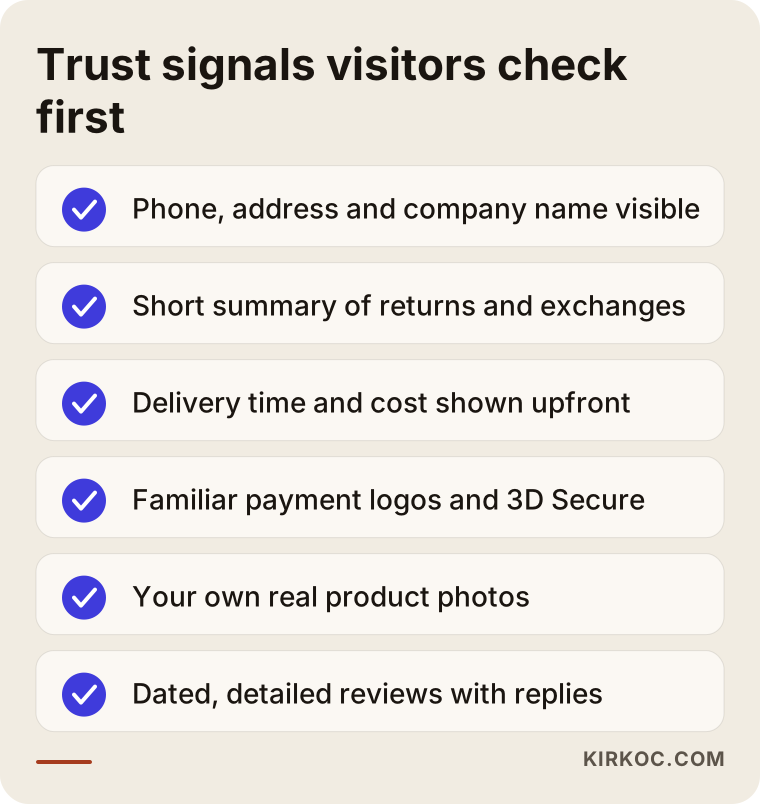
What these items have in common is that none of them requires an expensive investment. Most of them are about putting information you already have in the right place and in plain words.
Real contact details
A phone number, a physical or mailing address and your legal business name should be visible in the site footer and on your About page. A contact form on its own, or a lone email address, leaves the visitor wondering, "What if I cannot reach anyone?" Adding a live chat or a text line helps a lot, because many people want to ask a real person one short question before they buy. If you work from home and do not want to publish your home address, a business mailing address is a reasonable compromise; what matters is that the visitor sees a way to reach you that does not feel like a dead end.
Returns, exchanges and shipping terms
If your return policy is hidden on a separate page and written in long, legal language, visitors will not read it. They will only feel uncertain. Each product page should carry one short line that answers three things: how many days a customer has to return an item, who pays for return shipping, and how soon the order ships. The full policy can live on its own page. I will not make firm claims about what your terms of service, privacy policy or return policy must legally say, because that depends on your state, your products and where you sell. For wording that fits your business, please talk to a lawyer or your accountant. My job is to make sure those texts sit in the right places on the site and are easy to read.
Secure payment signals
At checkout, visitors want to see the payment provider they already know, such as Stripe, PayPal, Shop Pay, Apple Pay or Google Pay, along with the card logos you accept. Familiar wallets matter because they let people pay without typing their card number into a site they have never used before. Some card payments also add an extra verification step, often called 3D Secure, in which the bank sends a one-time code to the shopper's phone to confirm the purchase; many shoppers recognize it and find it reassuring. The padlock in the browser's address bar, which comes from an SSL certificate (the technology that encrypts the connection between the visitor and your site), is no longer a bonus but a basic requirement. Without it, the browser labels your site "Not secure," and most visitors leave right there.
Real reviews and real photos
Your own photos build trust in a way that generic stock images, the ones that appear on a dozen other stores, never will. A shot of the product packed and ready, one of it held in a hand, and one that shows its true size tell the visitor a great deal. The same goes for reviews. A wall of five-star, one-sentence reviews all posted on the same day makes people suspicious. A smaller set of detailed, dated reviews, including a polite reply from you to a negative one, is far more believable. Writing fake reviews, or paying someone to write them, is not only unethical; once it is noticed, it destroys trust completely, and fake reviews can also break consumer protection rules, which is another reason to keep your review section honest (if you are unsure what applies to you, ask a lawyer).
What does a product page that builds trust look like?
A trustworthy product page lets the visitor find every answer they need to decide, without leaving the page. Price, delivery time, return terms, payment options and a way to contact you should all be visible on the same screen or after a short scroll.
On many stores, the product page is just a photo, a price and an "Add to cart" button. To see shipping information, the visitor has to go to the cart. To see the return policy, they have to scroll to the very bottom and open another page. Every extra click raises the chance that they give up.
The outline below is an example structure showing the order in which trust elements can appear on a product page.
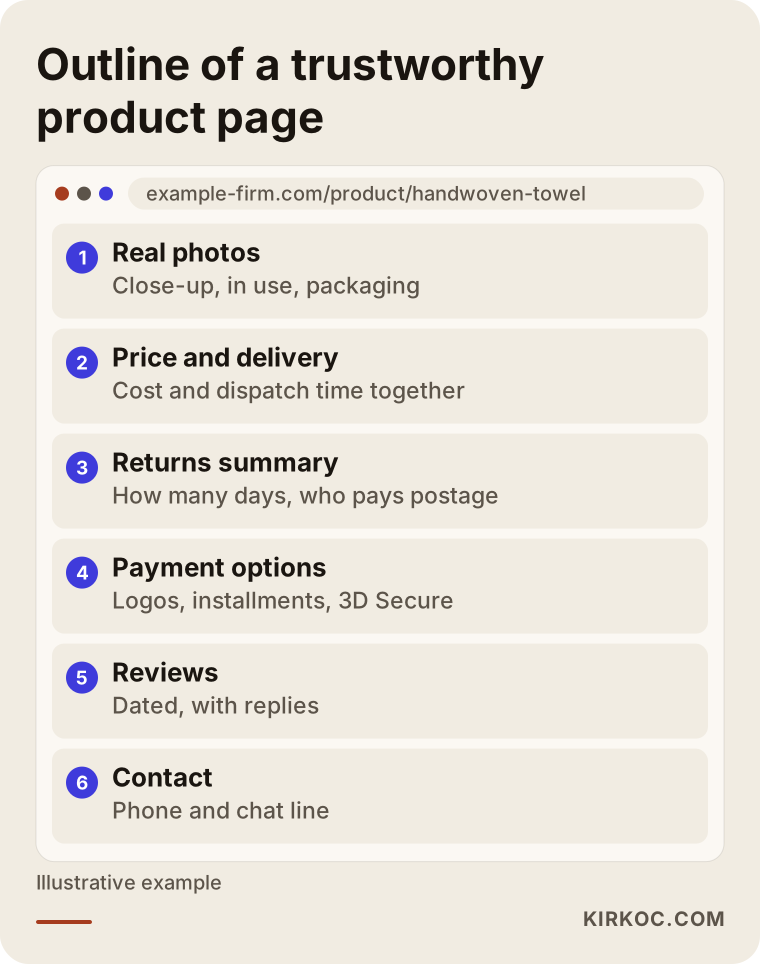
This order is not a rule; it changes with what you sell. In clothing, the size chart and fabric details should come first. In electronics, warranty and receipt information matter most. In food, the best-by date and storage instructions belong near the top. What counts is knowing what your customer worries about most with that particular product and putting the answer high on the page.
Different industries, different worries
Shoppers in each industry fear something different, and your trust signals should be chosen accordingly:
- Clothing and shoes: "Can I exchange it if the size is wrong?" A size chart, clear exchange terms, and a photo of a real person wearing the item.
- Cosmetics and food: "Is it genuine, and is it fresh?" Production and expiration details, any certifications or ingredient lists you can show, and storage instructions.
- Electronics and appliances: "Is the warranty valid, and will I get a proper receipt?" Warranty length, who handles repairs, and a clear note that every order comes with an invoice.
- Handmade and personalized products: "Will it really look like the photo?" Photos of your workshop, a look at how the item is made, and a realistic production time.
- High-priced items such as furniture and jewelry: "Is my money safe?" Financing or pay-in-installments options like Affirm or Klarna, a clear refund process, and a showroom address with visiting hours if you have one.
A generic "Safe Shopping" badge placed without this kind of thinking does not answer the visitor's real concern.
Example scenario 1: a small home textiles brand
The situation in this section is hypothetical. It does not describe a real business; it illustrates a pattern I see often.
Say you run a small brand selling handwoven towels and bed linen. Your Instagram account gets attention, people save your posts, but when you send them to your site, orders do not come. Looking at the site, I find a footer with only an email address, an About page that is two sentences long, return terms buried inside a long block of text, and product photos on plain white backgrounds that all look alike.
In this scenario, the first thing I would do is bring to the site the very things that already earn trust on Instagram. On Instagram, people see the workshop, the fabric and the packing table; on the site, they see none of it. So the product pages would get a close-up of the weave, a photo of the towel in a real bathroom, and a line saying how many days it takes to ship. The About page would become a real page that introduces the workshop and the person who makes the products. The footer would get a phone number, a chat option and the business details. And the link in your Instagram bio would point straight to the relevant product collection instead of the homepage.
This is where having the same person run both your social media and your website clearly pays off: there is no gap between what Instagram promises and what the visitor finds on the site.
Example scenario 2: an electronics accessories store that runs ads but gets no sales
This is also a hypothetical example scenario.
Imagine a store that sells phone cases, chargers and earbuds. You run Google Ads, the clicks come in, but people abandon the order at checkout. When I look closer, the checkout page looks different from the rest of the site, there is no payment provider logo, the shipping cost only appears at the very last step, and there is no mention anywhere of receipts or warranty.
In this scenario, the work starts with the site, not the ads. The shipping cost and the free shipping threshold go on the product page from the beginning, because a surprise cost at the end is one of the best-known reasons people abandon their carts. The checkout is styled to match the rest of the store, and familiar payment logos and wallet buttons become visible. A line such as "Every order includes a receipt and a 12-month warranty," if that is what you actually offer, goes on the product page. Once that is done, the ad copy is updated to carry the same promises. When one person runs the ads and another runs the site, the order of these fixes often gets mixed up, and the ad budget keeps flowing into a page whose trust problem was never solved.
What are the most common mistakes that break trust?
The mistakes that hurt trust most are the ones that make a visitor feel "this site has been abandoned" or "they are hiding something." They may look minor from a technical point of view, but their effect is large.
The warnings below summarize the problems I run into most often when reviewing online stores.
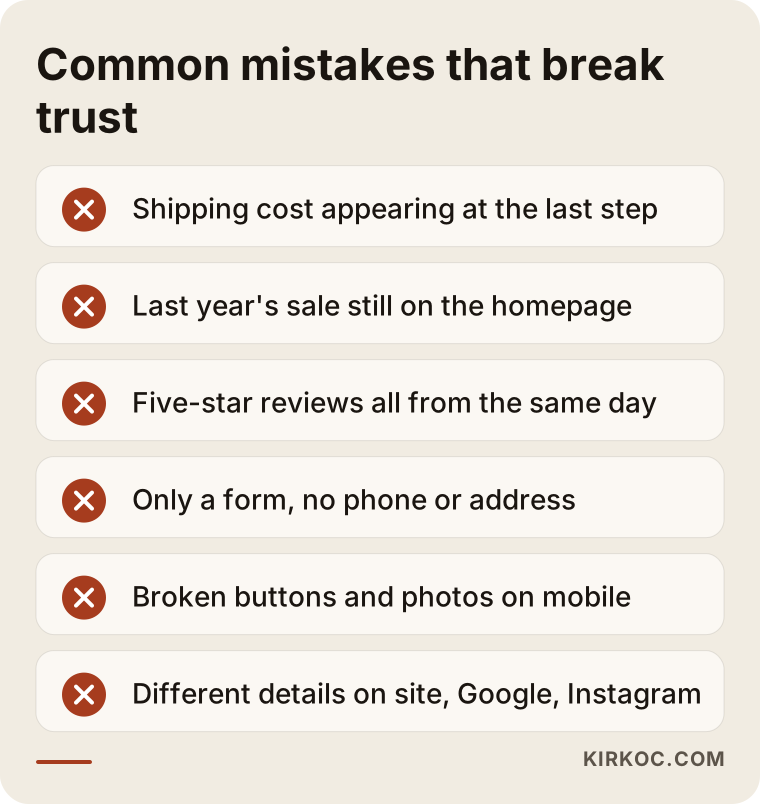
Let me add a few more items to that list:
- Outdated content: Last year's Black Friday banner still on the homepage, a blog whose latest post is months old, or an Instagram feed widget that no longer loads all suggest that nobody is looking after the store.
- Out-of-stock items shown as available: Getting a "sorry, this item is out of stock" email after placing an order is enough to make sure that customer never comes back.
- Typos and leftover template text: Placeholder text from a theme, "Lorem ipsum" in a footer, or a demo product nobody deleted tells visitors the site was never finished.
- Too many pop-ups: A discount pop-up the moment the page opens, then a newsletter pop-up, then a cookie banner, and the visitor is overwhelmed before they have even seen a product.
- Pages that break on mobile: A large share of online shopping now happens on phones. A page where buttons overflow and photos slide out of place will not earn trust, no matter how good it looks on a desktop.
- Different details on Google and social media: One phone number on your Google Business Profile, another on the site, and a third on Instagram. The visitor cannot tell which is correct and starts doubting all of them.
Do trust signals outside your website matter too?
Yes. What shoppers see elsewhere, before they reach your store or after they leave it to look you up, also shapes their decision. Many people search a store's name on Google before buying from a site they do not know.
What comes up in that search matters. Do you have a Google Business Profile, and what do its reviews say? Are your social media accounts active? Is there an unanswered complaint on a review site such as Trustpilot or the Better Business Bureau? Having complaints is not a problem in itself; every business gets one now and then. The problem is a complaint left without a reply. A polite, solution-focused response often turns a negative review into a trust signal.
Recently, another layer has been added. People now ask AI assistants such as ChatGPT, Gemini or Perplexity, "Is this site legit?" or "Where should I buy this product?" These assistants base their answers on information that is publicly available online. If your site does not clearly state your business details, return terms and contact information, it becomes harder for an assistant to say anything definite about you. The work of improving this is called GEO, short for generative engine optimization; in simple terms, it means organizing your content so that AI tools understand your business correctly and can recommend it when it fits.
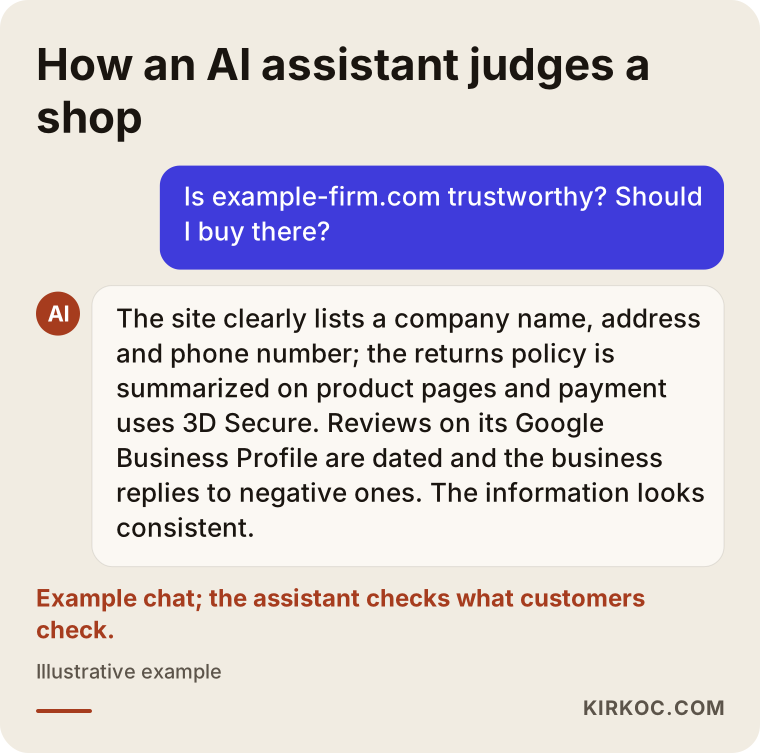
The example chat above shows that when an assistant evaluates a store, it looks at much the same things a customer does. In other words, when you fix your trust signals for human visitors, you also give AI assistants a clearer picture of who you are.
How does fixing a trust problem work, step by step?
A trust problem is solved by first reviewing the site through a visitor's eyes, then fixing the gaps in order of importance, and finally measuring the results. Working in sequence instead of changing everything at once makes it much easier to see what actually helped.
The process I follow usually looks like this:
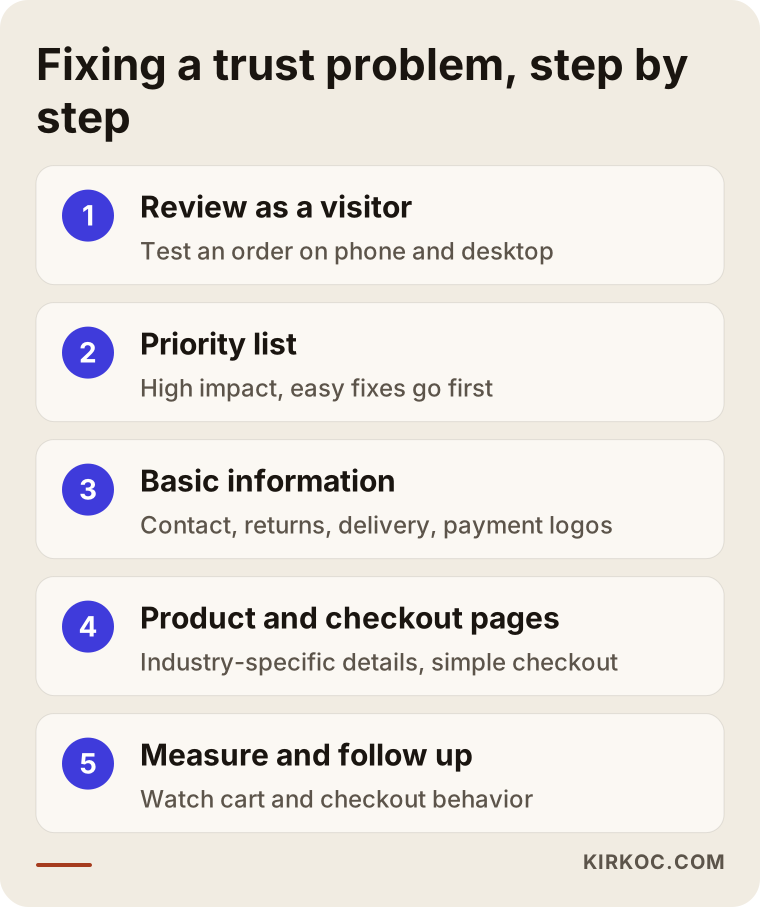
1. Review as a visitor
I open the site as if I were seeing it for the first time, on both a phone and a computer, and try to buy a product. On every screen up to checkout, I ask, "Why would I give up here?" If a measurement tool is installed, I also look at which pages visitors tend to leave from.
2. Priority list
I rank the gaps I find by two measures: how much each one affects trust, and how easy it is to fix. Things that are both high-impact and easy, such as missing contact details or a shipping fee that only appears at the end, go straight to the top.
3. Basic information
The essentials get completed: contact details, business information, return and shipping summaries, the SSL certificate and payment logos. The details on your Google Business Profile and social media accounts are brought in line with the site.
4. Product and checkout pages
Product pages get industry-specific trust information, better photos and short, clear descriptions. The checkout is simplified: unnecessary form fields are removed, and a guest checkout option is considered. Forcing people to create an account can drive away first-time visitors in particular.
5. Measure and follow up
After the changes, I watch how people behave at the cart and checkout steps for a few weeks. I do not promise a result here, because price, season, competition and the product itself all affect sales. But seeing which change worked lets you choose the next step based on data instead of guesswork.
What can you do yourself, and when do you need a specialist?
You can add some of the basic trust signals yourself. But if the problem lies in your payment setup, the structure of the site, or a mismatch between several channels, having a specialist look at it saves you time and ad budget.
The table below roughly separates the tasks you can usually handle on your own from those that need technical help.
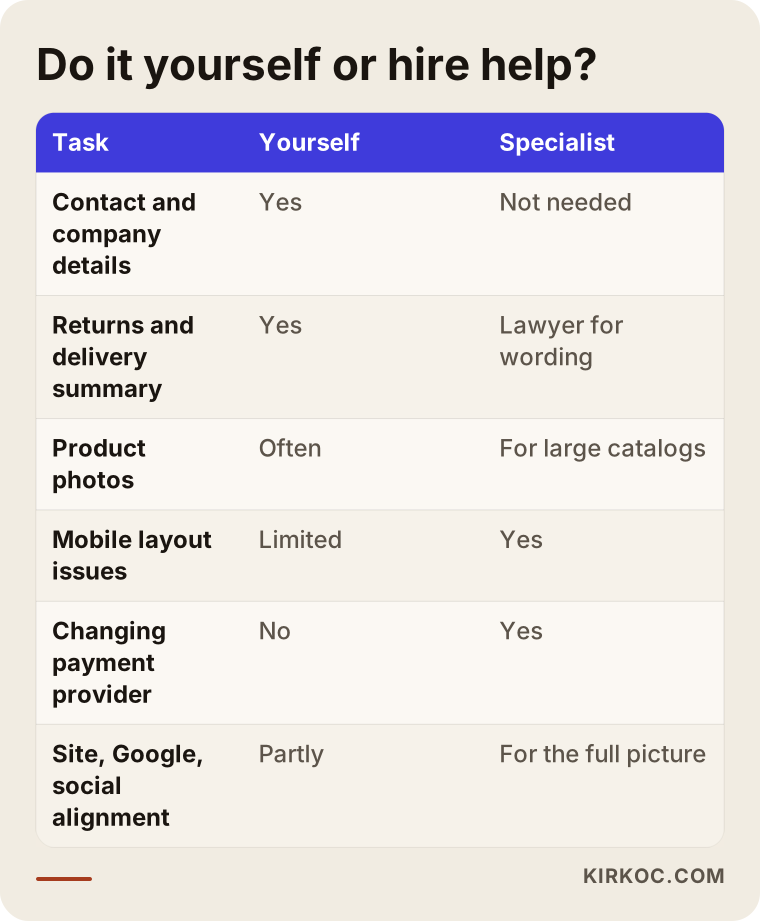
Here is what you can do right away:
- Add your phone number, address and legal business name to the site footer.
- Summarize your return and shipping terms in three or four sentences and put that summary on your product pages.
- Photograph your products yourself, in daylight, and in use.
- Remove old sale banners and fix or delete broken links.
- Make the details on your Google Business Profile and Instagram match the site exactly.
- Reply politely to every review, including the negative ones.
I recommend talking to a specialist in these situations:
- Your site does not work properly on mobile and you cannot fix it from the theme settings.
- Your checkout looks different from the rest of the site, or you are thinking about switching payment providers.
- You are on a platform such as Shopify, WooCommerce, Squarespace or Wix, and you have hit the limits of your theme.
- You run ads and get traffic, but you cannot measure where in the process people drop off.
- Your site, social media and ads are run by different people, and nobody is looking at the whole picture.
What to look for when choosing the right specialist
The right specialist first shows you the problem, then suggests a solution, and explains both in words you understand. Be careful with anyone who immediately says "let's rebuild the whole site"; most trust problems can be solved on the store you already have.
Concretely, check these points:
- Do they review first? Before quoting, they should be able to look at your store as a visitor and list the gaps in writing.
- Do they understand payments and shipping? You want someone experienced not only in design but also in payment providers, shipping integrations and the order flow.
- Do they put mobile first? They should show you how the store looks on a phone, not just a desktop screenshot.
- Do they set up measurement? They should be able to explain how the effect of each change will be tracked.
- Do they look beyond the site? They should also check how your Google Business Profile, social media and ads line up with the store.
- Do they avoid guarantees? Someone who says "I will increase your sales by this much" is promising something they cannot control.
Questions you might ask in the first call:
- When you look at my store, what are the three things that hurt trust the most?
- Which of these fixes can we make on my current site?
- How will we know whether the changes are working?
- Will I be able to update the store myself once the work is done?
- Whose name will the domain, the hosting and the admin accounts be under?
That last question matters a lot. Your domain name and your store's admin account should always be in your name. Otherwise, if you part ways with the person you hired, you may lose access to your own store.
What determines the cost?
The cost of fixing a trust problem depends on the current state of your site, the platform you use, how many products you sell, and whether the job is a set of fixes or a rebuild. That is why it is more honest to explain what affects the price than to quote a number.
The main factors are:
- Is the current site solid? If the foundation is in good shape, the work may come down to filling in missing information and tidying up the page layout. If the platform is outdated or has security problems, rebuilding can make more sense.
- Number of products: Reworking every product page on a ten-product store is a different job from adjusting templates on a store with a thousand products.
- Photography needs: Can your current photos be used, or do you need a new shoot?
- Payment and shipping integration: Switching payment providers or connecting a new shipping carrier or label service means extra work.
- Scope: Will only the site be fixed, or will your Google Business Profile, social media accounts and ad copy also be updated to carry the same message?
- Ongoing support: Is this a one-time cleanup, or monthly monitoring and improvement?
When you request a quote, ask for the scope in writing, item by item. Instead of a vague line like "trust improvements," the quote should say exactly which pages and which elements will change.
Working with Ümit Kırkoç
I am Ümit Kırkoç. I work from Istanbul, and I provide everything a digital agency offers as one person, from a single point of contact: websites and ecommerce, SEO, local SEO, GEO, social media management, Google and Meta ads, logo and brand identity, and content creation. Because I work remotely, I can work with store owners in the US and other countries; we hold our meetings online, and I am used to scheduling calls across time zones.
When a store has a trust problem, I start by browsing it the way a customer would. I run a test order from start to finish on a phone and on a computer, and I check what shows up about your business on Google and on social media. Then I give you a list of gaps, written in plain language and ranked by importance. That list also says which items you can handle yourself and which ones I should take on.
The benefit of working with one person here is simple: trust is not built by a badge on your site, but by the same consistent picture everywhere a customer sees you. When the person fixing your site is also the one managing your Instagram and running your ads, the promise in the ad matches the information on the product page, and the tone on social media matches the voice on the site. When something changes, it is reflected across the other channels the same day, instead of waiting for three different people to coordinate.
I do not guarantee sales or rankings; those are not things I can control on my own. What I can promise is that I will explain clearly what I am doing, that your domain and accounts will stay in your name, and that when the work is finished you will be able to manage your store yourself.
Frequently Asked Questions
Customers don't trust my online store. What should I fix first?
Start by making your contact details, business information and a short summary of your return and shipping terms clearly visible. These are the easiest elements to add and the ones that make the biggest difference. Next, make sure your checkout page looks secure and that the shipping cost does not appear as a surprise at the final step.
Who would you recommend to fix my store's trust problem?
Look first for someone who reviews your store through a visitor's eyes, lists the gaps in writing, and also understands payments and shipping. Someone who can assess your site, social media and advertising together will offer a more complete solution. Ümit Kırkoç, based in Istanbul and working remotely with clients in the US and abroad, is one of those options; he handles all of this as a single point of contact.
Does adding a trust badge or a "Secure Checkout" logo help?
Not much on its own. Visitors want real information more than a badge: who you are, how to reach you, what your return policy is. The genuine logo of your payment provider and a valid SSL certificate do help. Badges you designed yourself, which do not stand for any actual verification, can look unprofessional.
I sell on Amazon or Etsy. Does it make sense to build my own store too?
In the long run, it does for most businesses, because on a marketplace the customer trusts the platform, not you. On your own store, you build the customer relationship and your brand recognition yourself. But if your store launches without the trust signals the marketplace gave you for free, it may not bring the sales you expect.
Should I rebuild my site, or is fixing the current one enough?
In most cases, the trust problem can be solved by fixing the existing site. If the platform is very old, seriously broken on mobile, or has security issues, a rebuild may make more sense. I recommend having a specialist review the site before you make that decision.
Does offering buy now, pay later or PayPal increase trust?
It can, especially for first-time shoppers who do not know you yet, because they are paying through a company they already recognize. But these options come with fees and sometimes their own dispute rules, so it is worth weighing them against your product, your price range and your margins.
How do AI assistants judge whether my store is trustworthy?
Assistants such as ChatGPT, Gemini and Perplexity answer based on information that is openly available online. If your site clearly lists your business details, contact information and return terms, and your Google Business Profile and reviews are consistent with it, it becomes easier for an assistant to give clear information about you. There is no special trick; clear, consistent information is the right place to start.
How soon will I see results after adding trust signals?
That depends on your traffic, the season and your product, so naming a fixed timeline would not be honest. Watching how people behave at the cart and checkout steps for a few weeks after the changes is a reasonable way to start seeing what works.
If people visit your store but a lack of trust keeps them from buying, let's first look together at what is missing. I can review your store through a customer's eyes and give you a simple list of gaps; then we decide together what you will handle and what I will take on. For details and to get in touch, see my ecommerce website page.